THE Best Power Supply?

No. Just because a power supply is rated at XXX watts does not mean it runs at XXX watts at all times. Your components will only draw what is needed.
smarteyeball;

I found this quote:
Another caveat: Optimal efficiency is only reached at a "proper" load. If you have a 500 Watt Power Supply but then a super-low-consumption PC that only consumes 80 Watt, you're not going to reach 80% efficiency and could easily use ~120 Watt (~50% efficiency).
at this site: Does a 500 watt power supply always use 500 watts of electricity? - Server Fault

Now I am not an expert, and I do not know the qualifications of the author, but it does raise the question about the electricity cost, if I understand correctly, of an OVERPOWERED power supply?
 

My Computer My Computer

OS
...
Corsair with a single rail. You can't go wrong. The quality is amazing and they come with a 5 year warranty. 5 years on a power supply is amazing in and of it's self really. Considering the power supply is one of the most likely to go parts in your system.
 

My Computer My Computer

Computer Manufacturer/Model Number
Custom
OS
Win7 64bit Ultimate
CPU
AMD Phenom II X6 1100T Black Edition Thuban 3.3GHz, 3.7GHz
Motherboard
Gigabyte GA-890FXA-UD5
Memory
CORSAIR DOMINATOR GT 8GB (2 x 4GB) 1866 DDR3
Graphics Card(s)
XFX HD-697A-CNDC Radeon HD6970 2GB 256-bit
Sound Card
Creative SoundBlaster X-Fi Platinum Fatal1ty Edition
Monitor(s) Displays
Dual 25 Inch Hanns-G HZ251
Screen Resolution
1920x1080 X 2
PSU
Corsair 850W Single Rail
Case
Thermaltake V9 BlacX w/ Dual HDD Docking Station
Cooling
Air lots and lots of air and copper...
Keyboard
Kensington (Low-Profile)
Mouse
Creative Fatal1ty
Internet Speed
15Gbit (15 Down 5 Up)
Other Info
XIGMATEK HDT-S1284F 120mm HYPRO Bearing CPU Cooler, LG Blu-Ray Burner.
smarteyeball;

Maybe there is a $500 power supply that will upgrade for 10 years? I don't think so.

Neither do I. My apologies for not clearly stating a definition of 'future'. I incorrectly assumed it would be understood that I was referring to a more realistic time frame ie 2-3 years or one, perhaps two upgrades.

But would you double or triple the power requirement just so you could brag about the big powerful power supply under the hood?

I can't deny that some people do indeed go oversized for bragging rights. If that's the sole reason going over-sized, then yes, that decision is not a smart one.

However, the PSU I bought has nothing to do with bragging or e-peen. With my next upgrade, I do plan to continue overclocking, run multiple cards, add more devices etc.

I used my previous PSU to replace an ailing PSU in another PC. Since I had to buy a new one anyway, I used a little forethought, hence the reason I am currently using an over-powered PSU. Come next upgrade, I plan to utilize it's capacity. So to me, my decision was a smart one.

Now I am not an expert

Neither am I, nor do I claim to be an expert on the intricacies of power usage. It would appear that I was slightly erroneous regarding efficiency.

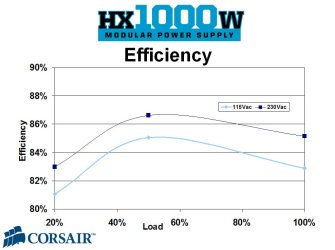
But different brands/models impact on overall efficiency. Some have better low/load usage efficiency than others. In fact some power supplies are most efficient around 50% of total load capacity:
hx1000w_efficiency.jpg

By the time I factor in my current setups power usage, I would not be varying far from the peak efficiency under load or at idle.

At any rate, I have that many electrical devices plugged in at any given moment, what's a few extra kilowatts here and there? ;)
 

My Computer My Computer

Computer type
PC/Desktop
Computer Manufacturer/Model Number
Systems by SmartEyeball
OS
8 Pro x64
CPU
i7 3770K 4.6GHz
Motherboard
ASUS P8Z77 WS
Memory
16GB G.Skill Trident X 2666mhz
Graphics Card(s)
x2 EVGA 780 Ti Superclocked SLI
Sound Card
SB X-FI Surround 5.1 PRO USB / ATH-AD900 Headphones
Monitor(s) Displays
x3 Dell U2410 / 58" Samsung
Screen Resolution
5760*1200/ 1920*1200
Hard Drives
2x Intel 520 240GB (RAID 0) * 2x WD Caviar Blacks 2TB (RAID 0) * 2TB WD Caviar Black * Sony Optirac DVD
PSU
Silverstone Strider Evolution 1200W
Case
Thermaltake Level 10 GT Snow Edition
Cooling
Noctua NH-D14
Keyboard
Topre Realforce // Ducky Shine MX Black // Filco Ninja TKL
Mouse
Thermaltake Theron (Highly Recommended) + Razer Imperator
Antivirus
MSE
Browser
IE, FF, WaterFox
Other Info
GT Extreme V2 Sim Racing Cockpit + 40" LCD and K/B Mouse stand ▼
Fanatec CSR Elite Wheel + Clubsport V1 Pedals + CSR shifter/7G-H ▼Saitek X52 Pro ▼ TrackIR 5 Pro
Buttkicker v2 Seat Rumbler with Dedicated 5.1 and Sub Woofer attached to frame ▼
=
Bloody Big Grin
But different brands/models impact on overall efficiency. Some have better low/load usage efficiency than others. In fact some power supplies are most efficient around 50% of total load capacity:
This is awesome. Most efficient at 50% load! Smartyeyeball, I do not believe there is actually any disagreement between us!

:what:
 

My Computer My Computer

OS
...
I would definitely say Corsair. I have used several of their line of power supplies and they have all worked great. They preform perfectly, quietly and according to the research I did when buying (about a year ago) they offered the most reliable and cleanest power overall. They may cost more than other PSU's and it will eat into your budget, but is well worth it.

If you check Corsair's line of PSU's on newegg you will see they each, with hundreds of reviews, have 5 eggs. A great rating, and they have very positive feedback.

Newegg.com - Computer Hardware,Power Supplies,Power Supplies,Corsair Memory
http://www.newegg.com/Product/ProductList.aspx?Submit=ENE&N=2010320058 50001459&name=Corsair Memory
 

My Computer My Computer

OS
XP & 7
Corsair was apparently voted best manufacturer in 2008 by "Custom PC". I am not familiar with that publication, but Newegg as posted it on each of the corsair PSU's.

I currently have these two PSU's form corsair in use and can say that they are fantastic:

Newegg.com - CORSAIR CMPSU-400CX 400W ATX12V V2.2 80 PLUS Certified Compatible with Core i7 Power Supply - Power Supplies
Newegg.com - CORSAIR CMPSU-620HX 620W ATX12V v2.2 and EPS12V 2.91 SLI Certified CrossFire Ready 80 PLUS Certified Modular Active PFC Compatible with Core i7 Power Supply - Power Supplies
 

My Computer My Computer

OS
XP & 7
Agreed. You will need to pay attention to the 80 PLUS rating that the PSU has to help determine the quality of it. The more power it has the more you have available as needed.

Yes, the 80 PLUS rating is important as PSU's that can run at 80% efficiency overall (50% and 100% load) will waste less energy and thus generate less noise, heat, and will consume less power: saving money.

I have nothing but good things to say about these PSU's. They are the first ones I look at when building anything, and I always leave a bit of my budget to pay for it.
 

My Computer My Computer

OS
XP & 7
Yes, the 80 PLUS rating is important as PSU's that can run at 80% efficiency overall (50% and 100% load) will waste less energy and thus generate less noise, heat, and will consume less power: saving money.

I have nothing but good things to say about these PSU's. They are the first ones I look at when building anything, and I always leave a bit of my budget to pay for it.
kplu;

Would you put these power supplies in the "Over $100", or "Over $200" category?
 

My Computer My Computer

OS
...
However, the PSU I bought has nothing to do with bragging or e-peen. With my next upgrade, I do plan to continue overclocking, run multiple cards, add more devices etc.
Of course, with a 1000W PSU, using this site as a a guide http://extreme.outervision.com/psucalculatorlite.jsp

You can run an
--overclocked Core i7 965 Extreme Edition
--32 sticks of DDR3 RAM,
--10 high RPM SATA hard drives,
--2 DVD Burners,
--1 BluRay drive,
--1 PCI RAID SATA controller card,
--Dual ATI Radeon 4870 x2's in Crossfire
--10 120mm case fans \

And you still have 10 watts to spare.

Just sayin :)
 

My Computer My Computer

Computer Manufacturer/Model Number
Self-Built in July 2009
OS
Windows 7 Ultimate x64
CPU
Intel Q9550 2.83Ghz OC'd to 3.40Ghz
Motherboard
Gigabyte GA-EP45-UD3R rev. 1.1, F12 BIOS
Memory
8GB G.Skill PI DDR2-800, 4-4-4-12 timings
Graphics Card(s)
EVGA 1280MB Nvidia GeForce GTX570
Sound Card
Realtek ALC899A 8 channel onboard audio
Monitor(s) Displays
23" Acer x233H
Screen Resolution
1920x1080
Hard Drives
Intel X25-M 80GB Gen 2 SSD
Western Digital 1TB Caviar Black, 32MB cache. WD1001FALS
PSU
Corsair 620HX modular
Case
Antec P182
Cooling
stock
Keyboard
ABS M1 Mechanical
Mouse
Logitech G9 Laser Mouse
Internet Speed
15/2 cable modem
Other Info
Windows and Linux enthusiast. Logitech G35 Headset.
It depends on the wattage. The 400CX, 450VX, 550VX, 650TX, and 520VX(w/ rebate) are under $100 according at Newegg. This is relatively inexpensive for such good quality parts, especially the 650TX.

The 620HX, 750HX, 850TX, 850HX, 1000HX(w/ rebate) are between $100 and $200.

None of these listed on Newegg are over $200. (The 1000HX is $239 with a $40 rebate.)
 

My Computer My Computer

OS
XP & 7
+1 Corsair HX

These things are GREAT!
 

My Computer My Computer

Computer Manufacturer/Model Number
Keeps changing - (Custom)
OS
Windows 7 Professional x64
CPU
Intel Core i7 860
Motherboard
Gigabyte GA-P55-UD4P
Memory
4GB DDR3 Mushkin 1600Mhz @ 7-8-7-20
Graphics Card(s)
MSI GTS250 1GB DDR3 Twin Frozr
Sound Card
Onboard realtek
Monitor(s) Displays
Samsung SyncMaster 24" P2450 + Samsung 20" 2033
Screen Resolution
1920 X 1080 and 1600 X 900 (#2 system 1440 X 900)
Hard Drives
Patriot Inferno 120GB SSD + 3 WD Blue 640GB drives
PSU
Corsair 750 HX Modular
Case
Lancool PC-K62
Cooling
Cooler Master TX3 CPU cooler and 4-140mm and 1-120mm case
Keyboard
Gigabyte USB keyboard
Mouse
Microsoft wireless laser mouse 5000
Internet Speed
7 Mb down 1.5 up
Other Info
System #2: AMD Phenom II X6 1055T (Freezer 7 Pro cooler) - Gigabyte 880GMA-UD2H - WD 500GB Black - 9500GT (1GB) 500W OCZ modular PSU - Antec 200 case. System #3 (LapTop) Core 2 Duo T6670 - 320GB 7200RPM HD - 4GB DDR3 RAM.
Of course, with a 1000W PSU, using this site as a a guide eXtreme Power Supply Calculator Lite v2.5

You can run an
--overclocked Core i7 965 Extreme Edition
--32 sticks of DDR3 RAM,
--10 high RPM SATA hard drives,
--2 DVD Burners,
--1 BluRay drive,
--1 PCI RAID SATA controller card,
--Dual ATI Radeon 4870 x2's in Crossfire
--10 120mm case fans \

And you still have 10 watts to spare.

Just sayin :)

:roflmao:
 

My Computer My Computer

OS
...
I think I paid about 160.00 Total for my Corsair 800W unit. This was after fighting with Xion for 6 weeks to get an RMA on my last unit.

About another 6 weeks of fighting after I got the Corsair unit in they finally got around to sending me a replacement for the old unit. The replacement was an 850W the burned out unit was only 600W but I sold the Xion 850W because it was the third unit after returning 2 that only lasted 6 months each.
 

My Computer My Computer

Computer Manufacturer/Model Number
Custom
OS
Win7 64bit Ultimate
CPU
AMD Phenom II X6 1100T Black Edition Thuban 3.3GHz, 3.7GHz
Motherboard
Gigabyte GA-890FXA-UD5
Memory
CORSAIR DOMINATOR GT 8GB (2 x 4GB) 1866 DDR3
Graphics Card(s)
XFX HD-697A-CNDC Radeon HD6970 2GB 256-bit
Sound Card
Creative SoundBlaster X-Fi Platinum Fatal1ty Edition
Monitor(s) Displays
Dual 25 Inch Hanns-G HZ251
Screen Resolution
1920x1080 X 2
PSU
Corsair 850W Single Rail
Case
Thermaltake V9 BlacX w/ Dual HDD Docking Station
Cooling
Air lots and lots of air and copper...
Keyboard
Kensington (Low-Profile)
Mouse
Creative Fatal1ty
Internet Speed
15Gbit (15 Down 5 Up)
Other Info
XIGMATEK HDT-S1284F 120mm HYPRO Bearing CPU Cooler, LG Blu-Ray Burner.
Back
Top
