External disk -folders not visible -access denied system volume info

zoyana

New member
Local time
7:02 PM
Messages
6
The folders on my external hard disk are not visible. I followed Cottonball's suggestion from one of the threads on using Roguekiller to eliminate the virus. I downloaded RogueKiller and scanned my disk. After that i deleted the malware it detected.

Subsequently, I also tried the following command:

attrib -h -s -r -a /s /d F:\*.*

After doing all of this still i am unable to access system volume information. I guess The virus persists. any help to fix this issue will be highly appreciated.
 

My Computer My Computer

At a glance

Windows 7
Computer type
Laptop
Computer Manufacturer/Model Number
Lenovo Thinkpad
OS
Windows 7
Antivirus
Symantec
Browser
Chrome
Hello zoyana Welcome to the Seven Forums!

If you had a spare hard drive to back files upto the live and harder manual method would allow you to use a live Linux disk in order to copy and paste files over to the second drive and then simply nuke the external to insure it was totally bug free seeing an entirely new volume created in it's place. That would still require tunning a thorough bug sweep over the rescues files to insure none had been recoded by the malware however.

For using the other guy's OS for a project like this I can point you to an older thread showing to make a live data recovery flash drive with ubuntu at the time seen at http://www.sevenforums.com/chillout-room/11844-using-other-os-usb-rescue-device.html

Presently Linux Mint or Linux Mint Debian would the slightly larger but preferred distro. Knoppix Live on dvd only is also one of the others for this providing the partition information is intact. If the partition table is toast due to corruption then other options like disk recovery program would then be needed to restore the partition(s) on the drive itself.

A fast test would be going into the Disk Management tool however found under Adminstrative tools/Computer management/Storage and right clicking on the effected volume to use the change drive letter option. That will show if the volume is able to be remounted in Windows without problems.

If that fails then the live method for data recovery would be an option to consider since the distro is not able to be infected by the malware itself. But the security sweep over all files recovered would still be the advice given.
 

My Computers My Computers

  • At a glance

    W7 Ultimate x64/W10 Pro x64/W11 Pro Triple Bo...AMD Phenom II X4 975 Deneb 3.6ghz - 965 2nd r...Kingston Hyper X DDR3 1600 1.5v 16gb - Hyper ...MSI HD Radeon 5750 1gb - MSI HD Radeon 6450 o...
    Computer type
    PC/Desktop
    Computer Manufacturer/Model Number
    Custom builds = 2
    OS
    W7 Ultimate x64/W10 Pro x64/W11 Pro Triple Boot - Main PC W7 Remote PC Micro ATX W7 Pro x64/W11 Pro
    CPU
    AMD Phenom II X4 975 Deneb 3.6ghz - 965 2nd remote pc
    Motherboard
    Gigabyte GA-790XTA-UD4-Gigabyte GA-880GM-D2H remote pc
    Memory
    Kingston Hyper X DDR3 1600 1.5v 16gb - Hyper X Fury 8gb 2nd
    Graphics Card(s)
    MSI HD Radeon 5750 1gb - MSI HD Radeon 6450 on mini tower
    Sound Card
    Creative Labs X-Fi Xtreme Audio P - Realtek onooard 2nd case
    Monitor(s) Displays
    ASUS VW199T-P 19" HP 2082a Main-HP 2082a 20" remote pc
    Screen Resolution
    Asus 1440x900 - HP 1600x900
    Hard Drives
    WD Black 1TB HD per OS W7, W10, and pending W11 presently on 500gb OS Drive - Pending Triple 1TB HDs for Spanned Storage/backup volume
    Single 2TB external USB enclosure, single 1TB System 7 Host/Boot drive, Pending 8TB external HD for system image b
    PSU
    Corsair 750TX - primary / Corsair CX600 - second
    Case
    Antec 900-2 - SSD compatible / NZXT Vulcan mini tower
    Cooling
    Zalman CNPS9900A
    Keyboard
    AZIO L70 Backlit Letters Gaming - ONN Cordless/USB
    Mouse
    MSI DS200 Programmable, Logitech Cordless
    Internet Speed
    30mbps upgrade - primary hard wired - mini tower usb WiFi
    Antivirus
    GFI VIPRE Internet Security 2014 on W7 2016 beta on W10,
    Browser
    Cyberfox, WaterFox 64bit FF variants, FireFox x64, Pale Moon
    Other Info
    Accomdata fan cooled usb 2.0 PIDE/Sata II, III external enclosure.
    Sambient usb/eSata PATA/Sata II, III external enclosure.
  • At a glance

    W7 Pro x64/W11 ProAMD Deneb 3.6ghz - 965Kingston Hyper X Fury 8gbMSI HD Radeon 6450 DVI Output
    Computer type
    PC/Desktop
    System Manufacturer/Model Number
    CUSTOM ASSEMBLY
    OS
    W7 Pro x64/W11 Pro
    CPU
    AMD Deneb 3.6ghz - 965
    Motherboard
    Gigabyte GA-880GM-D2H remote pc
    Memory
    Kingston Hyper X Fury 8gb
    Graphics Card(s)
    MSI HD Radeon 6450 DVI Output
    Sound Card
    Realtek onooard Creative or Other separate PENDING
    Monitor(s) Displays
    VIZIO 32" LCD TV Separate LCD Pending
    Screen Resolution
    1600x1080
    Hard Drives
    WD 500GB OS Host/Boot WD Green 1TB Storage/Backup
    PSU
    Corsair 600W - THERMALTAKE 600W spare case
    Case
    NZXT Vulcan mini tower
    Cooling
    Twin 120mm Top Fans - 240mm Side Cover
    Keyboard
    ONN Cordless/USB Logitech Cordless
    Mouse
    ONN USB/Cordless - Logitech Cordless
    Internet Speed
    DSL 5G
    Browser
    MS Edge, FireFox, WaterFox x64, FireFox Nightly
    Other Info
    OS Testing-Remote Access to Main TeamViewer
zoyana,

The folders on my external hard disk are not visible.

Try the following:
Go to Control Panel > Folder Options
In Folder Options, select the View tab
Uncheck: Hide protected operating system files (Recommended)
Check: Show hidden files, folders, and drives

...i am unable to access system volume information.
Is there a reason why you want to gain access to this folder?
It is used by System Restore to keep Restore Points.
 

My Computer My Computer

At a glance

Windows 7 Home Premium
Computer type
PC/Desktop
Computer Manufacturer/Model Number
An ol' eMachines
OS
Windows 7 Home Premium
Internet Speed
Fine for me...I'm retired!
Also, do the following to check for malware...

:info: Download the Farbar Recovery Scan Tool
Select the version that applies to the system.

Save to the Desktop.
  • Double-click the downloaded file to run it.
  • When the tool opens click Yes to disclaimer.
  • Press the Scan button.
  • FRST64 makes a log (FRST.txt) in the same directory from which the tool is run (Desktop).
:ar: Please provide the FRST.txt in your reply.
The first time the tool is run, it also makes another log: Addition.txt
:ar: Also post the Addition.txt in your reply. It will present a list of the programs that are installed on your computer, and any undesirables can be identified.


:info: Next, please download UsbFix:
http://www.infospyware.com/utiles/usbfix/

It is a Spanish language website, but the program is in English.
To download. press the button that says: Descagar

Right-click the downloaded file and select: Run as Administrator
Connect your External drive when requested.

Press: Vaccinate
Vaccinate your Desktop, as well as the External drive, to protect from infections.
Also, the program disables the Autorun/Autoplay feature.

Next, press: Listing

When done, the program closes on its own, and a report appears.

:ar: Please post the USBFix Listing report in your reply.
 
Last edited:

My Computer My Computer

At a glance

Windows 7 Home Premium
Computer type
PC/Desktop
Computer Manufacturer/Model Number
An ol' eMachines
OS
Windows 7 Home Premium
Internet Speed
Fine for me...I'm retired!
Thx Cottonball. have attached results of FRST.
I dont need access to System folder. But i guess thats the folder where the virus is hidden. Also there is an additional problem now. I had created a partion on my external drive. While i can access one partition, the other partition is not getting recognised.

Thx a lot for your help and time

View attachment FRST.txt

View attachment Addition.txt
 

My Computer My Computer

At a glance

Windows 7
Computer type
Laptop
Computer Manufacturer/Model Number
Lenovo Thinkpad
OS
Windows 7
Antivirus
Symantec
Browser
Chrome
zoyana,

Please run USBFix as instructed, and post its results.
 

My Computer My Computer

At a glance

Windows 7 Home Premium
Computer type
PC/Desktop
Computer Manufacturer/Model Number
An ol' eMachines
OS
Windows 7 Home Premium
Internet Speed
Fine for me...I'm retired!

My Computer My Computer

At a glance

Windows 7 Home Premium
Computer type
PC/Desktop
Computer Manufacturer/Model Number
An ol' eMachines
OS
Windows 7 Home Premium
Internet Speed
Fine for me...I'm retired!
Here u go...

Capture.PNG
 

My Computer My Computer

At a glance

Windows 7
Computer type
Laptop
Computer Manufacturer/Model Number
Lenovo Thinkpad
OS
Windows 7
Antivirus
Symantec
Browser
Chrome
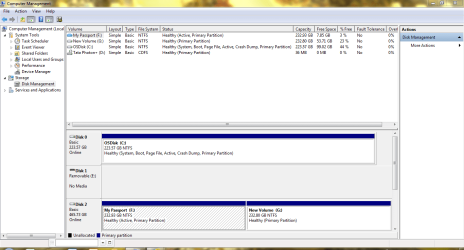
Is there more showing if you scroll down in the lower area of Disk Management?

Or, is the External drive supposed to be E:, and it is not showing?


Edit: My Passport is the External! Just saw the light. The name My Passport finally rang a bell. :rolleyes:
 
Last edited:

My Computer My Computer

At a glance

Windows 7 Home Premium
Computer type
PC/Desktop
Computer Manufacturer/Model Number
An ol' eMachines
OS
Windows 7 Home Premium
Internet Speed
Fine for me...I'm retired!
Hi Zoyana,

When I saw the screenshot the one thing that struck me was that one of the partitions in your external drive is flagged active. Though many reports suggest it is inconsequential, I would consider removing the active flag better.

Try setting that particular partition in the external drive inactive.

Though it can be done with Diskpart, you may find it easy to do with Partition Wizard Home Edition 8 Free download Magic Partition Manager Software, partition magic alternative, free partition magic, partition magic Windows 7 and server partition software - Partition Wizard Online

Install and run Partition Wizard. Right click on the selected external drive partition > Modify > Set Inactive and then APPLY ( top menu)

For the real problem, though I have been giving cursory glances, I have not formulated any ideas on how to go about it. So let me see whether I get any flash tonight. Good night.

Edit: Once done take a screenshot of how your external drive looks in Partition Wizard and post.
Please remove all other external drives/pen drives/Card Readers except the problem external drive when you take the screenshots so that we don't get confused. We are already confused ;) .
 
Last edited:

My Computer My Computer

At a glance

Windows 7 Home Premium 32 bit
OS
Windows 7 Home Premium 32 bit
Dear Jumanji & Cottonball,

The F: and G: drive are the two partitions of my external hard disk. C: is what it is and D: is Tata Photon which i have used to connect to the internet. Sorry for the confusion
 

My Computer My Computer

At a glance

Windows 7
Computer type
Laptop
Computer Manufacturer/Model Number
Lenovo Thinkpad
OS
Windows 7
Antivirus
Symantec
Browser
Chrome

My Computer My Computer

At a glance

Windows 7
Computer type
Laptop
Computer Manufacturer/Model Number
Lenovo Thinkpad
OS
Windows 7
Antivirus
Symantec
Browser
Chrome
zoyana,

I was the one confused. The name My Passport did not initially register in my brain as a Western Digital external drive. It finally clicked!! :rolleyes:

Is it a 500GB?
 

My Computer My Computer

At a glance

Windows 7 Home Premium
Computer type
PC/Desktop
Computer Manufacturer/Model Number
An ol' eMachines
OS
Windows 7 Home Premium
Internet Speed
Fine for me...I'm retired!
zoyana,

Have you run any program that led you to believe the External drive, System Volume Information folder was infected?

If so, do you have the results of the program?
 

My Computer My Computer

At a glance

Windows 7 Home Premium
Computer type
PC/Desktop
Computer Manufacturer/Model Number
An ol' eMachines
OS
Windows 7 Home Premium
Internet Speed
Fine for me...I'm retired!
Hi Zoyana,

When I saw the screenshot the one thing that struck me was that one of the partitions in your external drive is flagged active. Though many reports suggest it is inconsequential, I would consider removing the active flag better.

Try setting that particular partition in the external drive inactive.

Though it can be done with Diskpart, you may find it easy to do with Partition Wizard Home Edition 8 Free download Magic Partition Manager Software, partition magic alternative, free partition magic, partition magic Windows 7 and server partition software - Partition Wizard Online

Install and run Partition Wizard. Right click on the selected external drive partition > Modify > Set Inactive and then APPLY ( top menu)

For the real problem, though I have been giving cursory glances, I have not formulated any ideas on how to go about it. So let me see whether I get any flash tonight. Good night.

Edit: Once done take a screenshot of how your external drive looks in Partition Wizard and post.
Please remove all other external drives/pen drives/Card Readers except the problem external drive when you take the screenshots so that we don't get confused. We are already confused ;) .

When I turn on my external enclosure with a WD 1tb model you will see it marked as an healthy "active" primary partition. That's normal behavior with external drives when compared to the other internal HDs. Have a look. Note Disk #4 is the drive in the external usb enclosure.

2isji2b.jpg
 

My Computers My Computers

  • At a glance

    W7 Ultimate x64/W10 Pro x64/W11 Pro Triple Bo...AMD Phenom II X4 975 Deneb 3.6ghz - 965 2nd r...Kingston Hyper X DDR3 1600 1.5v 16gb - Hyper ...MSI HD Radeon 5750 1gb - MSI HD Radeon 6450 o...
    Computer type
    PC/Desktop
    Computer Manufacturer/Model Number
    Custom builds = 2
    OS
    W7 Ultimate x64/W10 Pro x64/W11 Pro Triple Boot - Main PC W7 Remote PC Micro ATX W7 Pro x64/W11 Pro
    CPU
    AMD Phenom II X4 975 Deneb 3.6ghz - 965 2nd remote pc
    Motherboard
    Gigabyte GA-790XTA-UD4-Gigabyte GA-880GM-D2H remote pc
    Memory
    Kingston Hyper X DDR3 1600 1.5v 16gb - Hyper X Fury 8gb 2nd
    Graphics Card(s)
    MSI HD Radeon 5750 1gb - MSI HD Radeon 6450 on mini tower
    Sound Card
    Creative Labs X-Fi Xtreme Audio P - Realtek onooard 2nd case
    Monitor(s) Displays
    ASUS VW199T-P 19" HP 2082a Main-HP 2082a 20" remote pc
    Screen Resolution
    Asus 1440x900 - HP 1600x900
    Hard Drives
    WD Black 1TB HD per OS W7, W10, and pending W11 presently on 500gb OS Drive - Pending Triple 1TB HDs for Spanned Storage/backup volume
    Single 2TB external USB enclosure, single 1TB System 7 Host/Boot drive, Pending 8TB external HD for system image b
    PSU
    Corsair 750TX - primary / Corsair CX600 - second
    Case
    Antec 900-2 - SSD compatible / NZXT Vulcan mini tower
    Cooling
    Zalman CNPS9900A
    Keyboard
    AZIO L70 Backlit Letters Gaming - ONN Cordless/USB
    Mouse
    MSI DS200 Programmable, Logitech Cordless
    Internet Speed
    30mbps upgrade - primary hard wired - mini tower usb WiFi
    Antivirus
    GFI VIPRE Internet Security 2014 on W7 2016 beta on W10,
    Browser
    Cyberfox, WaterFox 64bit FF variants, FireFox x64, Pale Moon
    Other Info
    Accomdata fan cooled usb 2.0 PIDE/Sata II, III external enclosure.
    Sambient usb/eSata PATA/Sata II, III external enclosure.
  • At a glance

    W7 Pro x64/W11 ProAMD Deneb 3.6ghz - 965Kingston Hyper X Fury 8gbMSI HD Radeon 6450 DVI Output
    Computer type
    PC/Desktop
    System Manufacturer/Model Number
    CUSTOM ASSEMBLY
    OS
    W7 Pro x64/W11 Pro
    CPU
    AMD Deneb 3.6ghz - 965
    Motherboard
    Gigabyte GA-880GM-D2H remote pc
    Memory
    Kingston Hyper X Fury 8gb
    Graphics Card(s)
    MSI HD Radeon 6450 DVI Output
    Sound Card
    Realtek onooard Creative or Other separate PENDING
    Monitor(s) Displays
    VIZIO 32" LCD TV Separate LCD Pending
    Screen Resolution
    1600x1080
    Hard Drives
    WD 500GB OS Host/Boot WD Green 1TB Storage/Backup
    PSU
    Corsair 600W - THERMALTAKE 600W spare case
    Case
    NZXT Vulcan mini tower
    Cooling
    Twin 120mm Top Fans - 240mm Side Cover
    Keyboard
    ONN Cordless/USB Logitech Cordless
    Mouse
    ONN USB/Cordless - Logitech Cordless
    Internet Speed
    DSL 5G
    Browser
    MS Edge, FireFox, WaterFox x64, FireFox Nightly
    Other Info
    OS Testing-Remote Access to Main TeamViewer
Thanks for the clarification, Night Hawk.

Was expecting for it to be the Removable E:.

Have never owned an External drive. Those little ol' pen drives do it for me!! :D
 

My Computer My Computer

At a glance

Windows 7 Home Premium
Computer type
PC/Desktop
Computer Manufacturer/Model Number
An ol' eMachines
OS
Windows 7 Home Premium
Internet Speed
Fine for me...I'm retired!
When going to use a flash drive if you happen to custom install an OS project like VBox portable or a Linux distro you may see some familiar things at times as well. Generally Windows sees the external HDs, flash drives, hand helds but not just any optical media as possible bootable media and mounts the volumes as active. I think that's where the confusion comes in. ;)

With externals I use regularly like a cell phone with camera or a particular flash drive I will assign each one a specific drive letter like P for the cell representing Personal and each time I go to plug it in the drive letter will remain the same over randomly plugging in the enclosure or other flash drive. Notice the letter "I" for the enclosure this time since I haven't had that turned on since the recent clean install of 7 I saw. Never got around to changing it to K again so it automatically took I as the next available instead.

For zoyana I could advice changing the external there to a higher drive letter like H so each time he goes to plug it in Windows would also remember that drive with that letter. You will notice the internal storage were moved higher up the food chain by choice however S for storage and T for the second almost clone of the first to back up the first of the two in case one should fail.

When backing up the first to the second the system security will also pick up on any old files containing bugs from downloads that sat idle never being used I found. I could recommend having a good firewall running as well as bug detection program while rescuing files from that drive to detect whatever contaminated files are still present to prevent any infection from reaching the main drive.

If you are lacking a good av program zoyanna give the VIPRE Internet Security free 30 day trial a run. That even in trial when activated for the 30 days can find bugs hidden in zip and rar files gone undetected by other programs! When I came across that situation on more then one occasion when finally going to filter out some old XP downloads still onhand the bug alerts sounded instantly! Free Antivirus Trial and Antivirus Download | VIPRE Antivirus

I found after 3 full years of use VIPRE eliminated the need for seeing 3 or 4 separate av, spyware removers, adware buners and wrapped up a lengthy list of bug detectors under one roof. It outperformed several other av programs examined. The reason for the VIPRE IS and not regular av program is that the premium version includes a good firewall as well as web filtering to keep those bugs you have now from connecting out as well as blocking out bad sites where they come from.
 

My Computers My Computers

  • At a glance

    W7 Ultimate x64/W10 Pro x64/W11 Pro Triple Bo...AMD Phenom II X4 975 Deneb 3.6ghz - 965 2nd r...Kingston Hyper X DDR3 1600 1.5v 16gb - Hyper ...MSI HD Radeon 5750 1gb - MSI HD Radeon 6450 o...
    Computer type
    PC/Desktop
    Computer Manufacturer/Model Number
    Custom builds = 2
    OS
    W7 Ultimate x64/W10 Pro x64/W11 Pro Triple Boot - Main PC W7 Remote PC Micro ATX W7 Pro x64/W11 Pro
    CPU
    AMD Phenom II X4 975 Deneb 3.6ghz - 965 2nd remote pc
    Motherboard
    Gigabyte GA-790XTA-UD4-Gigabyte GA-880GM-D2H remote pc
    Memory
    Kingston Hyper X DDR3 1600 1.5v 16gb - Hyper X Fury 8gb 2nd
    Graphics Card(s)
    MSI HD Radeon 5750 1gb - MSI HD Radeon 6450 on mini tower
    Sound Card
    Creative Labs X-Fi Xtreme Audio P - Realtek onooard 2nd case
    Monitor(s) Displays
    ASUS VW199T-P 19" HP 2082a Main-HP 2082a 20" remote pc
    Screen Resolution
    Asus 1440x900 - HP 1600x900
    Hard Drives
    WD Black 1TB HD per OS W7, W10, and pending W11 presently on 500gb OS Drive - Pending Triple 1TB HDs for Spanned Storage/backup volume
    Single 2TB external USB enclosure, single 1TB System 7 Host/Boot drive, Pending 8TB external HD for system image b
    PSU
    Corsair 750TX - primary / Corsair CX600 - second
    Case
    Antec 900-2 - SSD compatible / NZXT Vulcan mini tower
    Cooling
    Zalman CNPS9900A
    Keyboard
    AZIO L70 Backlit Letters Gaming - ONN Cordless/USB
    Mouse
    MSI DS200 Programmable, Logitech Cordless
    Internet Speed
    30mbps upgrade - primary hard wired - mini tower usb WiFi
    Antivirus
    GFI VIPRE Internet Security 2014 on W7 2016 beta on W10,
    Browser
    Cyberfox, WaterFox 64bit FF variants, FireFox x64, Pale Moon
    Other Info
    Accomdata fan cooled usb 2.0 PIDE/Sata II, III external enclosure.
    Sambient usb/eSata PATA/Sata II, III external enclosure.
  • At a glance

    W7 Pro x64/W11 ProAMD Deneb 3.6ghz - 965Kingston Hyper X Fury 8gbMSI HD Radeon 6450 DVI Output
    Computer type
    PC/Desktop
    System Manufacturer/Model Number
    CUSTOM ASSEMBLY
    OS
    W7 Pro x64/W11 Pro
    CPU
    AMD Deneb 3.6ghz - 965
    Motherboard
    Gigabyte GA-880GM-D2H remote pc
    Memory
    Kingston Hyper X Fury 8gb
    Graphics Card(s)
    MSI HD Radeon 6450 DVI Output
    Sound Card
    Realtek onooard Creative or Other separate PENDING
    Monitor(s) Displays
    VIZIO 32" LCD TV Separate LCD Pending
    Screen Resolution
    1600x1080
    Hard Drives
    WD 500GB OS Host/Boot WD Green 1TB Storage/Backup
    PSU
    Corsair 600W - THERMALTAKE 600W spare case
    Case
    NZXT Vulcan mini tower
    Cooling
    Twin 120mm Top Fans - 240mm Side Cover
    Keyboard
    ONN Cordless/USB Logitech Cordless
    Mouse
    ONN USB/Cordless - Logitech Cordless
    Internet Speed
    DSL 5G
    Browser
    MS Edge, FireFox, WaterFox x64, FireFox Nightly
    Other Info
    OS Testing-Remote Access to Main TeamViewer
zoyana,

Let's work on making sure the laptop and the External drive are free of malware. Once that happens, there may be other options in the data recovery area, and someone else can guide you through it.

:info: Please connect your External drive, and, if you have not disabled Autorun, hold down the Shift key when connecting it. This action stops the autorun.inf from executing automatically

:info: Please run Malwarebytes Anti-Malware:
Download: Malwarebytes Anti-Malware Download
Save to the Desktop
Double-click the downloaded MBAM file to run it.

When the installation begins, follow the prompts in the setup process.
DO NOT make any changes to default settings, and when the program has finished installing, make sure only the following options are checked:
>Update Malwarebytes’ Anti-Malware
>Launch Malwarebytes’ Anti-Malware
Uncheck:
>Enable free trial of Malwarebytes Anti-Malware PRO

Click on the Finish button.

If an update is found, the program automatically updates itself.
At the program console, on the Scanner tab, and select: Perform Full Scan

When the Select the Drives to Scan prompt appears, make sure all drives (except: CD-Rom/DVD and your connection device) are selected, and in particular the drive letters belonging to the External drive.

Next, click on the Scan button.

When the Malwarebytes scan is completed, click on: Show Results

When presented with a screen showing the malware detected, make sure everything is Checked, and click on: Remove Selected

When removal is completed, a report opens in Notepad.
:ar: Please copy/paste the entire contents of the MBAM report in your reply.

Note: If MBAM encounters a file that is difficult to remove, you are asked to reboot the computer so MBAM can proceed with the disinfection process. If asked to restart the computer, please do so immediately. Failure to reboot normally (not into safe mode) prevents MBAM from removing all the malware.

 
Last edited:

My Computer My Computer

At a glance

Windows 7 Home Premium
Computer type
PC/Desktop
Computer Manufacturer/Model Number
An ol' eMachines
OS
Windows 7 Home Premium
Internet Speed
Fine for me...I'm retired!
Thanks Night Hawk. For now I shall get going with zoyana with some quick instructions.

Cottonball has given some instructions for checking your system+external hard drive to get rid of any malware.

Before you carryout his instructions, just do this and report.

Download and install WinRAR (32bit or 64 bit as per your system) WinRAR archiver, a powerful tool to process RAR and ZIP files

Keeping the shift key pressed, plugin only your external drive to prevent any autorun executing.

Run WinRAR and explore the partitions on your external drive. It should show you all files and folders including hidden files. I am sure you will see all the data files and delighted.:) Yes, all your data is there and sure we will get it.
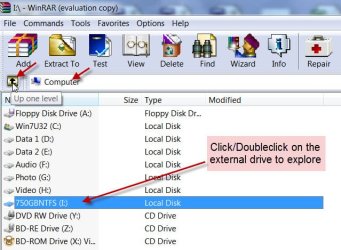
If you see any autorun.inf file,open it with Notepad. Take a screenshot and post it for cottonball to see and further instruct.

08-04-2013 16-26-09.jpg

While it is not our intention to intrude into your privacy and peep into the contents of your external drive, if you do not mind explore the contents of both partitions in WinRAR and post screenshots for our examination. (Please use Windows Snipping tool) OR delete any file or folder - after opening it and examinaing its contents- that you had not created and saved. Just right click on it and delete. Make sure that you do not delete any of your data files/folders. Our intention is to delete any unwanted and suspicious malware files. (Try opening the recyclebin and system volume Information too and try to delete the files in those. Do not bother if the contents in those could not be deleted)

But for sure we would like to read the autorun inf file, look for any .exe file , trace it on your PC and annihilate it.You will delete that file - the autorun.inf file - also on further instructions.

Once you have done this and posted all the requested info, wait for further instructions from cottonball before you execute his instructions in post #19. I may also gatecrash if needed.:)
 
Last edited:

My Computer My Computer

At a glance

Windows 7 Home Premium 32 bit
OS
Windows 7 Home Premium 32 bit
Back
Top