
Enforce user logoff when time restrictions apply

Nick2010

New member
Member
Local time
2:12 PM
Messages
44
Hi..

Due to an ongoing issue with Windows Live Family Safety time limits not working (for many people), I have been using the net user command to set time restrictions for my kids to logon. It works really well except that it doesn't log them off automatically or even prompt them to logoff when their time restrictions come into effect.

Does anyone know if this is possible to do and if it is, how to do it please?

Thanks.
 

My Computer My Computer

Computer type
PC/Desktop
Computer Manufacturer/Model Number
Custom Build
OS
Windows 7 Ultimate SP1 x64
CPU
Intel(R) Core 2 Duo E6600 'Conroe' 2.40Ghz (3.20Ghz - 400x8)
Motherboard
ASUS P5K-E WiFi-AP
Memory
4GB Corsair DDR2 XMS2-6400C4 (4-4-4-12 / DDR2-800MHz)
Graphics Card(s)
PowerColor ATI Radeon HD 3850 Pro Xtreme 512MB GDDR3
Hard Drives
1x Maxtor DiamondMax 22 500GB SATA II HDD (STM3500320AS)
2x Seagate Barracuda 7200.12 1TB SATA II HDD (ST31000528AS)
Are they using Windows 7 Pro or higher? If so, then we can look around for a Group Policy solution. Or maybe just a scheduled task using the shutdown -l command.
 

My Computer My Computer

Computer type
Laptop
Computer Manufacturer/Model Number
Employer provided Dell Latitude
OS
W7 Pro SP1 64bit
CPU
i7
Memory
8GB
Graphics Card(s)
Intel HD Graphics
Hard Drives
crappy SSD
Antivirus
Employer mandated Symantec Endpoint Protection
Browser
Pale Moon 64bit, IE11 64bit & Chrome 64bit
Thanks for the reply.

It's Windows 7 Ultimate.

I found a gp setting for:
Microsoft network server: Disconnect clients when logon hours expire

It was already enabled (default).

Not sure where else to look.

When the Windows Live Family Safety time limits were working, users would get a popup telling them they would be logged off in x amount of minutes and to save any work before logging users off. If I could get something similar through a built-in control/command that would be excellent.

I'll look into the scheduled task suggestion but as I set various logon/logoff times depending on whether it's a school day, weekend etc, it may get a little complicated.
 

My Computer My Computer

Computer type
PC/Desktop
Computer Manufacturer/Model Number
Custom Build
OS
Windows 7 Ultimate SP1 x64
CPU
Intel(R) Core 2 Duo E6600 'Conroe' 2.40Ghz (3.20Ghz - 400x8)
Motherboard
ASUS P5K-E WiFi-AP
Memory
4GB Corsair DDR2 XMS2-6400C4 (4-4-4-12 / DDR2-800MHz)
Graphics Card(s)
PowerColor ATI Radeon HD 3850 Pro Xtreme 512MB GDDR3
Hard Drives
1x Maxtor DiamondMax 22 500GB SATA II HDD (STM3500320AS)
2x Seagate Barracuda 7200.12 1TB SATA II HDD (ST31000528AS)
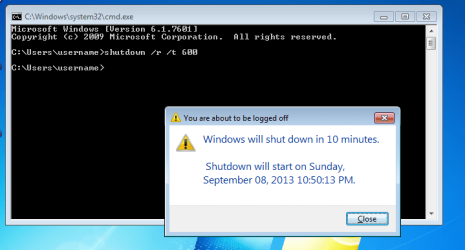
Bummer, I did not know that the log off switch for the shutdown program does not accept a time delay switch. Now that I've tested, I would suggest just restarting the computer via a scheduled task using the shutdown command with a delay in a batch file:
Code:
shutdown /r /t 600

The current user should see this:
restart-delay.png
(without the command prompt window)

This does nothing to prevent the child from cancelling the shutdown (shutdown /a) or from waiting until the computer has restarted and then logging back on again. If you find that they are not following your wishes, then post back and we can take more draconian steps.
 

My Computer My Computer

Computer type
Laptop
Computer Manufacturer/Model Number
Employer provided Dell Latitude
OS
W7 Pro SP1 64bit
CPU
i7
Memory
8GB
Graphics Card(s)
Intel HD Graphics
Hard Drives
crappy SSD
Antivirus
Employer mandated Symantec Endpoint Protection
Browser
Pale Moon 64bit, IE11 64bit & Chrome 64bit
I would like to know why windows live family safety stopped working. What have you tried to fix it?
 

My Computer My Computer

Computer type
PC/Desktop
Computer Manufacturer/Model Number
Custom Built
OS
Windows 10 Pro
CPU
AMD Ryzen 5 2400G Processor with Radeon RX Vega 11 Graphics
Motherboard
ASRock X470 Master SLI/AC AM4 AMD Promontory X470 SATA 6Gb/s
Memory
G.SKILL Ripjaws V Series 16GB (2 x 8GB) 288-Pin DDR4 SDRAM D
Graphics Card(s)
2047MB NVIDIA GeForce GTX 1060 6GB (EVGA)
Sound Card
Motherboard Built in
Monitor(s) Displays
Acer R240HY bidx 23.8-Inch IPS HDMI DVI VGA (1920 x 1080) Wi
Screen Resolution
1920 x 1080
Hard Drives
1TB Sandisk SSD PLUS (Main drive)
500 GB Seagate 7200 RPM (Games)
500 GB Western Digital 7200 RPM (Virtual Machines)
PSU
CORSAIR TX Series TX650M 650W 80+ Gold Modular Power Supply
Case
CORSAIR CARBIDE SPEC-02 Mid-Tower Gaming Case, Red LED Fan
Cooling
220mm, two 120mm, and four 60mm fans
Keyboard
Wired Dell keyboard
Mouse
Wireless Logitech mouse
Internet Speed
250mb down, 30mb up
Antivirus
Panda Cloud Antivirus
Browser
Chrome-ish x64
Other Info
Your awesome for reading this.
I would like to know why windows live family safety stopped working. What have you tried to fix it?

I've no idea why the time limits feature is no longer working but it's an issue affecting many people.

MS have acknowledged the problem and have been working on it for a number of months but they haven't provided any indication of when it will be resolved.

I've tried reinstalling the the Family Safety filter and on one computer where it is installed, I've even performed a fresh installation of Windows 7 but it didn't fix the problem.

Some users are not affected so it's frustrating for those who are having the problems.
 

My Computer My Computer

Computer type
PC/Desktop
Computer Manufacturer/Model Number
Custom Build
OS
Windows 7 Ultimate SP1 x64
CPU
Intel(R) Core 2 Duo E6600 'Conroe' 2.40Ghz (3.20Ghz - 400x8)
Motherboard
ASUS P5K-E WiFi-AP
Memory
4GB Corsair DDR2 XMS2-6400C4 (4-4-4-12 / DDR2-800MHz)
Graphics Card(s)
PowerColor ATI Radeon HD 3850 Pro Xtreme 512MB GDDR3
Hard Drives
1x Maxtor DiamondMax 22 500GB SATA II HDD (STM3500320AS)
2x Seagate Barracuda 7200.12 1TB SATA II HDD (ST31000528AS)
Bummer, I did not know that the log off switch for the shutdown program does not accept a time delay switch. Now that I've tested, I would suggest just restarting the computer via a scheduled task using the shutdown command with a delay in a batch file:
Code:
shutdown /r /t 600
The current user should see this:
View attachment 285199
(without the command prompt window)

This does nothing to prevent the child from cancelling the shutdown (shutdown /a) or from waiting until the computer has restarted and then logging back on again. If you find that they are not following your wishes, then post back and we can take more draconian steps.

Thanks for the suggestion.

It's a shame the /l switch doesn't support time as that would go a long way to resolve things. I may try your suggestion along with a batch file but I've a feeling it could get a little complicated with different times for different days.
 

My Computer My Computer

Computer type
PC/Desktop
Computer Manufacturer/Model Number
Custom Build
OS
Windows 7 Ultimate SP1 x64
CPU
Intel(R) Core 2 Duo E6600 'Conroe' 2.40Ghz (3.20Ghz - 400x8)
Motherboard
ASUS P5K-E WiFi-AP
Memory
4GB Corsair DDR2 XMS2-6400C4 (4-4-4-12 / DDR2-800MHz)
Graphics Card(s)
PowerColor ATI Radeon HD 3850 Pro Xtreme 512MB GDDR3
Hard Drives
1x Maxtor DiamondMax 22 500GB SATA II HDD (STM3500320AS)
2x Seagate Barracuda 7200.12 1TB SATA II HDD (ST31000528AS)
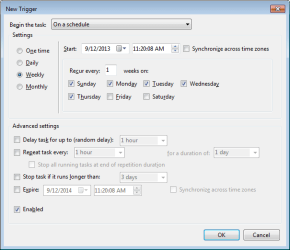
You would only need one batch file and two scheduled tasks (school night and weekend):

st.png
 

My Computer My Computer

Computer type
Laptop
Computer Manufacturer/Model Number
Employer provided Dell Latitude
OS
W7 Pro SP1 64bit
CPU
i7
Memory
8GB
Graphics Card(s)
Intel HD Graphics
Hard Drives
crappy SSD
Antivirus
Employer mandated Symantec Endpoint Protection
Browser
Pale Moon 64bit, IE11 64bit & Chrome 64bit
Sometimes security software can hamper windows from working correctly. What security software do you use?
 

My Computer My Computer

Computer type
PC/Desktop
Computer Manufacturer/Model Number
Custom Built
OS
Windows 10 Pro
CPU
AMD Ryzen 5 2400G Processor with Radeon RX Vega 11 Graphics
Motherboard
ASRock X470 Master SLI/AC AM4 AMD Promontory X470 SATA 6Gb/s
Memory
G.SKILL Ripjaws V Series 16GB (2 x 8GB) 288-Pin DDR4 SDRAM D
Graphics Card(s)
2047MB NVIDIA GeForce GTX 1060 6GB (EVGA)
Sound Card
Motherboard Built in
Monitor(s) Displays
Acer R240HY bidx 23.8-Inch IPS HDMI DVI VGA (1920 x 1080) Wi
Screen Resolution
1920 x 1080
Hard Drives
1TB Sandisk SSD PLUS (Main drive)
500 GB Seagate 7200 RPM (Games)
500 GB Western Digital 7200 RPM (Virtual Machines)
PSU
CORSAIR TX Series TX650M 650W 80+ Gold Modular Power Supply
Case
CORSAIR CARBIDE SPEC-02 Mid-Tower Gaming Case, Red LED Fan
Cooling
220mm, two 120mm, and four 60mm fans
Keyboard
Wired Dell keyboard
Mouse
Wireless Logitech mouse
Internet Speed
250mb down, 30mb up
Antivirus
Panda Cloud Antivirus
Browser
Chrome-ish x64
Other Info
Your awesome for reading this.
Sometimes security software can hamper windows from working correctly. What security software do you use?

ESET Smart Security
Malwarebytes Anti-Malware (run on demand)

Have tried Safe Mode with Networking to see if the Family Safety time limits work then but unfortunately, they don't.
 

My Computer My Computer

Computer type
PC/Desktop
Computer Manufacturer/Model Number
Custom Build
OS
Windows 7 Ultimate SP1 x64
CPU
Intel(R) Core 2 Duo E6600 'Conroe' 2.40Ghz (3.20Ghz - 400x8)
Motherboard
ASUS P5K-E WiFi-AP
Memory
4GB Corsair DDR2 XMS2-6400C4 (4-4-4-12 / DDR2-800MHz)
Graphics Card(s)
PowerColor ATI Radeon HD 3850 Pro Xtreme 512MB GDDR3
Hard Drives
1x Maxtor DiamondMax 22 500GB SATA II HDD (STM3500320AS)
2x Seagate Barracuda 7200.12 1TB SATA II HDD (ST31000528AS)
Safe mode would not work for family safety. Safe mode only loads windows critical services. It's services would not start, so that is not a reliable test. Try this, you do not need to uninstall, but have your antivirus disable itself, and you can leave malwarebytes on. Try using the family safety now after uninstalling it and reinstalling it again once more. See if it works then.

If it still doesn't, temporary uninstall your antivirus (eset) and then try the family safety. If it works, something is messed up with the antivirus software that is preventing it from working. Which then you can report to the vendor to have it fixed.

I have seen that an antivirus even though its disabled, can still cause issues. Sometimes you need to uninstall it for the proper test.
 

My Computer My Computer

Computer type
PC/Desktop
Computer Manufacturer/Model Number
Custom Built
OS
Windows 10 Pro
CPU
AMD Ryzen 5 2400G Processor with Radeon RX Vega 11 Graphics
Motherboard
ASRock X470 Master SLI/AC AM4 AMD Promontory X470 SATA 6Gb/s
Memory
G.SKILL Ripjaws V Series 16GB (2 x 8GB) 288-Pin DDR4 SDRAM D
Graphics Card(s)
2047MB NVIDIA GeForce GTX 1060 6GB (EVGA)
Sound Card
Motherboard Built in
Monitor(s) Displays
Acer R240HY bidx 23.8-Inch IPS HDMI DVI VGA (1920 x 1080) Wi
Screen Resolution
1920 x 1080
Hard Drives
1TB Sandisk SSD PLUS (Main drive)
500 GB Seagate 7200 RPM (Games)
500 GB Western Digital 7200 RPM (Virtual Machines)
PSU
CORSAIR TX Series TX650M 650W 80+ Gold Modular Power Supply
Case
CORSAIR CARBIDE SPEC-02 Mid-Tower Gaming Case, Red LED Fan
Cooling
220mm, two 120mm, and four 60mm fans
Keyboard
Wired Dell keyboard
Mouse
Wireless Logitech mouse
Internet Speed
250mb down, 30mb up
Antivirus
Panda Cloud Antivirus
Browser
Chrome-ish x64
Other Info
Your awesome for reading this.
No joy I'm afraid.

Coincidentally, the Family Safety time limits work on the kid's grandparent's computer and ESET and Malwarebytes are installed on there too.

I guess I'm just one of the many unlucky customers waiting for a fix from MS.

BTW, I don't suppose anyone knows what registry key or files are modified as a result of running the net user /time command please?
 

My Computer My Computer

Computer type
PC/Desktop
Computer Manufacturer/Model Number
Custom Build
OS
Windows 7 Ultimate SP1 x64
CPU
Intel(R) Core 2 Duo E6600 'Conroe' 2.40Ghz (3.20Ghz - 400x8)
Motherboard
ASUS P5K-E WiFi-AP
Memory
4GB Corsair DDR2 XMS2-6400C4 (4-4-4-12 / DDR2-800MHz)
Graphics Card(s)
PowerColor ATI Radeon HD 3850 Pro Xtreme 512MB GDDR3
Hard Drives
1x Maxtor DiamondMax 22 500GB SATA II HDD (STM3500320AS)
2x Seagate Barracuda 7200.12 1TB SATA II HDD (ST31000528AS)
~~~
BTW, I don't suppose anyone knows what registry key or files are modified as a result of running the net user /time command please?

I did not glean much via Process Monitor. The second line is where the command was issued:

net-user-times.png


And the video below just shows a bit more of the Process Monitor screen - as well as showing what you stated in your original post about the user not getting logged off when net user username /times: is used.

You might want to watch this in the the full screen mode and at 720p.


Have you played with scheduled tasks yet? Is restarting the computer a problem?
 

My Computer My Computer

Computer type
Laptop
Computer Manufacturer/Model Number
Employer provided Dell Latitude
OS
W7 Pro SP1 64bit
CPU
i7
Memory
8GB
Graphics Card(s)
Intel HD Graphics
Hard Drives
crappy SSD
Antivirus
Employer mandated Symantec Endpoint Protection
Browser
Pale Moon 64bit, IE11 64bit & Chrome 64bit
~~~
BTW, I don't suppose anyone knows what registry key or files are modified as a result of running the net user /time command please?

I did not glean much via Process Monitor. The second line is where the command was issued:

View attachment 285705


And the video below just shows a bit more of the Process Monitor screen - as well as showing what you stated in your original post about the user not getting logged off when net user username /times: is used.

You might want to watch this in the the full screen mode and at 720p.


Have you played with scheduled tasks yet? Is restarting the computer a problem?

Very interesting. Thanks for taking the time to upload the video.

I haven't set the scheduled task as yet but I have made progress in other areas.

The reason I asked if anyone knew what registry key was being created/edited with the net user /time command is that I noticed that the restriction wasn't being enforced after a reboot. Running the command, switching user or logging off and the results were good but for some reason, it wasn't sticking after the computer restarted. I found a thread on Tom's Hardware forum where another user reported the same issue.

Can you confirm whether the same happens on your test account please UsernameIssues?

I then decided to put a little more time into the Family Safety time limits problem and it's now working on both computers in the house. Before shouting 'eureka', I want to test things over the weekend to ensure that it's not a coincidence. Managed to get things going on the desktop fairly easily enough but the laptop took considerably more tinkering before it started to work. Although there were a couple of corrupted tasks and a problem which was preventing the group policy editor from loading which may have been related to the issue too.

I have to consider the possibility that it had absolutely nothing to do with whatever I changed and perhaps MS have resolved something their end?
 

My Computer My Computer

Computer type
PC/Desktop
Computer Manufacturer/Model Number
Custom Build
OS
Windows 7 Ultimate SP1 x64
CPU
Intel(R) Core 2 Duo E6600 'Conroe' 2.40Ghz (3.20Ghz - 400x8)
Motherboard
ASUS P5K-E WiFi-AP
Memory
4GB Corsair DDR2 XMS2-6400C4 (4-4-4-12 / DDR2-800MHz)
Graphics Card(s)
PowerColor ATI Radeon HD 3850 Pro Xtreme 512MB GDDR3
Hard Drives
1x Maxtor DiamondMax 22 500GB SATA II HDD (STM3500320AS)
2x Seagate Barracuda 7200.12 1TB SATA II HDD (ST31000528AS)
The time restrictions held thru a reboot. How odd that they did not hold for you.
 

My Computer My Computer

Computer type
Laptop
Computer Manufacturer/Model Number
Employer provided Dell Latitude
OS
W7 Pro SP1 64bit
CPU
i7
Memory
8GB
Graphics Card(s)
Intel HD Graphics
Hard Drives
crappy SSD
Antivirus
Employer mandated Symantec Endpoint Protection
Browser
Pale Moon 64bit, IE11 64bit & Chrome 64bit
Back
Top