Solved Windows XP Unmountable_Boot_Volume possible to fix and upgrade?

Kesha

New member
Member
Local time
11:18 AM
Messages
43
Hello. I have an old Dell PC that I stopped using years ago that stop working & ended up getting me a blue. I can't remember if it was a virus or not. I would like to fix this PC and possible install Windows 7. Hoping that this PC will meet the minimum requirements.

The error message I have is UNMOUNTABLE_BOOT_VOLUME

Technical Information:

**STOP: 0X000000ED (0X82BCBC68, 0XC000006, 0X00000000, 0X00000000)

If this isn't "fixable" should I try to get any files from the hard drive or just cut my losses and work on updating this PC (getting new everything and work on fixing it)?

Thanks for your time!
 

My Computer My Computer

At a glance

Windows 7 64 bit
OS
Windows 7 64 bit
How can we answer when you don't provide the slightest specs? How much RAM and CPU? If it's powerful enough then you can try a booted http://www.sevenforums.com/tutorials/1649-clean-install-windows-7-a.html making sure to delete all partitions during install as shown in Steps 7 and 8.

I'd also see if there is a network driver for the PC on it's Support Downloads webpage so if the installer doesn't provide it you can install it to get online, enable http://www.sevenforums.com/tutorials/2803-device-installation-settings.html Option 3 then run all rounds of Important and Optional Windows Updates to completion.

Then supply any drivers still missing in Device Manager from the same location.

If you don't like 7's performance after we help you work out the glitches then you can reinstall the licensed XP version on it using the Product Key on COA sticker.
 
Thanks for the suggestion, I can try that. I'll be glad to give provide specs, if you can tell me how to find it on PC.
 

My Computer My Computer

At a glance

Windows 7 64 bit
OS
Windows 7 64 bit
Well I was hoping you'd at least know how much RAM and the CPU.

What is the make /model on the serial sticker on the bottom of PC? Example: Compaq Q3145-567w. We can find out some info by googling that.

You are wanting to know if you can install Win7 on it, correct? What I would do is go ahead following http://www.sevenforums.com/tutorials/1649-clean-install-windows-7-a.html to see how it runs - since it doesn't work now anyway you have nothing to lose.

We can then help you troubleshoot any issues and make decisions about upgrading hardware if it's badly needed.
 
Lol. Sorry! I'm somewhat technical but not that technical. I can do that.

Make: Dell
Model No: DMC

That's true I'll start on the Clean Install Windows 7..

Thanks again for the quick reply.
 

My Computer My Computer

At a glance

Windows 7 64 bit
OS
Windows 7 64 bit
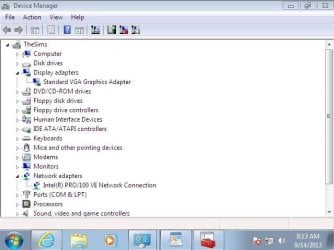
I have Windows 7 on the PC! But the resolution or the display is large hard for me to see the bottom of the window. I can't get the PC to change size of it. Just says Generic PnP Monitor on Standard VGA Graphics Adapter 640x480, unless my monitor that I'm using is too old.
 

My Computer My Computer

At a glance

Windows 7 64 bit
OS
Windows 7 64 bit
Follow the steps in http://www.sevenforums.com/tutorials/219487-clean-reinstall-factory-oem-windows-7-a.html#post1839164 to enable Automatically deliver drivers via Windows Update (Step 3) and then run all rounds of Important and Optional Windows Updates to see if it delivers your drivers.

If not import the driver for Display and any others missing from the Acer Support Downloads webpage for your model. If it is not available there then use http://www.sevenforums.com/tutorials/73420-hardware-identification.html
 
Last edited:
Thanks. I'll give those a try.
 

My Computer My Computer

At a glance

Windows 7 64 bit
OS
Windows 7 64 bit
Follow the steps in http://www.sevenforums.com/tutorials/219487-clean-reinstall-factory-oem-windows-7-a.html#post1839164 to enable http://www.sevenforums.com/tutorials/2803-device-installation-settings.html and then run all rounds of Important and Optional Windows Updates to see if it delivers your drivers.

If not import the driver for Display and any others missing from the Acer Support Downloads webpage for your model. If it is not available there then use http://www.sevenforums.com/tutorials/73420-hardware-identification.html

I'm following the steps to do a Clean Reinstall for W7. I downloaded the Windows ISO file, then went to download & install the Windows 7 USB-DVD Download Tool. But I would need to download Microsoft .NET Framework 2.0 & Microsoft Image Mastering API v2 1st before using the W7 USB-DVD Dwnld Tool.

I end up getting an error message went trying to install Microsoft .NET Framework 2.0 Sp2, then I tried to install Microsoft .NET Framework 2.0 Sp1 said the same thing as Sp2.

"Setup has detected that this computer does not meet the requirements to install this software. These requirements must be met before you can install Microsoft .NET 2.0 SP1. This product is not supported on Vista Operating System."
 

My Computer My Computer

At a glance

Windows 7 64 bit
OS
Windows 7 64 bit
To burn the ISO for our licensed version (make sure Product Key on COA sticker is readable!) use
ImgBurn at 4x speed to Burn Image File.


To write the ISO to flash stick use UltraISO Software To Create Bootable USB Flash Drive

I was able to do a clean reinstall and update the PC with all the W7 updates (122 Windows Updates). I've tried Device Installation Settings, to check to see if I can update using Devices & Printers that did not work.

I tried to doing hardware identification and looked on the Acer Support Download website but was unable to find any drivers.

Went to Device Manager to see if I can the PC search the internet for the driver for the monitor. It did search and said 'The best driver software for your device is already installed. Windows has determined the driver software for your device is up to date. Standard VGA Graphics Adapter."

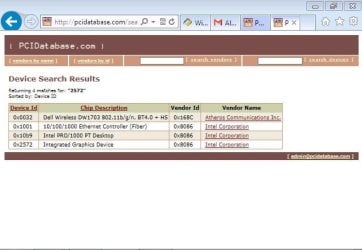
This is what I found from PCIDatabase:

Vendor Id ---- Vendor Name
0x8086 -------Intel Corporation

Device Id ---- Chip Description ------------------------------ Vendor Id ------------ Vendor Name
0x0032 ----- Dell Wireless DW1703 802.11b/g/n, BT4.0 + HS -- 0x168C --- Atheros Communications Inc.
0x1001 ----- 10/100/1000 Ethernet Controller (Fiber) ----------0x8086 ------ Intel Corporation
0x10b9 ------ Intel PRO/1000 PT Desktop ---------------------0x8086 -------- Intel Corporation
0x2572 ------- Integrated Graphics Device --------------------- 0x8086 ------ Intel Corporation
 

My Computer My Computer

At a glance

Windows 7 64 bit
OS
Windows 7 64 bit
Did you first enable Automatically deliver drivers via Windows Update (Step 3)
then run all Important and Optional Windows Updates to see if the rest of your drivers were delivered that way?

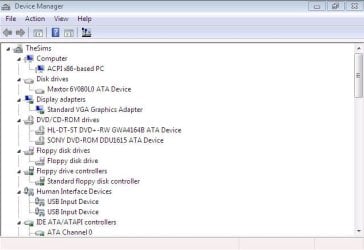
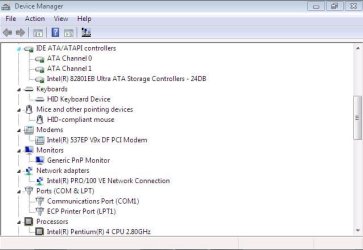
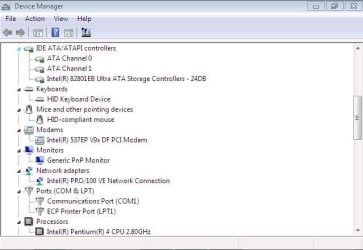
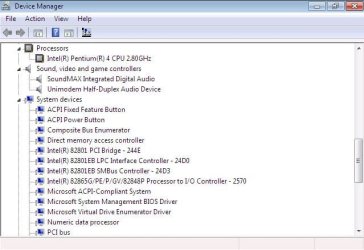
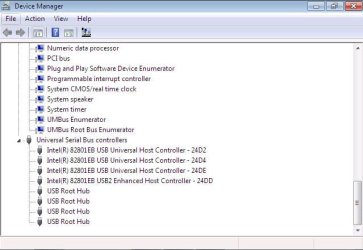
Please post back a screenshot of the Device Manager using the Snipping Tool in Start menu to make a Rectangular snip of the entire maximized window. Expand the Network adapters so we can see what's already installed.

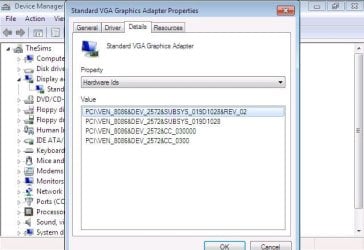
The Hardware ID is not useful if you don't narrow it down using both identifiers for the missing device driver. If you can't do this then post a screenshot of the Hardware ID for the device, and any others missing their driver.

From the Dell sticker on the PC post back also the Model number and any extension for it, and the Tag number. This is how you should have already checked the Dell Support Downloads webpage for the latest Display driver.
 
Did you first enable Automatically deliver drivers via Windows Update (Step 3)
then run all Important and Optional Windows Updates to see if the rest of your drivers were delivered that way?

Please post back a screenshot of the Device Manager using the Snipping Tool in Start menu to make a Rectangular snip of the entire maximized window. Expand the Network adapters so we can see what's already installed.

The Hardware ID is not useful if you don't narrow it down using both identifiers for the missing device driver. If you can't do this then post a screenshot of the Hardware ID for the device, and any others missing their driver.

From the Dell sticker on the PC post back also the Model number and any extension for it, and the Tag number. This is how you should have already checked the Dell Support Downloads webpage for the latest Display driver.

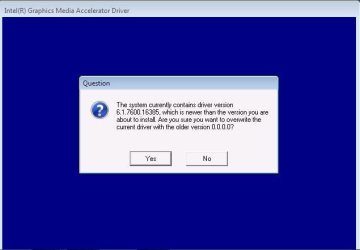
Yes, I enabled the automatically delivers via Windows Update (step 3). I checked Dell's website after the Acer website did not help. I downloaded the drivers for my PC, even though the description mention it is for XP, I download it anyway & tried to install but I end up getting an error message: "Intel(R) Graphics Media Accelerator Driver, This Operating System is not supported."
 

Attachments

  • Ntwrk Adaptr Screenshot.JPG
    Ntwrk Adaptr Screenshot.JPG
    43.5 KB · Views: 10

My Computer My Computer

At a glance

Windows 7 64 bit
OS
Windows 7 64 bit
The window is not maximized since we can't see what's down lower when you scroll.

Since you have the ethernet (wired) connection Network Adapter the missing one must be the Wireless, maybe the 0x0032 ----- Dell Wireless DW1703 802.11b/g/n, BT4.0 + HS -- 0x168C --- Atheros Communications Inc. which you traced earlier. However we can't confirm this because you didn't post back the Hardware ID for the missing device or the Standard VGA adapter as requested. Nor can we see the Missing Device in the Device Manager, perhaps because we can't scroll down.

I also asked for your Dell model and tag number and you did not reply. If you're not even going to complete the steps requested then we can't help you. Thoroughness is everything in these cases.
 
Thought you were mentioning how to find drivers on Dell's website and not requesting the info.

Dell Demension 3000
Service Tag: ((Was asked to removed service tag from Dell))
 

Attachments

  • Ntwrk Adaptr Screenshot 1.JPG
    Ntwrk Adaptr Screenshot 1.JPG
    38.8 KB · Views: 11
  • Ntwrk Adaptr Screenshot 2.JPG
    Ntwrk Adaptr Screenshot 2.JPG
    40 KB · Views: 10
  • Ntwrk Adaptr Screenshot 3.JPG
    Ntwrk Adaptr Screenshot 3.JPG
    40 KB · Views: 10
  • Ntwrk Adaptr Screenshot 4.JPG
    Ntwrk Adaptr Screenshot 4.JPG
    46.6 KB · Views: 10
  • Ntwrk Adaptr Screenshot 5.JPG
    Ntwrk Adaptr Screenshot 5.JPG
    42.7 KB · Views: 10
Last edited:

My Computer My Computer

At a glance

Windows 7 64 bit
OS
Windows 7 64 bit
OK, I don't see the missing Driver now, the one you posted the HID for? I suspected it was the wireless driver choice but it's not there now. Is this a laptop which features a wireless driver?

Where is the Dell model and tag number requested three times now?

Confirm also that you have enabled Automatically deliver drivers via Windows Update (Step 3)
and run Check for Updates to see if there are any newer drivers to install. Check again now.

If so then we need to find a Win7 driver for your Display, starting with on the Dell Support Downloads webpage for your tag number. If not there then we'll need its Hardware ID.
 
OK, I don't see the missing Driver now, the one you posted the HID for? I suspected it was the wireless driver choice but it's not there now. Is this a laptop which features a wireless driver?

Where is the Dell model and tag number requested three times now?

Confirm also that you have enabled Automatically deliver drivers via Windows Update (Step 3)
and run Check for Updates to see if there are any newer drivers to install. Check again now.

If so then we need to find a Win7 driver for your Display, starting with on the Dell Support Downloads webpage for your tag number. If not there then we'll need its Hardware ID.

This is a PC tower. I don't understand the HID thing. Ok, here's the model is DMC from the sticker on the bottom of the PC. The tag that is mention on the PC is the service tag, ((Was asked to removed service tag from Dell)).

Yes, the Automatically deliver drivers via Windows Update (Step 3) is enabled. The PC is installed 12 or 13 more security updates today.

Went to Dell's website to have it see the new configurations on it, it recognizes that W7 is on but when I try to find drivers for my PC using my service tag it still says Windows XP for the OS.

I'm lost and don't what else to do. Thanks again for helping.

((Pictures of my Dell PC were asked to be removed))
 

Attachments

  • Display HID Vendor.JPG
    Display HID Vendor.JPG
    28 KB · Views: 9
  • Display HID Device ID.JPG
    Display HID Device ID.JPG
    39 KB · Views: 10
  • Display HID.JPG
    Display HID.JPG
    46.5 KB · Views: 9
  • Display Dell 2.JPG
    Display Dell 2.JPG
    31.1 KB · Views: 9
  • Display Dell 3.JPG
    Display Dell 3.JPG
    34.8 KB · Views: 9
Last edited:

My Computer My Computer

At a glance

Windows 7 64 bit
OS
Windows 7 64 bit
Open Windows Update now and click on Check For Updates. Install all Important and Optional Updates. Reboot the PC when prompted, then go back a check again for updates. Do this until there are no more.

DMC is not a model number. Inputting your tag number on the Dell Support Downloads webpage shows that it is a Dimension 3000: Drivers & Downloads | Dell US

Only XP drivers are available and the latest Display driver is from 2005: Driver Details | Dell US. Try installing it now if Windows Updates didn't deliver another. If it fails try installing in XP SP2 Compatibility Mode. Read the blue link to understand how.

The latest Display driver on the Intel site is also from 2005 and may or may not work. Download and rightclick .exe to install from here: https://downloadcenter.intel.com/De...ics+and+Memory+Controller+Hub+(GMCH)&lang=eng.

It's possible that the chip is too old for any other than Standard VGA driver which means you'll be limited to the screen resolutions shown when you rightclick desktop for Screen Resolution. It also means Sleep and Hibernate will most likely not work. This only happens with the very oldest chipsets. However someone might know of an obscure or modified driver that works. I only did a cursory web search.
 
Open Windows Update now and click on Check For Updates. Install all Important and Optional Updates. Reboot the PC when prompted, then go back a check again for updates. Do this until there are no more.

DMC is not a model number. Inputting your tag number on the Dell Support Downloads webpage shows that it is a Dimension 3000: Drivers & Downloads | Dell US

Only XP drivers are available and the latest Display driver is from 2005: Driver Details | Dell US. Try installing it now if Windows Updates didn't deliver another. If it fails try installing in XP SP2 Compatibility Mode. Read the blue link to understand how.

The latest Display driver on the Intel site is also from 2005 and may or may not work. Download and rightclick .exe to install from here: https://downloadcenter.intel.com/De...ics+and+Memory+Controller+Hub+(GMCH)&lang=eng.

It's possible that the chip is too old for any other than Standard VGA driver which means you'll be limited to the screen resolutions shown when you rightclick desktop for Screen Resolution. It also means Sleep and Hibernate will most likely not work. This only happens with the very oldest chipsets. However someone might know of an obscure or modified driver that works. I only did a cursory web search.


I feel that it mostly is too old to update. Should I try to update the driver even though it says I have the latest driver?


Going back to Windows XP would the OS having issues like updating and my screen resolution working since XP is very outdated? Or keeping W7 like is best option? I just want this PC to function well enough for me to get online (occasionally), record me talking & playing the Sims 2 that does not require me to get online and does not need updating. I have a PC that I used for the Sims 3, I had Sims 2 on the PC before..

Thanks again for your help.
 

Attachments

  • Intel site driver.JPG
    Intel site driver.JPG
    24.2 KB · Views: 12

My Computer My Computer

At a glance

Windows 7 64 bit
OS
Windows 7 64 bit
So when you try to install the Driver from Dell it gives you that message, even though you still have Standard VGA Display driver in Device Manager?

I would try it to see if it offers you different and better screen resolutions, allows Sleep and Hibernate in Power Options. Again you may have to install it in XP SP2 Compatibility mode.

If it doesn't work better and offer those options then I would roll it back to Standard VGA in Device Manager.

How is performance overall once this driver is resolved? Is it better than XP, as it should be or I would go back to XP?
 
Back
Top