Solved ATI gpu driver fails to install, says Windows does not support it

Attachments

  • BMyt5UM.jpg
    BMyt5UM.jpg
    48.9 KB · Views: 1

My Computer My Computer

Computer type
PC/Desktop
Computer Manufacturer/Model Number
Unknown
OS
Windows 7 Ultimate x84
Yes that is the settings you should have
 

My Computer My Computer

Computer Manufacturer/Model Number
W530-3630QM1
OS
windows 7 home 64bit
CPU
INTEL-CORE I7
Memory
16GB
Hard Drives
750GB
Browser
Chrome

My Computer My Computer

Computer type
PC/Desktop
Computer Manufacturer/Model Number
Unknown
OS
Windows 7 Ultimate x84
They both seem to be the same Version
 

My Computer My Computer

Computer Manufacturer/Model Number
W530-3630QM1
OS
windows 7 home 64bit
CPU
INTEL-CORE I7
Memory
16GB
Hard Drives
750GB
Browser
Chrome
Sorry they are not your choice
 

My Computer My Computer

Computer Manufacturer/Model Number
W530-3630QM1
OS
windows 7 home 64bit
CPU
INTEL-CORE I7
Memory
16GB
Hard Drives
750GB
Browser
Chrome
First one says:
Display Driver ver. 8.97.100.7
OpenCL(tm) Driver 10.0.937.2
Catalyst Control Center 2012.1116.1514.27190

Second one says:
Display Driver ver. 9.012
OpenCL(tm) Driver ver. 10.0.1084.4
Catalyst Control Center ver. 2012.1219.1520.27485

I have no idea what the difference is.
 

My Computer My Computer

Computer type
PC/Desktop
Computer Manufacturer/Model Number
Unknown
OS
Windows 7 Ultimate x84
Alright, downloading. Will post here when I have installed it.
 

My Computer My Computer

Computer type
PC/Desktop
Computer Manufacturer/Model Number
Unknown
OS
Windows 7 Ultimate x84
One would think that latest Driver would be the best .. That is not always the case
 

My Computer My Computer

Computer Manufacturer/Model Number
W530-3630QM1
OS
windows 7 home 64bit
CPU
INTEL-CORE I7
Memory
16GB
Hard Drives
750GB
Browser
Chrome
Installed it and got this log:

Catalyst™ Install Manager
Installation Report
09/21/13 17:06:34


Hardware information
Name AMD Radeon Graphics Processor
Manufacturer Advanced Micro Devices, Inc.
Device ID 0x9498
Vendor ID 0x1002
Class Code 0x030000
Revision ID 0x00
Subsystem ID 0xe109
Subsystem vendor ID 0x174b
Other hardware

Existing packages
Packages for install
AMD Catalyst Install ManagerFinal Status: Success
Version of Item: 8.0.903.0
Size: 20 Mbytes
AMD APP SDK RuntimeFinal Status: Success
Version of Item: 10.0.1084.4
Size: 90 Mbytes
HDMI Audio DriverFinal Status: Fail
Version of Item: 7.12.0.7712
Size: 1 Mbytes
AMD VISION Engine Control CenterFinal Status: Success
Version of Item: 2012.1219.1521.27485
Size: 150 Mbytes


Other detected devices
RS780
Manufacturer Advanced Micro Devices, Inc.
Device ID 0x9600
Vendor ID 0x1022
Class Code 0x060000
Revision ID 0x00
Subsystem ID 0x7501
Subsystem vendor ID 0x1462


Manufacturer Advanced Micro Devices, Inc.
Device ID 0x960b
Vendor ID 0x1022
Class Code 0x060400
Revision ID 0x00
Subsystem ID 0x0000
Subsystem vendor ID 0x0000

Azalia (R600)
Manufacturer Advanced Micro Devices, Inc.
Device ID 0xaa00
Vendor ID 0x1002
Class Code 0x040300
Revision ID 0x00
Subsystem ID 0xaa00
Subsystem vendor ID 0x174b


Manufacturer Advanced Micro Devices, Inc.
Device ID 0x9605
Vendor ID 0x1022
Class Code 0x060400
Revision ID 0x00
Subsystem ID 0x0000
Subsystem vendor ID 0x0000


Manufacturer Advanced Micro Devices, Inc.
Device ID 0x9606
Vendor ID 0x1022
Class Code 0x060400
Revision ID 0x00
Subsystem ID 0x0000
Subsystem vendor ID 0x0000

ATI Integrated SATA Support
Manufacturer Advanced Micro Devices, Inc.
Device ID 0x4390
Vendor ID 0x1002
Class Code 0x01018f
Revision ID 0x00
Subsystem ID 0x7501
Subsystem vendor ID 0x1462

ATI Integrated SMBus Support
Manufacturer Advanced Micro Devices, Inc.
Device ID 0x4385
Vendor ID 0x1002
Class Code 0x0c0500
Revision ID 0x3a
Subsystem ID 0x7501
Subsystem vendor ID 0x1462

ATI Integrated SATA Support
Manufacturer Advanced Micro Devices, Inc.
Device ID 0x439c
Vendor ID 0x1002
Class Code 0x01018a
Revision ID 0x00
Subsystem ID 0x7501
Subsystem vendor ID 0x1462

ATI Integrated Azalia Support
Manufacturer Advanced Micro Devices, Inc.
Device ID 0x4383
Vendor ID 0x1002
Class Code 0x040300
Revision ID 0x00
Subsystem ID 0x501b
Subsystem vendor ID 0x1462


Manufacturer Advanced Micro Devices, Inc.
Device ID 0x4384
Vendor ID 0x1002
Class Code 0x060401
Revision ID 0x00
Subsystem ID 0x0000
Subsystem vendor ID 0x0000


Manufacturer Advanced Micro Devices, Inc.
Device ID 0x1200
Vendor ID 0x1022
Class Code 0x060000
Revision ID 0x00
Subsystem ID 0x0000
Subsystem vendor ID 0x0000


Manufacturer Advanced Micro Devices, Inc.
Device ID 0x1201
Vendor ID 0x1022
Class Code 0x060000
Revision ID 0x00
Subsystem ID 0x0000
Subsystem vendor ID 0x0000


Manufacturer Advanced Micro Devices, Inc.
Device ID 0x1202
Vendor ID 0x1022
Class Code 0x060000
Revision ID 0x00
Subsystem ID 0x0000
Subsystem vendor ID 0x0000


Manufacturer Advanced Micro Devices, Inc.
Device ID 0x1203
Vendor ID 0x1022
Class Code 0x060000
Revision ID 0x00
Subsystem ID 0x0000
Subsystem vendor ID 0x0000


Manufacturer Advanced Micro Devices, Inc.
Device ID 0x1204
Vendor ID 0x1022
Class Code 0x060000
Revision ID 0x00
Subsystem ID 0x0000
Subsystem vendor ID 0x0000


Error messages
Driver Install: Windows® version does not support this operation

 

My Computer My Computer

Computer type
PC/Desktop
Computer Manufacturer/Model Number
Unknown
OS
Windows 7 Ultimate x84
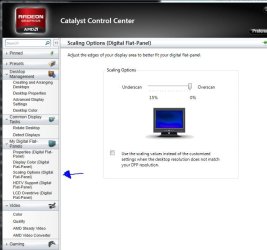
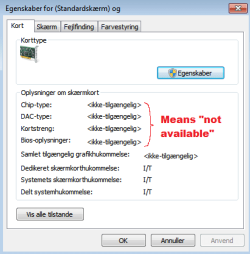
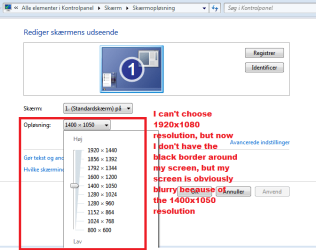
Ooookay some weird things happened, black border disappeared but graphics/resolution is horrible, see pictures:
111.png
222.png

EDIT: I obviously can't chose 1920x1440, it is not supported and my screen is supposed to run at 1920x1080
 

My Computer My Computer

Computer type
PC/Desktop
Computer Manufacturer/Model Number
Unknown
OS
Windows 7 Ultimate x84
Rebooted PC, black border reappeared.

Aaaargh this is so frustrating...
 

My Computer My Computer

Computer type
PC/Desktop
Computer Manufacturer/Model Number
Unknown
OS
Windows 7 Ultimate x84
Well that Version is not stable .. Maybe try an older Version .. Not even sure a clean install would sort the problem
 

My Computer My Computer

Computer Manufacturer/Model Number
W530-3630QM1
OS
windows 7 home 64bit
CPU
INTEL-CORE I7
Memory
16GB
Hard Drives
750GB
Browser
Chrome
Just noticed this in device manager, doesn't seem good :(...

"Windows cannot start this hardware device because its configuration information (in the registry) is incomplete or damaged. (Code 19)".

That is the graphics card.
 

My Computer My Computer

Computer type
PC/Desktop
Computer Manufacturer/Model Number
Unknown
OS
Windows 7 Ultimate x84
It is the Driver that is causing that
 

My Computer My Computer

Computer Manufacturer/Model Number
W530-3630QM1
OS
windows 7 home 64bit
CPU
INTEL-CORE I7
Memory
16GB
Hard Drives
750GB
Browser
Chrome
Okay I will remove all the drivers again, posting when done.
 

My Computer My Computer

Computer type
PC/Desktop
Computer Manufacturer/Model Number
Unknown
OS
Windows 7 Ultimate x84
Alright, drivers are gone once more. Can you recommend me another driver that I can try?
 

My Computer My Computer

Computer type
PC/Desktop
Computer Manufacturer/Model Number
Unknown
OS
Windows 7 Ultimate x84
Back
Top