HP tools aren't working properly after Finger Print Scanner attempt

TechnoKid

New member
Local time
8:00 AM
Messages
13
Hello,


I messed up with my HP tools, when I was trying to install the finger print scanner (tried simple pass and my identity) on my HP 4530s probook (windows 7).


1. Now, I can't use the "quick web" button to open my default browser..
2. I uninstalled the hp connection manager as I was getting an QLB Controller failed error. I am trying to install it again, but after it installs I can't launch as it says "can't load assembly".

3. I can't uninstall the HP Protect tools (they are partially uninstalled, I can't use them), but in the end I get an 1722.


Please help me, I don't know what went wrong. But the problem started when I tried to install the simple pass or My Identity, then tried to uninstall them as they didn't work..


I'll appreciate your help,

thank you
 

My Computer My Computer

At a glance

Windows 7 Home Premium 64-bitIntel(R) Core(TM) i3-2310M CPU @ 2.10GHz4.00 GBIntel(R) HD Graphics Family
Computer type
Laptop
Computer Manufacturer/Model Number
HP
OS
Windows 7 Home Premium 64-bit
CPU
Intel(R) Core(TM) i3-2310M CPU @ 2.10GHz
Motherboard
Hewlett-Packard 167C
Memory
4.00 GB
Graphics Card(s)
Intel(R) HD Graphics Family
Sound Card
(1) IDT High Definition Audio CODEC (2) Intel(R) Display A
Screen Resolution
1366 x 768 x 32 bits (4294967296 colors) @ 60 Hz
Browser
Firefox

My Computer My Computer

At a glance

Windows 10 Home x64INTEL Core i5-750 Quad-Core 3.37GHzHyperX Fury Black Series 8GB (2 x 4GB) 1866MhzEVGA GeForce GTX 750 Superclocked 1GB 128-Bit...
Computer type
PC/Desktop
OS
Windows 10 Home x64
CPU
INTEL Core i5-750 Quad-Core 3.37GHz
Motherboard
ASUS P7P55D
Memory
HyperX Fury Black Series 8GB (2 x 4GB) 1866Mhz
Graphics Card(s)
EVGA GeForce GTX 750 Superclocked 1GB 128-Bit GDDR5
Monitor(s) Displays
LG 32MA68HY 32" IPS
Screen Resolution
1920 x 1080
Hard Drives
Samsung 840 Evo 120GB, SEAGATE 500GB Barracuda® 7200.12, SATA 3 Gb/s, 7200 RPM, 16MB cache
PSU
ANTEC TruePower New TP-550, 80 PLUS, 550W
Case
ANTEC Three Hundred Illusion
Cooling
COOLER MASTER Hyper 212 Plus, 4 x 120mm 1 x 140mm Noctua's
Internet Speed
85 + Mbps
Antivirus
Avast
Browser
Vivaldi
Welcome to Seven Forums TechnoKid. Do you have a System Restore point from just before you tried this? Id so, that may be the easiest way. You can click to see what programs are affected before you make the restore point.

http://www.sevenforums.com/tutorials/700-system-restore.html

A Guy

No, I don't have a restore point.. Also, I had turned off the automatic backups etc.

That's why I am so disappointed..


And thanks for the warm welcome.. I am sure, I will enjoy my stay here :)
 

My Computer My Computer

At a glance

Windows 7 Home Premium 64-bitIntel(R) Core(TM) i3-2310M CPU @ 2.10GHz4.00 GBIntel(R) HD Graphics Family
Computer type
Laptop
Computer Manufacturer/Model Number
HP
OS
Windows 7 Home Premium 64-bit
CPU
Intel(R) Core(TM) i3-2310M CPU @ 2.10GHz
Motherboard
Hewlett-Packard 167C
Memory
4.00 GB
Graphics Card(s)
Intel(R) HD Graphics Family
Sound Card
(1) IDT High Definition Audio CODEC (2) Intel(R) Display A
Screen Resolution
1366 x 768 x 32 bits (4294967296 colors) @ 60 Hz
Browser
Firefox

My Computer My Computer

At a glance

Windows 10 Home x64INTEL Core i5-750 Quad-Core 3.37GHzHyperX Fury Black Series 8GB (2 x 4GB) 1866MhzEVGA GeForce GTX 750 Superclocked 1GB 128-Bit...
Computer type
PC/Desktop
OS
Windows 10 Home x64
CPU
INTEL Core i5-750 Quad-Core 3.37GHz
Motherboard
ASUS P7P55D
Memory
HyperX Fury Black Series 8GB (2 x 4GB) 1866Mhz
Graphics Card(s)
EVGA GeForce GTX 750 Superclocked 1GB 128-Bit GDDR5
Monitor(s) Displays
LG 32MA68HY 32" IPS
Screen Resolution
1920 x 1080
Hard Drives
Samsung 840 Evo 120GB, SEAGATE 500GB Barracuda® 7200.12, SATA 3 Gb/s, 7200 RPM, 16MB cache
PSU
ANTEC TruePower New TP-550, 80 PLUS, 550W
Case
ANTEC Three Hundred Illusion
Cooling
COOLER MASTER Hyper 212 Plus, 4 x 120mm 1 x 140mm Noctua's
Internet Speed
85 + Mbps
Antivirus
Avast
Browser
Vivaldi
Ahhh, ok, it will be a bit more complex to say the least then. 1st off, let's have you fill out your system specs

http://www.sevenforums.com/tutorials/180324-system-info-see-your-system-specs.html

Then if you can post a screenshot of the error when trying to run the connection manager, and when trying to uninstall the HP Protect tools.

http://www.sevenforums.com/tutorials/9733-screenshots-files-upload-post-seven-forums.html

I take it you have a CD with all the tools on it from HP?

A Guy

Thank you very for the quick reply.. I really appreciate that..

I have filled my system specifications..

Also, I was/am trying to install with HP Software Setup that is in my lappy since I bought it.


Let me update with the current situation as well:
I didn't have a restore point so that didn't worked for me..

Then I ran Microsoft Fix it (for safely uninstalling programs) , and removed the HP Protect tools. Microsoft fix it now shows that its uninstalled and also the Revo Uninstaller..
However, in Installed programs (in my computer) and also in the "HP software setup", it shows it installed.
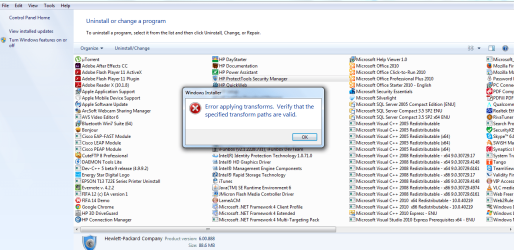
When I try to remove it from the installed programs, I get this error (see attachment).

Also, I did a hard reset of my Laptop.

However, I removed the HP Hotkey support that fixed the quick web launch button in my probook 4530s and also now I have successfully installed the HP connection manager from the HP software setup.

However windows start up is still slow, but it has improved than before..
Let me know, what can I do now?

I am trying to explain my situation well, so that I am able to help you to help me :D
thank you so much man.. I really appreciate that..
 

Attachments

  • error protect tools.png
    error protect tools.png
    65.9 KB · Views: 4

My Computer My Computer

At a glance

Windows 7 Home Premium 64-bitIntel(R) Core(TM) i3-2310M CPU @ 2.10GHz4.00 GBIntel(R) HD Graphics Family
Computer type
Laptop
Computer Manufacturer/Model Number
HP
OS
Windows 7 Home Premium 64-bit
CPU
Intel(R) Core(TM) i3-2310M CPU @ 2.10GHz
Motherboard
Hewlett-Packard 167C
Memory
4.00 GB
Graphics Card(s)
Intel(R) HD Graphics Family
Sound Card
(1) IDT High Definition Audio CODEC (2) Intel(R) Display A
Screen Resolution
1366 x 768 x 32 bits (4294967296 colors) @ 60 Hz
Browser
Firefox

My Computer My Computer

At a glance

win 7 ultimate32bit, Win8.1pro wmc 32bitamd phenom x4 9600corsair twinxs 2x2gb2x nvidia 1gb 8500gt
Computer type
PC/Desktop
Computer Manufacturer/Model Number
self build
OS
win 7 ultimate32bit, Win8.1pro wmc 32bit
CPU
amd phenom x4 9600
Motherboard
asus m2n32-sli deluxe
Memory
corsair twinxs 2x2gb
Graphics Card(s)
2x nvidia 1gb 8500gt
Sound Card
onboard
Monitor(s) Displays
23" PB Viseo 233d
Screen Resolution
1920x1080
Hard Drives
maxtor sata 500gb
maxtor sata 320gb
fujitsu sata200gb
PSU
oryxx tornado 750w
Case
thermaltake xaser lll
Cooling
artic freezer64 pro + 7 case fans
Hi TechnoKid, As you do not have a system restore point have you thought about doing a repair install ? http://www.sevenforums.com/tutorials/3413-repair-install.html You will not lose any files doing this, also run the system file checker http://www.sevenforums.com/tutorials/1538-sfc-scannow-command-system-file-checker.html this will tell if you have any corrupt system files :)

Hello,

thank you for the reply.

I have run the system file checker and have posted the result screenshot (attached). Let me know..
 

Attachments

  • nfc scan result.png
    nfc scan result.png
    16.4 KB · Views: 88

My Computer My Computer

At a glance

Windows 7 Home Premium 64-bitIntel(R) Core(TM) i3-2310M CPU @ 2.10GHz4.00 GBIntel(R) HD Graphics Family
Computer type
Laptop
Computer Manufacturer/Model Number
HP
OS
Windows 7 Home Premium 64-bit
CPU
Intel(R) Core(TM) i3-2310M CPU @ 2.10GHz
Motherboard
Hewlett-Packard 167C
Memory
4.00 GB
Graphics Card(s)
Intel(R) HD Graphics Family
Sound Card
(1) IDT High Definition Audio CODEC (2) Intel(R) Display A
Screen Resolution
1366 x 768 x 32 bits (4294967296 colors) @ 60 Hz
Browser
Firefox
Um, that won't help us much, we can't see all of it ;) See OPTION THREE on the SFC tutorial and post your sfcdetails.txt. A Guy
 

My Computer My Computer

At a glance

Windows 10 Home x64INTEL Core i5-750 Quad-Core 3.37GHzHyperX Fury Black Series 8GB (2 x 4GB) 1866MhzEVGA GeForce GTX 750 Superclocked 1GB 128-Bit...
Computer type
PC/Desktop
OS
Windows 10 Home x64
CPU
INTEL Core i5-750 Quad-Core 3.37GHz
Motherboard
ASUS P7P55D
Memory
HyperX Fury Black Series 8GB (2 x 4GB) 1866Mhz
Graphics Card(s)
EVGA GeForce GTX 750 Superclocked 1GB 128-Bit GDDR5
Monitor(s) Displays
LG 32MA68HY 32" IPS
Screen Resolution
1920 x 1080
Hard Drives
Samsung 840 Evo 120GB, SEAGATE 500GB Barracuda® 7200.12, SATA 3 Gb/s, 7200 RPM, 16MB cache
PSU
ANTEC TruePower New TP-550, 80 PLUS, 550W
Case
ANTEC Three Hundred Illusion
Cooling
COOLER MASTER Hyper 212 Plus, 4 x 120mm 1 x 140mm Noctua's
Internet Speed
85 + Mbps
Antivirus
Avast
Browser
Vivaldi
Hi TechnoKid, As you do not have a system restore point have you thought about doing a repair install ? http://www.sevenforums.com/tutorials/3413-repair-install.html You will not lose any files doing this, also run the system file checker http://www.sevenforums.com/tutorials/1538-sfc-scannow-command-system-file-checker.html this will tell if you have any corrupt system files :)

Hello,

thank you for the reply.

I have run the system file checker and have posted the result screenshot (attached). Let me know..
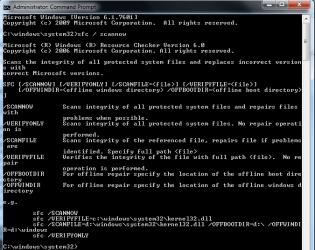
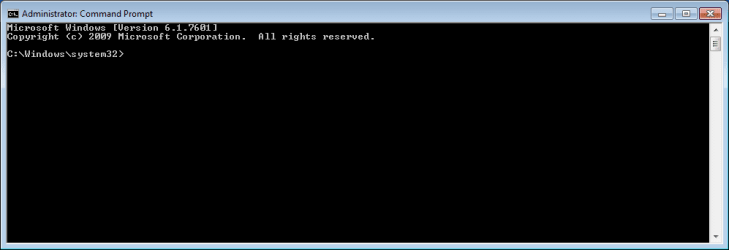
The screenshot of your SFC scan indicates that you got the command a bit wrong.

You have one extra space.

You don't really need any spaces:

SFC/SCANNOW

OR
SFC /SCANNOW
but not
SFC / SCANNOW

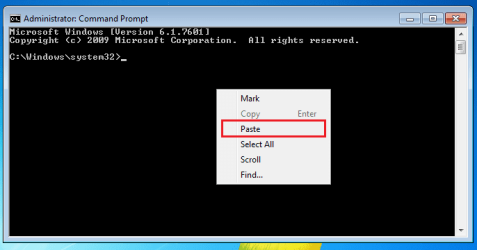
You should be able to copy the command mentioned above and paste it into the admin level command prompt.

Right click in the black area of the command prompt window for the paste process:
cmd0.png


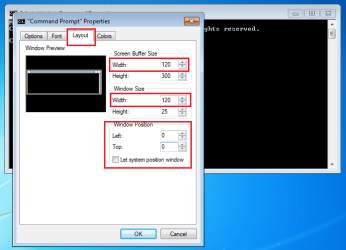
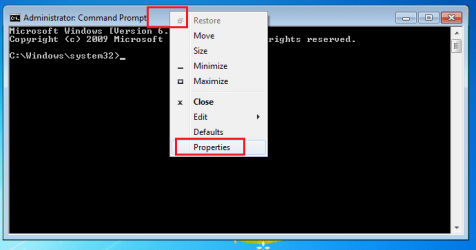
Or, you can change the properties of command prompt windows as follows to make them easier to read (prevent some of the text wrapping):

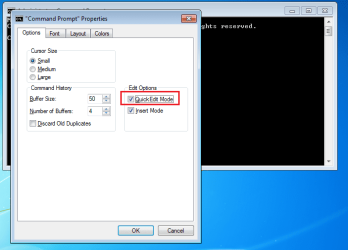
Right click on the title bar of the window and select Properties.
cmd1.png

If you make this change, then you will not need to use the context menu to paste info into a command prompt window. A right click inside the command prompt window will send the (text based) contents of the Windows clipboard into that command prompt window. If text is selected in the command prompt window, right clicking inside that command prompt window will send that selected text into the Windows clipboard.
cmd2.png

cmd3.png

cmd4.png


When you included the extra space, Windows displayed the "help file" text. Below is what that info would look like in a command prompt window that has been re-sized using the steps above:
cmd5.png
(You can click on the image above to see a larger version.)
 
Last edited:

My Computer My Computer

At a glance

W7 Pro SP1 64biti78GBIntel HD Graphics
Computer type
Laptop
Computer Manufacturer/Model Number
Employer provided Dell Latitude
OS
W7 Pro SP1 64bit
CPU
i7
Memory
8GB
Graphics Card(s)
Intel HD Graphics
Hard Drives
crappy SSD
Antivirus
Employer mandated Symantec Endpoint Protection
Browser
Pale Moon 64bit, IE11 64bit & Chrome 64bit
Good catch, I just saw the command window and knew we couldn't read it :o

A Guy
 

My Computer My Computer

At a glance

Windows 10 Home x64INTEL Core i5-750 Quad-Core 3.37GHzHyperX Fury Black Series 8GB (2 x 4GB) 1866MhzEVGA GeForce GTX 750 Superclocked 1GB 128-Bit...
Computer type
PC/Desktop
OS
Windows 10 Home x64
CPU
INTEL Core i5-750 Quad-Core 3.37GHz
Motherboard
ASUS P7P55D
Memory
HyperX Fury Black Series 8GB (2 x 4GB) 1866Mhz
Graphics Card(s)
EVGA GeForce GTX 750 Superclocked 1GB 128-Bit GDDR5
Monitor(s) Displays
LG 32MA68HY 32" IPS
Screen Resolution
1920 x 1080
Hard Drives
Samsung 840 Evo 120GB, SEAGATE 500GB Barracuda® 7200.12, SATA 3 Gb/s, 7200 RPM, 16MB cache
PSU
ANTEC TruePower New TP-550, 80 PLUS, 550W
Case
ANTEC Three Hundred Illusion
Cooling
COOLER MASTER Hyper 212 Plus, 4 x 120mm 1 x 140mm Noctua's
Internet Speed
85 + Mbps
Antivirus
Avast
Browser
Vivaldi
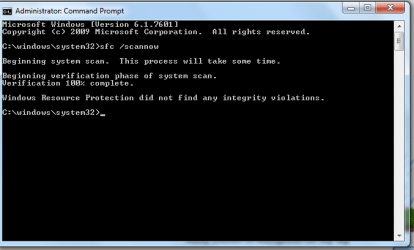
I am so sorry for the wrong command..

However, I have entered the correct command this time and it says no error (see screenshot). Then Whats the reason :( .
 

Attachments

  • nfc scan result.png
    nfc scan result.png
    11.5 KB · Views: 59

My Computer My Computer

At a glance

Windows 7 Home Premium 64-bitIntel(R) Core(TM) i3-2310M CPU @ 2.10GHz4.00 GBIntel(R) HD Graphics Family
Computer type
Laptop
Computer Manufacturer/Model Number
HP
OS
Windows 7 Home Premium 64-bit
CPU
Intel(R) Core(TM) i3-2310M CPU @ 2.10GHz
Motherboard
Hewlett-Packard 167C
Memory
4.00 GB
Graphics Card(s)
Intel(R) HD Graphics Family
Sound Card
(1) IDT High Definition Audio CODEC (2) Intel(R) Display A
Screen Resolution
1366 x 768 x 32 bits (4294967296 colors) @ 60 Hz
Browser
Firefox
Hello,

I will appreciate your support..

I got this reply from a person on HP. Can you please explain?? :(

Transform errors might better be called, "You have the wrong installation path - registry impasse" errors.

At least one would have a clue where to look.

Fortunately, lots of people have experienced this bit of irritation and have posted how to get around it.


It appears that the exact path used to install / uninstall the product is incorrect in the registry. Whether or not there is "truth" to the presumption that something was installed improperly seems beside the point. Most of what I have found on this subject indicates the way to fix this (short of being able to "go back in time") involves adjusting the Registry contents to make the Installer happy.


------------------------------------------------------------------------------------------------------------------------------

I always recommend that you have your backups current before making changes to your computer:


HP PCs - Backing Up Your Files (Windows 7)


HP PCs - Backing Up Your Files (Windows 8)


------------------------------------------------------------------------------------------------------------------------------


Set up System Restore (if not already set up) AND create a Restore Point:

Open and select the file entitled:

System Restore Overview


------------------------------------------------------------------------------------------------------------------------------


Open the Registry

HP PCs - Backing Up, Editing, and Restoring the Windows Registry (Windows 8)


HP PCs - Backing Up, Editing, and Restoring the Windows Registry (Windows 7)


Click "File" > Export > create an export file of your registry > OK


In the Registry, go to Location:

Computer\HKey_CLASSES_ROOT\Installer\Products\


Here is where you must use your "Powers of the Admin":

Use "Edit > find" to seek out the "Transform" entry you seek for the software installation that is failing

OR

Click Open each category and look at the name of that Registry entry


When you find your software entry: Open the entry, check, and modify as required

If you find something other than what looks "exactly" right (using your "Powers of the Admin" senses), modify the entry to correct the Transform path.


After any changes to the Registry, click File and Exit


===========================================================================================
 

My Computer My Computer

At a glance

Windows 7 Home Premium 64-bitIntel(R) Core(TM) i3-2310M CPU @ 2.10GHz4.00 GBIntel(R) HD Graphics Family
Computer type
Laptop
Computer Manufacturer/Model Number
HP
OS
Windows 7 Home Premium 64-bit
CPU
Intel(R) Core(TM) i3-2310M CPU @ 2.10GHz
Motherboard
Hewlett-Packard 167C
Memory
4.00 GB
Graphics Card(s)
Intel(R) HD Graphics Family
Sound Card
(1) IDT High Definition Audio CODEC (2) Intel(R) Display A
Screen Resolution
1366 x 768 x 32 bits (4294967296 colors) @ 60 Hz
Browser
Firefox
Seems no help here :(
 

My Computer My Computer

At a glance

Windows 7 Home Premium 64-bitIntel(R) Core(TM) i3-2310M CPU @ 2.10GHz4.00 GBIntel(R) HD Graphics Family
Computer type
Laptop
Computer Manufacturer/Model Number
HP
OS
Windows 7 Home Premium 64-bit
CPU
Intel(R) Core(TM) i3-2310M CPU @ 2.10GHz
Motherboard
Hewlett-Packard 167C
Memory
4.00 GB
Graphics Card(s)
Intel(R) HD Graphics Family
Sound Card
(1) IDT High Definition Audio CODEC (2) Intel(R) Display A
Screen Resolution
1366 x 768 x 32 bits (4294967296 colors) @ 60 Hz
Browser
Firefox
Back
Top