Solved How do I display attachement titles?

naebrains

New member
Local time
12:23 PM
Messages
4
Having just moved from XP to Windows 7, I really don't like Windows Live Mail but am prepared to stick with it meantime. I have two queries, however.

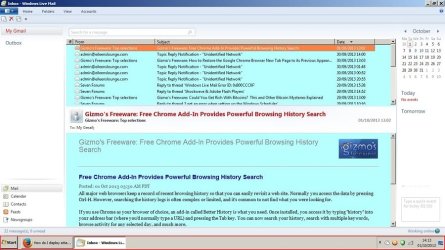
1. When I receive an email with an attachment, the contents of the attachment (xx.zip xx.jpeg etc) are not displayed when the email is opened. The only way to preview the contents is to click on the paperclip symbol in the in-box, which opens the attachment, and that is not much use if it is a virus! Is there any way to read the attachment contents? With good old OE this information was displayed at the top right hand corner via a click.

2. At the same time, I don't like how WLM uses faint border lines between the boxes - it makes hard to 'read' the screen. Plus I don't like not being able to see the sender, title, date, etc, as part of the opened email. XP's OE screen display was so much more legible. Is there any way these aspects can be customised?
 

My Computer My Computer

Computer type
PC/Desktop
Computer Manufacturer/Model Number
Unknown
OS
Windows 7 Home premium 64-bit
Antivirus
Kaspersky
Browser
Firefox

My Computer My Computer

Computer Manufacturer/Model Number
Look in my Signature.
OS
Win7 H.Prem. 32bit+SP1
Thanks for replying, Roderunner.

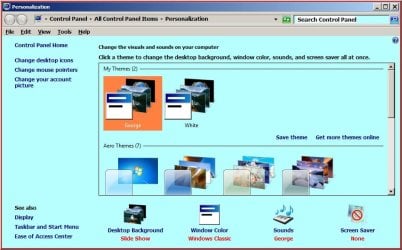
I checked out your .jpg screenshots, but couldn't spot any differences to my set-up. However, one thing that would make quite an improvement for me is that your email text background (and for that matter, the backgrounds in your set-up check boxes) IS COLOURED. How did you do that?

Your extracted folders files came out as empty folders!

I have bitten the bullet and clicked on a few known attachments and found that that action displays the file titles in the message pane. Whilst I remain paranoid about accidentally opening zip file attachments, I guess I'm just going to have to get used to that.

Regards,

naebrains
 

My Computer My Computer

Computer type
PC/Desktop
Computer Manufacturer/Model Number
Unknown
OS
Windows 7 Home premium 64-bit
Antivirus
Kaspersky
Browser
Firefox
Thanks, Roderunner.

Firstly, I used SecureZip, which gave me the empty folders (note I said 'folders'; the individual screenshots unzipped fine). Then I downloaded 7-zip (64-bit) but I can't find where it is stored in order to prod it into action, so I am still working on that one! However, thanks to your info, I have found where the window colour can be changed and I am now experimenting with that to get a nice balance.

I also, by chance, found where to make attachments display with the message : its in 'view', 'reading pane', 'display header'. Simples! Surprised I missed it when first setting up WLM.

Getting there! Thanks again :D:D
 

My Computer My Computer

Computer type
PC/Desktop
Computer Manufacturer/Model Number
Unknown
OS
Windows 7 Home premium 64-bit
Antivirus
Kaspersky
Browser
Firefox
Right click on zipped folder and you will see 7-zip and options for what you want to do with contents of folder.
 

My Computer My Computer

Computer Manufacturer/Model Number
Put together
OS
Win7 Pro-64 Bit
CPU
i7-2600-3.4GHz
Motherboard
ASRock Z68M
Memory
8 GIG DDR3
Graphics Card(s)
onboard
Sound Card
onboard
Hard Drives
Seagate 1TB 7200RPM
PSU
680 W
Case
black
Cooling
stock fans
Keyboard
Microsoft
Mouse
Microsoft optical

My Computer My Computer

Computer type
PC/Desktop
Computer Manufacturer/Model Number
Home Built Desktop By DataTech
OS
Windows 7 Ultimate X64 SP1
CPU
Intel i5-2550K, Differing ~4.4-4.8GHz No built in GPU
Motherboard
ASUS P8Z68-V PRO/GEN3
Memory
16GB G.Skill Sniper 1866MHz @ 2133MHz 2x8GB
Graphics Card(s)
ASUS GTX650TIB-DC2OC-2GD5, (650TI Boost)
Sound Card
Onboard Realtek 5-1
Monitor(s) Displays
Samsung P2570HD
Screen Resolution
1920x1080
Hard Drives
Samsung 840 Pro 256GB SSD for OS, 500GB Seagate Constellation (Enterprise drive) for Data
PSU
Corsair HX650W
Case
Inwin Dragon Rider
Cooling
Hyper 212 EVO w/two Noctua fans, push-pull, @1300 RPM
Keyboard
E-Z Eyes, bright yellow keys with large characters
Mouse
steelseries SENSEI Laser Pro Gaming
Internet Speed
48-51Mbs Mbs down, 11 Mbs up Xfinity Cable
Antivirus
Norton Internet Security 2013
Browser
IE 10, Opera, Pale Moon if needed
Other Info
4 case fans, LG BluRay-RE, ASUS DVD-RW, Mr. Fusion power supply, 1.21 gigawatts.
Thanks, Roderunner.
I have found where the window colour can be changed and I am now experimenting with that to get a nice balance.
After making changes, save them. If wrong or unwanted they can be deleted.
-
Right click a zipped file, select 'Open with' select 7Zip.
 

My Computer My Computer

Computer Manufacturer/Model Number
Look in my Signature.
OS
Win7 H.Prem. 32bit+SP1
"Right click a zipped file, select 'Open with' select 7Zip."

No, but at last I've got 7-zip to work; very tortuous because my computer automatically offers SecureZip to the exclusion of all others. As I say, problem solved (more or less!)

Thanks guys
 

My Computer My Computer

Computer type
PC/Desktop
Computer Manufacturer/Model Number
Unknown
OS
Windows 7 Home premium 64-bit
Antivirus
Kaspersky
Browser
Firefox
Back
Top