Custom built PC black screens on first boot(s)

wisecraker1

New member
Member
VIP
Local time
6:26 AM
Messages
105
Hello,

I have a custom built PC that I put together about 3 1/2 months ago (the specs are up-to-date).
The problem is that after restarting, or shutting down the first time I try to boot is a black screen with a flashing white underscore _ that continues on endlessly (the most I waited before holding the power button was ~5 minutes).

Possibly unrelated, but who knows, on the Windows Log-on screen nearly 90% of the time when resuming from sleep or turning on, repeats a letter I press around 10 times or so. This also happens when typing normally in applications such as Safari (twice so far while typing this up) and Office.

Any help is much appreciated!
 

My Computer My Computer

Computer type
PC/Desktop
Computer Manufacturer/Model Number
Custom Build
OS
Windows 7 64-bit Enterprise
CPU
Intel Core i7-3770 3.4GHz
Motherboard
Intel BOXDZ77GA70K
Memory
32GB G.Skill Ripjaws X Series (4x8GB)
Graphics Card(s)
EVGA Geforce GTX 680 2GB GDDR5
Sound Card
Creative SoundBlaster-Z
Monitor(s) Displays
3x Acer 21.5 inch VS228H-P
Screen Resolution
1920x1080 x3
Hard Drives
Internal 120GB Intel 520 SSD
Internal 180GB Intel SSD
Internal 2TB Seagate Barracuda 7200 RPM
2x Internal 3TB Seagate Barracuda 7200RPM
External Seagate 1TB USB 3.0
PSU
Corsair HX Series 650W
Case
Antec 1200 V3 Black Steel ATX Full Tower
Keyboard
Razer DeathStalker
Mouse
Logitech G500s
Internet Speed
25/5mbits
Antivirus
Microsoft Security Essentials
Browser
Safari
so can you log into windows? have you tried a windows restore?
 

My Computer My Computer

Computer type
PC/Desktop
Computer Manufacturer/Model Number
custom build
OS
Windows 7 Professional / Windows 8 Pro
CPU
intel i5 - 3450, 3.10GHz, 6MB Cache
Motherboard
gigabyte Z77-D3H
Memory
Kingston Hyper x 8gb 1600mhz
Graphics Card(s)
EVGA Nvidia 550Ti with 3D
Sound Card
N/A
Monitor(s) Displays
BenQ XL2411T 23inch gaming monitor
Screen Resolution
120mhz
Hard Drives
Kingston Hyper X 3K SSD 120GB
PSU
Corsair CX600M
Case
Zalman Z5
Cooling
coolermaster Hyper TX3
Keyboard
Cherry ZF5000
Mouse
Cherry ZF5000
Internet Speed
Sky Fibre 26meg download / 9mb upload
Antivirus
MSE free anti virus
Browser
Firefox
You could try going into BIOS and lowering your memory speed, or increasing your timings (specifically CAS, tRCD, TRP and tRAS) temporarily. It sounds like a memory issue to me. I had a similar problem using 12 GB in my rig. I had to lower the RAM speed and adjust the timings to have it boot reliably.

Can you post the RAM timings from your sticks and what you have them set to in BIOS?
 

My Computer My Computer

Computer type
PC/Desktop
Computer Manufacturer/Model Number
Mellon Labs (custom build)
OS
Win 7 Pro x64/Win 10 Pro x64 dual boot
CPU
AMD FX 8350 Vishera @ 4200
Motherboard
ASUS M5A97 R2.0
Memory
16 GB Mushkin Blackline DDR3-2400 @ 1866 (9-10-10-10-31)
Graphics Card(s)
XFX Radeon R9 280 Double D Black Edition
Sound Card
Realtek HD Audio on MB. Sounds great.
Monitor(s) Displays
Acer 24", Acer 22"
Screen Resolution
3840 x 1080
Hard Drives
1 x Mushkin Chronos 120 GB SSD (Win 10)
1 x Samsung 850 EVO 250 GB SSD (Win 7)
1 x WD 1TB SATA Blue
1 x WD 1TB SATA Green
PSU
Corsair TX-750
Case
CoolerMaster HAF 912+
Cooling
Coolermaster Seidon 240M Liquid AIO. 6 case fans
Keyboard
Logitech G710+
Mouse
Logitech G500s
Internet Speed
Much better since I got fiber, but still way overpriced.
Antivirus
MSE, Malware Bytes for scanning
Browser
Firefox
Other Info
Corsair VOID USB headphones.

A Mellon Labs X-1 - LCD Smartie driven system status display.

Brought to you by the letter E
Yes, and I performed Windows restore to the farthest date back, with no success. I will look into the RAM settings on the BIOS once I get home, but I haven't manually over-clocked anything as far as I know.
 

My Computer My Computer

Computer type
PC/Desktop
Computer Manufacturer/Model Number
Custom Build
OS
Windows 7 64-bit Enterprise
CPU
Intel Core i7-3770 3.4GHz
Motherboard
Intel BOXDZ77GA70K
Memory
32GB G.Skill Ripjaws X Series (4x8GB)
Graphics Card(s)
EVGA Geforce GTX 680 2GB GDDR5
Sound Card
Creative SoundBlaster-Z
Monitor(s) Displays
3x Acer 21.5 inch VS228H-P
Screen Resolution
1920x1080 x3
Hard Drives
Internal 120GB Intel 520 SSD
Internal 180GB Intel SSD
Internal 2TB Seagate Barracuda 7200 RPM
2x Internal 3TB Seagate Barracuda 7200RPM
External Seagate 1TB USB 3.0
PSU
Corsair HX Series 650W
Case
Antec 1200 V3 Black Steel ATX Full Tower
Keyboard
Razer DeathStalker
Mouse
Logitech G500s
Internet Speed
25/5mbits
Antivirus
Microsoft Security Essentials
Browser
Safari
You could try going into BIOS and lowering your memory speed, or increasing your timings (specifically CAS, tRCD, TRP and tRAS) temporarily. It sounds like a memory issue to me. I had a similar problem using 12 GB in my rig. I had to lower the RAM speed and adjust the timings to have it boot reliably.

This and you may also check RAM volatge if it's set as recommended in BIOS.
Very often BIOS sets RAM voltage a bit too conservative.
Another thing is SATA cable could get loose. Unplug and plug again or try another one.
Make sure PSU cables are plugged firmly too, although if they were not you'd probably experience random reboots.
 

My Computer My Computer

Computer type
PC/Desktop
Computer Manufacturer/Model Number
built by myself
OS
Windows 7 Ultimate x64 SP1
CPU
Intel Core i5-3570K @ 4GHz
Motherboard
Asus P8Z77-V Deluxe
Memory
Corsair Vengeance DDR3 8 GB Dual Channel
Graphics Card(s)
Asus Radeon RX 570 Strix OC 4GB
Monitor(s) Displays
LG 24BK550Y-B IPS
Screen Resolution
1920x1080
Hard Drives
SSD SAMSUNG 860 EVO SATA III 2.5'' 500GB
SSD CRUCIAL MX500 SATA III 2.5'' 250GB
Seagate ST1000DM003 SATA III
TOSHIBA HDWD110 SATA III
PSU
Corsair HX750i
Case
Corsair Carbide 400R
Cooling
CPU Cooler Master Hyper 412 Slim
Keyboard
Logitech K200
Mouse
Logitech G400
Antivirus
Norton Security
Browser
Firefox
Yes, and I performed Windows restore to the farthest date back, with no success. I will look into the RAM settings on the BIOS once I get home, but I haven't manually over-clocked anything as far as I know.
I'm not talking about overclocking. You may have to relax your RAM timings slightly to get the machine to boot reliably. Sometimes having large amounts of RAM or large capacity RAM sticks can cause problems with the memory controller in your PC. Sometimes large RAM sticks will not run properly at their rated speed without some adjustments.

Post your RAM settings when you get to them, please. We need to have someplace to start.
 

My Computer My Computer

Computer type
PC/Desktop
Computer Manufacturer/Model Number
Mellon Labs (custom build)
OS
Win 7 Pro x64/Win 10 Pro x64 dual boot
CPU
AMD FX 8350 Vishera @ 4200
Motherboard
ASUS M5A97 R2.0
Memory
16 GB Mushkin Blackline DDR3-2400 @ 1866 (9-10-10-10-31)
Graphics Card(s)
XFX Radeon R9 280 Double D Black Edition
Sound Card
Realtek HD Audio on MB. Sounds great.
Monitor(s) Displays
Acer 24", Acer 22"
Screen Resolution
3840 x 1080
Hard Drives
1 x Mushkin Chronos 120 GB SSD (Win 10)
1 x Samsung 850 EVO 250 GB SSD (Win 7)
1 x WD 1TB SATA Blue
1 x WD 1TB SATA Green
PSU
Corsair TX-750
Case
CoolerMaster HAF 912+
Cooling
Coolermaster Seidon 240M Liquid AIO. 6 case fans
Keyboard
Logitech G710+
Mouse
Logitech G500s
Internet Speed
Much better since I got fiber, but still way overpriced.
Antivirus
MSE, Malware Bytes for scanning
Browser
Firefox
Other Info
Corsair VOID USB headphones.

A Mellon Labs X-1 - LCD Smartie driven system status display.

Brought to you by the letter E
G.Skill Ripjaws X Series 2x8GB 240-pin DDR3 Model F3-1600C9D-16GXM
All settings in BIOS:
Voltage: 1.5
System Agent Voltage: 0.925
Memory Multiplier Speed: 12
DIMM Reference Voltage Training: Automatic
Host Clock Frequency: 100
Memory Speed: 1600Mhz

tCl: 9
tRCD: 9
tRP: 9
tRAS min: 24
tRFC: 208
tRRD: 5
tWTR: 6
tRTP: 6
tWR: 12
tRC: 33
tFAW: 24
Command Rate: 27


I have no idea what these mean :P
 

My Computer My Computer

Computer type
PC/Desktop
Computer Manufacturer/Model Number
Custom Build
OS
Windows 7 64-bit Enterprise
CPU
Intel Core i7-3770 3.4GHz
Motherboard
Intel BOXDZ77GA70K
Memory
32GB G.Skill Ripjaws X Series (4x8GB)
Graphics Card(s)
EVGA Geforce GTX 680 2GB GDDR5
Sound Card
Creative SoundBlaster-Z
Monitor(s) Displays
3x Acer 21.5 inch VS228H-P
Screen Resolution
1920x1080 x3
Hard Drives
Internal 120GB Intel 520 SSD
Internal 180GB Intel SSD
Internal 2TB Seagate Barracuda 7200 RPM
2x Internal 3TB Seagate Barracuda 7200RPM
External Seagate 1TB USB 3.0
PSU
Corsair HX Series 650W
Case
Antec 1200 V3 Black Steel ATX Full Tower
Keyboard
Razer DeathStalker
Mouse
Logitech G500s
Internet Speed
25/5mbits
Antivirus
Microsoft Security Essentials
Browser
Safari
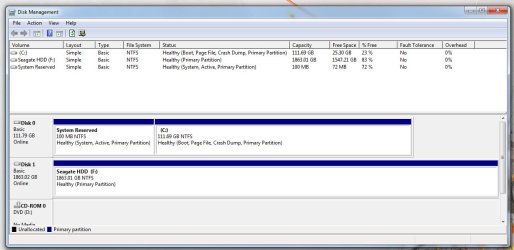
Here is the Disk Management screenshot.

I tried another keyboard (on the same USB port and another) with the same issue.
 

Attachments

  • Disk Management.jpg
    Disk Management.jpg
    97.7 KB · Views: 1

My Computer My Computer

Computer type
PC/Desktop
Computer Manufacturer/Model Number
Custom Build
OS
Windows 7 64-bit Enterprise
CPU
Intel Core i7-3770 3.4GHz
Motherboard
Intel BOXDZ77GA70K
Memory
32GB G.Skill Ripjaws X Series (4x8GB)
Graphics Card(s)
EVGA Geforce GTX 680 2GB GDDR5
Sound Card
Creative SoundBlaster-Z
Monitor(s) Displays
3x Acer 21.5 inch VS228H-P
Screen Resolution
1920x1080 x3
Hard Drives
Internal 120GB Intel 520 SSD
Internal 180GB Intel SSD
Internal 2TB Seagate Barracuda 7200 RPM
2x Internal 3TB Seagate Barracuda 7200RPM
External Seagate 1TB USB 3.0
PSU
Corsair HX Series 650W
Case
Antec 1200 V3 Black Steel ATX Full Tower
Keyboard
Razer DeathStalker
Mouse
Logitech G500s
Internet Speed
25/5mbits
Antivirus
Microsoft Security Essentials
Browser
Safari
@wisecraker:

That RAM is SPD rated to run at 1333. To run at 1600 MHz you might need to enable the XMP profile on your motherboard, if the BIOS has one. That might be why you're having trouble booting.

Try setting your memory speed to 1333 in BIOS and see if it boots up reliably. If it does, we can go from there.

That's after you do what gregrocker suggested. :)
 

My Computer My Computer

Computer type
PC/Desktop
Computer Manufacturer/Model Number
Mellon Labs (custom build)
OS
Win 7 Pro x64/Win 10 Pro x64 dual boot
CPU
AMD FX 8350 Vishera @ 4200
Motherboard
ASUS M5A97 R2.0
Memory
16 GB Mushkin Blackline DDR3-2400 @ 1866 (9-10-10-10-31)
Graphics Card(s)
XFX Radeon R9 280 Double D Black Edition
Sound Card
Realtek HD Audio on MB. Sounds great.
Monitor(s) Displays
Acer 24", Acer 22"
Screen Resolution
3840 x 1080
Hard Drives
1 x Mushkin Chronos 120 GB SSD (Win 10)
1 x Samsung 850 EVO 250 GB SSD (Win 7)
1 x WD 1TB SATA Blue
1 x WD 1TB SATA Green
PSU
Corsair TX-750
Case
CoolerMaster HAF 912+
Cooling
Coolermaster Seidon 240M Liquid AIO. 6 case fans
Keyboard
Logitech G710+
Mouse
Logitech G500s
Internet Speed
Much better since I got fiber, but still way overpriced.
Antivirus
MSE, Malware Bytes for scanning
Browser
Firefox
Other Info
Corsair VOID USB headphones.

A Mellon Labs X-1 - LCD Smartie driven system status display.

Brought to you by the letter E
Check the boot order in the bios is set to the hard drive first. It could be needlessly looking at the Optical drives and reading whatever is on them or just halting on that, turn off the setting in the bios halt on all errors (if applicable). Also as Greg suggested "Try another keyboard" There is no way something should be generating extra characters when you are typing in Windows using a browser and pressing buttons whilst the PC is booting this will make it hang as it pays attention to the keyboard. So a keyboard playing silly games can lead you on a silly dance.
 

My Computer My Computer

Computer type
PC/Desktop
Computer Manufacturer/Model Number
Bluethunder II
OS
Windows 7 x64 Ultimate and numerous virtual machines
CPU
AMD FX-8350 Vishera 32nm Technology @ 4.2 GHz default
Motherboard
ASUSTeK COMPUTER INC. SABERTOOTH 990FX R2.0 (Socket 942)
Memory
G Skill 32.0GB Dual-Channel DDR3 @ 1204MHz (11-13-13-31)
Graphics Card(s)
EVGA GeForce GTX 960 4GB Super SC ACX 2.0+ with Back Plate
Sound Card
Creative X-Fi Titanium HD Audiophile PCIe
Monitor(s) Displays
LG L227WTG x 3
Screen Resolution
1680 x 1050 16:10
Hard Drives
238GB Samsung850 PRO SATA Disk Device (SSD)
1863GB Seagate ST2000DM 001-1CH164 (SATA)
1397GB Seagate ST1500DL 003-9VT16L(SATA)
466GB Western Digital WDC WD50 03AZEX-00K1GA0 (SATA) x 2
932GB Seagate ST310005 28AS SATA Disk Device (SATA)
PSU
Enermax Revolution87+ 1000 Watts Gold Certified Power Supply
Case
Rocketfish Full Tower
Cooling
Cooler Master Hyper 212 EVO Push Pull 120mm Fans
Keyboard
Logitech K740
Mouse
Logitech G100S Laser LED + Logitech Gamepad F310
Internet Speed
500 mbs down and 30mbs up
Antivirus
Malwarebytes Pro & Avast and MSE on certain Virtual Machines
Browser
Firefox (Main) Chrome, Internet Explorer (Back Up)
Other Info
Logitech X 230 2.1 Stereo System and 5.1 Yamaha RX V2090
B&W DM6 Monitor Speakers + Center and Surround Speakers
Using Mouse Without Borders (Google it)
Back
Top