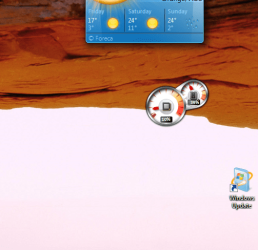
My desktop settings are as such:
View --> Small icons, align icons to grid, show desktop icons
I have 2 rows of icons (shortcuts and stuff) on the left
and 2 rows of icons on the right.
The ones on the left are perfect, the ones closest to the edge, have about 1/4 inch of space to the edge of the screen
However, the ones on the right have about an inch and I can't place them closer unless I do all manually, which I don't want to do since they will all be crooked, not does the option seem to exist.
I would like the right side to 'kiss' the edge as they do on the left. Is this possible or not? If not, why pls? Thank you
View --> Small icons, align icons to grid, show desktop icons
I have 2 rows of icons (shortcuts and stuff) on the left
and 2 rows of icons on the right.
The ones on the left are perfect, the ones closest to the edge, have about 1/4 inch of space to the edge of the screen
However, the ones on the right have about an inch and I can't place them closer unless I do all manually, which I don't want to do since they will all be crooked, not does the option seem to exist.
I would like the right side to 'kiss' the edge as they do on the left. Is this possible or not? If not, why pls? Thank you
My Computer
At a glance
Windows 7 Home Premium 64Intel Core i5 760 @ 2800MHz12288MBAMD Radeon HD 7800 Series
- Computer type
- PC/Desktop
- Computer Manufacturer/Model Number
- OEM Designed by me :-)
- OS
- Windows 7 Home Premium 64
- CPU
- Intel Core i5 760 @ 2800MHz
- Motherboard
- Asus P7P55D-E LX
- Memory
- 12288MB
- Graphics Card(s)
- AMD Radeon HD 7800 Series
- Sound Card
- ASUS Xonar DG
- Monitor(s) Displays
- ViewSonic VX2453 Series, HDMI 1080p Full HD
- Screen Resolution
- 1920X1080
- Hard Drives
- Samsung SSD 840 EVO 250GB& two others
- PSU
- Tagan BZ Series, TG800-BZ 800W
- Keyboard
- Logitech MK250
- Mouse
- Logitech M310
- Internet Speed
- toppest, mostest :-) <-- bad, but fun English
- Browser
- Firefox, Crrome, IE