Solved How to “print screen” without the need to press “fn”,

Jamal NUMAN

New member
Member
VIP
Local time
1:42 PM
Messages
144
How to “print screen” without the need to press “fn”,

How to “print screen” without the need to press “fn”,

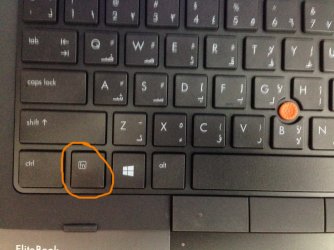
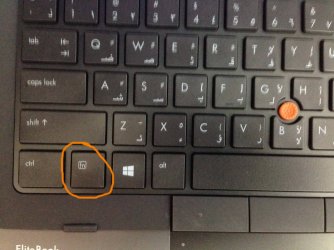
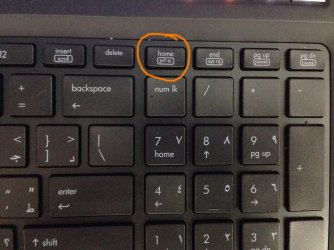
The “print screen” button in the keyboard of the “HP EliteBook 8770w Mobile Workstation” needs pressing the “fn” and thus two buttons are required to do the print screen (attached).

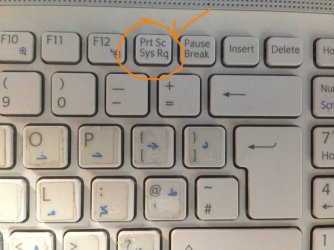
In return, the print screen in the keyboard of “Sony Vaio VPCE C3S0E” doesn’t require pressing fn as it is placed on top of “sys rq”.

I’m wondering if there is a way to do the “print screen” without the need to press fn in case of “HP EliteBook 8770w Mobile Workstation”?

Thank you

Best

Jamal
 

Attachments
  • IMG_0593.JPG
    IMG_0593.JPG
    481.3 KB · Views: 2
  • IMG_0594.JPG
    IMG_0594.JPG
    462.9 KB · Views: 2
  • IMG_0595.JPG
    IMG_0595.JPG
    431.1 KB · Views: 1
  • IMG_0596.JPG
    IMG_0596.JPG
    300.7 KB · Views: 2

My Computer My Computer

At a glance

Windows 7 Ultimate x64
OS
Windows 7 Ultimate x64
You could always set the print screen button as a shortcut to the snipping tool...
 

My Computer My Computer

At a glance

Windows 7 Ultimate SP1 x64i7 950 4ghz6GB G.Skill pc12800EVGA GTX 580 SC
Computer Manufacturer/Model Number
Custom build
OS
Windows 7 Ultimate SP1 x64
CPU
i7 950 4ghz
Motherboard
EVGA x58 FTW3
Memory
6GB G.Skill pc12800
Graphics Card(s)
EVGA GTX 580 SC
Sound Card
Xfi Titanium
Monitor(s) Displays
Samsung 24"
Screen Resolution
1920x1200
Hard Drives
Vertex 3 SSD 120Gb x2 RAID 0
4 x 1TB WD Black RAID 0
PSU
Thermaltake 850
Case
Mountain Mods U2-UFO Horizon
Cooling
Custom watercooling
Internet Speed
100 down 5 up
Maybe AutoHotkey ?

Am having no experience with it, but looks like a clever program.
 

My Computer My Computer

At a glance

W7, W8.1
Computer type
Laptop
Computer Manufacturer/Model Number
Dell \ Lenovo\ HP \ Toshiba
OS
W7, W8.1
Antivirus
MSE, Malwarebytes
Browser
FF
Not free, but far more flexible and capable and useful than a simple "print screen" is a terrific 3rd-party product named FULLSHOT.

I've been using it for what now seems like decades, as it evolved over time to what it is today.

Couldn't live without it. Never ever used "print screen" key or similar because those methods simply don't provide all of the selective features I need.
 

My Computer My Computer

At a glance

Windows 7 Pro x64 (1), Win7 Pro X64 (2)i5-3350p 3.1Ghz/6MB-cache (1); E8400 3.0Ghz/6...8GB PC3-12800 DDR3 (1); 4GB PC3-10600 DDR3 (2)ATI HD7750 (1), (see TV cards); ATI R7 250 (2)
Computer type
PC/Desktop
Computer Manufacturer/Model Number
Home-built, two systems (1) and (2)
OS
Windows 7 Pro x64 (1), Win7 Pro X64 (2)
CPU
i5-3350p 3.1Ghz/6MB-cache (1); E8400 3.0Ghz/6MB-cache (2)
Motherboard
ASUS P8Z77-V Pro (1); ASUS P5Q3 (2)
Memory
8GB PC3-12800 DDR3 (1); 4GB PC3-10600 DDR3 (2)
Graphics Card(s)
ATI HD7750 (1), (see TV cards); ATI R7 250 (2)
Sound Card
Realtek ALC892 HD Audio (1); Realtek ALC1200 HD Audio (2)
Monitor(s) Displays
Eizo HD2441W LCD, Eizo S2433W (1); Eizo 24" S2433W (2)
Screen Resolution
1920x1200, 1920x1200 (1); 1920x1200 (2)
Hard Drives
(1) 1TB SATA-II (7200RPM), 2x2TB SATA-III (7200RPM), 250GB SATA-III (10000RPM) for OS; 2x2TB external USB 3.0

(2) 320GB SATA-II (7200RPM), 750GB SATA-II (7200RPM), 150GB SATA-II (10000RPM) for OS; 2TB external USB 3.0
PSU
Nesteq ECS-6001 600W (1); Nesteq ECS-5001 500W (2)
Case
Acousti-Case 360 (1) and (2)
Cooling
Noctua NH-U12P SE2 for CPU, 2x120mm case fans (1) and (2)
Keyboard
IBM PS/2 (1) and (2)
Mouse
Logitech MX Revolution wireless (1); Microsoft wired (2)
Internet Speed
100mbps down / 10mbps up
Antivirus
Microsoft Security Essentials; Malwarebyte Anti-Malware Pro
Browser
Firefox
Other Info
Ceton InfiniTV 4-tuner cablecard-enabled TV card as well as Hauppauge HVR-2250 OTA/ATSC 2-tuner TV card in (1), running under Win7 WMC
I use a freebie called Greenshot. There are lots of options with it, and you can do a print-screen with a mouse-click.
 

My Computer My Computer

At a glance

Windows 7 Home Premium x64
OS
Windows 7 Home Premium x64
  • Like
Reactions: 4wd
I've been using a free version of a program called Gadwin PrintScreen for years. You can select any of the normal F1 to F12 functions keys as the hot key alone (preferable for OP), or with also pressing CTRL or the Shift key with the selected function key. And of course the printscreen key. The free version offers a number of features to save in a number of formats and also allows date/time stamping with color selection and transparency. Also you can select the area to capture. The paid version adds editing/tagging of files.
 

My Computer My Computer

At a glance

Windows XP SP3 32bit / Win7 32bit Home PremiumCeleron D 340 2.93 Ghz2GB (2x 1GB PNY DDR PC3200)EVGA 8400GS PCI / OnBoard Intel 82845G/GL/GE/...
Computer Manufacturer/Model Number
HP A705W
OS
Windows XP SP3 32bit / Win7 32bit Home Premium
CPU
Celeron D 340 2.93 Ghz
Motherboard
MSI MS-6577 Giovani2-GL6
Memory
2GB (2x 1GB PNY DDR PC3200)
Graphics Card(s)
EVGA 8400GS PCI / OnBoard Intel 82845G/GL/GE/PE/GV
Sound Card
OnBoard Realtek AC'97 Audio
Monitor(s) Displays
17" CRT
Screen Resolution
1024x768
Hard Drives
WD 320GB Primary (Dual Boot XP/7), Seagate 250GB slave
PSU
CoolerMaster 430w
Mouse
Logitech VX Revolution
Internet Speed
DSL 1.5M
Other Info
ATI 550 Pro PCI TV tuner card
generic IEEE1394 PCI card
2nd system - HP DV6130US notebook
I use a freebie called Greenshot. There are lots of options with it, and you can do a print-screen with a mouse-click.
Thanks for the tip, this one proves useful to me. Am appreciating these sourceforge programs.
 

My Computer My Computer

At a glance

W7, W8.1
Computer type
Laptop
Computer Manufacturer/Model Number
Dell \ Lenovo\ HP \ Toshiba
OS
W7, W8.1
Antivirus
MSE, Malwarebytes
Browser
FF
I use a freebie called Greenshot. There are lots of options with it, and you can do a print-screen with a mouse-click.
Thanks for the tip, this one proves useful to me. Am appreciating these sourceforge programs.


Sorry for the confusion.

What I wanted to say is that some functions on buttons are reached directly (which are located on top) while others (which are located below) need the “fn” to be reached.

There should be some setting on the keyboard by which this setting cab be switched such that functions which are located below are reached directly while functions on top need to press the “fn”

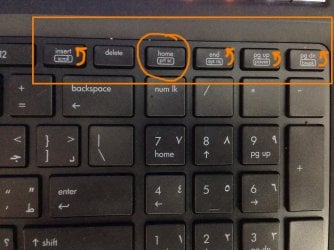
For example, in the keyboard of the HP I have previously attached, “page up” and “pause” are put in the same button. What if I need to let “pause” reached directly while “page up” needs “fn”?

Thank you

Best

Jamal
 

My Computer My Computer

At a glance

Windows 7 Ultimate x64
OS
Windows 7 Ultimate x64
have a search for a key mapper that will allow you to swap keys around.
 

My Computer My Computer

At a glance

Microsoft Windows 7 Home Premium 64-bit 7600IIx4 amd athelon 635 processor2x2gbati radeon HD 5450
Computer Manufacturer/Model Number
Hewlett packard/p6512uk
OS
Microsoft Windows 7 Home Premium 64-bit 7600
CPU
IIx4 amd athelon 635 processor
Motherboard
FOXCONN 2AA9
Memory
2x2gb
Graphics Card(s)
ati radeon HD 5450
Sound Card
(1) Realtek High Definition Audio (2) AMD High Definition
Monitor(s) Displays
samsung lcd tv 32"
Screen Resolution
1360x 768
Hard Drives
(1) WDC WD10 01FAES-60Z2A0 SATA Disk Device (2) Maxtor OneTouch USB Device (3) ST310003 33AS USB Device (4) WD My Book 1111 USB Device
PSU
?
Cooling
air!
Keyboard
wireless hp
Mouse
wireless Hp,optical
Internet Speed
1.10mb/s
Antivirus
MSE
Browser
Firefox
have a search for a key mapper that will allow you to swap keys around.


Thank you boohbah for the help,

I had a look on the “key mapper” on the web but couldn’t find how to do what I’m looking for.

Please, have a look on the attached screenshots. All what I need is have the lower functions reached directly without pressing “fn’

My keyboard is “HP EliteBook 8770w Mobile Workstation”

Best

Jamal
 

Attachments

  • IMG_0593.JPG
    IMG_0593.JPG
    494.6 KB · Views: 1
  • IMG_0594.JPG
    IMG_0594.JPG
    433 KB · Views: 1

My Computer My Computer

At a glance

Windows 7 Ultimate x64
OS
Windows 7 Ultimate x64
Use a third party application to change the command key
 

My Computer My Computer

At a glance

Windows 7 Home Premium x642.0 GB DDR2 RAM
Computer type
PC/Desktop
OS
Windows 7 Home Premium x64
Memory
2.0 GB DDR2 RAM
Antivirus
AVG 2013
Browser
Google Chrome
Thanks JamesAS,

Do you recommend any one of these software?
 

My Computer My Computer

At a glance

Windows 7 Ultimate x64
OS
Windows 7 Ultimate x64
I used the “Map Keyboard 1.5” software (attached) to remap the function of any key in the keyboard. It works great.
 

Attachments

Last edited by a moderator:

My Computer My Computer

At a glance

Windows 7 Ultimate x64
OS
Windows 7 Ultimate x64
Back
Top