Solved Why sharing over bluetooth is so awful?

kharl

New member
Member
VIP
Local time
9:08 AM
Messages
209
Hi guys

ok, i can stand this anymore, i have been experiencing this since my fist steps in windows 7, since windows 7 basic edition, spanish, then english then professional, then 64bit, in this computer, my mom's computer friends computers.... trying to share files with my phone, other phones other BT devices... always the same traumatic and frustrating experience.... i decide to avoid using BT, always find another solution, i sent it by email (with one device within inches from the other... but was easier) even private network direct transfer using wifi, EVEN infrared.... but always trying to avoid BT... but i just can stand it anymore, today i woke up very happy (as usual) this morning and my girlfriend asked me to put some pict i toke this past weekend in her phone... with all the delightful and comfortable temperature and smells of the morning around here... (i really was happy this morning) i decide to use BT, first file worked flawlessly...
but the next file: the same error since my beginning in windows 7
"windows was unable to
transfer some files an invalid argument was supplied...."

i am tired of this... can anyone help me with this?

linux, (all distros) work fine, windows xp too... but not win 7
 

My Computer My Computer

OS
widnows 7 professional 32 bits
You do have the latest bluetooth drivers for your PC? Please update your system specs. Assuming you have, try:

Click Start :orb:

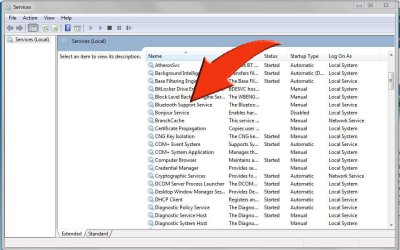
Type " services.msc " (without the quote marks) choose Services Local then scroll down the list until you see Bluetooth Support Service. Right click on it. Stop the process and start it again.

Capture.JPG
 

My Computer My Computer

Computer type
PC/Desktop
Computer Manufacturer/Model Number
Custom Build
OS
W7 Pro x64 SP1 | W10 Pro IP x64 | W8.1 Pro x64 VM | Linux Mint VM
CPU
i7-4790k @ 4GHz (4.4GHz Boost)
Motherboard
ASUS Sabertooth Z87 (BIOS Rev 2004)
Memory
16GB DDR3 Kingston HyperX Fury @ 1600MHz CL 9-9-9-27
Graphics Card(s)
EVGA GTX 980 Classified
Sound Card
Realtek Onboard
Monitor(s) Displays
Samsung S27D390
Screen Resolution
1920 x 1080
Hard Drives
240GB Intel 520 Series SSD |
Samsung 850 EVO 120GB SSD |
2TB WD Caviar Black |
2TB WD Caviar Green
PSU
Corsair HX850-80 Gold Modular
Case
Cooler Master Silencio 650
Cooling
Corsair H80i w/2 x Corsair SP120 | 2 x 120mm Noctua NF-S12B
Keyboard
Microsoft Sidewinder X4
Mouse
Gigabyte M6900 optical
Internet Speed
152mb
Antivirus
F-Secure
Browser
Firefox 38.0
Other Info
Backup Rig: Win 7 Pro 64-bit | AMD A10-5800k | ASUS F2A85-V Pro | 8GB Samsung DDR3 @1600MHz | 120GB Toshiba SDD | 2TB Seagate HDD | Cooler Master Silencio 550
Hi!

yes i tried that. and i have the latest driver
and also i had the latest drivers in all the other pc i have tried before
 

My Computer My Computer

OS
widnows 7 professional 32 bits
Two things to try


Start and restart the bluettoth service
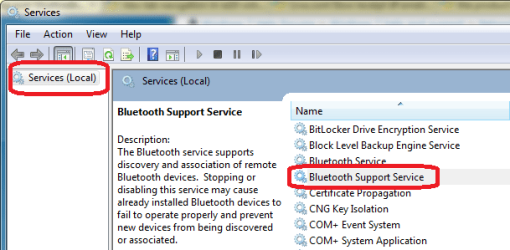
  • Start menu > search services.msc > select services from the search results
  • Services Local
    • Scroll down to: Bluetooth Support Service
    • Right click opens the service dialog
      • Stop the service
      • Start the service
74msBT.PNG


If that worked, great, if not then check the HW mfgr for an updated driver, download and install.

Bill
 

My Computer My Computer

Computer type
Laptop
Computer Manufacturer/Model Number
HP Pavilion dv6-6c10us
OS
x64 (6.3.9600) Win8.1 Pro & soon dual boot x64 (6.1.7601) Win7_SP1 HomePrem
CPU
AMD A6-3420M APU with Radeon(tm) HD Graphics
Motherboard
Hewlett-Packard 1805
Memory
6.00 GB
Graphics Card(s)
AMD Radeon(TM) HD 6520G
Sound Card
(1) AMD High Definition Audio Device (2) IDT High Definiti
Monitor(s) Displays
HP W2072a 20" LCD (1600 x 900) @ 60 Hz
Screen Resolution
1366 x 768 x 32 bits (4294967296 colors) @ 60 Hz
Hard Drives
ST640LM0 00 HM641JI SATA Disk Device
Keyboard
Logitech k520 wireless KB
Mouse
Logitech m320 wireless mouse (bundled with KB)
Internet Speed
15/5 | 54 MB Wireless 'n'
Antivirus
Realtime: Defender or Avast | On-demand: Malwarebytes, ESET
Browser
IE 11 on Win8, IE 10 on win 7
Other Info
Media: [Gimp, Audacity, VLC] || Comm: [WEmail 2012, Skype] || Productivity: [OpenOffice,| Textpad] || Utils: [Sysinternals, cCleaner, Speccy, Defraggler]
Instead of using Bluetooth (which can be problematic as you discovered), install DropBox on your phone and PC. You can get a free DropBox account and you can share the pics (and other files) from your phone with others very easily.

I just did a test where I transferred a .5MB picture of my puppy from my phone to my laptop using BT, then tried transferring the same pic from my phone to my DropBox account which was then synced to my laptop. The DropBox transfer was simpler since I only needed to tap 1 button and the transfer took about half as long as the BT transfer.

If interested, send me a PM with your email addy and I can send you an invite to DropBox which will result in both of us receiving an extra 500MB of online storage.
 

My Computer My Computer

Computer type
PC/Desktop
Computer Manufacturer/Model Number
Home Built desktop, Dell G15 5511 Gaming laptop,MS Surface Pro 7 tablet
OS
W10 Pro desktop, W11 laptop, W11 Pro tablet (all 64-bit)
CPU
3.7Ghz 8700K i7, i7-11800H, i7-1065G7
Motherboard
ASUS TUF Z370-Pro Gaming in desktop
Memory
16G desktop, 16G laptop, 4G tablet
Graphics Card(s)
AMD Radeon RX580, RTX 3060, Intel Iris Plus
Sound Card
High Definition Audio (Built-in to mobo)
Monitor(s) Displays
Samsung U32J59 32" (2x), 15.6", 12"
Screen Resolution
3840x2160, 3840x2160, 1920x1080, 2160x1440
Hard Drives
500G SSD for OS; 2T, 10T & 15T HDDs for Data on Desktop, 1TB SSD laptop, 128G SSD tablet.
PSU
Corsair CX 750M
Case
Antec 100
Cooling
CM 212+
Keyboard
IBM Model M - used continuously since 1986
Mouse
Microsoft Pro IntelliMouse
Internet Speed
400M down 8M up
Antivirus
Windows Defender
Browser
FireFox
Other Info
Built my first computer (8Mhz 8088cpu, 640K RAM, 20MB HDD, 2 360K floppy drives) in 1985 and have been building them for myself, relatives and friends ever since.
Two things to try


Start and restart the bluettoth service
  • Start menu > search services.msc > select services from the search results
  • Services Local
    • Scroll down to: Bluetooth Support Service
    • Right click opens the service dialog
      • Stop the service
      • Start the service


If that worked, great, if not then check the HW mfgr for an updated driver, download and install.

Bill


that is exactly what "Boozad" suggested me.. and i already answered that..

do you guys really think is driver problem after i have tied different hardwares in different machines....?
just being curious
 

My Computer My Computer

OS
widnows 7 professional 32 bits
Instead of using Bluetooth (which can be problematic as you discovered), install DropBox on your phone and PC. You can get a free DropBox account and you can share the pics (and other files) from your phone with others very easily.

I just did a test where I transferred a .5MB picture of my puppy from my phone to my laptop using BT, then tried transferring the same pic from my phone to my DropBox account which was then synced to my laptop. The DropBox transfer was simpler since I only needed to tap 1 button and the transfer took about half as long as the BT transfer.

If interested, send me a PM with your email addy and I can send you an invite to DropBox which will result in both of us receiving an extra 500MB of online storage.

I appreciate your invitation, i really do!
i will consider it.
but by now what i am seeing is that everyday the direct communication between devices are getting harder and more difficult/troubleshooter... the big brothers are working really hard to get us to get used that all communication with other devices must be done through their hands.....

the only down point i have with dropbox... is that...it is internet dependent.
 

My Computer My Computer

OS
widnows 7 professional 32 bits
Yeah, sorry 'bout that. I was working on the image when Boozad posted.
Two things to try...Bill
that is exactly what "Boozad" suggested me.. and i already answered that..
do you guys really think is driver problem after i have tied different hardwares in different machines....? just being curious
Yeah, a driver might improve things, check the mfrs site for an update, if available->download and install.
 

My Computer My Computer

Computer type
Laptop
Computer Manufacturer/Model Number
HP Pavilion dv6-6c10us
OS
x64 (6.3.9600) Win8.1 Pro & soon dual boot x64 (6.1.7601) Win7_SP1 HomePrem
CPU
AMD A6-3420M APU with Radeon(tm) HD Graphics
Motherboard
Hewlett-Packard 1805
Memory
6.00 GB
Graphics Card(s)
AMD Radeon(TM) HD 6520G
Sound Card
(1) AMD High Definition Audio Device (2) IDT High Definiti
Monitor(s) Displays
HP W2072a 20" LCD (1600 x 900) @ 60 Hz
Screen Resolution
1366 x 768 x 32 bits (4294967296 colors) @ 60 Hz
Hard Drives
ST640LM0 00 HM641JI SATA Disk Device
Keyboard
Logitech k520 wireless KB
Mouse
Logitech m320 wireless mouse (bundled with KB)
Internet Speed
15/5 | 54 MB Wireless 'n'
Antivirus
Realtime: Defender or Avast | On-demand: Malwarebytes, ESET
Browser
IE 11 on Win8, IE 10 on win 7
Other Info
Media: [Gimp, Audacity, VLC] || Comm: [WEmail 2012, Skype] || Productivity: [OpenOffice,| Textpad] || Utils: [Sysinternals, cCleaner, Speccy, Defraggler]
... the only down point i have with dropbox... is that...it is internet dependent.
I understand about not wanting to rely on the internet. I don't know about you, but my phone has access to the internet more often than it is in close enough proximity to my laptop to do a BT transfer!
 

My Computer My Computer

Computer type
PC/Desktop
Computer Manufacturer/Model Number
Home Built desktop, Dell G15 5511 Gaming laptop,MS Surface Pro 7 tablet
OS
W10 Pro desktop, W11 laptop, W11 Pro tablet (all 64-bit)
CPU
3.7Ghz 8700K i7, i7-11800H, i7-1065G7
Motherboard
ASUS TUF Z370-Pro Gaming in desktop
Memory
16G desktop, 16G laptop, 4G tablet
Graphics Card(s)
AMD Radeon RX580, RTX 3060, Intel Iris Plus
Sound Card
High Definition Audio (Built-in to mobo)
Monitor(s) Displays
Samsung U32J59 32" (2x), 15.6", 12"
Screen Resolution
3840x2160, 3840x2160, 1920x1080, 2160x1440
Hard Drives
500G SSD for OS; 2T, 10T & 15T HDDs for Data on Desktop, 1TB SSD laptop, 128G SSD tablet.
PSU
Corsair CX 750M
Case
Antec 100
Cooling
CM 212+
Keyboard
IBM Model M - used continuously since 1986
Mouse
Microsoft Pro IntelliMouse
Internet Speed
400M down 8M up
Antivirus
Windows Defender
Browser
FireFox
Other Info
Built my first computer (8Mhz 8088cpu, 640K RAM, 20MB HDD, 2 360K floppy drives) in 1985 and have been building them for myself, relatives and friends ever since.
Take a look at this: [Solve] Bluetooth File Transfer Not Completed

It essentially guides you through two scenarios
  • the devices aren't paired (you said yours were, so skip this and scroll down to For Connected Devices)
  • removing a connected device in Bluetooth CP
    • pair the device to Windows again.
It might be advantageous to initiate the pairing from Windows using "send to..." Bluetooth device. It shouldn't matter.... but
 

My Computer My Computer

Computer type
Laptop
Computer Manufacturer/Model Number
HP Pavilion dv6-6c10us
OS
x64 (6.3.9600) Win8.1 Pro & soon dual boot x64 (6.1.7601) Win7_SP1 HomePrem
CPU
AMD A6-3420M APU with Radeon(tm) HD Graphics
Motherboard
Hewlett-Packard 1805
Memory
6.00 GB
Graphics Card(s)
AMD Radeon(TM) HD 6520G
Sound Card
(1) AMD High Definition Audio Device (2) IDT High Definiti
Monitor(s) Displays
HP W2072a 20" LCD (1600 x 900) @ 60 Hz
Screen Resolution
1366 x 768 x 32 bits (4294967296 colors) @ 60 Hz
Hard Drives
ST640LM0 00 HM641JI SATA Disk Device
Keyboard
Logitech k520 wireless KB
Mouse
Logitech m320 wireless mouse (bundled with KB)
Internet Speed
15/5 | 54 MB Wireless 'n'
Antivirus
Realtime: Defender or Avast | On-demand: Malwarebytes, ESET
Browser
IE 11 on Win8, IE 10 on win 7
Other Info
Media: [Gimp, Audacity, VLC] || Comm: [WEmail 2012, Skype] || Productivity: [OpenOffice,| Textpad] || Utils: [Sysinternals, cCleaner, Speccy, Defraggler]
HI!
nop, that didnt work, they already were paired anyway i deleted the device on my pc and paired it again with no success, the same error
 

My Computer My Computer

OS
widnows 7 professional 32 bits
Drat....

I guess I've exhausted my short list, so it's back to updating your BT device driver.

I'll leave this thread with a request for you kharl (originally asked by Boozad in post#2)

Please update the information in your Sevenforums system specs. This helps people on this side of the monitor understand your machine. Knowing this information might point out a conflict and it allows members to research the issue with regards to your HW and SW environment.

The easiest way to do that is to follow this tutorial: http://www.sevenforums.com/tutorials/180324-system-info-see-your-system-specs.html

Thanks
 

My Computer My Computer

Computer type
Laptop
Computer Manufacturer/Model Number
HP Pavilion dv6-6c10us
OS
x64 (6.3.9600) Win8.1 Pro & soon dual boot x64 (6.1.7601) Win7_SP1 HomePrem
CPU
AMD A6-3420M APU with Radeon(tm) HD Graphics
Motherboard
Hewlett-Packard 1805
Memory
6.00 GB
Graphics Card(s)
AMD Radeon(TM) HD 6520G
Sound Card
(1) AMD High Definition Audio Device (2) IDT High Definiti
Monitor(s) Displays
HP W2072a 20" LCD (1600 x 900) @ 60 Hz
Screen Resolution
1366 x 768 x 32 bits (4294967296 colors) @ 60 Hz
Hard Drives
ST640LM0 00 HM641JI SATA Disk Device
Keyboard
Logitech k520 wireless KB
Mouse
Logitech m320 wireless mouse (bundled with KB)
Internet Speed
15/5 | 54 MB Wireless 'n'
Antivirus
Realtime: Defender or Avast | On-demand: Malwarebytes, ESET
Browser
IE 11 on Win8, IE 10 on win 7
Other Info
Media: [Gimp, Audacity, VLC] || Comm: [WEmail 2012, Skype] || Productivity: [OpenOffice,| Textpad] || Utils: [Sysinternals, cCleaner, Speccy, Defraggler]

My Computer My Computer

Computer type
PC/Desktop
Computer Manufacturer/Model Number
Home built
OS
Windows 7 Ult, Windows 8.1 Pro,
CPU
Q9650-4.275GHz, E8600 4.5GHz, E6750-3.8GHz
Motherboard
Evga 780i FTW
Memory
G.Skill PC2 9600 1200Mhz 5 5 5 15 2T
Graphics Card(s)
GTX480
Sound Card
Asus Xonar D2
Monitor(s) Displays
HannsG
Screen Resolution
1680X1050
Hard Drives
GSkill Phoenix Pro 120GB SSD
PSU
ThermalTake Toughpower 1000Watt modular
Case
ThermalTake XaserV
Cooling
Xigmatek S1283
Keyboard
Logitech G15
Mouse
Logitech G9
Internet Speed
T1
Hi guys!
i just want to tell that i have solved the issue.
it was the driver.... BUT... the latest driver was causing problem i just rolled back to the basic microsoft 2006 driver.. and then all solved....

that justify why all the laptops i ave around have had the same issue... there was only one pc that had no issue with BT and it is exactly the same machine, the only different was the driver, that machine has Microsoft drivers and the rest, broadcom own driver...

I want to thank you all the effort and time you spent with my problem.

Thank you guys!
 

My Computer My Computer

OS
widnows 7 professional 32 bits
Great news kharl, having a machine to compare against is always a great asset. Good troubleshooting and finding the solution.
 

My Computer My Computer

Computer type
Laptop
Computer Manufacturer/Model Number
HP Pavilion dv6-6c10us
OS
x64 (6.3.9600) Win8.1 Pro & soon dual boot x64 (6.1.7601) Win7_SP1 HomePrem
CPU
AMD A6-3420M APU with Radeon(tm) HD Graphics
Motherboard
Hewlett-Packard 1805
Memory
6.00 GB
Graphics Card(s)
AMD Radeon(TM) HD 6520G
Sound Card
(1) AMD High Definition Audio Device (2) IDT High Definiti
Monitor(s) Displays
HP W2072a 20" LCD (1600 x 900) @ 60 Hz
Screen Resolution
1366 x 768 x 32 bits (4294967296 colors) @ 60 Hz
Hard Drives
ST640LM0 00 HM641JI SATA Disk Device
Keyboard
Logitech k520 wireless KB
Mouse
Logitech m320 wireless mouse (bundled with KB)
Internet Speed
15/5 | 54 MB Wireless 'n'
Antivirus
Realtime: Defender or Avast | On-demand: Malwarebytes, ESET
Browser
IE 11 on Win8, IE 10 on win 7
Other Info
Media: [Gimp, Audacity, VLC] || Comm: [WEmail 2012, Skype] || Productivity: [OpenOffice,| Textpad] || Utils: [Sysinternals, cCleaner, Speccy, Defraggler]
Back
Top