BSOD playing WoW and different BSODs while doing other stuff

Thanks for the update :) .
This topic is pretty much solved :p, but I won't mind hearing the final verdict about the source of the noise.
 

My Computer My Computer

At a glance

Windows 10Intel Core i5 3570K16GB 1600Mhz G.SkillGigabyte GTX 970 G1-Gaming
Computer type
PC/Desktop
OS
Windows 10
CPU
Intel Core i5 3570K
Motherboard
Asus P8Z77V-PRO
Memory
16GB 1600Mhz G.Skill
Graphics Card(s)
Gigabyte GTX 970 G1-Gaming
PSU
Seasonic 1000W Platinum
Case
Fractal Design Define R4
Cooling
Noctua NH-D14
It's been a few days and the noise hasn't come back after a fan stopped working.. so I think it's safe to say that the fan that broke was the source of the humming noise. Among other news, I just got a BSOD on my mostly new system. Not sure if this is a random occurrence and won't happen again, but let's be on the safe side and check?
 

My Computer My Computer

At a glance

Windows 7 Professional 64-bitIntel Core i7 98024GBGTX 580 1536MB
Computer type
PC/Desktop
Computer Manufacturer/Model Number
MSI
OS
Windows 7 Professional 64-bit
CPU
Intel Core i7 980
Memory
24GB
Graphics Card(s)
GTX 580 1536MB
Hard Drives
96GB SSD
3TB HDD
120GB SSD
Antivirus
Malwarebytes
Browser
Mozilla Firefox, Google Chrome
Sure no problem :) .

The bugcheck is quite obviously due to intel rapid storage (Driver Reference Table - iaStor.sys),
it's all over the stack.
What is your storage configuration, RAID, basic / dynamic? It would be helpful if you generate a new
.rar file with the SFDT :) .

When you installed the new motherboard, did you install the Gigabyte software that ships with it?
Did you download all of the latest drivers from Gigabyte's website or did you use the CD?
 

My Computer My Computer

At a glance

Windows 10Intel Core i5 3570K16GB 1600Mhz G.SkillGigabyte GTX 970 G1-Gaming
Computer type
PC/Desktop
OS
Windows 10
CPU
Intel Core i5 3570K
Motherboard
Asus P8Z77V-PRO
Memory
16GB 1600Mhz G.Skill
Graphics Card(s)
Gigabyte GTX 970 G1-Gaming
PSU
Seasonic 1000W Platinum
Case
Fractal Design Define R4
Cooling
Noctua NH-D14
Sure no problem :) .

The bugcheck is quite obviously due to intel rapid storage (Driver Reference Table - iaStor.sys),
it's all over the stack.
What is your storage configuration, RAID, basic / dynamic? It would be helpful if you generate a new
.rar file with the SFDT :) .

When you installed the new motherboard, did you install the Gigabyte software that ships with it?
Did you download all of the latest drivers from Gigabyte's website or did you use the CD?

I forgot about the CD and I no longer have it now. When I reformatted/reinstalled windows, I went and downloaded software that scans for all outdated drivers/missing drivers and auto-downloads/installs them all, so I think it should all be up to date. I'm not sure what you mean by storage configuration, so I'd assume it's default (basic?)

I attached the SFDT for my current pc
 

My Computer My Computer

At a glance

Windows 7 Professional 64-bitIntel Core i7 98024GBGTX 580 1536MB
Computer type
PC/Desktop
Computer Manufacturer/Model Number
MSI
OS
Windows 7 Professional 64-bit
CPU
Intel Core i7 980
Memory
24GB
Graphics Card(s)
GTX 580 1536MB
Hard Drives
96GB SSD
3TB HDD
120GB SSD
Antivirus
Malwarebytes
Browser
Mozilla Firefox, Google Chrome
Thanks :) .
What software was it?
Auto driver downloaders are usually incompetent in installing the properly tested WHQL drivers
which means they do more harm than good.

If the dump was a one time occurrence, I wouldn't change anything just yet and spare IRST for now ;) .

Just a side note, you have a 3TB HDD (WDC WD30EZRX-00MMMB0), it is formatted as a NTFS
file system which peaks at 2TB, so you have an unallocated space.

Please > http://www.sevenforums.com/tutorials/274797-disk-management-post-screen-capture-image.html
 

My Computer My Computer

At a glance

Windows 10Intel Core i5 3570K16GB 1600Mhz G.SkillGigabyte GTX 970 G1-Gaming
Computer type
PC/Desktop
OS
Windows 10
CPU
Intel Core i5 3570K
Motherboard
Asus P8Z77V-PRO
Memory
16GB 1600Mhz G.Skill
Graphics Card(s)
Gigabyte GTX 970 G1-Gaming
PSU
Seasonic 1000W Platinum
Case
Fractal Design Define R4
Cooling
Noctua NH-D14
Thanks :) .
What software was it?
Auto driver downloaders are usually incompetent in installing the properly tested WHQL drivers
which means they do more harm than good.

If the dump was a one time occurrence, I wouldn't change anything just yet and spare IRST for now ;) .

Just a side note, you have a 3TB HDD (WDC WD30EZRX-00MMMB0), it is formatted as a NTFS
file system which peaks at 2TB, so you have an unallocated space.

Please > http://www.sevenforums.com/tutorials/274797-disk-management-post-screen-capture-image.html

Yeah I have a 3TB HDD that has around 750GB of wasted space that I can't use. I tried following these steps: http://answers.microsoft.com/en-us/...t-format/b1cc3811-f25f-e011-8dfc-68b599b31bf5 and it simply didn't work.

I'm not using all of the space yet, so it's alright, here's the screenshot: http://i.imgur.com/9XKcnDM.png

The driver scanner type application that I used, I'm 99% certain you're unfamiliar with it because it's chinese (my cousin did it for me) so I don't even know what it is myself.

Should I download my motherboard's bios and install?

I got another bsod earlier this morning, attached is the minidump.
 
Last edited:

My Computer My Computer

At a glance

Windows 7 Professional 64-bitIntel Core i7 98024GBGTX 580 1536MB
Computer type
PC/Desktop
Computer Manufacturer/Model Number
MSI
OS
Windows 7 Professional 64-bit
CPU
Intel Core i7 980
Memory
24GB
Graphics Card(s)
GTX 580 1536MB
Hard Drives
96GB SSD
3TB HDD
120GB SSD
Antivirus
Malwarebytes
Browser
Mozilla Firefox, Google Chrome
Thanks for the feedback :) .

As I said before the automatic driver installers are good at breaking drivers installations and installing
half-decent drivers and should never be used.
It seems that it has been proven why that is with your recent bugchecks as the latest is typical for driver
fault, unfortunately it wasn't caught red handed so we have some digging to do.

First I would deal with IRST, then enable Driver Verifier to help us catch it in the act.
As for the BIOS update normally it would be a valid idea only if the drivers were installed
in the correct manner and order, I read on Gigabyte's website that the USB driver must
be updated in advanced prior to flashing the BIOS so I would hold off on doing that at the moment.


Arc said:
Get rid of intel rapid storage. First uninstall it from Control Panel > Programs and Features.
Then Uninstall the driver from device manager.

  1. Right click on "my computer" icon and click "manage" on the context menu.
  2. It will open the "computer management" window.
  3. Select "Device Manager" in the left pane, It will list all the existing devices up.
  4. Expand "IDE ATA/ATAPI controllers" by clicking on the triangle in front of it.
  5. Select one Intel device item under it, right click, uninstall.
  6. Continue the process for all Intel items under "IDE ATA/ATAPI controllers"
  7. Now restart the computer. At restart, windows will auto configure the appropriate native system driver.

   Information
Why Driver Verifier:
It puts a stress on the drivers, ans so it makes the unstable drivers crash. Hopefully the driver that crashes is recorded in the memory dump.

How Can we know that DV is enabled:
It will make the system bit of slow, laggy.

   Warning
Before enabling DV, make it sure that you have earlier System restore points made in your computer. You can check it easily by using CCleaner looking at Tools > System Restore.

If there is no points, make a System Restore Point manually before enabling DV.

   Tip


Please enable driver verifier following this TUTORIAL | But using the settings below:


  1. Go to Start and type in "verifier" (without the quotes) and press Enter
  2. Select "Create custom settings (for code developers)" and click "Next"
  3. Select "Select individual settings from a full list" and click "Next"
  4. Select everything EXCEPT FOR "Low Resource Simulation", "Force Pending I/O Requests", "IRP Logging" and click "Next"
  5. Select "Select driver names from a list" and click "Next"
  6. Then select all drivers NOT provided by Microsoft, Unknown, or Macrovision and click "Next"
  7. Select "Finish" on the next page.

Keep us posted :) .
 

My Computer My Computer

At a glance

Windows 10Intel Core i5 3570K16GB 1600Mhz G.SkillGigabyte GTX 970 G1-Gaming
Computer type
PC/Desktop
OS
Windows 10
CPU
Intel Core i5 3570K
Motherboard
Asus P8Z77V-PRO
Memory
16GB 1600Mhz G.Skill
Graphics Card(s)
Gigabyte GTX 970 G1-Gaming
PSU
Seasonic 1000W Platinum
Case
Fractal Design Define R4
Cooling
Noctua NH-D14
Arc said:
Get rid of intel rapid storage. First uninstall it from Control Panel > Programs and Features.
Then Uninstall the driver from device manager.

  1. Right click on "my computer" icon and click "manage" on the context menu.
  2. It will open the "computer management" window.
  3. Select "Device Manager" in the left pane, It will list all the existing devices up.
  4. Expand "IDE ATA/ATAPI controllers" by clicking on the triangle in front of it.
  5. Select one Intel device item under it, right click, uninstall.
  6. Continue the process for all Intel items under "IDE ATA/ATAPI controllers"
  7. Now restart the computer. At restart, windows will auto configure the appropriate native system driver.

I followed the instructions above and get this message: http://i.imgur.com/JBLq0Mm.png

I have rebooted my computer twice after getting the message that I have to restart my computer to apply these changes but the message keeps on coming up. Any thoughts or negatives for this? Also, I'm not exactly sure uninstalling the intel stuff did.

After I apply those settings to verifier and restart my computer... loading windows takes 4-5x longer than usual and cpu usage is consistently above 70% and each time I try to do something it's super laggy and slow, to the point where I literally can't do anything because things respond so slowly. I deleted the settings on verifier and restarted my PC and everything went back to normal.
 

My Computer My Computer

At a glance

Windows 7 Professional 64-bitIntel Core i7 98024GBGTX 580 1536MB
Computer type
PC/Desktop
Computer Manufacturer/Model Number
MSI
OS
Windows 7 Professional 64-bit
CPU
Intel Core i7 980
Memory
24GB
Graphics Card(s)
GTX 580 1536MB
Hard Drives
96GB SSD
3TB HDD
120GB SSD
Antivirus
Malwarebytes
Browser
Mozilla Firefox, Google Chrome
Thanks for the update :) .

Do you mean that every time you restart the PC the drivers are being reinstalled?
Did you remove IRST from the Add or remove programs as well?

Which drivers / options did you select for Driver Verifier?
It's normal for DV to take a toll on system resources and make the PC slower than usual.
What you're describing is a bit excessive, although performance hit and usability is some what relative.
 

My Computer My Computer

At a glance

Windows 10Intel Core i5 3570K16GB 1600Mhz G.SkillGigabyte GTX 970 G1-Gaming
Computer type
PC/Desktop
OS
Windows 10
CPU
Intel Core i5 3570K
Motherboard
Asus P8Z77V-PRO
Memory
16GB 1600Mhz G.Skill
Graphics Card(s)
Gigabyte GTX 970 G1-Gaming
PSU
Seasonic 1000W Platinum
Case
Fractal Design Define R4
Cooling
Noctua NH-D14
Thanks for the update :) .

Do you mean that every time you restart the PC the drivers are being reinstalled?
Did you remove IRST from the Add or remove programs as well?

Which drivers / options did you select for Driver Verifier?
It's normal for DV to take a toll on system resources and make the PC slower than usual.
What you're describing is a bit excessive, although performance hit and usability is some what relative.

Yeah I uninstalled the IRST program and uninstalled the driver. I 100% followed the instructions you provided me. Windows is on an ssd too so I was baffled how long the windows load took. It was so bad that when I opened up speedfan (I usually leave that open to monitor temps), it froze up instead of completely loading and gave me the message that speedfan was taking super long to load and gave me the options of closing the program, reopening it, and some other option. I did this:

  1. Go to Start and type in "verifier" (without the quotes) and press Enter
  2. Select "Create custom settings (for code developers)" and click "Next"
  3. Select "Select individual settings from a full list" and click "Next"
  4. Select everything EXCEPT FOR "Low Resource Simulation", "Force Pending I/O Requests", "IRP Logging" and click "Next"
  5. Select "Select driver names from a list" and click "Next"
  6. Then select all drivers NOT provided by Microsoft, Unknown, or Macrovision and click "Next"
  7. Select "Finish" on the next page.

Also, the computer needs to restart for changes to take effect stopped after restarting like 4 times.
 

My Computer My Computer

At a glance

Windows 7 Professional 64-bitIntel Core i7 98024GBGTX 580 1536MB
Computer type
PC/Desktop
Computer Manufacturer/Model Number
MSI
OS
Windows 7 Professional 64-bit
CPU
Intel Core i7 980
Memory
24GB
Graphics Card(s)
GTX 580 1536MB
Hard Drives
96GB SSD
3TB HDD
120GB SSD
Antivirus
Malwarebytes
Browser
Mozilla Firefox, Google Chrome
OK thanks :) .

What drivers did you select?
 

My Computer My Computer

At a glance

Windows 10Intel Core i5 3570K16GB 1600Mhz G.SkillGigabyte GTX 970 G1-Gaming
Computer type
PC/Desktop
OS
Windows 10
CPU
Intel Core i5 3570K
Motherboard
Asus P8Z77V-PRO
Memory
16GB 1600Mhz G.Skill
Graphics Card(s)
Gigabyte GTX 970 G1-Gaming
PSU
Seasonic 1000W Platinum
Case
Fractal Design Define R4
Cooling
Noctua NH-D14
OK thanks :) .

What drivers did you select?
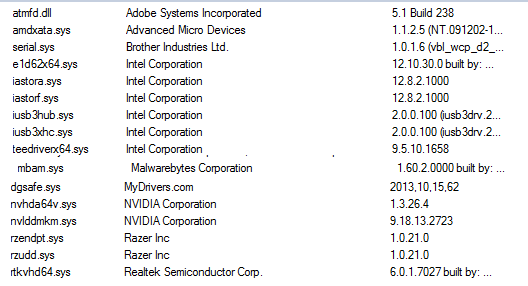
uLGw1dH.png

The full list ^
 

My Computer My Computer

At a glance

Windows 7 Professional 64-bitIntel Core i7 98024GBGTX 580 1536MB
Computer type
PC/Desktop
Computer Manufacturer/Model Number
MSI
OS
Windows 7 Professional 64-bit
CPU
Intel Core i7 980
Memory
24GB
Graphics Card(s)
GTX 580 1536MB
Hard Drives
96GB SSD
3TB HDD
120GB SSD
Antivirus
Malwarebytes
Browser
Mozilla Firefox, Google Chrome
I got another BSOD today, this time with the message on the BSOD saying: PAGE_FAULT_IN_NONPAGED_AREA

Attached is the minidump
 

My Computer My Computer

At a glance

Windows 7 Professional 64-bitIntel Core i7 98024GBGTX 580 1536MB
Computer type
PC/Desktop
Computer Manufacturer/Model Number
MSI
OS
Windows 7 Professional 64-bit
CPU
Intel Core i7 980
Memory
24GB
Graphics Card(s)
GTX 580 1536MB
Hard Drives
96GB SSD
3TB HDD
120GB SSD
Antivirus
Malwarebytes
Browser
Mozilla Firefox, Google Chrome
Hi :) .

It's the second bugcheck that lists ts3client_win64 as the active process on that thread.
Code:
ts3client_win64.exe    c:\program files\teamspeak 3 client\ts3client_win64.exe

Both bugcheck codes are usually due to bad drivers which I too suspect is the issue in this case
especially if we consider the fact that auto-driver installers where involved.

If you're reluctant to use Driver Verifier the very least you can do is undo any bad driver installation
that might took place.
I suggest you go to the manufacturer's website and properly install the drivers.


My Computer My Computer

At a glance

Windows 10Intel Core i5 3570K16GB 1600Mhz G.SkillGigabyte GTX 970 G1-Gaming
Computer type
PC/Desktop
OS
Windows 10
CPU
Intel Core i5 3570K
Motherboard
Asus P8Z77V-PRO
Memory
16GB 1600Mhz G.Skill
Graphics Card(s)
Gigabyte GTX 970 G1-Gaming
PSU
Seasonic 1000W Platinum
Case
Fractal Design Define R4
Cooling
Noctua NH-D14
Hi :) .

It's the second bugcheck that lists ts3client_win64 as the active process on that thread.
Code:
ts3client_win64.exe    c:\program files\teamspeak 3 client\ts3client_win64.exe
Both bugcheck codes are usually due to bad drivers which I too suspect is the issue in this case
especially if we consider the fact that auto-driver installers where involved.

If you're reluctant to use Driver Verifier the very least you can do is undo any bad driver installation
that might took place.
I suggest you go to the manufacturer's website and properly install the drivers.


There's a bunch of drivers listed on their downloads page, which ones do I download or do I download/install all of them?
Realtek HD Audio Driver
Intel Management Engine Interface
Intel INF installation
Intel LAN Driver
Intel SATA Preinstall driver
Intel Rapid Storage Technology
Intel USB 3.0 Driver
Intel VGA Driver

The list includes the rapid storage tech which you told me to uninstall as well.

Also, do I look into downloading the BIOS/Manual/Utility (there's a drop-down menu from drivers to the other 3)?

I saw teamspeak listed in your last post, is there anything wrong with my installation of teamspeak?
 

My Computer My Computer

At a glance

Windows 7 Professional 64-bitIntel Core i7 98024GBGTX 580 1536MB
Computer type
PC/Desktop
Computer Manufacturer/Model Number
MSI
OS
Windows 7 Professional 64-bit
CPU
Intel Core i7 980
Memory
24GB
Graphics Card(s)
GTX 580 1536MB
Hard Drives
96GB SSD
3TB HDD
120GB SSD
Antivirus
Malwarebytes
Browser
Mozilla Firefox, Google Chrome
Yes the possibility of an issue specifically with TeamSpeak is real.
But it can also be the drivers it's calling (LAN, Audio etc...).

Please make sure you select Windows 7 64bit for the driver list and download the following:
   Note
Install the drivers in the order they appear.

Intel INF installation
Intel Management Engine Interface
Intel LAN Driver
Realtek HD Audio Driver
Intel VGA Driver
Intel USB 3.0 Driver

I assume that you at least downloaded the GPU driver from nVidia's website and installed
it the correct way via the installer?

As for the the other options DON'T install any utilities!
You can update the BIOS:
   Warning
Flashing the BIOS is a risky procedure. If you are uncomfortable
performing it yourself have a technician perform it for you.
Regardless, flashing is at your own risk.


F5 | 5.98 MB2013/08/15 | Asia China America Europe Europe(Russia) : FTP / Http
  1. Support PCB ver 1.0/1.1
  2. Improve PCIE-E compatibility
(Note) The USB driver must be updated in advanced.
 

My Computer My Computer

At a glance

Windows 10Intel Core i5 3570K16GB 1600Mhz G.SkillGigabyte GTX 970 G1-Gaming
Computer type
PC/Desktop
OS
Windows 10
CPU
Intel Core i5 3570K
Motherboard
Asus P8Z77V-PRO
Memory
16GB 1600Mhz G.Skill
Graphics Card(s)
Gigabyte GTX 970 G1-Gaming
PSU
Seasonic 1000W Platinum
Case
Fractal Design Define R4
Cooling
Noctua NH-D14
I assume that you at least downloaded the GPU driver from nVidia's website and installed
it the correct way via the installer?

Yeah :)

After reading similar experiences from different people via Googling, it looks like there might be a possible RAM issue (I never replaced RAM, is it possible it got damaged when the motherboard/cpu went way overheated?) that caused the PAGE_FAULT_IN_NONPAGED_AREA BSOD. Tonight, I had a random computer complete freeze where I had to forcibly hold down the power button to restart the computer, similar experience here: http://www.tomshardware.com/forum/354629-31-computer-freezes-requiring-forced-restart suggesting that RAM sticks might be the cause. If I choose to replace my RAM, any suggestions on what RAM I should be looking for? Any incompatibility issues with certain RAM that I should avoid?

I don't think I want to take the risk of flashing bios after reading about it. Can't really afford to take risks at the moment. I haven't gotten any bsods in the past 48hours. I will re-install the drivers sometime next weekend or so, cause I have to do wow raiding on tues-thurs, and don't want to take any risks of something bad happening which is probably unlikely from reinstalling the drivers.

I will post back here when I have an update :)

Thanks!
 

My Computer My Computer

At a glance

Windows 7 Professional 64-bitIntel Core i7 98024GBGTX 580 1536MB
Computer type
PC/Desktop
Computer Manufacturer/Model Number
MSI
OS
Windows 7 Professional 64-bit
CPU
Intel Core i7 980
Memory
24GB
Graphics Card(s)
GTX 580 1536MB
Hard Drives
96GB SSD
3TB HDD
120GB SSD
Antivirus
Malwarebytes
Browser
Mozilla Firefox, Google Chrome
Yeah :)

After reading similar experiences from different people via Googling, it looks like there might be a possible RAM issue (I never replaced RAM, is it possible it got damaged when the motherboard/cpu went way overheated?) that caused the PAGE_FAULT_IN_NONPAGED_AREA BSOD. Tonight, I had a random computer complete freeze where I had to forcibly hold down the power button to restart the computer, similar experience here: Computer "freezes," requiring forced restart. - Homebuilt - Systems suggesting that RAM sticks might be the cause. If I choose to replace my RAM, any suggestions on what RAM I should be looking for? Any incompatibility issues with certain RAM that I should avoid?

I don't think I want to take the risk of flashing bios after reading about it. Can't really afford to take risks at the moment. I haven't gotten any bsods in the past 48hours. I will re-install the drivers sometime next weekend or so, cause I have to do wow raiding on tues-thurs, and don't want to take any risks of something bad happening which is probably unlikely from reinstalling the drivers.

I will post back here when I have an update :)

Thanks!

No rush on the BIOS update
(or anything for that matter it's your decision to take at the end of the day) :) .

As for the RAM you can test it if you would like to invest the time doing so, if you mind isn't
already set to replacing the kit.
As to what model it's a good rule of thumb to first look at the QVL (Qualified Vendor List) for your motherboard and see if you find something you fancy, if not it's most probable that models that
are not listed on there will also comply.

If you want my advice as to which I would take, it's as follow.
I would grab a 8GBx2 kit at 1600MHz (not more 1866) and from your MB QVL I would
go with Corsair / G.Skill / ADATA.


If you feel like it:
Test your RAM modules for possible errors.
How to Test and Diagnose RAM Issues with Memtest86+
Run memtest for at least 8 passes, preferably overnight.

First run it with all the existing/installed RAM modules. If it comes with no error, all is good.

But if it starts showing errors, Stop testing. Errors/red lines means one or more RAM is faulty. But the fault may occur due to a faulty DIMM slot, too, which is a motherboard component. Using memtest86+, you can discriminate between a faulty RAM and a faulty motherboard.

How? Say you have two RAM sticks and two DIMM slots. You obtained errors at the test with all RAM sticks installed. Now, remove all the sticks but one. Test it in all the available slots, one by one. Continue the same procedure for all the available sticks.
How to make the inference that is it a RAM issue or it is a motherboard issue? Suppose you have got the result like that:
test|Slot1|Slot2
RAM1| Error | Error
RAM2|Good|Good
It is a RAM, a bad RAM.

But if you have got a result like that:
test|Slot1|Slot2
RAM1| Error |Good
RAM2| Error |Good
It is a motherboard issue. The particular slot is bad.
 

My Computer My Computer

At a glance

Windows 10Intel Core i5 3570K16GB 1600Mhz G.SkillGigabyte GTX 970 G1-Gaming
Computer type
PC/Desktop
OS
Windows 10
CPU
Intel Core i5 3570K
Motherboard
Asus P8Z77V-PRO
Memory
16GB 1600Mhz G.Skill
Graphics Card(s)
Gigabyte GTX 970 G1-Gaming
PSU
Seasonic 1000W Platinum
Case
Fractal Design Define R4
Cooling
Noctua NH-D14
I'll definitely do a MemTest sometime this week to see if there are any errors. Today, I just got a random complete lockout (where I had to reset power to restart the PC), as I was surfing the web with nothing really open. Similar to the other day when I exited diablo 3 game and my computer just completely froze. I read that it might be a ram issue or a voltage to ram issue.

My default motherboard to ram voltage was set to 1.5v, and my ram needs 1.65v or 1.7v to run. I googled and stuff and now I changed my ram voltage to 1.65v and see if anything changes before I look more into replacing my ram.
 
Last edited:

My Computer My Computer

At a glance

Windows 7 Professional 64-bitIntel Core i7 98024GBGTX 580 1536MB
Computer type
PC/Desktop
Computer Manufacturer/Model Number
MSI
OS
Windows 7 Professional 64-bit
CPU
Intel Core i7 980
Memory
24GB
Graphics Card(s)
GTX 580 1536MB
Hard Drives
96GB SSD
3TB HDD
120GB SSD
Antivirus
Malwarebytes
Browser
Mozilla Firefox, Google Chrome
Hi, thanks for the update :) .
That's odd, we cleared the CMOS four-weeks ago it should have been defaulted to those settings...
(Post #14).
 

My Computer My Computer

At a glance

Windows 10Intel Core i5 3570K16GB 1600Mhz G.SkillGigabyte GTX 970 G1-Gaming
Computer type
PC/Desktop
OS
Windows 10
CPU
Intel Core i5 3570K
Motherboard
Asus P8Z77V-PRO
Memory
16GB 1600Mhz G.Skill
Graphics Card(s)
Gigabyte GTX 970 G1-Gaming
PSU
Seasonic 1000W Platinum
Case
Fractal Design Define R4
Cooling
Noctua NH-D14
Back
Top