Media Center won't record one particular scheduled program

raylo

New member
Local time
4:39 AM
Messages
11
Running Win 7 media center for DVR for a few weeks now and it generally works great. I have several series set to record the entire season, new shows only. I picked the shows on the guide and clicked "record series". The one issue I am having is that it fails to record "The Blacklist". It appears in the recording schedule (Monday night, channel 4.1 here), then after that date passes with no recording it shows up again on the schedule for Saturday at 9:00 when it is repeated. But that fails to record, too. Then the record schedule shows the next episode for Monday. But of course, that fails to record, too. All other shows record fine to the nearly empty 2TB hdd. Any ideas?
 

My Computer My Computer

At a glance

Win 7 x64, Home Prem and Pro
OS
Win 7 x64, Home Prem and Pro
Can you play or record anything on 4.1?

If not, do a rescan of channels.
 

My Computer My Computer

At a glance

Windows 7 Professional X64Core i7 (2nd gen) i7-2600K / 3.40GHzDDR3 2400MHz (OC) 16gbIntel(R) HD Graphics 3000, -1988 Mb
Computer type
PC/Desktop
Computer Manufacturer/Model Number
Self-Built
OS
Windows 7 Professional X64
CPU
Core i7 (2nd gen) i7-2600K / 3.40GHz
Motherboard
ASUS P8Z77-V Intel 7 Series Motherboard
Memory
DDR3 2400MHz (OC) 16gb
Graphics Card(s)
Intel(R) HD Graphics 3000, -1988 Mb
Sound Card
8 ChannelsAudio Chipset Realtek ALC892
Monitor(s) Displays
LG 29UM65 Black 29"
Screen Resolution
2560 x 1080
Hard Drives
840 EVO 250 GB SSD ;2tb (2);Seagate;1tb Seagate; 750 gb Seagate; wd ext (2) 750 gb,WD 2tb X 2;WD 3TB Black
PSU
750 watt
Case
Thermaltake RX -1
Cooling
2120mm Fans Included 1Other Fan Ports 5x 200mm Fan Ports
Keyboard
Microsoft Digital Media Pro
Mouse
Microsoft Wireless 6000
Internet Speed
U-verse 18 mbps
Antivirus
MSE
Browser
Firefox, Chrome and my favorite: Pale Moon
Other Info
HdHomerun Dual Tuner.
SRS Audio Lab,
Pioneer BDR 208-DBK
PS3-What a difference in my Surround Sound Receiver!
HP 4540s - My new Toy.
Epson R280 Printer- To personalize my Dvds.
Canon MP 560 - For scanning.
2 very good reasons for this comes to mind...... the StartRecording task is corrupt or the broadcaster is blocking it.

Quit WMC, go to
C:\Windows\System32\Tasks\Microsoft\Windows\Media Center
and delete the task.
Restart WMC and it should re-create the task.

Good Luck
 

My Computer My Computer

At a glance

Windows 7 Home Premium 64 bitIntel Core i7-4790G.SKILL 8GB (2 x 4GB) DDR3 F3-10666CL9D-8GBNTAMD Radeon R7 250
Computer type
PC/Desktop
Computer Manufacturer/Model Number
Custom Build
OS
Windows 7 Home Premium 64 bit
CPU
Intel Core i7-4790
Motherboard
GA-Z87X-D3H
Memory
G.SKILL 8GB (2 x 4GB) DDR3 F3-10666CL9D-8GBNT
Graphics Card(s)
AMD Radeon R7 250
Sound Card
Realtek ALC892
Monitor(s) Displays
Samsung UN32EH5000, Dell 1703FPT
Screen Resolution
1920 x 1080, 1280 x 1024
Hard Drives
WD5003AZEX
WD10EZEX
Samsung HD103SJ
Samsung 128 GB 840 PRO
PSU
SeaSonic M12II SS-500GM
Case
Fractal Design Define R4
Cooling
Zalman CNPS9900ALED
Keyboard
Logitech K800
Mouse
Logitech M705
Internet Speed
16 Mbps
Antivirus
Avast
Browser
Firefox
Other Info
Bose Companion 2 Multimedia Speakers
the broadcaster is blocking it.
Since when are over-the-air channels blocked?

Answer: Never.

I can record from all over-the air channels.
 

My Computer My Computer

At a glance

Windows 7 Professional X64Core i7 (2nd gen) i7-2600K / 3.40GHzDDR3 2400MHz (OC) 16gbIntel(R) HD Graphics 3000, -1988 Mb
Computer type
PC/Desktop
Computer Manufacturer/Model Number
Self-Built
OS
Windows 7 Professional X64
CPU
Core i7 (2nd gen) i7-2600K / 3.40GHz
Motherboard
ASUS P8Z77-V Intel 7 Series Motherboard
Memory
DDR3 2400MHz (OC) 16gb
Graphics Card(s)
Intel(R) HD Graphics 3000, -1988 Mb
Sound Card
8 ChannelsAudio Chipset Realtek ALC892
Monitor(s) Displays
LG 29UM65 Black 29"
Screen Resolution
2560 x 1080
Hard Drives
840 EVO 250 GB SSD ;2tb (2);Seagate;1tb Seagate; 750 gb Seagate; wd ext (2) 750 gb,WD 2tb X 2;WD 3TB Black
PSU
750 watt
Case
Thermaltake RX -1
Cooling
2120mm Fans Included 1Other Fan Ports 5x 200mm Fan Ports
Keyboard
Microsoft Digital Media Pro
Mouse
Microsoft Wireless 6000
Internet Speed
U-verse 18 mbps
Antivirus
MSE
Browser
Firefox, Chrome and my favorite: Pale Moon
Other Info
HdHomerun Dual Tuner.
SRS Audio Lab,
Pioneer BDR 208-DBK
PS3-What a difference in my Surround Sound Receiver!
HP 4540s - My new Toy.
Epson R280 Printer- To personalize my Dvds.
Canon MP 560 - For scanning.
I'll try recording something else on that channel this evening. The channel does come through fine viewing live TV via the PC TV card and media center.

Edit: I just checked and that channel is not playing on live TV after all. Medic center says signal not available... So I'll try re scanning the channels this evening. It is a local channel and comes through fine on all my TVs' OTA tuners. Not sure why the WinTV card would lose the signal.... But that would explain the problem.
 
Last edited:

My Computer My Computer

At a glance

Win 7 x64, Home Prem and Pro
OS
Win 7 x64, Home Prem and Pro
It could be that Media Center has two sources for channel 4.1. This happens sometimes when the TV station has a nearby repeater. The repeater may be too weak for you to receive, but Media Center chooses it as the first source for some reason.

Go to the guide, and click on the channel number (4.1) on the left side of the guide. Go to Edit Channel -> Edit Sources. See if there are multiple sources listed. For example, if you have two tuners, there should be two sources listed. If there are four sources (and only two tuners) then disable the incorrect ones.
 

My Computer My Computer

At a glance

Windows 7 Ultimate x64
OS
Windows 7 Ultimate x64
I'll try recording something else on that channel this evening. The channel does come through fine viewing live TV via the PC TV card and media center.

Edit: I just checked and that channel is not playing on live TV after all. Medic center says signal not available... So I'll try re scanning the channels this evening. It is a local channel and comes through fine on all my TVs' OTA tuners. Not sure why the WinTV card would lose the signal.... But that would explain the problem.

I'll try re scanning the channels this evening
I'm sure that was your problem - a rescan will fix it.

After you do the rescan, you will see 4.1 in channel strength in WMC.

Good luck.

Paul
 

My Computer My Computer

At a glance

Windows 7 Professional X64Core i7 (2nd gen) i7-2600K / 3.40GHzDDR3 2400MHz (OC) 16gbIntel(R) HD Graphics 3000, -1988 Mb
Computer type
PC/Desktop
Computer Manufacturer/Model Number
Self-Built
OS
Windows 7 Professional X64
CPU
Core i7 (2nd gen) i7-2600K / 3.40GHz
Motherboard
ASUS P8Z77-V Intel 7 Series Motherboard
Memory
DDR3 2400MHz (OC) 16gb
Graphics Card(s)
Intel(R) HD Graphics 3000, -1988 Mb
Sound Card
8 ChannelsAudio Chipset Realtek ALC892
Monitor(s) Displays
LG 29UM65 Black 29"
Screen Resolution
2560 x 1080
Hard Drives
840 EVO 250 GB SSD ;2tb (2);Seagate;1tb Seagate; 750 gb Seagate; wd ext (2) 750 gb,WD 2tb X 2;WD 3TB Black
PSU
750 watt
Case
Thermaltake RX -1
Cooling
2120mm Fans Included 1Other Fan Ports 5x 200mm Fan Ports
Keyboard
Microsoft Digital Media Pro
Mouse
Microsoft Wireless 6000
Internet Speed
U-verse 18 mbps
Antivirus
MSE
Browser
Firefox, Chrome and my favorite: Pale Moon
Other Info
HdHomerun Dual Tuner.
SRS Audio Lab,
Pioneer BDR 208-DBK
PS3-What a difference in my Surround Sound Receiver!
HP 4540s - My new Toy.
Epson R280 Printer- To personalize my Dvds.
Canon MP 560 - For scanning.
It seems that the issue is simply that the tuners in the Hauppage WinTV card just don't receive channel 4.1 as well as my TVs so at times it just isn't there, hence no recording.

My WinTV card does have 2 tuners and I went to the channel and edit sources and split them into 2 channels. Didn't really help as both tuners are identical. Now I can't figure out how to recombine them into one listing on the guide, not that it is really necessary, but it would clean up the guide display if I could do this. Anyone know how?

Thanks for all the input folks. I guess I'll just have to try streaming NBC stuff instead of DVR'ing.... Or find a TV card with a more sensitive tuner.
 

My Computer My Computer

At a glance

Win 7 x64, Home Prem and Pro
OS
Win 7 x64, Home Prem and Pro
I wasn't suggesting to split them into two different channels. You can merge them back again, but I don't remember off the top of my head how to do it in Media Center. The easiest thing is to download the free Guide Tool. Then, just highlight the two 4.1's, right-click, and choose "merge tuners".
 

My Computer My Computer

At a glance

Windows 7 Ultimate x64
OS
Windows 7 Ultimate x64
It seems that the issue is simply that the tuners in the Hauppage WinTV card just don't receive channel 4.1 as well as my TVs so at times it just isn't there, hence no recording.

My WinTV card does have 2 tuners and I went to the channel and edit sources and split them into 2 channels. Didn't really help as both tuners are identical. Now I can't figure out how to recombine them into one listing on the guide, not that it is really necessary, but it would clean up the guide display if I could do this. Anyone know how?

Thanks for all the input folks. I guess I'll just have to try streaming NBC stuff instead of DVR'ing.... Or find a TV card with a more sensitive tuner.

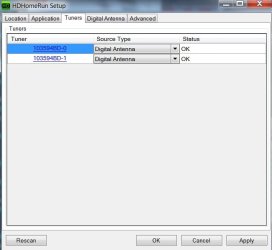
This is what my setup shows upon launch - 2 tuners.
All I do is click apply and rescan.

I would uninstall your card and reinstall and do a rescan- it should solve your problem.
 

Attachments

  • HDHOMERUN SETUP 10,25.jpg
    HDHOMERUN SETUP 10,25.jpg
    27.3 KB · Views: 14

My Computer My Computer

At a glance

Windows 7 Professional X64Core i7 (2nd gen) i7-2600K / 3.40GHzDDR3 2400MHz (OC) 16gbIntel(R) HD Graphics 3000, -1988 Mb
Computer type
PC/Desktop
Computer Manufacturer/Model Number
Self-Built
OS
Windows 7 Professional X64
CPU
Core i7 (2nd gen) i7-2600K / 3.40GHz
Motherboard
ASUS P8Z77-V Intel 7 Series Motherboard
Memory
DDR3 2400MHz (OC) 16gb
Graphics Card(s)
Intel(R) HD Graphics 3000, -1988 Mb
Sound Card
8 ChannelsAudio Chipset Realtek ALC892
Monitor(s) Displays
LG 29UM65 Black 29"
Screen Resolution
2560 x 1080
Hard Drives
840 EVO 250 GB SSD ;2tb (2);Seagate;1tb Seagate; 750 gb Seagate; wd ext (2) 750 gb,WD 2tb X 2;WD 3TB Black
PSU
750 watt
Case
Thermaltake RX -1
Cooling
2120mm Fans Included 1Other Fan Ports 5x 200mm Fan Ports
Keyboard
Microsoft Digital Media Pro
Mouse
Microsoft Wireless 6000
Internet Speed
U-verse 18 mbps
Antivirus
MSE
Browser
Firefox, Chrome and my favorite: Pale Moon
Other Info
HdHomerun Dual Tuner.
SRS Audio Lab,
Pioneer BDR 208-DBK
PS3-What a difference in my Surround Sound Receiver!
HP 4540s - My new Toy.
Epson R280 Printer- To personalize my Dvds.
Canon MP 560 - For scanning.
I didn't uninstall the card but I went through the whole TV signal setup again including rescanning the channels. It did indeed re-combine the 2 separate 4.1s back into one channel listing in the guide. But the channel still comes and goes. It's just a signal strength and tuner sensitivity issue.
 

My Computer My Computer

At a glance

Win 7 x64, Home Prem and Pro
OS
Win 7 x64, Home Prem and Pro
Don't know why the 4.1 comes and goes.

I thought a rescan would definitely solve it. - Sorry.:cry:
 

My Computer My Computer

At a glance

Windows 7 Professional X64Core i7 (2nd gen) i7-2600K / 3.40GHzDDR3 2400MHz (OC) 16gbIntel(R) HD Graphics 3000, -1988 Mb
Computer type
PC/Desktop
Computer Manufacturer/Model Number
Self-Built
OS
Windows 7 Professional X64
CPU
Core i7 (2nd gen) i7-2600K / 3.40GHz
Motherboard
ASUS P8Z77-V Intel 7 Series Motherboard
Memory
DDR3 2400MHz (OC) 16gb
Graphics Card(s)
Intel(R) HD Graphics 3000, -1988 Mb
Sound Card
8 ChannelsAudio Chipset Realtek ALC892
Monitor(s) Displays
LG 29UM65 Black 29"
Screen Resolution
2560 x 1080
Hard Drives
840 EVO 250 GB SSD ;2tb (2);Seagate;1tb Seagate; 750 gb Seagate; wd ext (2) 750 gb,WD 2tb X 2;WD 3TB Black
PSU
750 watt
Case
Thermaltake RX -1
Cooling
2120mm Fans Included 1Other Fan Ports 5x 200mm Fan Ports
Keyboard
Microsoft Digital Media Pro
Mouse
Microsoft Wireless 6000
Internet Speed
U-verse 18 mbps
Antivirus
MSE
Browser
Firefox, Chrome and my favorite: Pale Moon
Other Info
HdHomerun Dual Tuner.
SRS Audio Lab,
Pioneer BDR 208-DBK
PS3-What a difference in my Surround Sound Receiver!
HP 4540s - My new Toy.
Epson R280 Printer- To personalize my Dvds.
Canon MP 560 - For scanning.
I have to disconnect and reconnect (clean) all the connectors in my outdoor antenna system about every other year. The connections seem to get just enough corrosion to affect the digital signals. I have a couple of distant OTA channels that loose strength and that's when I know it's time to clean again. :) The satellite channels never seem to have that problem but it has fewer and better connectors.
 

My Computer My Computer

At a glance

Windows 7 Pro-x64i7-2600 3.4GHz - 3.8GHz Turbo8Gb - 2x4GB, Muskin 991770 PC3-1333Integrated Intel HD 2000
Computer type
PC/Desktop
Computer Manufacturer/Model Number
Built 2/11/2011
OS
Windows 7 Pro-x64
CPU
i7-2600 3.4GHz - 3.8GHz Turbo
Motherboard
Intel DH67BL-B3
Memory
8Gb - 2x4GB, Muskin 991770 PC3-1333
Graphics Card(s)
Integrated Intel HD 2000
Sound Card
Integrated Intel 10.1 HD, RealTek ALC892
Monitor(s) Displays
Asus LCD VH222H, Haier HL24XSL2a
Screen Resolution
1920x1080, 1920x1080
Hard Drives
Crucial SSD C300-128Gb,
Western Digital WD5002AALX - 500Gb,
Western Digital WD7501AALS - 750Gb
PSU
Seasonic 650W 80+ Gold Modular
Case
Rosewill Defender
Cooling
Stock CPU, Four 120mm case fans, PCH fan added
Keyboard
Logitech EX100 Y-RBH94 Wireless
Mouse
Logitech EX100 M-RCE95 Wireless
Internet Speed
3.0/1.5 Mbs
Antivirus
Microsoft Security Essentials
Browser
Microsoft Internet Explorer 11
Other Info
Antec Veris Premier-Multimedia IR Station,
Cyber Accoustics-3602 Speakers,
AFT XM-5U Card Reader,
Hauppauge TV-HVR-2250,
Sony LX300 USB Turntable
Carwiz made a great suggestion, which made me think of my antenna also.

A while ago, we had some strong winds and my antenna moved slightly - enough to lose channel 7.

I re-oriented it and that solved it.

That might be your problem with 4.1?

You also said that your TV does get 4.1.
You might have a bad coax leading into your antenna connection on PC.(Or not making good contact).

Try re-seating the coax .
Do you have another coax you can try?
 

My Computer My Computer

At a glance

Windows 7 Professional X64Core i7 (2nd gen) i7-2600K / 3.40GHzDDR3 2400MHz (OC) 16gbIntel(R) HD Graphics 3000, -1988 Mb
Computer type
PC/Desktop
Computer Manufacturer/Model Number
Self-Built
OS
Windows 7 Professional X64
CPU
Core i7 (2nd gen) i7-2600K / 3.40GHz
Motherboard
ASUS P8Z77-V Intel 7 Series Motherboard
Memory
DDR3 2400MHz (OC) 16gb
Graphics Card(s)
Intel(R) HD Graphics 3000, -1988 Mb
Sound Card
8 ChannelsAudio Chipset Realtek ALC892
Monitor(s) Displays
LG 29UM65 Black 29"
Screen Resolution
2560 x 1080
Hard Drives
840 EVO 250 GB SSD ;2tb (2);Seagate;1tb Seagate; 750 gb Seagate; wd ext (2) 750 gb,WD 2tb X 2;WD 3TB Black
PSU
750 watt
Case
Thermaltake RX -1
Cooling
2120mm Fans Included 1Other Fan Ports 5x 200mm Fan Ports
Keyboard
Microsoft Digital Media Pro
Mouse
Microsoft Wireless 6000
Internet Speed
U-verse 18 mbps
Antivirus
MSE
Browser
Firefox, Chrome and my favorite: Pale Moon
Other Info
HdHomerun Dual Tuner.
SRS Audio Lab,
Pioneer BDR 208-DBK
PS3-What a difference in my Surround Sound Receiver!
HP 4540s - My new Toy.
Epson R280 Printer- To personalize my Dvds.
Canon MP 560 - For scanning.
My antenna is indoors in the attic with a booster amp. I live in MD suburbs of DC and I can get the DC channels and some Baltimore channels (Balt is 50 miles away). 4.1 is DC channel but the orientation of my antenna to get Balt channels hurts 4.1 a bit and in windy conditions it is usually one of the first to get some breakups. But the Hauppage TV tuner has trouble with it in good conditions while my Samsung TVs and crappy little Zinwell digital converter box on an old tube TV do better. Same antenna, same connections. It's just the Hauppage tuner....
 

My Computer My Computer

At a glance

Win 7 x64, Home Prem and Pro
OS
Win 7 x64, Home Prem and Pro
Back
Top