Java is unsafe! Which part and which version

andis59

New member
Member
Local time
1:46 AM
Messages
77
Location
Mora, Dalicarlia, Sweden
We all hear that Java is unsafe, but which part is unsafe?
There are browser plugins and there is standalone applications (which have its own version of Java).

I have found this on my C drive

Filename: c:\Datalogic\IMPACT\Applications\jre\bin\java-rmi.exe Version: 6.0.250.6
Filename: c:\Datalogic\IMPACT\Applications\jre\bin\java.exe Version: 6.0.250.6
Filename: c:\Datalogic\IMPACT\Applications\jre\bin\javacpl.exe Version: 6.0.250.6
Filename: c:\Datalogic\IMPACT\Applications\jre\bin\javaw.exe Version: 6.0.250.6
Filename: c:\Datalogic\IMPACT\Applications\jre\bin\javaws.exe Version: 6.0.250.6
Filename: c:\Program Files\Finale NotePad 2012\Plugin Components\Java\jre\bin\java-rmi.exe Version: 6.0.300.12
Filename: c:\Program Files\Java\jre7\bin\java-rmi.exe Version: 7.0.450.18
Filename: c:\Program Files\Java\jre7\bin\java.exe Version: 7.0.450.18
Filename: c:\Program Files\Java\jre7\bin\javacpl.exe Version: 10.45.2.18
Filename: c:\Program Files\Java\jre7\bin\javaw.exe Version: 7.0.450.18
Filename: c:\Program Files\Java\jre7\bin\javaws.exe Version: 10.45.2.18
Filename: c:\Program Files\Jet Profiler for MySQL\jre\bin\java-rmi.exe Version: 0.0.0.0
Filename: c:\Program Files\Jet Profiler for MySQL\jre\bin\java.exe Version: 0.0.0.0
Filename: c:\Program Files\Jet Profiler for MySQL\jre\bin\javacpl.exe Version: 0.0.0.0
Filename: c:\Program Files\Jet Profiler for MySQL\jre\bin\javaw.exe Version: 0.0.0.0
Filename: c:\Program Files\Jet Profiler for MySQL\jre\bin\javaws.exe Version: 0.0.0.0
Filename: c:\Program Files\JetBrains\PyCharm Community Edition 3.0\jre\jre\bin\java-rmi.exe Version: 7.0.100.18
Filename: c:\Program Files\JetBrains\PyCharm Community Edition 3.0\jre\jre\bin\java.exe Version: 7.0.100.18
Filename: c:\Program Files\JetBrains\PyCharm Community Edition 3.0\jre\jre\bin\javacpl.exe Version: 10.10.2.18
Filename: c:\Program Files\JetBrains\PyCharm Community Edition 3.0\jre\jre\bin\javaw.exe Version: 7.0.100.18
Filename: c:\Program Files\JetBrains\PyCharm Community Edition 3.0\jre\jre\bin\javaws.exe Version: 10.10.2.18
Filename: c:\Program Files\Oracle\JavaFX 2.1 Runtime\bin\javacpl.exe Version: 10.5.1.255
Filename: c:\Program Files\Oracle\JavaFX 2.1 Runtime\bin\javaws.exe Version: 10.5.1.255
Filename: c:\Windows\System32\java.exe Version: 7.0.450.18
Filename: c:\Windows\System32\javaw.exe Version: 7.0.450.18
Filename: c:\Windows\System32\javaws.exe Version: 10.45.2.18

Just by searching for java*.exe, but there are also java*.dll and ...

Oracle recommends version Version 7 upgrade 45 (7.0.450.18)

I don't have any browser plugins activated (I think) but I have some standalone applications that has their own Java version

Which are safe(ish)?
 

My Computer

Computer type
PC/Desktop
Computer Manufacturer/Model Number
Dell Vostro 1720, HP 7300 elite mt
OS
Microsoft Windows 7 Ultimate 32-bit 7601 Multiprocessor Free Service Pack 1
CPU
Intel(R) Core(TM)2 Duo CPU P8700 @ 2.53GHz, 2 cores
Motherboard
Dell Inc. 0J056T
Memory
4GB
Graphics Card(s)
NVIDIA GeForce 9600M GS, 512 Mb
Sound Card
High Definition Audio Device
Screen Resolution
1440 x 900 x 59 hertz
Hard Drives
ST750LX003-1AC154 ATA Device 698,64 GB
Keyboard
Standard Keyboard - PS/2
Mouse
Microsoft Wireless Notebook Presenter Mouse 8000 (IntelliPoi
Internet Speed
14 - 20 Mb/s
Antivirus
AVG Free
Browser
Chrome
Other Info
Bios: Dell Inc. A08, 2010-03-05
I too have some apps that include an old versions of Java. In my case, version 6 update 19.

But I do not think that the files are referenced in the registry in such a way as to allow a program to pass a Java file to the OS shell... in other words: If a browser tries to run a Java file, the operating system will not know to pass that file on to the old version of Java that comes with these apps.

Malware writers usually attempt to use Java's flaws to get the malware running in such a way that it can do things that it normally could not do. In theory, malware could be started via other means (you run something from a USB/CD/DVD/download) and the malware could scan the hard drive for versions of Java that it can exploit - thus allowing the malware the ability to do things that it normally could not do.

I doubt that there are any forum members that are willing to state which parts of Java are safe.
(Probably not the answer that you wanted to hear.)
 

My Computer

Computer type
Laptop
Computer Manufacturer/Model Number
Employer provided Dell Latitude
OS
W7 Pro SP1 64bit
CPU
i7
Memory
8GB
Graphics Card(s)
Intel HD Graphics
Hard Drives
crappy SSD
Antivirus
Employer mandated Symantec Endpoint Protection
Browser
Pale Moon 64bit, IE11 64bit & Chrome 64bit
Guess what? Unfortunately all java is unsafe and has multiple attack points and exploits. Simply do not use it.

(Unless you absolutely have too)
 

My Computer

Computer type
PC/Desktop
Computer Manufacturer/Model Number
Custom Built
OS
Windows 10 Pro
CPU
AMD Ryzen 5 2400G Processor with Radeon RX Vega 11 Graphics
Motherboard
ASRock X470 Master SLI/AC AM4 AMD Promontory X470 SATA 6Gb/s
Memory
G.SKILL Ripjaws V Series 16GB (2 x 8GB) 288-Pin DDR4 SDRAM D
Graphics Card(s)
2047MB NVIDIA GeForce GTX 1060 6GB (EVGA)
Sound Card
Motherboard Built in
Monitor(s) Displays
Acer R240HY bidx 23.8-Inch IPS HDMI DVI VGA (1920 x 1080) Wi
Screen Resolution
1920 x 1080
Hard Drives
1TB Sandisk SSD PLUS (Main drive)
500 GB Seagate 7200 RPM (Games)
500 GB Western Digital 7200 RPM (Virtual Machines)
PSU
CORSAIR TX Series TX650M 650W 80+ Gold Modular Power Supply
Case
CORSAIR CARBIDE SPEC-02 Mid-Tower Gaming Case, Red LED Fan
Cooling
220mm, two 120mm, and four 60mm fans
Keyboard
Wired Dell keyboard
Mouse
Wireless Logitech mouse
Internet Speed
250mb down, 30mb up
Antivirus
Panda Cloud Antivirus
Browser
Chrome-ish x64
Other Info
Your awesome for reading this.
Guess what? Unfortunately all java is unsafe and has multiple attack points and exploits. Simply do not use it.

(Unless you absolutely have too)
Why is inherently unsafe? Is it because java bypasses the normal windows security layers?
 

My Computer

OS
Windows 7 64-bit
No, did you not read my post? The program itself is unsafe.....meaning it has multiple security holes. It can easily be exploited and attacked.

See here for examples:

http://arstechnica.com/security/201...s-a-dangerous-turn-for-the-worse-experts-say/

http://www.usatoday.com/story/tech/columnist/2013/01/18/rob-pegoraro-java/1840219/

http://www.pcworld.com/article/2030...-and-lived-without-java-reader-and-flash.html

Oracle on Monday was distributing a patch for Java software flaws deemed so dangerous that the US Department of Homeland Security said that people should stop using it.

Read more at: http://phys.org/news/2013-01-oracle-patches-dangerous-java-holes.html#jCp
 

My Computer

Computer type
PC/Desktop
Computer Manufacturer/Model Number
Custom Built
OS
Windows 10 Pro
CPU
AMD Ryzen 5 2400G Processor with Radeon RX Vega 11 Graphics
Motherboard
ASRock X470 Master SLI/AC AM4 AMD Promontory X470 SATA 6Gb/s
Memory
G.SKILL Ripjaws V Series 16GB (2 x 8GB) 288-Pin DDR4 SDRAM D
Graphics Card(s)
2047MB NVIDIA GeForce GTX 1060 6GB (EVGA)
Sound Card
Motherboard Built in
Monitor(s) Displays
Acer R240HY bidx 23.8-Inch IPS HDMI DVI VGA (1920 x 1080) Wi
Screen Resolution
1920 x 1080
Hard Drives
1TB Sandisk SSD PLUS (Main drive)
500 GB Seagate 7200 RPM (Games)
500 GB Western Digital 7200 RPM (Virtual Machines)
PSU
CORSAIR TX Series TX650M 650W 80+ Gold Modular Power Supply
Case
CORSAIR CARBIDE SPEC-02 Mid-Tower Gaming Case, Red LED Fan
Cooling
220mm, two 120mm, and four 60mm fans
Keyboard
Wired Dell keyboard
Mouse
Wireless Logitech mouse
Internet Speed
250mb down, 30mb up
Antivirus
Panda Cloud Antivirus
Browser
Chrome-ish x64
Other Info
Your awesome for reading this.

My Computer

Computer type
PC/Desktop
OS
Windows 10 Home x64
CPU
INTEL Core i5-750 Quad-Core 3.37GHz
Motherboard
ASUS P7P55D
Memory
HyperX Fury Black Series 8GB (2 x 4GB) 1866Mhz
Graphics Card(s)
EVGA GeForce GTX 750 Superclocked 1GB 128-Bit GDDR5
Monitor(s) Displays
LG 32MA68HY 32" IPS
Screen Resolution
1920 x 1080
Hard Drives
Samsung 840 Evo 120GB, SEAGATE 500GB Barracuda® 7200.12, SATA 3 Gb/s, 7200 RPM, 16MB cache
PSU
ANTEC TruePower New TP-550, 80 PLUS, 550W
Case
ANTEC Three Hundred Illusion
Cooling
COOLER MASTER Hyper 212 Plus, 4 x 120mm 1 x 140mm Noctua's
Internet Speed
85 + Mbps
Antivirus
Avast
Browser
Vivaldi
You can, at least, remove older versions of Java to reduce your exposure.

Why should I uninstall older versions of Java from my system?

Java Uninstall Tool

A Guy
I'm not sure if you were talking to the OP or to benedictus or both...
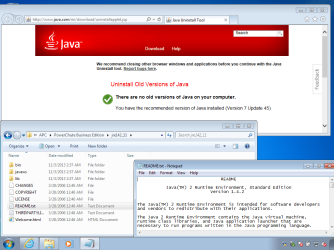
...but, I do not think that the Java Uninstall Tool (JUT) will help the OP.

You can have several old versions of Java installed by other apps (which is what the OP is talking about) and those versions will not be detected by the JUT. That JUT only looks in the registry for one key. If that key is not there, it gives up. See the end of this video for that key.

IE10-64bit-java64bit.png

I ran the JUT using
IE10 with 64bit tabs and 64bit Java
and
IE10 with 32bit tabs and 32bit Java
Neither found the old Java shown in the screenshot.
I'm guessing that the OP will have the same results.
 

My Computer

Computer type
Laptop
Computer Manufacturer/Model Number
Employer provided Dell Latitude
OS
W7 Pro SP1 64bit
CPU
i7
Memory
8GB
Graphics Card(s)
Intel HD Graphics
Hard Drives
crappy SSD
Antivirus
Employer mandated Symantec Endpoint Protection
Browser
Pale Moon 64bit, IE11 64bit & Chrome 64bit
The OP, yes. But wasn't speaking to removing the older versions used by an application. It was more a general Java safety (an oxymoron?) tip. The biggest exposure is via browsers, but older Java installations on the system are still an issue.

The older versions in apps can hopefully either be updated via the app, or sometimes you can just copy the corresponding file from the updated Java installation to the app. An older app, that has no newer alternative, and must use an older Java would not be acceptable, although I understand people are put in positions where they must use such conditions.

I don't have Java to confirm what options are available with "Additional tasks" in JavaRa these days. Nor did I have that ability with Java's own tool. A Guy
 

My Computer

Computer type
PC/Desktop
OS
Windows 10 Home x64
CPU
INTEL Core i5-750 Quad-Core 3.37GHz
Motherboard
ASUS P7P55D
Memory
HyperX Fury Black Series 8GB (2 x 4GB) 1866Mhz
Graphics Card(s)
EVGA GeForce GTX 750 Superclocked 1GB 128-Bit GDDR5
Monitor(s) Displays
LG 32MA68HY 32" IPS
Screen Resolution
1920 x 1080
Hard Drives
Samsung 840 Evo 120GB, SEAGATE 500GB Barracuda® 7200.12, SATA 3 Gb/s, 7200 RPM, 16MB cache
PSU
ANTEC TruePower New TP-550, 80 PLUS, 550W
Case
ANTEC Three Hundred Illusion
Cooling
COOLER MASTER Hyper 212 Plus, 4 x 120mm 1 x 140mm Noctua's
Internet Speed
85 + Mbps
Antivirus
Avast
Browser
Vivaldi
The particular thing that has been specified to have flaws always were the browsers plugins, which are able, under the right circumstances, to run arbitrary code on your computer. Disabling them removes the vulnerability altogether. I'm not aware of any other parts of them to have the same flaw, since everything else runs on your machine and isn't exposed to the web.

Another different history are the programs themselves written in Java. They can be themselves a problem because of their own behavior, but not related to Java itself (the same can happen with any program, written in ANY language). Some programs as you see use their own "private" Java runtime in their own folders, which is merely a convenience. That doesn't means a potential security exploit in your computer (again, the flawed component is the browser plugin) because of the presence of those, but rather you must think if you really trust the program using them, as you would do with any program.

Just remember to have an updated antivirus, a working, properly configured firewall and most important common sense, and you can live reasonably safe.
 

My Computer

Computer type
Laptop
Computer Manufacturer/Model Number
Toshiba Sattelite A665-S6092
OS
Windows 7 Ultimate x64
CPU
Intel Core i7-740QM
Memory
8 GB DDR3
Graphics Card(s)
NVIDIA GeForce 330GT
Screen Resolution
1366x768
Hard Drives
Samsung 840 SSD 500GB
1TB USB3 external HD
Cooling
Coolermaster Notepal U3 notebook cooling pad
Internet Speed
3mbps ASDL
Antivirus
ClamWin 0.98.7
Browser
Opera 12.17 x86 (main), Firefox 38 (sec), IE11 (last resort)
~~~
I doubt that there are any forum members that are willing to state which parts of Java are safe.
(Probably not the answer that you wanted to hear.)

The particular thing that has been specified to have flaws always were the browsers plugins, which are able, under the right circumstances, to run arbitrary code on your computer. Disabling them removes the vulnerability altogether. I'm not aware of any other parts of them to have the same flaw, since everything else runs on your machine and isn't exposed to the web.

Another different history are the programs themselves written in Java. They can be themselves a problem because of their own behavior, but not related to Java itself (the same can happen with any program, written in ANY language). Some programs as you see use their own "private" Java runtime in their own folders, which is merely a convenience. That doesn't means a potential security exploit in your computer (again, the flawed component is the browser plugin) because of the presence of those, but rather you must think if you really trust the program using them, as you would do with any program.

Just remember to have an updated antivirus, a working, properly configured firewall and most important common sense, and you can live reasonably safe.


I stand corrected.

Actually, I'm not standing at the moment :-)
 

My Computer

Computer type
Laptop
Computer Manufacturer/Model Number
Employer provided Dell Latitude
OS
W7 Pro SP1 64bit
CPU
i7
Memory
8GB
Graphics Card(s)
Intel HD Graphics
Hard Drives
crappy SSD
Antivirus
Employer mandated Symantec Endpoint Protection
Browser
Pale Moon 64bit, IE11 64bit & Chrome 64bit
Back
Top