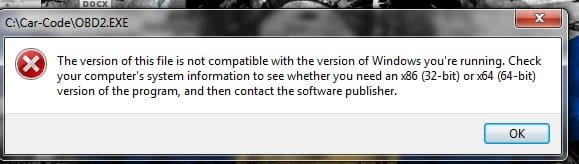
32 Bit program, can't get it to run in 64 bit

great white

New member
Well, I've got an older program that I need to run for some car tuning software (OBD-2 Vehicle Explorer Scan Tool Browser, careful if you click the link, that website will hurt your brain reading it!). That software is the only bi-directional option for an older GM diesel truck I have.

My current laptop is a sony Vaio, and it's running window home premium. It came pre-installed on the laptop and it has the "oa" sticker.

I've tried installing/running as administrator, I've tried compatibility modes and nothing works. It refuses to even install.

Some googling turned up "xpmode", but home premium doesn't have it. Need Pro or ultimate to run it apparently. Figures I would be running "home".

Needing XPmode seems consistent with the programmers requirements: Use Windows 3.1, 95, 98, BOB, ME, 2K, XP, Vista-32 bit, 7-Ultimate, 7-Professional, 386 processor or higher, optimized for low cost mobile laptops and netbook screens.

No home editions listed there, so it must be looking for XPMode to run in Win7. :(

I tried a couple virtual machines, but apparently I'm not "tech savvy" enough to get that to work either.

Anyone have any "workarounds" on how I can get this program to run in Home premium?

If only it had xpmode already........:rolleyes:
 

My Computer

Computer Manufacturer/Model Number
HP, M8277c Media Center PC (HTPC)
OS
Win7 SP1 x86
CPU
Core 2 Duo E6750 2.6 Ghz
Motherboard
Asus IPIBL-LA/Berkeley-GL8E
Memory
4GB
Graphics Card(s)
NVidia GeForce 8400 GS
Sound Card
Integrated Realtek ALC888S Audio (7.1)
Monitor(s) Displays
Flatron wide, 20"
Screen Resolution
Dunno....
Hard Drives
internal - 400 GB, 80GB
External - 400 GB
PSU
300W
Case
Stock HP (Mid tower micro ATX?)
Cooling
Stock Fans
Keyboard
Logitek Wave Media Keyboard
Mouse
Logitek
Internet Speed
Dunno....
Do you get any error messages?

So the program is designed to run the listed operating systems?

I don't see how, there would any difference between Windows 7 Professional/Ultimate and Home Premium, apart from some additional features?
 

My Computer

Computer type
Laptop
just this one.
 

Attachments

  • Untitled-1.jpg
    Untitled-1.jpg
    91.7 KB · Views: 45

My Computer

Computer Manufacturer/Model Number
HP, M8277c Media Center PC (HTPC)
OS
Win7 SP1 x86
CPU
Core 2 Duo E6750 2.6 Ghz
Motherboard
Asus IPIBL-LA/Berkeley-GL8E
Memory
4GB
Graphics Card(s)
NVidia GeForce 8400 GS
Sound Card
Integrated Realtek ALC888S Audio (7.1)
Monitor(s) Displays
Flatron wide, 20"
Screen Resolution
Dunno....
Hard Drives
internal - 400 GB, 80GB
External - 400 GB
PSU
300W
Case
Stock HP (Mid tower micro ATX?)
Cooling
Stock Fans
Keyboard
Logitek Wave Media Keyboard
Mouse
Logitek
Internet Speed
Dunno....
I will bet it's a 16 bit program, I tried it in 64 bit ultimate in VMware it would not install then tried 32 bit ultimate and it installed. Some older programs will only work with 32 bit systems.

Try using VMware but install 32 bit Windows 7.

Jerry
 

My Computer

Computer type
Laptop
Computer Manufacturer/Model Number
Sager NP9170
OS
Win 7 Pro x64 / Win 10 Pro
CPU
Intel(R) Core(TM) i7-3630QM CPU @ 2.40GHz
Motherboard
CLEVO P170EM
Memory
12 GB
Graphics Card(s)
(1) Intel(R) HD Graphics 4000 (2) NVIDIA GeForce GTX 675M
Sound Card
(1) Realtek High Definition Audio (2) Intel(R) Display Aud
Monitor(s) Displays
17.3
Screen Resolution
1920x1080
Hard Drives
(1) Samsung 860 EVO 500GB(OS) (1) Samsung 860 EVO 500GB(Data)
Keyboard
Backlite
Antivirus
MSE, Malwarebytes Pro
Browser
Firefox
Other Info
DESKTOP: Custom-built.
OS: Win 10 Pro x64.
CASE: Rosewill R5.
CPU: Intel I5 4670K CPU @ 3.40GHz.
CPU COOLER: Cool Master Hyper 212 EVO.
MOTHERBOARD: Asus Z87-A.
MEMORY: Kingston HyperX 2x4 GB.
GPU: Nvidia Geforce 650 TI.
PSU: Corsair TX750.
DRIVES: (1) Samsung 840 120 GB SSD (2) Western Digital blue 500 GB 7200 RPM.
From the system requirements it appears the software will run on any 32 bit version of Windows. It will also run on Professional, Ultimate, and Enterprise editions of 64 bit Windows 7 because they support XPMode. The difference between these and home editions is in the features they support, being able to run XPMode being one of them. This is documened by Microsoft.

I don't think there is any way this software will run on your system without a virtual machine. You would need to install something like VirtualPC or VirtualBox and install a legal supported OS on that. On that OS you can install the software.
 

My Computer

Computer type
PC/Desktop
Computer Manufacturer/Model Number
HP
OS
Windows 7 Pro 64 bit
CPU
Xeon W3520
Memory
8 GB
Graphics Card(s)
Nvidia Geforce 210
32-bit operating systems are backwards compatible with 16-bit programs.

http://www.sevenforums.com/tutorials/8254-windows-virtual-pc-create-virtual-machine.html and http://www.sevenforums.com/tutorials/278957-vmware-player-install-setup-zorin.html

The VMware Player tutorial shows how to install Linux, but the concept will be the same to a certain extent.

Well, this has given me a measure of success!

I installed windows virtual PC and am running XP on it. The link was immensely helpful, but I still had to do some digging around to get it all working.

That allowed the "carcode" program to install and run.

I also installed the USB driver the program usually needs in teh virtual machine.

Next step is to see if I can get it all to connect to the vehicle and run properly....
 

My Computer

Computer Manufacturer/Model Number
HP, M8277c Media Center PC (HTPC)
OS
Win7 SP1 x86
CPU
Core 2 Duo E6750 2.6 Ghz
Motherboard
Asus IPIBL-LA/Berkeley-GL8E
Memory
4GB
Graphics Card(s)
NVidia GeForce 8400 GS
Sound Card
Integrated Realtek ALC888S Audio (7.1)
Monitor(s) Displays
Flatron wide, 20"
Screen Resolution
Dunno....
Hard Drives
internal - 400 GB, 80GB
External - 400 GB
PSU
300W
Case
Stock HP (Mid tower micro ATX?)
Cooling
Stock Fans
Keyboard
Logitek Wave Media Keyboard
Mouse
Logitek
Internet Speed
Dunno....
Another small success thanks to the tutorials on the forum.

Managed to tie the VM into my wireless and get my old copy of xp pro activated.

Now to see if it all will talk to the truck.

Crossed fingers and out to the garage I go.....
 

My Computer

Computer Manufacturer/Model Number
HP, M8277c Media Center PC (HTPC)
OS
Win7 SP1 x86
CPU
Core 2 Duo E6750 2.6 Ghz
Motherboard
Asus IPIBL-LA/Berkeley-GL8E
Memory
4GB
Graphics Card(s)
NVidia GeForce 8400 GS
Sound Card
Integrated Realtek ALC888S Audio (7.1)
Monitor(s) Displays
Flatron wide, 20"
Screen Resolution
Dunno....
Hard Drives
internal - 400 GB, 80GB
External - 400 GB
PSU
300W
Case
Stock HP (Mid tower micro ATX?)
Cooling
Stock Fans
Keyboard
Logitek Wave Media Keyboard
Mouse
Logitek
Internet Speed
Dunno....
Success!!!


Well, mostly success.

Running in virtual PC, I take control of the USB device (obdii interface) and sometimes the program connects, sometimes it doesn't. The program wants com1 or com 2. If it's not on those I have to go into device manager and force the com port.

Then it's an "iffy" proposition whether the program will see the interface or not.

But once it finds it, everything works right. Data display, systems test, etc.

What a pita, but at least it's usuable again.
 

My Computer

Computer Manufacturer/Model Number
HP, M8277c Media Center PC (HTPC)
OS
Win7 SP1 x86
CPU
Core 2 Duo E6750 2.6 Ghz
Motherboard
Asus IPIBL-LA/Berkeley-GL8E
Memory
4GB
Graphics Card(s)
NVidia GeForce 8400 GS
Sound Card
Integrated Realtek ALC888S Audio (7.1)
Monitor(s) Displays
Flatron wide, 20"
Screen Resolution
Dunno....
Hard Drives
internal - 400 GB, 80GB
External - 400 GB
PSU
300W
Case
Stock HP (Mid tower micro ATX?)
Cooling
Stock Fans
Keyboard
Logitek Wave Media Keyboard
Mouse
Logitek
Internet Speed
Dunno....
Back
Top