IE10 browser hijacked. Unable to load firewall or download programs.

Thank you for lurking.... and your input!
 

My Computer My Computer

At a glance

Windows 7
Computer type
PC/Desktop
Computer Manufacturer/Model Number
HP
OS
Windows 7
Antivirus
Microsoft
Browser
IE10
While we're waiting for cottonball, let's get rid of the adware and clean out all temporary folders:

Please download AdwCleaner by Xplode and save to your Desktop.

  • Double click on AdwCleaner.exe to run the tool.
    Vista/Windows 7/8 users right-click and select Run As Administrator.
  • Click on the Scan button.
  • AdwCleaner will begin...be patient as the scan may take some time to complete.
  • After the scan has finished, click on the Report button...a logfile (AdwCleaner[R0].txt) will open in Notepad for review.
  • The contents of the log file may be confusing. Unless you see a program name that you know should not be removed, don't worry about it. If you see an entry you want to keep, let me know about it.
  • Copy and paste the contents of that logfile in your next reply.
  • A copy of all logfiles are saved in the C:\AdwCleaner folder which was created when running the tool.

Using AdwCleaner v3: Scan & Clean:

Double click on AdwCleaner.exe to run the tool again.

  • Click on the Scan button.
  • AdwCleaner will begin to scan your computer like it did before.
  • After the scan has finished...
  • This time, click on the Clean button.
  • Press OK when asked to close all programs and follow the onscreen prompts.
  • Press OK again to allow AdwCleaner to restart the computer and complete the removal process.
  • After rebooting, a logfile report (AdwCleaner[S0].txt) will open automatically.
  • Copy and paste the contents of that logfile in your next reply.
  • A copy of that logfile will also be saved in the C:\AdwCleaner folder.
Next, download Download TFC to your desktop

  • Close any open windows.
  • Double click the TFC icon to run the program
  • TFC will close all open programs itself in order to run,
  • Click the Start button to begin the process.
  • Allow TFC to run uninterrupted.
  • The program should not take long to finish it's job
  • Once its finished it should automatically reboot your machine,
  • if it doesn't, manually reboot to ensure a complete clean
 

My Computer My Computer

At a glance

Windows 7 Ultimate 32bit SP1Intel(R) Core(TM)2 Quad CPU @ 2.40GHz, 2400 MHz4 GBATI Radeon HD 2600 Pro
Computer type
PC/Desktop
Computer Manufacturer/Model Number
Bruce ... somewhere in his 40's
OS
Windows 7 Ultimate 32bit SP1
CPU
Intel(R) Core(TM)2 Quad CPU @ 2.40GHz, 2400 MHz
Motherboard
INTEL/D975XBX2
Memory
4 GB
Graphics Card(s)
ATI Radeon HD 2600 Pro
Monitor(s) Displays
Samsung SyncMaster 914v
Screen Resolution
1280 x 1024
Hard Drives
2/500GB each ... ST3500630AS ATA Device.
One is not connected
PSU
Rocketfish 700 W
Case
G.Skill Gigabyte Chassis
Keyboard
Standard PS/2 Keyboard
Mouse
Microsoft PS/2 Mouse
Internet Speed
DSL
Antivirus
Avira Internet Security
Browser
IE 11
Other Info
ATI HDMI Audio
Samgray2005,

On the error:
(file"C:users\Don's computer\frst64.exe"): Error: can not redeclare a constant.

Have no clue where that is coming from. If someone does, please jump in.


Let's give FRST and the fixlist another try...

Please remove the Farbar Recovery Scan Tool from the Desktop, as well as the folder located in C:\FRST

Download it again from here:
http://www.bleepingcomputer.com/download/farbar-recovery-scan-tool/
Select the version that applies to your system.

This time, make sure you save it to your Desktop!!
Also, leave the fixlist.txt on the Desktop.

Run FRST, press the Fix button just once, and wait.

When done, the tool creates a report on the Desktop called: Fixlog.txt
:ar: Please post the Fixlog.txt in your reply.
 

My Computer My Computer

At a glance

Windows 7 Home Premium
Computer type
PC/Desktop
Computer Manufacturer/Model Number
An ol' eMachines
OS
Windows 7 Home Premium
Internet Speed
Fine for me...I'm retired!
Samgray2005,

On the error:
(file"C:users\Don's computer\frst64.exe"): Error: can not redeclare a constant.

Have no clue where that is coming from. If someone does, please jump in.
~~~

It is a standard AutoIt error. I'm pretty sure that the OP did nothing wrong. The code in the tool probably has an error in it. I could not reproduce the issue using the Farbar tool, but I could use a script with a coding error to make this appear:
error.png

One would probably have to push more than one button on the FarBar tool to get that error - or maybe push the same button twice. Like I said, I could not reproduce it. The author of the tool should review the code to see if "include" statements are inside functions.
 

My Computer My Computer

At a glance

W7 Pro SP1 64biti78GBIntel HD Graphics
Computer type
Laptop
Computer Manufacturer/Model Number
Employer provided Dell Latitude
OS
W7 Pro SP1 64bit
CPU
i7
Memory
8GB
Graphics Card(s)
Intel HD Graphics
Hard Drives
crappy SSD
Antivirus
Employer mandated Symantec Endpoint Protection
Browser
Pale Moon 64bit, IE11 64bit & Chrome 64bit
UsernameIssues,

Thanks for the info. That was new one for me.

The Farbar Recovery Scan Tool is used all over the world, and, to date, nobody has posted the occurrence of that error in the thread (private) belonging to that tool. It is unlikely tha there is a coding error in the tool. The developer (farbar) is a very meticulous person, and if that error had happened once, he would have been right on it.

...to push more than one button on the FarBar tool to get that error - or maybe push the same button twice.
It is not hard to do this, I do it myself many times.
 

My Computer My Computer

At a glance

Windows 7 Home Premium
Computer type
PC/Desktop
Computer Manufacturer/Model Number
An ol' eMachines
OS
Windows 7 Home Premium
Internet Speed
Fine for me...I'm retired!
Even if the OP pushed a button twice (which I tried) - the tool's coding should handle that gracefully.

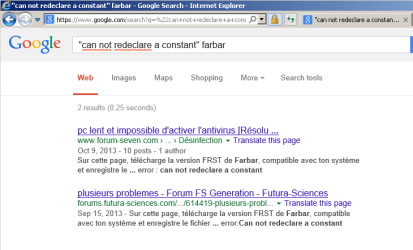
If you Google this...
"can not redeclare a constant" fabar
...you will see two forum posts:
One from Oct 2013 and one from Sept 2013.

error2.png

At least our OP is not alone :-)

I don't see how AutoIt could throw this error without there being an error in the code.

You might want to point farbar to this thread.
...or not - I'm fine with that :-)
 

My Computer My Computer

At a glance

W7 Pro SP1 64biti78GBIntel HD Graphics
Computer type
Laptop
Computer Manufacturer/Model Number
Employer provided Dell Latitude
OS
W7 Pro SP1 64bit
CPU
i7
Memory
8GB
Graphics Card(s)
Intel HD Graphics
Hard Drives
crappy SSD
Antivirus
Employer mandated Symantec Endpoint Protection
Browser
Pale Moon 64bit, IE11 64bit & Chrome 64bit
ok- I redid the scan and attached the frst file. It is on the desktop now. Here is the report
 

Attachments

My Computer My Computer

At a glance

Windows 7
Computer type
PC/Desktop
Computer Manufacturer/Model Number
HP
OS
Windows 7
Antivirus
Microsoft
Browser
IE10
OK- must be doing some thing wrong. I saved fixlist.txt onto the computer- not in documents, but when I hit Fix on FRST it says : No Fixlist.txt found. The fixlist.txt should be saved in the same directory the tool is located.
 

My Computer My Computer

At a glance

Windows 7
Computer type
PC/Desktop
Computer Manufacturer/Model Number
HP
OS
Windows 7
Antivirus
Microsoft
Browser
IE10
Save the FRST on your desktop. No other location.

Save the Fixlist.txt file on your desktop. No other location.

Run the FRST tool from your desktop. No other location.
 

My Computer My Computer

At a glance

W7 Pro SP1 64biti78GBIntel HD Graphics
Computer type
Laptop
Computer Manufacturer/Model Number
Employer provided Dell Latitude
OS
W7 Pro SP1 64bit
CPU
i7
Memory
8GB
Graphics Card(s)
Intel HD Graphics
Hard Drives
crappy SSD
Antivirus
Employer mandated Symantec Endpoint Protection
Browser
Pale Moon 64bit, IE11 64bit & Chrome 64bit

My Computer My Computer

At a glance

W7 Pro SP1 64biti78GBIntel HD Graphics
Computer type
Laptop
Computer Manufacturer/Model Number
Employer provided Dell Latitude
OS
W7 Pro SP1 64bit
CPU
i7
Memory
8GB
Graphics Card(s)
Intel HD Graphics
Hard Drives
crappy SSD
Antivirus
Employer mandated Symantec Endpoint Protection
Browser
Pale Moon 64bit, IE11 64bit & Chrome 64bit
Hmmm... I thought I did. Let me re- look again. Sorry- I am not the most computer savvy person on earth...obviously.
 

My Computer My Computer

At a glance

Windows 7
Computer type
PC/Desktop
Computer Manufacturer/Model Number
HP
OS
Windows 7
Antivirus
Microsoft
Browser
IE10
Jacee, Thank you for the input, I do appreciate it, but as Usernameissues suggested, I am going to follow one item at a time. I don't want to confuse myself either!
 

My Computer My Computer

At a glance

Windows 7
Computer type
PC/Desktop
Computer Manufacturer/Model Number
HP
OS
Windows 7
Antivirus
Microsoft
Browser
IE10
I checked and they are both definitely named properly, and both are on DESKTOP
 

My Computer My Computer

At a glance

Windows 7
Computer type
PC/Desktop
Computer Manufacturer/Model Number
HP
OS
Windows 7
Antivirus
Microsoft
Browser
IE10
OK- must be doing some thing wrong. I saved fixlist.txt onto the computer- not in documents, but when I hit Fix on FRST it says : No Fixlist.txt found. The fixlist.txt should be saved in the same directory the tool is located.

That is what scared me a bit - but there was really no reason for me to assume that you did not have both files on the desktop.

Save the FRST on your desktop. No other location.

Save the Fixlist.txt file on your desktop. No other location.

Run the FRST tool from your desktop. No other location.

Sorry if the post ^^^ quoted above sounded harsh or rude - that was not my intent.

Hmmm... I thought I did. Let me re- look again. Sorry- I am not the most computer savvy person on earth...obviously.

No need to apologize. It is I that probably came across as rude.


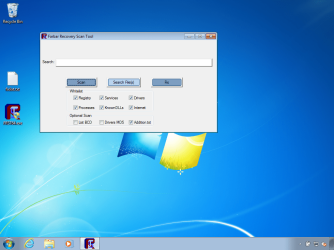
Can you let us see what you are seeing by...
...posting an image of the FRST tool opened up
...and the fixlist.txt file in the screenshot?

You don't have to show your whole desktop...
...but you can if you want to (it is up to you).

FRST.png

Here is a link on how to make/save/post screenshots:
http://www.sevenforums.com/tutorials/9733-screenshots-files-upload-post-seven-forums.html
 

My Computer My Computer

At a glance

W7 Pro SP1 64biti78GBIntel HD Graphics
Computer type
Laptop
Computer Manufacturer/Model Number
Employer provided Dell Latitude
OS
W7 Pro SP1 64bit
CPU
i7
Memory
8GB
Graphics Card(s)
Intel HD Graphics
Hard Drives
crappy SSD
Antivirus
Employer mandated Symantec Endpoint Protection
Browser
Pale Moon 64bit, IE11 64bit & Chrome 64bit
Nope- did not sound rude at all! I didn't take it that way, anyway :)
Question- this tells me how to save a screenshot, but how do I GET the screenshot in the first place please?
 

My Computer My Computer

At a glance

Windows 7
Computer type
PC/Desktop
Computer Manufacturer/Model Number
HP
OS
Windows 7
Antivirus
Microsoft
Browser
IE10

My Computer My Computer

At a glance

W7 Pro SP1 64biti78GBIntel HD Graphics
Computer type
Laptop
Computer Manufacturer/Model Number
Employer provided Dell Latitude
OS
W7 Pro SP1 64bit
CPU
i7
Memory
8GB
Graphics Card(s)
Intel HD Graphics
Hard Drives
crappy SSD
Antivirus
Employer mandated Symantec Endpoint Protection
Browser
Pale Moon 64bit, IE11 64bit & Chrome 64bit
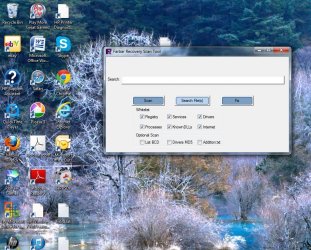
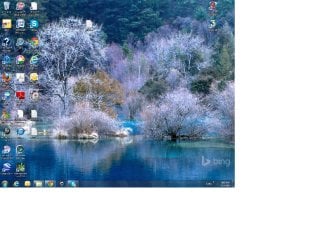
ok. Think I got it!screenshot.jpg
 

My Computer My Computer

At a glance

Windows 7
Computer type
PC/Desktop
Computer Manufacturer/Model Number
HP
OS
Windows 7
Antivirus
Microsoft
Browser
IE10
It is funny that a couple of us are playing I SPY over in this thread:
http://www.sevenforums.com/chillout-room/310901-i-spy.html
Here are the rules - if you care to join us:
http://www.sevenforums.com/chillout-room/310901-i-spy-12.html#post2589908

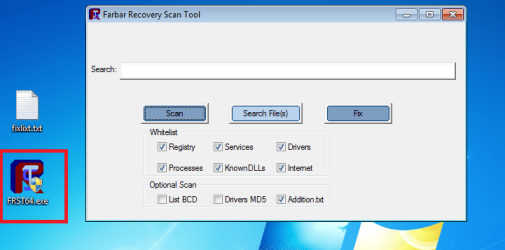
I mention that because I've been staring at images real close for hours now and when I look at a screenshot of your desktop, I'm not seeing the FRST.EXE application. This is what the FRST tool looks like on my desktop:

FRST.png

Also - one minor thing that will make your screenshots better:
Shrink the size of the white background down to about one square inch and then exit Paint. When you reopen Paint, the white background should remain small. You can re-size that white background by click (and hold) on the lower right corner and dragging it toward the upper left corner (then release the click). It is done pretty much the same way that you would re-size a window.
 

My Computer My Computer

At a glance

W7 Pro SP1 64biti78GBIntel HD Graphics
Computer type
Laptop
Computer Manufacturer/Model Number
Employer provided Dell Latitude
OS
W7 Pro SP1 64bit
CPU
i7
Memory
8GB
Graphics Card(s)
Intel HD Graphics
Hard Drives
crappy SSD
Antivirus
Employer mandated Symantec Endpoint Protection
Browser
Pale Moon 64bit, IE11 64bit & Chrome 64bit
not sure if I did it right, but try this. screenshot2.jpg
 

My Computer My Computer

At a glance

Windows 7
Computer type
PC/Desktop
Computer Manufacturer/Model Number
HP
OS
Windows 7
Antivirus
Microsoft
Browser
IE10
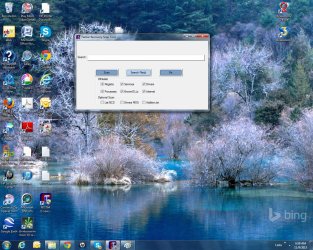
The last one was no good- I cut part off reducing. Here's a proper one- I hope. screenshot3.jpg
 

My Computer My Computer

At a glance

Windows 7
Computer type
PC/Desktop
Computer Manufacturer/Model Number
HP
OS
Windows 7
Antivirus
Microsoft
Browser
IE10
Back
Top