Can't install Win 7 on Win 8 Dell for dual boot

cougdan

New member
Local time
11:04 PM
Messages
8
Hi all-
I brand new here but have been "lurking" in this wonderful forum for a while.
I am trying to install Win 7 on my new Dell inspiron 17 5917 in order to have the dual boot option with Win 8.
I've tried to follow the excellent help threads here and feel as though I'm very close.
1) disabled secure boot in BIOS
2) created bootable USB with Win 7
3) formatted a partition on the HDD(?) to install Win 7

When I boot to USB, it says it's loading and then freezes at "Starting Windows" screen.

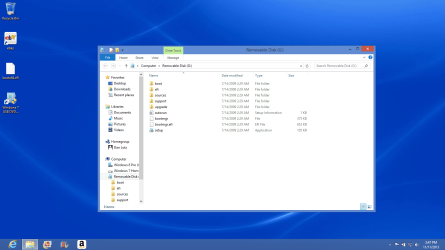
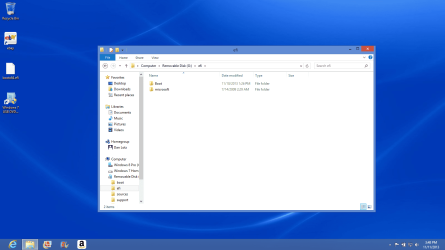
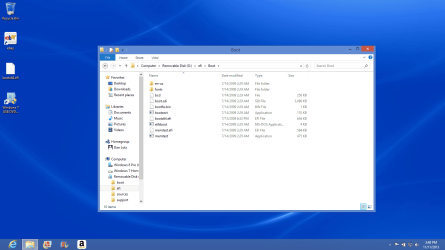
I'll try to post screen shots of "disk management" screen and Win 7 boot USB.
I know this has been discussed extensively here, but I'm hoping someone can take a look and help.
Thanks in advance.
 

Attachments
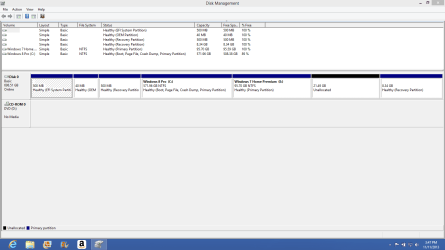
  • Screenshot (1).png
    Screenshot (1).png
    23.7 KB · Views: 5
  • Screenshot (2).png
    Screenshot (2).png
    118.8 KB · Views: 2
  • Screenshot (3).png
    Screenshot (3).png
    106.6 KB · Views: 2
  • Screenshot (4).png
    Screenshot (4).png
    118.1 KB · Views: 2

My Computer My Computer

At a glance

Win 7 home premium 64 bit
Computer type
Laptop
Computer Manufacturer/Model Number
Dell
OS
Win 7 home premium 64 bit
You have the Dell OEM disc? It worked with most models I have used.
You will have some issues setting up dual boot if it has Win 8.1 installed first.
I found I had to install Win 7 first, then Win 8. (Otherwise you end up with the Win 7 DOS boot loader)
Then after the 8.1 update, I had to copy over two hidden files on the Win 8.1 SSD (bootmgr & BOOTNXT) to the Win 7 SSD. After that dual boot worked perfectly with the 8.1 boot loader.

I will admit, I had to return a few Lenovo laptops for Dells today.
The BIOS automatically locked out a Win 8 Pro OEM install disc to just Win 8 and refused the license key from an actual OEM valid license! But I have never seen this with a Dell.

I would also check the BIOS and make sure you use Legacy Boot to install the Windows 7 and not UEFI until you finish setting it up.
 
Last edited:

My Computer My Computer

At a glance

District of Columbiai5-2430M 2.4 GHz (4 Cores)16 GB RAM (2x8GB) CrucialGeForce GT 550M 1GB
Computer type
Laptop
Computer Manufacturer/Model Number
Dell XPS L702x customized
OS
District of Columbia
CPU
i5-2430M 2.4 GHz (4 Cores)
Memory
16 GB RAM (2x8GB) Crucial
Graphics Card(s)
GeForce GT 550M 1GB
Hard Drives
2x SanDisk Ultra Plus 256 GB SSD
Dual Boot Win 7 Pro/8.1 Pro
Antivirus
MSE/MalwareBytes
Browser
Chrome
Other Info
I use StartMenu8 to make Win 8/8.1 tolerable to use, but honestly the OS is not anything expected. After 2 years they still haven't fixed Title Bar text colors and their Start Menu is for a tablet, not a multi tasking desktop. Most apps are hideous and no where near as good as a simple browser based app. Two thumbs down for the recent 8.1 update, and the pricing is a joke.
What is the Legacy BIOS or CSM settings in BIOS now?

It's possible you may not be able to install to the HD as it is now, unless you can get the installer to boot in UEFI of CSM/Legacy and it doesn't refuse to allow you to install to the partition you made - try pressing Next even if you get the warning message.

In that case you'll need to delete all partitions using the Drive Options at the drive selection screen, install Win7, then if desired later install Win8 using installer provided by Dell. I would ask them for WIn 8.1 which will activate with the license coded on your BIOS chip.
 
You have the Dell OEM disc? It worked with most models I have used.
You will have some issues setting up dual boot if it has Win 8.1 installed first.
I found I had to install Win 7 first, then Win 8. (Otherwise you end up with the Win 7 DOS boot loader)
Then after the 8.1 update, I had to copy over two hidden files on the Win 8.1 SSD (bootmgr & BOOTNXT) to the Win 7 SSD. After that dual boot worked perfectly with the 8.1 boot loader.

I will admit, I had to return a few Lenovo laptops for Dells today.
The BIOS automatically locked out a Win 8 Pro OEM install disc to just Win 8 and refused the license key from an actual OEM valid license! But I have never seen this with a Dell.

I would also check the BIOS and make sure you use Legacy Boot to install the Windows 7 and not UEFI until you finish setting it up.

To upgrade Windows 8 core, you need to use the Pro Pack.
To upgrade to Pro Pack
No install files needed.
Only the Upgrade key is need.
Add Features to Windows 8
 

My Computer My Computer

At a glance

ME/XP/Vista/Win7
OS
ME/XP/Vista/Win7
If you want to make your life easy, install Win7 with VMware Player. Then you avoid all disk problems and can run 7 and 8 side by side.

Here is a tutorial that shows you how to handle VMware Player. Just select Win7 in lieu of Win8. The rest is the same.

Here is a little demo I made running 7 and 8 side by side (in my case it is 8 that is under VMware Player - but the principle is the same).
 

My Computer My Computer

At a glance

Vista, Windows7, Mint Mate, Zorin, Windows 8from 1.6GHz Duo to i7
Computer Manufacturer/Model Number
HP, Dell, Gateway, Toshiba - 4 laptops and 2 desktops
OS
Vista, Windows7, Mint Mate, Zorin, Windows 8
CPU
from 1.6GHz Duo to i7
Monitor(s) Displays
2x HP w2207
Hard Drives
5x HDD, 7x SSD, 12x Externals
Keyboard
with trackball - no mices
Mouse
Trackball mice
Internet Speed
DSL 6000
Theog,
First, many thanks for your awesome posts!
To answer your question, I tried to initially install from DVD, but was stopped by the "GPT partition" error message. Then I created the bootable USB following instructions from here, but the install hangs up at "Starting Windows" screen .
 

My Computer My Computer

At a glance

Win 7 home premium 64 bit
Computer type
Laptop
Computer Manufacturer/Model Number
Dell
OS
Win 7 home premium 64 bit
2) created bootable USB with Win 7

When I boot to USB, it says it's loading and then freezes at "Starting Windows" screen.

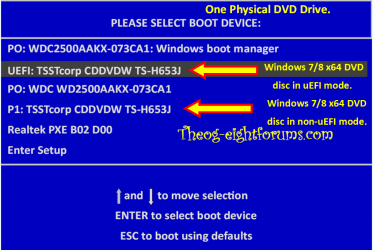
Are you booting the DVD/USB in UEFI mode?

UEFI Bootable USB Flash Drive - Create in Windows

Theog,
First, many thanks for your awesome posts!
To answer your question, I tried to initially install from DVD, but was stopped by the "GPT partition" error message. Then I created the bootable USB following instructions from here, but the install hangs up at "Starting Windows" screen .

Are you booting the DVD/USB in UEFI mode or Legacy mode?

Windows 8 Downgrade-006 SB for posting.PNG
 

My Computer My Computer

At a glance

ME/XP/Vista/Win7
OS
ME/XP/Vista/Win7
Initial boot from DVD was in legacy mode.
Subsequent attempts with USB were in UEFI mode.
 

My Computer My Computer

At a glance

Win 7 home premium 64 bit
Computer type
Laptop
Computer Manufacturer/Model Number
Dell
OS
Win 7 home premium 64 bit
Try booting the DVD in UEFI mode.
 

My Computer My Computer

At a glance

ME/XP/Vista/Win7
OS
ME/XP/Vista/Win7
I'll try that.
I have Win 7 drivers from Dell. When and how is the best time to install them?
 

My Computer My Computer

At a glance

Win 7 home premium 64 bit
Computer type
Laptop
Computer Manufacturer/Model Number
Dell
OS
Win 7 home premium 64 bit
Follow the steps to get and keep a perfect Clean Reinstall - Factory OEM Windows 7
which are same for retail and discuss how drivers are best handled in Win7.

Win7 is a driver-complete OS in the installer and via Windows Updates, so run all rounds of Important and Optional Updates after getting online and enabling Automatically deliver drivers via Windows Update (Step 3) before importing any drivers which are still missing from the PC/Device's Support Downloads webpage.

Our Drivers forum can find any driver if you need help.
 
Tried booting DVD in UEFI mode-install hangs @ "starting Windows" screen.
Any other suggestions before I give up, for now.
 

My Computer My Computer

At a glance

Win 7 home premium 64 bit
Computer type
Laptop
Computer Manufacturer/Model Number
Dell
OS
Win 7 home premium 64 bit
This same thing happens to me on many Win8 PC's including a Toshiba just yesterday. The BIOS may be locked to install any other than Windows 8 in UEFI mode. The only way to know for sure is to disable Secure Boot, during booted UEFI install wipe the HD with Diskpart Clean Command to see if it will format GPT disk for you to install. If it won't proceed with disk or USB installer, or even allow either to boot, then I'd try changing the BIOS to Legacy Boot or CSM.

You can also contact Dell or our Dell Resident here Sandeep to see if this is a known issue for your model. I would also ask at Eight Forums where they have helped me with these unnecessary problems caused by unneeded UEFI crapware overkill.
 
USB in legacy?
 

My Computer My Computer

At a glance

Windows 7 Professional 32-bit/Windows 8 64-bi...Intel Core 2 Quad Q6600/Intel Core i7 4790/In...2GB/16GB/4GBIntel G33/G31 Express(Vostro)/NVIDIA GeForce ...
Computer type
PC/Desktop
Computer Manufacturer/Model Number
Dell Vostro 400/Dell XPS 8700(Slightly Customized for me by Dell)/Toshiba Satellite T135
OS
Windows 7 Professional 32-bit/Windows 8 64-bit/Win7 Pro64-bit
CPU
Intel Core 2 Quad Q6600/Intel Core i7 4790/Intel Pentium
Memory
2GB/16GB/4GB
Graphics Card(s)
Intel G33/G31 Express(Vostro)/NVIDIA GeForce GTX 745(XPS)
Monitor(s) Displays
HP 2009m(Vostro)/ViewSonic VX2250wm-LED(XPS)
Screen Resolution
1600x900(Vostro)/1920x1080(XPS)
Hard Drives
Seagate ST3160815AS(Vostro)/Western Digital Blue(Satellite)
External:
Western Digital My Passport 0748
Samsung HM121HC
Keyboard
Dell L100)(Vostro)/Dell KB2133p(XPS)
Mouse
Dell M-UAV-DEL8(XPS)
Internet Speed
100 Mbit/s(Only when IPTV is plugged out)
Antivirus
Avast, Malwarebytes PRO
Browser
Internet Explorer 11
Other Info
Note: Names with slashes between two different parts mean that the left is my old desktop and the right is my old laptop and the middle is my new desktop.(Unless specified)
Ping is horrible for servers overseas in US and Europe.
New laptop:LG Gram(Not available in US) Processor:Intel Core i3 4th Gen Ultra Low Power RAM:4GB Hard Drive:SK Hynix OEM MSATA or M.2 Graphics:Intel HD
Thanks gregrocker.
When I try the install in legacy mode, I get an error message about "can't install to GPT partition".
If I follow the "bypass uefi to Install Win 7" instructions, will the currently loaded win 8 be deleted when I clean the HD?
 

Attachments

  • Screenshot (1).png
    Screenshot (1).png
    23.7 KB · Views: 3

My Computer My Computer

At a glance

Win 7 home premium 64 bit
Computer type
Laptop
Computer Manufacturer/Model Number
Dell
OS
Win 7 home premium 64 bit
The error when trying to install in Legacy means the HD has not been wiped or had all partitions deleted during install attempt. Did you read Bypass UEFI to Install WIn7 or my post earlier where I said you need to wipe the HD first with Diskpart Clean Command?

So enable Legacy BIOS, boot into installer, delete all partitions during install to see if that's enough for it to proceed.

Make your Recovery Disks first if you want a path back to the factory bloatware install.
 
Where do you buy your Windows 7 x64 DVD from?
 

My Computer My Computer

At a glance

ME/XP/Vista/Win7
OS
ME/XP/Vista/Win7
Theog-
I really can't remember. It was quite a while back. Got a 3-pack and only used it once before, but that install went very smoothly.
 

My Computer My Computer

At a glance

Win 7 home premium 64 bit
Computer type
Laptop
Computer Manufacturer/Model Number
Dell
OS
Win 7 home premium 64 bit
Back
Top