Constantly having wifi go to limited access only

superskid

New member
Local time
5:30 PM
Messages
15
I am not sure why, but my laptop at the office constantly goes to limited connectivity only. If I disconnect and connect it will work again, but then the cycle repeats anywhere between 2 minutes after to a couple of hours.

There are lots of other computers in the office and only mine is doing this. I have gone into the cmd prompt and run an ipconfig dnsflush release and renew. I have gone to the intel website and installed the newest drivers from my wifi chip and if anything it might be happening a bit more often.

I am using Windows 7 Ultimate x64.

I am at a loss of what to try next, it would be greatly appreciated if someone could help me out. I am happy to follow instructions posted and provide any log files that you think may be of use.

Thanks,
 

My Computer My Computer

At a glance

Windows 7 Ultimate x64
OS
Windows 7 Ultimate x64
Motherboard
Asus P5Q Deluxe
Sound Card
On board
Monitor(s) Displays
42" LG TV (42LF11)
Hard Drives
1 x 128GB M4 SSD
6 X 2TB Green
Pretty standard problem but with many possible causes.

If I can take a look at the ipconfig/all I may be able to help. :)
 

My Computer My Computer

At a glance

Windows 7 Ult, Windows 8.1 Pro,Q9650-4.275GHz, E8600 4.5GHz, E6750-3.8GHzG.Skill PC2 9600 1200Mhz 5 5 5 15 2TGTX480
Computer type
PC/Desktop
Computer Manufacturer/Model Number
Home built
OS
Windows 7 Ult, Windows 8.1 Pro,
CPU
Q9650-4.275GHz, E8600 4.5GHz, E6750-3.8GHz
Motherboard
Evga 780i FTW
Memory
G.Skill PC2 9600 1200Mhz 5 5 5 15 2T
Graphics Card(s)
GTX480
Sound Card
Asus Xonar D2
Monitor(s) Displays
HannsG
Screen Resolution
1680X1050
Hard Drives
GSkill Phoenix Pro 120GB SSD
PSU
ThermalTake Toughpower 1000Watt modular
Case
ThermalTake XaserV
Cooling
Xigmatek S1283
Keyboard
Logitech G15
Mouse
Logitech G9
Internet Speed
T1
Pretty standard problem but with many possible causes.

If I can take a look at the ipconfig/all I may be able to help. :)

And, let us know WHICH versions of the drivers you're using. The latest I find are from 2009 :)
 

My Computer My Computer

At a glance

Microsoft Windows 10 Home Build 15036Intel(R) Core(TM) i7-860 @ 2.80GHz4.00 GBNVIDIA GeForce GTX 750
Computer type
PC/Desktop
Computer Manufacturer/Model Number
iBuyPower NZXT
OS
Microsoft Windows 10 Home Build 15036
CPU
Intel(R) Core(TM) i7-860 @ 2.80GHz
Motherboard
Gigabyte Technology Co., Ltd. P55-UD3L
Memory
4.00 GB
Graphics Card(s)
NVIDIA GeForce GTX 750
Sound Card
(1) Line 6 UX2 (2) Realtek High Definition Audio
Monitor(s) Displays
23" acer
Screen Resolution
1920 x 1080 x 32 bits (4294967296 colors) @ 60 Hz
Hard Drives
(1) WDC WD5000AAKS-00D2B0 ATA Device (2) Seagate FreeAgent Go 250G USB Device
Cooling
Corsair H75 liquid cooler (Very easy to install, actually)
Internet Speed
60M cable modem-->Linksys E1200-->1Gbps net card
Browser
Chrome
Other Info
This is probably the longest I've ever had a Windows machine run without having to restore it to scratch. I'm used to restoring to "factory" about every 2 yrs. I've run with Win7 since new in 2009 and only recently (Nov, '14) restored to clean up the machine from all my 'xperimenting. LOL!! I may never need another machine.

Upgraded to 10 when it was still free, then installed 2017 update.
Microsoft Windows [Version 6.1.7601]
Copyright (c) 2009 Microsoft Corporation. All rights reserved.

C:\Users\John>ipconfig /all

Windows IP Configuration

Host Name . . . . . . . . . . . . : John-Seair
Primary Dns Suffix . . . . . . . :
Node Type . . . . . . . . . . . . : Hybrid
IP Routing Enabled. . . . . . . . : No
WINS Proxy Enabled. . . . . . . . : No

Ethernet adapter Local Area Connection 2:

Media State . . . . . . . . . . . : Media disconnected
Connection-specific DNS Suffix . :
Description . . . . . . . . . . . : TAP-Windows Adapter V9
Physical Address. . . . . . . . . : 00-FF-BE-65-59-16
DHCP Enabled. . . . . . . . . . . : Yes
Autoconfiguration Enabled . . . . : Yes

Wireless LAN adapter Wireless Network Connection 2:

Media State . . . . . . . . . . . : Media disconnected
Connection-specific DNS Suffix . :
Description . . . . . . . . . . . : Microsoft Virtual WiFi Miniport Adapter
Physical Address. . . . . . . . . : 84-3A-4B-09-4A-9F
DHCP Enabled. . . . . . . . . . . : Yes
Autoconfiguration Enabled . . . . : Yes

Wireless LAN adapter Wireless Network Connection:

Connection-specific DNS Suffix . :
Description . . . . . . . . . . . : Intel(R) Centrino(R) Advanced-N 6205
Physical Address. . . . . . . . . : 84-3A-4B-09-4A-9E
DHCP Enabled. . . . . . . . . . . : Yes
Autoconfiguration Enabled . . . . : Yes
IPv4 Address. . . . . . . . . . . : 192.168.1.62(Preferred)
Subnet Mask . . . . . . . . . . . : 255.255.255.0
Lease Obtained. . . . . . . . . . : Saturday, November 09, 2013 4:42:55 PM
Lease Expires . . . . . . . . . . : Sunday, November 10, 2013 4:42:55 PM
Default Gateway . . . . . . . . . : 192.168.1.1
DHCP Server . . . . . . . . . . . : 192.168.1.1
DNS Servers . . . . . . . . . . . : 192.168.1.1
NetBIOS over Tcpip. . . . . . . . : Enabled

Ethernet adapter Local Area Connection:

Media State . . . . . . . . . . . : Media disconnected
Connection-specific DNS Suffix . :
Description . . . . . . . . . . . : Intel(R) 82579LM Gigabit Network Connecti
on
Physical Address. . . . . . . . . : 3C-97-0E-1A-99-62
DHCP Enabled. . . . . . . . . . . : Yes
Autoconfiguration Enabled . . . . : Yes

Ethernet adapter Bluetooth Network Connection:

Media State . . . . . . . . . . . : Media disconnected
Connection-specific DNS Suffix . :
Description . . . . . . . . . . . : Bluetooth Device (Personal Area Network)
Physical Address. . . . . . . . . : 7C-E9-D3-E4-75-7A
DHCP Enabled. . . . . . . . . . . : Yes
Autoconfiguration Enabled . . . . : Yes

Tunnel adapter Local Area Connection* 12:

Media State . . . . . . . . . . . : Media disconnected
Connection-specific DNS Suffix . :
Description . . . . . . . . . . . : Microsoft ISATAP Adapter #3
Physical Address. . . . . . . . . : 00-00-00-00-00-00-00-E0
DHCP Enabled. . . . . . . . . . . : No
Autoconfiguration Enabled . . . . : Yes

Tunnel adapter Teredo Tunneling Pseudo-Interface:

Connection-specific DNS Suffix . :
Description . . . . . . . . . . . : Teredo Tunneling Pseudo-Interface
Physical Address. . . . . . . . . : 00-00-00-00-00-00-00-E0
DHCP Enabled. . . . . . . . . . . : No
Autoconfiguration Enabled . . . . : Yes
IPv6 Address. . . . . . . . . . . : 2001:0:9d38:6ab8:c00:3400:3f57:fec1(Prefe
rred)
Link-local IPv6 Address . . . . . : fe80::c00:3400:3f57:fec1%15(Preferred)
Default Gateway . . . . . . . . . : ::
NetBIOS over Tcpip. . . . . . . . : Disabled

Tunnel adapter isatap.{07D959BB-8367-4ED4-8EFD-7CAB5EE0B9AD}:

Media State . . . . . . . . . . . : Media disconnected
Connection-specific DNS Suffix . :
Description . . . . . . . . . . . : Microsoft ISATAP Adapter #5
Physical Address. . . . . . . . . : 00-00-00-00-00-00-00-E0
DHCP Enabled. . . . . . . . . . . : No
Autoconfiguration Enabled . . . . : Yes


10gFzFc.png
 

My Computer My Computer

At a glance

Windows 7 Ultimate x64
OS
Windows 7 Ultimate x64
Motherboard
Asus P5Q Deluxe
Sound Card
On board
Monitor(s) Displays
42" LG TV (42LF11)
Hard Drives
1 x 128GB M4 SSD
6 X 2TB Green
The IP is valid and looks good.

You should try disabling the Microsoft Virtual WiFi Miniport adaptor first. After that test the connection for while and see if there are any changes. This virtual adaptor has been known to cause problems.

If that doesn't fix anything then try disabling the Bluetooth devices one at a time, see if that has an effect on the problem and let me know.
 

My Computer My Computer

At a glance

Windows 7 Ult, Windows 8.1 Pro,Q9650-4.275GHz, E8600 4.5GHz, E6750-3.8GHzG.Skill PC2 9600 1200Mhz 5 5 5 15 2TGTX480
Computer type
PC/Desktop
Computer Manufacturer/Model Number
Home built
OS
Windows 7 Ult, Windows 8.1 Pro,
CPU
Q9650-4.275GHz, E8600 4.5GHz, E6750-3.8GHz
Motherboard
Evga 780i FTW
Memory
G.Skill PC2 9600 1200Mhz 5 5 5 15 2T
Graphics Card(s)
GTX480
Sound Card
Asus Xonar D2
Monitor(s) Displays
HannsG
Screen Resolution
1680X1050
Hard Drives
GSkill Phoenix Pro 120GB SSD
PSU
ThermalTake Toughpower 1000Watt modular
Case
ThermalTake XaserV
Cooling
Xigmatek S1283
Keyboard
Logitech G15
Mouse
Logitech G9
Internet Speed
T1
I'd be sure that there is no BIOS or OS setting that will put the wireless card in a "pwr save" mode and drop power on the transmitter.
 

My Computer My Computer

At a glance

Microsoft Windows 10 Home Build 15036Intel(R) Core(TM) i7-860 @ 2.80GHz4.00 GBNVIDIA GeForce GTX 750
Computer type
PC/Desktop
Computer Manufacturer/Model Number
iBuyPower NZXT
OS
Microsoft Windows 10 Home Build 15036
CPU
Intel(R) Core(TM) i7-860 @ 2.80GHz
Motherboard
Gigabyte Technology Co., Ltd. P55-UD3L
Memory
4.00 GB
Graphics Card(s)
NVIDIA GeForce GTX 750
Sound Card
(1) Line 6 UX2 (2) Realtek High Definition Audio
Monitor(s) Displays
23" acer
Screen Resolution
1920 x 1080 x 32 bits (4294967296 colors) @ 60 Hz
Hard Drives
(1) WDC WD5000AAKS-00D2B0 ATA Device (2) Seagate FreeAgent Go 250G USB Device
Cooling
Corsair H75 liquid cooler (Very easy to install, actually)
Internet Speed
60M cable modem-->Linksys E1200-->1Gbps net card
Browser
Chrome
Other Info
This is probably the longest I've ever had a Windows machine run without having to restore it to scratch. I'm used to restoring to "factory" about every 2 yrs. I've run with Win7 since new in 2009 and only recently (Nov, '14) restored to clean up the machine from all my 'xperimenting. LOL!! I may never need another machine.

Upgraded to 10 when it was still free, then installed 2017 update.
Try to download the latest Intel PROSet/Wireless WiFi Software version 15.9.1.2 here: Station-Drivers - Intel (Wlan & Lan)

If you prefer installing the drivers only (no Proset software), you need to open the extracted folder and then open "Driver.msi".

After installing the drivers, go to device manager -> double click on your Intel 6205 -> power management -> uncheck "Allow the computer to turn off this device to save power."

Then go to "Advanced" tab -> set the "Ad Hoc QoS mode" to "WMM Enabled". Go to "Preferred Band" then set "prefer 5.2 GHz band". Finally, Go to Wireless Mode. Set it to "802.11 a/g"

Test and see if your laptop still goes to limited connection after awhile.
 

My Computer My Computer

At a glance

Windows 7 Professional x64 SP1Intel® Pentium® 4 @ 2.26 GHz, Intel Core i7-2...512MB Dual channel DDR SDRAM @ 400MHz 2.5-3-3...Intel 82865G, Nvidia GeForce 520M Graphics
Computer type
Laptop
Computer Manufacturer/Model Number
Dell Optiplex SX270, Lenovo Z470
OS
Windows 7 Professional x64 SP1
CPU
Intel® Pentium® 4 @ 2.26 GHz, Intel Core i7-2670QM @ 2.20 GH
Motherboard
Dell, Lenovo
Memory
512MB Dual channel DDR SDRAM @ 400MHz 2.5-3-3-7, 8 GB DDR3
Graphics Card(s)
Intel 82865G, Nvidia GeForce 520M Graphics
Sound Card
SoundMax Integrated Audio, Integrated HD Audio
Monitor(s) Displays
LG W1952
Screen Resolution
1440x900, 1366 x 768
Hard Drives
40 GB 2.5" IDE 4200 RPM HDD, 500 GB 5400 RPM Sata 1.5 + 32 GB SSD
PSU
Dell 145 Watt, Lenovo 120 Watt Power Adapter
Case
Optiplex SX270 Small Form Factor, Laptop
Cooling
Dell Proprietary Air Cooling, Stock laptop cooling
Keyboard
Dell SK-8125 USB Keyboard
Mouse
Dell PS/2 2 button ball mouse with wheel scroll
Internet Speed
300 Mbit down / 20 Mbps up Time Warner Cable
Antivirus
MSE, Malwarebytes Scanner
Browser
Internet (Aizawa) Explorer 11
Other Info
Running Windows Server 2012 Datacenter on a virtual machine to run Metro Apps.
Try to download the latest Intel PROSet/Wireless WiFi Software version 15.9.1.2 here: Station-Drivers - Intel (Wlan & Lan)

If you prefer installing the drivers only (no Proset software), you need to open the extracted folder and then open "Driver.msi".

After installing the drivers, go to device manager -> double click on your Intel 6205 -> power management -> uncheck "Allow the computer to turn off this device to save power."

Then go to "Advanced" tab -> set the "Ad Hoc QoS mode" to "WMM Enabled". Go to "Preferred Band" then set "prefer 5.2 GHz band". Finally, Go to Wireless Mode. Set it to "802.11 a/g"

Test and see if your laptop still goes to limited connection after awhile.


OK, I have done all of this and still have the exact same problem; however, I took my laptop home and didn't have this issue once. Then back to work and it's doing it again. At work I have an apple router, is it something in the setup? Not one other person at work has these issues though.
 

My Computer My Computer

At a glance

Windows 7 Ultimate x64
OS
Windows 7 Ultimate x64
Motherboard
Asus P5Q Deluxe
Sound Card
On board
Monitor(s) Displays
42" LG TV (42LF11)
Hard Drives
1 x 128GB M4 SSD
6 X 2TB Green
The driver you showed was from 6-16-13 so seemed pretty much updated to me and no reason to update really. I would also question the reason for setting the wireless to use a/g when it should work best using n.

Are there other Windows 7 machines connected to the Apple router?

Did you try disabling the Bluetooth and the Msoft mini port adaptor?

I asked this for good reason as both have been known to cause limited connection issues.

No response on that form you?
 

My Computer My Computer

At a glance

Windows 7 Ult, Windows 8.1 Pro,Q9650-4.275GHz, E8600 4.5GHz, E6750-3.8GHzG.Skill PC2 9600 1200Mhz 5 5 5 15 2TGTX480
Computer type
PC/Desktop
Computer Manufacturer/Model Number
Home built
OS
Windows 7 Ult, Windows 8.1 Pro,
CPU
Q9650-4.275GHz, E8600 4.5GHz, E6750-3.8GHz
Motherboard
Evga 780i FTW
Memory
G.Skill PC2 9600 1200Mhz 5 5 5 15 2T
Graphics Card(s)
GTX480
Sound Card
Asus Xonar D2
Monitor(s) Displays
HannsG
Screen Resolution
1680X1050
Hard Drives
GSkill Phoenix Pro 120GB SSD
PSU
ThermalTake Toughpower 1000Watt modular
Case
ThermalTake XaserV
Cooling
Xigmatek S1283
Keyboard
Logitech G15
Mouse
Logitech G9
Internet Speed
T1
I have tried disabling the bluetooth and mini port adapters, I still drop to limited connectivity anywhere from 5 mins to 90 mins after reconnecting.

There are other windows 7 machines connecting, no one else having problems.
 

My Computer My Computer

At a glance

Windows 7 Ultimate x64
OS
Windows 7 Ultimate x64
Motherboard
Asus P5Q Deluxe
Sound Card
On board
Monitor(s) Displays
42" LG TV (42LF11)
Hard Drives
1 x 128GB M4 SSD
6 X 2TB Green
It may be worth while to start up in safe mode with networking so as to isolate the cause.

If the problem goes away in safe mode then it's most likely that something installed on the system is causing the problem like a third party A/V software etc..

Running the following file will flush the DNS on this machine and reset the network stack, this may be worth a shot as no problems are showing up in the ipconfig.

You might also want to run the sfc /scannow command in an elevated command prompt to fix any possible system file problems. ;)
 

Attachments

My Computer My Computer

At a glance

Windows 7 Ult, Windows 8.1 Pro,Q9650-4.275GHz, E8600 4.5GHz, E6750-3.8GHzG.Skill PC2 9600 1200Mhz 5 5 5 15 2TGTX480
Computer type
PC/Desktop
Computer Manufacturer/Model Number
Home built
OS
Windows 7 Ult, Windows 8.1 Pro,
CPU
Q9650-4.275GHz, E8600 4.5GHz, E6750-3.8GHz
Motherboard
Evga 780i FTW
Memory
G.Skill PC2 9600 1200Mhz 5 5 5 15 2T
Graphics Card(s)
GTX480
Sound Card
Asus Xonar D2
Monitor(s) Displays
HannsG
Screen Resolution
1680X1050
Hard Drives
GSkill Phoenix Pro 120GB SSD
PSU
ThermalTake Toughpower 1000Watt modular
Case
ThermalTake XaserV
Cooling
Xigmatek S1283
Keyboard
Logitech G15
Mouse
Logitech G9
Internet Speed
T1
It may be worth while to start up in safe mode with networking so as to isolate the cause.

If the problem goes away in safe mode then it's most likely that something installed on the system is causing the problem like a third party A/V software etc..


Even though I get no problems connecting to networks at home or friends places? It would seem if it was third party software the problem wouldnt be isolated to this one network?
 

My Computer My Computer

At a glance

Windows 7 Ultimate x64
OS
Windows 7 Ultimate x64
Motherboard
Asus P5Q Deluxe
Sound Card
On board
Monitor(s) Displays
42" LG TV (42LF11)
Hard Drives
1 x 128GB M4 SSD
6 X 2TB Green
It may be worth while to start up in safe mode with networking so as to isolate the cause.

If the problem goes away in safe mode then it's most likely that something installed on the system is causing the problem like a third party A/V software etc..


Even though I get no problems connecting to networks at home or friends places? It would seem if it was third party software the problem wouldnt be isolated to this one network?

With an intermittent problem like this it's very difficult to nail down the cause so all we can do is run standard tests and see what it comes up with.

This could also be a compatibility problem between this specific wireless NIC and the type of router being used at work.
 

My Computer My Computer

At a glance

Windows 7 Ult, Windows 8.1 Pro,Q9650-4.275GHz, E8600 4.5GHz, E6750-3.8GHzG.Skill PC2 9600 1200Mhz 5 5 5 15 2TGTX480
Computer type
PC/Desktop
Computer Manufacturer/Model Number
Home built
OS
Windows 7 Ult, Windows 8.1 Pro,
CPU
Q9650-4.275GHz, E8600 4.5GHz, E6750-3.8GHz
Motherboard
Evga 780i FTW
Memory
G.Skill PC2 9600 1200Mhz 5 5 5 15 2T
Graphics Card(s)
GTX480
Sound Card
Asus Xonar D2
Monitor(s) Displays
HannsG
Screen Resolution
1680X1050
Hard Drives
GSkill Phoenix Pro 120GB SSD
PSU
ThermalTake Toughpower 1000Watt modular
Case
ThermalTake XaserV
Cooling
Xigmatek S1283
Keyboard
Logitech G15
Mouse
Logitech G9
Internet Speed
T1
The router at work is an apple router.

OK, it may take me longer to do the safemode thing as when I'm at work I'm generally using my computer the whole time and won't be able to use it while in safemode, since the disconnect can happen after any random amount of time.
 

My Computer My Computer

At a glance

Windows 7 Ultimate x64
OS
Windows 7 Ultimate x64
Motherboard
Asus P5Q Deluxe
Sound Card
On board
Monitor(s) Displays
42" LG TV (42LF11)
Hard Drives
1 x 128GB M4 SSD
6 X 2TB Green
I'm also not sure the type of laptop as it's not in your specs?

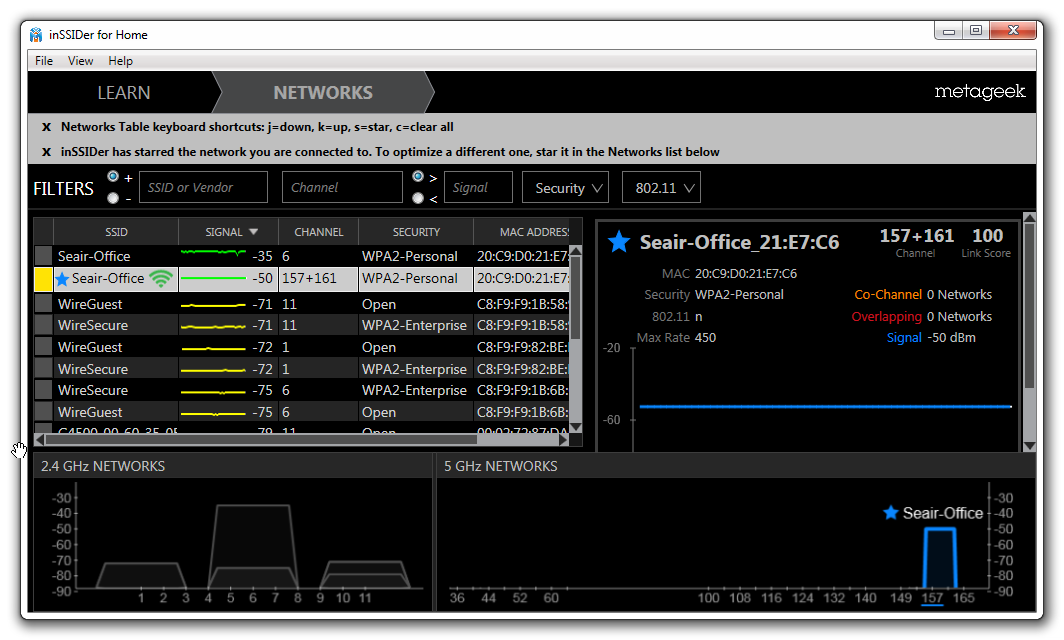
An inSSIDer snap shot of the wireless landscape at the office might also be helpful, could just be a channel crossover problem but hard to say from here. It's a small program easy to install and very useful.

inSSIDer for Home ? Discover The Wi-Fi Around You | MetaGeek
 

My Computer My Computer

At a glance

Windows 7 Ult, Windows 8.1 Pro,Q9650-4.275GHz, E8600 4.5GHz, E6750-3.8GHzG.Skill PC2 9600 1200Mhz 5 5 5 15 2TGTX480
Computer type
PC/Desktop
Computer Manufacturer/Model Number
Home built
OS
Windows 7 Ult, Windows 8.1 Pro,
CPU
Q9650-4.275GHz, E8600 4.5GHz, E6750-3.8GHz
Motherboard
Evga 780i FTW
Memory
G.Skill PC2 9600 1200Mhz 5 5 5 15 2T
Graphics Card(s)
GTX480
Sound Card
Asus Xonar D2
Monitor(s) Displays
HannsG
Screen Resolution
1680X1050
Hard Drives
GSkill Phoenix Pro 120GB SSD
PSU
ThermalTake Toughpower 1000Watt modular
Case
ThermalTake XaserV
Cooling
Xigmatek S1283
Keyboard
Logitech G15
Mouse
Logitech G9
Internet Speed
T1
The computer is a lenovo w520 product specs 4282CS5

The channels that I am connected to on this network do seem strange? or maybe that is a 5ghz thing?

SykhkwI.png
 

My Computer My Computer

At a glance

Windows 7 Ultimate x64
OS
Windows 7 Ultimate x64
Motherboard
Asus P5Q Deluxe
Sound Card
On board
Monitor(s) Displays
42" LG TV (42LF11)
Hard Drives
1 x 128GB M4 SSD
6 X 2TB Green
Here could be a reason. You are connected to the 5GHz frequency although the connection looks good there must be some sort of problem with stability which could be a compatibility problem of some sort.

It's possible either a driver or firmware update could help fix this but it's best to test if this is the actual problem first. https://downloadcenter.intel.com/Detail_Desc.aspx?ProductID=3316&DwnldID=23391&lang=eng&iid=dc_rss

If you can try connecting to the 2.4Ghz radio it may be more stable for you. It could be using the same password or different.

The 2.4Ghz is showing up with a strong signal using channel 6 so try to delete the wireless profile for the 5Ghz for now then create a new wireless profile for the 2.4Ghz connection so as to only connect to that one then test to see if it's more stable for you.
 
Last edited:

My Computer My Computer

At a glance

Windows 7 Ult, Windows 8.1 Pro,Q9650-4.275GHz, E8600 4.5GHz, E6750-3.8GHzG.Skill PC2 9600 1200Mhz 5 5 5 15 2TGTX480
Computer type
PC/Desktop
Computer Manufacturer/Model Number
Home built
OS
Windows 7 Ult, Windows 8.1 Pro,
CPU
Q9650-4.275GHz, E8600 4.5GHz, E6750-3.8GHz
Motherboard
Evga 780i FTW
Memory
G.Skill PC2 9600 1200Mhz 5 5 5 15 2T
Graphics Card(s)
GTX480
Sound Card
Asus Xonar D2
Monitor(s) Displays
HannsG
Screen Resolution
1680X1050
Hard Drives
GSkill Phoenix Pro 120GB SSD
PSU
ThermalTake Toughpower 1000Watt modular
Case
ThermalTake XaserV
Cooling
Xigmatek S1283
Keyboard
Logitech G15
Mouse
Logitech G9
Internet Speed
T1
OK, I went into the apple router and gave the 5ghz name a different network name. I then connected the the 2.4GHZ network and same thing. I am going limited connectivity constantly. Today is a very bad day, seems like every 20 minutes.
 

My Computer My Computer

At a glance

Windows 7 Ultimate x64
OS
Windows 7 Ultimate x64
Motherboard
Asus P5Q Deluxe
Sound Card
On board
Monitor(s) Displays
42" LG TV (42LF11)
Hard Drives
1 x 128GB M4 SSD
6 X 2TB Green
OK, I went into the apple router and gave the 5ghz name a different network name. I then connected the the 2.4GHZ network and same thing. I am going limited connectivity constantly. Today is a very bad day, seems like every 20 minutes.

The connections with the Apple router are plenty good but the compatibility seems to be a problem with this particular network adaptor. This is fairly typical for the newer 802.11ac routers.

I'm sure there is a firmware update for the Apple router as well which may help.

Try installing the latest driver in the link for the Intel adaptor which is dated just a few days ago.

https://downloadcenter.intel.com/Detail_Desc.aspx?ProductID=3316&DwnldID=23391&lang=eng&iid=dc_rss
 

My Computer My Computer

At a glance

Windows 7 Ult, Windows 8.1 Pro,Q9650-4.275GHz, E8600 4.5GHz, E6750-3.8GHzG.Skill PC2 9600 1200Mhz 5 5 5 15 2TGTX480
Computer type
PC/Desktop
Computer Manufacturer/Model Number
Home built
OS
Windows 7 Ult, Windows 8.1 Pro,
CPU
Q9650-4.275GHz, E8600 4.5GHz, E6750-3.8GHz
Motherboard
Evga 780i FTW
Memory
G.Skill PC2 9600 1200Mhz 5 5 5 15 2T
Graphics Card(s)
GTX480
Sound Card
Asus Xonar D2
Monitor(s) Displays
HannsG
Screen Resolution
1680X1050
Hard Drives
GSkill Phoenix Pro 120GB SSD
PSU
ThermalTake Toughpower 1000Watt modular
Case
ThermalTake XaserV
Cooling
Xigmatek S1283
Keyboard
Logitech G15
Mouse
Logitech G9
Internet Speed
T1
Back
Top