This started about a month ago when a system restore completely mucked up my computer. I've managed to fix most of the problems (NoelDP is a wizard) but I can't get past the start up screen with the Nvidia drivers enabled. I think I managed to get past it once after a clean install but then I kept getting BSODs. It could be an outdated BIOS (when I click on @BIOS in the GIGABYTE folder in 'All Programs' I get a BSOD) but I really want to know if there are more options before I start mucking around with BIOS flashing.
The graphics card I have is a GIGABYTE GeForce GTX 660 and I've done clean installs of at least 3 different Nvidia driver versions.
Nakitu mate this is the right driver for the card - not the top one as it is beta and I would if I were you dump the AVG and pick a different security.
One other Desktop (tester) and spare Toshba laptop both with SSD's
Running Kaspersky 2016 ISS on all machines config'd identically
Logitec audio stereo systems on each machine (x3)
Canon MG5250MFC
Router/modem TP-Link running WPA2SK
No, I've tried previous working versions along with the newest WHQL/beta drivers for the right graphics card. I use AVG in conjunction with MalwareBytes; it does the job as long as I don't go to fishy sites (I doubt it's related to the problem). Could you suggest things to try before I try flashing the BIOS?
AVG has actually caused me a lot of problems in the past. for your motherboard sometimes there is chip-set drivers like for mine there is one and i need to use them for my graphics to display correctly. So it might help if you download the right drivers.
-edit- if there is any specific for yours?
-Second edit- There is device specific check the link below:
Like crytoncore has said mate the AVG is really not a good player and in my humble opinion I would never have it on board as many years ago I had an untold number of problems with it on board.
It is also very hard to get rid of too I found and that in itself speaks rams to me but the choice is yours.
I gave you some options and this is another link I did not mention last night. Probably the Best Free Security List in the World section 2 is the real time stuff the rest is a good list of other stuff you can use for all sorts of problems.
My Computer
Computer type
PC/Desktop
Computer Manufacturer/Model Number
Own build (new) Desk1 / Asus ROG Win 7 / Desk2 1st build
OS
Desk1 7 Home Prem / Desk2 10 Pro / Main lap Asus ROG 10 Pro 2 laptop Toshiba 7 Pro Asus P2520 7 & 10
One other Desktop (tester) and spare Toshba laptop both with SSD's
Running Kaspersky 2016 ISS on all machines config'd identically
Logitec audio stereo systems on each machine (x3)
Canon MG5250MFC
Router/modem TP-Link running WPA2SK
Not possible at all mate. On that score, you're fine.
When you say clean install of drivers, are you talking about just uninstalling through programs and features?
Sounds like you'd be better off using Driver Fusion to remove all nvidia drivers/settings etc as well.
Uninstall the nvidia drivers. In safe mode since you can't boot properly.
Run Driver Fusion select Display> Nvidia
Reboot normally and re-install the nvidia drivers.
If the PC is still Blue screening afterwards, you might have to start a thread in the BSOD section to determine whats actually causing the blue screens.
My Computer
Computer type
PC/Desktop
Computer Manufacturer/Model Number
Systems by SmartEyeball
OS
8 Pro x64
CPU
i7 3770K 4.6GHz
Motherboard
ASUS P8Z77 WS
Memory
16GB G.Skill Trident X 2666mhz
Graphics Card(s)
x2 EVGA 780 Ti Superclocked SLI
Sound Card
SB X-FI Surround 5.1 PRO USB / ATH-AD900 Headphones
Monitor(s) Displays
x3 Dell U2410 / 58" Samsung
Screen Resolution
5760*1200/ 1920*1200
Hard Drives
2x Intel 520 240GB (RAID 0) * 2x WD Caviar Blacks 2TB (RAID 0) * 2TB WD Caviar Black * Sony Optirac DVD
Thermaltake Theron (Highly Recommended) + Razer Imperator
Antivirus
MSE
Browser
IE, FF, WaterFox
Other Info
GT Extreme V2 Sim Racing Cockpit + 40" LCD and K/B Mouse stand ▼
Fanatec CSR Elite Wheel + Clubsport V1 Pedals + CSR shifter/7G-H ▼Saitek X52 Pro ▼ TrackIR 5 Pro
Buttkicker v2 Seat Rumbler with Dedicated 5.1 and Sub Woofer attached to frame ▼
=
Bloody Big Grin
No, this all started with a system restore gone wrong so if there is a program causing it, it's not obvious.
I've already used Driver Sweeper and turned off automatic installation of drivers. I've just used my old disc that came with my GPU and installed something called Gigabyte OC Guru for diagnostics but that gave a BSOD too . This has been the case with accessing @BIOS in All Programs as well so it seems like every driver related to my graphics card crashes. I have GPU-Z which shows that my graphics card is at least alive, but I don't know how well...
Is there like a main driver specific to GIGABYTE graphics cards that needs fixing?
No mate there is no specific Giga driver the driver you need is the one Iquoted earlier http://www.geforce.com/driversas (unless I am very wrong) the GPU brands use the NVidia base.
Just for info I hardly ever used the Gigabyte disk when I built my Sandy Bridge because the drivers for example were so far behind the current ones. I always use the manufacturers site as the Windows feature in my humble opinion is a waste of space.
Plus the disk also has a ton of unwanted crapware that I personally (I don't know about anyone else) I do not need as it screws things up.
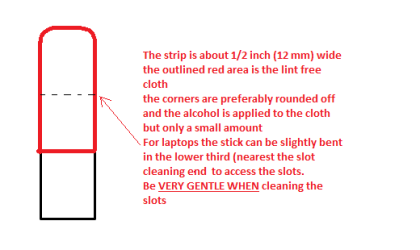
Now as for the slots to clean them use astrip of old credit card about 1/2 inch wide nip the corners off one end - preferably round them off hold apiece of thin lint free cloth over the end dab on some form of alcohol - isopropyl alcohol (what we swab the skin with before an injection) is good and GENTLY swipe along the slots.
This can also be done for the GPU slot/s.
You may think this a lot of trouble to go to but it will eliminate some other probabilities even though they may look unrelated.
Attachments
STICK CLEANER.PNG
4.9 KB
· Views: 11
My Computer
Computer type
PC/Desktop
Computer Manufacturer/Model Number
Own build (new) Desk1 / Asus ROG Win 7 / Desk2 1st build
OS
Desk1 7 Home Prem / Desk2 10 Pro / Main lap Asus ROG 10 Pro 2 laptop Toshiba 7 Pro Asus P2520 7 & 10
One other Desktop (tester) and spare Toshba laptop both with SSD's
Running Kaspersky 2016 ISS on all machines config'd identically
Logitec audio stereo systems on each machine (x3)
Canon MG5250MFC
Router/modem TP-Link running WPA2SK
Sorry for letting this thread get cold. I've arranged to test my graphics card with my friend's computer for when the holidays start to confirm whether it's my graphics card causing the problem. It's likely my PSU actually causing the problem; I occasionally got full-on crashes while playing PlanetSide 2 and one unusual crash while watching Youtube prior to the system restore. Serves me right for being a cheapskate and buying a 500w PSU


 . This has been the case with accessing @BIOS in All Programs as well so it seems like every driver related to my graphics card crashes. I have GPU-Z which shows that my graphics card is at least alive, but I don't know how well...