BSOD playing Grooveshark in Google Chrome, "cdd.dll" mentioned.

kmplsv

New member
Local time
9:47 PM
Messages
7
BSOD playing Grooveshark in Google Chrome, "cdd.dll" mentioned.

I was listening to music in Grooveshark in Chrome and the BSOD occured. There was a mention of "cdd.dll" but I couldn't get much more info other than that. I've attached my SF Diagnostic Tool file.
 

My Computer My Computer

At a glance

Windows 7 Professional x64 w/ SP1Intel Core i7 92012GB (6GB OCZ3G1600LV2G + F3-12800CL9T-6GBNQ)Sapphire ATI Radeon 4870x2 (Catalyst 10.10 w/...
Computer type
PC/Desktop
Computer Manufacturer/Model Number
Custom
OS
Windows 7 Professional x64 w/ SP1
CPU
Intel Core i7 920
Motherboard
Asus P6T Deluxe (x58) w/ Latest BIOS
Memory
12GB (6GB OCZ3G1600LV2G + F3-12800CL9T-6GBNQ)
Graphics Card(s)
Sapphire ATI Radeon 4870x2 (Catalyst 10.10 w/ OpenCL)
Sound Card
SoundMAX Integrated Digital HD Audio (SPDIF)
Monitor(s) Displays
BenQ E2400HD
Screen Resolution
1920x1080
Hard Drives
Intel X25-M 80GB SSDSA2M080G2GN
Samsung Spinpoint F1 DT 1TB
PSU
Xclio Greatpower 850w
Case
Antec Twelve Hundred
Cooling
Air - (1) top 200mm, (2) rear 120mm, (3) front 120mm
Hi kmplsv :) .

No dump files are present in the zip file as well as no logs are present of such occurrences.
please manually check the minidump folder.
Code:
C:\Windows\minidump
If dump files are present in that folder copy them to the Desktop, zip and upload in your next post.

:ar: Make sure you have your PC configured to generate a minidump.


:ar: Stop using CCleaner for the duration of the debugging process as it deletes the minidump files!


:ar: Free up space in your C:\ partition and reset your page file:
Code:
Size    74.43 GB (79,919,312,896 bytes)
Free Space   [COLOR=Red][U] 8.95 GB[/U][/COLOR] (9,610,526,720 bytes)
Total Virtual Memory    12.5 GB
Page File Space    [COLOR=Red][U]500 MB[/U][/COLOR]
Reset your Page File:

1. :orb:Start Menu> Run >type control.exe system
and press the Enter key.
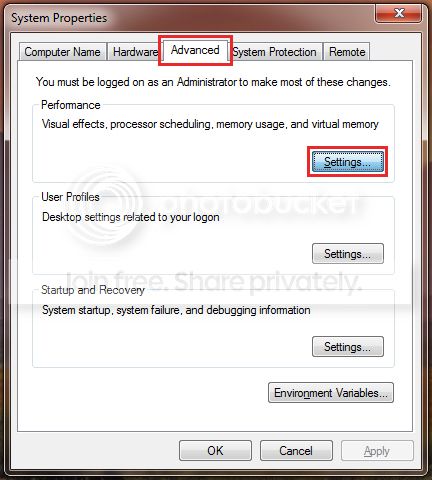
A windows will open and on the Left hand side you will see Advanced system settings, click it.


2.
Next click on the Advanced tab and Settings which correspond to the Performance section;


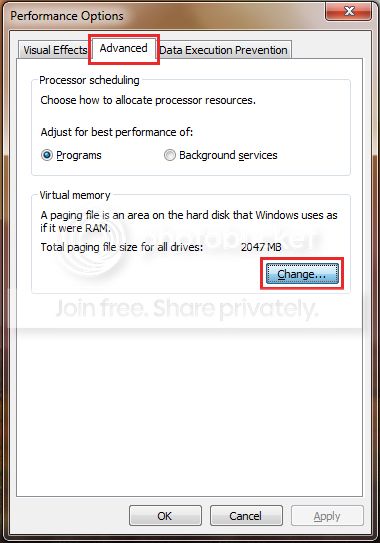
3. Then the Advanced tab once more and click on the Change button;


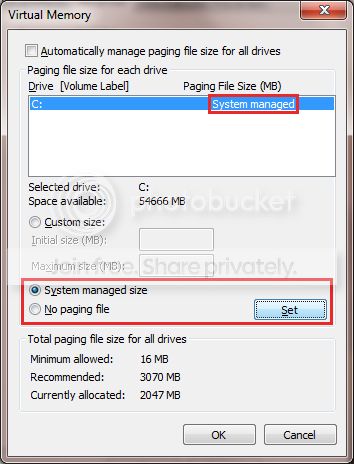
4. Untick the checkbox next to Automatically manage paging file size for all drives;

Select No paging file and Click on the Set button;


5. Confirm all the windows.

6.
Restart the PC.

7. Reverse the procedure, by following steps 1-3, only this time select System managed size
and click the Set button;


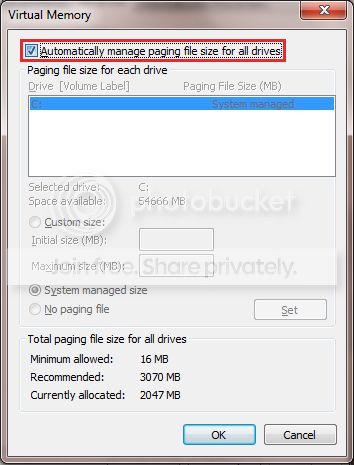
8. Recheck the box next to Automatically manage paging file size for all drives
and exit the windows by clicking the OK button;


9. Confirm all of the remaining windows by click the OK button
and restart the PC once again to take affect.
 

My Computer My Computer

At a glance

Windows 10Intel Core i5 3570K16GB 1600Mhz G.SkillGigabyte GTX 970 G1-Gaming
Computer type
PC/Desktop
OS
Windows 10
CPU
Intel Core i5 3570K
Motherboard
Asus P8Z77V-PRO
Memory
16GB 1600Mhz G.Skill
Graphics Card(s)
Gigabyte GTX 970 G1-Gaming
PSU
Seasonic 1000W Platinum
Case
Fractal Design Define R4
Cooling
Noctua NH-D14
Ok. I freed up as much space on my OS drive as I could and did the page file adjustments. I've attached the new file. Thank you for the help!
 

My Computer My Computer

At a glance

Windows 7 Professional x64 w/ SP1Intel Core i7 92012GB (6GB OCZ3G1600LV2G + F3-12800CL9T-6GBNQ)Sapphire ATI Radeon 4870x2 (Catalyst 10.10 w/...
Computer type
PC/Desktop
Computer Manufacturer/Model Number
Custom
OS
Windows 7 Professional x64 w/ SP1
CPU
Intel Core i7 920
Motherboard
Asus P6T Deluxe (x58) w/ Latest BIOS
Memory
12GB (6GB OCZ3G1600LV2G + F3-12800CL9T-6GBNQ)
Graphics Card(s)
Sapphire ATI Radeon 4870x2 (Catalyst 10.10 w/ OpenCL)
Sound Card
SoundMAX Integrated Digital HD Audio (SPDIF)
Monitor(s) Displays
BenQ E2400HD
Screen Resolution
1920x1080
Hard Drives
Intel X25-M 80GB SSDSA2M080G2GN
Samsung Spinpoint F1 DT 1TB
PSU
Xclio Greatpower 850w
Case
Antec Twelve Hundred
Cooling
Air - (1) top 200mm, (2) rear 120mm, (3) front 120mm
Were those files generated after the changes requested?
They show the same specifications.
 

My Computer My Computer

At a glance

Windows 10Intel Core i5 3570K16GB 1600Mhz G.SkillGigabyte GTX 970 G1-Gaming
Computer type
PC/Desktop
OS
Windows 10
CPU
Intel Core i5 3570K
Motherboard
Asus P8Z77V-PRO
Memory
16GB 1600Mhz G.Skill
Graphics Card(s)
Gigabyte GTX 970 G1-Gaming
PSU
Seasonic 1000W Platinum
Case
Fractal Design Define R4
Cooling
Noctua NH-D14
I didn't have a page file set because my main OS drive is an SSD and I have 12GB of RAM. Everything I've read recommends not having one at all. However, since apparently I need one to solve this issue, I just set a small page file for the drive (32MB initial size, 64MB max size). Is this sufficient? So since I didn't have this set before do I just have to wait until I get a BSOD again before I can generate all of the information necessary to troubleshoot the issue?
 

My Computer My Computer

At a glance

Windows 7 Professional x64 w/ SP1Intel Core i7 92012GB (6GB OCZ3G1600LV2G + F3-12800CL9T-6GBNQ)Sapphire ATI Radeon 4870x2 (Catalyst 10.10 w/...
Computer type
PC/Desktop
Computer Manufacturer/Model Number
Custom
OS
Windows 7 Professional x64 w/ SP1
CPU
Intel Core i7 920
Motherboard
Asus P6T Deluxe (x58) w/ Latest BIOS
Memory
12GB (6GB OCZ3G1600LV2G + F3-12800CL9T-6GBNQ)
Graphics Card(s)
Sapphire ATI Radeon 4870x2 (Catalyst 10.10 w/ OpenCL)
Sound Card
SoundMAX Integrated Digital HD Audio (SPDIF)
Monitor(s) Displays
BenQ E2400HD
Screen Resolution
1920x1080
Hard Drives
Intel X25-M 80GB SSDSA2M080G2GN
Samsung Spinpoint F1 DT 1TB
PSU
Xclio Greatpower 850w
Case
Antec Twelve Hundred
Cooling
Air - (1) top 200mm, (2) rear 120mm, (3) front 120mm
I didn't have a page file set because my main OS drive is an SSD and I have 12GB of RAM. Everything I've read recommends not having one at all. However, since apparently I need one to solve this issue, I just set a small page file for the drive (32MB initial size, 64MB max size). Is this sufficient? So since I didn't have this set before do I just have to wait until I get a BSOD again before I can generate all of the information necessary to troubleshoot the issue?
I know but 32MB is even worse, set it to at least 2GB.
Did you free some space in the C:\ partition?
Did you set the dump file to a minidump?
Yes we need the dumps files to have any sort of chance of figuring out what is going on.
 

My Computer My Computer

At a glance

Windows 10Intel Core i5 3570K16GB 1600Mhz G.SkillGigabyte GTX 970 G1-Gaming
Computer type
PC/Desktop
OS
Windows 10
CPU
Intel Core i5 3570K
Motherboard
Asus P8Z77V-PRO
Memory
16GB 1600Mhz G.Skill
Graphics Card(s)
Gigabyte GTX 970 G1-Gaming
PSU
Seasonic 1000W Platinum
Case
Fractal Design Define R4
Cooling
Noctua NH-D14
All I have free on the poor little SSD is about 8GB of free space. I'll try to free up some more space but I have enough for the minidump. Yes, I set the dump file to minidump. What do I set to 2GB, the initial size or the maximum size? If initial is 2GB, what should I set max to?
 

My Computer My Computer

At a glance

Windows 7 Professional x64 w/ SP1Intel Core i7 92012GB (6GB OCZ3G1600LV2G + F3-12800CL9T-6GBNQ)Sapphire ATI Radeon 4870x2 (Catalyst 10.10 w/...
Computer type
PC/Desktop
Computer Manufacturer/Model Number
Custom
OS
Windows 7 Professional x64 w/ SP1
CPU
Intel Core i7 920
Motherboard
Asus P6T Deluxe (x58) w/ Latest BIOS
Memory
12GB (6GB OCZ3G1600LV2G + F3-12800CL9T-6GBNQ)
Graphics Card(s)
Sapphire ATI Radeon 4870x2 (Catalyst 10.10 w/ OpenCL)
Sound Card
SoundMAX Integrated Digital HD Audio (SPDIF)
Monitor(s) Displays
BenQ E2400HD
Screen Resolution
1920x1080
Hard Drives
Intel X25-M 80GB SSDSA2M080G2GN
Samsung Spinpoint F1 DT 1TB
PSU
Xclio Greatpower 850w
Case
Antec Twelve Hundred
Cooling
Air - (1) top 200mm, (2) rear 120mm, (3) front 120mm
Sorry I should have been clearer, 1024 (1GB) - 2048 (2GB).
Even though I still recommend letting Windows handle it for you :huh:.
 

My Computer My Computer

At a glance

Windows 10Intel Core i5 3570K16GB 1600Mhz G.SkillGigabyte GTX 970 G1-Gaming
Computer type
PC/Desktop
OS
Windows 10
CPU
Intel Core i5 3570K
Motherboard
Asus P8Z77V-PRO
Memory
16GB 1600Mhz G.Skill
Graphics Card(s)
Gigabyte GTX 970 G1-Gaming
PSU
Seasonic 1000W Platinum
Case
Fractal Design Define R4
Cooling
Noctua NH-D14
Sorry I should have been clearer, 1024 (1GB) - 2048 (2GB).
Even though I still recommend letting Windows handle it for you :huh:.

I don't have enough free space to let Windows handle it on this drive. As I've said before, it is pretty foreign to run any page file on an SSD in my experience except (as I've learned) in troubleshooting instances such as this. I'm setting it to 1024 and 2048 respectively and I'll post the crashdump if it happens again. Thank you for the assistance.
 

My Computer My Computer

At a glance

Windows 7 Professional x64 w/ SP1Intel Core i7 92012GB (6GB OCZ3G1600LV2G + F3-12800CL9T-6GBNQ)Sapphire ATI Radeon 4870x2 (Catalyst 10.10 w/...
Computer type
PC/Desktop
Computer Manufacturer/Model Number
Custom
OS
Windows 7 Professional x64 w/ SP1
CPU
Intel Core i7 920
Motherboard
Asus P6T Deluxe (x58) w/ Latest BIOS
Memory
12GB (6GB OCZ3G1600LV2G + F3-12800CL9T-6GBNQ)
Graphics Card(s)
Sapphire ATI Radeon 4870x2 (Catalyst 10.10 w/ OpenCL)
Sound Card
SoundMAX Integrated Digital HD Audio (SPDIF)
Monitor(s) Displays
BenQ E2400HD
Screen Resolution
1920x1080
Hard Drives
Intel X25-M 80GB SSDSA2M080G2GN
Samsung Spinpoint F1 DT 1TB
PSU
Xclio Greatpower 850w
Case
Antec Twelve Hundred
Cooling
Air - (1) top 200mm, (2) rear 120mm, (3) front 120mm
I understand, post back with the files :).
 

My Computer My Computer

At a glance

Windows 10Intel Core i5 3570K16GB 1600Mhz G.SkillGigabyte GTX 970 G1-Gaming
Computer type
PC/Desktop
OS
Windows 10
CPU
Intel Core i5 3570K
Motherboard
Asus P8Z77V-PRO
Memory
16GB 1600Mhz G.Skill
Graphics Card(s)
Gigabyte GTX 970 G1-Gaming
PSU
Seasonic 1000W Platinum
Case
Fractal Design Define R4
Cooling
Noctua NH-D14
Back
Top