Abysmal internet speed with new laptop

gregrocker

New member
Guru
Local time
12:39 PM
Messages
50,634
New Hp Pavilion 17-de019dx laptop running Dual Boot Windows 8/7, both OS's are getting horrible internet speeds of 1-1.5 mb download/11mb upload. A 10 year old HP on the same network gets 11 mb download and upload which is what we pay for.

I've tried ipconfig /release and /renew, updating Realtek RTL8188EE wireless driver, Intel chipset, etc. but there seems to be some hidden cause. The issue remains even if I switch off the other laptop.

This same thing happened when I tried another new laptop on this home network last year, causing me to take it back because no matter what I tried I could not get the speed up. Any ideas?

I'd like to keep this great Cyber Monday deal 17.3" LED screen, Core i3-4000 Haswell for $399. But the net speed would be a deal killer.

SF Diagnostics tool Grab All below:
 

Attachments

Last edited:
How well does this new laptop perform on another network?

Maybe you can test it on a friend's network, the library, Starbucks (or the like), hotel.....

Testing on another network will at least tell us if we need to play with your laptop's settings or your router's.

Just as a test, set your router to only use the "N" protocol.
 

My Computer My Computer

At a glance

W7 Pro SP1 64biti78GBIntel HD Graphics
Computer type
Laptop
Computer Manufacturer/Model Number
Employer provided Dell Latitude
OS
W7 Pro SP1 64bit
CPU
i7
Memory
8GB
Graphics Card(s)
Intel HD Graphics
Hard Drives
crappy SSD
Antivirus
Employer mandated Symantec Endpoint Protection
Browser
Pale Moon 64bit, IE11 64bit & Chrome 64bit
Your Realtek driver is giving a Device Manager error code of 39, which means that Windows couldn't load the driver for the network adapter.

Error codes in Device Manager in Windows

Have you tried installing the network adapter driver again?
 

My Computer My Computer

Computer type
Laptop
New Hp Pavilion 17-de019dx laptop running Dual Boot Windows 8/7, both OS's are getting horrible internet speeds of 1-1.5 mb download/11mb upload. A 10 year old HP on the same network gets 11 mb download and upload which is what we pay for.

I've tried ipconfig /release and /renew, updating Realtek RTL8188EE wireless driver, Intel chipset, etc. but there seems to be some hidden cause. The issue remains even if I switch off the other laptop.

This same thing happened when I tried another new laptop on this home network last year, causing me to take it back because no matter what I tried I could not get the speed up. Any ideas?

I'd like to keep this great Cyber Monday deal 17.3" LED screen, Core i3-4000 Haswell for $399. But the net speed would be a deal killer.

SF Diagnostics tool Grab All below:

Apparently this is a common problem with this adaptor. The link below talks about the problem and shows a patch that is working as a solution. :)

https://bugzilla.redhat.com/show_bug.cgi?id=770207
 

My Computer My Computer

At a glance

Windows 7 Ult, Windows 8.1 Pro,Q9650-4.275GHz, E8600 4.5GHz, E6750-3.8GHzG.Skill PC2 9600 1200Mhz 5 5 5 15 2TGTX480
Computer type
PC/Desktop
Computer Manufacturer/Model Number
Home built
OS
Windows 7 Ult, Windows 8.1 Pro,
CPU
Q9650-4.275GHz, E8600 4.5GHz, E6750-3.8GHz
Motherboard
Evga 780i FTW
Memory
G.Skill PC2 9600 1200Mhz 5 5 5 15 2T
Graphics Card(s)
GTX480
Sound Card
Asus Xonar D2
Monitor(s) Displays
HannsG
Screen Resolution
1680X1050
Hard Drives
GSkill Phoenix Pro 120GB SSD
PSU
ThermalTake Toughpower 1000Watt modular
Case
ThermalTake XaserV
Cooling
Xigmatek S1283
Keyboard
Logitech G15
Mouse
Logitech G9
Internet Speed
T1
How are those patches run?

Harry the erroring driver is not the wireless but ethernet which I just updated to resolve the error. I'm about to try a wired connection to router and directly to modem to compare.

There's no firmware update on this Linksys WRT300N router which is about 5 years old or more. Rayda thinks it might not be modern enough for the brand new adapter.
 
Last edited:
How are those patches run?

I'm not sure but the replys in the thread mentioned what was needed to fix the problem.

The problem description was exactly the same and there were many solves reporting back in so good luck.
 

My Computer My Computer

At a glance

Windows 7 Ult, Windows 8.1 Pro,Q9650-4.275GHz, E8600 4.5GHz, E6750-3.8GHzG.Skill PC2 9600 1200Mhz 5 5 5 15 2TGTX480
Computer type
PC/Desktop
Computer Manufacturer/Model Number
Home built
OS
Windows 7 Ult, Windows 8.1 Pro,
CPU
Q9650-4.275GHz, E8600 4.5GHz, E6750-3.8GHz
Motherboard
Evga 780i FTW
Memory
G.Skill PC2 9600 1200Mhz 5 5 5 15 2T
Graphics Card(s)
GTX480
Sound Card
Asus Xonar D2
Monitor(s) Displays
HannsG
Screen Resolution
1680X1050
Hard Drives
GSkill Phoenix Pro 120GB SSD
PSU
ThermalTake Toughpower 1000Watt modular
Case
ThermalTake XaserV
Cooling
Xigmatek S1283
Keyboard
Logitech G15
Mouse
Logitech G9
Internet Speed
T1
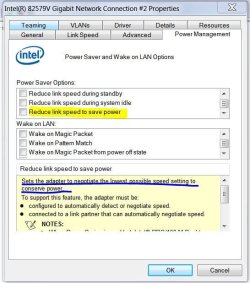
Open Device Manager, expand Network Adapters, right-click on the adapter then click Properties. See if there's a Power Management tab. If so, click on the tab and check to see if there's any power saving item marked. Power saver will slow the speed of your internet as a way to conserve power. The picture below is a sample.
 

Attachments

  • Network - Low Speed.JPG
    Network - Low Speed.JPG
    60.8 KB · Views: 23

My Computer My Computer

At a glance

Windows 7 Pro-x64i7-2600 3.4GHz - 3.8GHz Turbo8Gb - 2x4GB, Muskin 991770 PC3-1333Integrated Intel HD 2000
Computer type
PC/Desktop
Computer Manufacturer/Model Number
Built 2/11/2011
OS
Windows 7 Pro-x64
CPU
i7-2600 3.4GHz - 3.8GHz Turbo
Motherboard
Intel DH67BL-B3
Memory
8Gb - 2x4GB, Muskin 991770 PC3-1333
Graphics Card(s)
Integrated Intel HD 2000
Sound Card
Integrated Intel 10.1 HD, RealTek ALC892
Monitor(s) Displays
Asus LCD VH222H, Haier HL24XSL2a
Screen Resolution
1920x1080, 1920x1080
Hard Drives
Crucial SSD C300-128Gb,
Western Digital WD5002AALX - 500Gb,
Western Digital WD7501AALS - 750Gb
PSU
Seasonic 650W 80+ Gold Modular
Case
Rosewill Defender
Cooling
Stock CPU, Four 120mm case fans, PCH fan added
Keyboard
Logitech EX100 Y-RBH94 Wireless
Mouse
Logitech EX100 M-RCE95 Wireless
Internet Speed
3.0/1.5 Mbs
Antivirus
Microsoft Security Essentials
Browser
Microsoft Internet Explorer 11
Other Info
Antec Veris Premier-Multimedia IR Station,
Cyber Accoustics-3602 Speakers,
AFT XM-5U Card Reader,
Hauppauge TV-HVR-2250,
Sony LX300 USB Turntable
No special options as shown above. In Power Options Wireless Adapter is set for Maximum Performance.
 
Last edited:
That's because my chipset is Intel. That's why I mentioned it was a sample of what to look for. All OEM drivers will have different options. "Maximum Performance" may be limited to adapter speed for negotiations. The Power Saving options may be shown differently but nearly all have some type power control besides speed.
 

My Computer My Computer

At a glance

Windows 7 Pro-x64i7-2600 3.4GHz - 3.8GHz Turbo8Gb - 2x4GB, Muskin 991770 PC3-1333Integrated Intel HD 2000
Computer type
PC/Desktop
Computer Manufacturer/Model Number
Built 2/11/2011
OS
Windows 7 Pro-x64
CPU
i7-2600 3.4GHz - 3.8GHz Turbo
Motherboard
Intel DH67BL-B3
Memory
8Gb - 2x4GB, Muskin 991770 PC3-1333
Graphics Card(s)
Integrated Intel HD 2000
Sound Card
Integrated Intel 10.1 HD, RealTek ALC892
Monitor(s) Displays
Asus LCD VH222H, Haier HL24XSL2a
Screen Resolution
1920x1080, 1920x1080
Hard Drives
Crucial SSD C300-128Gb,
Western Digital WD5002AALX - 500Gb,
Western Digital WD7501AALS - 750Gb
PSU
Seasonic 650W 80+ Gold Modular
Case
Rosewill Defender
Cooling
Stock CPU, Four 120mm case fans, PCH fan added
Keyboard
Logitech EX100 Y-RBH94 Wireless
Mouse
Logitech EX100 M-RCE95 Wireless
Internet Speed
3.0/1.5 Mbs
Antivirus
Microsoft Security Essentials
Browser
Microsoft Internet Explorer 11
Other Info
Antec Veris Premier-Multimedia IR Station,
Cyber Accoustics-3602 Speakers,
AFT XM-5U Card Reader,
Hauppauge TV-HVR-2250,
Sony LX300 USB Turntable
Just plugged in by wire here and download goes to 53 mbps, while Upload stays around 11 mbps. I didn't even know we get speeds that fast here. I realize that only absolves the ethernet adapter, so I'll try to take it by Panera Sunday to see how it performs on their Wifi.

Even sitting right next to the router, both 8 and 7 get under 1 mbps Downloads, 11 mbps Uploads. I spoke with Rayda on the phone today and she thinks it could be router which is 5+ years old with no firmware update.

The wifi adapter seems to perform the same for both OS's so I don't think its driver or performance related. I had to use an 8 driver for Windows 7 because the adapter is so new it doesn't have a 7 driver that I or Archie can find. So maybe this WRT300N router is too old for it.
 
Use the patch. You are so stuck at 54Mbps.

Upgrade hardware and make wireless your slave.
 

Attachments

  • 1.1Gbps.PNG
    1.1Gbps.PNG
    13.4 KB · Views: 19

My Computer My Computer

At a glance

Windows 7 Ult, Windows 8.1 Pro,Q9650-4.275GHz, E8600 4.5GHz, E6750-3.8GHzG.Skill PC2 9600 1200Mhz 5 5 5 15 2TGTX480
Computer type
PC/Desktop
Computer Manufacturer/Model Number
Home built
OS
Windows 7 Ult, Windows 8.1 Pro,
CPU
Q9650-4.275GHz, E8600 4.5GHz, E6750-3.8GHz
Motherboard
Evga 780i FTW
Memory
G.Skill PC2 9600 1200Mhz 5 5 5 15 2T
Graphics Card(s)
GTX480
Sound Card
Asus Xonar D2
Monitor(s) Displays
HannsG
Screen Resolution
1680X1050
Hard Drives
GSkill Phoenix Pro 120GB SSD
PSU
ThermalTake Toughpower 1000Watt modular
Case
ThermalTake XaserV
Cooling
Xigmatek S1283
Keyboard
Logitech G15
Mouse
Logitech G9
Internet Speed
T1
I'd patch it if I could figure out how to run the script.... :huh:
To run the script, you need to save the script to a notepad, and then change the extension name to .inf from .txt.

Now, if you right click on it, the second option is "install". Click on it. The script will be installed.

2013-12-09_205531.jpg

Could it brick the adapter if I do it wrong?
I have no answer to it. But, as the code may not apply to the hardware itself, a system restore point before applying that patch, at a maximum a system image should keep you safe.

I am saying that the patch will not be applied to the hardware itself. chev65 can say if my opinion is wrong or not. I wish he will confirm it. So if he says that I am wrong here, please dont go for the script installation.
 

My Computer My Computer

At a glance

Microsoft Windows 10 Pro Insider Preview 64-bitIntel(R) Core(TM) i3-4130 CPU @ 3.40GHzCorsair Vengence 4GB x2 (8.00GB Dual-Channel ...2047MB GeForce GTS 450 (ZOTAC International)
Computer type
PC/Desktop
Computer Manufacturer/Model Number
Self Assembled
OS
Microsoft Windows 10 Pro Insider Preview 64-bit
CPU
Intel(R) Core(TM) i3-4130 CPU @ 3.40GHz
Motherboard
Gigabyte Technology Co., Ltd. B85M-D3H
Memory
Corsair Vengence 4GB x2 (8.00GB Dual-Channel DDR3 @ 798MHz)
Graphics Card(s)
2047MB GeForce GTS 450 (ZOTAC International)
Sound Card
Onboard (Realtek High Definition Audio)
Monitor(s) Displays
LG Flatron E2040T
Screen Resolution
1600x900
Hard Drives
Western Digital 1 TB
Seagate 500 GB
PSU
Corsair VS550
Case
Cooler Master K380
Cooling
Cooler Master Seidon 120V Plus
Keyboard
Logitech MK260r
Mouse
Logitech MK260r
Internet Speed
PMPL Broadband
Antivirus
Windows Defender + MBAM
Browser
Firefox
Other Info
Dell Studio 15" Laptop
Since the router is throttling the Comcast internet speed by about 80% based on the speed difference between wire (50 mbps) and wireless (11-12 mbps at best) I called Comcast today and they said we can get a Wireless gateway for the same price $7 month as just the modem. I figured they must have a way to assure that such high speeds are easier to get wirelessly when so many routers are junk and totally out of their control.

Until that arrives Thursday, I am using a wired connection with 55 mbps speeds. Also tried a USB wireless adapter which can't get any faster speed than 1 mbps, same as built-in wireless. Hopefully the new wireless gateway will break the logjam. What else could it be?
 
Last edited:
New wireless Gateway installed, laptop speed now 51 mbps.

Think it was the Linksys router?
 
Wow! That was a big change. Thanks for the follow up. Was the Linksys an old 802-b or g router?
 

My Computer My Computer

At a glance

Windows 7 Pro-x64i7-2600 3.4GHz - 3.8GHz Turbo8Gb - 2x4GB, Muskin 991770 PC3-1333Integrated Intel HD 2000
Computer type
PC/Desktop
Computer Manufacturer/Model Number
Built 2/11/2011
OS
Windows 7 Pro-x64
CPU
i7-2600 3.4GHz - 3.8GHz Turbo
Motherboard
Intel DH67BL-B3
Memory
8Gb - 2x4GB, Muskin 991770 PC3-1333
Graphics Card(s)
Integrated Intel HD 2000
Sound Card
Integrated Intel 10.1 HD, RealTek ALC892
Monitor(s) Displays
Asus LCD VH222H, Haier HL24XSL2a
Screen Resolution
1920x1080, 1920x1080
Hard Drives
Crucial SSD C300-128Gb,
Western Digital WD5002AALX - 500Gb,
Western Digital WD7501AALS - 750Gb
PSU
Seasonic 650W 80+ Gold Modular
Case
Rosewill Defender
Cooling
Stock CPU, Four 120mm case fans, PCH fan added
Keyboard
Logitech EX100 Y-RBH94 Wireless
Mouse
Logitech EX100 M-RCE95 Wireless
Internet Speed
3.0/1.5 Mbs
Antivirus
Microsoft Security Essentials
Browser
Microsoft Internet Explorer 11
Other Info
Antec Veris Premier-Multimedia IR Station,
Cyber Accoustics-3602 Speakers,
AFT XM-5U Card Reader,
Hauppauge TV-HVR-2250,
Sony LX300 USB Turntable
It was a WRT 300N Wireless N router, about 4 years old.
 
Back
Top