Desktop does not "sleep" after fibre optic broadband installed

puzzledlad

New member
Local time
4:17 AM
Messages
2
Desktop does not "sleep" after fibre optic broadband installed

Got fibre optic broadband installed by TalkTalk last week. Since then when I put desktop to Sleep, it goes to sleep but gets restarted by itself within a couple of minutes. It then continues to go to sleep and get restarted by itself. However, if the Ethernet connection between the router and computer is removed, the computer stays in sleep. I rang TalkTalk tech support and they say I need to update my network driver. Device Manager on my computer says the Network adapter is Intel 82566DC Gigabit Network Connection. I right-click that and select "Update driver software" and then "Search automatically for updated driver software", I get the message "Windows has determined the driver software for your device is up to date".

I am running Windows 7 Professional on Dell Dimension 9200. The router supplied by TalkTalk is DSL 3780 by D-Link.

Has anybody else experienced this problem? Help!
 

My Computer My Computer

At a glance

Windows 7 Professional 32-bitIntel Core 22 GB
Computer type
PC/Desktop
Computer Manufacturer/Model Number
Dell Dimension 9200
OS
Windows 7 Professional 32-bit
CPU
Intel Core 2
Memory
2 GB
Hard Drives
2 x 250 GB
Antivirus
AVG Free edition
Browser
IE 9
This might be what you are looking for. Make sure you create a system restore point before installing a new driver then if it is no good you can easily get back to square one.

https://downloadcenter.intel.com/SearchResult.aspx?lang=eng

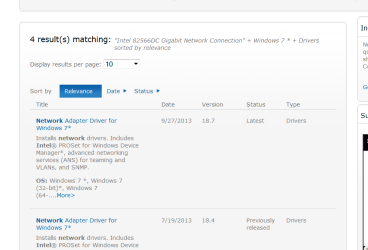
Where it says "Search Downloads" copy and paste this "Intel 82566DC Gigabit Network Connection". You should get to a page that looks like this:

Intel.PNG
 

My Computer My Computer

At a glance

Microsoft Windows 7 Home Premium 64-bit 7601 ...Intel(R) Core(TM) i7-3770 CPU @ 3.40GHz8.00 GBIntel(R) HD Graphics 4000
Computer type
PC/Desktop
OS
Microsoft Windows 7 Home Premium 64-bit 7601 Multiprocessor Free Service Pack 1
CPU
Intel(R) Core(TM) i7-3770 CPU @ 3.40GHz
Motherboard
ASUSTeK COMPUTER INC. P8H77-M
Memory
8.00 GB
Graphics Card(s)
Intel(R) HD Graphics 4000
Sound Card
On Board
Monitor(s) Displays
Dell 24"
Screen Resolution
1920 x 1080
Hard Drives
(1) INTEL SSDSC2CT180A3 ATA Device (2) ST500DM002-1BD142 ATA Device (3) WDC WD3200AAKS-75L9A0 ATA Device (4) Generic- Compact Flash USB Device (5) Generic- MS/MS-Pro USB Device (6) Generic- SD/MMC USB Device (7) Generic- SM/xD-Picture USB
PSU
500w Corsair
Case
Cooler Master
Cooling
3 Fans
Keyboard
Logitech MK300
Mouse
Logitech WOM
Internet Speed
75Mb
Antivirus
Norton 360
Browser
Firefox, Opera, IE
Got fibre optic broadband installed by TalkTalk last week. Since then when I put desktop to Sleep, it goes to sleep but gets restarted by itself within a couple of minutes. It then continues to go to sleep and get restarted by itself. However, if the Ethernet connection between the router and computer is removed, the computer stays in sleep. I rang TalkTalk tech support and they say I need to update my network driver. Device Manager on my computer says the Network adapter is Intel 82566DC Gigabit Network Connection. I right-click that and select "Update driver software" and then "Search automatically for updated driver software", I get the message "Windows has determined the driver software for your device is up to date".

I am running Windows 7 Professional on Dell Dimension 9200. The router supplied by TalkTalk is DSL 3780 by D-Link.

Has anybody else experienced this problem? Help!

Hi puzzledlad,

Welcome to Seven forums.

Please check this link below where you can download and install the driver for the system:

Driver Details | Dell US

If you received any error then install it under compatibility mode:

http://www.sevenforums.com/tutorials/98073-drivers-install-vista-drivers-windows-7-a.html

Check this video for updating any driver for your system:

Updating Dell Drivers

Keep us posted with the results so we can advise you further.
 

My Computer My Computer

At a glance

Winndows 7 32 bit
Computer type
PC/Desktop
OS
Winndows 7 32 bit
Thank you mitchell65 and SandeepP for your suggestions. But I thought of doing further digging on the sleep and awake aspect and came across this
Computer frequently wakes up by itself
In that thread one contributor mentions settings for the network adaptor which I followed as follows:
Start
Type "Device Manager"
Select Device Manager
Expand Network Adaptor
Right-click the card - in my case "Intel 82566DC Gigabit Network Connection"
Select Properties
Select tab "Power Management"
Uncheck "Allow this device to wake up computer"
OK

That seems to have done the trick.
 

My Computer My Computer

At a glance

Windows 7 Professional 32-bitIntel Core 22 GB
Computer type
PC/Desktop
Computer Manufacturer/Model Number
Dell Dimension 9200
OS
Windows 7 Professional 32-bit
CPU
Intel Core 2
Memory
2 GB
Hard Drives
2 x 250 GB
Antivirus
AVG Free edition
Browser
IE 9
Well Done1 Thanks for the feedback. Others may have the same problem so you have helped others already. Rep to you:)
 

My Computer My Computer

At a glance

Microsoft Windows 7 Home Premium 64-bit 7601 ...Intel(R) Core(TM) i7-3770 CPU @ 3.40GHz8.00 GBIntel(R) HD Graphics 4000
Computer type
PC/Desktop
OS
Microsoft Windows 7 Home Premium 64-bit 7601 Multiprocessor Free Service Pack 1
CPU
Intel(R) Core(TM) i7-3770 CPU @ 3.40GHz
Motherboard
ASUSTeK COMPUTER INC. P8H77-M
Memory
8.00 GB
Graphics Card(s)
Intel(R) HD Graphics 4000
Sound Card
On Board
Monitor(s) Displays
Dell 24"
Screen Resolution
1920 x 1080
Hard Drives
(1) INTEL SSDSC2CT180A3 ATA Device (2) ST500DM002-1BD142 ATA Device (3) WDC WD3200AAKS-75L9A0 ATA Device (4) Generic- Compact Flash USB Device (5) Generic- MS/MS-Pro USB Device (6) Generic- SD/MMC USB Device (7) Generic- SM/xD-Picture USB
PSU
500w Corsair
Case
Cooler Master
Cooling
3 Fans
Keyboard
Logitech MK300
Mouse
Logitech WOM
Internet Speed
75Mb
Antivirus
Norton 360
Browser
Firefox, Opera, IE
Thank you mitchell65 and SandeepP for your suggestions. But I thought of doing further digging on the sleep and awake aspect and came across this
Computer frequently wakes up by itself
In that thread one contributor mentions settings for the network adaptor which I followed as follows:
Start
Type "Device Manager"
Select Device Manager
Expand Network Adaptor
Right-click the card - in my case "Intel 82566DC Gigabit Network Connection"
Select Properties
Select tab "Power Management"
Uncheck "Allow this device to wake up computer"
OK

That seems to have done the trick.

Hi puzzledlad,

Its great to hear that it has resolved the issue to your satisfaction. We appreciate you sharing the resolution with us as I am sure this would help other users as well with a similar issue.

If you have any further queries, please feel free to contact us.
 

My Computer My Computer

At a glance

Winndows 7 32 bit
Computer type
PC/Desktop
OS
Winndows 7 32 bit
Back
Top