
Show - Hide Hidden Files - Add to Context Menu

How to Add "Show/Hide Hidden Files" to Context Menu in Vista, Windows 7, and Windows 8

   Information
This will show you how to add or remove Show/Hide Hidden Files to the desktop, library, and folder window context menu for all users to be able to toggle "Show" or "Don't show" hidden files, folders, drives, and protected operating system files in Vista, Windows 7, and Windows 8.

While you must be logged in as an administrator to be able to add or remove the context menu, all users will be able to use the context menu.

   Note
When you right click on the Desktop and click on Show/Hide Hidden Files, the hidden files (faded files) will instantly show or hide. You will need to refresh (F5) any other opened inactive window to see the hidden files show or hide in them.

When you right click on a blank area in the main window of a library or folder and click on Show/Hide Hidden Files, the hidden files (faded files) will instantly show or hide in that window. You may need to refresh (F5) with any other opened inactive window to see the hidden files show or hide in them.


EXAMPLE: "Show/Hide Hidden Files" and/or "Show/Hide All Hidden Files" Added to Context Menu
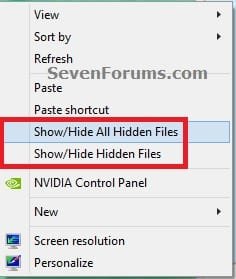
Desktop_Context_Menu.jpg


OPTION ONE

To Add "Show/Hide Hidden Files" to Context Menu


1. Do either step 2 or 3, and/or step 4 or 5 for what you would like.


2. To Toggle Show or Hide ALL Hidden Files with Notify Sound Played
NOTE: When you click/tap on the Show/Hide Hidden Files context menu item using this option, you will hear the notify.wav file play only if Window Media Player is set as the default program for .wav files. If you do not have Window Media Player turned on in Windows Features, then you will get an error instead of the sound playing.
A) Click/tap on the Download button below to download the file below, and go to step 6 below.
NOTE: This includes all "hidden files, folders, or drives" and "hidden protected operating system files".
Add_Show_Hide_ALL_Hidden_Files_to_Context_Menu_with_SOUND.zip


Download


3. To Toggle Show or Hide ALL Hidden Files without any Sound
NOTE: This option is if you did not want to have the Notify.wav play when you use the Show/Hide Hidden Files context menu item, or if you get an error from using step 2 since you have Windows Media Player turned off in Windows Features.
A) Click/tap on the Download button below to download the file below, and go to step 6 below.
NOTE: This includes all "hidden files, folders, or drives" and "hidden protected operating system files".
Add_Show_Hide_ALL_Hidden_Files_to_Context_Menu.zip


Download


AND/OR


4. To Toggle Show or Hide Hidden Files with Notify Sound Played
NOTE: When you click/tap on the Show/Hide Hidden Files context menu item using this option, you will hear the notify.wav file play only if Window Media Player is set as the default program for .wav files. If you do not have Window Media Player turned on in Windows Features, then you will get an error instead of the sound playing.
A) Click/tap on the Download button below to download the file below, and go to step 6 below.
NOTE: This includes only all "hidden files, folders, or drives" and not "hidden protected operating system files".
Add_Show_Hide_Hidden_Files_to_Context_Menu_with_SOUND.zip


Download


5. To Toggle Show or Hide Hidden Files without any Sound
NOTE: This option is if you did not want to have the Notify.wav play when you use the Show/Hide Hidden Files context menu item, or if you get an error from using step 4 since you have Windows Media Player turned off in Windows Features.
A) Click/tap on the Download button below to download the file below, and go to step 6 below.
NOTE: This includes only all "hidden files, folders, or drives" and not "hidden protected operating system files".
Add_Show_Hide_Hidden_Files_to_Context_Menu.zip


Download


6. Save the .zip file to your desktop.

7. Open the downloaded ZIP file, and extract (drag and drop) both the .reg and .vbs files to your desktop.

8. Unblock the extracted .vbs file, click/tap on Properties.

9. Right click or press and hold on the extracted and unblocked .vbs file, and click/tap on Copy.

10. In Windows Explorer, navigate to and open the C:\Windows folder. Right click or press and hold on an empty area in the C:\Window folder, click/tap on Paste, then click/tap on Continue and Yes (UAC) if prompted. Close the Windows Explorer window.

11. Double click/tap on the extracted .reg file to merge it.

12. If prompter, click/tap on Run, Yes (UAC-Windows 7/8) or Continue (UAC-Vista), Yes, and OK to approve the merge.

13. You can now delete the downloaded files left on your desktop if you like.


OPTION TWO

To Remove "Show/Hide Hidden Files" from Context Menu


NOTE: This is the default setting.
1. Do step 2 and/or 3 below for what you would like to do.

2. To Remove "Show/Hide Hidden Files" from Context Menu
A) Click/tap on the Download button below to download the file below, and go to step 4 below.
Remove_Show_Hide_Hidden_Files_from_Context_Menu.reg


Download


3. To Remove "Show/Hide All Hidden Files" from Context Menu
A) Click/tap on the Download button below to download the file below, and go to step 4 below.
Remove_Show_Hide_All_Hidden_Files_from_Context_Menu.reg


Download


4. Save the .zip file to your desktop.

5. Double click/tap on the downloaded .reg file to merge it.

6. If prompted, click/tap on Run, Yes (UAC-Windows 7/8) or Continue (UAC-Vista), Yes, and OK to approve the merge.

7. In Windows Explorer, navigate to and open the C:\Windows folder, right click or press and hold on the file below, click/tap on Delete, and Yes (if prompted).
Toggle_Show_Hidden_Files_On_Off.vbs

OR

Toggle_Show_Hidden_Files_On_Off_with_SOUND.vbs
AND/OR

Toggle_Show_All_Hidden_Files_On_Off.vbs

OR

Toggle_Show_All_Hidden_Files_On_Off_with_SOUND.vbs
8. You can now delete the download reg file if you would like to.
That's it,
Shawn


Attachments

Last edited:
You're most welcome Woki, and welcome to Seven Forums. :)
 

My Computer My Computer

At a glance

64-bit Windows 11 Pro for WorkstationsIntel i7-8700K OC'd to 5 GHz64 GB (4x16GB) G.SKILL TridentZ RGB DDR4 3600...ASUS ROG-STRIX-GTX1080TI-O11G-GAMING
Computer type
PC/Desktop
Computer Manufacturer/Model Number
Self built custom
OS
64-bit Windows 11 Pro for Workstations
CPU
Intel i7-8700K OC'd to 5 GHz
Motherboard
ASUS ROG Maximus XI Formula Z390
Memory
64 GB (4x16GB) G.SKILL TridentZ RGB DDR4 3600 MHz
Graphics Card(s)
ASUS ROG-STRIX-GTX1080TI-O11G-GAMING
Sound Card
Integrated
Monitor(s) Displays
2 x Samsung Odyssey G7 27"
Screen Resolution
2560x1440
Hard Drives
1TB Samsung 990 PRO M.2,
4TB Samsung 990 PRO PRO M.2,
TerraMaster F8 SSD Plus NAS
PSU
Seasonic Prime Titanium 850W
Case
Thermaltake Core P3
Cooling
Corsair Hydro H115i
Keyboard
Logitech wireless K800
Mouse
Logitech MX Master 4
Internet Speed
2 Gb/s Download and 100 Mb/s Upload
Antivirus
Malwarebyte Anti-Malware Premium
Browser
Google Chrome
Other Info
Logitech Z625 speaker system,
Logitech BRIO 4K Pro webcam,
HP Color LaserJet Pro MFP M477fdn,
APC SMART-UPS RT 1000 XL - SURT1000XLI,
Galaxy S23 Plus phone
Brink, I was wondering if there was a Context Menu tweak so when you Right click on something it shows Hide File if showing and Show File if Hidden and Show Hidden Files is on at AppData, it makes it a lot easier than going into the File Properties.
 

My Computer My Computer

At a glance

Windows 7 Ultimate SP1 - 64 BitIntel Core i5 2500k2x4GB DDR3 1333HzAti Radeon 6770
Computer type
PC/Desktop
Computer Manufacturer/Model Number
Novatech iRush Pro
OS
Windows 7 Ultimate SP1 - 64 Bit
CPU
Intel Core i5 2500k
Motherboard
Foxconn H67M-S/H67M-V/H67
Memory
2x4GB DDR3 1333Hz
Graphics Card(s)
Ati Radeon 6770
Sound Card
None
Monitor(s) Displays
Samsung S22B150
Screen Resolution
1920x1080
Hard Drives
2x500GB
PSU
500W
Cooling
Fan
Keyboard
HP KU0316
Mouse
Wireless Logitech M185
Internet Speed
20MB/s
Antivirus
Avast Free
Browser
Google Chrome
Other Info
Logitech M185 Mouse
KU-M316 Keyboard
Hello Infinite,

I'll look into it, but it may be a wee bit hard to unhide a file/folder like that if it's already hidden though. :)
 

My Computer My Computer

At a glance

64-bit Windows 11 Pro for WorkstationsIntel i7-8700K OC'd to 5 GHz64 GB (4x16GB) G.SKILL TridentZ RGB DDR4 3600...ASUS ROG-STRIX-GTX1080TI-O11G-GAMING
Computer type
PC/Desktop
Computer Manufacturer/Model Number
Self built custom
OS
64-bit Windows 11 Pro for Workstations
CPU
Intel i7-8700K OC'd to 5 GHz
Motherboard
ASUS ROG Maximus XI Formula Z390
Memory
64 GB (4x16GB) G.SKILL TridentZ RGB DDR4 3600 MHz
Graphics Card(s)
ASUS ROG-STRIX-GTX1080TI-O11G-GAMING
Sound Card
Integrated
Monitor(s) Displays
2 x Samsung Odyssey G7 27"
Screen Resolution
2560x1440
Hard Drives
1TB Samsung 990 PRO M.2,
4TB Samsung 990 PRO PRO M.2,
TerraMaster F8 SSD Plus NAS
PSU
Seasonic Prime Titanium 850W
Case
Thermaltake Core P3
Cooling
Corsair Hydro H115i
Keyboard
Logitech wireless K800
Mouse
Logitech MX Master 4
Internet Speed
2 Gb/s Download and 100 Mb/s Upload
Antivirus
Malwarebyte Anti-Malware Premium
Browser
Google Chrome
Other Info
Logitech Z625 speaker system,
Logitech BRIO 4K Pro webcam,
HP Color LaserJet Pro MFP M477fdn,
APC SMART-UPS RT 1000 XL - SURT1000XLI,
Galaxy S23 Plus phone

My Computer My Computer

At a glance

64-bit Windows 11 Pro for WorkstationsIntel i7-8700K OC'd to 5 GHz64 GB (4x16GB) G.SKILL TridentZ RGB DDR4 3600...ASUS ROG-STRIX-GTX1080TI-O11G-GAMING
Computer type
PC/Desktop
Computer Manufacturer/Model Number
Self built custom
OS
64-bit Windows 11 Pro for Workstations
CPU
Intel i7-8700K OC'd to 5 GHz
Motherboard
ASUS ROG Maximus XI Formula Z390
Memory
64 GB (4x16GB) G.SKILL TridentZ RGB DDR4 3600 MHz
Graphics Card(s)
ASUS ROG-STRIX-GTX1080TI-O11G-GAMING
Sound Card
Integrated
Monitor(s) Displays
2 x Samsung Odyssey G7 27"
Screen Resolution
2560x1440
Hard Drives
1TB Samsung 990 PRO M.2,
4TB Samsung 990 PRO PRO M.2,
TerraMaster F8 SSD Plus NAS
PSU
Seasonic Prime Titanium 850W
Case
Thermaltake Core P3
Cooling
Corsair Hydro H115i
Keyboard
Logitech wireless K800
Mouse
Logitech MX Master 4
Internet Speed
2 Gb/s Download and 100 Mb/s Upload
Antivirus
Malwarebyte Anti-Malware Premium
Browser
Google Chrome
Other Info
Logitech Z625 speaker system,
Logitech BRIO 4K Pro webcam,
HP Color LaserJet Pro MFP M477fdn,
APC SMART-UPS RT 1000 XL - SURT1000XLI,
Galaxy S23 Plus phone
Cool! Nice one, thanks again Brink!
 

My Computer My Computer

At a glance

Windows 7 Pro x64 SP1AMD Phenom II x6 1090T Black Edition 3.2GHzPatriot G ‘Sector 5’ Edition 8GB (2 x 4GB) 16...
Computer type
PC/Desktop
OS
Windows 7 Pro x64 SP1
CPU
AMD Phenom II x6 1090T Black Edition 3.2GHz
Motherboard
ASUS M4A88TD-V EVO/USB3
Memory
Patriot G ‘Sector 5’ Edition 8GB (2 x 4GB) 1600MHz
Sound Card
(onboard) Realtek® ALC 892 8-Channel High Definition Audio
Monitor(s) Displays
ViewSonic VX2253 22"
Screen Resolution
1920x1080
Hard Drives
Transcend SSD720 2.5" SATAIII 64GB SSD; Western Digital Caviar Green WD20EARS 2TB 64MB 3.5" HDD
LG WH10LS30 10X Blu-ray Burner with LightScribe
PSU
CORSAIR TX Series 950W ATX12V 80 Plus Bronze
Case
Cooler Master HAF X NVidia Edition; 5 Green LED Fans!
Cooling
CORSAIR A70 120mm Dual-Fan
Keyboard
Verbatim 97472 Mini Wireless Slim
Mouse
bundled Verbatim 97472 Wireless
Antivirus
Avast
Browser
Chrome
Other Info
Ultraportable/Desktop Replacement Laptop:
circa Oct 2006,
Dell XPS M1210,
Windows 7 Professional 32-bit,
Intel Core 2 Duo T7200 2.0GHz,
3.25 (4) GB of RAM,
NVidia GeForce Go 7400,
500GB Seagate Momentus 7200RPM HDD
You're most welcome Denise. Thank you. :)
 

My Computer My Computer

At a glance

64-bit Windows 11 Pro for WorkstationsIntel i7-8700K OC'd to 5 GHz64 GB (4x16GB) G.SKILL TridentZ RGB DDR4 3600...ASUS ROG-STRIX-GTX1080TI-O11G-GAMING
Computer type
PC/Desktop
Computer Manufacturer/Model Number
Self built custom
OS
64-bit Windows 11 Pro for Workstations
CPU
Intel i7-8700K OC'd to 5 GHz
Motherboard
ASUS ROG Maximus XI Formula Z390
Memory
64 GB (4x16GB) G.SKILL TridentZ RGB DDR4 3600 MHz
Graphics Card(s)
ASUS ROG-STRIX-GTX1080TI-O11G-GAMING
Sound Card
Integrated
Monitor(s) Displays
2 x Samsung Odyssey G7 27"
Screen Resolution
2560x1440
Hard Drives
1TB Samsung 990 PRO M.2,
4TB Samsung 990 PRO PRO M.2,
TerraMaster F8 SSD Plus NAS
PSU
Seasonic Prime Titanium 850W
Case
Thermaltake Core P3
Cooling
Corsair Hydro H115i
Keyboard
Logitech wireless K800
Mouse
Logitech MX Master 4
Internet Speed
2 Gb/s Download and 100 Mb/s Upload
Antivirus
Malwarebyte Anti-Malware Premium
Browser
Google Chrome
Other Info
Logitech Z625 speaker system,
Logitech BRIO 4K Pro webcam,
HP Color LaserJet Pro MFP M477fdn,
APC SMART-UPS RT 1000 XL - SURT1000XLI,
Galaxy S23 Plus phone
Another cool tutorial plus support files ! thank you Mr. Brink .
works like a charm (7 Ultimate x64)
 

My Computer My Computer

At a glance

win7 x64
OS
win7 x64
You're most welcome. I'm glad you like it. :)
 

My Computer My Computer

At a glance

64-bit Windows 11 Pro for WorkstationsIntel i7-8700K OC'd to 5 GHz64 GB (4x16GB) G.SKILL TridentZ RGB DDR4 3600...ASUS ROG-STRIX-GTX1080TI-O11G-GAMING
Computer type
PC/Desktop
Computer Manufacturer/Model Number
Self built custom
OS
64-bit Windows 11 Pro for Workstations
CPU
Intel i7-8700K OC'd to 5 GHz
Motherboard
ASUS ROG Maximus XI Formula Z390
Memory
64 GB (4x16GB) G.SKILL TridentZ RGB DDR4 3600 MHz
Graphics Card(s)
ASUS ROG-STRIX-GTX1080TI-O11G-GAMING
Sound Card
Integrated
Monitor(s) Displays
2 x Samsung Odyssey G7 27"
Screen Resolution
2560x1440
Hard Drives
1TB Samsung 990 PRO M.2,
4TB Samsung 990 PRO PRO M.2,
TerraMaster F8 SSD Plus NAS
PSU
Seasonic Prime Titanium 850W
Case
Thermaltake Core P3
Cooling
Corsair Hydro H115i
Keyboard
Logitech wireless K800
Mouse
Logitech MX Master 4
Internet Speed
2 Gb/s Download and 100 Mb/s Upload
Antivirus
Malwarebyte Anti-Malware Premium
Browser
Google Chrome
Other Info
Logitech Z625 speaker system,
Logitech BRIO 4K Pro webcam,
HP Color LaserJet Pro MFP M477fdn,
APC SMART-UPS RT 1000 XL - SURT1000XLI,
Galaxy S23 Plus phone
Thanks for the script! The only problem is that if you want to assign the .vbs to a keyboard shortcut, via a shortcut placed in the desktop/start menu, the explorer window becomes inactive when you press the keyboard shortcut. As a result, the "F5" refresh no longer works. I was able to solve the problem with this AutoIt script:

$Key = "HKCU\Software\Microsoft\Windows\CurrentVersion\Explorer\Advanced"
$SHid = "ShowSuperHidden"
$Hid = "Hidden"

If RegRead($Key, $Hid) = 2 Then
RegWrite($Key, $Hid, "REG_DWORD", 1)
RegWrite($Key, $SHid, "REG_DWORD", 0)

ElseIf RegRead($Key, $SHid) = 0 Then
RegWrite($Key, $SHid, "REG_DWORD", 1)

Else
RegWrite($Key, $Hid, "REG_DWORD", 2)
RegWrite($Key, $SHid, "REG_DWORD", 0)
EndIf

ControlFocus("[CLASS:CabinetWClass]", "", "[CLASS:DirectUIHWND]")
Send("{F5}")

As you can see, I've also edited the toggle somewhat to allow for all 3 possible combinations of hidden files with one keyboard shortcut. I found this a bit more intuitive. If you have AutoIt installed: please compile it and try it out :)

If anyone is able to get the same result in a .vbs script, please let me know!
 

My Computer My Computer

At a glance

Windows 7 Ultimate x64
OS
Windows 7 Ultimate x64
You're most welcome. I'm glad you like it. :)

I like this but is it possible to exclude certain files from showing up such as Thumbs.db and Desktop.ini ? I added.ico extensions to My Music folder in order to display them as full flat thumbnail view similar to XP and prefer this explorer context menu then 'ToggleHiddenFiles' as it runs as a constant process but would prefer if it didn't show Thumbs.db & Desktop.ini.

I guess I want 'Show hidden files, folders and drives' and not Show protected operating system files (Recommended) ? I'm also curious why does it display little icon shield in the context menu

Thanks
 

My Computer My Computer

At a glance

Windows 7 Ultimate 6.1 x842.93Ghz Intel Pentium 41GBNVIDIA GeForce 8400 GS
Computer type
PC/Desktop
Computer Manufacturer/Model Number
Packard Bell NEC PB34305801
OS
Windows 7 Ultimate 6.1 x84
CPU
2.93Ghz Intel Pentium 4
Motherboard
GA-8TRC410M-NF
Memory
1GB
Graphics Card(s)
NVIDIA GeForce 8400 GS
Sound Card
Realtek High Definition Audio
Monitor(s) Displays
Generic PnP Monitor (17.1")
Screen Resolution
1280x1024
Hard Drives
Corsair Force 3 120GB SSD
Western Digital Caviar Green 2TB x 2 (Internal)
Western Digital My Book Live Duo 4TB NAS (2x2TB Greens)
Keyboard
Perixx PERIDUO-701U Wireless RF2 4Ghz USB Keyboard
Mouse
Belkin Optical Glow Mouse
Internet Speed
Advertised 20Meg - Actual 1.4MB/Sec (Sky Broadband)
Antivirus
Avira Internet Security
Browser
Firefox
You're most welcome. I'm glad you like it. :)

I like this but is it possible to exclude certain files from showing up such as Thumbs.db and Desktop.ini ? I added.ico extensions to My Music folder in order to display them as full flat thumbnail view similar to XP and prefer this explorer context menu then 'ToggleHiddenFiles' as it runs as a constant process but would prefer if it didn't show Thumbs.db & Desktop.ini.

I guess I want 'Show hidden files, folders and drives' and not Show protected operating system files (Recommended) ? I'm also curious why does it display little icon shield in the context menu

Thanks

Hello Swiftkidd,

Correct, you could use step 4 in Option One to not have protected OS files unhidden. These would included the desktop.ini and thumbs.db files.
 
Last edited:

My Computer My Computer

At a glance

64-bit Windows 11 Pro for WorkstationsIntel i7-8700K OC'd to 5 GHz64 GB (4x16GB) G.SKILL TridentZ RGB DDR4 3600...ASUS ROG-STRIX-GTX1080TI-O11G-GAMING
Computer type
PC/Desktop
Computer Manufacturer/Model Number
Self built custom
OS
64-bit Windows 11 Pro for Workstations
CPU
Intel i7-8700K OC'd to 5 GHz
Motherboard
ASUS ROG Maximus XI Formula Z390
Memory
64 GB (4x16GB) G.SKILL TridentZ RGB DDR4 3600 MHz
Graphics Card(s)
ASUS ROG-STRIX-GTX1080TI-O11G-GAMING
Sound Card
Integrated
Monitor(s) Displays
2 x Samsung Odyssey G7 27"
Screen Resolution
2560x1440
Hard Drives
1TB Samsung 990 PRO M.2,
4TB Samsung 990 PRO PRO M.2,
TerraMaster F8 SSD Plus NAS
PSU
Seasonic Prime Titanium 850W
Case
Thermaltake Core P3
Cooling
Corsair Hydro H115i
Keyboard
Logitech wireless K800
Mouse
Logitech MX Master 4
Internet Speed
2 Gb/s Download and 100 Mb/s Upload
Antivirus
Malwarebyte Anti-Malware Premium
Browser
Google Chrome
Other Info
Logitech Z625 speaker system,
Logitech BRIO 4K Pro webcam,
HP Color LaserJet Pro MFP M477fdn,
APC SMART-UPS RT 1000 XL - SURT1000XLI,
Galaxy S23 Plus phone
Hello Swiftkidd,

Correct, you could use step 4 in Option One to not have protected OS files unhidden. These would included the desktop.ini and thumbs.db files.

Thanks for the prompt reply, I must have missed that section :)
 

My Computer My Computer

At a glance

Windows 7 Ultimate 6.1 x842.93Ghz Intel Pentium 41GBNVIDIA GeForce 8400 GS
Computer type
PC/Desktop
Computer Manufacturer/Model Number
Packard Bell NEC PB34305801
OS
Windows 7 Ultimate 6.1 x84
CPU
2.93Ghz Intel Pentium 4
Motherboard
GA-8TRC410M-NF
Memory
1GB
Graphics Card(s)
NVIDIA GeForce 8400 GS
Sound Card
Realtek High Definition Audio
Monitor(s) Displays
Generic PnP Monitor (17.1")
Screen Resolution
1280x1024
Hard Drives
Corsair Force 3 120GB SSD
Western Digital Caviar Green 2TB x 2 (Internal)
Western Digital My Book Live Duo 4TB NAS (2x2TB Greens)
Keyboard
Perixx PERIDUO-701U Wireless RF2 4Ghz USB Keyboard
Mouse
Belkin Optical Glow Mouse
Internet Speed
Advertised 20Meg - Actual 1.4MB/Sec (Sky Broadband)
Antivirus
Avira Internet Security
Browser
Firefox
You're most welcome. :)
 

My Computer My Computer

At a glance

64-bit Windows 11 Pro for WorkstationsIntel i7-8700K OC'd to 5 GHz64 GB (4x16GB) G.SKILL TridentZ RGB DDR4 3600...ASUS ROG-STRIX-GTX1080TI-O11G-GAMING
Computer type
PC/Desktop
Computer Manufacturer/Model Number
Self built custom
OS
64-bit Windows 11 Pro for Workstations
CPU
Intel i7-8700K OC'd to 5 GHz
Motherboard
ASUS ROG Maximus XI Formula Z390
Memory
64 GB (4x16GB) G.SKILL TridentZ RGB DDR4 3600 MHz
Graphics Card(s)
ASUS ROG-STRIX-GTX1080TI-O11G-GAMING
Sound Card
Integrated
Monitor(s) Displays
2 x Samsung Odyssey G7 27"
Screen Resolution
2560x1440
Hard Drives
1TB Samsung 990 PRO M.2,
4TB Samsung 990 PRO PRO M.2,
TerraMaster F8 SSD Plus NAS
PSU
Seasonic Prime Titanium 850W
Case
Thermaltake Core P3
Cooling
Corsair Hydro H115i
Keyboard
Logitech wireless K800
Mouse
Logitech MX Master 4
Internet Speed
2 Gb/s Download and 100 Mb/s Upload
Antivirus
Malwarebyte Anti-Malware Premium
Browser
Google Chrome
Other Info
Logitech Z625 speaker system,
Logitech BRIO 4K Pro webcam,
HP Color LaserJet Pro MFP M477fdn,
APC SMART-UPS RT 1000 XL - SURT1000XLI,
Galaxy S23 Plus phone
Hello Brink,

I've been using your tweak for some time now, and given the chance that I registered, I would like to thank you, it's been very useful!

I wanted to expand its functionality though, and insert it into the Windows 7 Libraries Context Menu. With a little googling I found the place where I should place it is here:
[HKEY_CLASSES_ROOT\LibraryFolder\Background]

It seems to work, the option appears in the context menu but when I click on it, I get the following error:
3JobP.jpg


I don't have the knowledge to pursue it any further. I hope you do! :D
 

My Computer My Computer

At a glance

Windows 7 Ultimate x64Intel Core i54GB DDR3ATi Radeon
Computer type
PC/Desktop
Computer Manufacturer/Model Number
Custom build
OS
Windows 7 Ultimate x64
CPU
Intel Core i5
Motherboard
Gigabyte
Memory
4GB DDR3
Graphics Card(s)
ATi Radeon
Browser
Chrome
Hello KreAch, and welcome to Seven Forums. :)

I'm not sure what you mean. This context menu already gets added to the context menu in libraries.

What did you want to right click on and see this context menu at?
 

My Computer My Computer

At a glance

64-bit Windows 11 Pro for WorkstationsIntel i7-8700K OC'd to 5 GHz64 GB (4x16GB) G.SKILL TridentZ RGB DDR4 3600...ASUS ROG-STRIX-GTX1080TI-O11G-GAMING
Computer type
PC/Desktop
Computer Manufacturer/Model Number
Self built custom
OS
64-bit Windows 11 Pro for Workstations
CPU
Intel i7-8700K OC'd to 5 GHz
Motherboard
ASUS ROG Maximus XI Formula Z390
Memory
64 GB (4x16GB) G.SKILL TridentZ RGB DDR4 3600 MHz
Graphics Card(s)
ASUS ROG-STRIX-GTX1080TI-O11G-GAMING
Sound Card
Integrated
Monitor(s) Displays
2 x Samsung Odyssey G7 27"
Screen Resolution
2560x1440
Hard Drives
1TB Samsung 990 PRO M.2,
4TB Samsung 990 PRO PRO M.2,
TerraMaster F8 SSD Plus NAS
PSU
Seasonic Prime Titanium 850W
Case
Thermaltake Core P3
Cooling
Corsair Hydro H115i
Keyboard
Logitech wireless K800
Mouse
Logitech MX Master 4
Internet Speed
2 Gb/s Download and 100 Mb/s Upload
Antivirus
Malwarebyte Anti-Malware Premium
Browser
Google Chrome
Other Info
Logitech Z625 speaker system,
Logitech BRIO 4K Pro webcam,
HP Color LaserJet Pro MFP M477fdn,
APC SMART-UPS RT 1000 XL - SURT1000XLI,
Galaxy S23 Plus phone
Hello KreAch, and welcome to Seven Forums. :)

I'm not sure what you mean. This context menu already gets added to the context menu in libraries.

What did you want to right click on and see this context menu at?

Thank you for the warm welcome. :)

You are right. I had modified an earlier version (I guess) of this tweak to install into Program Files, and that version didn't include the Library shortcut. When I tried to re-invent the wheel and create it on my own (I didn't know of your version) the error showed up.

Nevertheless, everything is OK now. I removed my version, installed yours and modified it to run from my Program Files folder.

So, thank you for your support. Keep up the good work. :)
 

My Computer My Computer

At a glance

Windows 7 Ultimate x64Intel Core i54GB DDR3ATi Radeon
Computer type
PC/Desktop
Computer Manufacturer/Model Number
Custom build
OS
Windows 7 Ultimate x64
CPU
Intel Core i5
Motherboard
Gigabyte
Memory
4GB DDR3
Graphics Card(s)
ATi Radeon
Browser
Chrome
You're most welcome KreAch. I'm glad that it was able to work for you. :)
 

My Computer My Computer

At a glance

64-bit Windows 11 Pro for WorkstationsIntel i7-8700K OC'd to 5 GHz64 GB (4x16GB) G.SKILL TridentZ RGB DDR4 3600...ASUS ROG-STRIX-GTX1080TI-O11G-GAMING
Computer type
PC/Desktop
Computer Manufacturer/Model Number
Self built custom
OS
64-bit Windows 11 Pro for Workstations
CPU
Intel i7-8700K OC'd to 5 GHz
Motherboard
ASUS ROG Maximus XI Formula Z390
Memory
64 GB (4x16GB) G.SKILL TridentZ RGB DDR4 3600 MHz
Graphics Card(s)
ASUS ROG-STRIX-GTX1080TI-O11G-GAMING
Sound Card
Integrated
Monitor(s) Displays
2 x Samsung Odyssey G7 27"
Screen Resolution
2560x1440
Hard Drives
1TB Samsung 990 PRO M.2,
4TB Samsung 990 PRO PRO M.2,
TerraMaster F8 SSD Plus NAS
PSU
Seasonic Prime Titanium 850W
Case
Thermaltake Core P3
Cooling
Corsair Hydro H115i
Keyboard
Logitech wireless K800
Mouse
Logitech MX Master 4
Internet Speed
2 Gb/s Download and 100 Mb/s Upload
Antivirus
Malwarebyte Anti-Malware Premium
Browser
Google Chrome
Other Info
Logitech Z625 speaker system,
Logitech BRIO 4K Pro webcam,
HP Color LaserJet Pro MFP M477fdn,
APC SMART-UPS RT 1000 XL - SURT1000XLI,
Galaxy S23 Plus phone
Hello M18XR2,

I shall look into it tomorrow to see what I may be able to come up with, and post back. :)
 

My Computer My Computer

At a glance

64-bit Windows 11 Pro for WorkstationsIntel i7-8700K OC'd to 5 GHz64 GB (4x16GB) G.SKILL TridentZ RGB DDR4 3600...ASUS ROG-STRIX-GTX1080TI-O11G-GAMING
Computer type
PC/Desktop
Computer Manufacturer/Model Number
Self built custom
OS
64-bit Windows 11 Pro for Workstations
CPU
Intel i7-8700K OC'd to 5 GHz
Motherboard
ASUS ROG Maximus XI Formula Z390
Memory
64 GB (4x16GB) G.SKILL TridentZ RGB DDR4 3600 MHz
Graphics Card(s)
ASUS ROG-STRIX-GTX1080TI-O11G-GAMING
Sound Card
Integrated
Monitor(s) Displays
2 x Samsung Odyssey G7 27"
Screen Resolution
2560x1440
Hard Drives
1TB Samsung 990 PRO M.2,
4TB Samsung 990 PRO PRO M.2,
TerraMaster F8 SSD Plus NAS
PSU
Seasonic Prime Titanium 850W
Case
Thermaltake Core P3
Cooling
Corsair Hydro H115i
Keyboard
Logitech wireless K800
Mouse
Logitech MX Master 4
Internet Speed
2 Gb/s Download and 100 Mb/s Upload
Antivirus
Malwarebyte Anti-Malware Premium
Browser
Google Chrome
Other Info
Logitech Z625 speaker system,
Logitech BRIO 4K Pro webcam,
HP Color LaserJet Pro MFP M477fdn,
APC SMART-UPS RT 1000 XL - SURT1000XLI,
Galaxy S23 Plus phone
Hello M18XR2,

I shall look into it tomorrow to see what I may be able to come up with, and post back. :)
thanks brink you're a life saver !!
 

My Computer My Computer

At a glance

window 7 64 bit
OS
window 7 64 bit
Back
Top