
Show - Hide Hidden Files - Add to Context Menu

How to Add "Show/Hide Hidden Files" to Context Menu in Vista, Windows 7, and Windows 8

   Information
This will show you how to add or remove Show/Hide Hidden Files to the desktop, library, and folder window context menu for all users to be able to toggle "Show" or "Don't show" hidden files, folders, drives, and protected operating system files in Vista, Windows 7, and Windows 8.

While you must be logged in as an administrator to be able to add or remove the context menu, all users will be able to use the context menu.

   Note
When you right click on the Desktop and click on Show/Hide Hidden Files, the hidden files (faded files) will instantly show or hide. You will need to refresh (F5) any other opened inactive window to see the hidden files show or hide in them.

When you right click on a blank area in the main window of a library or folder and click on Show/Hide Hidden Files, the hidden files (faded files) will instantly show or hide in that window. You may need to refresh (F5) with any other opened inactive window to see the hidden files show or hide in them.


EXAMPLE: "Show/Hide Hidden Files" and/or "Show/Hide All Hidden Files" Added to Context Menu
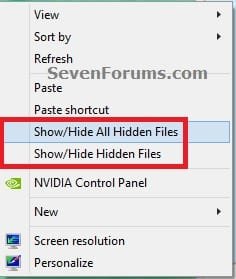
Desktop_Context_Menu.jpg


OPTION ONE

To Add "Show/Hide Hidden Files" to Context Menu


1. Do either step 2 or 3, and/or step 4 or 5 for what you would like.


2. To Toggle Show or Hide ALL Hidden Files with Notify Sound Played
NOTE: When you click/tap on the Show/Hide Hidden Files context menu item using this option, you will hear the notify.wav file play only if Window Media Player is set as the default program for .wav files. If you do not have Window Media Player turned on in Windows Features, then you will get an error instead of the sound playing.
A) Click/tap on the Download button below to download the file below, and go to step 6 below.
NOTE: This includes all "hidden files, folders, or drives" and "hidden protected operating system files".
Add_Show_Hide_ALL_Hidden_Files_to_Context_Menu_with_SOUND.zip


Download


3. To Toggle Show or Hide ALL Hidden Files without any Sound
NOTE: This option is if you did not want to have the Notify.wav play when you use the Show/Hide Hidden Files context menu item, or if you get an error from using step 2 since you have Windows Media Player turned off in Windows Features.
A) Click/tap on the Download button below to download the file below, and go to step 6 below.
NOTE: This includes all "hidden files, folders, or drives" and "hidden protected operating system files".
Add_Show_Hide_ALL_Hidden_Files_to_Context_Menu.zip


Download


AND/OR


4. To Toggle Show or Hide Hidden Files with Notify Sound Played
NOTE: When you click/tap on the Show/Hide Hidden Files context menu item using this option, you will hear the notify.wav file play only if Window Media Player is set as the default program for .wav files. If you do not have Window Media Player turned on in Windows Features, then you will get an error instead of the sound playing.
A) Click/tap on the Download button below to download the file below, and go to step 6 below.
NOTE: This includes only all "hidden files, folders, or drives" and not "hidden protected operating system files".
Add_Show_Hide_Hidden_Files_to_Context_Menu_with_SOUND.zip


Download


5. To Toggle Show or Hide Hidden Files without any Sound
NOTE: This option is if you did not want to have the Notify.wav play when you use the Show/Hide Hidden Files context menu item, or if you get an error from using step 4 since you have Windows Media Player turned off in Windows Features.
A) Click/tap on the Download button below to download the file below, and go to step 6 below.
NOTE: This includes only all "hidden files, folders, or drives" and not "hidden protected operating system files".
Add_Show_Hide_Hidden_Files_to_Context_Menu.zip


Download


6. Save the .zip file to your desktop.

7. Open the downloaded ZIP file, and extract (drag and drop) both the .reg and .vbs files to your desktop.

8. Unblock the extracted .vbs file, click/tap on Properties.

9. Right click or press and hold on the extracted and unblocked .vbs file, and click/tap on Copy.

10. In Windows Explorer, navigate to and open the C:\Windows folder. Right click or press and hold on an empty area in the C:\Window folder, click/tap on Paste, then click/tap on Continue and Yes (UAC) if prompted. Close the Windows Explorer window.

11. Double click/tap on the extracted .reg file to merge it.

12. If prompter, click/tap on Run, Yes (UAC-Windows 7/8) or Continue (UAC-Vista), Yes, and OK to approve the merge.

13. You can now delete the downloaded files left on your desktop if you like.


OPTION TWO

To Remove "Show/Hide Hidden Files" from Context Menu


NOTE: This is the default setting.
1. Do step 2 and/or 3 below for what you would like to do.

2. To Remove "Show/Hide Hidden Files" from Context Menu
A) Click/tap on the Download button below to download the file below, and go to step 4 below.
Remove_Show_Hide_Hidden_Files_from_Context_Menu.reg


Download


3. To Remove "Show/Hide All Hidden Files" from Context Menu
A) Click/tap on the Download button below to download the file below, and go to step 4 below.
Remove_Show_Hide_All_Hidden_Files_from_Context_Menu.reg


Download


4. Save the .zip file to your desktop.

5. Double click/tap on the downloaded .reg file to merge it.

6. If prompted, click/tap on Run, Yes (UAC-Windows 7/8) or Continue (UAC-Vista), Yes, and OK to approve the merge.

7. In Windows Explorer, navigate to and open the C:\Windows folder, right click or press and hold on the file below, click/tap on Delete, and Yes (if prompted).
Toggle_Show_Hidden_Files_On_Off.vbs

OR

Toggle_Show_Hidden_Files_On_Off_with_SOUND.vbs
AND/OR

Toggle_Show_All_Hidden_Files_On_Off.vbs

OR

Toggle_Show_All_Hidden_Files_On_Off_with_SOUND.vbs
8. You can now delete the download reg file if you would like to.
That's it,
Shawn


Attachments

Last edited:
I'M GETTING THIS PROBLEM, i followed all steps as written but it shows this dailogbox. this trick toggles the hidden files and folders but i'm getting this annoying dialog box, same is happening in the "show/hide file extensions"

problemf.jpg


pls help


Hello Pranavjindal, and welcome to Seven Forums.

I have updated the tutorial to have two options for the Show/Hide Hidden Files context menu item. One that will play sound, and one that will not play sound when used to help those that have Windows Media Player turned off in Windows Features. :)


thank you for helping.. works fine now.
 

My Computer My Computer

At a glance

Windows 8 Pro 64bitIntel Core i5 2nd Gen 2450m 2.5 Ghz to 3.1 GHz4 GB DDR3Intel HD 3000 and Nvidia 630m 2 GB DDR3
Computer type
Laptop
Computer Manufacturer/Model Number
Asus K53SM-SX010D
OS
Windows 8 Pro 64bit
CPU
Intel Core i5 2nd Gen 2450m 2.5 Ghz to 3.1 GHz
Memory
4 GB DDR3
Graphics Card(s)
Intel HD 3000 and Nvidia 630m 2 GB DDR3
Sound Card
Realtek High Definition Audio
Monitor(s) Displays
Inbuilt Laptop Panel
Screen Resolution
1366x768
Hard Drives
Hitachi 750 GB 5400rpm HDD
Keyboard
Chiclet Style
Mouse
Synaptics Touchpad and Logitech Mouse
Internet Speed
1 Mbps DSL Broadband
Antivirus
AVG 2013
Browser
Google Chrome
You're most welcome Pranavjindal. Great news. :)
 

My Computer My Computer

At a glance

64-bit Windows 11 Pro for WorkstationsIntel i7-8700K OC'd to 5 GHz64 GB (4x16GB) G.SKILL TridentZ RGB DDR4 3600...ASUS ROG-STRIX-GTX1080TI-O11G-GAMING
Computer type
PC/Desktop
Computer Manufacturer/Model Number
Self built custom
OS
64-bit Windows 11 Pro for Workstations
CPU
Intel i7-8700K OC'd to 5 GHz
Motherboard
ASUS ROG Maximus XI Formula Z390
Memory
64 GB (4x16GB) G.SKILL TridentZ RGB DDR4 3600 MHz
Graphics Card(s)
ASUS ROG-STRIX-GTX1080TI-O11G-GAMING
Sound Card
Integrated
Monitor(s) Displays
2 x Samsung Odyssey G7 27"
Screen Resolution
2560x1440
Hard Drives
1TB Samsung 990 PRO M.2,
4TB Samsung 990 PRO PRO M.2,
TerraMaster F8 SSD Plus NAS
PSU
Seasonic Prime Titanium 850W
Case
Thermaltake Core P3
Cooling
Corsair Hydro H115i
Keyboard
Logitech wireless K800
Mouse
Logitech MX Master 4
Internet Speed
2 Gb/s Download and 100 Mb/s Upload
Antivirus
Malwarebyte Anti-Malware Premium
Browser
Google Chrome
Other Info
Logitech Z625 speaker system,
Logitech BRIO 4K Pro webcam,
HP Color LaserJet Pro MFP M477fdn,
APC SMART-UPS RT 1000 XL - SURT1000XLI,
Galaxy S23 Plus phone
I have noticed that if WMP is running while this vbs is run it will be killed, even if you use the "no sound" version. However, I have managed to fix this by changing the code in "Toggle_Show_Hidden_Files_On_Off.vbs" to:
Code:
Hidden = "HKCU\Software\Microsoft\Windows\CurrentVersion\Explorer\Advanced\Hidden"
SSHidden = "HKCU\Software\Microsoft\Windows\CurrentVersion\Explorer\Advanced\ShowSuperHidden"
Set Command1 = WScript.CreateObject("WScript.Shell")
Check = Command1.RegRead(Hidden)
If Check = 2 Then
Command1.RegWrite Hidden, 1, "REG_DWORD"
Command1.RegWrite SSHidden, 1, "REG_DWORD"
Else
Command1.RegWrite Hidden, 2, "REG_DWORD"
Command1.RegWrite SSHidden, 0, "REG_DWORD"
End If
Command1.SendKeys "{F5}"
(pretty much just cutting out command2)

... hopefully this will cause fewer people to be interrupted while listening to Mr. Scruff (or other music). Also, please reply if you see something wrong with this modification, this is my first time editing vb code.

Edit: Never mind, I must have been using the "with sound" version, or a old version.
 
Last edited:

My Computer My Computer

At a glance

Windows 7 Pro x64, and Ubuntu 11.04
OS
Windows 7 Pro x64, and Ubuntu 11.04
Hello Slang, and welcome to Seven Forums.

Thank you, but this is the same as the download in step 2 of OPTION ONE though. I provided two separate downloads for one with sound and one without sound. :)
 

My Computer My Computer

At a glance

64-bit Windows 11 Pro for WorkstationsIntel i7-8700K OC'd to 5 GHz64 GB (4x16GB) G.SKILL TridentZ RGB DDR4 3600...ASUS ROG-STRIX-GTX1080TI-O11G-GAMING
Computer type
PC/Desktop
Computer Manufacturer/Model Number
Self built custom
OS
64-bit Windows 11 Pro for Workstations
CPU
Intel i7-8700K OC'd to 5 GHz
Motherboard
ASUS ROG Maximus XI Formula Z390
Memory
64 GB (4x16GB) G.SKILL TridentZ RGB DDR4 3600 MHz
Graphics Card(s)
ASUS ROG-STRIX-GTX1080TI-O11G-GAMING
Sound Card
Integrated
Monitor(s) Displays
2 x Samsung Odyssey G7 27"
Screen Resolution
2560x1440
Hard Drives
1TB Samsung 990 PRO M.2,
4TB Samsung 990 PRO PRO M.2,
TerraMaster F8 SSD Plus NAS
PSU
Seasonic Prime Titanium 850W
Case
Thermaltake Core P3
Cooling
Corsair Hydro H115i
Keyboard
Logitech wireless K800
Mouse
Logitech MX Master 4
Internet Speed
2 Gb/s Download and 100 Mb/s Upload
Antivirus
Malwarebyte Anti-Malware Premium
Browser
Google Chrome
Other Info
Logitech Z625 speaker system,
Logitech BRIO 4K Pro webcam,
HP Color LaserJet Pro MFP M477fdn,
APC SMART-UPS RT 1000 XL - SURT1000XLI,
Galaxy S23 Plus phone
If you see a console opening an closing every time you show or hide, try to change "cmd.exe" to "WScript" to run the vbs script.
 

My Computer My Computer

At a glance

Windows 7 x64
OS
Windows 7 x64
Hello Ibaca, and welcome to Seven Forums.

Thank you. Downloads have been updated for this. :)
 

My Computer My Computer

At a glance

64-bit Windows 11 Pro for WorkstationsIntel i7-8700K OC'd to 5 GHz64 GB (4x16GB) G.SKILL TridentZ RGB DDR4 3600...ASUS ROG-STRIX-GTX1080TI-O11G-GAMING
Computer type
PC/Desktop
Computer Manufacturer/Model Number
Self built custom
OS
64-bit Windows 11 Pro for Workstations
CPU
Intel i7-8700K OC'd to 5 GHz
Motherboard
ASUS ROG Maximus XI Formula Z390
Memory
64 GB (4x16GB) G.SKILL TridentZ RGB DDR4 3600 MHz
Graphics Card(s)
ASUS ROG-STRIX-GTX1080TI-O11G-GAMING
Sound Card
Integrated
Monitor(s) Displays
2 x Samsung Odyssey G7 27"
Screen Resolution
2560x1440
Hard Drives
1TB Samsung 990 PRO M.2,
4TB Samsung 990 PRO PRO M.2,
TerraMaster F8 SSD Plus NAS
PSU
Seasonic Prime Titanium 850W
Case
Thermaltake Core P3
Cooling
Corsair Hydro H115i
Keyboard
Logitech wireless K800
Mouse
Logitech MX Master 4
Internet Speed
2 Gb/s Download and 100 Mb/s Upload
Antivirus
Malwarebyte Anti-Malware Premium
Browser
Google Chrome
Other Info
Logitech Z625 speaker system,
Logitech BRIO 4K Pro webcam,
HP Color LaserJet Pro MFP M477fdn,
APC SMART-UPS RT 1000 XL - SURT1000XLI,
Galaxy S23 Plus phone
Honestly this is the best tutorial/hack/tweak/option whatever you want to call it, in the world. I have been searching for this option for years and I can't thank you enough for making it. ^^)
 

My Computer My Computer

At a glance

Windows 7 Home Premium 64bit
OS
Windows 7 Home Premium 64bit
You're most welcome Winz. I'm happy to hear that it was what you were looking for. :)
 

My Computer My Computer

At a glance

64-bit Windows 11 Pro for WorkstationsIntel i7-8700K OC'd to 5 GHz64 GB (4x16GB) G.SKILL TridentZ RGB DDR4 3600...ASUS ROG-STRIX-GTX1080TI-O11G-GAMING
Computer type
PC/Desktop
Computer Manufacturer/Model Number
Self built custom
OS
64-bit Windows 11 Pro for Workstations
CPU
Intel i7-8700K OC'd to 5 GHz
Motherboard
ASUS ROG Maximus XI Formula Z390
Memory
64 GB (4x16GB) G.SKILL TridentZ RGB DDR4 3600 MHz
Graphics Card(s)
ASUS ROG-STRIX-GTX1080TI-O11G-GAMING
Sound Card
Integrated
Monitor(s) Displays
2 x Samsung Odyssey G7 27"
Screen Resolution
2560x1440
Hard Drives
1TB Samsung 990 PRO M.2,
4TB Samsung 990 PRO PRO M.2,
TerraMaster F8 SSD Plus NAS
PSU
Seasonic Prime Titanium 850W
Case
Thermaltake Core P3
Cooling
Corsair Hydro H115i
Keyboard
Logitech wireless K800
Mouse
Logitech MX Master 4
Internet Speed
2 Gb/s Download and 100 Mb/s Upload
Antivirus
Malwarebyte Anti-Malware Premium
Browser
Google Chrome
Other Info
Logitech Z625 speaker system,
Logitech BRIO 4K Pro webcam,
HP Color LaserJet Pro MFP M477fdn,
APC SMART-UPS RT 1000 XL - SURT1000XLI,
Galaxy S23 Plus phone
Wow what a great little tweak.. love it! thanks :D
 

My Computer My Computer

At a glance

Microsoft Windows 7 Professional 64-bit 7601 ...Intel(R) Core(TM) i5 CPU M 460 @ 2.53GHz4.00 GBNVIDIA GeForce GT 330M
OS
Microsoft Windows 7 Professional 64-bit 7601 Multiprocessor Free Service Pack 1
CPU
Intel(R) Core(TM) i5 CPU M 460 @ 2.53GHz
Motherboard
Sony Corporation VAIO
Memory
4.00 GB
Graphics Card(s)
NVIDIA GeForce GT 330M
Sound Card
(1) Bluetooth Hands-free Audio (2) NVIDIA High Definition
Monitor(s) Displays
LED backlight 13.1 in TFT active matrix
Screen Resolution
1600 x 900 x 32 bits (4294967296 colors) @ 59 Hz
Hard Drives
SSD
Internet Speed
50mb
You're most weclome Blagger, and welcome to Seven Forums. :)
 

My Computer My Computer

At a glance

64-bit Windows 11 Pro for WorkstationsIntel i7-8700K OC'd to 5 GHz64 GB (4x16GB) G.SKILL TridentZ RGB DDR4 3600...ASUS ROG-STRIX-GTX1080TI-O11G-GAMING
Computer type
PC/Desktop
Computer Manufacturer/Model Number
Self built custom
OS
64-bit Windows 11 Pro for Workstations
CPU
Intel i7-8700K OC'd to 5 GHz
Motherboard
ASUS ROG Maximus XI Formula Z390
Memory
64 GB (4x16GB) G.SKILL TridentZ RGB DDR4 3600 MHz
Graphics Card(s)
ASUS ROG-STRIX-GTX1080TI-O11G-GAMING
Sound Card
Integrated
Monitor(s) Displays
2 x Samsung Odyssey G7 27"
Screen Resolution
2560x1440
Hard Drives
1TB Samsung 990 PRO M.2,
4TB Samsung 990 PRO PRO M.2,
TerraMaster F8 SSD Plus NAS
PSU
Seasonic Prime Titanium 850W
Case
Thermaltake Core P3
Cooling
Corsair Hydro H115i
Keyboard
Logitech wireless K800
Mouse
Logitech MX Master 4
Internet Speed
2 Gb/s Download and 100 Mb/s Upload
Antivirus
Malwarebyte Anti-Malware Premium
Browser
Google Chrome
Other Info
Logitech Z625 speaker system,
Logitech BRIO 4K Pro webcam,
HP Color LaserJet Pro MFP M477fdn,
APC SMART-UPS RT 1000 XL - SURT1000XLI,
Galaxy S23 Plus phone
Thanks Brink! This worked great!
 

My Computer My Computer

At a glance

Windows 7 Ultimate 64biti34GbIntel(R) HD Graphics
Computer Manufacturer/Model Number
Dell
OS
Windows 7 Ultimate 64bit
CPU
i3
Memory
4Gb
Graphics Card(s)
Intel(R) HD Graphics
Hard Drives
350G built-in, 1T Seagate External, 2T Buffalo External
Case
I prefer upper, but I will settle for lower
Internet Speed
Yes, I would like some please...
Other Info
Ham & Eggs - A days work for a chicken, but a lifetime of commitment for a pig.
Thank you. It worked.
It's just doesnt show the hidden files, it also shows the hidden system files. How can I make it show just hidden files and not the hidden system files?
 

My Computer My Computer

At a glance

Win7
OS
Win7
Hello Tyler,

Yes, that's what they should be doing. I have added steps 4 and 5 in OPTION ONE for you for what you wanted though. :)

If you already are using the other ones, then use OPTION TWO to remove them, and use the new ones now instead.

Hope this helps,
Shawn
 

My Computer My Computer

At a glance

64-bit Windows 11 Pro for WorkstationsIntel i7-8700K OC'd to 5 GHz64 GB (4x16GB) G.SKILL TridentZ RGB DDR4 3600...ASUS ROG-STRIX-GTX1080TI-O11G-GAMING
Computer type
PC/Desktop
Computer Manufacturer/Model Number
Self built custom
OS
64-bit Windows 11 Pro for Workstations
CPU
Intel i7-8700K OC'd to 5 GHz
Motherboard
ASUS ROG Maximus XI Formula Z390
Memory
64 GB (4x16GB) G.SKILL TridentZ RGB DDR4 3600 MHz
Graphics Card(s)
ASUS ROG-STRIX-GTX1080TI-O11G-GAMING
Sound Card
Integrated
Monitor(s) Displays
2 x Samsung Odyssey G7 27"
Screen Resolution
2560x1440
Hard Drives
1TB Samsung 990 PRO M.2,
4TB Samsung 990 PRO PRO M.2,
TerraMaster F8 SSD Plus NAS
PSU
Seasonic Prime Titanium 850W
Case
Thermaltake Core P3
Cooling
Corsair Hydro H115i
Keyboard
Logitech wireless K800
Mouse
Logitech MX Master 4
Internet Speed
2 Gb/s Download and 100 Mb/s Upload
Antivirus
Malwarebyte Anti-Malware Premium
Browser
Google Chrome
Other Info
Logitech Z625 speaker system,
Logitech BRIO 4K Pro webcam,
HP Color LaserJet Pro MFP M477fdn,
APC SMART-UPS RT 1000 XL - SURT1000XLI,
Galaxy S23 Plus phone
Thank you very much. Worked out great. :)
 

My Computer My Computer

At a glance

Win7
OS
Win7
You're most welcome. :)
 

My Computer My Computer

At a glance

64-bit Windows 11 Pro for WorkstationsIntel i7-8700K OC'd to 5 GHz64 GB (4x16GB) G.SKILL TridentZ RGB DDR4 3600...ASUS ROG-STRIX-GTX1080TI-O11G-GAMING
Computer type
PC/Desktop
Computer Manufacturer/Model Number
Self built custom
OS
64-bit Windows 11 Pro for Workstations
CPU
Intel i7-8700K OC'd to 5 GHz
Motherboard
ASUS ROG Maximus XI Formula Z390
Memory
64 GB (4x16GB) G.SKILL TridentZ RGB DDR4 3600 MHz
Graphics Card(s)
ASUS ROG-STRIX-GTX1080TI-O11G-GAMING
Sound Card
Integrated
Monitor(s) Displays
2 x Samsung Odyssey G7 27"
Screen Resolution
2560x1440
Hard Drives
1TB Samsung 990 PRO M.2,
4TB Samsung 990 PRO PRO M.2,
TerraMaster F8 SSD Plus NAS
PSU
Seasonic Prime Titanium 850W
Case
Thermaltake Core P3
Cooling
Corsair Hydro H115i
Keyboard
Logitech wireless K800
Mouse
Logitech MX Master 4
Internet Speed
2 Gb/s Download and 100 Mb/s Upload
Antivirus
Malwarebyte Anti-Malware Premium
Browser
Google Chrome
Other Info
Logitech Z625 speaker system,
Logitech BRIO 4K Pro webcam,
HP Color LaserJet Pro MFP M477fdn,
APC SMART-UPS RT 1000 XL - SURT1000XLI,
Galaxy S23 Plus phone
How can I add this to the Shift+Right click context menu?

I'd like it there as I won't be using it all the time. I tried using shellExView but can't find it in there
 

My Computer My Computer

At a glance

Windows 7 Professional 32-bit2GB
Computer Manufacturer/Model Number
Compaq Presario CQ61-223SA
OS
Windows 7 Professional 32-bit
Memory
2GB
Hello Mkr10001,


After you do the tutorial to add it. You could go to the two registry locations below, and do these extra steps to only have it available when you Shift+Right click instead. :)
  • In the right pane of Show/Hide Hidden Files, right click on a empty space, click on New and String Value.
  • Type Extended and press Enter.
HKEY_CLASSES_ROOT\Directory\Background\shell\Show/Hide Hidden Files

and

HKEY_CLASSES_ROOT\LibraryFolder\Background\shell\Show/Hide Hidden Files


extended.jpg
 

My Computer My Computer

At a glance

64-bit Windows 11 Pro for WorkstationsIntel i7-8700K OC'd to 5 GHz64 GB (4x16GB) G.SKILL TridentZ RGB DDR4 3600...ASUS ROG-STRIX-GTX1080TI-O11G-GAMING
Computer type
PC/Desktop
Computer Manufacturer/Model Number
Self built custom
OS
64-bit Windows 11 Pro for Workstations
CPU
Intel i7-8700K OC'd to 5 GHz
Motherboard
ASUS ROG Maximus XI Formula Z390
Memory
64 GB (4x16GB) G.SKILL TridentZ RGB DDR4 3600 MHz
Graphics Card(s)
ASUS ROG-STRIX-GTX1080TI-O11G-GAMING
Sound Card
Integrated
Monitor(s) Displays
2 x Samsung Odyssey G7 27"
Screen Resolution
2560x1440
Hard Drives
1TB Samsung 990 PRO M.2,
4TB Samsung 990 PRO PRO M.2,
TerraMaster F8 SSD Plus NAS
PSU
Seasonic Prime Titanium 850W
Case
Thermaltake Core P3
Cooling
Corsair Hydro H115i
Keyboard
Logitech wireless K800
Mouse
Logitech MX Master 4
Internet Speed
2 Gb/s Download and 100 Mb/s Upload
Antivirus
Malwarebyte Anti-Malware Premium
Browser
Google Chrome
Other Info
Logitech Z625 speaker system,
Logitech BRIO 4K Pro webcam,
HP Color LaserJet Pro MFP M477fdn,
APC SMART-UPS RT 1000 XL - SURT1000XLI,
Galaxy S23 Plus phone
Oh man I love this site....nice one
 

My Computer My Computer

At a glance

Windows 7 Professional 32-bit2GB
Computer Manufacturer/Model Number
Compaq Presario CQ61-223SA
OS
Windows 7 Professional 32-bit
Memory
2GB
You're most welcome. :)
 

My Computer My Computer

At a glance

64-bit Windows 11 Pro for WorkstationsIntel i7-8700K OC'd to 5 GHz64 GB (4x16GB) G.SKILL TridentZ RGB DDR4 3600...ASUS ROG-STRIX-GTX1080TI-O11G-GAMING
Computer type
PC/Desktop
Computer Manufacturer/Model Number
Self built custom
OS
64-bit Windows 11 Pro for Workstations
CPU
Intel i7-8700K OC'd to 5 GHz
Motherboard
ASUS ROG Maximus XI Formula Z390
Memory
64 GB (4x16GB) G.SKILL TridentZ RGB DDR4 3600 MHz
Graphics Card(s)
ASUS ROG-STRIX-GTX1080TI-O11G-GAMING
Sound Card
Integrated
Monitor(s) Displays
2 x Samsung Odyssey G7 27"
Screen Resolution
2560x1440
Hard Drives
1TB Samsung 990 PRO M.2,
4TB Samsung 990 PRO PRO M.2,
TerraMaster F8 SSD Plus NAS
PSU
Seasonic Prime Titanium 850W
Case
Thermaltake Core P3
Cooling
Corsair Hydro H115i
Keyboard
Logitech wireless K800
Mouse
Logitech MX Master 4
Internet Speed
2 Gb/s Download and 100 Mb/s Upload
Antivirus
Malwarebyte Anti-Malware Premium
Browser
Google Chrome
Other Info
Logitech Z625 speaker system,
Logitech BRIO 4K Pro webcam,
HP Color LaserJet Pro MFP M477fdn,
APC SMART-UPS RT 1000 XL - SURT1000XLI,
Galaxy S23 Plus phone
Thank you. This method saves a lot of time and hassle.
 

My Computer My Computer

At a glance

Windows 7 Ultimate 64bitIntel i5 2500k4GB (2x2GB) Patriot Memory
OS
Windows 7 Ultimate 64bit
CPU
Intel i5 2500k
Motherboard
GIGABYTE P67A-UD3-B3
Memory
4GB (2x2GB) Patriot Memory
Screen Resolution
1920x1080
Back
Top