
Win 7 clone to new WD HD Fails

bamafamily

New member
Local time
4:19 PM
Messages
19
good afternoon all,
First time poster so plz bear with me....

- as seen in my specs, I have a 640GB system drive that I wanted to upgrade to a WD10EZEX
- my Dell Studio only has options for ATA and RAID in BIOS. Currently running in ATA mode
- tried an Acronis clone onto the new drive. seemed to work until I booted into Win7 the first time and after loading a driver for the new hard disk, asked for a reboot and then failed with a BSOD 7b
- tried a C: Drive only image from oroiginal and restore to new WD with same results
- Verified that new WD drive shows up in BIOS correctly and is prioritized correctly
- tried Startup Repair, FIXMbr, Fixboot and BCDedit to no avail
- Tried adding the WD drive as the extended drive alongside the 640GB. I made one large logical partition out of it and it seemed to work fine except that I got Yellow Exclamations in device manager. I pointed the error to the driver store and it picked up the "Generic Volume" driver and seemed to fix itself. I thought I had it.
- I reconfigured but This time I cloned the 640 -> new WD with the WD Acronis tool
- When it entered windows for the first time, it recognized and added the driver for the new WD drive. BEFORE I rebooted the machine, I went to device manager and saw the exclamation points and again pointed the error to pick up the Generic Volume Driver which it did and seemed to fix.
- I did the required reboot and once again slammed by the BSOD 7b...(sigh)
- BTW, I did all the same on a second NEW WD10EZEX (bought 2) and all above happened identically...

For some reason, whatever Win7 does to the drive when it recognizes it in the Windows environment, screws it up at the next boot....

Hopefully you guys can help me out...
thx
bama
 

My Computer My Computer

At a glance

win 7 Home Premium 64 bitQ82006GBATI
Computer type
PC/Desktop
Computer Manufacturer/Model Number
Dell Studio 540
OS
win 7 Home Premium 64 bit
CPU
Q8200
Motherboard
Intel
Memory
6GB
Graphics Card(s)
ATI
Sound Card
Realtek Onboard
Hard Drives
Samsung HD642JJ, C,D,E,F,G
Samsung HD 103SJ, H, I
Keyboard
Logitech Wireless
Mouse
Logitech Wireless
Internet Speed
25/5
Antivirus
MSE
Browser
Latest FF
Did you tell the Acronis cloning app to include Track0 and mark the Win7 partition (or 100mb System Reserved if you had that) Active?

To repair a clone or image that won't boot, unplug all other HD's including the source, Mark Partition Active the 100mb System Reserved (preferred if you have it) or C partition then run Startup Repair - Run up to 3 Separate Times.

If these fail I would unplug all other HD's and Clean Install Windows 7 to the target HD using the latest official installer from Windows 7 Direct Download Links

Drivers are never needed to be supplied for modern HD's. If an installer or Repair CD prompts for one it usually means the installation/repair media is bad.
 

My Computer My Computer

At a glance

Microsoft Windows 7 Home Premium 64-bits 7601...Intel(R) Core(TM) i3 CPU M 370 @ 2.40GHz4,00 GBATI Mobility Radeon HD 5400 Series
Computer type
Laptop
Computer Manufacturer/Model Number
ACER ASPIRE 5742G
OS
Microsoft Windows 7 Home Premium 64-bits 7601 Multiprocessor Free Service Pack 1
CPU
Intel(R) Core(TM) i3 CPU M 370 @ 2.40GHz
Motherboard
Acer Aspire 5742G
Memory
4,00 GB
Graphics Card(s)
ATI Mobility Radeon HD 5400 Series
Sound Card
(1) AMD High Definition Audio Device (2) Realtek High Defi
Screen Resolution
1366 x 768 x 32 bits (4294967296 colors) @ 60 Hz
Hard Drives
WDC WD5000BEVT-22ZAT0
@gregrocker - I will have to go back and double check the track issue....This morning I went in and booted with Disk Director and checked both drives....The initial is the ~50MB volume, next is the Recovery (Z:) volume and then the C: Volume. They are all primary but only C:\ is marked active. Besides the fact that Acronis increased the size proportionally of the new disk, it is exactly identical to the one that works.
I have run the Startuprepair 3X but it wont work...Of course that was only with the C:\ drive active and not the reserve...

@Kaktussoft - I will check out your link...thx
 

My Computer My Computer

At a glance

win 7 Home Premium 64 bitQ82006GBATI
Computer type
PC/Desktop
Computer Manufacturer/Model Number
Dell Studio 540
OS
win 7 Home Premium 64 bit
CPU
Q8200
Motherboard
Intel
Memory
6GB
Graphics Card(s)
ATI
Sound Card
Realtek Onboard
Hard Drives
Samsung HD642JJ, C,D,E,F,G
Samsung HD 103SJ, H, I
Keyboard
Logitech Wireless
Mouse
Logitech Wireless
Internet Speed
25/5
Antivirus
MSE
Browser
Latest FF
The WD10EZEX is a SATA3 HDD, is old HDD SATA3 or SATA2?
 

My Computer My Computer

At a glance

ME/XP/Vista/Win7
OS
ME/XP/Vista/Win7

My Computer My Computer

At a glance

win 7 Home Premium 64 bitQ82006GBATI
Computer type
PC/Desktop
Computer Manufacturer/Model Number
Dell Studio 540
OS
win 7 Home Premium 64 bit
CPU
Q8200
Motherboard
Intel
Memory
6GB
Graphics Card(s)
ATI
Sound Card
Realtek Onboard
Hard Drives
Samsung HD642JJ, C,D,E,F,G
Samsung HD 103SJ, H, I
Keyboard
Logitech Wireless
Mouse
Logitech Wireless
Internet Speed
25/5
Antivirus
MSE
Browser
Latest FF
Did you tell the Acronis cloning app to include Track0 and mark the Win7 partition (or 100mb System Reserved if you had that) Active?

To repair a clone or image that won't boot, unplug all other HD's including the source, Mark Partition Active the 100mb System Reserved (preferred if you have it) or C partition then run Startup Repair - Run up to 3 Separate Times.

If these fail I would unplug all other HD's and Clean Install Windows 7 to the target HD using the latest official installer from Windows 7 Direct Download Links

Drivers are never needed to be supplied for modern HD's. If an installer or Repair CD prompts for one it usually means the installation/repair media is bad.

@Greg what do you mean with Track0? You mean sector 0 instead? Sector 0 of physical disk is MBR which contains:
  • partition table (updated automatically when modifying/deleting/adding partitions)
  • disk signature. Not important in this case
  • Master Boot Code. Can be be rewritten using : Bootrec/fixmbr or a startup repair.
If you get "Stop 7B blue screen" then Master boot code and bootsector are fine. It has read the bootmgr and bootmenu.

Did you connect the cloned drive to another SATA slot?
 

My Computer My Computer

At a glance

Microsoft Windows 7 Home Premium 64-bits 7601...Intel(R) Core(TM) i3 CPU M 370 @ 2.40GHz4,00 GBATI Mobility Radeon HD 5400 Series
Computer type
Laptop
Computer Manufacturer/Model Number
ACER ASPIRE 5742G
OS
Microsoft Windows 7 Home Premium 64-bits 7601 Multiprocessor Free Service Pack 1
CPU
Intel(R) Core(TM) i3 CPU M 370 @ 2.40GHz
Motherboard
Acer Aspire 5742G
Memory
4,00 GB
Graphics Card(s)
ATI Mobility Radeon HD 5400 Series
Sound Card
(1) AMD High Definition Audio Device (2) Realtek High Defi
Screen Resolution
1366 x 768 x 32 bits (4294967296 colors) @ 60 Hz
Hard Drives
WDC WD5000BEVT-22ZAT0

My Computer My Computer

At a glance

Microsoft Windows 7 Home Premium 64-bits 7601...Intel(R) Core(TM) i3 CPU M 370 @ 2.40GHz4,00 GBATI Mobility Radeon HD 5400 Series
Computer type
Laptop
Computer Manufacturer/Model Number
ACER ASPIRE 5742G
OS
Microsoft Windows 7 Home Premium 64-bits 7601 Multiprocessor Free Service Pack 1
CPU
Intel(R) Core(TM) i3 CPU M 370 @ 2.40GHz
Motherboard
Acer Aspire 5742G
Memory
4,00 GB
Graphics Card(s)
ATI Mobility Radeon HD 5400 Series
Sound Card
(1) AMD High Definition Audio Device (2) Realtek High Defi
Screen Resolution
1366 x 768 x 32 bits (4294967296 colors) @ 60 Hz
Hard Drives
WDC WD5000BEVT-22ZAT0
Did you connect the cloned drive to another SATA slot?
I think I only ever connected the new drive to SATA0..but I did it both by itself as well as with the other secondary drive I have
 

My Computer My Computer

At a glance

win 7 Home Premium 64 bitQ82006GBATI
Computer type
PC/Desktop
Computer Manufacturer/Model Number
Dell Studio 540
OS
win 7 Home Premium 64 bit
CPU
Q8200
Motherboard
Intel
Memory
6GB
Graphics Card(s)
ATI
Sound Card
Realtek Onboard
Hard Drives
Samsung HD642JJ, C,D,E,F,G
Samsung HD 103SJ, H, I
Keyboard
Logitech Wireless
Mouse
Logitech Wireless
Internet Speed
25/5
Antivirus
MSE
Browser
Latest FF
Already tried #3 ?
 

My Computer My Computer

At a glance

Microsoft Windows 7 Home Premium 64-bits 7601...Intel(R) Core(TM) i3 CPU M 370 @ 2.40GHz4,00 GBATI Mobility Radeon HD 5400 Series
Computer type
Laptop
Computer Manufacturer/Model Number
ACER ASPIRE 5742G
OS
Microsoft Windows 7 Home Premium 64-bits 7601 Multiprocessor Free Service Pack 1
CPU
Intel(R) Core(TM) i3 CPU M 370 @ 2.40GHz
Motherboard
Acer Aspire 5742G
Memory
4,00 GB
Graphics Card(s)
ATI Mobility Radeon HD 5400 Series
Sound Card
(1) AMD High Definition Audio Device (2) Realtek High Defi
Screen Resolution
1366 x 768 x 32 bits (4294967296 colors) @ 60 Hz
Hard Drives
WDC WD5000BEVT-22ZAT0
The WD10EZEX is a SATA3 HDD, is old HDD SATA3 or SATA2?
Old one is SATA2. New one is sata3
Thx
So you connected the cloned drive to sata3 port instead of sata2 port? sata3 drivers are in clone as well?

Here is what I did..
Original SATA2 drive on SATA0 (original location)
Original SATA2 second disk on SATA1 (original location)
New SATA3 disk on SATA4 (removed a CDROM drive and put it here)
Cloned SATA0 to SATA3
turned machine off and put new disk in SATA0 spot
It booted into Windows, installed what looked like the driver for the new HDD and then asked for a restart.
Once it restarted, it starts the Win7 logo and then BSOD's on the 7b
(happens on 2 identical NEW WD10EZEX's....)
 

My Computer My Computer

At a glance

win 7 Home Premium 64 bitQ82006GBATI
Computer type
PC/Desktop
Computer Manufacturer/Model Number
Dell Studio 540
OS
win 7 Home Premium 64 bit
CPU
Q8200
Motherboard
Intel
Memory
6GB
Graphics Card(s)
ATI
Sound Card
Realtek Onboard
Hard Drives
Samsung HD642JJ, C,D,E,F,G
Samsung HD 103SJ, H, I
Keyboard
Logitech Wireless
Mouse
Logitech Wireless
Internet Speed
25/5
Antivirus
MSE
Browser
Latest FF
What type of SATA ports are on the Motherboard? SATA1, SATA2 or SATA3.
 

My Computer My Computer

At a glance

ME/XP/Vista/Win7
OS
ME/XP/Vista/Win7

My Computer My Computer

At a glance

win 7 Home Premium 64 bitQ82006GBATI
Computer type
PC/Desktop
Computer Manufacturer/Model Number
Dell Studio 540
OS
win 7 Home Premium 64 bit
CPU
Q8200
Motherboard
Intel
Memory
6GB
Graphics Card(s)
ATI
Sound Card
Realtek Onboard
Hard Drives
Samsung HD642JJ, C,D,E,F,G
Samsung HD 103SJ, H, I
Keyboard
Logitech Wireless
Mouse
Logitech Wireless
Internet Speed
25/5
Antivirus
MSE
Browser
Latest FF
What type of SATA ports are on the Motherboard? SATA1, SATA2 or SATA3.
Per the specs, SATA2 (3.0Gbs)....Qty. 4 each
 

My Computer My Computer

At a glance

win 7 Home Premium 64 bitQ82006GBATI
Computer type
PC/Desktop
Computer Manufacturer/Model Number
Dell Studio 540
OS
win 7 Home Premium 64 bit
CPU
Q8200
Motherboard
Intel
Memory
6GB
Graphics Card(s)
ATI
Sound Card
Realtek Onboard
Hard Drives
Samsung HD642JJ, C,D,E,F,G
Samsung HD 103SJ, H, I
Keyboard
Logitech Wireless
Mouse
Logitech Wireless
Internet Speed
25/5
Antivirus
MSE
Browser
Latest FF
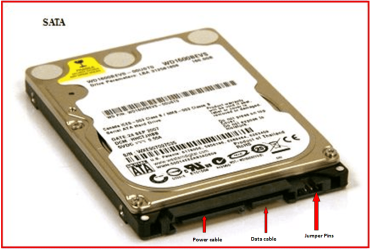
Set the SATA3 HDD to SATA2 mode, using the jumper setting.

SATA 0076.PNG

Check the manufacturer's website for the jumper settings.
 

My Computer My Computer

At a glance

ME/XP/Vista/Win7
OS
ME/XP/Vista/Win7
Already tried #3 ?

Did not work......I followed all the steps in Auto mode...It only took about 5 seconds....I applied the changes...rebooted and failed at 7b again....I even ran the Boot Repair part of Paragon against the drive after I rebooted a second time...no luck..

Set the SATA3 HDD to SATA2 mode, using the jumper setting.
I set the jumpers to 5-6 to no avail...Failed as well

thanks guys for the help but something is just not right.....Something about the first boot after the restore, and Windows adds some driver when it recognizes the new drive and after the required reboot fails with a 7b....every time
 

My Computer My Computer

At a glance

win 7 Home Premium 64 bitQ82006GBATI
Computer type
PC/Desktop
Computer Manufacturer/Model Number
Dell Studio 540
OS
win 7 Home Premium 64 bit
CPU
Q8200
Motherboard
Intel
Memory
6GB
Graphics Card(s)
ATI
Sound Card
Realtek Onboard
Hard Drives
Samsung HD642JJ, C,D,E,F,G
Samsung HD 103SJ, H, I
Keyboard
Logitech Wireless
Mouse
Logitech Wireless
Internet Speed
25/5
Antivirus
MSE
Browser
Latest FF
Please post back a camera snap of your drive map on Disk Director or bootable Partition Manager.

If the original had System Reserved booting Win7 then SysReserved partition should be Partition Marked Active while you run Startup Repair - Run up to 3 Separate Times. All other drivers must be unplugged or it will not repair.

If C is marked System on original Win7 then set it Active and run the 3 repairs with all other HD's unplugged.

Most imaging suites ask if you want to preserve Track1 and keep the OS partition Active when transferring.

If these fail, cut your losses by doing a Clean Install Windows 7 with only the target HD plugged in.
 
Please post back a camera snap of your drive map on Disk Director or bootable Partition Manager.

If the original had System Reserved booting Win7 then SysReserved partition should be Partition Marked Active while you run Startup Repair - Run up to 3 Separate Times. All other drivers must be unplugged or it will not repair.

If C is marked System on original Win7 then set it Active and run the 3 repairs with all other HD's unplugged.

Most imaging suites ask if you want to preserve Track1 and keep the OS partition Active when transferring.

If these fail, cut your losses by doing a Clean Install Windows 7 with only the target HD plugged in.

GOOD DRIVE (G drive got cut off in pic but can be seen in text portion)
Working_640GB_Original.jpg


Non Working (drives a different size due to proportioning)
Non_Working_WD10EZEX.jpg


My Computer My Computer

At a glance

win 7 Home Premium 64 bitQ82006GBATI
Computer type
PC/Desktop
Computer Manufacturer/Model Number
Dell Studio 540
OS
win 7 Home Premium 64 bit
CPU
Q8200
Motherboard
Intel
Memory
6GB
Graphics Card(s)
ATI
Sound Card
Realtek Onboard
Hard Drives
Samsung HD642JJ, C,D,E,F,G
Samsung HD 103SJ, H, I
Keyboard
Logitech Wireless
Mouse
Logitech Wireless
Internet Speed
25/5
Antivirus
MSE
Browser
Latest FF
i guess i should have been more specific....
Disks H&I are my secondary Samsung 1TB drive.
Throughtout this whole ordeal, they have not changed from that...
only Disk 1 in both pictures are the different drives...

I took the good drive (640GB)(picture 1) and cloned it to the WDC drive (non working)(Disk 1)
I then tried to boot it alongside the Disk2 Samsung drive..
I also tried to boot it alone..both resulted in BSOD 7b

when i put my 640GB disk 1 back in the system it works fine....

I tried running the Startup Repair 3x and it failed with a Bad Driver message and still got a 7b...
and if you look close you can see the active flag on Drive C in both pics..

This one looks unsolveable and I am about to just try a fresh Win7 install as much as I dont want to..
 

My Computer My Computer

At a glance

win 7 Home Premium 64 bitQ82006GBATI
Computer type
PC/Desktop
Computer Manufacturer/Model Number
Dell Studio 540
OS
win 7 Home Premium 64 bit
CPU
Q8200
Motherboard
Intel
Memory
6GB
Graphics Card(s)
ATI
Sound Card
Realtek Onboard
Hard Drives
Samsung HD642JJ, C,D,E,F,G
Samsung HD 103SJ, H, I
Keyboard
Logitech Wireless
Mouse
Logitech Wireless
Internet Speed
25/5
Antivirus
MSE
Browser
Latest FF
If your OS is on a logical drive then you need an active system reserved primary partition. I can't recall if Dell or HP use their recovery partition as active to perform this boot function. Your screenshots don't appear to show the active status of your partitions. Windows Disk Management will show this.
 

My Computer My Computer

At a glance

Windows 7x64 Home Premium SP1Intel i7 2600kG.Skill Ripjaws (DDR3-1600) 2x4GBNvidia GeForce GTS 450; Intel HD Graphics 300...
Computer type
PC/Desktop
Computer Manufacturer/Model Number
Own build
OS
Windows 7x64 Home Premium SP1
CPU
Intel i7 2600k
Motherboard
ASUS P8Z68 Deluxe
Memory
G.Skill Ripjaws (DDR3-1600) 2x4GB
Graphics Card(s)
Nvidia GeForce GTS 450; Intel HD Graphics 3000(GT2+)
Monitor(s) Displays
Dell Ultrasharp IPS panel U2311H, Samsung SyncMaster P2350
Screen Resolution
1920x1080
Hard Drives
Samsung 850 Pro SSD 256GB, Samsung SSD 840 120GB, Seagates 1TB Barracuda ST31000528AS x2
PSU
Seasonic M12II 520W
Case
Lian Li Lancool PC-K60
Cooling
Case: 1x120mm, 3x140mm CPU: Hyper 212+
Keyboard
Logitech MK520 (wireless)
Mouse
Logitech MK520
Internet Speed
6-7 Mbps
Antivirus
Norton Security Premium, Malwarebytes on 2 (MSE on 3rd PC)
Browser
FireFox
Other Info
Audio: Logitech Z523 2.1
Back
Top