Solved Virus Deletion Now Makes Internet Access Impossible

Merry Christmas to all the terrific gurus at Seven Forums.

JACEE: Thanks for your continuing encouragement.

COTTONBALL: I appreciate your help. Infused with lots of coffee and leftover Christmas Eve Rum Cake for breakfast, I ran System Look this morning per your suggestion and I am attaching the report. I will get to your other suggestion after fetching more java. Again, many thanks!
 

Attachments

My Computer My Computer

At a glance

Windows 7 643.00 gig AMD Athlon II x4 6406136 Megabytes Installed MemoryNVIDIA GeForce GTS 450
Computer type
PC/Desktop
Computer Manufacturer/Model Number
HP HPE-500Z
OS
Windows 7 64
CPU
3.00 gig AMD Athlon II x4 640
Motherboard
FOXCONN 2A92 1.01, BIOS: American Megatrends 6.09
Memory
6136 Megabytes Installed Memory
Graphics Card(s)
NVIDIA GeForce GTS 450
Sound Card
Realtek HD Audio & NVIDIA HD Audio 4x
Monitor(s) Displays
Twin Dell 2405FPW 24.2
Screen Resolution
1920 x 1200
Hard Drives
Hitachi HDS721010CLA332 SCSI 1000.20 GB;
Seagate ST31000528AS SCSI 1000.20 GB
Keyboard
IBM KB8923
Mouse
HP MODGUO
Antivirus
AVG
Browser
Firefox 26.0 + IE-11 + Chrome
Since ScorpionSaver uses a service to run, let's also get a list of started services using the Command Prompt...

Please do the following:
Go to Start > All Programs > Accessories > Command Prompt
At the Command Prompt, copy/paste the following text inside the code box, and press: Enter

Code:
net start

To copy the text contained/produced in the Command Prompt, click on the small command icon in the top left corner, and then choose:
Edit > Select All
Once again, Edit > Copy
Next, open Notepad, and paste the text to it.

:ar: Please post the text in your reply.

To close the Command Prompt, use the [X], or type in: exit Press: Enter

Gotcha!

It's attached.

Merry, Merry & Happy, Happy!
 

Attachments

My Computer My Computer

At a glance

Windows 7 643.00 gig AMD Athlon II x4 6406136 Megabytes Installed MemoryNVIDIA GeForce GTS 450
Computer type
PC/Desktop
Computer Manufacturer/Model Number
HP HPE-500Z
OS
Windows 7 64
CPU
3.00 gig AMD Athlon II x4 640
Motherboard
FOXCONN 2A92 1.01, BIOS: American Megatrends 6.09
Memory
6136 Megabytes Installed Memory
Graphics Card(s)
NVIDIA GeForce GTS 450
Sound Card
Realtek HD Audio & NVIDIA HD Audio 4x
Monitor(s) Displays
Twin Dell 2405FPW 24.2
Screen Resolution
1920 x 1200
Hard Drives
Hitachi HDS721010CLA332 SCSI 1000.20 GB;
Seagate ST31000528AS SCSI 1000.20 GB
Keyboard
IBM KB8923
Mouse
HP MODGUO
Antivirus
AVG
Browser
Firefox 26.0 + IE-11 + Chrome
Merry Christmas, Florida Rene!

Will get back with instructions later today...need some uninterrupted time.

Hope you have a USB pen/flash drive available, if not, an SD Card, since we are going to do some 'surgery' from outside of Windows.

Thanks for your patience.
 

My Computer My Computer

At a glance

Windows 7 Home Premium
Computer type
PC/Desktop
Computer Manufacturer/Model Number
An ol' eMachines
OS
Windows 7 Home Premium
Internet Speed
Fine for me...I'm retired!
Merry Christmas, Florida Rene!

Will get back with instructions later today...need some uninterrupted time.

Hope you have a USB pen/flash drive available, if not, an SD Card, since we are going to do some 'surgery' from outside of Windows.

Thanks for your patience.

No...Thanks are due TO YOU!

Yes, I have a flash drive Kingston with 14 GB available. FYI, I am talking to you via my backup machine Xena. It's my main computer, ZIVA, that had the infections. Via LAN, ZIVA can see partition e:\ on XENA (only e:), but XENA can't see any on ZIVA because I'm not yet smart enough to figure out how to do it.

I appreciate all your help, but please take today to be with family and favored friends.
 

My Computer My Computer

At a glance

Windows 7 643.00 gig AMD Athlon II x4 6406136 Megabytes Installed MemoryNVIDIA GeForce GTS 450
Computer type
PC/Desktop
Computer Manufacturer/Model Number
HP HPE-500Z
OS
Windows 7 64
CPU
3.00 gig AMD Athlon II x4 640
Motherboard
FOXCONN 2A92 1.01, BIOS: American Megatrends 6.09
Memory
6136 Megabytes Installed Memory
Graphics Card(s)
NVIDIA GeForce GTS 450
Sound Card
Realtek HD Audio & NVIDIA HD Audio 4x
Monitor(s) Displays
Twin Dell 2405FPW 24.2
Screen Resolution
1920 x 1200
Hard Drives
Hitachi HDS721010CLA332 SCSI 1000.20 GB;
Seagate ST31000528AS SCSI 1000.20 GB
Keyboard
IBM KB8923
Mouse
HP MODGUO
Antivirus
AVG
Browser
Firefox 26.0 + IE-11 + Chrome
Florida Rene,

Please read the info that follows, so you can have an idea of what you need to do, in the sequence presented. You may also want to print these instructions so you do not have to go back and forth to access them. Do this when you have the time, as it may take a while, and needs done in one attempt.

So, here we go…

On a clean computer:

:info: Please download the Farbar Recovery Scan Tool:
Download > Farbar Recovery Scan Tool Download
This time, save it to the USB flash drive.
Note: You need to select the version of FRST compatible with your system: 64-bit

Still on the clean computer, press the Windows key and the R key at the same time.
At the Run prompt, type in notepad, and press: Enter

Please copy/paste the contents of the code box below into Notepad and save it on the flash drive as: fixlist.txt

Code:
start
C:\Program Files\ScorpionSaver Services\AdpeakProxy.exe
C:\Program Files\ScorpionSaver Services
c:\Program Files (x86)\ScorpionSaver
C:\MATS\{9B65F9A3-9D24-452A-B6EF-1457D65E4259}\FileBackup\c\Program Files (x86)\ScorpionSaver
end

Use the Safely Remove icon on the bottom right of the Taskbar to remove the USB flash drive. We will use the drive containing FRST and the fixlist.txt later.


On the problem computer:

:info: Please remove the Farbar Recovery Scan Tool from the Desktop. By now it is probably outdated, and we do not need it.

:info: Next, please copy the contents of the code box below to Notepad.
Name the file as: scorp.reg
Change the Save as Type to: All Files
Save on the


Code:
REGEDIT4 
 
[-HKEY_LOCAL_MACHINE\SOFTWARE\Classes\SOFTWARE\Wow6432Node\CLSID\F5D333A8-C748-4686-AE0A-9E008F670C22]
[-HKEY_LOCAL_MACHINE\SOFTWARE\Microsoft\MATS\WindowsInstaller\{9B65F9A3-9D24-452A-B6EF-1457D65E4259}
[HKEY_LOCAL_MACHINE\SOFTWARE\Microsoft\Windows\CurrentVersion\Installer\Folders]
"c:\Program Files (x86)\ScorpionSaver\"=-
[-HKEY_LOCAL_MACHINE\SOFTWARE\Microsoft\Windows\CurrentVersion\Installer\UserData\S-1-5-18\Components\1C19AC53289098045B06B0DD1D37CBAB]
[-HKEY_LOCAL_MACHINE\SOFTWARE\Microsoft\Windows\CurrentVersion\Installer\UserData\S-1-5-18\Components\23D9E9D21B4E77E41B9F50DD22F24E20]
[-HKEY_LOCAL_MACHINE\SOFTWARE\Microsoft\Windows\CurrentVersion\Installer\UserData\S-1-5-18\Components\23EEA1F105A7F45449974D9B95E7AC89]
[-HKEY_LOCAL_MACHINE\SOFTWARE\Microsoft\Windows\CurrentVersion\Installer\UserData\S-1-5-18\Components\26982796A8AFD1246B95E00265A95BF9]
[-HKEY_LOCAL_MACHINE\SOFTWARE\Microsoft\Windows\CurrentVersion\Installer\UserData\S-1-5-18\Components\42D92D0D75AFEF74297E03876C8D9D33]
[-HKEY_LOCAL_MACHINE\SOFTWARE\Microsoft\Windows\CurrentVersion\Installer\UserData\S-1-5-18\Components\50FFE845C555A6E4BADB7CB7A145BFEB]
[-HKEY_LOCAL_MACHINE\SOFTWARE\Microsoft\Windows\CurrentVersion\Installer\UserData\S-1-5-18\Components\7B7B13B037A7C2A42AC3E3EAF14D7107]
[-HKEY_LOCAL_MACHINE\SOFTWARE\Microsoft\Windows\CurrentVersion\Installer\UserData\S-1-5-18\Components\7D05B2942E9CC80499F397F6114DFB35]
[-HKEY_LOCAL_MACHINE\SOFTWARE\Microsoft\Windows\CurrentVersion\Installer\UserData\S-1-5-18\Components\8591B8948E1C4A04F90505B3CDEE8555]
[-HKEY_LOCAL_MACHINE\SOFTWARE\Microsoft\Windows\CurrentVersion\Installer\UserData\S-1-5-18\Components\8D841C5FEC311624CB88D49DB3884FA7]
[-HKEY_LOCAL_MACHINE\SOFTWARE\Microsoft\Windows\CurrentVersion\Installer\UserData\S-1-5-18\Components\AD746BF3B3B3FD8409B86604BA85982A]
[-HKEY_LOCAL_MACHINE\SOFTWARE\Microsoft\Windows\CurrentVersion\Installer\UserData\S-1-5-18\Components\F355F0DB7A2E3A14B8E7A568FBA25937]
[-HKEY_LOCAL_MACHINE\SOFTWARE\Wow6432Node\Microsoft\Windows\CurrentVersion\Uninstall\{9B65F9A3-9D24-452A-B6EF-1457D65E4259}]
[-HKEY_LOCAL_MACHINE\SYSTEM\ControlSet003\services\WinSock2\Parameters\AppId_Catalog\049970F0]
[-HKEY_LOCAL_MACHINE\SYSTEM\ControlSet004\services\WinSock2\Parameters\AppId_Catalog\049970F0]
[-HKEY_LOCAL_MACHINE\SYSTEM\CurrentControlSet\services\WinSock2\Parameters\AppId_Catalog\049970F0]
[-HKEY_USERS\.DEFAULT\Software\AppDataLow\Software\Scorpion Saver]
[-HKEY_USERS\S-1-5-18\Software\AppDataLow\Software\Scorpion Saver]

Keep the scorp.reg on the Desktop, and we will use it later.

:info: Since we are editing the Registry, we need to back it up.

Please download the installer for Registry Backup:
Downlaod > Registry Backup Download
Save to the Desktop.

Right-click on tweaking.com_registry_backup_setup.exe and select: Run as Administrator
Follow the prompts for a default installation.

Make sure the following option is selected: Open "Tweaking.com - Registry Backup" When Install Completes

Click: Next > Finish

At the program console, click on: Backup Now
Once the process completes, a notice is displayed as follows:
Successfull / Registry Files Backed Up

Close: Tweaking.com - Registry Backup

If all goes well, there is a folder created at the root of the hard drive named C:\RegBackup
Make sure the folder is there before you proceed!!

:info: Now, please use RKill to terminate any obnoxious processes (if still present): RKill Download
Save the downloaded file to the Desktop.

If RKill.exe does not run per instructions below, download and try to run RKill.com:
RKill Download

You only need to get one of the versions of RKill to run.

If your AntiVirus warns you about this tool, ignore the warning, or temporarily disable your AntiVirus.

Right-click on the downloaded RKill file and select: Run as Administrator
A black box briefly flashes and then disappears. This is normal and indicates the tool ran successfully.

After running the tool, do not reboot.
When the scan is done Notepad opens with the RKill report.

:ar: Please save the RKill report to post in your reply.

Do not reboot!!!!!!

:info: Next, go to the Desktop, and double-click on the scorp.reg file,
Agree when it prompts you to merge the info into the Registry.

:info: Now, plug in the USB flash drive. However, do not run any of its contents!

:info: Restart the computer, but only as follows:

As the computer restarts, tap the F8 key until you get to the Advanced Boot Options menu
Use the arrow keys to select: Repair your computer

From there...

Select your language settings, and click: Next
Select your User account and click: OK (If you did not set a password, leave blank.)

On System Recovery Options, you get the following options:
Startup Repair
System Restore
Windows Complete PC Restore
Windows Memory Diagnostic Tool
Scan your computer's memory for errors
Command Prompt

Select: Command Prompt

At the Command Prompt window, type in notepad, and press: Enter
When Notepad opens, under the File menu select: Open
Select My Computer and find your flash drive letter, make note of it, and close Notepad.

At the Command Prompt window type x:\frst64 and press: Enter
Note: Replace letter x with the drive letter of your flash drive!!

FRST starts to run.
Accept the disclaimer.

At the program console, press the Fix button, only once, and wait.

When done, a report named fixlog.txt is created on the flash drive.

Click the Command Prompt window, type exit, and press: Enter

Back at System Recovery Options, press: Restart

:ar: Back in Windows, please open the flash drive, and provide the fixlog.txt in your reply. Also provide the RKill report, located on the Desktop.

Thanks!

 

My Computer My Computer

At a glance

Windows 7 Home Premium
Computer type
PC/Desktop
Computer Manufacturer/Model Number
An ol' eMachines
OS
Windows 7 Home Premium
Internet Speed
Fine for me...I'm retired!

My Computer My Computer

At a glance

Windows 7 Home Premium
Computer type
PC/Desktop
Computer Manufacturer/Model Number
An ol' eMachines
OS
Windows 7 Home Premium
Internet Speed
Fine for me...I'm retired!
Have you tried turning off your computer and your modem and router if you have one. Then turn them back in this order. 1. Modem, wait till all the lights are flashing correctly. 2. Router, same with the lights. 3. Computer.
 

My Computer My Computer

At a glance

Windows 7 Ultimate x64FX 8350 @ 4.8ghz, turbo clocked to 5.4ghzMushkin Enhanced Blackline 16GB 1760mhz 10-10...Gigabyte-660 Windforce OC- GPU Clock 1212MHz ...
Computer type
PC/Desktop
Computer Manufacturer/Model Number
Custom Build
OS
Windows 7 Ultimate x64
CPU
FX 8350 @ 4.8ghz, turbo clocked to 5.4ghz
Motherboard
Asus Sabertooth FX990 Gen 3.0 R2.0
Memory
Mushkin Enhanced Blackline 16GB 1760mhz 10-10-9-24 T1
Graphics Card(s)
Gigabyte-660 Windforce OC- GPU Clock 1212MHz /3504MHz ram
Sound Card
Creative Sound Blaster Recon3D PCIe Sound Card
Monitor(s) Displays
Samsung SyncMaster S27B350H (HDMI)
Screen Resolution
1920x1080 60HZ
Hard Drives
1 x SSD Crucial M4 256GB (Primary OS)
3 x HDD WD 1TB
4 x HDD 2TB
1 x HDD 160GB (Secondary Backup OS)
Raid SATA III 6GB/s 4-port PCI-e Controller Card, Marvel 88SE9215 chipset
PSU
Chieftec-650-14CS (Modular) 80 Plus Gold-650 Watt
Case
Akasa Venom Toxic Gaming Big tower ( Custom Black ) Ver 2.0
Cooling
Water 2.0 PRO / GEIL Cyclone VRM / 6x120mm 2x220mm 2x140mm
Keyboard
Logitech G19
Mouse
Wireless Notebook Presenter Mouse 8000
Internet Speed
Fiber GBS
Antivirus
Don't Announce it to the world :)
Browser
Gotta have at least 1!
Also, could you please open SuperAntiSpyware, go to its Control Panel, and look for its Scan Logs.

Please post the Scan Log for the run depicted on Post #110:
http://www.sevenforums.com/system-s...nternet-access-impossible-11.html#post2633800

These ol' eyes are not what they use to be...or maybe it was the eggnog! The image was too difficult for me to read!!

Thanks!

COTTONBALL: Wow!...Thanks ever so much for all the time and professionalism you have devoted to helping me with this episode. Truly astonishing! I hope to carefully follow your directions today (in-between grandkids), one step at a time, slowly, because I am not nearly the expert that you obviously are.

In the meantime, I went to SuperAntiSpyware and that log no longer exists. I guess it writes new logs over the old ones. So, via SnagIt, I converted the jpg file to a pdf. It is attached. You may have to enlarge it to read it. Let me know if that doesn't work for you and I'll try something else.

CRANKYPENGUIN: Posts by Indiana, Kaktus, Jacee, Golden and others enabled me to successfully get the infected machine back online and that works just fine right now. It's the residue cleanup and assurance that replication is no longer likely that I'm currently concerned with...and to that end, I will focus today on Cottonball's step-by-step procedure.
 

Attachments

My Computer My Computer

At a glance

Windows 7 643.00 gig AMD Athlon II x4 6406136 Megabytes Installed MemoryNVIDIA GeForce GTS 450
Computer type
PC/Desktop
Computer Manufacturer/Model Number
HP HPE-500Z
OS
Windows 7 64
CPU
3.00 gig AMD Athlon II x4 640
Motherboard
FOXCONN 2A92 1.01, BIOS: American Megatrends 6.09
Memory
6136 Megabytes Installed Memory
Graphics Card(s)
NVIDIA GeForce GTS 450
Sound Card
Realtek HD Audio & NVIDIA HD Audio 4x
Monitor(s) Displays
Twin Dell 2405FPW 24.2
Screen Resolution
1920 x 1200
Hard Drives
Hitachi HDS721010CLA332 SCSI 1000.20 GB;
Seagate ST31000528AS SCSI 1000.20 GB
Keyboard
IBM KB8923
Mouse
HP MODGUO
Antivirus
AVG
Browser
Firefox 26.0 + IE-11 + Chrome
Cottonball...

I'm up to the ADVANCED BOOT OPTIONS on my problem machine. Everything has gone well, just as you outlined...and the RKill text file is attached.

But...I do NOT have "Repair Your Computer" as an option.

I see these options:
Safe
Safe with Networking
Safe with Command Prompt
Enable Boot Logging
Enable Low-Res Video
Last Known Good Configuration
Directory Services Restore Mode
Debugging Mode
Disable automatic restart on system failure
Disable Driver Signature Enforcement
Start Windows Normally
It's on the screen now and I have not made a selection. Which do I choose?
 

Attachments

Last edited:

My Computer My Computer

At a glance

Windows 7 643.00 gig AMD Athlon II x4 6406136 Megabytes Installed MemoryNVIDIA GeForce GTS 450
Computer type
PC/Desktop
Computer Manufacturer/Model Number
HP HPE-500Z
OS
Windows 7 64
CPU
3.00 gig AMD Athlon II x4 640
Motherboard
FOXCONN 2A92 1.01, BIOS: American Megatrends 6.09
Memory
6136 Megabytes Installed Memory
Graphics Card(s)
NVIDIA GeForce GTS 450
Sound Card
Realtek HD Audio & NVIDIA HD Audio 4x
Monitor(s) Displays
Twin Dell 2405FPW 24.2
Screen Resolution
1920 x 1200
Hard Drives
Hitachi HDS721010CLA332 SCSI 1000.20 GB;
Seagate ST31000528AS SCSI 1000.20 GB
Keyboard
IBM KB8923
Mouse
HP MODGUO
Antivirus
AVG
Browser
Firefox 26.0 + IE-11 + Chrome
Well, at long last, I figured it out...I think.

I opted for Safe with Command Prompt, and then continued. The fixlog report is attached.

I then rebooted "normally" and SuperAntiSpyware generated the pdf report that I've attached. Also, I updated MalwareBytes and now I'm running it in a full scan mode. I'll report what it unearths.
 

Attachments

My Computer My Computer

At a glance

Windows 7 643.00 gig AMD Athlon II x4 6406136 Megabytes Installed MemoryNVIDIA GeForce GTS 450
Computer type
PC/Desktop
Computer Manufacturer/Model Number
HP HPE-500Z
OS
Windows 7 64
CPU
3.00 gig AMD Athlon II x4 640
Motherboard
FOXCONN 2A92 1.01, BIOS: American Megatrends 6.09
Memory
6136 Megabytes Installed Memory
Graphics Card(s)
NVIDIA GeForce GTS 450
Sound Card
Realtek HD Audio & NVIDIA HD Audio 4x
Monitor(s) Displays
Twin Dell 2405FPW 24.2
Screen Resolution
1920 x 1200
Hard Drives
Hitachi HDS721010CLA332 SCSI 1000.20 GB;
Seagate ST31000528AS SCSI 1000.20 GB
Keyboard
IBM KB8923
Mouse
HP MODGUO
Antivirus
AVG
Browser
Firefox 26.0 + IE-11 + Chrome
Thanks for the info!

Does SAS have its Scan Logs in the Control Panel area?

If so, can you post its last report?

Or, run SAS again, and see if a Scan Log that can be copied/pasted is generated, so you can provide it in your reply.

Can't copy the individual items from the image, and do not want to make a mistake writing them out manually.

Also, running MBAM is a good idea. Will take a look at it when you post the report.

Thanks!
 

My Computer My Computer

At a glance

Windows 7 Home Premium
Computer type
PC/Desktop
Computer Manufacturer/Model Number
An ol' eMachines
OS
Windows 7 Home Premium
Internet Speed
Fine for me...I'm retired!
Thanks for the info!

Does SAS have its Scan Logs in the Control Panel area?

If so, can you post its last report?

Or, run SAS again, and see if a Scan Log that can be copied/pasted is generated, so you can provide it in your reply.

Can't copy the individual items from the image, and do not want to make a mistake writing them out manually.

Also, running MBAM is a good idea. Will take a look at it when you post the report.

Thanks!

Thank you. And again, thanks for sticking with me!

Rkill.txt is attached again.

After restart, Mbam reported no threats, but SAS said I still had 3 Scorpion and 3 Great Arcade hijackers. Thinking SAS may have retained its memory, I uninstalled it and then reinstalled it, then ran it again. This time, it listed 66 cookie threats, all of which I removed. Got a report and it should be attached.

Ran SAS again. This time it again produced the 3 Scorpion and 3 Great Arcade hijackers, but allowed me to uninstall Scorpion(s). I did. It wouldn't let me uninstall Arcade(s).

So I ran SAS once more. This time, uninstalling Arcade(s) worked!

Backed out of SAS. Restarted SAS. None of the Scorpions or Arcades show now. So I'm running a complete SAS scan now.

SAS scan logs do not show the pre-scan hijackers it finds. They show up before you hit "continue" but the only way I have to get them to you is via a screen print. How can I convert a JPG to text?

OOPS, forgot to mention that I used IE, FF, and Chrome to check for extensions. All 3 said I still have none (except Bing in IE). That was before SAS found the 66 Cookie threats.
 

Attachments

Last edited:

My Computer My Computer

At a glance

Windows 7 643.00 gig AMD Athlon II x4 6406136 Megabytes Installed MemoryNVIDIA GeForce GTS 450
Computer type
PC/Desktop
Computer Manufacturer/Model Number
HP HPE-500Z
OS
Windows 7 64
CPU
3.00 gig AMD Athlon II x4 640
Motherboard
FOXCONN 2A92 1.01, BIOS: American Megatrends 6.09
Memory
6136 Megabytes Installed Memory
Graphics Card(s)
NVIDIA GeForce GTS 450
Sound Card
Realtek HD Audio & NVIDIA HD Audio 4x
Monitor(s) Displays
Twin Dell 2405FPW 24.2
Screen Resolution
1920 x 1200
Hard Drives
Hitachi HDS721010CLA332 SCSI 1000.20 GB;
Seagate ST31000528AS SCSI 1000.20 GB
Keyboard
IBM KB8923
Mouse
HP MODGUO
Antivirus
AVG
Browser
Firefox 26.0 + IE-11 + Chrome
Wondering if new Internet access produces new threats, I decided to try running SAS after accessing the Internet, going to a few major sites (Major League Baseball, National Football League, USA Today, CNN and MSNBC) then running SAS again.

Here what I found, after starting with a clean SAS report.

STEP ONE
Run Chrome alone...
SAS found 20 threats, see Chrome report attached.

STEP TWO
Remove threats obtained via Chrome.
Run Internet Explorer alone...
No threats found by SAS

STEP THREE
Run FireFox alone...
No threats found by SAS.

STEP FOUR
Uninstalled Chrome and removed Chrome history.
Restart. F8. Safe with Networking.
Will run complete scan with SAS, then with Mbam, then with AVG...and will report.

Meanwhile...Thank You all for your perseverance and most helpful instructions. I guess if you can help a geezer, you can help a lot of other more tech-savvy folks. I greatly appreciate all you've done. And, Cottonball & Jacee, you get Gold Stars!
 

Attachments

My Computer My Computer

At a glance

Windows 7 643.00 gig AMD Athlon II x4 6406136 Megabytes Installed MemoryNVIDIA GeForce GTS 450
Computer type
PC/Desktop
Computer Manufacturer/Model Number
HP HPE-500Z
OS
Windows 7 64
CPU
3.00 gig AMD Athlon II x4 640
Motherboard
FOXCONN 2A92 1.01, BIOS: American Megatrends 6.09
Memory
6136 Megabytes Installed Memory
Graphics Card(s)
NVIDIA GeForce GTS 450
Sound Card
Realtek HD Audio & NVIDIA HD Audio 4x
Monitor(s) Displays
Twin Dell 2405FPW 24.2
Screen Resolution
1920 x 1200
Hard Drives
Hitachi HDS721010CLA332 SCSI 1000.20 GB;
Seagate ST31000528AS SCSI 1000.20 GB
Keyboard
IBM KB8923
Mouse
HP MODGUO
Antivirus
AVG
Browser
Firefox 26.0 + IE-11 + Chrome
If SAS (IMO, The Cookie Monster) let you remove the last few entries, there is no need for your posting its results, unless SS appears again.
Ugh! Stubborn piece of tripe!

:info: Let this program take a shot at removing SS:
Junkware Removal Tool Download
Save to the Desktop.

Make sure you temporarily disable your AntiVirus, Firewall, and any other AntiSpyware applications. These programs may interfere with the running of JRT.
Info: How To Temporarily Disable Your Anti-virus, Firewall And Anti-malware Programs - Security Mini-Guides

Right-click JRT.exe and select: Run as Administrator

The tool opens and starts scanning the system. Please be patient as this can take a while...

When done, a report, JRT.txt is saved on the Desktop.

:ar: Please post the contents of JRT.txt in your reply.


In Post #90, LaybackBear proposed a very good step in this process >> running the ESET Online Scanner.

It has a very good detection rate, so please give it a whirl. Different scanners have varying definitions for what they look for, so throwing in a new perspective may help us.


:info: To run the ESET Online Scanner...

Since it is implemented as an ActiveX control, it is best run on Internet Explorer.
Right click the IE shortcut and select: Run as Administrator

Next, in IE, download > Free Virus Scan | Online Virus Scanner from ESET
On the ESET website, click on: Run ESET Online Scanner
Click: Start

When asked, allow the add-on to be installed.
Again, click: Start

On the next prompt, Computer Scan Settings, check: Remove found threats

Next, click on: Advanced Settings
Make sure the following options are checked:
>Scan for potentially unwanted applications
>Scan for potentially unsafe applications
>Enable Anti-Stealth Technology

By Current Scan Targets, Operating memory, Local drives, press: Change
In Selection of scan targets, Local drives, select the drives in question.
Click: OK

Click: Start
Follow the prompts.

When the scan completes, if threats are found, in the Scan Results prompt, click on: List of threats found
Click on: Export to text file
Save to the Desktop and name it: ESET Scan Results
Click on: Back
Click on: Finish, and close the program.

If anything is found, please provide the ESET Scan Results in your reply to determine what further action is necessary.

BTW, this scan may take a while, so get some more rum cake and some coffee! Just a suggestion, from geezer to geezer...
 

My Computer My Computer

At a glance

Windows 7 Home Premium
Computer type
PC/Desktop
Computer Manufacturer/Model Number
An ol' eMachines
OS
Windows 7 Home Premium
Internet Speed
Fine for me...I'm retired!
U R a STITCH! Alas, no more rum cake.

Thank you, Cottonball.

Late night summary: Ran SAS, Mbam, & AVG. All clear with all 3.

This a.m.: Ran JRT. Report is attached.

Haven't enough coffee in me yet to figure out how to do ESET and whether it's needed since all seems to be running okay today. Is it only for IE?
 

Attachments

My Computer My Computer

At a glance

Windows 7 643.00 gig AMD Athlon II x4 6406136 Megabytes Installed MemoryNVIDIA GeForce GTS 450
Computer type
PC/Desktop
Computer Manufacturer/Model Number
HP HPE-500Z
OS
Windows 7 64
CPU
3.00 gig AMD Athlon II x4 640
Motherboard
FOXCONN 2A92 1.01, BIOS: American Megatrends 6.09
Memory
6136 Megabytes Installed Memory
Graphics Card(s)
NVIDIA GeForce GTS 450
Sound Card
Realtek HD Audio & NVIDIA HD Audio 4x
Monitor(s) Displays
Twin Dell 2405FPW 24.2
Screen Resolution
1920 x 1200
Hard Drives
Hitachi HDS721010CLA332 SCSI 1000.20 GB;
Seagate ST31000528AS SCSI 1000.20 GB
Keyboard
IBM KB8923
Mouse
HP MODGUO
Antivirus
AVG
Browser
Firefox 26.0 + IE-11 + Chrome
Cottonball...

I'm up to the ADVANCED BOOT OPTIONS on my problem machine. Everything has gone well, just as you outlined...and the RKill text file is attached.

But...I do NOT have "Repair Your Computer" as an option.

I see these options:
Safe
Safe with Networking
Safe with Command Prompt
Enable Boot Logging
Enable Low-Res Video
Last Known Good Configuration
Directory Services Restore Mode
Debugging Mode
Disable automatic restart on system failure
Disable Driver Signature Enforcement
Start Windows Normally
It's on the screen now and I have not made a selection. Which do I choose?
In http://www.sevenforums.com/tutorials/783-elevated-command-prompt.html :
Code:
reagentc/disable
reagentc/enable
reagentc/info

Post output. Is "repair your computer" in the list again?
 

My Computer My Computer

At a glance

Microsoft Windows 7 Home Premium 64-bits 7601...Intel(R) Core(TM) i3 CPU M 370 @ 2.40GHz4,00 GBATI Mobility Radeon HD 5400 Series
Computer type
Laptop
Computer Manufacturer/Model Number
ACER ASPIRE 5742G
OS
Microsoft Windows 7 Home Premium 64-bits 7601 Multiprocessor Free Service Pack 1
CPU
Intel(R) Core(TM) i3 CPU M 370 @ 2.40GHz
Motherboard
Acer Aspire 5742G
Memory
4,00 GB
Graphics Card(s)
ATI Mobility Radeon HD 5400 Series
Sound Card
(1) AMD High Definition Audio Device (2) Realtek High Defi
Screen Resolution
1366 x 768 x 32 bits (4294967296 colors) @ 60 Hz
Hard Drives
WDC WD5000BEVT-22ZAT0
Cottonball...

I'm up to the ADVANCED BOOT OPTIONS on my problem machine. Everything has gone well, just as you outlined...and the RKill text file is attached.

But...I do NOT have "Repair Your Computer" as an option.

I see these options:
Safe
Safe with Networking
Safe with Command Prompt
Enable Boot Logging
Enable Low-Res Video
Last Known Good Configuration
Directory Services Restore Mode
Debugging Mode
Disable automatic restart on system failure
Disable Driver Signature Enforcement
Start Windows Normally
It's on the screen now and I have not made a selection. Which do I choose?
In http://www.sevenforums.com/tutorials/783-elevated-command-prompt.html :
Code:
reagentc/disable
reagentc/enable
reagentc/info

Post output. Is "repair your computer" in the list again?

Thank you. Output attached.

I tried and failed. Remember, Ich ist ein dumbkopf!

Und, man nicht sprecht Deutsch.
 

Attachments

  • Reagentc 12-27-2013 7-48-08 AM.jpg
    Reagentc 12-27-2013 7-48-08 AM.jpg
    44.4 KB · Views: 0

My Computer My Computer

At a glance

Windows 7 643.00 gig AMD Athlon II x4 6406136 Megabytes Installed MemoryNVIDIA GeForce GTS 450
Computer type
PC/Desktop
Computer Manufacturer/Model Number
HP HPE-500Z
OS
Windows 7 64
CPU
3.00 gig AMD Athlon II x4 640
Motherboard
FOXCONN 2A92 1.01, BIOS: American Megatrends 6.09
Memory
6136 Megabytes Installed Memory
Graphics Card(s)
NVIDIA GeForce GTS 450
Sound Card
Realtek HD Audio & NVIDIA HD Audio 4x
Monitor(s) Displays
Twin Dell 2405FPW 24.2
Screen Resolution
1920 x 1200
Hard Drives
Hitachi HDS721010CLA332 SCSI 1000.20 GB;
Seagate ST31000528AS SCSI 1000.20 GB
Keyboard
IBM KB8923
Mouse
HP MODGUO
Antivirus
AVG
Browser
Firefox 26.0 + IE-11 + Chrome
reagentc/enable
reagentc/info

post output
 

My Computer My Computer

At a glance

Microsoft Windows 7 Home Premium 64-bits 7601...Intel(R) Core(TM) i3 CPU M 370 @ 2.40GHz4,00 GBATI Mobility Radeon HD 5400 Series
Computer type
Laptop
Computer Manufacturer/Model Number
ACER ASPIRE 5742G
OS
Microsoft Windows 7 Home Premium 64-bits 7601 Multiprocessor Free Service Pack 1
CPU
Intel(R) Core(TM) i3 CPU M 370 @ 2.40GHz
Motherboard
Acer Aspire 5742G
Memory
4,00 GB
Graphics Card(s)
ATI Mobility Radeon HD 5400 Series
Sound Card
(1) AMD High Definition Audio Device (2) Realtek High Defi
Screen Resolution
1366 x 768 x 32 bits (4294967296 colors) @ 60 Hz
Hard Drives
WDC WD5000BEVT-22ZAT0
From elevated command prompt:
Code:
attrib /s  c:\win*.wim
attrib /s  c:\*.sdi

If you also have a D drive
Code:
attrib /s  d:\win*.wim
attrib /s  d:\*.sdi

Post output.
 
Last edited:

My Computer My Computer

At a glance

Microsoft Windows 7 Home Premium 64-bits 7601...Intel(R) Core(TM) i3 CPU M 370 @ 2.40GHz4,00 GBATI Mobility Radeon HD 5400 Series
Computer type
Laptop
Computer Manufacturer/Model Number
ACER ASPIRE 5742G
OS
Microsoft Windows 7 Home Premium 64-bits 7601 Multiprocessor Free Service Pack 1
CPU
Intel(R) Core(TM) i3 CPU M 370 @ 2.40GHz
Motherboard
Acer Aspire 5742G
Memory
4,00 GB
Graphics Card(s)
ATI Mobility Radeon HD 5400 Series
Sound Card
(1) AMD High Definition Audio Device (2) Realtek High Defi
Screen Resolution
1366 x 768 x 32 bits (4294967296 colors) @ 60 Hz
Hard Drives
WDC WD5000BEVT-22ZAT0
From elevated command prompt:
Code:
attrib /s  c:\win*.wim
attrib /s  c:\win*.sdi

If you also have a D drive
Code:
attrib /s  d:\win*.wim
attrib /s  d:\win*.sdi

Post output.

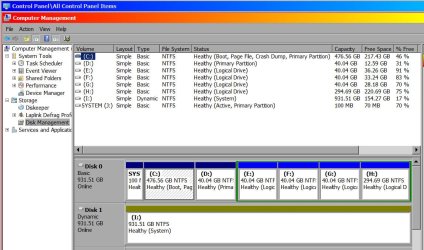
On the main computer (not this backup machine), Drive A is the cd/dvd drive and the others are itemized below. Do I use the code lines you typed similarly for all partitions in a txt file and then run it with Elevated Command Prompt?
 

Attachments

  • Disk Config.jpg
    Disk Config.jpg
    117.8 KB · Views: 0

My Computer My Computer

At a glance

Windows 7 643.00 gig AMD Athlon II x4 6406136 Megabytes Installed MemoryNVIDIA GeForce GTS 450
Computer type
PC/Desktop
Computer Manufacturer/Model Number
HP HPE-500Z
OS
Windows 7 64
CPU
3.00 gig AMD Athlon II x4 640
Motherboard
FOXCONN 2A92 1.01, BIOS: American Megatrends 6.09
Memory
6136 Megabytes Installed Memory
Graphics Card(s)
NVIDIA GeForce GTS 450
Sound Card
Realtek HD Audio & NVIDIA HD Audio 4x
Monitor(s) Displays
Twin Dell 2405FPW 24.2
Screen Resolution
1920 x 1200
Hard Drives
Hitachi HDS721010CLA332 SCSI 1000.20 GB;
Seagate ST31000528AS SCSI 1000.20 GB
Keyboard
IBM KB8923
Mouse
HP MODGUO
Antivirus
AVG
Browser
Firefox 26.0 + IE-11 + Chrome
Back
Top