Solved CMD line BCDEDIT to point to winre.wim and Disk letter assignment

NeilPaisnel

New member
Local time
11:06 PM
Messages
63
Now, i have already 'solved' this issue by installing a temporary copy of Win 7 to the c:\ and using EasyBCD to add an entry to the bcd file, to point to winre.wim to run the HP Recovery factory software.

But I should be able to create the bootmgr file just with the command line bcdedit command , but no matter how many threads I have read here, and how many different options i have tried. I can't get the commands correct to create a working BCD file to point to winre.wim

The path to winre.wim is:

drive letter:\Recovery\WindowsRE\winre.wim.


This brings me to my second question, DRIVE LETTER allocation.

I have read somewhere (on here?) that Diskpart often reports different drive letters per partition compared to what Windows Disk manager reports /sees..so what letter do we put in the BCD file?


As I said, i already have created a BCD file by installing Windows, but it is a long winded method compared to just booting from a WinPE stick and creating the BCD via command line.

Thanks

Neil
 

My Computer My Computer

At a glance

Many: XP, 7, Home & Pro, Slax, FreeNAS, OS-X ...core i58Gb
Computer type
Laptop
Computer Manufacturer/Model Number
HP 4530's Toshiba Sat Pro MacPro, MacBook Pro
OS
Many: XP, 7, Home & Pro, Slax, FreeNAS, OS-X 10.9 10.6.8
CPU
core i5
Memory
8Gb
Hard Drives
Crucial SSD
Various
What exactly do you want?
  • Create bcd from scratch?
  • Create an extra entry in BCD that runs winre?
Be more specific what you want please
 

My Computer My Computer

At a glance

Microsoft Windows 7 Home Premium 64-bits 7601...Intel(R) Core(TM) i3 CPU M 370 @ 2.40GHz4,00 GBATI Mobility Radeon HD 5400 Series
Computer type
Laptop
Computer Manufacturer/Model Number
ACER ASPIRE 5742G
OS
Microsoft Windows 7 Home Premium 64-bits 7601 Multiprocessor Free Service Pack 1
CPU
Intel(R) Core(TM) i3 CPU M 370 @ 2.40GHz
Motherboard
Acer Aspire 5742G
Memory
4,00 GB
Graphics Card(s)
ATI Mobility Radeon HD 5400 Series
Sound Card
(1) AMD High Definition Audio Device (2) Realtek High Defi
Screen Resolution
1366 x 768 x 32 bits (4294967296 colors) @ 60 Hz
Hard Drives
WDC WD5000BEVT-22ZAT0
Now I look back, maybe not as clear as intended, sorry,
The last line of my post was attempting to say that I wanted to create from scratch.

I know how and have used the create command to create the BCD, but have not had any success in getting it to boot.

So to be totally straight, I want to create the BCD file, from the CMD line, once booted via USB Win PE boot stick, to point the boot sequence to winre.wim, located at the path given in the first post.

Thanks
 

My Computer My Computer

At a glance

Many: XP, 7, Home & Pro, Slax, FreeNAS, OS-X ...core i58Gb
Computer type
Laptop
Computer Manufacturer/Model Number
HP 4530's Toshiba Sat Pro MacPro, MacBook Pro
OS
Many: XP, 7, Home & Pro, Slax, FreeNAS, OS-X 10.9 10.6.8
CPU
core i5
Memory
8Gb
Hard Drives
Crucial SSD
Various
please post bcdedit output you have created so far.

Code:
bcdedit /store c:\boot\bcd   /enum all

replace c:\boot\bcd with actual location.
 

My Computer My Computer

At a glance

Microsoft Windows 7 Home Premium 64-bits 7601...Intel(R) Core(TM) i3 CPU M 370 @ 2.40GHz4,00 GBATI Mobility Radeon HD 5400 Series
Computer type
Laptop
Computer Manufacturer/Model Number
ACER ASPIRE 5742G
OS
Microsoft Windows 7 Home Premium 64-bits 7601 Multiprocessor Free Service Pack 1
CPU
Intel(R) Core(TM) i3 CPU M 370 @ 2.40GHz
Motherboard
Acer Aspire 5742G
Memory
4,00 GB
Graphics Card(s)
ATI Mobility Radeon HD 5400 Series
Sound Card
(1) AMD High Definition Audio Device (2) Realtek High Defi
Screen Resolution
1366 x 768 x 32 bits (4294967296 colors) @ 60 Hz
Hard Drives
WDC WD5000BEVT-22ZAT0
Now, i have already 'solved' this issue by installing a temporary copy of Win 7 to the c:\ and using EasyBCD to add an entry to the bcd file, to point to winre.wim to run the HP Recovery factory software.

But I should be able to create the bootmgr file just with the command line bcdedit command , but no matter how many threads I have read here, and how many different options i have tried. I can't get the commands correct to create a working BCD file to point to winre.wim

The path to winre.wim is:

drive letter:\Recovery\WindowsRE\winre.wim.


This brings me to my second question, DRIVE LETTER allocation.

I have read somewhere (on here?) that Diskpart often reports different drive letters per partition compared to what Windows Disk manager reports /sees..so what letter do we put in the BCD file?


As I said, i already have created a BCD file by installing Windows, but it is a long winded method compared to just booting from a WinPE stick and creating the BCD via command line.

Thanks

Neil
Here's an example:

Code:
id                      {dd7283fe-b052-11e2-adc3-cdc89ac63bc5}
device                  ramdisk=[C:]\Recovery\dd7283fe-b052-11e2-adc3-cdc89ac63bc5\Winre.wim,{dd7283ff-b052-11e2-adc3-cdc89ac63bc5}
path                    \windows\system32\winload.exe
description             Windows Recovery Environment
inherit                 {bootloadersettings}
osdevice                ramdisk=[C:]\Recovery\dd7283fe-b052-11e2-adc3-cdc89ac63bc5\Winre.wim,{dd7283ff-b052-11e2-adc3-cdc89ac63bc5}
systemroot              \windows
nx                      OptIn
winpe                   Yes
 

My Computer My Computer

At a glance

Microsoft Windows 7 Home Premium 64-bits 7601...Intel(R) Core(TM) i3 CPU M 370 @ 2.40GHz4,00 GBATI Mobility Radeon HD 5400 Series
Computer type
Laptop
Computer Manufacturer/Model Number
ACER ASPIRE 5742G
OS
Microsoft Windows 7 Home Premium 64-bits 7601 Multiprocessor Free Service Pack 1
CPU
Intel(R) Core(TM) i3 CPU M 370 @ 2.40GHz
Motherboard
Acer Aspire 5742G
Memory
4,00 GB
Graphics Card(s)
ATI Mobility Radeon HD 5400 Series
Sound Card
(1) AMD High Definition Audio Device (2) Realtek High Defi
Screen Resolution
1366 x 768 x 32 bits (4294967296 colors) @ 60 Hz
Hard Drives
WDC WD5000BEVT-22ZAT0
So you booted to winpe from usb? From that situation you want to modify the bcd store?
 

My Computer My Computer

At a glance

Microsoft Windows 7 Home Premium 64-bits 7601...Intel(R) Core(TM) i3 CPU M 370 @ 2.40GHz4,00 GBATI Mobility Radeon HD 5400 Series
Computer type
Laptop
Computer Manufacturer/Model Number
ACER ASPIRE 5742G
OS
Microsoft Windows 7 Home Premium 64-bits 7601 Multiprocessor Free Service Pack 1
CPU
Intel(R) Core(TM) i3 CPU M 370 @ 2.40GHz
Motherboard
Acer Aspire 5742G
Memory
4,00 GB
Graphics Card(s)
ATI Mobility Radeon HD 5400 Series
Sound Card
(1) AMD High Definition Audio Device (2) Realtek High Defi
Screen Resolution
1366 x 768 x 32 bits (4294967296 colors) @ 60 Hz
Hard Drives
WDC WD5000BEVT-22ZAT0
This is one of these situations, where in trying to keep the initial post brief and too the point and not waffling too much, I have obviously left too much out.

Trouble is too much explanation often ends up masking the question..so I'll try again.

I can't show any examples of what i had tried, as, as I mentioned in the first post, I now have solved the problem by doing a install from a Win 7 disk, running EasyBCD, then that having allowed access to the GUI version of BCDEdit, I changed the BCD file to allow booting in to the Windows factory recovery environment.
So I cant show any examples of what I tried because they all were deleted when the 1st install from disk was created, and then the factory recovery overwrote the lot.

But in future if I come across this I would like to be able to create the BCD from scratch, from booting from the Win PE USB disk...or the Win RE via the Install CD.

So the partition system on the disk would be
100mb system, no drive letter
XYZ GB C:\..blank for Windows
20GB Recovery Partition HP_Recovery..this is the partition with the winre.wim file
5GB HP_Tools partition.

These partitions created on a fresh HDD, using DISKPART to CLEAN and reformat and then ImageX to re image the recovery, system and tools partitions back to the correct locations

I have seen plenty of examples of the BCD files as shown above, and I have seen the 'Create ' command used to create the empty BCD file.

But the issue comes when I try to populate the BCD with the required data:

take for instance the device ID
id {dd7283fe-b052-11e2-adc3-cdc89ac63bc5}
device ramdisk=[C:]\Recovery\dd7283fe-b052-11e2-adc3-cdc89ac63bc5\Winre.wim,{dd7283ff-

I cannot seem to find how that is obtained...DISKPART maybe. I have been Googling around and trying so many things to get this to work by myself in the past ...2-3? weeks that I now no longer now where i am or what I can try next... Yes I can do it by installing windows in order to access BCDEdit GUI interface, but that does seem to be a long way around it.


Things I have either got consistently wrong seem to be the path to the winre.wim file or other unspecified errors that I relate to my second point in my first post, that of volume naming

So what I would really like is a sample of something like the following taken from the thread; http://www.sevenforums.com/tutorials/2676-bcdedit-how-use.html, but corrected/ adjusted for my situation, ..so for Win7..bootmgr, and not ntldr and the path to the winre.wim filr being at
drive letter:\Recovery\WindowsRE\winre.wim.


bcdedit /create {ntldr} /d "Windows XP"

bcdedit /set {ntldr} device partition=F:

bcdedit /set {ntldr} path \ntldr

bcdedit /displayorder {ntldr} /addlast


I have tried the various commands as listed above, substituting what I thought were my variables, but never go anywhere.

What other information can I supply / is needed to get help on this.?

I can not try anything tonight, as I am now out of spare HDD's to try again. I do not want to reformat my now working system, but will happily try on a blank HDD as soon as I can scrounge another.

Thanks once more for your time in helping on this. For me this is a learning process rather than a necessity..just do not like to be beaten
 

My Computer My Computer

At a glance

Many: XP, 7, Home & Pro, Slax, FreeNAS, OS-X ...core i58Gb
Computer type
Laptop
Computer Manufacturer/Model Number
HP 4530's Toshiba Sat Pro MacPro, MacBook Pro
OS
Many: XP, 7, Home & Pro, Slax, FreeNAS, OS-X 10.9 10.6.8
CPU
core i5
Memory
8Gb
Hard Drives
Crucial SSD
Various
So, yes
Create BCD from scratch after booting from WinPE
where the c:\ is blank
winre.wim file is at sourceDrive letter:\Recovery\WindowsRE\winre.wim.

How do I discover the source drive letter if Diskpart and Windows often allocate different drive letters
 

My Computer My Computer

At a glance

Many: XP, 7, Home & Pro, Slax, FreeNAS, OS-X ...core i58Gb
Computer type
Laptop
Computer Manufacturer/Model Number
HP 4530's Toshiba Sat Pro MacPro, MacBook Pro
OS
Many: XP, 7, Home & Pro, Slax, FreeNAS, OS-X 10.9 10.6.8
CPU
core i5
Memory
8Gb
Hard Drives
Crucial SSD
Various
So it's working now. Can you post the current situation?
Code:
bcdedit/enum all

If I see that I can give you instructions how to create from scratch.
 

My Computer My Computer

At a glance

Microsoft Windows 7 Home Premium 64-bits 7601...Intel(R) Core(TM) i3 CPU M 370 @ 2.40GHz4,00 GBATI Mobility Radeon HD 5400 Series
Computer type
Laptop
Computer Manufacturer/Model Number
ACER ASPIRE 5742G
OS
Microsoft Windows 7 Home Premium 64-bits 7601 Multiprocessor Free Service Pack 1
CPU
Intel(R) Core(TM) i3 CPU M 370 @ 2.40GHz
Motherboard
Acer Aspire 5742G
Memory
4,00 GB
Graphics Card(s)
ATI Mobility Radeon HD 5400 Series
Sound Card
(1) AMD High Definition Audio Device (2) Realtek High Defi
Screen Resolution
1366 x 768 x 32 bits (4294967296 colors) @ 60 Hz
Hard Drives
WDC WD5000BEVT-22ZAT0
So, yes
Create BCD from scratch after booting from WinPE
where the c:\ is blank
winre.wim file is at sourceDrive letter:\Recovery\WindowsRE\winre.wim.

How do I discover the source drive letter if Diskpart and Windows often allocate different drive letters
Use the correct drive letter used in winpe and pointing to the disk you want. It's just a drive letter ... kind of synonym. Actually in bcd will be stored: "disk signature" (kind of unique barcode to identify the disk) and "start sector of partition".
 

My Computer My Computer

At a glance

Microsoft Windows 7 Home Premium 64-bits 7601...Intel(R) Core(TM) i3 CPU M 370 @ 2.40GHz4,00 GBATI Mobility Radeon HD 5400 Series
Computer type
Laptop
Computer Manufacturer/Model Number
ACER ASPIRE 5742G
OS
Microsoft Windows 7 Home Premium 64-bits 7601 Multiprocessor Free Service Pack 1
CPU
Intel(R) Core(TM) i3 CPU M 370 @ 2.40GHz
Motherboard
Acer Aspire 5742G
Memory
4,00 GB
Graphics Card(s)
ATI Mobility Radeon HD 5400 Series
Sound Card
(1) AMD High Definition Audio Device (2) Realtek High Defi
Screen Resolution
1366 x 768 x 32 bits (4294967296 colors) @ 60 Hz
Hard Drives
WDC WD5000BEVT-22ZAT0
OK, thanks..I'll get back on to that tomorrow...

I have the HDD out back at the workshop now and i am at home.

This particular machine is a HP4530s that I run 'Dual Boot' ...via removing the HDD and sticking another SSD HDD in to run OS-X. Got it here with me now , but with the OS-X HDD in place.

I'll get back on to it tomorrow

Many thanks
 

My Computer My Computer

At a glance

Many: XP, 7, Home & Pro, Slax, FreeNAS, OS-X ...core i58Gb
Computer type
Laptop
Computer Manufacturer/Model Number
HP 4530's Toshiba Sat Pro MacPro, MacBook Pro
OS
Many: XP, 7, Home & Pro, Slax, FreeNAS, OS-X 10.9 10.6.8
CPU
core i5
Memory
8Gb
Hard Drives
Crucial SSD
Various
Use the letter you see from winpe, it is an alias.
You also need to point at boot.sdi.

Example:

1. Create {ramdisktoptions} object in the bcd store:

bcdedit /create {ramdiskoptions} /d "Ramdisk options"

bcdedit /set {ramdiskoptions} ramdisksdidevice partition=Drive:

2. Add sdipath:

bcdedit /set {ramdiskoptions} ramdisksdipath \Recovery\WindowsRE\boot.sdi

3. Create boot application entry:

for /f "tokens=1-3" %%a in ('Bcdedit /create /d "Boot from Wim" /application osloader') do set PE_GUID=%%c

bcdedit /set %PE_GUID% device ramdisk=[Drive:]\Recovery\WindowsRE\winre.wim,{ramdiskoptions}

bcdedit /set %PE_GUID% osdevice ramdisk=[Drive:]\Recovery\WindowsRE\winre.wim,{ramdiskoptions}

bcdedit /set %PE_GUID% path \windows\system32\winload.exe

(note - use winload.efi for efi boot )

bcdedit /set %PE_GUID% systemroot \windows

3. Specify winpe:

bcdedit /set %PE_GUID% winpe yes

bcdedit /set %PE_GUID% detecthal yes

4. Add new entry to display order:

bcdedit /displayorder %PE_GUID% /addlast
 
Last edited:

My Computers My Computers

  • At a glance

    7 X64i5 84002x8gb 3200mhz
    Computer type
    PC/Desktop
    OS
    7 X64
    CPU
    i5 8400
    Motherboard
    gigabyte b365m ds3h
    Memory
    2x8gb 3200mhz
    Hard Drives
    various
    PSU
    pure power 11 400w cm
    Case
    Coolermaster
    Cooling
    cryorig m9i
  • At a glance

    7x64g54008gb ddr4 2400
    Computer type
    PC/Desktop
    OS
    7x64
    CPU
    g5400
    Motherboard
    ga b365m ds3h
    Memory
    8gb ddr4 2400
    PSU
    xfx pro 450w

My Computer My Computer

At a glance

Microsoft Windows 7 Home Premium 64-bits 7601...Intel(R) Core(TM) i3 CPU M 370 @ 2.40GHz4,00 GBATI Mobility Radeon HD 5400 Series
Computer type
Laptop
Computer Manufacturer/Model Number
ACER ASPIRE 5742G
OS
Microsoft Windows 7 Home Premium 64-bits 7601 Multiprocessor Free Service Pack 1
CPU
Intel(R) Core(TM) i3 CPU M 370 @ 2.40GHz
Motherboard
Acer Aspire 5742G
Memory
4,00 GB
Graphics Card(s)
ATI Mobility Radeon HD 5400 Series
Sound Card
(1) AMD High Definition Audio Device (2) Realtek High Defi
Screen Resolution
1366 x 768 x 32 bits (4294967296 colors) @ 60 Hz
Hard Drives
WDC WD5000BEVT-22ZAT0
Here are the BCD files I currently have on the now removed HDD.

This is a working system.

I am not going to touch this system.
Will need to find another HDD to try a recovery too, as I wan't to avoid screwing with this now I have got it working..but want the knowledge to do it again when necessary...as I am sure that will occur. The only thing that is going to stop me is if it turns out not to be possible to get Win7 to see the network and FreeBSD CIFS SMB and Mac AFP shares. If Win7 cant be set up to do that then it is not going to be worth the effort to use Win7


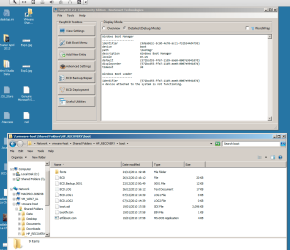
HP_Recovery PARTITION BCD
Code:
Windows Boot Manager
--------------------
identifier              {9dea862c-5cdd-4e70-acc1-f32b344d4795}
device                  boot
path                    \bootmgr
description             Windows Boot Manager
locale                  en-US
default                 {572bcd55-ffa7-11d9-aae0-0007e994107d}
displayorder            {572bcd55-ffa7-11d9-aae0-0007e994107d}
timeout                 30

Windows Boot Loader
-------------------
identifier              {572bcd55-ffa7-11d9-aae0-0007e994107d}
A device attached to the system is not functioning.

System PARTITION BCD's

Code:
Windows Boot Manager
--------------------
identifier              {9dea862c-5cdd-4e70-acc1-f32b344d4795}
device                  unknown
description             Windows Boot Manager
locale                  en-US
inherit                 {7ea2e1ac-2e61-4728-aaa3-896d9d0a9f0e}
extendedinput           Yes
default                 {c0e849d1-6e89-11e3-aa17-c4df00072efd}
resumeobject            {c0e849d0-6e89-11e3-aa17-c4df00072efd}
displayorder            {c0e849d1-6e89-11e3-aa17-c4df00072efd}
toolsdisplayorder       {b2721d73-1db4-4c62-bf78-c548a880142d}
timeout                 30
customactions           0x1000085000001
                        0x5400000f
custom:5400000f         {c0e849d4-6e89-11e3-aa17-c4df00072efd}

Windows Boot Loader
-------------------
identifier              {c0e849d1-6e89-11e3-aa17-c4df00072efd}
device                  unknown
path                    \windows\system32\winload.exe
description             Windows 7
locale                  en-US
inherit                 {6efb52bf-1766-41db-a6b3-0ee5eff72bd7}
recoverysequence        {c0e849d4-6e89-11e3-aa17-c4df00072efd}
recoveryenabled         Yes
osdevice                unknown
systemroot              \windows
resumeobject            {c0e849d0-6e89-11e3-aa17-c4df00072efd}
nx                      OptIn


FROM WORKING C:\

Code:
Windows Boot Manager
--------------------
identifier              {9dea862c-5cdd-4e70-acc1-f32b344d4795}
device                  locate=custom:12000002
description             Windows Boot Manager
locale                  en-US
inherit                 {7ea2e1ac-2e61-4728-aaa3-896d9d0a9f0e}
default                 {b5c086aa-359d-11e0-ae5e-82634f96898b}
resumeobject            {b5c086a9-359d-11e0-ae5e-82634f96898b}
displayorder            {b5c086aa-359d-11e0-ae5e-82634f96898b}
toolsdisplayorder       {b2721d73-1db4-4c62-bf78-c548a880142d}
timeout                 30

Windows Boot Loader
-------------------
identifier              {b5c086aa-359d-11e0-ae5e-82634f96898b}
device                  unknown
path                    \windows\system32\winload.exe
description             Windows 7
locale                  en-US
inherit                 {6efb52bf-1766-41db-a6b3-0ee5eff72bd7}
truncatememory          0x100000000
recoveryenabled         No
osdevice                unknown
systemroot              \windows
resumeobject            {b5c086a9-359d-11e0-ae5e-82634f96898b}
nx                      OptIn
 

My Computer My Computer

At a glance

Many: XP, 7, Home & Pro, Slax, FreeNAS, OS-X ...core i58Gb
Computer type
Laptop
Computer Manufacturer/Model Number
HP 4530's Toshiba Sat Pro MacPro, MacBook Pro
OS
Many: XP, 7, Home & Pro, Slax, FreeNAS, OS-X 10.9 10.6.8
CPU
core i5
Memory
8Gb
Hard Drives
Crucial SSD
Various
HP_Recovery PARTITION BCD: Is that really the bcd located on that partition?
identifier {572bcd55-ffa7-11d9-aae0-0007e994107d}
A device attached to the system is not functioning.
--is that realy end of output??


System PARTITION BCD's: Where is that bcd located?

FROM WORKING C:\: That bcd is on C?


Post bcdedit/enum all output.
 

My Computer My Computer

At a glance

Microsoft Windows 7 Home Premium 64-bits 7601...Intel(R) Core(TM) i3 CPU M 370 @ 2.40GHz4,00 GBATI Mobility Radeon HD 5400 Series
Computer type
Laptop
Computer Manufacturer/Model Number
ACER ASPIRE 5742G
OS
Microsoft Windows 7 Home Premium 64-bits 7601 Multiprocessor Free Service Pack 1
CPU
Intel(R) Core(TM) i3 CPU M 370 @ 2.40GHz
Motherboard
Acer Aspire 5742G
Memory
4,00 GB
Graphics Card(s)
ATI Mobility Radeon HD 5400 Series
Sound Card
(1) AMD High Definition Audio Device (2) Realtek High Defi
Screen Resolution
1366 x 768 x 32 bits (4294967296 colors) @ 60 Hz
Hard Drives
WDC WD5000BEVT-22ZAT0
HP_Recovery PARTITION BCD: Is that really the bcd located on that partition?
identifier {572bcd55-ffa7-11d9-aae0-0007e994107d}
A device attached to the system is not functioning.
--is that realy end of output??

Yes, that is it..
it is located
HP_RECOVERY\boot\bcd

maybe because that is created initially at the point where there is no data on the c:\..it is just a blank partition


Screen shot 2013-12-28 at 12.02.50.png


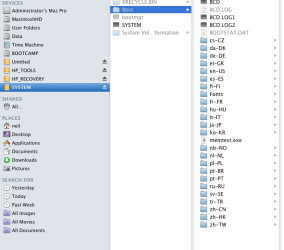
System PARTITION BCD's: Where is that bcd located?

in a boot folder on the SYSTEM drive..the 300mb 1st partition

System\Boot\bcd
Screen shot 2013-12-28 at 12.07.10.png


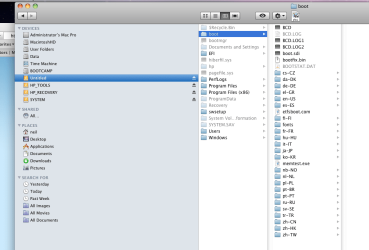
FROM WORKING C:\: That bcd is on C?

Yes on c:
c:\boot\bcd

Screen shot 2013-12-28 at 12.10.01.png


Post bcdedit/enum all output.

have mounted the drive on an external USB adapter and pulled the BCD's off it from there and viewed the output via EasyBCD running on a VM machine.

Will booting the real machine from this HDD and running bcdedit/enum all give a different output? If so , i'll get on with it.
 

My Computer My Computer

At a glance

Many: XP, 7, Home & Pro, Slax, FreeNAS, OS-X ...core i58Gb
Computer type
Laptop
Computer Manufacturer/Model Number
HP 4530's Toshiba Sat Pro MacPro, MacBook Pro
OS
Many: XP, 7, Home & Pro, Slax, FreeNAS, OS-X 10.9 10.6.8
CPU
core i5
Memory
8Gb
Hard Drives
Crucial SSD
Various

My Computer My Computer

At a glance

Microsoft Windows 7 Home Premium 64-bits 7601...Intel(R) Core(TM) i3 CPU M 370 @ 2.40GHz4,00 GBATI Mobility Radeon HD 5400 Series
Computer type
Laptop
Computer Manufacturer/Model Number
ACER ASPIRE 5742G
OS
Microsoft Windows 7 Home Premium 64-bits 7601 Multiprocessor Free Service Pack 1
CPU
Intel(R) Core(TM) i3 CPU M 370 @ 2.40GHz
Motherboard
Acer Aspire 5742G
Memory
4,00 GB
Graphics Card(s)
ATI Mobility Radeon HD 5400 Series
Sound Card
(1) AMD High Definition Audio Device (2) Realtek High Defi
Screen Resolution
1366 x 768 x 32 bits (4294967296 colors) @ 60 Hz
Hard Drives
WDC WD5000BEVT-22ZAT0
Should I do this from within elevated cmd prompt of the running system? or boot from Win PE USB or Win7 Install disk Repair console?
 

My Computer My Computer

At a glance

Many: XP, 7, Home & Pro, Slax, FreeNAS, OS-X ...core i58Gb
Computer type
Laptop
Computer Manufacturer/Model Number
HP 4530's Toshiba Sat Pro MacPro, MacBook Pro
OS
Many: XP, 7, Home & Pro, Slax, FreeNAS, OS-X 10.9 10.6.8
CPU
core i5
Memory
8Gb
Hard Drives
Crucial SSD
Various
Should I do this from within elevated cmd prompt of the running system? or boot from Win PE USB or Win7 Install disk Repair console?
From any system that can run bcdedit. And of course it must be able to access the HP_RECOVERY, SYSTEM and C partition.
 

My Computer My Computer

At a glance

Microsoft Windows 7 Home Premium 64-bits 7601...Intel(R) Core(TM) i3 CPU M 370 @ 2.40GHz4,00 GBATI Mobility Radeon HD 5400 Series
Computer type
Laptop
Computer Manufacturer/Model Number
ACER ASPIRE 5742G
OS
Microsoft Windows 7 Home Premium 64-bits 7601 Multiprocessor Free Service Pack 1
CPU
Intel(R) Core(TM) i3 CPU M 370 @ 2.40GHz
Motherboard
Acer Aspire 5742G
Memory
4,00 GB
Graphics Card(s)
ATI Mobility Radeon HD 5400 Series
Sound Card
(1) AMD High Definition Audio Device (2) Realtek High Defi
Screen Resolution
1366 x 768 x 32 bits (4294967296 colors) @ 60 Hz
Hard Drives
WDC WD5000BEVT-22ZAT0

My Computer My Computer

At a glance

Many: XP, 7, Home & Pro, Slax, FreeNAS, OS-X ...core i58Gb
Computer type
Laptop
Computer Manufacturer/Model Number
HP 4530's Toshiba Sat Pro MacPro, MacBook Pro
OS
Many: XP, 7, Home & Pro, Slax, FreeNAS, OS-X 10.9 10.6.8
CPU
core i5
Memory
8Gb
Hard Drives
Crucial SSD
Various
Back
Top