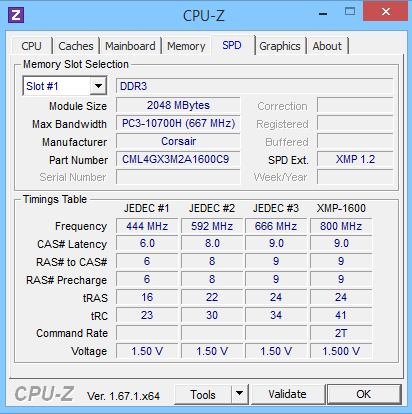
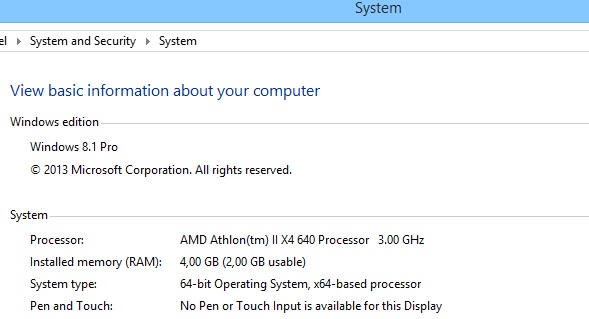
Problem RAM (4GB RAM 2GB Usable) Windows 8.1 Pro

dark1show

New member
Local time
11:29 AM
Messages
5
Hello, I will try to put there my problem, sorry for my english tho.

So the problem I have is the RAM one, I mean I have 4 GB RAM installed, but only 2 GB 'usable'. I've done all things, like update BIOS, type msconfig, Boot, uncheck Maximum memory thing
but nothing works,I tried to swap RAM DDIM slots as well, I really need help because I can't do anything with 2gb ram, I'm using 4GB (2x2) btw, I will post now pics of all my specs, one fact, This erro was with Windows 7 Ultimate 64bits,
so I tried to install Windows 8.1 Pro 64 bits, and the problem still here, that's why im asking to help please.

AMD Athlon II X4 640 Processor
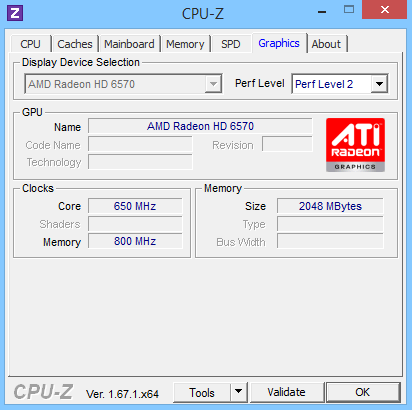
AMD Radeon HD 6570
ASUS M5A78L-M LE
Memory RAM: CORSAIR Vengeance 4GB Dual Blue

There I wil post pics of all things:
ysetn7D.jpg
System properties
pM6j6El.jpg
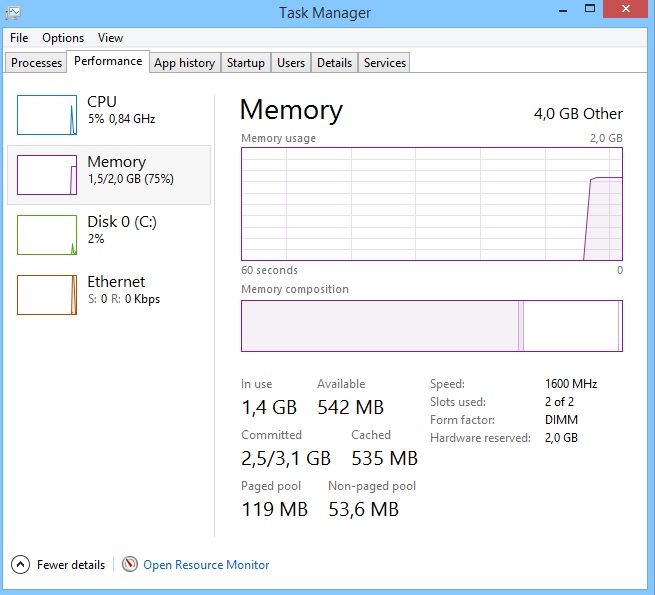
Task Manager
obzXKc2.png
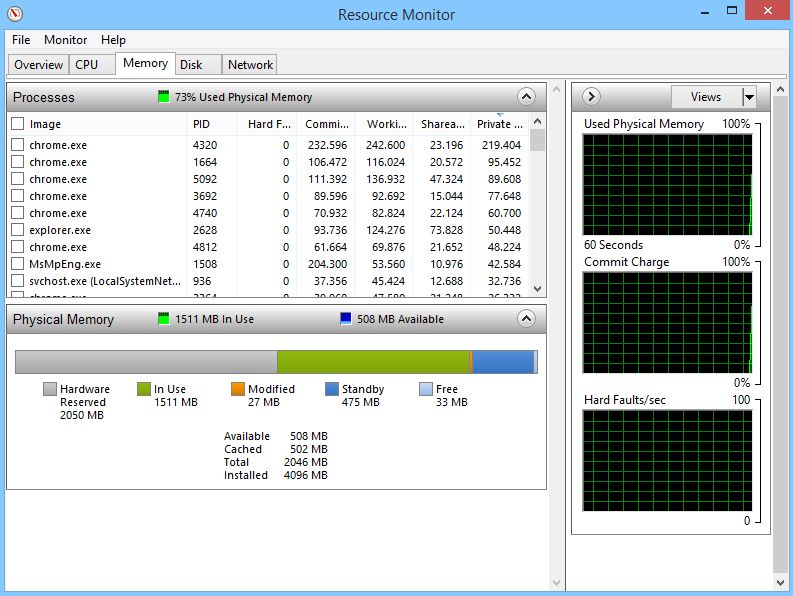
Resource Monitor
YZuf0rK.png
CCleaner
H2pLikY.png
CPU-Z Processor
EcUDBaD.png
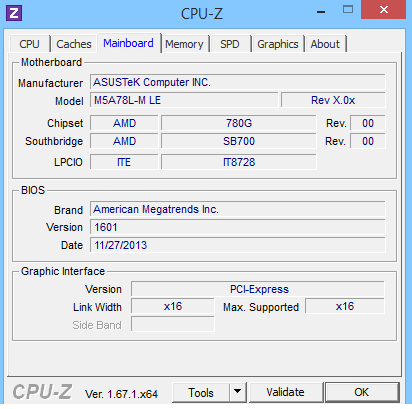
CPU-Z Mainboard
YsuQrTC.png
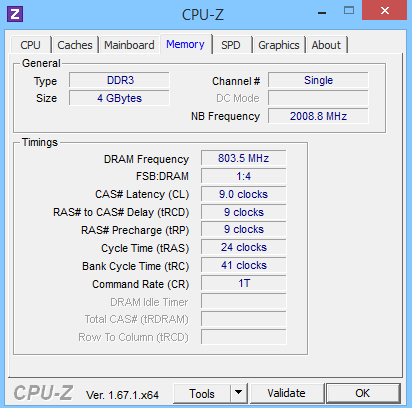
CPU-Z Memory
sW9pXcj.png
CPU-Z SPD
s3Bwcrg.png
CPU-Z Graphics
LzO0lbh.jpg
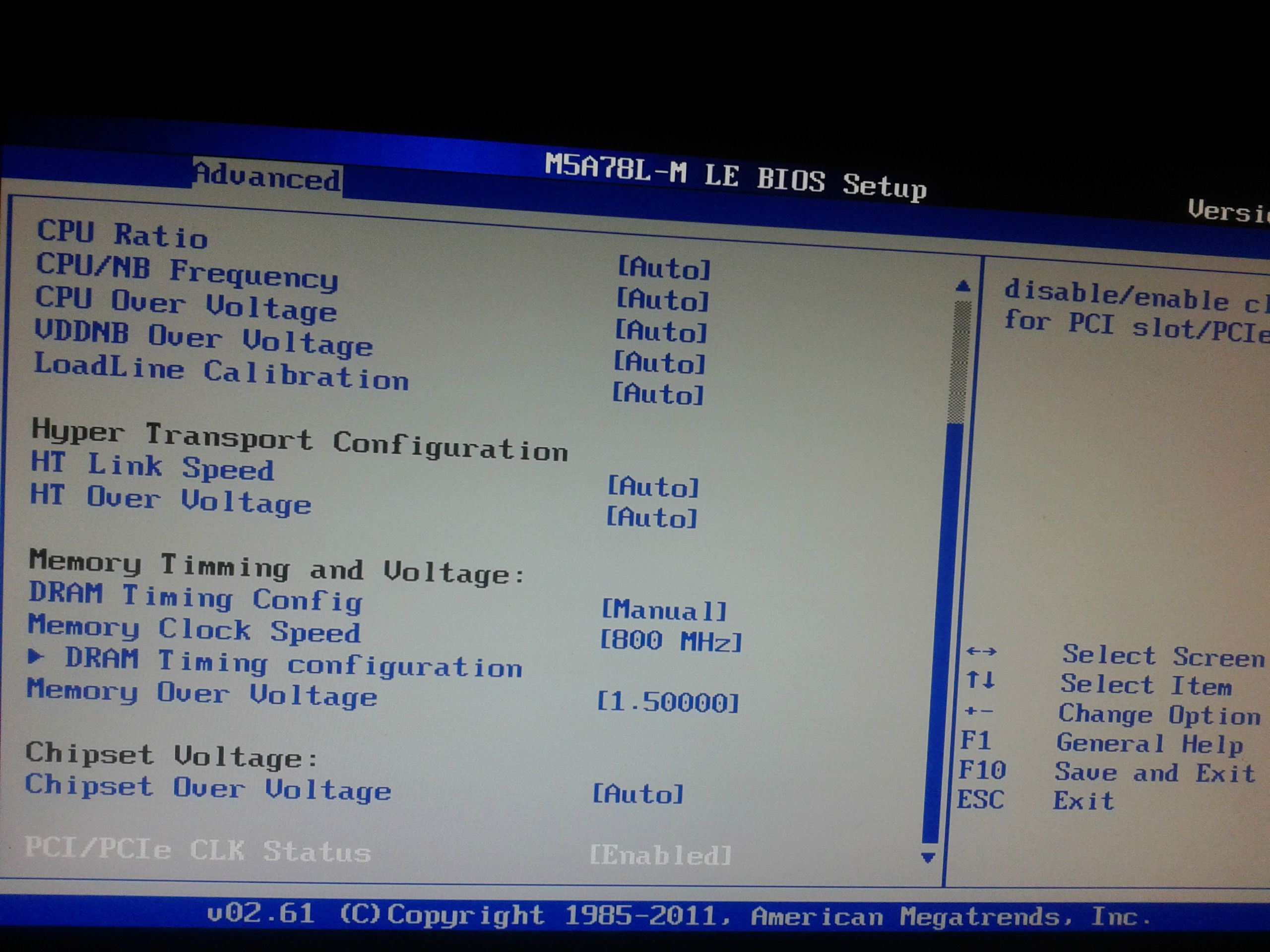
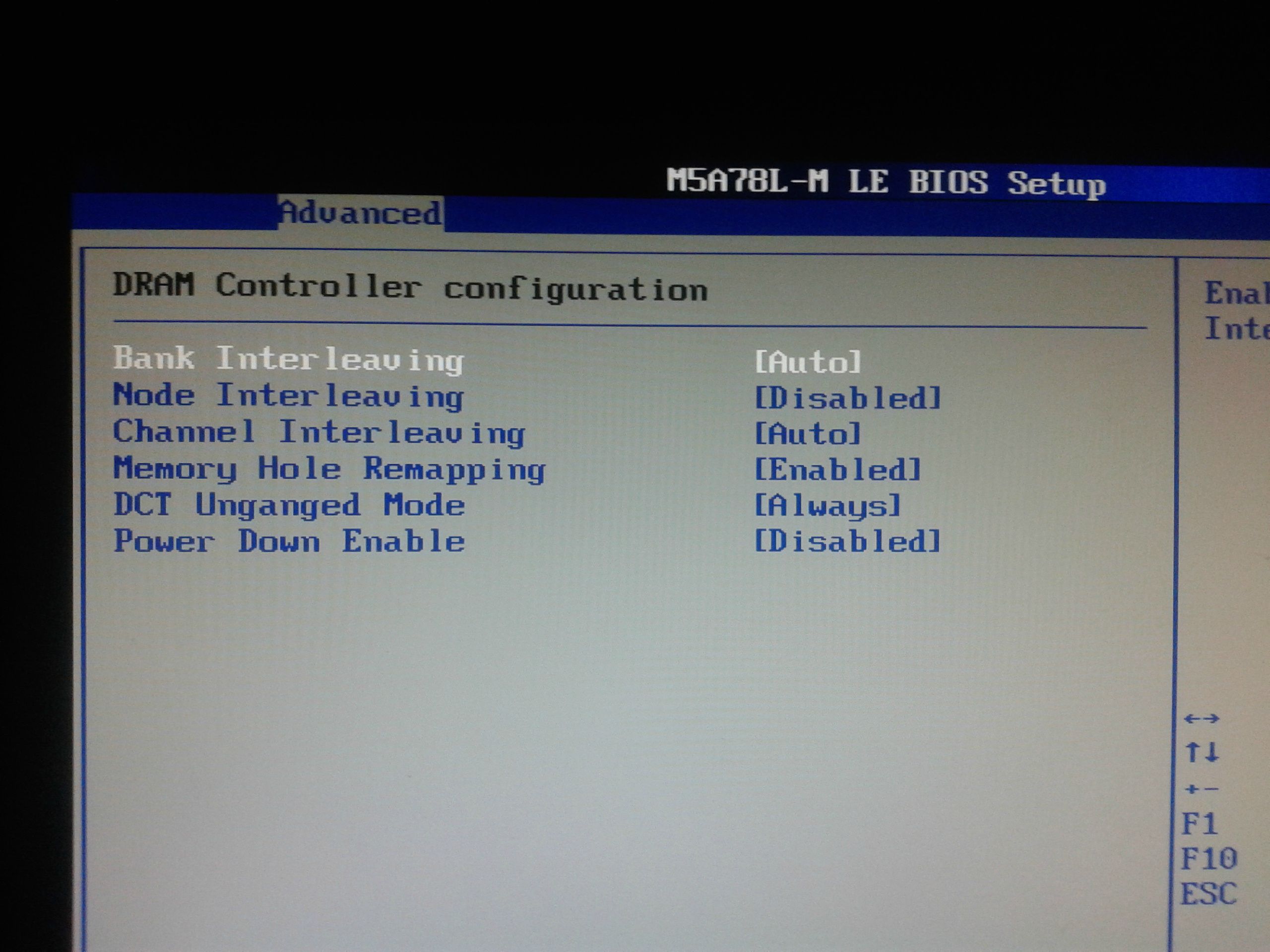
BIOS 1
eWgz3t6.jpg
BIOS 2
PGP2Exs.jpg
BIOS 3
75Z3wdv.jpg
BIOS 4
pimFUjQ.jpg
BIOS 5

Please help me.. Thanks everyone.
 
Last edited:

My Computer My Computer

Computer type
PC/Desktop
OS
Windows 8.1 Pro
It looks like 2 GB is reserved for the video card. Nothing you can do about it. Other then getting a new MB.

Or you can max out the memory.
 

My Computer My Computer

Computer type
PC/Desktop
Computer Manufacturer/Model Number
Skylake Special #666
OS
Windows 10 Pro x64
CPU
Intel Core i7 6700K
Motherboard
Asus Sabertooth Z170 Mark 1
Memory
GSkill TridentZ RGB 16GB 3600 16-16-16-36
Graphics Card(s)
EVGA GTX 980 Ti SC x2
Sound Card
Realtek High Definition
Monitor(s) Displays
AOC G2460PG
Screen Resolution
1920 x 1080 144Hz
Hard Drives
Samsung 860 Pro 256GB, Seagate Barracuda 4TB x2
PSU
EVGA 1000 P2, EVGA White Custom Braided Cables
Case
Corsair Vengeance C70 Gunmetal Black
Cooling
Corsair H100i v2, Corsair ML120 x2, Thermal Grizzly Kryonaut
Keyboard
Logitech G910 Orion Spectrum
Mouse
Logitech G700s
Internet Speed
Verizon Fios Quantum Gateway 75/75
Antivirus
Windows Defender, Malwarebytes Free 3.8.3
Browser
Chrome
Other Info
Corsair SP120 x4, LG Blu-ray Drive, Durabrand HT-395 100 Watt Dolby Digital Amp, Corsair H2100 Wireless 7.1 Headset
It looks like 2 GB is reserved for the video card. Nothing you can do about it. Other then getting a new MB.

Or you can max out the memory.

But before I format, I was fine with this same components, and it was 4gb usable..
 

My Computer My Computer

Computer type
PC/Desktop
OS
Windows 8.1 Pro
It looks like 2 GB is reserved for the video card. Nothing you can do about it. Other then getting a new MB.

Or you can max out the memory.

But before I format, I was fine with this same components, and it was 4gb usable..

I doubt if you had 4 GB usable out of 4. There is always some that is reserved for video.
 

My Computer My Computer

Computer type
PC/Desktop
Computer Manufacturer/Model Number
Custom Build
OS
Windows 7 Home Premium 32-Bit - Build 7600 SP1
CPU
Intel Core i3-2120 3.30Ghz
Motherboard
Asus P8Z68-V LX Intel Z68 Socket H2 ATX
Memory
Kingston 4 GB DDR3 1333 mhz
Graphics Card(s)
AMD Radeon HD6670
Sound Card
Sound Blaster Audigy SE 24-Bit
Monitor(s) Displays
Asus VE228
Screen Resolution
1440 X 900
Hard Drives
OCZ Vertex 3 120 GB Sata 3 SSD ==
Kingston SH103/S3 120 G Hyper X 120 GB SSD ==
Western Digital 500 GB Caviar Green 7200 RPM ==
PSU
Corsair CX600M == 600 Watt
Case
NZXT Apollo - Silver with Clear Side Panel
Cooling
Three 120 mm Fans
Keyboard
Microsoft Natural 4000
Mouse
Microsoft Custom Optical 3000
Internet Speed
AT&T Fiber Optic Wireless Network
Antivirus
Microsoft Security Essentials
Browser
Chrome
Other Info
120 mm Blue LED Fan -- Three Blue LED Lazer Light Sticks
bigmck is right. Usually most if not all video cards use some of the available ram as memory for the cards use for it to properly render graphics, etc; so indeed; usually there is not a lot u can do except well like bigmck said; max out the ram capability in your motherboard.
 

My Computer My Computer

Computer type
PC/Desktop
Computer Manufacturer/Model Number
custom built
OS
Windows 7 ultimate 64-bit
CPU
Intel I7 2600K 3.4ghz
Motherboard
Asus Evo P8P67
Memory
Corsair 16gb ddr3 1600mhz
Graphics Card(s)
Nvidia Geforce gt 430
Sound Card
Sound Blaster Titanium x-fi pci express
Monitor(s) Displays
Dell E198WFP
Hard Drives
1 western digital 2TB drive.
PSU
Antec 1200 watt
Case
Inwin Dragon Rider
Cooling
6 case supplied cooling fans
Keyboard
logitech mk700
Mouse
logitech m705
Internet Speed
25-50mbps download; 10mbps upload(i think)
Antivirus
avg free 2014
Browser
mozilla firefox
Other Info
Also have a pretty bad speaker setup which is a klipsch promedia 5.1 surround speaker setup with huge subwoofer and lg blu ray player/writer. Also a hp officejet pro 8600 plus wireless all in one and a logitech s7500 webcam.
Ok guys, something new, I think i know where the problem is, but i dont know how to resolve, the thing is, this happens since i buyed a new Hard drive, and I think there is the problem the hard drive is gettin the 2gb since default, did you know how to change that or where? please help now
 

My Computer My Computer

Computer type
PC/Desktop
OS
Windows 8.1 Pro
Ok guys, something new, I think i know where the problem is, but i dont know how to resolve, the thing is, this happens since i buyed a new Hard drive, and I think there is the problem the hard drive is gettin the 2gb since default, did you know how to change that or where? please help now

No, You will never have a case where all of your RAM is usable. Click on your Start Button, and right click on Computer. Left click on Properties. This will bring up a page that tells your Total Memory and Usable Memory. Tell us what it says.
 

My Computer My Computer

Computer type
PC/Desktop
Computer Manufacturer/Model Number
Custom Build
OS
Windows 7 Home Premium 32-Bit - Build 7600 SP1
CPU
Intel Core i3-2120 3.30Ghz
Motherboard
Asus P8Z68-V LX Intel Z68 Socket H2 ATX
Memory
Kingston 4 GB DDR3 1333 mhz
Graphics Card(s)
AMD Radeon HD6670
Sound Card
Sound Blaster Audigy SE 24-Bit
Monitor(s) Displays
Asus VE228
Screen Resolution
1440 X 900
Hard Drives
OCZ Vertex 3 120 GB Sata 3 SSD ==
Kingston SH103/S3 120 G Hyper X 120 GB SSD ==
Western Digital 500 GB Caviar Green 7200 RPM ==
PSU
Corsair CX600M == 600 Watt
Case
NZXT Apollo - Silver with Clear Side Panel
Cooling
Three 120 mm Fans
Keyboard
Microsoft Natural 4000
Mouse
Microsoft Custom Optical 3000
Internet Speed
AT&T Fiber Optic Wireless Network
Antivirus
Microsoft Security Essentials
Browser
Chrome
Other Info
120 mm Blue LED Fan -- Three Blue LED Lazer Light Sticks
4gb (2gb usable) and I know what are you saying bigmck but i never before had this (2gb usable) i should have 3 at least..
 

My Computer My Computer

Computer type
PC/Desktop
OS
Windows 8.1 Pro
4gb (2gb usable) and I know what are you saying bigmck but i never before had this (2gb usable) i should have 3 at least..

It is quite possible it is also the ability of your motherboard. How old is the system board in your system? The reason i ask is because the "older" ones dont neccessairily have the capability to allow more ram for "use". granted; I could be on the wrong path here; but this is just coming from what i think based somewhat on the knowledge i do have.
 

My Computer My Computer

Computer type
PC/Desktop
Computer Manufacturer/Model Number
custom built
OS
Windows 7 ultimate 64-bit
CPU
Intel I7 2600K 3.4ghz
Motherboard
Asus Evo P8P67
Memory
Corsair 16gb ddr3 1600mhz
Graphics Card(s)
Nvidia Geforce gt 430
Sound Card
Sound Blaster Titanium x-fi pci express
Monitor(s) Displays
Dell E198WFP
Hard Drives
1 western digital 2TB drive.
PSU
Antec 1200 watt
Case
Inwin Dragon Rider
Cooling
6 case supplied cooling fans
Keyboard
logitech mk700
Mouse
logitech m705
Internet Speed
25-50mbps download; 10mbps upload(i think)
Antivirus
avg free 2014
Browser
mozilla firefox
Other Info
Also have a pretty bad speaker setup which is a klipsch promedia 5.1 surround speaker setup with huge subwoofer and lg blu ray player/writer. Also a hp officejet pro 8600 plus wireless all in one and a logitech s7500 webcam.
No, You will never have a case where all of your RAM is usable. Click on your Start Button, and right click on Computer. Left click on Properties. This will bring up a page that tells your Total Memory and Usable Memory. Tell us what it says.

Please do the above and let us know what it says.
 

My Computer My Computer

Computer type
PC/Desktop
Computer Manufacturer/Model Number
Custom Build
OS
Windows 7 Home Premium 32-Bit - Build 7600 SP1
CPU
Intel Core i3-2120 3.30Ghz
Motherboard
Asus P8Z68-V LX Intel Z68 Socket H2 ATX
Memory
Kingston 4 GB DDR3 1333 mhz
Graphics Card(s)
AMD Radeon HD6670
Sound Card
Sound Blaster Audigy SE 24-Bit
Monitor(s) Displays
Asus VE228
Screen Resolution
1440 X 900
Hard Drives
OCZ Vertex 3 120 GB Sata 3 SSD ==
Kingston SH103/S3 120 G Hyper X 120 GB SSD ==
Western Digital 500 GB Caviar Green 7200 RPM ==
PSU
Corsair CX600M == 600 Watt
Case
NZXT Apollo - Silver with Clear Side Panel
Cooling
Three 120 mm Fans
Keyboard
Microsoft Natural 4000
Mouse
Microsoft Custom Optical 3000
Internet Speed
AT&T Fiber Optic Wireless Network
Antivirus
Microsoft Security Essentials
Browser
Chrome
Other Info
120 mm Blue LED Fan -- Three Blue LED Lazer Light Sticks
No, You will never have a case where all of your RAM is usable. Click on your Start Button, and right click on Computer. Left click on Properties. This will bring up a page that tells your Total Memory and Usable Memory. Tell us what it says.

Please do the above and let us know what it says.

693zR.png
 

My Computer My Computer

Computer type
PC/Desktop
OS
Windows 8.1 Pro
Back
Top