Solved Help Installing Fresh Win 7 on different hardrive partition (primary)

TJGOA

New member
Local time
2:07 PM
Messages
93
Currently I have two 500gb HD's; one is system and one is primary. On the system there are two win 7 installed on it (one won't boot, the other running too slow). I want to try and do a fresh win7 install on the other free HD marked as primary and have already formatted it. When I tried to install win 7 on it wouldn't let me ( can't remember message). So far I understand you can only install WIN7 on a partition marked as system am I correct? I was wondering if there was a way to convert the primary partition to system, I was unable to do this in windows disk manager. Is there some software that can do this easily. I don't want to do a full formatting of both drives as of yet, is there a workaround here? The system partition is marked as healthy, system, boot, and the other partition is marked as primary. This is from just what I remember. If it is crucial I can boot the system again and give exacts. Thanks in advance.
 

My Computer My Computer

Computer type
PC/Desktop
Computer Manufacturer/Model Number
custom build
OS
Windows 7 Home Premium 64-bit SP1
CPU
6.00GB Dual-Channel DDR3 @ 666MHz (9-9-9-24)
Motherboard
Dell Inc. 0DPRF9 (CPU 1)
Memory
2 gig
Graphics Card(s)
NSPIRON ONE (1280x768@60Hz) ATI Mobility Radeon HD 4200 (Del
Hard Drives
System 500gb
Primary 500GB

My Computer My Computer

Computer type
PC/Desktop
Computer Manufacturer/Model Number
Custom Bulid/Self made
OS
Windows 11 x64
CPU
i5 2500K @ 3.3 GHz
Motherboard
ASUS P8 Z77 V pro
Memory
16 GB DDR 3 @ 1600Mhz
Graphics Card(s)
MSI 1050TI 4GB OC version
Sound Card
On Board (Realtek HD audio)
Monitor(s) Displays
Samsung 22" LCD
Screen Resolution
1920*1080
Hard Drives
Seagate 1 TB, WD 1TB, Seagate 2 TB ( I use a lot of space)
PSU
coolermaster 750 W
Case
Coolermaster HAF912
Cooling
Coolermaster hyper 212 EVO
Keyboard
Samsung
Mouse
Dell Wireless
Internet Speed
Wireless 50 Mbps
Antivirus
AVG 2016 Internet Security
Browser
Google Chrome
Thanks for the welcome! I am hesitant to try to re-install on the system partition be it after format or not because I think maybe the drive the partition is on might be damaged or worn down or what not. I'm hoping the other partition on the other drive will run faster. I also read somewhere the system partition should be smaller (mine is 500gb), is that a good idea. In any case I can always create a new partition on the hopefully soon to be converted primary partition to system . If all comes to fail I will reconsider formating the system partition. Here is the Image File of Disk Management. I would appreciate any advice.
Untitled.jpg
 

My Computer My Computer

Computer type
PC/Desktop
Computer Manufacturer/Model Number
custom build
OS
Windows 7 Home Premium 64-bit SP1
CPU
6.00GB Dual-Channel DDR3 @ 666MHz (9-9-9-24)
Motherboard
Dell Inc. 0DPRF9 (CPU 1)
Memory
2 gig
Graphics Card(s)
NSPIRON ONE (1280x768@60Hz) ATI Mobility Radeon HD 4200 (Del
Hard Drives
System 500gb
Primary 500GB
Oh yeah, the computer was a custom built desktop created about five years ago. If you are referring to the company I bought it from the internet at the site Ibuypower.com. I'm not sure if they can supply me with a drive diagnostic tool (probably not). Is there anywhere I might dl it online for free. I believe the processor is dual quad 2.66 intel if that helps.

Also If the newly installed WIN 7 on the system partition ran faster then I could bypass all of this, but not quite sure where to start to trouble shoot. The computer in question does not have access to the internet which makes it a pain. From what I figure it has a 1. worn down drive (maybe not??) 2. not sure if it has sp1 installed 3. not sure if the netfx net framework (I think 1.1 was the update??) is installed correctly or working right, an era popped up sometime in update installation. Is there some easy way I can trouble shoot the system partition problem, or download the correct net framework, drives, sp1? (unworkably slow with little cpu and ram used)
 

My Computer My Computer

Computer type
PC/Desktop
Computer Manufacturer/Model Number
custom build
OS
Windows 7 Home Premium 64-bit SP1
CPU
6.00GB Dual-Channel DDR3 @ 666MHz (9-9-9-24)
Motherboard
Dell Inc. 0DPRF9 (CPU 1)
Memory
2 gig
Graphics Card(s)
NSPIRON ONE (1280x768@60Hz) ATI Mobility Radeon HD 4200 (Del
Hard Drives
System 500gb
Primary 500GB
What hard drive manufacturer?
 

My Computer My Computer

OS
ME/XP/Vista/Win7
I wasn't sure what to look but the manufactorer on one of the storage information simple said standard drives??
Here's all the info contained in the System Information sub panel Storage...


NVIDIA GeForce 8500 GT (Microsoft Corporation - WDDM v1.1)
PNP Device ID PCI\VEN_10DE&DEV_0421&SUBSYS_C7473842&REV_A1\4&6BB9499&0&0018
Adapter Type GeForce 8500 GT, NVIDIA compatible
Adapter Description NVIDIA GeForce 8500 GT (Microsoft Corporation - WDDM v1.1)
Adapter RAM 512.00 MB (536,870,912 bytes)
Installed Drivers nvd3dum.dll,nvwgf2um.dll
Driver Version 8.15.11.8593
INF File nv_lh.inf (nv_G86_0 section)
Color Planes Not Available
Color Table Entries Not Available
Resolution Not Available
Bits/Pixel Not Available
Memory Address 0xFA000000-0xFAFFFFFF
Memory Address 0xE0000000-0xEFFFFFFF
Memory Address 0xF8000000-0xFBFFFFFF
I/O Port 0x0000CF00-0x0000CF7F
IRQ Channel IRQ 11
Driver c:\windows\system32\drivers\nvlddmkm.sys (8.15.11.8593, 9.40 MB (9,853,248 bytes), 7/13/2009 3:09 PM)


disks


Description Disk drive
Manufacturer (Standard disk drives)
Model WDC WD50 00AAKS-00YGA SCSI Disk Device
Bytes/Sector 512
Media Loaded Yes
Media Type Fixed hard disk
Partitions 1
SCSI Bus 0
SCSI Logical Unit 0
SCSI Port 2
SCSI Target ID 0
Sectors/Track 63
Size 465.76 GB (500,105,249,280 bytes)
Total Cylinders 60,801
Total Sectors 976,768,065
Total Tracks 15,504,255
Tracks/Cylinder 255
Partition Disk #0, Partition #0
Partition Size 465.75 GB (500,096,991,744 bytes)
Partition Starting Offset 32,256 bytes

Description Disk drive
Manufacturer (Standard disk drives)
Model WDC WD50 00AAKS-00YGA SCSI Disk Device
Bytes/Sector 512
Media Loaded Yes
Media Type Fixed hard disk
Partitions 1
SCSI Bus 0
SCSI Logical Unit 0
SCSI Port 3
SCSI Target ID 0
Sectors/Track 63
Size 465.76 GB (500,105,249,280 bytes)
Total Cylinders 60,801
Total Sectors 976,768,065
Total Tracks 15,504,255
Tracks/Cylinder 255
Partition Disk #1, Partition #0
Partition Size 465.76 GB (500,105,217,024 bytes)
Partition Starting Offset 32,256 bytes

Description Disk drive
Manufacturer (Standard disk drives)
Model Lexar JumpDrive USB Device
Bytes/Sector 512
Media Loaded Yes
Media Type Removable Media
Partitions 1
SCSI Bus Not Available
SCSI Logical Unit Not Available
SCSI Port Not Available
SCSI Target ID Not Available
Sectors/Track 63
Size 7.33 GB (7,871,592,960 bytes)
Total Cylinders 957
Total Sectors 15,374,205
Total Tracks 244,035
Tracks/Cylinder 255
Partition Disk #4, Partition #0
Partition Size 7.34 GB (7,876,870,656 bytes)
Partition Starting Offset 32,256 bytes

Description Disk drive
Manufacturer (Standard disk drives)
Model Seagate FreeAgent USB Device
Bytes/Sector 512
Media Loaded Yes
Media Type External hard disk media
Partitions 1
SCSI Bus Not Available
SCSI Logical Unit Not Available
SCSI Port Not Available
SCSI Target ID Not Available
Sectors/Track 63
Size 465.76 GB (500,105,249,280 bytes)
Total Cylinders 60,801
Total Sectors 976,768,065
Total Tracks 15,504,255
Tracks/Cylinder 255
Partition Disk #3, Partition #0
Partition Size 465.76 GB (500,105,217,024 bytes)
Partition Starting Offset 32,256 bytes

Description Disk drive
Manufacturer (Standard disk drives)
Model WD My Book 1130 USB Device
Bytes/Sector 512
Media Loaded Yes
Media Type External hard disk media
Partitions 1
SCSI Bus Not Available
SCSI Logical Unit Not Available
SCSI Port Not Available
SCSI Target ID Not Available
Sectors/Track 63
Size 1.82 TB (2,000,363,420,160 bytes)
Total Cylinders 243,197
Total Sectors 3,906,959,805
Total Tracks 62,015,235
Tracks/Cylinder 255
Partition Disk #2, Partition #0
Partition Size 1.82 TB (2,000,364,240,896 bytes)
Partition Starting Offset 1,048,576 bytes


DRIVE


Drive A:
Description 3 1/2 Inch Floppy Drive

Drive C:
Description Local Fixed Disk
Compressed No
File System NTFS
Size 465.75 GB (500,096,991,232 bytes)
Free Space 234.15 GB (251,412,803,584 bytes)
Volume Name
Volume Serial Number F4E39A08

Drive D:
Description Local Fixed Disk
Compressed No
File System NTFS
Size 465.76 GB (500,105,216,000 bytes)
Free Space 465.66 GB (499,995,840,512 bytes)
Volume Name
Volume Serial Number 3003E6C9

Drive E:
Description CD-ROM Disc

Drive F:
Description Removable Disk

Drive G:
Description Local Fixed Disk
Compressed No
File System NTFS
Size 1.82 TB (2,000,364,236,800 bytes)
Free Space 1.26 GB (1,356,713,984 bytes)
Volume Name My Book
Volume Serial Number 1843759F

Drive H:
Description Local Fixed Disk
Compressed No
File System NTFS
Size 465.76 GB (500,105,216,000 bytes)
Free Space 2.30 GB (2,474,962,944 bytes)
Volume Name FreeAgent Drive
Volume Serial Number 7C59C1DD


STORAGE


Name NVIDIA nForce Serial ATA Controller
Manufacturer NVIDIA Corporation
Status OK
PNP Device ID PCI\VEN_10DE&DEV_0266&SUBSYS_81BC1043&REV_A1\3&2411E6FE&1&70
I/O Port 0x000009F0-0x000009F7
I/O Port 0x00000BF0-0x00000BF3
I/O Port 0x00000970-0x00000977
I/O Port 0x00000B70-0x00000B73
I/O Port 0x0000F800-0x0000F80F
Memory Address 0xFE02D000-0xFE02DFFF
IRQ Channel IRQ 21
Driver c:\windows\system32\drivers\nvstor.sys (10.6.0.16, 139.08 KB (142,416 bytes), 6/10/2009 2:19 PM)

Name NVIDIA nForce Serial ATA Controller
Manufacturer NVIDIA Corporation
Status OK
PNP Device ID PCI\VEN_10DE&DEV_0267&SUBSYS_81BC1043&REV_A1\3&2411E6FE&1&78
I/O Port 0x000009E0-0x000009E7
I/O Port 0x00000BE0-0x00000BE3
I/O Port 0x00000960-0x00000967
I/O Port 0x00000B60-0x00000B63
I/O Port 0x0000F300-0x0000F30F
Memory Address 0xFE02C000-0xFE02CFFF
IRQ Channel IRQ 22
Driver c:\windows\system32\drivers\nvstor.sys (10.6.0.16, 139.08 KB (142,416 bytes), 6/10/2009 2:19 PM)


ide


Name Standard AHCI 1.0 Serial ATA Controller
Manufacturer Standard AHCI 1.0 Serial ATA Controller
Status OK
PNP Device ID PCI\VEN_197B&DEV_2360&SUBSYS_82081043&REV_02\4&2212B143&0&0038
I/O Port 0x0000DF00-0x0000DF07
I/O Port 0x0000DE00-0x0000DE03
I/O Port 0x0000DD00-0x0000DD07
I/O Port 0x0000DC00-0x0000DC03
I/O Port 0x0000DB00-0x0000DB0F
Memory Address 0xFD9FE000-0xFD9FFFFF
IRQ Channel IRQ 16
Driver c:\windows\system32\drivers\msahci.sys (6.1.7600.16385, 27.06 KB (27,712 bytes), 7/13/2009 4:45 PM)

Name ATA Channel 0
Manufacturer (Standard IDE ATA/ATAPI controllers)
Status OK
PNP Device ID PCIIDE\IDECHANNEL\4&1E6968A9&0&0
I/O Port 0x000001F0-0x000001F7
I/O Port 0x000003F6-0x000003F6
IRQ Channel IRQ 14
Driver c:\windows\system32\drivers\atapi.sys (6.1.7600.16385, 21.08 KB (21,584 bytes), 7/13/2009 4:11 PM)

Name ATA Channel 1
Manufacturer (Standard IDE ATA/ATAPI controllers)
Status OK
PNP Device ID PCIIDE\IDECHANNEL\4&1E6968A9&0&1
I/O Port 0x00000170-0x00000177
I/O Port 0x00000376-0x00000376
IRQ Channel IRQ 15
Driver c:\windows\system32\drivers\atapi.sys (6.1.7600.16385, 21.08 KB (21,584 bytes), 7/13/2009 4:11 PM)

Name ATA Channel 0
Manufacturer (Standard IDE ATA/ATAPI controllers)
Status OK
PNP Device ID PCIIDE\IDECHANNEL\5&19CFF9D1&0&0
Driver c:\windows\system32\drivers\atapi.sys (6.1.7600.16385, 21.08 KB (21,584 bytes), 7/13/2009 4:11 PM)

Name Standard Dual Channel PCI IDE Controller
Manufacturer (Standard IDE ATA/ATAPI controllers)
Status OK
PNP Device ID PCI\VEN_10DE&DEV_0265&SUBSYS_81BC1043&REV_A1\3&2411E6FE&1&68
I/O Port 0x0000FD00-0x0000FD0F
Driver c:\windows\system32\drivers\pciide.sys (6.1.7600.16385, 12.08 KB (12,368 bytes), 7/13/2009 4:11 PM)

 

My Computer My Computer

Computer type
PC/Desktop
Computer Manufacturer/Model Number
custom build
OS
Windows 7 Home Premium 64-bit SP1
CPU
6.00GB Dual-Channel DDR3 @ 666MHz (9-9-9-24)
Motherboard
Dell Inc. 0DPRF9 (CPU 1)
Memory
2 gig
Graphics Card(s)
NSPIRON ONE (1280x768@60Hz) ATI Mobility Radeon HD 4200 (Del
Hard Drives
System 500gb
Primary 500GB
Thanks for letting me know, so I assume you still recommend i try and grab their diagnostic tool, run it, and maybe post back here what shows up. I'll see how far that takes me, but my primary objective as of yet is still to try a fresh install on reformatted primary partition. Found this link but couldn't really follow it all the way through, How to create a separate system partition for dual booting Windows XP or Windows 2000 with Windows 7 could this help me at all do the aforementioned?
 

My Computer My Computer

Computer type
PC/Desktop
Computer Manufacturer/Model Number
custom build
OS
Windows 7 Home Premium 64-bit SP1
CPU
6.00GB Dual-Channel DDR3 @ 666MHz (9-9-9-24)
Motherboard
Dell Inc. 0DPRF9 (CPU 1)
Memory
2 gig
Graphics Card(s)
NSPIRON ONE (1280x768@60Hz) ATI Mobility Radeon HD 4200 (Del
Hard Drives
System 500gb
Primary 500GB
Is this the right software for the diagnostics? http://support.wd.com/product/downlo...&sid=3&lang=en

Also before I install this are you sure its western digital, I believe I had a total of four 'disk' , two partitions and two external HD connected when I copied the information from the system information..

*Edit its cool, both of the 500gb ones are from wdc so its fine but I'm not sure about the make numbers or what not, i tried search for Model WDC WD50 00AAKS-00YGA and nothing on site, not sure?
 
Last edited:

My Computer My Computer

Computer type
PC/Desktop
Computer Manufacturer/Model Number
custom build
OS
Windows 7 Home Premium 64-bit SP1
CPU
6.00GB Dual-Channel DDR3 @ 666MHz (9-9-9-24)
Motherboard
Dell Inc. 0DPRF9 (CPU 1)
Memory
2 gig
Graphics Card(s)
NSPIRON ONE (1280x768@60Hz) ATI Mobility Radeon HD 4200 (Del
Hard Drives
System 500gb
Primary 500GB
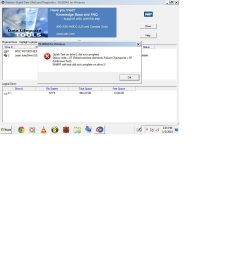
Okay just finished the quick test and it failed to complete?? Here is screen shot? What on Earth does this mean in english?

y.jpg

Not sure where to find out about this error message, any help would be appreciated. I'm trying to find the product on the western digital site to into conversations but by searching Model WDC WD50 00AAKS-00YGA nothing pops up?
 

My Computer My Computer

Computer type
PC/Desktop
Computer Manufacturer/Model Number
custom build
OS
Windows 7 Home Premium 64-bit SP1
CPU
6.00GB Dual-Channel DDR3 @ 666MHz (9-9-9-24)
Motherboard
Dell Inc. 0DPRF9 (CPU 1)
Memory
2 gig
Graphics Card(s)
NSPIRON ONE (1280x768@60Hz) ATI Mobility Radeon HD 4200 (Del
Hard Drives
System 500gb
Primary 500GB
You can do the long test, this may take hours.
but the base is the HDD needs to be replaced.
 

My Computer My Computer

OS
ME/XP/Vista/Win7
I believe I have two Hard Drives in the Desktop so if that were the case couldn't I just install windows 7 on the other one that is formated opposed to the damaged one which needs to be replaced?[or could it maybe be just one Hard Drive (HDD) but split in two partitions? - How could I find this out?)] I will run the test again, both but this time not in safe mode to see if that might make a difference.
 

My Computer My Computer

Computer type
PC/Desktop
Computer Manufacturer/Model Number
custom build
OS
Windows 7 Home Premium 64-bit SP1
CPU
6.00GB Dual-Channel DDR3 @ 666MHz (9-9-9-24)
Motherboard
Dell Inc. 0DPRF9 (CPU 1)
Memory
2 gig
Graphics Card(s)
NSPIRON ONE (1280x768@60Hz) ATI Mobility Radeon HD 4200 (Del
Hard Drives
System 500gb
Primary 500GB
disks

Description Disk drive
Manufacturer (Standard disk drives)
Model WDC WD50 00AAKS-00YGA SCSI Disk Device
Bytes/Sector 512
Media Loaded Yes
Media Type Fixed hard disk
Partitions 1
SCSI Bus 0
SCSI Logical Unit 0
SCSI Port 2
SCSI Target ID 0
Sectors/Track 63
Size 465.76 GB (500,105,249,280 bytes)
Total Cylinders 60,801
Total Sectors 976,768,065
Total Tracks 15,504,255
Tracks/Cylinder 255
Partition Disk #0, Partition #0
Partition Size 465.75 GB (500,096,991,744 bytes)
Partition Starting Offset 32,256 bytes

Description Disk drive
Manufacturer (Standard disk drives)
Model WDC WD50 00AAKS-00YGA SCSI Disk Device
Bytes/Sector 512
Media Loaded Yes
Media Type Fixed hard disk
Partitions 1
SCSI Bus 0
SCSI Logical Unit 0
SCSI Port 3
SCSI Target ID 0
Sectors/Track 63
Size 465.76 GB (500,105,249,280 bytes)
Total Cylinders 60,801
Total Sectors 976,768,065
Total Tracks 15,504,255
Tracks/Cylinder 255
Partition Disk #1, Partition #0
Partition Size 465.76 GB (500,105,217,024 bytes)
Partition Starting Offset 32,256 bytes

You have two HDD, you can reinstall to Disk 0.
 

My Computer My Computer

OS
ME/XP/Vista/Win7
Is Disk 0 the current primary partition or is it the system partition? If you mean primary partition I tried and it wouldn't let me, I will try again and get the exact message they give.
 

My Computer My Computer

Computer type
PC/Desktop
Computer Manufacturer/Model Number
custom build
OS
Windows 7 Home Premium 64-bit SP1
CPU
6.00GB Dual-Channel DDR3 @ 666MHz (9-9-9-24)
Motherboard
Dell Inc. 0DPRF9 (CPU 1)
Memory
2 gig
Graphics Card(s)
NSPIRON ONE (1280x768@60Hz) ATI Mobility Radeon HD 4200 (Del
Hard Drives
System 500gb
Primary 500GB
Well about to call it a night for now, been for 27 hours straight trying to fix this:sleep: By all means keep posting your advice if you can, I look forward to reading them in the morning, thanks.
 

My Computer My Computer

Computer type
PC/Desktop
Computer Manufacturer/Model Number
custom build
OS
Windows 7 Home Premium 64-bit SP1
CPU
6.00GB Dual-Channel DDR3 @ 666MHz (9-9-9-24)
Motherboard
Dell Inc. 0DPRF9 (CPU 1)
Memory
2 gig
Graphics Card(s)
NSPIRON ONE (1280x768@60Hz) ATI Mobility Radeon HD 4200 (Del
Hard Drives
System 500gb
Primary 500GB
Thanks for the welcome! I am hesitant to try to re-install on the system partition be it after format or not because I think maybe the drive the partition is on might be damaged or worn down or what not. I'm hoping the other partition on the other drive will run faster. I also read somewhere the system partition should be smaller (mine is 500gb), is that a good idea. In any case I can always create a new partition on the hopefully soon to be converted primary partition to system . If all comes to fail I will reconsider formating the system partition. Here is the Image File of Disk Management. I would appreciate any advice.
View attachment 299967

Disk0 = C: partition.
 

My Computer My Computer

OS
ME/XP/Vista/Win7
disks

Description Disk drive
Manufacturer (Standard disk drives)
Model WDC WD50 00AAKS-00YGA SCSI Disk Device
Bytes/Sector 512
Media Loaded Yes
Media Type Fixed hard disk
Partitions 1
SCSI Bus 0
SCSI Logical Unit 0
SCSI Port 2
SCSI Target ID 0
Sectors/Track 63
Size 465.76 GB (500,105,249,280 bytes)
Total Cylinders 60,801
Total Sectors 976,768,065
Total Tracks 15,504,255
Tracks/Cylinder 255
Partition Disk #0, Partition #0
Partition Size 465.75 GB (500,096,991,744 bytes)
Partition Starting Offset 32,256 bytes

Description Disk drive
Manufacturer (Standard disk drives)
Model WDC WD50 00AAKS-00YGA SCSI Disk Device
Bytes/Sector 512
Media Loaded Yes
Media Type Fixed hard disk
Partitions 1
SCSI Bus 0
SCSI Logical Unit 0
SCSI Port 3
SCSI Target ID 0
Sectors/Track 63
Size 465.76 GB (500,105,249,280 bytes)
Total Cylinders 60,801
Total Sectors 976,768,065
Total Tracks 15,504,255
Tracks/Cylinder 255
Partition Disk #1, Partition #0
Partition Size 465.76 GB (500,105,217,024 bytes)
Partition Starting Offset 32,256 bytes

You have two HDD, you can reinstall to Disk 0.


After reading my posts how would you go about reinstalling to Disk 0? I installed a few days ago, just overwrote old windows 7 that wouldn't load but its unusably slow?
 

My Computer My Computer

Computer type
PC/Desktop
Computer Manufacturer/Model Number
custom build
OS
Windows 7 Home Premium 64-bit SP1
CPU
6.00GB Dual-Channel DDR3 @ 666MHz (9-9-9-24)
Motherboard
Dell Inc. 0DPRF9 (CPU 1)
Memory
2 gig
Graphics Card(s)
NSPIRON ONE (1280x768@60Hz) ATI Mobility Radeon HD 4200 (Del
Hard Drives
System 500gb
Primary 500GB

My Computer My Computer

OS
ME/XP/Vista/Win7
Back
Top