Solved PC hangs and stutters sound while playing games. Overheat?

dukethedj

Banned
Local time
5:37 AM
Messages
76
Location
Bow, WA
So a few minutes ago, I was playing NFSMW on My PC. It was running on High. Everything was normal except that the metal chassis on the PC is hot. I thought it was just my rear intake fan just blowing hot air out of the open DVD drive bay cover I took out for air flow, so I just kept playing. A few minutes later, the PC just hangs and I am forced to do a cold restart witch I hate doing. Anyone know what the problem is? Overheat? Should I change something? (PS: I did NOT Overclock anything.)
 
Last edited:

My Computer My Computer

At a glance

Windows 8.1 Pro x86 (Temporary)AMD Phenom ll x4 840 clocked at 3.2 GHz (AM3)4.00 gigs (Two SAMSUNG 2.00 gig modules) (DDR...NVIDIA GeForce GTX 560 TI (Zotac)
Computer type
PC/Desktop
Computer Manufacturer/Model Number
Custom Build
OS
Windows 8.1 Pro x86 (Temporary)
CPU
AMD Phenom ll x4 840 clocked at 3.2 GHz (AM3)
Motherboard
Pegatron Corperation NARRA5 (AM2+)
Memory
4.00 gigs (Two SAMSUNG 2.00 gig modules) (DDR2) (802 Mhz)
Graphics Card(s)
NVIDIA GeForce GTX 560 TI (Zotac)
Sound Card
Realtek High Defintion Audio (On board)
Monitor(s) Displays
Dell E772c
Screen Resolution
1024 x 768
Hard Drives
Seagate Momentus (80 gb) (Boot) (Temporary)
Western Digital WDC WD6400AAKS-22A7B0 (596.2GB)
PSU
Corsair CX 600
Case
Some really old PC case
Cooling
AMD stock cooler,two fans from AMD heatsinks(front and back)
Keyboard
Logitech K400r
Mouse
Logitech K400r
Internet Speed
9.87 Mbps
Antivirus
Microsoft Security Essentials
Browser
Microsoft Internet Explorer 11, Google Chrome
Other Info
HP DVD drive,
Pinnacle Systems 1394 controller,
Sony 3.5 inch floppy drive,
Startech 5.25 front panel I/O
Wi-fi card
Hi duke :) .
Well over heating can be tested, don't let the temperatures 85°C if they do stop the test(s).
:ar: Test for thermals and stability:

  • Download HWinfo and post a Screenshot of the sensors window, one at idle and another while putting load on the PC using Prime95 for the CPU side and Furmark for the GPU.
    • Before running Prime95 make sure to enable Round-off checking (see 1st post under the tutorial).
       Note
    It is not mandatory to run both tests simultaneously, although possible as long as the temperatures are under constant monitoring.
:ar: Please upload the MSINFO32 file:

:orb:Start → Run → type MSINFO32 then hit Enter.
In MSINFO32 go to, File → Save → name it your user-name.
Once the file is saved right click it and choose Send toCompressed (zipped) folder.

Attach the file in your next post.

:ar: Please export and upload your system event log:

  1. :orb: Start → type eventvwr → hit Enter.
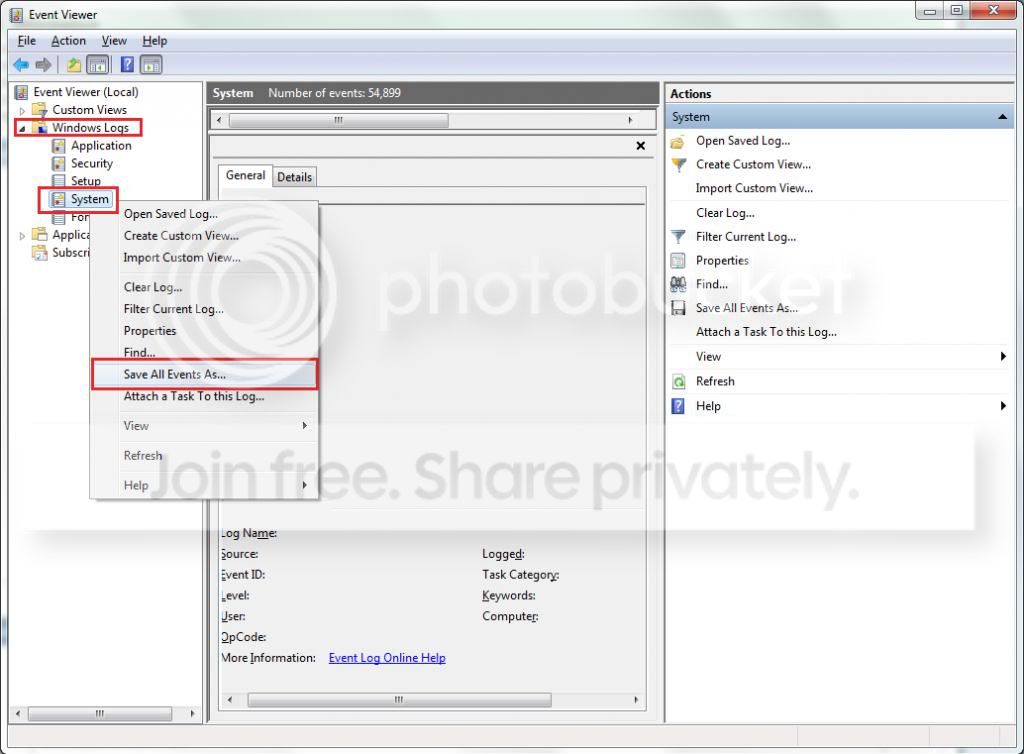
  2. Toggle open the triangle to the left of Windows Logs, right-click on System and choose Save All Events As...
  3. syseventvwrlog1_zps5b0a5395.jpg
  4. A dialogue box will pop up asking you to name the file and select the save directory, name the file the same as your Seven Forums user-name and save it to the desktop.
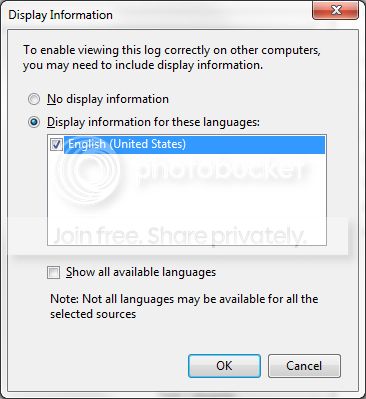
  5. A second dialogue box will appear asking you to select the Display Information, select Display information for these languages and check the box next to English (if you don't have English automatically offered check the box at the bottom to display additional languages - Show all available languages and check English).
  6. syseventvwrlog2_zpsdafa4dba.jpg
  7. Wait a few moments until the cursor returns to normal. The file will now be on your desktop (given it's the directory it was saved to) UserName.evtx, next to it there will be a folder called LocaleMetaData select both the .evtx file as well as the folder and compress them using Winrar / 7zip and attach it in your next post.
 

My Computer My Computer

At a glance

Windows 10Intel Core i5 3570K16GB 1600Mhz G.SkillGigabyte GTX 970 G1-Gaming
Computer type
PC/Desktop
OS
Windows 10
CPU
Intel Core i5 3570K
Motherboard
Asus P8Z77V-PRO
Memory
16GB 1600Mhz G.Skill
Graphics Card(s)
Gigabyte GTX 970 G1-Gaming
PSU
Seasonic 1000W Platinum
Case
Fractal Design Define R4
Cooling
Noctua NH-D14
it does in fact sound like your system is boiling over so to speak. How many fan(s) does your system have and what rpm are they running at? Please post according to the pictures above so we can see what temps etc the system is running at.
 

My Computer My Computer

At a glance

Windows 7 ultimate 64-bitIntel I7 2600K 3.4ghzCorsair 16gb ddr3 1600mhzNvidia Geforce gt 430
Computer type
PC/Desktop
Computer Manufacturer/Model Number
custom built
OS
Windows 7 ultimate 64-bit
CPU
Intel I7 2600K 3.4ghz
Motherboard
Asus Evo P8P67
Memory
Corsair 16gb ddr3 1600mhz
Graphics Card(s)
Nvidia Geforce gt 430
Sound Card
Sound Blaster Titanium x-fi pci express
Monitor(s) Displays
Dell E198WFP
Hard Drives
1 western digital 2TB drive.
PSU
Antec 1200 watt
Case
Inwin Dragon Rider
Cooling
6 case supplied cooling fans
Keyboard
logitech mk700
Mouse
logitech m705
Internet Speed
25-50mbps download; 10mbps upload(i think)
Antivirus
avg free 2014
Browser
mozilla firefox
Other Info
Also have a pretty bad speaker setup which is a klipsch promedia 5.1 surround speaker setup with huge subwoofer and lg blu ray player/writer. Also a hp officejet pro 8600 plus wireless all in one and a logitech s7500 webcam.
I have one rear 120 mil fan and I have no idea what it is running at, the AMD stock 90 mill cooler for the processor (No idea what it is running at), one 120 mil fan for the power supply (again, no idea) and one 90 mil fan for the video card. (It is running at 4680 RPM)
picture.php


picture.php
 

Attachments

My Computer My Computer

At a glance

Windows 8.1 Pro x86 (Temporary)AMD Phenom ll x4 840 clocked at 3.2 GHz (AM3)4.00 gigs (Two SAMSUNG 2.00 gig modules) (DDR...NVIDIA GeForce GTX 560 TI (Zotac)
Computer type
PC/Desktop
Computer Manufacturer/Model Number
Custom Build
OS
Windows 8.1 Pro x86 (Temporary)
CPU
AMD Phenom ll x4 840 clocked at 3.2 GHz (AM3)
Motherboard
Pegatron Corperation NARRA5 (AM2+)
Memory
4.00 gigs (Two SAMSUNG 2.00 gig modules) (DDR2) (802 Mhz)
Graphics Card(s)
NVIDIA GeForce GTX 560 TI (Zotac)
Sound Card
Realtek High Defintion Audio (On board)
Monitor(s) Displays
Dell E772c
Screen Resolution
1024 x 768
Hard Drives
Seagate Momentus (80 gb) (Boot) (Temporary)
Western Digital WDC WD6400AAKS-22A7B0 (596.2GB)
PSU
Corsair CX 600
Case
Some really old PC case
Cooling
AMD stock cooler,two fans from AMD heatsinks(front and back)
Keyboard
Logitech K400r
Mouse
Logitech K400r
Internet Speed
9.87 Mbps
Antivirus
Microsoft Security Essentials
Browser
Microsoft Internet Explorer 11, Google Chrome
Other Info
HP DVD drive,
Pinnacle Systems 1394 controller,
Sony 3.5 inch floppy drive,
Startech 5.25 front panel I/O
Wi-fi card
Thanks for the files :) .
The images are very small but I can make out that Prime95 was parked (not stressing)
and that the CPU is at 49.5°, the GPU is at 53° and that the images are the same.
 

My Computer My Computer

At a glance

Windows 10Intel Core i5 3570K16GB 1600Mhz G.SkillGigabyte GTX 970 G1-Gaming
Computer type
PC/Desktop
OS
Windows 10
CPU
Intel Core i5 3570K
Motherboard
Asus P8Z77V-PRO
Memory
16GB 1600Mhz G.Skill
Graphics Card(s)
Gigabyte GTX 970 G1-Gaming
PSU
Seasonic 1000W Platinum
Case
Fractal Design Define R4
Cooling
Noctua NH-D14
Thanks for the files :) .
The images are very small but I can make out that Prime95 was parked (not stressing)
and that the CPU is at 49.5°, the GPU is at 53° and that the images are the same.


Hm..... Weird. I do remember taking two pictures. And I also remember running the CPU test.. Strange. So it is not an overheating problem?
 

My Computer My Computer

At a glance

Windows 8.1 Pro x86 (Temporary)AMD Phenom ll x4 840 clocked at 3.2 GHz (AM3)4.00 gigs (Two SAMSUNG 2.00 gig modules) (DDR...NVIDIA GeForce GTX 560 TI (Zotac)
Computer type
PC/Desktop
Computer Manufacturer/Model Number
Custom Build
OS
Windows 8.1 Pro x86 (Temporary)
CPU
AMD Phenom ll x4 840 clocked at 3.2 GHz (AM3)
Motherboard
Pegatron Corperation NARRA5 (AM2+)
Memory
4.00 gigs (Two SAMSUNG 2.00 gig modules) (DDR2) (802 Mhz)
Graphics Card(s)
NVIDIA GeForce GTX 560 TI (Zotac)
Sound Card
Realtek High Defintion Audio (On board)
Monitor(s) Displays
Dell E772c
Screen Resolution
1024 x 768
Hard Drives
Seagate Momentus (80 gb) (Boot) (Temporary)
Western Digital WDC WD6400AAKS-22A7B0 (596.2GB)
PSU
Corsair CX 600
Case
Some really old PC case
Cooling
AMD stock cooler,two fans from AMD heatsinks(front and back)
Keyboard
Logitech K400r
Mouse
Logitech K400r
Internet Speed
9.87 Mbps
Antivirus
Microsoft Security Essentials
Browser
Microsoft Internet Explorer 11, Google Chrome
Other Info
HP DVD drive,
Pinnacle Systems 1394 controller,
Sony 3.5 inch floppy drive,
Startech 5.25 front panel I/O
Wi-fi card
Hm..... Weird. I do remember taking two pictures. And I also remember running the CPU test.. Strange. So it is not an overheating problem?

I can't know if the test didn't run or at least the proper data was presented, please try again :).

I went through the event log and found several points of interest.
You are experiencing (or at least experienced) a couple of TDR events.

"Display driver xxxxx stopped responding and was recovered"

Timeout Detection & Recovery (TDR) = "Display Driver Stopped Responding and was Recovered" is a useful feature that started in Vista and is also in W7 that allows the OS to try and recover from a video timeout so that the system does not crash to a bluescreen. Symptoms included a screen flash with the TDR message appearing one or more times or the screen blinking out to black. If the system cannot recover it will crash (Stop Error 116 typical). The issue is that the video card is not responding as expected.
Code:
Warning    28/12/2013 02:26:01    Display    4101    None
Warning    28/12/2013 02:13:13    Display    4101    None
Warning    27/12/2013 07:17:18    Display    4101    None
Warning    27/12/2013 07:10:44    Display    4101    None
Warning    27/12/2013 07:04:37    Display    4101    None
Warning    27/12/2013 07:04:15    Display    4101    None

Display driver nvlddmkm stopped responding and has successfully recovered.
In your case it didn't bugcheck the machine but it doesn't mean that you should accept its presence.

You also have a couple these entries.
Code:
Error    03/01/2014 00:11:13    HAL    12    None
Error    01/01/2014 00:24:26    HAL    12    None
Error    30/12/2013 02:51:58    HAL    12    None

The platform firmware has corrupted memory across the previous system power transition.  Please check for updated firmware for your system.
Are any of those dates ring a bell with new hardware of some sort?
Anything really a USB, a PCI-e etc'..

Also you had a couple of 0x7E bugchecks, please post the file from this tutorial.


My Computer My Computer

At a glance

Windows 10Intel Core i5 3570K16GB 1600Mhz G.SkillGigabyte GTX 970 G1-Gaming
Computer type
PC/Desktop
OS
Windows 10
CPU
Intel Core i5 3570K
Motherboard
Asus P8Z77V-PRO
Memory
16GB 1600Mhz G.Skill
Graphics Card(s)
Gigabyte GTX 970 G1-Gaming
PSU
Seasonic 1000W Platinum
Case
Fractal Design Define R4
Cooling
Noctua NH-D14
Hm..... Weird. I do remember taking two pictures. And I also remember running the CPU test.. Strange. So it is not an overheating problem?

I can't know if the test didn't run or at least the proper data was presented, please try again :).

I went through the event log and found several points of interest.
You are experiencing (or at least experienced) a couple of TDR events.

"Display driver xxxxx stopped responding and was recovered"

Timeout Detection & Recovery (TDR) = "Display Driver Stopped Responding and was Recovered" is a useful feature that started in Vista and is also in W7 that allows the OS to try and recover from a video timeout so that the system does not crash to a bluescreen. Symptoms included a screen flash with the TDR message appearing one or more times or the screen blinking out to black. If the system cannot recover it will crash (Stop Error 116 typical). The issue is that the video card is not responding as expected.
Code:
Warning    28/12/2013 02:26:01    Display    4101    None
Warning    28/12/2013 02:13:13    Display    4101    None
Warning    27/12/2013 07:17:18    Display    4101    None
Warning    27/12/2013 07:10:44    Display    4101    None
Warning    27/12/2013 07:04:37    Display    4101    None
Warning    27/12/2013 07:04:15    Display    4101    None
 
Display driver nvlddmkm stopped responding and has successfully recovered.
In your case it didn't bugcheck the machine but it doesn't mean that you should accept its presence.

You also have a couple these entries.
Code:
Error    03/01/2014 00:11:13    HAL    12    None
Error    01/01/2014 00:24:26    HAL    12    None
Error    30/12/2013 02:51:58    HAL    12    None
 
The platform firmware has corrupted memory across the previous system power transition.  Please check for updated firmware for your system.
Are any of those dates ring a bell with new hardware of some sort?
Anything really a USB, a PCI-e etc'..

Also you had a couple of 0x7E bugchecks, please post the file from this tutorial.


I ran the test again and I got the same data


12/27/13 That's when I added my new video card and processor. Failed on the fan speed changing (EVGA Precision X (I did not overclock it) (TDR)
1/1/14 is when I started getting problems

30/12/13 is when I tried to do a Skype Call and the stinking drivers for the webcam (Logitech Pro 9000) Always gives me a bluescreen when the webcam software is opened
 

My Computer My Computer

At a glance

Windows 8.1 Pro x86 (Temporary)AMD Phenom ll x4 840 clocked at 3.2 GHz (AM3)4.00 gigs (Two SAMSUNG 2.00 gig modules) (DDR...NVIDIA GeForce GTX 560 TI (Zotac)
Computer type
PC/Desktop
Computer Manufacturer/Model Number
Custom Build
OS
Windows 8.1 Pro x86 (Temporary)
CPU
AMD Phenom ll x4 840 clocked at 3.2 GHz (AM3)
Motherboard
Pegatron Corperation NARRA5 (AM2+)
Memory
4.00 gigs (Two SAMSUNG 2.00 gig modules) (DDR2) (802 Mhz)
Graphics Card(s)
NVIDIA GeForce GTX 560 TI (Zotac)
Sound Card
Realtek High Defintion Audio (On board)
Monitor(s) Displays
Dell E772c
Screen Resolution
1024 x 768
Hard Drives
Seagate Momentus (80 gb) (Boot) (Temporary)
Western Digital WDC WD6400AAKS-22A7B0 (596.2GB)
PSU
Corsair CX 600
Case
Some really old PC case
Cooling
AMD stock cooler,two fans from AMD heatsinks(front and back)
Keyboard
Logitech K400r
Mouse
Logitech K400r
Internet Speed
9.87 Mbps
Antivirus
Microsoft Security Essentials
Browser
Microsoft Internet Explorer 11, Google Chrome
Other Info
HP DVD drive,
Pinnacle Systems 1394 controller,
Sony 3.5 inch floppy drive,
Startech 5.25 front panel I/O
Wi-fi card
Ok. I found out that it was not a hardware problem. This happens when I leave DreamScene Activator running for a while. I turned it off and it is now working problem free.
 

My Computer My Computer

At a glance

Windows 8.1 Pro x86 (Temporary)AMD Phenom ll x4 840 clocked at 3.2 GHz (AM3)4.00 gigs (Two SAMSUNG 2.00 gig modules) (DDR...NVIDIA GeForce GTX 560 TI (Zotac)
Computer type
PC/Desktop
Computer Manufacturer/Model Number
Custom Build
OS
Windows 8.1 Pro x86 (Temporary)
CPU
AMD Phenom ll x4 840 clocked at 3.2 GHz (AM3)
Motherboard
Pegatron Corperation NARRA5 (AM2+)
Memory
4.00 gigs (Two SAMSUNG 2.00 gig modules) (DDR2) (802 Mhz)
Graphics Card(s)
NVIDIA GeForce GTX 560 TI (Zotac)
Sound Card
Realtek High Defintion Audio (On board)
Monitor(s) Displays
Dell E772c
Screen Resolution
1024 x 768
Hard Drives
Seagate Momentus (80 gb) (Boot) (Temporary)
Western Digital WDC WD6400AAKS-22A7B0 (596.2GB)
PSU
Corsair CX 600
Case
Some really old PC case
Cooling
AMD stock cooler,two fans from AMD heatsinks(front and back)
Keyboard
Logitech K400r
Mouse
Logitech K400r
Internet Speed
9.87 Mbps
Antivirus
Microsoft Security Essentials
Browser
Microsoft Internet Explorer 11, Google Chrome
Other Info
HP DVD drive,
Pinnacle Systems 1394 controller,
Sony 3.5 inch floppy drive,
Startech 5.25 front panel I/O
Wi-fi card
Back
Top