New Win7 computers won't connect to shared printers

rboltz

New member
Member
Local time
10:36 AM
Messages
36
Location
York, PA
My office network had 3 workstations and two laptops, all running XP. Also, an HP large format plotter on Jet direct, a Xerox high speed page printer on the Ethernet port, another HP small format plotter connected directly to one of the workstations and a small HP inkjet page printer connected to another of the workstations. All was well in the kingdom for 10 years with all the printers/plotters shared and all the data files (folders) shared with everyone, even with replacement devices over the years. Then, a laptop recently died and the new one has WIN7 pro. It will share folders but won’t print to anything. Then we added a new workstation last week and it too has WIN7 pro. It will share files but won’t print to anything. Both the Win7 machines “see” the network printers and both reported successful connections and drivers and show in the device manager. They both show all the printers/plotters as “ready” or “offline” correctly in the spooler or control panel. If you send a print job to them, it appears to go but never prints/plots. The “test print” function does the same, no print. The onboard printer diagnostics say “no errors detected”. There are no print jobs hanging in the spooler. If I connect the printers directly (USB) to the win7 machines they print OK. I have no way to directly connect and test the Ethernet printers/plotters
Any clues? If this is progress, I want my XP back!!!!
 

My Computer My Computer

At a glance

Win 7 Pro 64bit4gb
Computer type
PC/Desktop
Computer Manufacturer/Model Number
Dell7010
OS
Win 7 Pro 64bit
Memory
4gb
Hard Drives
500gb
Antivirus
Norton 360
Browser
crome
Well, even if windows 7 sees the printers; you still have to install drivers for printers; even if they are on a network. I would check with each of the printers manufacturer's sites to see what drivers they have. I know this because i had to do this for my dad's desktop at his current office. They have a high speed printer on their network; for which i had to install the driver for it.
 

My Computer My Computer

At a glance

Windows 7 ultimate 64-bitIntel I7 2600K 3.4ghzCorsair 16gb ddr3 1600mhzNvidia Geforce gt 430
Computer type
PC/Desktop
Computer Manufacturer/Model Number
custom built
OS
Windows 7 ultimate 64-bit
CPU
Intel I7 2600K 3.4ghz
Motherboard
Asus Evo P8P67
Memory
Corsair 16gb ddr3 1600mhz
Graphics Card(s)
Nvidia Geforce gt 430
Sound Card
Sound Blaster Titanium x-fi pci express
Monitor(s) Displays
Dell E198WFP
Hard Drives
1 western digital 2TB drive.
PSU
Antec 1200 watt
Case
Inwin Dragon Rider
Cooling
6 case supplied cooling fans
Keyboard
logitech mk700
Mouse
logitech m705
Internet Speed
25-50mbps download; 10mbps upload(i think)
Antivirus
avg free 2014
Browser
mozilla firefox
Other Info
Also have a pretty bad speaker setup which is a klipsch promedia 5.1 surround speaker setup with huge subwoofer and lg blu ray player/writer. Also a hp officejet pro 8600 plus wireless all in one and a logitech s7500 webcam.
Those drivers will also need to be Windows 7 compatible, not to mention USB printers are so 10 years ago. We print to network printers these days, much more reliable.
 

My Computer My Computer

At a glance

Windows 7 Ult, Windows 8.1 Pro,Q9650-4.275GHz, E8600 4.5GHz, E6750-3.8GHzG.Skill PC2 9600 1200Mhz 5 5 5 15 2TGTX480
Computer type
PC/Desktop
Computer Manufacturer/Model Number
Home built
OS
Windows 7 Ult, Windows 8.1 Pro,
CPU
Q9650-4.275GHz, E8600 4.5GHz, E6750-3.8GHz
Motherboard
Evga 780i FTW
Memory
G.Skill PC2 9600 1200Mhz 5 5 5 15 2T
Graphics Card(s)
GTX480
Sound Card
Asus Xonar D2
Monitor(s) Displays
HannsG
Screen Resolution
1680X1050
Hard Drives
GSkill Phoenix Pro 120GB SSD
PSU
ThermalTake Toughpower 1000Watt modular
Case
ThermalTake XaserV
Cooling
Xigmatek S1283
Keyboard
Logitech G15
Mouse
Logitech G9
Internet Speed
T1
Windows update might find the drivers if you have Device Installation Settings configured to allow this.

Start menu -> Devices and Printers

Right click on your computer name
Select Device Installation Settings from teh alternate menu
Click Yes, do this automatically
clcik on the save changes button

Then manually run Windows Update.
 
Last edited:

My Computer My Computer

At a glance

x64 (6.3.9600) Win8.1 Pro & soon dual boot x6...AMD A6-3420M APU with Radeon(tm) HD Graphics6.00 GBAMD Radeon(TM) HD 6520G
Computer type
Laptop
Computer Manufacturer/Model Number
HP Pavilion dv6-6c10us
OS
x64 (6.3.9600) Win8.1 Pro & soon dual boot x64 (6.1.7601) Win7_SP1 HomePrem
CPU
AMD A6-3420M APU with Radeon(tm) HD Graphics
Motherboard
Hewlett-Packard 1805
Memory
6.00 GB
Graphics Card(s)
AMD Radeon(TM) HD 6520G
Sound Card
(1) AMD High Definition Audio Device (2) IDT High Definiti
Monitor(s) Displays
HP W2072a 20" LCD (1600 x 900) @ 60 Hz
Screen Resolution
1366 x 768 x 32 bits (4294967296 colors) @ 60 Hz
Hard Drives
ST640LM0 00 HM641JI SATA Disk Device
Keyboard
Logitech k520 wireless KB
Mouse
Logitech m320 wireless mouse (bundled with KB)
Internet Speed
15/5 | 54 MB Wireless 'n'
Antivirus
Realtime: Defender or Avast | On-demand: Malwarebytes, ESET
Browser
IE 11 on Win8, IE 10 on win 7
Other Info
Media: [Gimp, Audacity, VLC] || Comm: [WEmail 2012, Skype] || Productivity: [OpenOffice,| Textpad] || Utils: [Sysinternals, cCleaner, Speccy, Defraggler]
Those drivers will also need to be Windows 7 compatible, not to mention USB printers are so 10 years ago. We print to network printers these days, much more reliable.

U are right on the USB printers being so yesterday. I even have a new wireless printer that
I got earlier this year connected to my network via wireless .
 

My Computer My Computer

At a glance

Windows 7 ultimate 64-bitIntel I7 2600K 3.4ghzCorsair 16gb ddr3 1600mhzNvidia Geforce gt 430
Computer type
PC/Desktop
Computer Manufacturer/Model Number
custom built
OS
Windows 7 ultimate 64-bit
CPU
Intel I7 2600K 3.4ghz
Motherboard
Asus Evo P8P67
Memory
Corsair 16gb ddr3 1600mhz
Graphics Card(s)
Nvidia Geforce gt 430
Sound Card
Sound Blaster Titanium x-fi pci express
Monitor(s) Displays
Dell E198WFP
Hard Drives
1 western digital 2TB drive.
PSU
Antec 1200 watt
Case
Inwin Dragon Rider
Cooling
6 case supplied cooling fans
Keyboard
logitech mk700
Mouse
logitech m705
Internet Speed
25-50mbps download; 10mbps upload(i think)
Antivirus
avg free 2014
Browser
mozilla firefox
Other Info
Also have a pretty bad speaker setup which is a klipsch promedia 5.1 surround speaker setup with huge subwoofer and lg blu ray player/writer. Also a hp officejet pro 8600 plus wireless all in one and a logitech s7500 webcam.
Well, even if windows 7 sees the printers; you still have to install drivers for printers; even if they are on a network. I would check with each of the printers manufacturer's sites to see what drivers they have. I know this because i had to do this for my dad's desktop at his current office. They have a high speed printer on their network; for which i had to install the driver for it.

Yes, drivers are installed. They won't show in the device list without drivers. And, new ones for win7 were installed from HP and xerox. I may just put ethernet to USB or parallel print servers all around. Talking to HP they just tell you "buy new printers". Why trash a $5,000 plotter!
 

My Computer My Computer

At a glance

Win 7 Pro 64bit4gb
Computer type
PC/Desktop
Computer Manufacturer/Model Number
Dell7010
OS
Win 7 Pro 64bit
Memory
4gb
Hard Drives
500gb
Antivirus
Norton 360
Browser
crome
You say that the printers are seen in Windows, but it isn't clear that they are 'installed' correctly.

You say that you can connect the printer(s) directly to the box.

This tells me that you have a local printer AND possibly a network printer. It would be helpful to see a screen shot of Devices and Printers.

There are also some issues when XP is acting as the server. You might consider making the Win7 box the seerver for the one printer and share it from there.

From Win7 Help

If Windows can't detect a printer that you want to use, follow these steps to find and add the printer manually:
  1. Click to open Devices and Printers.
    Click Add a Printer.
    In the Add Printer wizard, select Add a network, wireless or Bluetooth printer.
    On the Searching for available printers page, click The printer that I want isn't listed.
    On the Find a printer by name or TCP/IP address page, choose how to find the printer that you want to use, based on the type or location of the printer, and then click Next.
  2. Complete the additional steps in the wizard, and then click Finish.
I'll back out until I see teh screen shot.
 
Last edited:

My Computer My Computer

At a glance

x64 (6.3.9600) Win8.1 Pro & soon dual boot x6...AMD A6-3420M APU with Radeon(tm) HD Graphics6.00 GBAMD Radeon(TM) HD 6520G
Computer type
Laptop
Computer Manufacturer/Model Number
HP Pavilion dv6-6c10us
OS
x64 (6.3.9600) Win8.1 Pro & soon dual boot x64 (6.1.7601) Win7_SP1 HomePrem
CPU
AMD A6-3420M APU with Radeon(tm) HD Graphics
Motherboard
Hewlett-Packard 1805
Memory
6.00 GB
Graphics Card(s)
AMD Radeon(TM) HD 6520G
Sound Card
(1) AMD High Definition Audio Device (2) IDT High Definiti
Monitor(s) Displays
HP W2072a 20" LCD (1600 x 900) @ 60 Hz
Screen Resolution
1366 x 768 x 32 bits (4294967296 colors) @ 60 Hz
Hard Drives
ST640LM0 00 HM641JI SATA Disk Device
Keyboard
Logitech k520 wireless KB
Mouse
Logitech m320 wireless mouse (bundled with KB)
Internet Speed
15/5 | 54 MB Wireless 'n'
Antivirus
Realtime: Defender or Avast | On-demand: Malwarebytes, ESET
Browser
IE 11 on Win8, IE 10 on win 7
Other Info
Media: [Gimp, Audacity, VLC] || Comm: [WEmail 2012, Skype] || Productivity: [OpenOffice,| Textpad] || Utils: [Sysinternals, cCleaner, Speccy, Defraggler]
You say that the printers are seen in Windows, but it isn't clear that they are 'installed' correctly.

You say that you can connect the printer(s) directly to the box.

This tells me that you have a local printer AND possibly a network printer. It would be helpful to see a screen shot of Devices and Printers.

There are also some issues when XP is acting as the server. You might consider making the Win7 box the seerver for the one printer and share it from there.

From Win7 Help

If Windows can't detect a printer that you want to use, follow these steps to find and add the printer manually:
  1. Click to open Devices and Printers.
    Click Add a Printer.
    In the Add Printer wizard, select Add a network, wireless or Bluetooth printer.
    On the Searching for available printers page, click The printer that I want isn't listed.
    On the Find a printer by name or TCP/IP address page, choose how to find the printer that you want to use, based on the type or location of the printer, and then click Next.
  2. Complete the additional steps in the wizard, and then click Finish.
I'll back out until I see teh screen shot.

Screen shot attached for one of the win7 machines. The other is the same. Today I tried to get the xerox attached and no luck. The driver will not install in win7 and xerox does not have a new one. Same story "get new printer". I suppose the root cause of all this is the drivers are just not up to the job in the newer OS. I'm afraid the software and the hardware manufacturers like it this way to sell more items. Right now I still have three printers/plotters running from the old XP work station. Two on Ethernet and one direct. Looks like everyone will have to go to that machine to run their print jobs. My office win 7 machine has the small modern HP attached and running but no one else can connect, including the other win 7 machine
 

Attachments

My Computer My Computer

At a glance

Win 7 Pro 64bit4gb
Computer type
PC/Desktop
Computer Manufacturer/Model Number
Dell7010
OS
Win 7 Pro 64bit
Memory
4gb
Hard Drives
500gb
Antivirus
Norton 360
Browser
crome
Thanks, I have an older Minolta printer and had to find a 'generic' driver since they stopped offering drivers.

If you could supply the Xerox model I can see what I can find - the trick is to find a reputable site and avoid the junk offered by so-called driver sites.

I had suggested using the new Win7 workstation as the 'print hub' instead of an XP box - it makes it 'easier' and moves you forward.

This will take some effort, but you seem capable enough and up to the task - it's just that Win7 is alien at first.

See if Share Files and Printers between Windows 7 and XP helps. It begins with a Win7 box and then connects an XP box to the printer. This method should connect all but the Xerox -> you might be able to run the Xerox driver in XP mode if no 'current' drive can be found - not sure about that though.
 

My Computer My Computer

At a glance

x64 (6.3.9600) Win8.1 Pro & soon dual boot x6...AMD A6-3420M APU with Radeon(tm) HD Graphics6.00 GBAMD Radeon(TM) HD 6520G
Computer type
Laptop
Computer Manufacturer/Model Number
HP Pavilion dv6-6c10us
OS
x64 (6.3.9600) Win8.1 Pro & soon dual boot x64 (6.1.7601) Win7_SP1 HomePrem
CPU
AMD A6-3420M APU with Radeon(tm) HD Graphics
Motherboard
Hewlett-Packard 1805
Memory
6.00 GB
Graphics Card(s)
AMD Radeon(TM) HD 6520G
Sound Card
(1) AMD High Definition Audio Device (2) IDT High Definiti
Monitor(s) Displays
HP W2072a 20" LCD (1600 x 900) @ 60 Hz
Screen Resolution
1366 x 768 x 32 bits (4294967296 colors) @ 60 Hz
Hard Drives
ST640LM0 00 HM641JI SATA Disk Device
Keyboard
Logitech k520 wireless KB
Mouse
Logitech m320 wireless mouse (bundled with KB)
Internet Speed
15/5 | 54 MB Wireless 'n'
Antivirus
Realtime: Defender or Avast | On-demand: Malwarebytes, ESET
Browser
IE 11 on Win8, IE 10 on win 7
Other Info
Media: [Gimp, Audacity, VLC] || Comm: [WEmail 2012, Skype] || Productivity: [OpenOffice,| Textpad] || Utils: [Sysinternals, cCleaner, Speccy, Defraggler]
Thanks, I have an older Minolta printer and had to find a 'generic' driver since they stopped offering drivers.

If you could supply the Xerox model I can see what I can find - the trick is to find a reputable site and avoid the junk offered by so-called driver sites.

I had suggested using the new Win7 workstation as the 'print hub' instead of an XP box - it makes it 'easier' and moves you forward.

This will take some effort, but you seem capable enough and up to the task - it's just that Win7 is alien at first.

See if Share Files and Printers between Windows 7 and XP helps. It begins with a Win7 box and then connects an XP box to the printer. This method should connect all but the Xerox -> you might be able to run the Xerox driver in XP mode if no 'current' drive can be found - not sure about that though.

Boy, are you right on the money!!! I found a generic "xerox 215 driver" online and it infected my entire network with junk. Took over Internet explorer and chrome in all the computers and fed us with adds!! Took me an hour to get it out of everything. Its a xerox workcenter pro 215. If I can get that printer on the new machines, I can live with the rest of the problems. I still don't understand why the two win7 machines wont share a printer physically connected (USB) to one of them. It works well with the machine it's attached to and will work if I connect it physically to the other but neither will "share" it with each other. Don't want to be old but glad my office days are mostly in the past. I own the company and took care of this stuff ever since PC's came into being but now it's just getting too much!!!
 

My Computer My Computer

At a glance

Win 7 Pro 64bit4gb
Computer type
PC/Desktop
Computer Manufacturer/Model Number
Dell7010
OS
Win 7 Pro 64bit
Memory
4gb
Hard Drives
500gb
Antivirus
Norton 360
Browser
crome
Give the universal driver from Xerox a shot: Global Printer Driver - Xerox
It says the device and Win7 are supported. The only thing I found with universal drivers is that you might lose some "bells and whistles" - but you do get a functioning printer


Please post some additional information re: Win7 not sharing
(see: http://www.sevenforums.com/tutorials/9733-screenshots-files-upload-post-seven-forums.html for the preferred method)

Machines involved (start with two and then you can figure out the others from here)
workgroup
Sharing options
Network window
Printer properties
Shared folders and devices

Examples of screenshots are in Share Files and Printers between Windows 7 and XP (most screens are before the page switches to XP)

Since I can't see what you see, I kind of have to poke around, but there are two areas of interest
password protected sharing
and
printer properties
 

My Computer My Computer

At a glance

x64 (6.3.9600) Win8.1 Pro & soon dual boot x6...AMD A6-3420M APU with Radeon(tm) HD Graphics6.00 GBAMD Radeon(TM) HD 6520G
Computer type
Laptop
Computer Manufacturer/Model Number
HP Pavilion dv6-6c10us
OS
x64 (6.3.9600) Win8.1 Pro & soon dual boot x64 (6.1.7601) Win7_SP1 HomePrem
CPU
AMD A6-3420M APU with Radeon(tm) HD Graphics
Motherboard
Hewlett-Packard 1805
Memory
6.00 GB
Graphics Card(s)
AMD Radeon(TM) HD 6520G
Sound Card
(1) AMD High Definition Audio Device (2) IDT High Definiti
Monitor(s) Displays
HP W2072a 20" LCD (1600 x 900) @ 60 Hz
Screen Resolution
1366 x 768 x 32 bits (4294967296 colors) @ 60 Hz
Hard Drives
ST640LM0 00 HM641JI SATA Disk Device
Keyboard
Logitech k520 wireless KB
Mouse
Logitech m320 wireless mouse (bundled with KB)
Internet Speed
15/5 | 54 MB Wireless 'n'
Antivirus
Realtime: Defender or Avast | On-demand: Malwarebytes, ESET
Browser
IE 11 on Win8, IE 10 on win 7
Other Info
Media: [Gimp, Audacity, VLC] || Comm: [WEmail 2012, Skype] || Productivity: [OpenOffice,| Textpad] || Utils: [Sysinternals, cCleaner, Speccy, Defraggler]
Give the universal driver from Xerox a shot:
Thought I had the xerox working with this driver but the xerox just prints garbage and then locks up. I tried several drivers including PCL6 (my machine) and PCL5 (also supported).


Please post some additional information re: Win7 not sharing
(see: http://www.sevenforums.com/tutorials/9733-screenshots-files-upload-post-seven-forums.html for the preferred method)

Machines involved (start with two and then you can figure out the others from here)
workgroup
Sharing options
Network window
Printer properties
Shared folders and devices

Examples of screenshots are in Share Files and Printers between Windows 7 and XP (most screens are before the page switches to XP)

Since I can't see what you see, I kind of have to poke around, but there are two areas of interest
password protected sharing
and
printer properties
Everything is as shown in the above and still no sharing from/to the win7 machines. As mentioned, FILE sharing is working as it should. It has to be the older drivers but yet the printers work if I use a direct USB to the win 7 machines. BTW, one win7 is 32 bit and the other is 64 bit.
 

My Computer My Computer

At a glance

Win 7 Pro 64bit4gb
Computer type
PC/Desktop
Computer Manufacturer/Model Number
Dell7010
OS
Win 7 Pro 64bit
Memory
4gb
Hard Drives
500gb
Antivirus
Norton 360
Browser
crome
re: Universal driver.... please post the printer configuration using that driver. I had similar difficulty with my Minolta (output=RAW vs IMF setting, I forget now)
Control Panel\Hardware and Sound\Devices and Printers
Right Click the printer
Select Printer Properties (about the middle of the menu on my box..not Properties at the bottom)
post a screenshot of the following tabs
Sharing
Sharing | Additional Drivers
Ports
Advaanced
Advanced | Print Processor

I'd still like to see the screen shots (extra pair of eyes thing) previously requested.

I also recommend that the Win7 destop machine act as the print hub instead of an XP box. Why? Win7 knows about XP, but XP being the older OS cannot know about Win7.

The bitdepth (32 vs. 64) shouldn't matter
 

My Computer My Computer

At a glance

x64 (6.3.9600) Win8.1 Pro & soon dual boot x6...AMD A6-3420M APU with Radeon(tm) HD Graphics6.00 GBAMD Radeon(TM) HD 6520G
Computer type
Laptop
Computer Manufacturer/Model Number
HP Pavilion dv6-6c10us
OS
x64 (6.3.9600) Win8.1 Pro & soon dual boot x64 (6.1.7601) Win7_SP1 HomePrem
CPU
AMD A6-3420M APU with Radeon(tm) HD Graphics
Motherboard
Hewlett-Packard 1805
Memory
6.00 GB
Graphics Card(s)
AMD Radeon(TM) HD 6520G
Sound Card
(1) AMD High Definition Audio Device (2) IDT High Definiti
Monitor(s) Displays
HP W2072a 20" LCD (1600 x 900) @ 60 Hz
Screen Resolution
1366 x 768 x 32 bits (4294967296 colors) @ 60 Hz
Hard Drives
ST640LM0 00 HM641JI SATA Disk Device
Keyboard
Logitech k520 wireless KB
Mouse
Logitech m320 wireless mouse (bundled with KB)
Internet Speed
15/5 | 54 MB Wireless 'n'
Antivirus
Realtime: Defender or Avast | On-demand: Malwarebytes, ESET
Browser
IE 11 on Win8, IE 10 on win 7
Other Info
Media: [Gimp, Audacity, VLC] || Comm: [WEmail 2012, Skype] || Productivity: [OpenOffice,| Textpad] || Utils: [Sysinternals, cCleaner, Speccy, Defraggler]
re: Universal driver.... please post the printer configuration using that driver. I had similar difficulty with my Minolta (output=RAW vs IMF setting, I forget now)
Control Panel\Hardware and Sound\Devices and Printers
Right Click the printer
Select Printer Properties (about the middle of the menu on my box..not Properties at the bottom)
post a screenshot of the following tabs
Sharing
Sharing | Additional Drivers
Ports
Advaanced
Advanced | Print Processor

I'd still like to see the screen shots (extra pair of eyes thing) previously requested.

I also recommend that the Win7 destop machine act as the print hub instead of an XP box. Why? Win7 knows about XP, but XP being the older OS cannot know about Win7.

The bitdepth (32 vs. 64) shouldn't matter

Shot from one win 7 machine attached. This has NO printers attached. As for using a win 7 for print serving, one already is. It is attached to the HP 7560 and no one can share, xp or win 7. There is nothing attached to the XP box now. the other 3 printers/potters are all on the Ethernet with assigned TCP/IP ports. They all work from the xp box but nothing from any win 7 so network connections are OK.

I don't see a print processor tab anywhere. I'll get the remaining screen shots later today.
 

Attachments

My Computer My Computer

At a glance

Win 7 Pro 64bit4gb
Computer type
PC/Desktop
Computer Manufacturer/Model Number
Dell7010
OS
Win 7 Pro 64bit
Memory
4gb
Hard Drives
500gb
Antivirus
Norton 360
Browser
crome
I might not have mentioned this before: http://www.sevenforums.com/tutorials/9733-screenshots-files-upload-post-seven-forums.html

Print Processor is a button on the Advanced Tab.

Perhaps a diagram identifying the PCs and currrent printer connections. I get dizzy trying to map networks in my head. I doesn't have to be fancy - PC names, printer names lines from Printers to computers with identifying protocol (ethernet, USB)

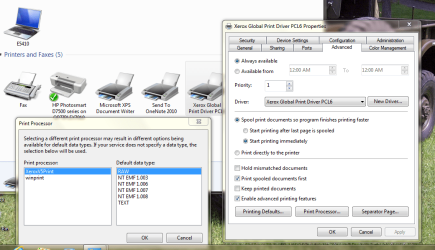
E5410 has no printers physically attached, but does show the Global PCS and the networked D7500 as the default printer.
 

My Computer My Computer

At a glance

x64 (6.3.9600) Win8.1 Pro & soon dual boot x6...AMD A6-3420M APU with Radeon(tm) HD Graphics6.00 GBAMD Radeon(TM) HD 6520G
Computer type
Laptop
Computer Manufacturer/Model Number
HP Pavilion dv6-6c10us
OS
x64 (6.3.9600) Win8.1 Pro & soon dual boot x64 (6.1.7601) Win7_SP1 HomePrem
CPU
AMD A6-3420M APU with Radeon(tm) HD Graphics
Motherboard
Hewlett-Packard 1805
Memory
6.00 GB
Graphics Card(s)
AMD Radeon(TM) HD 6520G
Sound Card
(1) AMD High Definition Audio Device (2) IDT High Definiti
Monitor(s) Displays
HP W2072a 20" LCD (1600 x 900) @ 60 Hz
Screen Resolution
1366 x 768 x 32 bits (4294967296 colors) @ 60 Hz
Hard Drives
ST640LM0 00 HM641JI SATA Disk Device
Keyboard
Logitech k520 wireless KB
Mouse
Logitech m320 wireless mouse (bundled with KB)
Internet Speed
15/5 | 54 MB Wireless 'n'
Antivirus
Realtime: Defender or Avast | On-demand: Malwarebytes, ESET
Browser
IE 11 on Win8, IE 10 on win 7
Other Info
Media: [Gimp, Audacity, VLC] || Comm: [WEmail 2012, Skype] || Productivity: [OpenOffice,| Textpad] || Utils: [Sysinternals, cCleaner, Speccy, Defraggler]
I might not have mentioned this before: http://www.sevenforums.com/tutorials/9733-screenshots-files-upload-post-seven-forums.html

Print Processor is a button on the Advanced Tab.

Perhaps a diagram identifying the PCs and currrent printer connections. I get dizzy trying to map networks in my head. I doesn't have to be fancy - PC names, printer names lines from Printers to computers with identifying protocol (ethernet, USB)

E5410 has no printers physically attached, but does show the Global PCS and the networked D7500 as the default printer.

Attached
 

Attachments

  • Capture.PNG
    Capture.PNG
    81 KB · Views: 2

My Computer My Computer

At a glance

Win 7 Pro 64bit4gb
Computer type
PC/Desktop
Computer Manufacturer/Model Number
Dell7010
OS
Win 7 Pro 64bit
Memory
4gb
Hard Drives
500gb
Antivirus
Norton 360
Browser
crome

My Computer My Computer

At a glance

x64 (6.3.9600) Win8.1 Pro & soon dual boot x6...AMD A6-3420M APU with Radeon(tm) HD Graphics6.00 GBAMD Radeon(TM) HD 6520G
Computer type
Laptop
Computer Manufacturer/Model Number
HP Pavilion dv6-6c10us
OS
x64 (6.3.9600) Win8.1 Pro & soon dual boot x64 (6.1.7601) Win7_SP1 HomePrem
CPU
AMD A6-3420M APU with Radeon(tm) HD Graphics
Motherboard
Hewlett-Packard 1805
Memory
6.00 GB
Graphics Card(s)
AMD Radeon(TM) HD 6520G
Sound Card
(1) AMD High Definition Audio Device (2) IDT High Definiti
Monitor(s) Displays
HP W2072a 20" LCD (1600 x 900) @ 60 Hz
Screen Resolution
1366 x 768 x 32 bits (4294967296 colors) @ 60 Hz
Hard Drives
ST640LM0 00 HM641JI SATA Disk Device
Keyboard
Logitech k520 wireless KB
Mouse
Logitech m320 wireless mouse (bundled with KB)
Internet Speed
15/5 | 54 MB Wireless 'n'
Antivirus
Realtime: Defender or Avast | On-demand: Malwarebytes, ESET
Browser
IE 11 on Win8, IE 10 on win 7
Other Info
Media: [Gimp, Audacity, VLC] || Comm: [WEmail 2012, Skype] || Productivity: [OpenOffice,| Textpad] || Utils: [Sysinternals, cCleaner, Speccy, Defraggler]
Have you seen this post? Same as my problems. There are posts all over the internet with this problem as well as a few here.

http://www.sevenforums.com/network-sharing/56307-can-t-add-network-printer.html

I won't get back to this for awhile. Maybe early next week. I'm spending all my time working on this and experience tells me to walk away. Today, while doing accounting the one printer that did work OK on my win 7 would not print anymore. It would print a "test page" but not from any applications. Deleted EVERYTHING and started over. Printer now works but I have error messages all over the place. Basically says "printer installation failed" and it shows 3 of the same printer installed. And this is the newer printer so it is win7 compatable. No wonder every one of my clients won't give up XP until absolutely necessary.

I'll get back at it again so thanks for your help. Any comments on the above thread link appreciated.
 

My Computer My Computer

At a glance

Win 7 Pro 64bit4gb
Computer type
PC/Desktop
Computer Manufacturer/Model Number
Dell7010
OS
Win 7 Pro 64bit
Memory
4gb
Hard Drives
500gb
Antivirus
Norton 360
Browser
crome

My Computer My Computer

At a glance

Windows 7 Ult, Windows 8.1 Pro,Q9650-4.275GHz, E8600 4.5GHz, E6750-3.8GHzG.Skill PC2 9600 1200Mhz 5 5 5 15 2TGTX480
Computer type
PC/Desktop
Computer Manufacturer/Model Number
Home built
OS
Windows 7 Ult, Windows 8.1 Pro,
CPU
Q9650-4.275GHz, E8600 4.5GHz, E6750-3.8GHz
Motherboard
Evga 780i FTW
Memory
G.Skill PC2 9600 1200Mhz 5 5 5 15 2T
Graphics Card(s)
GTX480
Sound Card
Asus Xonar D2
Monitor(s) Displays
HannsG
Screen Resolution
1680X1050
Hard Drives
GSkill Phoenix Pro 120GB SSD
PSU
ThermalTake Toughpower 1000Watt modular
Case
ThermalTake XaserV
Cooling
Xigmatek S1283
Keyboard
Logitech G15
Mouse
Logitech G9
Internet Speed
T1
You are wise - take a break from this and revisit it when you have the time.

Yep, I've seen similar reports when searching for help on the issue. Networking isn't that difficult, there's just a bunch of things that have to line up for it to work - Win7 adds a few wrinkles. That's why I kept asking to see YOUR configurations. I trust that most people to be able to look and see what;s on the screen, but every once in a while I, or another member, spot that little nugget that is the key.

Edit: The multiple printers or printer installation errors are probalby from the attempts to use the Xerox universal printer. See if there is a related entry in Control Panel -> Programs and Features - uninstall if you find it. Otherwise, check DevMgr and uninstall any printers there - answer yes to uninstall software if prompted.

Anyway, enjoy the accounting work that must be done ;) We'll be here when you come back.

Thanks Chev - your knowledge and experience are welcome and appreciated. I saw a similar approach somewhere and was waiting to see rbotlz config. I agree with OP that the best thign is to start over - now I have to help clean up what I suggested trying to get the Xerox driver working.

Have you seen this post? Same as my problems. There are posts all over the internet with this problem as well as a few here.

http://www.sevenforums.com/network-sharing/56307-can-t-add-network-printer.html

I won't get back to this for awhile. Maybe early next week. I'm spending all my time working on this and experience tells me to walk away. Today, while doing accounting the one printer that did work OK on my win 7 would not print anymore. It would print a "test page" but not from any applications. Deleted EVERYTHING and started over. Printer now works but I have error messages all over the place. Basically says "printer installation failed" and it shows 3 of the same printer installed. And this is the newer printer so it is win7 compatable. No wonder every one of my clients won't give up XP until absolutely necessary.

I'll get back at it again so thanks for your help. Any comments on the above thread link appreciated.
 
Last edited:

My Computer My Computer

At a glance

x64 (6.3.9600) Win8.1 Pro & soon dual boot x6...AMD A6-3420M APU with Radeon(tm) HD Graphics6.00 GBAMD Radeon(TM) HD 6520G
Computer type
Laptop
Computer Manufacturer/Model Number
HP Pavilion dv6-6c10us
OS
x64 (6.3.9600) Win8.1 Pro & soon dual boot x64 (6.1.7601) Win7_SP1 HomePrem
CPU
AMD A6-3420M APU with Radeon(tm) HD Graphics
Motherboard
Hewlett-Packard 1805
Memory
6.00 GB
Graphics Card(s)
AMD Radeon(TM) HD 6520G
Sound Card
(1) AMD High Definition Audio Device (2) IDT High Definiti
Monitor(s) Displays
HP W2072a 20" LCD (1600 x 900) @ 60 Hz
Screen Resolution
1366 x 768 x 32 bits (4294967296 colors) @ 60 Hz
Hard Drives
ST640LM0 00 HM641JI SATA Disk Device
Keyboard
Logitech k520 wireless KB
Mouse
Logitech m320 wireless mouse (bundled with KB)
Internet Speed
15/5 | 54 MB Wireless 'n'
Antivirus
Realtime: Defender or Avast | On-demand: Malwarebytes, ESET
Browser
IE 11 on Win8, IE 10 on win 7
Other Info
Media: [Gimp, Audacity, VLC] || Comm: [WEmail 2012, Skype] || Productivity: [OpenOffice,| Textpad] || Utils: [Sysinternals, cCleaner, Speccy, Defraggler]
Back
Top