Solved How to recover ntfs partition

Gerrit

New member
Local time
8:01 PM
Messages
20
Hi everyone,

I have an external drive, size 1TB with a ntfs partition on it. Some linux tools told me, that the size of the drive is 2TB. I used to GParted to resize it. Everything looked fine and the drive was still accessible. After writing something on the drive, the drive became inaccessible both under Ubuntu and Windows 7.

I tried to rewrite the MBR table with fdisk to have it set back to 1TB, but I dont really know, what sector size would be correct.

I wanted to use chkdsk to repair the drive, but unfortunately the drive is recognized as a RAW drive.

Can someone help me to rewrite the MBR table with fdisk or suggest a tool which can repair the MBR?


Some output that may be helpful:

fdisk after I rewrote the MBR

Code:
$ sudo fdisk -l /dev/sde

Disk /dev/sde: 1000.2 GB, 1000204886016 bytes
255 heads, 63 sectors/track, 121601 cylinders, total 1953525168 sectors
Units = sectors of 1 * 512 = 512 bytes
Sector size (logical/physical): 512 bytes / 512 bytes
I/O size (minimum/optimal): 512 bytes / 512 bytes
Disk identifier: 0x44fdfe06

   Device Boot      Start         End      Blocks   Id  System
/dev/sde1              63  1953525166   976762552    7  HPFS/NTFS/exFAT

parted output:

Code:
$ sudo parted /dev/sde unit s print
Model: WD 10EACS External (scsi)
Disk /dev/sde: 1953525168s
Sector size (logical/physical): 512B/512B
Partition Table: msdos

Number  Start  End          Size         Type     File system  Flags
 1      63s    1953525166s  1953525104s  primary

dmesg output when attaching the drive (in linux):

Code:
[ 7792.905572] usb 1-1.2: new high-speed USB device number 5 using ehci-pci
[ 7792.998930] usb 1-1.2: New USB device found, idVendor=1058, idProduct=1100
[ 7792.998932] usb 1-1.2: New USB device strings: Mfr=1, Product=2, SerialNumber=3
[ 7792.998934] usb 1-1.2: Product: My Book         
[ 7792.998935] usb 1-1.2: Manufacturer: Western Digital 
[ 7792.998936] usb 1-1.2: SerialNumber: 57442D574341534A30393431333733
[ 7792.999363] scsi7 : usb-storage 1-1.2:1.0
[ 7793.998087] scsi 7:0:0:0: Direct-Access     WD       10EACS External  1.65 PQ: 0 ANSI: 4
[ 7793.999008] sd 7:0:0:0: Attached scsi generic sg5 type 0
[ 7794.001221] sd 7:0:0:0: [sde] 1953525168 512-byte logical blocks: (1.00 TB/931 GiB)
[ 7794.002257] sd 7:0:0:0: [sde] Write Protect is off
[ 7794.002262] sd 7:0:0:0: [sde] Mode Sense: 21 00 00 00
[ 7794.003385] sd 7:0:0:0: [sde] No Caching mode page found
[ 7794.003388] sd 7:0:0:0: [sde] Assuming drive cache: write through
[ 7794.006132] sd 7:0:0:0: [sde] No Caching mode page found
[ 7794.006136] sd 7:0:0:0: [sde] Assuming drive cache: write through
[ 7794.023054]  sde: sde1
[ 7794.026132] sd 7:0:0:0: [sde] No Caching mode page found
[ 7794.026137] sd 7:0:0:0: [sde] Assuming drive cache: write through
[ 7794.026141] sd 7:0:0:0: [sde] Attached SCSI disk
 

My Computer My Computer

At a glance

Windows 7 x64, Ubuntu 12.04.3 64bitIntel(R) Xeon(R) CPU E3-1230 V2 @ 3.30GHz2x 8GB DDR3Sapphire Radeon HD 6950 2GB OC
Computer type
PC/Desktop
Computer Manufacturer/Model Number
custom build
OS
Windows 7 x64, Ubuntu 12.04.3 64bit
CPU
Intel(R) Xeon(R) CPU E3-1230 V2 @ 3.30GHz
Motherboard
ASRock H77 Pro4/MVP
Memory
2x 8GB DDR3
Graphics Card(s)
Sapphire Radeon HD 6950 2GB OC
Monitor(s) Displays
Samsung SyncMaster 226cw, Eizo FS2333-BK
Screen Resolution
1680x1050, 1920x1080
Hard Drives
currently complicated
Keyboard
Logitech K350
Mouse
Logitech G5
Internet Speed
100Mbit
jumanji is a whizz at this......I'll make him aware of this. Look for his reply.
 

My Computer My Computer

At a glance

Windows 10 Pro x64 ; Xubuntu x64Intel i7 860 @ 2.80 GHz O/C'ed to 4.0GHz16GB Corsair Vengance DDR3 @ 661 MHz Dual Cha...EVGA NVidia GTX 560 1024MB
Computer type
PC/Desktop
Computer Manufacturer/Model Number
Golden Mk. I.4
OS
Windows 10 Pro x64 ; Xubuntu x64
CPU
Intel i7 860 @ 2.80 GHz O/C'ed to 4.0GHz
Motherboard
Gigabyte P55A-UD3R Rev.1. Award BIOS F13
Memory
16GB Corsair Vengance DDR3 @ 661 MHz Dual Channel (9-9-9-24)
Graphics Card(s)
EVGA NVidia GTX 560 1024MB
Sound Card
Realtek Integrated
Monitor(s) Displays
Dual Samsung SyncMaster 2494HS
Screen Resolution
1920*1080 and 1920*1080
Hard Drives
1*Samsung 840 EVO 120GB SSD;
1*OCZ Vertex 2 60GB SSD;
2*Samsung F3 SpinPoint 1TB in RAID0;
1*Samsung F1 SpinPoint 1TB;
2*Western Digital 1TB External USB 3.0
1*Western Digital 500GB External USB 3.0
1*Seagate 500GB External USB 2.0
PSU
Thermaltake ToughPower QFan 750W
Case
Thermaltake Element S VK60001W2Z
Cooling
Corsair H60 Water Cooling, 2*230mm and 2*80mm case fans
Keyboard
Logitech G110
Mouse
Logitech MX518
I tried to rewrite the MBR table
MBR consists of:
  • disk signature
  • partition table
  • master boot code (to boot from partition). Small piece of bootstapr code.
Why rewrite MBR and which part of it? Rewrite with zeros's?
 

My Computer My Computer

At a glance

Microsoft Windows 7 Home Premium 64-bits 7601...Intel(R) Core(TM) i3 CPU M 370 @ 2.40GHz4,00 GBATI Mobility Radeon HD 5400 Series
Computer type
Laptop
Computer Manufacturer/Model Number
ACER ASPIRE 5742G
OS
Microsoft Windows 7 Home Premium 64-bits 7601 Multiprocessor Free Service Pack 1
CPU
Intel(R) Core(TM) i3 CPU M 370 @ 2.40GHz
Motherboard
Acer Aspire 5742G
Memory
4,00 GB
Graphics Card(s)
ATI Mobility Radeon HD 5400 Series
Sound Card
(1) AMD High Definition Audio Device (2) Realtek High Defi
Screen Resolution
1366 x 768 x 32 bits (4294967296 colors) @ 60 Hz
Hard Drives
WDC WD5000BEVT-22ZAT0
I tried to rewrite the MBR table
MBR consists of:
  • disk signature
  • partition table
  • master boot code (to boot from partition). Small piece of bootstapr code.
Why rewrite MBR and which part of it? Rewrite with zeros's?

Rewrite the partition table, so the information is correct according to the actual size of the hard drive. And because I was so stupid to belive the testdisk and fdisk, that the hard drive is 2TB big although I bought it as a 1TB drive and thus resized it with GParted.

And because there is data on it, that I havent backed up.
 

My Computer My Computer

At a glance

Windows 7 x64, Ubuntu 12.04.3 64bitIntel(R) Xeon(R) CPU E3-1230 V2 @ 3.30GHz2x 8GB DDR3Sapphire Radeon HD 6950 2GB OC
Computer type
PC/Desktop
Computer Manufacturer/Model Number
custom build
OS
Windows 7 x64, Ubuntu 12.04.3 64bit
CPU
Intel(R) Xeon(R) CPU E3-1230 V2 @ 3.30GHz
Motherboard
ASRock H77 Pro4/MVP
Memory
2x 8GB DDR3
Graphics Card(s)
Sapphire Radeon HD 6950 2GB OC
Monitor(s) Displays
Samsung SyncMaster 226cw, Eizo FS2333-BK
Screen Resolution
1680x1050, 1920x1080
Hard Drives
currently complicated
Keyboard
Logitech K350
Mouse
Logitech G5
Internet Speed
100Mbit

My Computer My Computer

At a glance

Microsoft Windows 7 Home Premium 64-bits 7601...Intel(R) Core(TM) i3 CPU M 370 @ 2.40GHz4,00 GBATI Mobility Radeon HD 5400 Series
Computer type
Laptop
Computer Manufacturer/Model Number
ACER ASPIRE 5742G
OS
Microsoft Windows 7 Home Premium 64-bits 7601 Multiprocessor Free Service Pack 1
CPU
Intel(R) Core(TM) i3 CPU M 370 @ 2.40GHz
Motherboard
Acer Aspire 5742G
Memory
4,00 GB
Graphics Card(s)
ATI Mobility Radeon HD 5400 Series
Sound Card
(1) AMD High Definition Audio Device (2) Realtek High Defi
Screen Resolution
1366 x 768 x 32 bits (4294967296 colors) @ 60 Hz
Hard Drives
WDC WD5000BEVT-22ZAT0
I tried to rewrite the MBR table


MBR consists of:
  • disk signature
  • partition table
  • master boot code (to boot from partition). Small piece of bootstapr code.
Why rewrite MBR and which part of it? Rewrite with zeros's?

Rewrite the partition table, so the information is correct according to the actual size of the hard drive. And because I was so stupid to belive the testdisk and fdisk, that the hard drive is 2TB big although I bought it as a 1TB drive and thus resized it with GParted.

And because there is data on it, that I havent backed up.
You are sure you messed up the MBR only (first 512bytes of disk)?
 

My Computer My Computer

At a glance

Microsoft Windows 7 Home Premium 64-bits 7601...Intel(R) Core(TM) i3 CPU M 370 @ 2.40GHz4,00 GBATI Mobility Radeon HD 5400 Series
Computer type
Laptop
Computer Manufacturer/Model Number
ACER ASPIRE 5742G
OS
Microsoft Windows 7 Home Premium 64-bits 7601 Multiprocessor Free Service Pack 1
CPU
Intel(R) Core(TM) i3 CPU M 370 @ 2.40GHz
Motherboard
Acer Aspire 5742G
Memory
4,00 GB
Graphics Card(s)
ATI Mobility Radeon HD 5400 Series
Sound Card
(1) AMD High Definition Audio Device (2) Realtek High Defi
Screen Resolution
1366 x 768 x 32 bits (4294967296 colors) @ 60 Hz
Hard Drives
WDC WD5000BEVT-22ZAT0
fdisk -land gparted
dispaly that it's a 1TB disk. Only 1 partition on disk, starting at sector 63 (quite normal in windows). ID=7 so NTFS.

They did before I resized and afterwards rewrote the MBR partition table with fdisk.

You are sure you messed up the MBR only (first 512bytes of disk)?

Not completely, but I hope not.


Will test partition wizard

Picture of partition wizard overview:

OQ4a1Qw.jpg
 

My Computer My Computer

At a glance

Windows 7 x64, Ubuntu 12.04.3 64bitIntel(R) Xeon(R) CPU E3-1230 V2 @ 3.30GHz2x 8GB DDR3Sapphire Radeon HD 6950 2GB OC
Computer type
PC/Desktop
Computer Manufacturer/Model Number
custom build
OS
Windows 7 x64, Ubuntu 12.04.3 64bit
CPU
Intel(R) Xeon(R) CPU E3-1230 V2 @ 3.30GHz
Motherboard
ASRock H77 Pro4/MVP
Memory
2x 8GB DDR3
Graphics Card(s)
Sapphire Radeon HD 6950 2GB OC
Monitor(s) Displays
Samsung SyncMaster 226cw, Eizo FS2333-BK
Screen Resolution
1680x1050, 1920x1080
Hard Drives
currently complicated
Keyboard
Logitech K350
Mouse
Logitech G5
Internet Speed
100Mbit
disksignature overwritten.... no problem.
master boot code overwritten... no problem.
You did override the partition table as well. Don't know what you did modify.

Anyway it's sector 0 of disk. tell me what Partition Wizard says.

Partition Wizard: How to perform lost partition recovery and deleted partition recovery under Windows? Partition Recovery Help. Do "full disk" ->quick scan. Does it find a large partition starting at sector 63? You can recover it. Make it PRIMARY using Partition Wizard as well. Since it was the only partition on that disk, mark it ACTIVE as well
 

My Computer My Computer

At a glance

Microsoft Windows 7 Home Premium 64-bits 7601...Intel(R) Core(TM) i3 CPU M 370 @ 2.40GHz4,00 GBATI Mobility Radeon HD 5400 Series
Computer type
Laptop
Computer Manufacturer/Model Number
ACER ASPIRE 5742G
OS
Microsoft Windows 7 Home Premium 64-bits 7601 Multiprocessor Free Service Pack 1
CPU
Intel(R) Core(TM) i3 CPU M 370 @ 2.40GHz
Motherboard
Acer Aspire 5742G
Memory
4,00 GB
Graphics Card(s)
ATI Mobility Radeon HD 5400 Series
Sound Card
(1) AMD High Definition Audio Device (2) Realtek High Defi
Screen Resolution
1366 x 768 x 32 bits (4294967296 colors) @ 60 Hz
Hard Drives
WDC WD5000BEVT-22ZAT0
disksignature overwritten.... no problem.
master boot code overwritten... no problem.
You did override the partition table as well. Don't know what you did modify.

Modified the sector size.

Anyway it's sector 0 of disk. tell me what Partition Wizard says.

Partition Wizard: How to perform lost partition recovery and deleted partition recovery under Windows? Partition Recovery Help. Do "full disk" ->quick scan. Does it find a large partition starting at sector 63? You can recover it. Make it PRIMARY using Partition Wizard as well. Since it was the only partition on that disk, mark it ACTIVE as well

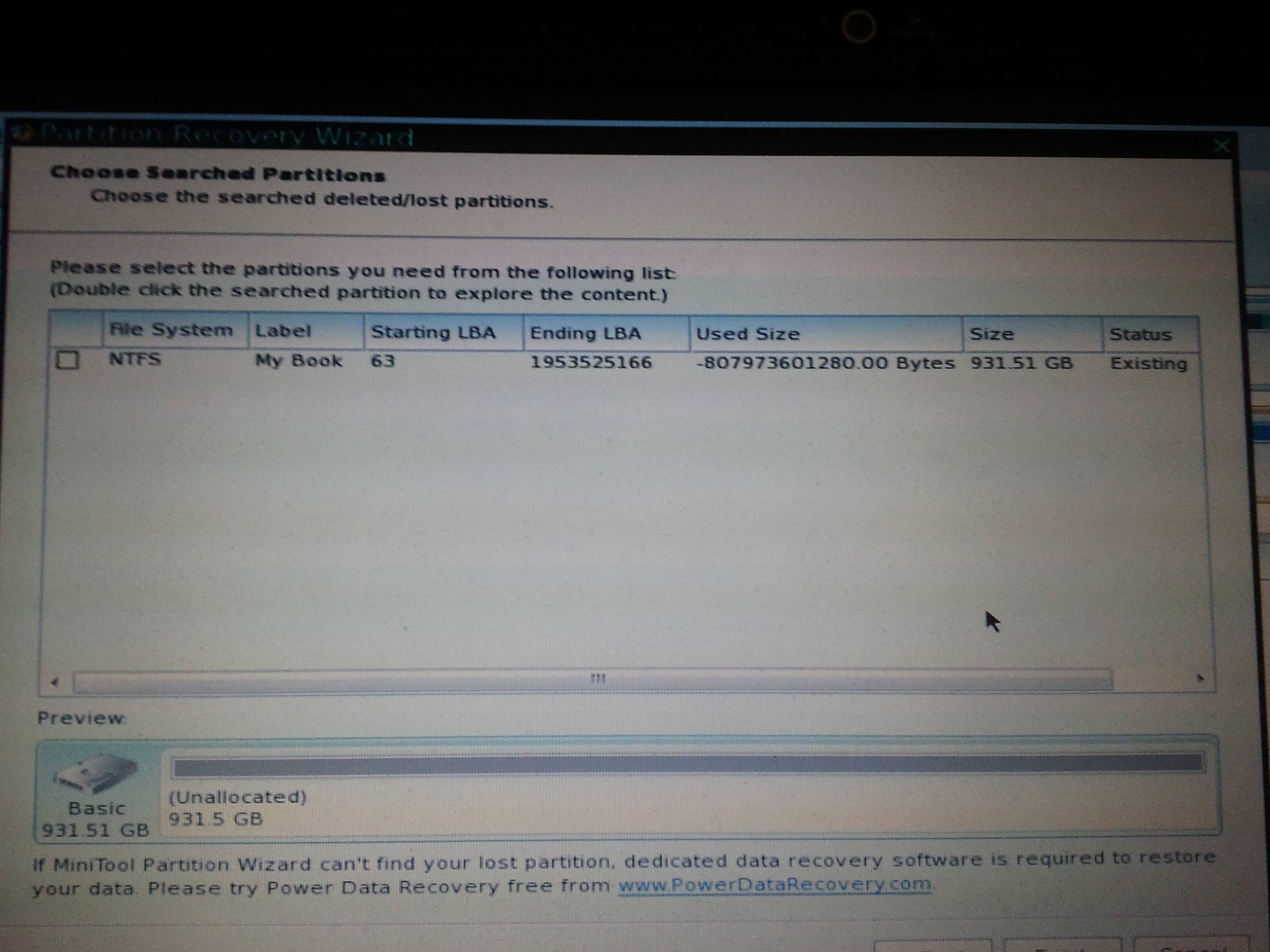
Partition wizard finds the partition. But I'm unsure if the "Used Size" is a problem:

9QhINiM.jpg
 

My Computer My Computer

At a glance

Windows 7 x64, Ubuntu 12.04.3 64bitIntel(R) Xeon(R) CPU E3-1230 V2 @ 3.30GHz2x 8GB DDR3Sapphire Radeon HD 6950 2GB OC
Computer type
PC/Desktop
Computer Manufacturer/Model Number
custom build
OS
Windows 7 x64, Ubuntu 12.04.3 64bit
CPU
Intel(R) Xeon(R) CPU E3-1230 V2 @ 3.30GHz
Motherboard
ASRock H77 Pro4/MVP
Memory
2x 8GB DDR3
Graphics Card(s)
Sapphire Radeon HD 6950 2GB OC
Monitor(s) Displays
Samsung SyncMaster 226cw, Eizo FS2333-BK
Screen Resolution
1680x1050, 1920x1080
Hard Drives
currently complicated
Keyboard
Logitech K350
Mouse
Logitech G5
Internet Speed
100Mbit
Status: Existing. Hmmmmm it is already there, or did you already recover. What does the main screen display after you start PW?
 

My Computer My Computer

At a glance

Microsoft Windows 7 Home Premium 64-bits 7601...Intel(R) Core(TM) i3 CPU M 370 @ 2.40GHz4,00 GBATI Mobility Radeon HD 5400 Series
Computer type
Laptop
Computer Manufacturer/Model Number
ACER ASPIRE 5742G
OS
Microsoft Windows 7 Home Premium 64-bits 7601 Multiprocessor Free Service Pack 1
CPU
Intel(R) Core(TM) i3 CPU M 370 @ 2.40GHz
Motherboard
Acer Aspire 5742G
Memory
4,00 GB
Graphics Card(s)
ATI Mobility Radeon HD 5400 Series
Sound Card
(1) AMD High Definition Audio Device (2) Realtek High Defi
Screen Resolution
1366 x 768 x 32 bits (4294967296 colors) @ 60 Hz
Hard Drives
WDC WD5000BEVT-22ZAT0
btw filetype NTFS, start sector 63, end sector 1953525166 size 931.51GB all looks fine to me.
The used size isn't in the partition table! Partition Wizard knows how NTFS works and read the structures and tells you how much space is used. It's a negative number so.... it's a PW summary overflow, or the filesystem is corrupt. Not a partition problem!!

win7 checkdisk will fix that, or report more details about the problem.
 

My Computer My Computer

At a glance

Microsoft Windows 7 Home Premium 64-bits 7601...Intel(R) Core(TM) i3 CPU M 370 @ 2.40GHz4,00 GBATI Mobility Radeon HD 5400 Series
Computer type
Laptop
Computer Manufacturer/Model Number
ACER ASPIRE 5742G
OS
Microsoft Windows 7 Home Premium 64-bits 7601 Multiprocessor Free Service Pack 1
CPU
Intel(R) Core(TM) i3 CPU M 370 @ 2.40GHz
Motherboard
Acer Aspire 5742G
Memory
4,00 GB
Graphics Card(s)
ATI Mobility Radeon HD 5400 Series
Sound Card
(1) AMD High Definition Audio Device (2) Realtek High Defi
Screen Resolution
1366 x 768 x 32 bits (4294967296 colors) @ 60 Hz
Hard Drives
WDC WD5000BEVT-22ZAT0
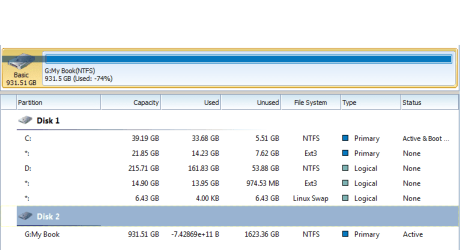
I didnt recover anything yet. Only started the quick scan and that is what you see in my last post. The start screen is looking like in the following picture.

Cant run checkdisk on it, because windows only sees it as a RAW drive. If I click on the partition in the quick scan result I can show all my files. So maybe PW can fix it.

OQ4a1Qw.jpg
 

My Computer My Computer

At a glance

Windows 7 x64, Ubuntu 12.04.3 64bitIntel(R) Xeon(R) CPU E3-1230 V2 @ 3.30GHz2x 8GB DDR3Sapphire Radeon HD 6950 2GB OC
Computer type
PC/Desktop
Computer Manufacturer/Model Number
custom build
OS
Windows 7 x64, Ubuntu 12.04.3 64bit
CPU
Intel(R) Xeon(R) CPU E3-1230 V2 @ 3.30GHz
Motherboard
ASRock H77 Pro4/MVP
Memory
2x 8GB DDR3
Graphics Card(s)
Sapphire Radeon HD 6950 2GB OC
Monitor(s) Displays
Samsung SyncMaster 226cw, Eizo FS2333-BK
Screen Resolution
1680x1050, 1920x1080
Hard Drives
currently complicated
Keyboard
Logitech K350
Mouse
Logitech G5
Internet Speed
100Mbit

My Computer My Computer

At a glance

Microsoft Windows 7 Home Premium 64-bits 7601...Intel(R) Core(TM) i3 CPU M 370 @ 2.40GHz4,00 GBATI Mobility Radeon HD 5400 Series
Computer type
Laptop
Computer Manufacturer/Model Number
ACER ASPIRE 5742G
OS
Microsoft Windows 7 Home Premium 64-bits 7601 Multiprocessor Free Service Pack 1
CPU
Intel(R) Core(TM) i3 CPU M 370 @ 2.40GHz
Motherboard
Acer Aspire 5742G
Memory
4,00 GB
Graphics Card(s)
ATI Mobility Radeon HD 5400 Series
Sound Card
(1) AMD High Definition Audio Device (2) Realtek High Defi
Screen Resolution
1366 x 768 x 32 bits (4294967296 colors) @ 60 Hz
Hard Drives
WDC WD5000BEVT-22ZAT0
PW sees all fine. Only it computes the used space wrong. So computes the used space wrong as well. Do you know the real used space (or free space) approximately?

Approximately 350GB, I can watch the complete file structure in the partition explorer.


Just tried, Everything worked fine until it copied the data. At 16% it gave a I/O error.
 

My Computer My Computer

At a glance

Windows 7 x64, Ubuntu 12.04.3 64bitIntel(R) Xeon(R) CPU E3-1230 V2 @ 3.30GHz2x 8GB DDR3Sapphire Radeon HD 6950 2GB OC
Computer type
PC/Desktop
Computer Manufacturer/Model Number
custom build
OS
Windows 7 x64, Ubuntu 12.04.3 64bit
CPU
Intel(R) Xeon(R) CPU E3-1230 V2 @ 3.30GHz
Motherboard
ASRock H77 Pro4/MVP
Memory
2x 8GB DDR3
Graphics Card(s)
Sapphire Radeon HD 6950 2GB OC
Monitor(s) Displays
Samsung SyncMaster 226cw, Eizo FS2333-BK
Screen Resolution
1680x1050, 1920x1080
Hard Drives
currently complicated
Keyboard
Logitech K350
Mouse
Logitech G5
Internet Speed
100Mbit
PW sees all fine. Only it computes the used space wrong. So computes the used space wrong as well. Do you know the real used space (or free space) approximately?

Approximately 350GB, I can watch the complete file structure in the partition explorer.


Just tried, Everything worked fine until it copied the data. At 16% it gave a I/O error.
Because drive is faulty? Because.... I don't know. You can still see files? Reboot to PW again. What is state of the faulty partition now?
 

My Computer My Computer

At a glance

Microsoft Windows 7 Home Premium 64-bits 7601...Intel(R) Core(TM) i3 CPU M 370 @ 2.40GHz4,00 GBATI Mobility Radeon HD 5400 Series
Computer type
Laptop
Computer Manufacturer/Model Number
ACER ASPIRE 5742G
OS
Microsoft Windows 7 Home Premium 64-bits 7601 Multiprocessor Free Service Pack 1
CPU
Intel(R) Core(TM) i3 CPU M 370 @ 2.40GHz
Motherboard
Acer Aspire 5742G
Memory
4,00 GB
Graphics Card(s)
ATI Mobility Radeon HD 5400 Series
Sound Card
(1) AMD High Definition Audio Device (2) Realtek High Defi
Screen Resolution
1366 x 768 x 32 bits (4294967296 colors) @ 60 Hz
Hard Drives
WDC WD5000BEVT-22ZAT0

My Computer My Computer

At a glance

Microsoft Windows 7 Home Premium 64-bits 7601...Intel(R) Core(TM) i3 CPU M 370 @ 2.40GHz4,00 GBATI Mobility Radeon HD 5400 Series
Computer type
Laptop
Computer Manufacturer/Model Number
ACER ASPIRE 5742G
OS
Microsoft Windows 7 Home Premium 64-bits 7601 Multiprocessor Free Service Pack 1
CPU
Intel(R) Core(TM) i3 CPU M 370 @ 2.40GHz
Motherboard
Acer Aspire 5742G
Memory
4,00 GB
Graphics Card(s)
ATI Mobility Radeon HD 5400 Series
Sound Card
(1) AMD High Definition Audio Device (2) Realtek High Defi
Screen Resolution
1366 x 768 x 32 bits (4294967296 colors) @ 60 Hz
Hard Drives
WDC WD5000BEVT-22ZAT0
The state hasnt changed, still negative unused space.

Can do a disk surface test, but that will take 9 hours and more, so I'll probably run that tonight and post the result tomorrow
 

My Computer My Computer

At a glance

Windows 7 x64, Ubuntu 12.04.3 64bitIntel(R) Xeon(R) CPU E3-1230 V2 @ 3.30GHz2x 8GB DDR3Sapphire Radeon HD 6950 2GB OC
Computer type
PC/Desktop
Computer Manufacturer/Model Number
custom build
OS
Windows 7 x64, Ubuntu 12.04.3 64bit
CPU
Intel(R) Xeon(R) CPU E3-1230 V2 @ 3.30GHz
Motherboard
ASRock H77 Pro4/MVP
Memory
2x 8GB DDR3
Graphics Card(s)
Sapphire Radeon HD 6950 2GB OC
Monitor(s) Displays
Samsung SyncMaster 226cw, Eizo FS2333-BK
Screen Resolution
1680x1050, 1920x1080
Hard Drives
currently complicated
Keyboard
Logitech K350
Mouse
Logitech G5
Internet Speed
100Mbit
The state hasnt changed, still negative unused space.

Can do a disk surface test, but that will take 9 hours and more, so I'll probably run that tonight and post the result tomorrow
It's still same size?

Can linux successfully mount the ntfs-partition? What kind of files are on the disk anyway?
 

My Computer My Computer

At a glance

Microsoft Windows 7 Home Premium 64-bits 7601...Intel(R) Core(TM) i3 CPU M 370 @ 2.40GHz4,00 GBATI Mobility Radeon HD 5400 Series
Computer type
Laptop
Computer Manufacturer/Model Number
ACER ASPIRE 5742G
OS
Microsoft Windows 7 Home Premium 64-bits 7601 Multiprocessor Free Service Pack 1
CPU
Intel(R) Core(TM) i3 CPU M 370 @ 2.40GHz
Motherboard
Acer Aspire 5742G
Memory
4,00 GB
Graphics Card(s)
ATI Mobility Radeon HD 5400 Series
Sound Card
(1) AMD High Definition Audio Device (2) Realtek High Defi
Screen Resolution
1366 x 768 x 32 bits (4294967296 colors) @ 60 Hz
Hard Drives
WDC WD5000BEVT-22ZAT0
. .......You can still see files? Reboot to PW again. What is state of the faulty partition now?

Yep, I would also be interested in knowing it.

Please rerun Partition Recovery Wizard, Quick Scan and if it stays partition still exists and partition explorer shows the files, blindly go ahead and rewrite the partition table. Since you will only be writing to sector 0, you are not doing anything to the data.( However if it I has already been corrupted due to your dabbling with Linux/fdisk,Changing sector size, attempting to shrink partitions etc., etc., and other write operations, data integrity cannot be guaranteed. Anyway let us make a brave attempt to retrieve whatever possible)

Please post screenshots of 1.how the drive looks in Partition Wizard, 2. The result after running the quick scan 3. How the files show up in the partition explorer and finally how your drive looks like after rewriting the partition table.

For all the screenshots please use the Windows Snipping Tool and upload the snap. ( Do not use third party sites)

For more help on how to go about with Partition Recovery Wizard, proceed to the topic Recovery with Partition Wizard: SanDisk Cruzer Blade 16GB ( in your case it will be your external hard drive) in Recover a flash drive turned RAW – Partition Wizard and TestDisk.

Since it is already bedtime for me, I may return only after another 10 hours. So Kaktussoft may continue if he has better ideas, short of any writing operations.
 

My Computer My Computer

At a glance

Windows 7 Home Premium 32 bit
OS
Windows 7 Home Premium 32 bit
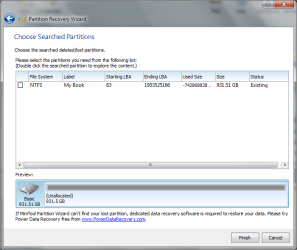
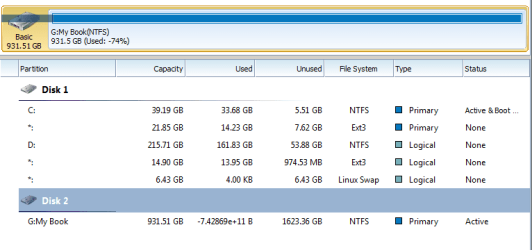
The partition explorer displays the files similar to the windows explorer. Rewriting the MBR Table dont seem to help.

1. pw overview.PNG

2. quickscan result.PNG

3. pw overview after rebuild MBR.PNG
 

My Computer My Computer

At a glance

Windows 7 x64, Ubuntu 12.04.3 64bitIntel(R) Xeon(R) CPU E3-1230 V2 @ 3.30GHz2x 8GB DDR3Sapphire Radeon HD 6950 2GB OC
Computer type
PC/Desktop
Computer Manufacturer/Model Number
custom build
OS
Windows 7 x64, Ubuntu 12.04.3 64bit
CPU
Intel(R) Xeon(R) CPU E3-1230 V2 @ 3.30GHz
Motherboard
ASRock H77 Pro4/MVP
Memory
2x 8GB DDR3
Graphics Card(s)
Sapphire Radeon HD 6950 2GB OC
Monitor(s) Displays
Samsung SyncMaster 226cw, Eizo FS2333-BK
Screen Resolution
1680x1050, 1920x1080
Hard Drives
currently complicated
Keyboard
Logitech K350
Mouse
Logitech G5
Internet Speed
100Mbit
Back
Top