Solved How to recover ntfs partition

Very strange. All seems fine, except the used space. As a result the unused space is incorrect (or vice versa).

But yesterday you told -80% is unused .. now -74%. How come?
 

My Computer My Computer

At a glance

Microsoft Windows 7 Home Premium 64-bits 7601...Intel(R) Core(TM) i3 CPU M 370 @ 2.40GHz4,00 GBATI Mobility Radeon HD 5400 Series
Computer type
Laptop
Computer Manufacturer/Model Number
ACER ASPIRE 5742G
OS
Microsoft Windows 7 Home Premium 64-bits 7601 Multiprocessor Free Service Pack 1
CPU
Intel(R) Core(TM) i3 CPU M 370 @ 2.40GHz
Motherboard
Acer Aspire 5742G
Memory
4,00 GB
Graphics Card(s)
ATI Mobility Radeon HD 5400 Series
Sound Card
(1) AMD High Definition Audio Device (2) Realtek High Defi
Screen Resolution
1366 x 768 x 32 bits (4294967296 colors) @ 60 Hz
Hard Drives
WDC WD5000BEVT-22ZAT0
Please answer post #17 and #18
 

My Computer My Computer

At a glance

Microsoft Windows 7 Home Premium 64-bits 7601...Intel(R) Core(TM) i3 CPU M 370 @ 2.40GHz4,00 GBATI Mobility Radeon HD 5400 Series
Computer type
Laptop
Computer Manufacturer/Model Number
ACER ASPIRE 5742G
OS
Microsoft Windows 7 Home Premium 64-bits 7601 Multiprocessor Free Service Pack 1
CPU
Intel(R) Core(TM) i3 CPU M 370 @ 2.40GHz
Motherboard
Acer Aspire 5742G
Memory
4,00 GB
Graphics Card(s)
ATI Mobility Radeon HD 5400 Series
Sound Card
(1) AMD High Definition Audio Device (2) Realtek High Defi
Screen Resolution
1366 x 768 x 32 bits (4294967296 colors) @ 60 Hz
Hard Drives
WDC WD5000BEVT-22ZAT0
Very strange. All seems fine, except the used space. As a result the unused space is incorrect (or vice versa).

But yesterday you told -80% is unused .. now -74%. How come?

I think that is a result of the attempted resize.

Please answer post #17 and #18

I'm currently running the surface test, but that will run at least 8 more hours.

No, Linux can't mount the partition.

Movies, music and a lot more different files.

Is the program "Power Data Recovery" good? With the Home Edition of the Power Wizard comes the free edition of this tool. If I cant recover the partition it would be at least great to recover the data that is important to me from it, then format the drive and do another full scan. Unfortunately the free edition only supports to copy 1GB, so I would have to get a personal license.
 

My Computer My Computer

At a glance

Windows 7 x64, Ubuntu 12.04.3 64bitIntel(R) Xeon(R) CPU E3-1230 V2 @ 3.30GHz2x 8GB DDR3Sapphire Radeon HD 6950 2GB OC
Computer type
PC/Desktop
Computer Manufacturer/Model Number
custom build
OS
Windows 7 x64, Ubuntu 12.04.3 64bit
CPU
Intel(R) Xeon(R) CPU E3-1230 V2 @ 3.30GHz
Motherboard
ASRock H77 Pro4/MVP
Memory
2x 8GB DDR3
Graphics Card(s)
Sapphire Radeon HD 6950 2GB OC
Monitor(s) Displays
Samsung SyncMaster 226cw, Eizo FS2333-BK
Screen Resolution
1680x1050, 1920x1080
Hard Drives
currently complicated
Keyboard
Logitech K350
Mouse
Logitech G5
Internet Speed
100Mbit
Very strange. All seems fine, except the used space. As a result the unused space is incorrect (or vice versa).

But yesterday you told -80% is unused .. now -74%. How come?

I think that is a result of the attempted resize.

Please answer post #17 and #18

I'm currently running the surface test, but that will run at least 8 more hours.

No, Linux can't mount the partition.

Movies, music and a lot more different files.

Is the program "Power Data Recovery" good? With the Home Edition of the Power Wizard comes the free edition of this tool. If I cant recover the partition it would be at least great to recover the data that is important to me from it, then format the drive and do another full scan. Unfortunately the free edition only supports to copy 1GB, so I would have to get a personal license.

I don't know that software.
Do one thing at a time. Let's wait for the results of the surface scan.
After that make a copy of that partition to another disk Copy Partition help of magic partition manager - Partition Wizard.

PW is smart enough.. you can shrink/extend on copy. But since PW thinks 1600GB is used.... it will use 1600GB at least, I think(?)

Otherwise make a full disk clone. Or a sector-to-sector clone. Use something that works before we continue troubleshooting.
 

My Computer My Computer

At a glance

Microsoft Windows 7 Home Premium 64-bits 7601...Intel(R) Core(TM) i3 CPU M 370 @ 2.40GHz4,00 GBATI Mobility Radeon HD 5400 Series
Computer type
Laptop
Computer Manufacturer/Model Number
ACER ASPIRE 5742G
OS
Microsoft Windows 7 Home Premium 64-bits 7601 Multiprocessor Free Service Pack 1
CPU
Intel(R) Core(TM) i3 CPU M 370 @ 2.40GHz
Motherboard
Acer Aspire 5742G
Memory
4,00 GB
Graphics Card(s)
ATI Mobility Radeon HD 5400 Series
Sound Card
(1) AMD High Definition Audio Device (2) Realtek High Defi
Screen Resolution
1366 x 768 x 32 bits (4294967296 colors) @ 60 Hz
Hard Drives
WDC WD5000BEVT-22ZAT0
sudo ntfsfix /dev/sde1

sudo ntfsck /dev/sde1
 

My Computer My Computer

At a glance

Microsoft Windows 7 Home Premium 64-bits 7601...Intel(R) Core(TM) i3 CPU M 370 @ 2.40GHz4,00 GBATI Mobility Radeon HD 5400 Series
Computer type
Laptop
Computer Manufacturer/Model Number
ACER ASPIRE 5742G
OS
Microsoft Windows 7 Home Premium 64-bits 7601 Multiprocessor Free Service Pack 1
CPU
Intel(R) Core(TM) i3 CPU M 370 @ 2.40GHz
Motherboard
Acer Aspire 5742G
Memory
4,00 GB
Graphics Card(s)
ATI Mobility Radeon HD 5400 Series
Sound Card
(1) AMD High Definition Audio Device (2) Realtek High Defi
Screen Resolution
1366 x 768 x 32 bits (4294967296 colors) @ 60 Hz
Hard Drives
WDC WD5000BEVT-22ZAT0
Good that Kaktussoft is back in. I can relax ;).

I don't think surface test is going to bring out anything. But no harm. Let it finish. But I do not recommend any writing operation such as shrinking the partition.

Basically I think the indication of wrong size is due to the sector/cluster size manipulation done with/by Linux ( though I wouldn't know how to restore it to the original state and whether any such attempt would result in inadvertent data loss.)

Before we explore and find it out, I would like the OP to post a screenshot of how the drive looks in Windows Disk Management and whether he is able to read the files.( If it still shows RAW we may attempt to rewrite the MBR code - again with Partition Wizard - and check our luck. It should atleast restore originality to sector 0)

And yes, he should get on to Data Recovery mode and try to recover what can be, before any such experimentation to alter the sector/cluster size (which can at best be only an academic exercise).

Power Data Recovery can recover only 1 GB of data free. So no point in trying it out unless any attempt to recover the data free fails.

I would instead recommend that the OP try PhotoRec and check whether he can recover the data. Advantages are 1. it does not write anything to the drive. No possibility of it even by mistake. (So the necessity of cloning the drive does not arise atleast for now.) However he will still need another 1TB drive connected to copy all the recovered data, if it indeed recovers and keep it connected before running PhotoRec to copy. 2. Recovery does not depend on the file system and so I presume it also would not depend on changed sector/cluster size. I hope it will be able to stitch all data together irrespective of the cluster/sector size.

And yes, 1 TB is going to take a long time more so since it works on zero-assumption without regard to file system and probably sector/cluster size.. Inevitable.
http://www.sevenforums.com/software/193467-guide-using-photorec-recovery-software.html
 

My Computer My Computer

At a glance

Windows 7 Home Premium 32 bit
OS
Windows 7 Home Premium 32 bit
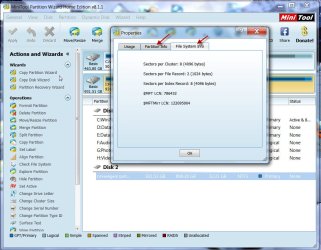
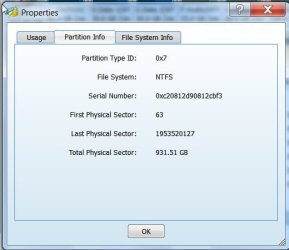
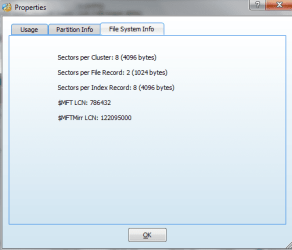
As an additional info to see what changes had taken place in the external drive, the OP may also post the screenshots of Partition Info, and File System Info for the drive.

In PW, right click on the external drive > Properties

The screenshot below shows my 1 TB Seagate GoFlex external drive.

07-01-2014 18-20-37.jpg

Partition Info:

07-01-2014 18-56-46.jpg
 
Last edited:

My Computer My Computer

At a glance

Windows 7 Home Premium 32 bit
OS
Windows 7 Home Premium 32 bit
Snap of the disk management tool.

View attachment 300666

Is there another way in PW rebuilding the MBR than clicking on the disk and use the "Rebuild MBR" Button to the left? I already tried that (snap was in one of my last posts) and it had no positive result.

Is there another tools than PhotoRec, because my experience with it is that it only recovers the files and not the filenames. That is definitely better than nothing, but I dont want to rename everything.

Cloning the disk comes not in question for me, because I dont have another disk that is able to hold that amount of data.

After the surface test I will give Power Data Recovery a try. Just to see if it works.
 

My Computer My Computer

At a glance

Windows 7 x64, Ubuntu 12.04.3 64bitIntel(R) Xeon(R) CPU E3-1230 V2 @ 3.30GHz2x 8GB DDR3Sapphire Radeon HD 6950 2GB OC
Computer type
PC/Desktop
Computer Manufacturer/Model Number
custom build
OS
Windows 7 x64, Ubuntu 12.04.3 64bit
CPU
Intel(R) Xeon(R) CPU E3-1230 V2 @ 3.30GHz
Motherboard
ASRock H77 Pro4/MVP
Memory
2x 8GB DDR3
Graphics Card(s)
Sapphire Radeon HD 6950 2GB OC
Monitor(s) Displays
Samsung SyncMaster 226cw, Eizo FS2333-BK
Screen Resolution
1680x1050, 1920x1080
Hard Drives
currently complicated
Keyboard
Logitech K350
Mouse
Logitech G5
Internet Speed
100Mbit
And the two snaps

properties file system info.PNG

properties partition info.PNG
 

My Computer My Computer

At a glance

Windows 7 x64, Ubuntu 12.04.3 64bitIntel(R) Xeon(R) CPU E3-1230 V2 @ 3.30GHz2x 8GB DDR3Sapphire Radeon HD 6950 2GB OC
Computer type
PC/Desktop
Computer Manufacturer/Model Number
custom build
OS
Windows 7 x64, Ubuntu 12.04.3 64bit
CPU
Intel(R) Xeon(R) CPU E3-1230 V2 @ 3.30GHz
Motherboard
ASRock H77 Pro4/MVP
Memory
2x 8GB DDR3
Graphics Card(s)
Sapphire Radeon HD 6950 2GB OC
Monitor(s) Displays
Samsung SyncMaster 226cw, Eizo FS2333-BK
Screen Resolution
1680x1050, 1920x1080
Hard Drives
currently complicated
Keyboard
Logitech K350
Mouse
Logitech G5
Internet Speed
100Mbit

My Computer My Computer

At a glance

Microsoft Windows 7 Home Premium 64-bits 7601...Intel(R) Core(TM) i3 CPU M 370 @ 2.40GHz4,00 GBATI Mobility Radeon HD 5400 Series
Computer type
Laptop
Computer Manufacturer/Model Number
ACER ASPIRE 5742G
OS
Microsoft Windows 7 Home Premium 64-bits 7601 Multiprocessor Free Service Pack 1
CPU
Intel(R) Core(TM) i3 CPU M 370 @ 2.40GHz
Motherboard
Acer Aspire 5742G
Memory
4,00 GB
Graphics Card(s)
ATI Mobility Radeon HD 5400 Series
Sound Card
(1) AMD High Definition Audio Device (2) Realtek High Defi
Screen Resolution
1366 x 768 x 32 bits (4294967296 colors) @ 60 Hz
Hard Drives
WDC WD5000BEVT-22ZAT0
Partition Wizard surface scan results?
#24 ?
#25 ?
 

My Computer My Computer

At a glance

Microsoft Windows 7 Home Premium 64-bits 7601...Intel(R) Core(TM) i3 CPU M 370 @ 2.40GHz4,00 GBATI Mobility Radeon HD 5400 Series
Computer type
Laptop
Computer Manufacturer/Model Number
ACER ASPIRE 5742G
OS
Microsoft Windows 7 Home Premium 64-bits 7601 Multiprocessor Free Service Pack 1
CPU
Intel(R) Core(TM) i3 CPU M 370 @ 2.40GHz
Motherboard
Acer Aspire 5742G
Memory
4,00 GB
Graphics Card(s)
ATI Mobility Radeon HD 5400 Series
Sound Card
(1) AMD High Definition Audio Device (2) Realtek High Defi
Screen Resolution
1366 x 768 x 32 bits (4294967296 colors) @ 60 Hz
Hard Drives
WDC WD5000BEVT-22ZAT0
1. The Windows Disk Management screenshot attachment is invalid. Please upload it again. (Tip: Preview your post and check everything is OK before hitting the Submit button)

2. Yes, the partition info and filesystem info is an exact replica of my 1TB HDD. And that leads me to believe that PW is fetching the info from the File System and not by actually reading the Disk Structure( OK, we are also learning.:)) Your disk structure in the data area may still be different.

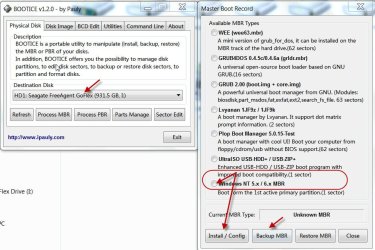
3. Yes, you can write the MBR using Bootice. ( I wanted you to try PW before getting on to it.) Download your Windows bit version - 32 bit or 64bit - from Booooooooting ? View topic - [ BOOTICE: A poweful boot-related utility ] - v1.3.2.1 Extract the rar file to get the exe file to run.

Check you have selected the right drive, click on Process MBR. Check the current MBR type shown( just for info). As a precautionary measure Backup MBR (the current one). Then select Windows NT 5.x /6.x MBR and then Install/Config. That should install the MBR. (You can also view sector 0 before and after by clicking on Sector Edit and viewing sector 0 )

08-01-2014 09-38-50.jpg

{You may find some help to familiarise yourself with Bootice here http://www.sevenforums.com/hardware-devices/310295-lost-partitions.html#post2584426}
 

My Computer My Computer

At a glance

Windows 7 Home Premium 32 bit
OS
Windows 7 Home Premium 32 bit
Ok, surface test was aborted by my great laptop (sometimes shuts down, must be some power issues).

I tried the Power Data Recovery Tool and recovered the data that was important to me.

Will try out ntfsfix and ntfsfsck now. If not successful I will try bootice.


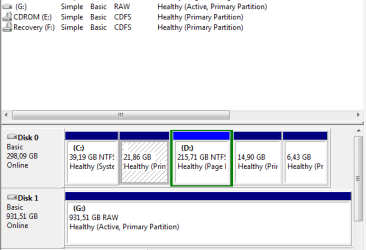
And not to forget, the snap of the disk management tool. Not sure if it helps.

disk management.PNG
 

My Computer My Computer

At a glance

Windows 7 x64, Ubuntu 12.04.3 64bitIntel(R) Xeon(R) CPU E3-1230 V2 @ 3.30GHz2x 8GB DDR3Sapphire Radeon HD 6950 2GB OC
Computer type
PC/Desktop
Computer Manufacturer/Model Number
custom build
OS
Windows 7 x64, Ubuntu 12.04.3 64bit
CPU
Intel(R) Xeon(R) CPU E3-1230 V2 @ 3.30GHz
Motherboard
ASRock H77 Pro4/MVP
Memory
2x 8GB DDR3
Graphics Card(s)
Sapphire Radeon HD 6950 2GB OC
Monitor(s) Displays
Samsung SyncMaster 226cw, Eizo FS2333-BK
Screen Resolution
1680x1050, 1920x1080
Hard Drives
currently complicated
Keyboard
Logitech K350
Mouse
Logitech G5
Internet Speed
100Mbit
ntfsfix seems to have fixed the sector count but has problems with the MFT, but I cant mount it on Linux yet. ntfsck only approves the wrong MFT. Will reboot with PW and see what it says now and if Windows can mount it.

Code:
$ sudo ntfsfix /dev/sdb1
Mounting volume... Failed to read last sector (4294965176): Invalid argument
HINTS: Either the volume is a RAID/LDM but it wasn't setup yet,
   or it was not setup correctly (e.g. by not using mdadm --build ...),
   or a wrong device is tried to be mounted,
   or the partition table is corrupt (partition is smaller than NTFS),
   or the NTFS boot sector is corrupt (NTFS size is not valid).
FAILED
Attempting to correct errors... Failed to read last sector (4294965176): Invalid argument
HINTS: Either the volume is a RAID/LDM but it wasn't setup yet,
   or it was not setup correctly (e.g. by not using mdadm --build ...),
   or a wrong device is tried to be mounted,
   or the partition table is corrupt (partition is smaller than NTFS),
   or the NTFS boot sector is corrupt (NTFS size is not valid).
FAILED
Failed to startup volume: Invalid argument
Failed to read last sector (4294965176): Invalid argument
HINTS: Either the volume is a RAID/LDM but it wasn't setup yet,
   or it was not setup correctly (e.g. by not using mdadm --build ...),
   or a wrong device is tried to be mounted,
   or the partition table is corrupt (partition is smaller than NTFS),
   or the NTFS boot sector is corrupt (NTFS size is not valid).
Trying the alternate boot sector
The alternate bootsector is usable
Set sector count to 1953525103 instead of 4294965176
Rewriting the bootsector
The boot sector has been rewritten

Processing $MFT and $MFTMirr...
Reading $MFT... OK
Reading $MFTMirr... ntfs_mst_post_read_fixup_warn: magic: 0x2602496e  size: 1024   usa_ofs: 14464  usa_count: 49164: Invalid argument
ntfs_mst_post_read_fixup_warn: magic: 0x806e4003  size: 1024   usa_ofs: 4040  usa_count: 59173: Invalid argument
ntfs_mst_post_read_fixup_warn: magic: 0x1fecf8f7  size: 1024   usa_ofs: 57175  usa_count: 21310: Invalid argument
ntfs_mst_post_read_fixup_warn: magic: 0x8e1eaecd  size: 1024   usa_ofs: 47645  usa_count: 19843: Invalid argument
OK
Comparing $MFTMirr to $MFT... FAILED
$MFTMirr error: Invalid mft record for $MFT.

Code:
$ sudo ntfsck /dev/sdb1
ntfs_mst_post_read_fixup_warn: magic: 0x2602496e  size: 1024   usa_ofs: 14464  usa_count: 49164: Invalid argument
ntfs_mst_post_read_fixup_warn: magic: 0x806e4003  size: 1024   usa_ofs: 4040  usa_count: 59173: Invalid argument
ntfs_mst_post_read_fixup_warn: magic: 0x1fecf8f7  size: 1024   usa_ofs: 57175  usa_count: 21310: Invalid argument
ntfs_mst_post_read_fixup_warn: magic: 0x8e1eaecd  size: 1024   usa_ofs: 47645  usa_count: 19843: Invalid argument
$MFTMirr error: Invalid mft record for '$MFT'.
 
Last edited:

My Computer My Computer

At a glance

Windows 7 x64, Ubuntu 12.04.3 64bitIntel(R) Xeon(R) CPU E3-1230 V2 @ 3.30GHz2x 8GB DDR3Sapphire Radeon HD 6950 2GB OC
Computer type
PC/Desktop
Computer Manufacturer/Model Number
custom build
OS
Windows 7 x64, Ubuntu 12.04.3 64bit
CPU
Intel(R) Xeon(R) CPU E3-1230 V2 @ 3.30GHz
Motherboard
ASRock H77 Pro4/MVP
Memory
2x 8GB DDR3
Graphics Card(s)
Sapphire Radeon HD 6950 2GB OC
Monitor(s) Displays
Samsung SyncMaster 226cw, Eizo FS2333-BK
Screen Resolution
1680x1050, 1920x1080
Hard Drives
currently complicated
Keyboard
Logitech K350
Mouse
Logitech G5
Internet Speed
100Mbit
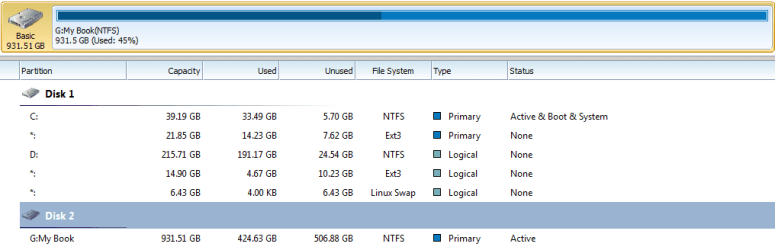
PW now shows the correct usage of the drive. Disk management still shows it as RAW drive. Windows cant mount it and it also does not offer to format the drive anymore. It just says its inaccessible.

disk management 2.PNG

pw overview 2.PNG
 

My Computer My Computer

At a glance

Windows 7 x64, Ubuntu 12.04.3 64bitIntel(R) Xeon(R) CPU E3-1230 V2 @ 3.30GHz2x 8GB DDR3Sapphire Radeon HD 6950 2GB OC
Computer type
PC/Desktop
Computer Manufacturer/Model Number
custom build
OS
Windows 7 x64, Ubuntu 12.04.3 64bit
CPU
Intel(R) Xeon(R) CPU E3-1230 V2 @ 3.30GHz
Motherboard
ASRock H77 Pro4/MVP
Memory
2x 8GB DDR3
Graphics Card(s)
Sapphire Radeon HD 6950 2GB OC
Monitor(s) Displays
Samsung SyncMaster 226cw, Eizo FS2333-BK
Screen Resolution
1680x1050, 1920x1080
Hard Drives
currently complicated
Keyboard
Logitech K350
Mouse
Logitech G5
Internet Speed
100Mbit
Bootice doesnt help either. In the beginning it says "Unknown MBR". I tried both, Windows NT 5.x and 6.x MBR, but still inaccessible and RAW drive.

Will start another surface test with another computer, but this will take at least 11 hours.
 

My Computer My Computer

At a glance

Windows 7 x64, Ubuntu 12.04.3 64bitIntel(R) Xeon(R) CPU E3-1230 V2 @ 3.30GHz2x 8GB DDR3Sapphire Radeon HD 6950 2GB OC
Computer type
PC/Desktop
Computer Manufacturer/Model Number
custom build
OS
Windows 7 x64, Ubuntu 12.04.3 64bit
CPU
Intel(R) Xeon(R) CPU E3-1230 V2 @ 3.30GHz
Motherboard
ASRock H77 Pro4/MVP
Memory
2x 8GB DDR3
Graphics Card(s)
Sapphire Radeon HD 6950 2GB OC
Monitor(s) Displays
Samsung SyncMaster 226cw, Eizo FS2333-BK
Screen Resolution
1680x1050, 1920x1080
Hard Drives
currently complicated
Keyboard
Logitech K350
Mouse
Logitech G5
Internet Speed
100Mbit
ntfsfix seems to have fixed the sector count but has problems with the MFT, but I cant mount it on Linux yet. ntfsck only approves the wrong MFT. Will reboot with PW and see what it says now and if Windows can mount it.

Code:
$ sudo ntfsfix /dev/sdb1
Mounting volume... Failed to read last sector (4294965176): Invalid argument
HINTS: Either the volume is a RAID/LDM but it wasn't setup yet,
   or it was not setup correctly (e.g. by not using mdadm --build ...),
   or a wrong device is tried to be mounted,
   or the partition table is corrupt (partition is smaller than NTFS),
   or the NTFS boot sector is corrupt (NTFS size is not valid).
FAILED
Attempting to correct errors... Failed to read last sector (4294965176): Invalid argument
HINTS: Either the volume is a RAID/LDM but it wasn't setup yet,
   or it was not setup correctly (e.g. by not using mdadm --build ...),
   or a wrong device is tried to be mounted,
   or the partition table is corrupt (partition is smaller than NTFS),
   or the NTFS boot sector is corrupt (NTFS size is not valid).
FAILED
Failed to startup volume: Invalid argument
Failed to read last sector (4294965176): Invalid argument
HINTS: Either the volume is a RAID/LDM but it wasn't setup yet,
   or it was not setup correctly (e.g. by not using mdadm --build ...),
   or a wrong device is tried to be mounted,
   or the partition table is corrupt (partition is smaller than NTFS),
   or the NTFS boot sector is corrupt (NTFS size is not valid).
Trying the alternate boot sector
The alternate bootsector is usable
[COLOR=red][B]Set sector count to 1953525103 instead of 4294965176[/B][/COLOR]
Rewriting the bootsector
The boot sector has been rewritten
 
Processing $MFT and $MFTMirr...
Reading $MFT... OK
Reading $MFTMirr... ntfs_mst_post_read_fixup_warn: magic: 0x2602496e  size: 1024   usa_ofs: 14464  usa_count: 49164: Invalid argument
ntfs_mst_post_read_fixup_warn: magic: 0x806e4003  size: 1024   usa_ofs: 4040  usa_count: 59173: Invalid argument
ntfs_mst_post_read_fixup_warn: magic: 0x1fecf8f7  size: 1024   usa_ofs: 57175  usa_count: 21310: Invalid argument
ntfs_mst_post_read_fixup_warn: magic: 0x8e1eaecd  size: 1024   usa_ofs: 47645  usa_count: 19843: Invalid argument
OK
Comparing $MFTMirr to $MFT... FAILED
$MFTMirr error: Invalid mft record for $MFT.

Code:
$ sudo ntfsck /dev/sdb1
ntfs_mst_post_read_fixup_warn: magic: 0x2602496e  size: 1024   usa_ofs: 14464  usa_count: 49164: Invalid argument
ntfs_mst_post_read_fixup_warn: magic: 0x806e4003  size: 1024   usa_ofs: 4040  usa_count: 59173: Invalid argument
ntfs_mst_post_read_fixup_warn: magic: 0x1fecf8f7  size: 1024   usa_ofs: 57175  usa_count: 21310: Invalid argument
ntfs_mst_post_read_fixup_warn: magic: 0x8e1eaecd  size: 1024   usa_ofs: 47645  usa_count: 19843: Invalid argument
$MFTMirr error: Invalid mft record for '$MFT'.
It did: Set sector count to 1953525103 instead of 4294965176'. The partition size problem has been solved in PW? used/unused space is fine now?

the MBR is fine! The Partition table is fine as well. But it's the file system that's corrupted. Run the ntfsfix again and post output.
 

My Computer My Computer

At a glance

Microsoft Windows 7 Home Premium 64-bits 7601...Intel(R) Core(TM) i3 CPU M 370 @ 2.40GHz4,00 GBATI Mobility Radeon HD 5400 Series
Computer type
Laptop
Computer Manufacturer/Model Number
ACER ASPIRE 5742G
OS
Microsoft Windows 7 Home Premium 64-bits 7601 Multiprocessor Free Service Pack 1
CPU
Intel(R) Core(TM) i3 CPU M 370 @ 2.40GHz
Motherboard
Acer Aspire 5742G
Memory
4,00 GB
Graphics Card(s)
ATI Mobility Radeon HD 5400 Series
Sound Card
(1) AMD High Definition Audio Device (2) Realtek High Defi
Screen Resolution
1366 x 768 x 32 bits (4294967296 colors) @ 60 Hz
Hard Drives
WDC WD5000BEVT-22ZAT0

My Computer My Computer

At a glance

Microsoft Windows 7 Home Premium 64-bits 7601...Intel(R) Core(TM) i3 CPU M 370 @ 2.40GHz4,00 GBATI Mobility Radeon HD 5400 Series
Computer type
Laptop
Computer Manufacturer/Model Number
ACER ASPIRE 5742G
OS
Microsoft Windows 7 Home Premium 64-bits 7601 Multiprocessor Free Service Pack 1
CPU
Intel(R) Core(TM) i3 CPU M 370 @ 2.40GHz
Motherboard
Acer Aspire 5742G
Memory
4,00 GB
Graphics Card(s)
ATI Mobility Radeon HD 5400 Series
Sound Card
(1) AMD High Definition Audio Device (2) Realtek High Defi
Screen Resolution
1366 x 768 x 32 bits (4294967296 colors) @ 60 Hz
Hard Drives
WDC WD5000BEVT-22ZAT0
It did: Set sector count to 1953525103 instead of 4294965176'. The partition size problem has been solved in PW? used/unused space is fine now?

the MBR is fine! The Partition table is fine as well. But it's the file system that's corrupted. Run the ntfsfix again and post output.

Yes, I know that it changed the sector count. The partition size is corrected and used/unused space is fine. But still Windows cant mount the drive, even worse (or maybe not), before windows wanted to format the drive. Now it says it is just inaccessible (it takes a pretty long time until Windows gives a message).

Will run ntfsfix again today evening when partition wizard has finished the surface test (this time on another computer to avoid the power issues of the laptop).
 

My Computer My Computer

At a glance

Windows 7 x64, Ubuntu 12.04.3 64bitIntel(R) Xeon(R) CPU E3-1230 V2 @ 3.30GHz2x 8GB DDR3Sapphire Radeon HD 6950 2GB OC
Computer type
PC/Desktop
Computer Manufacturer/Model Number
custom build
OS
Windows 7 x64, Ubuntu 12.04.3 64bit
CPU
Intel(R) Xeon(R) CPU E3-1230 V2 @ 3.30GHz
Motherboard
ASRock H77 Pro4/MVP
Memory
2x 8GB DDR3
Graphics Card(s)
Sapphire Radeon HD 6950 2GB OC
Monitor(s) Displays
Samsung SyncMaster 226cw, Eizo FS2333-BK
Screen Resolution
1680x1050, 1920x1080
Hard Drives
currently complicated
Keyboard
Logitech K350
Mouse
Logitech G5
Internet Speed
100Mbit
You better do #38 first.
 

My Computer My Computer

At a glance

Microsoft Windows 7 Home Premium 64-bits 7601...Intel(R) Core(TM) i3 CPU M 370 @ 2.40GHz4,00 GBATI Mobility Radeon HD 5400 Series
Computer type
Laptop
Computer Manufacturer/Model Number
ACER ASPIRE 5742G
OS
Microsoft Windows 7 Home Premium 64-bits 7601 Multiprocessor Free Service Pack 1
CPU
Intel(R) Core(TM) i3 CPU M 370 @ 2.40GHz
Motherboard
Acer Aspire 5742G
Memory
4,00 GB
Graphics Card(s)
ATI Mobility Radeon HD 5400 Series
Sound Card
(1) AMD High Definition Audio Device (2) Realtek High Defi
Screen Resolution
1366 x 768 x 32 bits (4294967296 colors) @ 60 Hz
Hard Drives
WDC WD5000BEVT-22ZAT0
Back
Top