
Western Digital Driver won't update - software says its in use

arayfo1

New member
Power User
VIP
Local time
7:55 AM
Messages
276
Hello. I have a Western Digital My Passport and I'm having issues getting the driver to update.

About a week ago I was downloading some torrents (writing to my passport) and I began to get this dowload error on utorrent - cyclic redundancy check. After a few days of fighting with utorrent I discovered that my pc wouldn't even recognize the device. Everything I read about CRC errors pointed to the drive going bad. I was having a lot of issues with windows explorer not responding at the time so I panicked and reformatted all of my partitions on my pc. Because my reasoning was that if I had just sacrificed all of my media and reformatted the drive (external) maybe I could have saved it from going bad altogether.

Now that I have Windows reinstalled I can focus on troubleshooting my external drive. I've just attempted to update the driver (firmware) from the WD firmware upgrader, but I keep getting an error which says that the drive is currently in use. But I am not tranferring anything nor am I writing anything to it. It's like it is trying to communicate with windows explorer somehow and that is causing a conflict. I'm not sure really, but I'm open to any all suggestions. Thanks.
 

My Computer My Computer

At a glance

Windows 7 Home Premium 64 bit
Computer type
PC/Desktop
Computer Manufacturer/Model Number
Acer Aspire m3202
OS
Windows 7 Home Premium 64 bit
Antivirus
not at the moment - just reinstalled
Any firmware on the external WD drive already got updated when you did it before. You don't need to do it again now that you have reinstalled Windows. Reformatting the external drive would have no effect on its firmware.
 

My Computer My Computer

At a glance

Win7 Pro 32-bit, Win8 Pro 32-bitAMD Phenom II X6 1090T4GB ddr3 1300AMD HD 4290 onboard
Computer type
PC/Desktop
Computer Manufacturer/Model Number
Custom
OS
Win7 Pro 32-bit, Win8 Pro 32-bit
CPU
AMD Phenom II X6 1090T
Motherboard
Gigabyte
Memory
4GB ddr3 1300
Graphics Card(s)
AMD HD 4290 onboard
Sound Card
Builtin Realtek HD Audio
Monitor(s) Displays
Samsung 24" widescreen, LG 23" widescreen
Screen Resolution
1920x1200/1920x1080
Hard Drives
Kingston 256GB SSD
Keyboard
Logitech Illuminated Keyboard
Mouse
Logitech M705 wireless mouse
Antivirus
Norton Av 2013
Browser
IE v10
i concur with Mark. it most likely already got updated so there definitely is no need to do it again. Also its a good idea to reboot the system after updating the firmware/software as i too have a western digital backup device(my book for system backups) and it usually asks you to restart the system to update the software and or firmware.
 

My Computer My Computer

At a glance

Windows 7 ultimate 64-bitIntel I7 2600K 3.4ghzCorsair 16gb ddr3 1600mhzNvidia Geforce gt 430
Computer type
PC/Desktop
Computer Manufacturer/Model Number
custom built
OS
Windows 7 ultimate 64-bit
CPU
Intel I7 2600K 3.4ghz
Motherboard
Asus Evo P8P67
Memory
Corsair 16gb ddr3 1600mhz
Graphics Card(s)
Nvidia Geforce gt 430
Sound Card
Sound Blaster Titanium x-fi pci express
Monitor(s) Displays
Dell E198WFP
Hard Drives
1 western digital 2TB drive.
PSU
Antec 1200 watt
Case
Inwin Dragon Rider
Cooling
6 case supplied cooling fans
Keyboard
logitech mk700
Mouse
logitech m705
Internet Speed
25-50mbps download; 10mbps upload(i think)
Antivirus
avg free 2014
Browser
mozilla firefox
Other Info
Also have a pretty bad speaker setup which is a klipsch promedia 5.1 surround speaker setup with huge subwoofer and lg blu ray player/writer. Also a hp officejet pro 8600 plus wireless all in one and a logitech s7500 webcam.
I think I may have confused you. I didn't reformat the external drive, I reformatted the drive on the pc. I wasn't able to update the firmware on the external drive in question because my pc can no longer recognize the drive.

To be clear, my pc had issues recognizing the external drive prior to reformatting the pc drive.

Any firmware on the external WD drive already got updated when you did it before. You don't need to do it again now that you have reinstalled Windows. Reformatting the external drive would have no effect on its firmware.
 

My Computer My Computer

At a glance

Windows 7 Home Premium 64 bit
Computer type
PC/Desktop
Computer Manufacturer/Model Number
Acer Aspire m3202
OS
Windows 7 Home Premium 64 bit
Antivirus
not at the moment - just reinstalled
One commenter on a similiar thread said: "These drives come with drive firmware and "Smartware" software. WD recommend you use the most up todate version. See the link. Updating may solve your problem. Personally I stick with the Elements (bare bones) range. The driver is handled by Windows."

I'm not sure I wanna condemn the drive altogether yet. I'm not sure whether it's a driver issue or not; it may just need replacing. I'm curious if I were to invest in an external drive with a driver which is handled by Windows as the Elements range apparently does, if I would have less issues with the driver or with the device in general. I think the Elements range is a desktop external drive. I'm not really sure what are the pro's and cons there. Is a desktop external harddrive not portable at all or how does that work?
 

My Computer My Computer

At a glance

Windows 7 Home Premium 64 bit
Computer type
PC/Desktop
Computer Manufacturer/Model Number
Acer Aspire m3202
OS
Windows 7 Home Premium 64 bit
Antivirus
not at the moment - just reinstalled
Also, I would like to know if it is problematic writing torrents on to an external drive.
 

My Computer My Computer

At a glance

Windows 7 Home Premium 64 bit
Computer type
PC/Desktop
Computer Manufacturer/Model Number
Acer Aspire m3202
OS
Windows 7 Home Premium 64 bit
Antivirus
not at the moment - just reinstalled
Well if you had issues getting windows to detect the external drive it may need to be formatted before windows might detect it. Windows itself will also need a driver in order for windows to detect it. As for the torrents well you probably are better off writing them to a external drive anyways so if something happens it doesn't knock out your main system drive
 

My Computer My Computer

At a glance

Windows 7 ultimate 64-bitIntel I7 2600K 3.4ghzCorsair 16gb ddr3 1600mhzNvidia Geforce gt 430
Computer type
PC/Desktop
Computer Manufacturer/Model Number
custom built
OS
Windows 7 ultimate 64-bit
CPU
Intel I7 2600K 3.4ghz
Motherboard
Asus Evo P8P67
Memory
Corsair 16gb ddr3 1600mhz
Graphics Card(s)
Nvidia Geforce gt 430
Sound Card
Sound Blaster Titanium x-fi pci express
Monitor(s) Displays
Dell E198WFP
Hard Drives
1 western digital 2TB drive.
PSU
Antec 1200 watt
Case
Inwin Dragon Rider
Cooling
6 case supplied cooling fans
Keyboard
logitech mk700
Mouse
logitech m705
Internet Speed
25-50mbps download; 10mbps upload(i think)
Antivirus
avg free 2014
Browser
mozilla firefox
Other Info
Also have a pretty bad speaker setup which is a klipsch promedia 5.1 surround speaker setup with huge subwoofer and lg blu ray player/writer. Also a hp officejet pro 8600 plus wireless all in one and a logitech s7500 webcam.
See, that's what I was thinking too but I can't seem to get into it long enough to format it. At least not from Disk Management. Actually, I just opened up Disk Management and then plugged it in and I had a diclaimer pop up saying that I can't use the drive until it has been formatted. But then whenever I click format it says I need to plug it in.

Well if you had issues getting windows to detect the external drive it may need to be formatted before windows might detect it. Windows itself will also need a driver in order for windows to detect it. As for the torrents well you probably are better off writing them to a external drive anyways so if something happens it doesn't knock out your main system drive
 

My Computer My Computer

At a glance

Windows 7 Home Premium 64 bit
Computer type
PC/Desktop
Computer Manufacturer/Model Number
Acer Aspire m3202
OS
Windows 7 Home Premium 64 bit
Antivirus
not at the moment - just reinstalled
Forget about the firmware, it's rare that there are any updates.

Whenever I see Torrents, I think of illegal media or possible virus breading ground.

The first thing I would do is scan that drive for viruses. What AV program is running on your machine?
Your System specs say "None".

Did you download and install one yet?

If not, choose ONE of these, then run a full scan on your system, including the ext. HD


Real time protection (use only one)
 
Last edited:

My Computer My Computer

At a glance

x64 (6.3.9600) Win8.1 Pro & soon dual boot x6...AMD A6-3420M APU with Radeon(tm) HD Graphics6.00 GBAMD Radeon(TM) HD 6520G
Computer type
Laptop
Computer Manufacturer/Model Number
HP Pavilion dv6-6c10us
OS
x64 (6.3.9600) Win8.1 Pro & soon dual boot x64 (6.1.7601) Win7_SP1 HomePrem
CPU
AMD A6-3420M APU with Radeon(tm) HD Graphics
Motherboard
Hewlett-Packard 1805
Memory
6.00 GB
Graphics Card(s)
AMD Radeon(TM) HD 6520G
Sound Card
(1) AMD High Definition Audio Device (2) IDT High Definiti
Monitor(s) Displays
HP W2072a 20" LCD (1600 x 900) @ 60 Hz
Screen Resolution
1366 x 768 x 32 bits (4294967296 colors) @ 60 Hz
Hard Drives
ST640LM0 00 HM641JI SATA Disk Device
Keyboard
Logitech k520 wireless KB
Mouse
Logitech m320 wireless mouse (bundled with KB)
Internet Speed
15/5 | 54 MB Wireless 'n'
Antivirus
Realtime: Defender or Avast | On-demand: Malwarebytes, ESET
Browser
IE 11 on Win8, IE 10 on win 7
Other Info
Media: [Gimp, Audacity, VLC] || Comm: [WEmail 2012, Skype] || Productivity: [OpenOffice,| Textpad] || Utils: [Sysinternals, cCleaner, Speccy, Defraggler]
Do NOT format

Do NOT format the drive.

There are people on the forum who really know their stuff about this type of problem.

It can be very time consuming and attention to detail is paramount. Wait for a while, someone might see the thread and decide to pitch in.

Plug in the external HD if it's not already connected.

Then, while you're waiting, follow this tutorial: http://www.sevenforums.com/tutorials/274797-disk-management-post-screen-capture-image.html

Bill
 

My Computer My Computer

At a glance

x64 (6.3.9600) Win8.1 Pro & soon dual boot x6...AMD A6-3420M APU with Radeon(tm) HD Graphics6.00 GBAMD Radeon(TM) HD 6520G
Computer type
Laptop
Computer Manufacturer/Model Number
HP Pavilion dv6-6c10us
OS
x64 (6.3.9600) Win8.1 Pro & soon dual boot x64 (6.1.7601) Win7_SP1 HomePrem
CPU
AMD A6-3420M APU with Radeon(tm) HD Graphics
Motherboard
Hewlett-Packard 1805
Memory
6.00 GB
Graphics Card(s)
AMD Radeon(TM) HD 6520G
Sound Card
(1) AMD High Definition Audio Device (2) IDT High Definiti
Monitor(s) Displays
HP W2072a 20" LCD (1600 x 900) @ 60 Hz
Screen Resolution
1366 x 768 x 32 bits (4294967296 colors) @ 60 Hz
Hard Drives
ST640LM0 00 HM641JI SATA Disk Device
Keyboard
Logitech k520 wireless KB
Mouse
Logitech m320 wireless mouse (bundled with KB)
Internet Speed
15/5 | 54 MB Wireless 'n'
Antivirus
Realtime: Defender or Avast | On-demand: Malwarebytes, ESET
Browser
IE 11 on Win8, IE 10 on win 7
Other Info
Media: [Gimp, Audacity, VLC] || Comm: [WEmail 2012, Skype] || Productivity: [OpenOffice,| Textpad] || Utils: [Sysinternals, cCleaner, Speccy, Defraggler]
I'm on my way out the door. Thanks a lot, Bill. I will check the tutorial when I return home. :)

Do NOT format the drive.

There are people on the forum who really know their stuff about this type of problem.

It can be very time consuming and attention to detail is paramount. Wait for a while, someone might see the thread and decide to pitch in.

Plug in the external HD if it's not already connected.

Then, while you're waiting, follow this tutorial: http://www.sevenforums.com/tutorials/274797-disk-management-post-screen-capture-image.html

Bill
 

My Computer My Computer

At a glance

Windows 7 Home Premium 64 bit
Computer type
PC/Desktop
Computer Manufacturer/Model Number
Acer Aspire m3202
OS
Windows 7 Home Premium 64 bit
Antivirus
not at the moment - just reinstalled
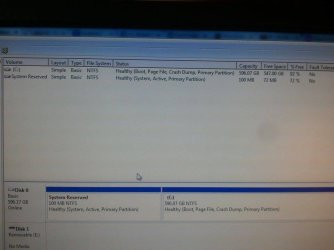
disk management.jpg
 

My Computer My Computer

At a glance

Windows 7 Home Premium 64 bit
Computer type
PC/Desktop
Computer Manufacturer/Model Number
Acer Aspire m3202
OS
Windows 7 Home Premium 64 bit
Antivirus
not at the moment - just reinstalled
And that is with external drive plugged in.
 

My Computer My Computer

At a glance

Windows 7 Home Premium 64 bit
Computer type
PC/Desktop
Computer Manufacturer/Model Number
Acer Aspire m3202
OS
Windows 7 Home Premium 64 bit
Antivirus
not at the moment - just reinstalled
Well hey; cant say i didnt try. I only mentioned formatting the drive because usually if windows wont detect the drive then that could be one of the reasons. But there is also the fact that yes you could scan it for viruses; etc as well as malware and spyware. Now that i see that you said it is in use; have you tried(if it will let you and if you can) to go into safe mode and try updating the windows drivers; because safe mode uses a very minimal number of drivers; so that may work if you can get to that mode.
 
Last edited:

My Computer My Computer

At a glance

Windows 7 ultimate 64-bitIntel I7 2600K 3.4ghzCorsair 16gb ddr3 1600mhzNvidia Geforce gt 430
Computer type
PC/Desktop
Computer Manufacturer/Model Number
custom built
OS
Windows 7 ultimate 64-bit
CPU
Intel I7 2600K 3.4ghz
Motherboard
Asus Evo P8P67
Memory
Corsair 16gb ddr3 1600mhz
Graphics Card(s)
Nvidia Geforce gt 430
Sound Card
Sound Blaster Titanium x-fi pci express
Monitor(s) Displays
Dell E198WFP
Hard Drives
1 western digital 2TB drive.
PSU
Antec 1200 watt
Case
Inwin Dragon Rider
Cooling
6 case supplied cooling fans
Keyboard
logitech mk700
Mouse
logitech m705
Internet Speed
25-50mbps download; 10mbps upload(i think)
Antivirus
avg free 2014
Browser
mozilla firefox
Other Info
Also have a pretty bad speaker setup which is a klipsch promedia 5.1 surround speaker setup with huge subwoofer and lg blu ray player/writer. Also a hp officejet pro 8600 plus wireless all in one and a logitech s7500 webcam.
You're right in post# 1 - CRC errors usually do indicate a failing drive, but not always.

You don't have to post another Disk management snip - the camera snip is fine for now, thanks
Camera shots were a good way to get information when you didn't have connectivity.

Now that you can connect on that machine, here's an easier way:http://www.sevenforums.com/tutorials/9733-screenshots-files-upload-post-seven-forums.html

Not only is it easier, it provides clearer pictures.

The Disk Management - Post a Screen Capture Image tut is specific to disk management screen shots and references the other more general "Screenshots and file...." tut in step 7.

I'm on my way out the door. Thanks a lot, Bill. I will check the tutorial when I return home. :)
 

My Computer My Computer

At a glance

x64 (6.3.9600) Win8.1 Pro & soon dual boot x6...AMD A6-3420M APU with Radeon(tm) HD Graphics6.00 GBAMD Radeon(TM) HD 6520G
Computer type
Laptop
Computer Manufacturer/Model Number
HP Pavilion dv6-6c10us
OS
x64 (6.3.9600) Win8.1 Pro & soon dual boot x64 (6.1.7601) Win7_SP1 HomePrem
CPU
AMD A6-3420M APU with Radeon(tm) HD Graphics
Motherboard
Hewlett-Packard 1805
Memory
6.00 GB
Graphics Card(s)
AMD Radeon(TM) HD 6520G
Sound Card
(1) AMD High Definition Audio Device (2) IDT High Definiti
Monitor(s) Displays
HP W2072a 20" LCD (1600 x 900) @ 60 Hz
Screen Resolution
1366 x 768 x 32 bits (4294967296 colors) @ 60 Hz
Hard Drives
ST640LM0 00 HM641JI SATA Disk Device
Keyboard
Logitech k520 wireless KB
Mouse
Logitech m320 wireless mouse (bundled with KB)
Internet Speed
15/5 | 54 MB Wireless 'n'
Antivirus
Realtime: Defender or Avast | On-demand: Malwarebytes, ESET
Browser
IE 11 on Win8, IE 10 on win 7
Other Info
Media: [Gimp, Audacity, VLC] || Comm: [WEmail 2012, Skype] || Productivity: [OpenOffice,| Textpad] || Utils: [Sysinternals, cCleaner, Speccy, Defraggler]
Matts: The issue with formatting a drive to diagnose the problem is that you lose data.

Your solution might well be the solution, but I don't recommend it as the FIRST solution, that's all.

There are other options to try first if the data is important. Your post did make me ask myself that very question "Is the data important?" - so I reread post 1.

I'm not sure if I would consider torrents important - the OP might.

Well hey; cant say i didnt try. I only mentioned formatting the drive because usually if windows wont detect the drive then that could be one of the reasons. But there is also the fact that yes you could scan it for viruses; etc as well as malware and spyware. Now that i see that you said it is in use; have you tried(if it will let you and if you can) to go into safe mode and try updating the windows drivers; because safe mode uses a very minimal number of drivers; so that may work if you can get to that mode.
 

My Computer My Computer

At a glance

x64 (6.3.9600) Win8.1 Pro & soon dual boot x6...AMD A6-3420M APU with Radeon(tm) HD Graphics6.00 GBAMD Radeon(TM) HD 6520G
Computer type
Laptop
Computer Manufacturer/Model Number
HP Pavilion dv6-6c10us
OS
x64 (6.3.9600) Win8.1 Pro & soon dual boot x64 (6.1.7601) Win7_SP1 HomePrem
CPU
AMD A6-3420M APU with Radeon(tm) HD Graphics
Motherboard
Hewlett-Packard 1805
Memory
6.00 GB
Graphics Card(s)
AMD Radeon(TM) HD 6520G
Sound Card
(1) AMD High Definition Audio Device (2) IDT High Definiti
Monitor(s) Displays
HP W2072a 20" LCD (1600 x 900) @ 60 Hz
Screen Resolution
1366 x 768 x 32 bits (4294967296 colors) @ 60 Hz
Hard Drives
ST640LM0 00 HM641JI SATA Disk Device
Keyboard
Logitech k520 wireless KB
Mouse
Logitech m320 wireless mouse (bundled with KB)
Internet Speed
15/5 | 54 MB Wireless 'n'
Antivirus
Realtime: Defender or Avast | On-demand: Malwarebytes, ESET
Browser
IE 11 on Win8, IE 10 on win 7
Other Info
Media: [Gimp, Audacity, VLC] || Comm: [WEmail 2012, Skype] || Productivity: [OpenOffice,| Textpad] || Utils: [Sysinternals, cCleaner, Speccy, Defraggler]
At this point I am willing to sacrifice the data. I just want to be able to write to the disk again if possible.
 

My Computer My Computer

At a glance

Windows 7 Home Premium 64 bit
Computer type
PC/Desktop
Computer Manufacturer/Model Number
Acer Aspire m3202
OS
Windows 7 Home Premium 64 bit
Antivirus
not at the moment - just reinstalled
Alright, that makes it really easy.

Except for one thing.... that drive is marked as the active drive.

Let me review some things first - it might not be that difficult, but I want to be certain.
 

My Computer My Computer

At a glance

x64 (6.3.9600) Win8.1 Pro & soon dual boot x6...AMD A6-3420M APU with Radeon(tm) HD Graphics6.00 GBAMD Radeon(TM) HD 6520G
Computer type
Laptop
Computer Manufacturer/Model Number
HP Pavilion dv6-6c10us
OS
x64 (6.3.9600) Win8.1 Pro & soon dual boot x64 (6.1.7601) Win7_SP1 HomePrem
CPU
AMD A6-3420M APU with Radeon(tm) HD Graphics
Motherboard
Hewlett-Packard 1805
Memory
6.00 GB
Graphics Card(s)
AMD Radeon(TM) HD 6520G
Sound Card
(1) AMD High Definition Audio Device (2) IDT High Definiti
Monitor(s) Displays
HP W2072a 20" LCD (1600 x 900) @ 60 Hz
Screen Resolution
1366 x 768 x 32 bits (4294967296 colors) @ 60 Hz
Hard Drives
ST640LM0 00 HM641JI SATA Disk Device
Keyboard
Logitech k520 wireless KB
Mouse
Logitech m320 wireless mouse (bundled with KB)
Internet Speed
15/5 | 54 MB Wireless 'n'
Antivirus
Realtime: Defender or Avast | On-demand: Malwarebytes, ESET
Browser
IE 11 on Win8, IE 10 on win 7
Other Info
Media: [Gimp, Audacity, VLC] || Comm: [WEmail 2012, Skype] || Productivity: [OpenOffice,| Textpad] || Utils: [Sysinternals, cCleaner, Speccy, Defraggler]
edit: Sorry, my cheap $tore glasses made me see what isn't there.
There is only one active partition.

Yeah, it's not that hard. The first disk has the system reserve partiton correctly marked as active.

You just have two that are marked as active - which is not correct.

edit: I still would move forward with diskpart to get the details of that drive.


Close attention to detail is paramount - I'll need a few screen shots to verify the operations.
  1. Open an http://www.sevenforums.com/tutorials/783-elevated-command-prompt.html
  2. In the Command Prompt window type the following commands:
    Diskpart
    lis dis
post a screen shot of that
 
Last edited:

My Computer My Computer

At a glance

x64 (6.3.9600) Win8.1 Pro & soon dual boot x6...AMD A6-3420M APU with Radeon(tm) HD Graphics6.00 GBAMD Radeon(TM) HD 6520G
Computer type
Laptop
Computer Manufacturer/Model Number
HP Pavilion dv6-6c10us
OS
x64 (6.3.9600) Win8.1 Pro & soon dual boot x64 (6.1.7601) Win7_SP1 HomePrem
CPU
AMD A6-3420M APU with Radeon(tm) HD Graphics
Motherboard
Hewlett-Packard 1805
Memory
6.00 GB
Graphics Card(s)
AMD Radeon(TM) HD 6520G
Sound Card
(1) AMD High Definition Audio Device (2) IDT High Definiti
Monitor(s) Displays
HP W2072a 20" LCD (1600 x 900) @ 60 Hz
Screen Resolution
1366 x 768 x 32 bits (4294967296 colors) @ 60 Hz
Hard Drives
ST640LM0 00 HM641JI SATA Disk Device
Keyboard
Logitech k520 wireless KB
Mouse
Logitech m320 wireless mouse (bundled with KB)
Internet Speed
15/5 | 54 MB Wireless 'n'
Antivirus
Realtime: Defender or Avast | On-demand: Malwarebytes, ESET
Browser
IE 11 on Win8, IE 10 on win 7
Other Info
Media: [Gimp, Audacity, VLC] || Comm: [WEmail 2012, Skype] || Productivity: [OpenOffice,| Textpad] || Utils: [Sysinternals, cCleaner, Speccy, Defraggler]
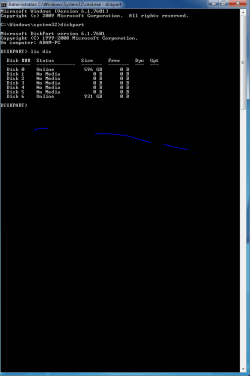
So DISK 6 would be my external drive and it appears to be online. . .

lisdis Capture.PNG
 

My Computer My Computer

At a glance

Windows 7 Home Premium 64 bit
Computer type
PC/Desktop
Computer Manufacturer/Model Number
Acer Aspire m3202
OS
Windows 7 Home Premium 64 bit
Antivirus
not at the moment - just reinstalled
Back
Top