Deleted Files Still Show Unless I Manually Refresh View

poolmon

New member
Power User
VIP
Local time
7:18 PM
Messages
172
The files I delete in My Documents still show unless I either perform a manual Refresh under the View Tab or close and reopen My Documents Folder. Then they disappear.

Is this normal for Win 7 64 bit, because as I best recall deleted files immediately disappeared previously from the open My Documents folder without any further action?

How can I make the folder auto-refresh since the files are in fact deleted immediately as evidenced by the fact that if I click on them again to delete I get a message that they are gone?
 

My Computer My Computer

OS
win 7
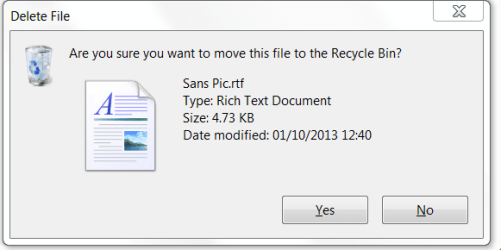
Do you get this window when you hit "Delete"?
Delete.PNG
 

My Computer My Computer

Computer type
PC/Desktop
OS
Microsoft Windows 7 Home Premium 64-bit 7601 Multiprocessor Free Service Pack 1
CPU
Intel(R) Core(TM) i7-3770 CPU @ 3.40GHz
Motherboard
ASUSTeK COMPUTER INC. P8H77-M
Memory
8.00 GB
Graphics Card(s)
Intel(R) HD Graphics 4000
Sound Card
On Board
Monitor(s) Displays
Dell 24"
Screen Resolution
1920 x 1080
Hard Drives
(1) INTEL SSDSC2CT180A3 ATA Device (2) ST500DM002-1BD142 ATA Device (3) WDC WD3200AAKS-75L9A0 ATA Device (4) Generic- Compact Flash USB Device (5) Generic- MS/MS-Pro USB Device (6) Generic- SD/MMC USB Device (7) Generic- SM/xD-Picture USB
PSU
500w Corsair
Case
Cooler Master
Cooling
3 Fans
Keyboard
Logitech MK300
Mouse
Logitech WOM
Internet Speed
75Mb
Antivirus
Norton 360
Browser
Firefox, Opera, IE
Do you get this window when you hit "Delete"?
View attachment 301749

Yes, I tried it again and I got that window when deleting a single file and a slightly smaller window (saying basically the same thing) when deleting 2 selected files. The files did go to the recycle bin but I had to manually refresh to get them to disappear from the folder.

I have a second win7 64 bit computer and it immediately refreshes after the deletion. The only significant difference between the 2 desktops is that the former one (the non-refresh one) has a SSD with slightly faster processor. They both have identical software installed.
 
Last edited:

My Computer My Computer

OS
win 7
If there is another user on your PC then try logging in to that and see if the same situation applies. If not create a new Admin account and try that. If no good then enable the hidden administrator account and give that a try. My reasoning is that I think you have a corrupted system file. What version of Windows 7 are you running, my guess would be "Ultimate"?
If all this fails try running sfc /scannow see here:
http://www.sevenforums.com/tutorials/1538-sfc-scannow-command-system-file-checker.html
 

My Computer My Computer

Computer type
PC/Desktop
OS
Microsoft Windows 7 Home Premium 64-bit 7601 Multiprocessor Free Service Pack 1
CPU
Intel(R) Core(TM) i7-3770 CPU @ 3.40GHz
Motherboard
ASUSTeK COMPUTER INC. P8H77-M
Memory
8.00 GB
Graphics Card(s)
Intel(R) HD Graphics 4000
Sound Card
On Board
Monitor(s) Displays
Dell 24"
Screen Resolution
1920 x 1080
Hard Drives
(1) INTEL SSDSC2CT180A3 ATA Device (2) ST500DM002-1BD142 ATA Device (3) WDC WD3200AAKS-75L9A0 ATA Device (4) Generic- Compact Flash USB Device (5) Generic- MS/MS-Pro USB Device (6) Generic- SD/MMC USB Device (7) Generic- SM/xD-Picture USB
PSU
500w Corsair
Case
Cooler Master
Cooling
3 Fans
Keyboard
Logitech MK300
Mouse
Logitech WOM
Internet Speed
75Mb
Antivirus
Norton 360
Browser
Firefox, Opera, IE
If there is another user on your PC then try logging in to that and see if the same situation applies. If not create a new Admin account and try that. If no good then enable the hidden administrator account and give that a try. My reasoning is that I think you have a corrupted system file. What version of Windows 7 are you running, my guess would be "Ultimate"?
If all this fails try running sfc /scannow see here:
http://www.sevenforums.com/tutorials/1538-sfc-scannow-command-system-file-checker.html

No other users accounts. I have Home Premium edition 64 bit. Will try SFC.
Thanks for the reference.
 

My Computer My Computer

OS
win 7
But first try quote:
create a new Admin account and try that. If no good then enable the hidden administrator account and give that a try. My reasoning is that I think you have a corrupted system file.
As I advised above
 

My Computer My Computer

Computer type
PC/Desktop
OS
Microsoft Windows 7 Home Premium 64-bit 7601 Multiprocessor Free Service Pack 1
CPU
Intel(R) Core(TM) i7-3770 CPU @ 3.40GHz
Motherboard
ASUSTeK COMPUTER INC. P8H77-M
Memory
8.00 GB
Graphics Card(s)
Intel(R) HD Graphics 4000
Sound Card
On Board
Monitor(s) Displays
Dell 24"
Screen Resolution
1920 x 1080
Hard Drives
(1) INTEL SSDSC2CT180A3 ATA Device (2) ST500DM002-1BD142 ATA Device (3) WDC WD3200AAKS-75L9A0 ATA Device (4) Generic- Compact Flash USB Device (5) Generic- MS/MS-Pro USB Device (6) Generic- SD/MMC USB Device (7) Generic- SM/xD-Picture USB
PSU
500w Corsair
Case
Cooler Master
Cooling
3 Fans
Keyboard
Logitech MK300
Mouse
Logitech WOM
Internet Speed
75Mb
Antivirus
Norton 360
Browser
Firefox, Opera, IE
Back
Top