no connetion on start up (run around to fix)

cteampride

New member
Local time
3:59 PM
Messages
6
Windows does not auto connect the router on start up. It says the network is available, however when i try to connect manually, it says there is a problem. After troubleshooting, it says to disconnect the router and power cycle, and try again. This usually works, and i get a connection with excellent strength. Bottom line, no connection unless i physically unplug the router, plug it back in, then connect to it. It may be a driver problem idk?

It is a generic linksys router. NO WLAN security what so ever.
 

My Computer My Computer

At a glance

windows 7 x64
OS
windows 7 x64
Look for an updated driver for your network adapter and update it.
 

My Computer My Computer

At a glance

Windows 7 Ultimate x64 SP1Core i7 920 (D0) @ 4Ghz, *26c idle *65c full ...12GB DDR3 Corsair Dominator -CMD12GX3M6A1600C...Zotac Geforce GTX 770
Computer type
PC/Desktop
Computer Manufacturer/Model Number
Airbot 2.0
OS
Windows 7 Ultimate x64 SP1
CPU
Core i7 920 (D0) @ 4Ghz, *26c idle *65c full load on air
Motherboard
Asus P6X58D Premium - Sata 6Gb/s - USB 3.0
Memory
12GB DDR3 Corsair Dominator -CMD12GX3M6A1600C8 at 1600MHz
Graphics Card(s)
Zotac Geforce GTX 770
Sound Card
ASUS Xonar D2X
Monitor(s) Displays
1 LG 24" Flatron W2453V-PF 1 Samsung 24" P2450H both 2ms RT
Screen Resolution
1920x1080@60hz
Hard Drives
1 Samsung 250GB 840 Evo SSD
1 OCZ Vertex2 180GB SSD
1 TB Samsung Spinpoint F1 7200RPM 32MB cache
2 500GB WD Caviar Blacks 7200RPM 32MB cache (WD5001AALS)

Pioneer DVD Burner DVR-S18M
PSU
Corsair HX1000W
Case
Cooler Master HAF 932
Cooling
Case Fans *3 230mm, *1 140mm/CPU - *Tuniq Tower 120 Extreme
Keyboard
Logitech Wireless MK700
Mouse
Logitech Wireless MK700
Internet Speed
DL 15 Mbps UL 0.98 Mbps
Antivirus
None
Browser
Firefox Nightly
Other Info
Processor-7.7 *RAM- 7.9 *Graphics-7.9 *Gaming Graphics- 7.9 *SSD- 7.8 W.E.I final score= 7.7
*Phone- LG Nexus 5
Windows does not auto connect the router on start up. It says the network is available, however when i try to connect manually, it says there is a problem. After troubleshooting, it says to disconnect the router and power cycle, and try again. This usually works, and i get a connection with excellent strength. Bottom line, no connection unless i physically unplug the router, plug it back in, then connect to it. It may be a driver problem idk?

It is a generic linksys router. NO WLAN security what so ever.

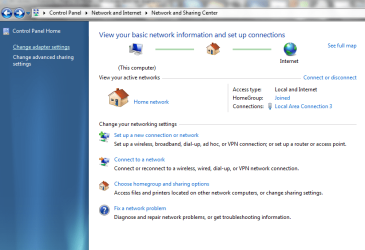
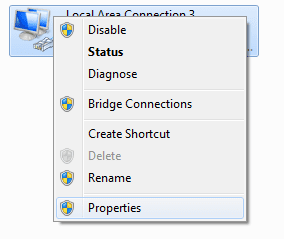
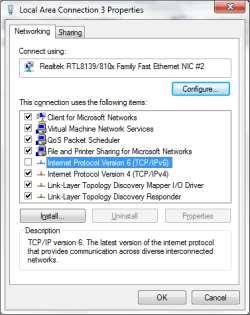
Try also to disable IPv6 from you network adapter's properties.
 

Attachments

  • Untitled.png
    Untitled.png
    45.7 KB · Views: 124
  • Untitled2.png
    Untitled2.png
    4.5 KB · Views: 2,543
  • Untitled3.png
    Untitled3.png
    14.1 KB · Views: 141

My Computer My Computer

At a glance

Windows 7 RC 7100 32bit/64bitIntel Core2Duo E4500 2.20 GHz2x1GB Kinsgston DDR2 800MHzNvidia 8500GT
Computer Manufacturer/Model Number
ENIAC
OS
Windows 7 RC 7100 32bit/64bit
CPU
Intel Core2Duo E4500 2.20 GHz
Motherboard
ASUS P5LD2-X/1333
Memory
2x1GB Kinsgston DDR2 800MHz
Graphics Card(s)
Nvidia 8500GT
Sound Card
Onboard High Definition Audio Device
Monitor(s) Displays
Sony Bravia 42"
Case
LINKW 2222
Cooling
Standard Intel
Keyboard
Some cheap one
Mouse
Microsoft Intellimouse something
Internet Speed
24MBps ADSL

My Computer My Computer

At a glance

XP/win7 x86 build 7127Athlon64 X2 DUAL 4200+ 2.21ghz2GB Dual Chan DDR2 CorsairNvidia 6800GT
Computer Manufacturer/Model Number
CUSTOM
OS
XP/win7 x86 build 7127
CPU
Athlon64 X2 DUAL 4200+ 2.21ghz
Motherboard
ASUS K8 PRO SLI
Memory
2GB Dual Chan DDR2 Corsair
Graphics Card(s)
Nvidia 6800GT
Sound Card
nvidia
Monitor(s) Displays
19' LCD
Screen Resolution
1280x1024
Hard Drives
WD 250, 2x500, 2x1TB IDE/USB
WD 250 SATA (system)
SEAGATE 120 Sata
PSU
coolermaster 450
Case
SUPERFLOWER
Cooling
1 HDD bay fan, 5x80mm Case Fans, AEROGATE II Fan/Temp
Keyboard
MS wireless
Mouse
MS Wireless
Internet Speed
fassssssssst
I disabled IPv6. Powered off, powered back on, and connected automatically. Improvement.

It will see if this is a permanent fix over the next few days, but thank you for the help: that may have done the trick.

I have an Atheros AR928x wireless card.

I checked for a driver update, but none were found, i could install a driver manually, but as of now, i dont think i need too.
 

My Computer My Computer

At a glance

windows 7 x64
OS
windows 7 x64
Back
Top