Finding an easy way to move a file to a predefined location

dTonic

Banned
Local time
11:09 PM
Messages
56
Location
3rd rock from the Sun
Preface:
My mother is 77 yrs young and has trouble, too often for my liking, with dragging and dropping files to the correct folders. She imports pics from her digital camera, which get sent to a newly created folder (date-time) insode her main picture folder. Then she edits the file-name and sometimes crops and tweaks the images. When she is done, she needs to move them from this temporary date-time folder to any number of specific folders.....Thanksgiving, Christmas, John, Mark and Terry...etc.

Objective:
I'm looking for a more fail-safe way of the move process. My first thought was to create a "move to" link for the right-click. But from there she has to continuously search for the "Specific file." I thought there were programs out there that allowed one to have a group of 'specific folders" to move files to. In other words, Right-click on a file, select move to, have a list of folder that one could move the file to, select the folder, and its all done.

any ideas??
 

My Computer My Computer

Computer type
PC/Desktop
Computer Manufacturer/Model Number
Custom
OS
Windows 8
CPU
AMD FX 3.9GHz Quad
Motherboard
?
Memory
32GB
Graphics Card(s)
nVidia
Sound Card
?
Monitor(s) Displays
Some old CRT
Hard Drives
128GB SSD
1TB HDD
PSU
Corsair 750Watt
Case
Black
Cooling
Coolmaster
Internet Speed
Comcast
Antivirus
Security Essentials
Browser
Firefox 26
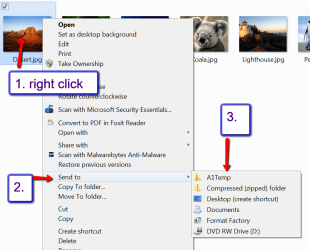
If there are not too many target folders, you could include them into the sendto right click menu. That would work with up to e.g. 10 - after that it gets a bit messy.

If that's something you want to try, post back and I give you the details. Here is an example of my right click menu that I have set up that way - but only for 1 folder => A1Temp.

PS: tell your mom this advice is from an oldtimer - I am 76 - ;)
 

Attachments

  • 2014-01-17_2237.png
    2014-01-17_2237.png
    43.7 KB · Views: 0

My Computer My Computer

Computer Manufacturer/Model Number
HP, Dell, Gateway, Toshiba - 4 laptops and 2 desktops
OS
Vista, Windows7, Mint Mate, Zorin, Windows 8
CPU
from 1.6GHz Duo to i7
Monitor(s) Displays
2x HP w2207
Hard Drives
5x HDD, 7x SSD, 12x Externals
Keyboard
with trackball - no mices
Mouse
Trackball mice
Internet Speed
DSL 6000
She may be very close to the "10" limit mark, but even so, she would have to delete the file afterwards. A move to, with a folder list would eliminate the extra steps, albeit, she could wait and delete all the files at once.

for the sendto I would merely create shortcuts in the sendto folder, or am I stuck in XP mode??

I would like to know though, in case the "move-to" option is not possible. The move-to option would give a visual conformation of the action as the file would disappear after the action was complete.
 
Last edited:

My Computer My Computer

Computer type
PC/Desktop
Computer Manufacturer/Model Number
Custom
OS
Windows 8
CPU
AMD FX 3.9GHz Quad
Motherboard
?
Memory
32GB
Graphics Card(s)
nVidia
Sound Card
?
Monitor(s) Displays
Some old CRT
Hard Drives
128GB SSD
1TB HDD
PSU
Corsair 750Watt
Case
Black
Cooling
Coolmaster
Internet Speed
Comcast
Antivirus
Security Essentials
Browser
Firefox 26
All you do is make shortcuts of the folders in question on the desktop. Then you open the sendto folder. Start > type shell:sendto > hit Enter > move the shortcuts from desktop into the folder > close folder.

Whilst you are in the sendto folder, you might as well delete the entries your mom will not use.

Where did that XP mode idea come from ??
 

My Computer My Computer

Computer Manufacturer/Model Number
HP, Dell, Gateway, Toshiba - 4 laptops and 2 desktops
OS
Vista, Windows7, Mint Mate, Zorin, Windows 8
CPU
from 1.6GHz Duo to i7
Monitor(s) Displays
2x HP w2207
Hard Drives
5x HDD, 7x SSD, 12x Externals
Keyboard
with trackball - no mices
Mouse
Trackball mice
Internet Speed
DSL 6000
the "XP Mode" was in reference to my process of creating the links, it was based on Windows XP's sendto location and how I'd create shortcuts there. I wasn't sure if Windows 7 would be the same or different.

Thus, my process was in "XP Mode"
 

My Computer My Computer

Computer type
PC/Desktop
Computer Manufacturer/Model Number
Custom
OS
Windows 8
CPU
AMD FX 3.9GHz Quad
Motherboard
?
Memory
32GB
Graphics Card(s)
nVidia
Sound Card
?
Monitor(s) Displays
Some old CRT
Hard Drives
128GB SSD
1TB HDD
PSU
Corsair 750Watt
Case
Black
Cooling
Coolmaster
Internet Speed
Comcast
Antivirus
Security Essentials
Browser
Firefox 26
I never used XP. So I would not know how it worked there.
 

My Computer My Computer

Computer Manufacturer/Model Number
HP, Dell, Gateway, Toshiba - 4 laptops and 2 desktops
OS
Vista, Windows7, Mint Mate, Zorin, Windows 8
CPU
from 1.6GHz Duo to i7
Monitor(s) Displays
2x HP w2207
Hard Drives
5x HDD, 7x SSD, 12x Externals
Keyboard
with trackball - no mices
Mouse
Trackball mice
Internet Speed
DSL 6000

My Computer My Computer

Computer type
PC/Desktop
Computer Manufacturer/Model Number
Custom
OS
Windows 8
CPU
AMD FX 3.9GHz Quad
Motherboard
?
Memory
32GB
Graphics Card(s)
nVidia
Sound Card
?
Monitor(s) Displays
Some old CRT
Hard Drives
128GB SSD
1TB HDD
PSU
Corsair 750Watt
Case
Black
Cooling
Coolmaster
Internet Speed
Comcast
Antivirus
Security Essentials
Browser
Firefox 26
It adds an extra step to what Send To can do, but maybe can add more destinations.
 

My Computer My Computer

Computer type
PC/Desktop
Computer Manufacturer/Model Number
Home Built Desktop By DataTech
OS
Windows 7 Ultimate X64 SP1
CPU
Intel i5-2550K, Differing ~4.4-4.8GHz No built in GPU
Motherboard
ASUS P8Z68-V PRO/GEN3
Memory
16GB G.Skill Sniper 1866MHz @ 2133MHz 2x8GB
Graphics Card(s)
ASUS GTX650TIB-DC2OC-2GD5, (650TI Boost)
Sound Card
Onboard Realtek 5-1
Monitor(s) Displays
Samsung P2570HD
Screen Resolution
1920x1080
Hard Drives
Samsung 840 Pro 256GB SSD for OS, 500GB Seagate Constellation (Enterprise drive) for Data
PSU
Corsair HX650W
Case
Inwin Dragon Rider
Cooling
Hyper 212 EVO w/two Noctua fans, push-pull, @1300 RPM
Keyboard
E-Z Eyes, bright yellow keys with large characters
Mouse
steelseries SENSEI Laser Pro Gaming
Internet Speed
48-51Mbs Mbs down, 11 Mbs up Xfinity Cable
Antivirus
Norton Internet Security 2013
Browser
IE 10, Opera, Pale Moon if needed
Other Info
4 case fans, LG BluRay-RE, ASUS DVD-RW, Mr. Fusion power supply, 1.21 gigawatts.
It adds an extra step to what Send To can do, but maybe can add more destinations.

Yes, but Send To will require deletion of the file afterwards. Destinations seem unlimited, though displaying the entire PATH to the folder is a bit cumbersome. A simple destination folder is all that was necessary.
 

My Computer My Computer

Computer type
PC/Desktop
Computer Manufacturer/Model Number
Custom
OS
Windows 8
CPU
AMD FX 3.9GHz Quad
Motherboard
?
Memory
32GB
Graphics Card(s)
nVidia
Sound Card
?
Monitor(s) Displays
Some old CRT
Hard Drives
128GB SSD
1TB HDD
PSU
Corsair 750Watt
Case
Black
Cooling
Coolmaster
Internet Speed
Comcast
Antivirus
Security Essentials
Browser
Firefox 26
A copy action is much better than a move action. At least you do not lose anything and you can always check whether everything arrived at the destination. I never use move or cut. If you e.g. lose power in the process, your data is gone. The later delete is a small price to pay for this security.
 

My Computer My Computer

Computer Manufacturer/Model Number
HP, Dell, Gateway, Toshiba - 4 laptops and 2 desktops
OS
Vista, Windows7, Mint Mate, Zorin, Windows 8
CPU
from 1.6GHz Duo to i7
Monitor(s) Displays
2x HP w2207
Hard Drives
5x HDD, 7x SSD, 12x Externals
Keyboard
with trackball - no mices
Mouse
Trackball mice
Internet Speed
DSL 6000
I agree with you, for the most part, for large files or multiple files, but for single files under 5MB I would not feel paranoid in the least. A 2 second process. And if the file is visible deleted from the source location, then the process was a success.
In other words, all a "Move" does is a copy, then a delete. Besides all this, she will need close to 20 folders to copy to from the send to context.
 

My Computer My Computer

Computer type
PC/Desktop
Computer Manufacturer/Model Number
Custom
OS
Windows 8
CPU
AMD FX 3.9GHz Quad
Motherboard
?
Memory
32GB
Graphics Card(s)
nVidia
Sound Card
?
Monitor(s) Displays
Some old CRT
Hard Drives
128GB SSD
1TB HDD
PSU
Corsair 750Watt
Case
Black
Cooling
Coolmaster
Internet Speed
Comcast
Antivirus
Security Essentials
Browser
Firefox 26
Hi dTonic,

whs is giving you some good ideas, but I thought I might add one more.

Don't let my post distract you from the path you are on with whs.

Win7 has this keen feature called libraries.
There are the standard Libraries Documents, Music, Pictures, and Videos that should have
the corresponding User folder (Documents, Music, Pictures, Videos) already referenced.

You can reference ANY folder anywhere on the computer in a library and find files without actually going to the folder.

There is a little learning curve with Libraries, but once set up to your liking - it's a no brainer.

The trick to organizing simpy becomes tagging - let the library do the organizing work for you.

Take some time to learn about libraries (see links in my sig - I think there's something in there, or check the SF tutorial section)

In the meantime, carry on with whs.

Bill
 

My Computer My Computer

Computer type
Laptop
Computer Manufacturer/Model Number
HP Pavilion dv6-6c10us
OS
x64 (6.3.9600) Win8.1 Pro & soon dual boot x64 (6.1.7601) Win7_SP1 HomePrem
CPU
AMD A6-3420M APU with Radeon(tm) HD Graphics
Motherboard
Hewlett-Packard 1805
Memory
6.00 GB
Graphics Card(s)
AMD Radeon(TM) HD 6520G
Sound Card
(1) AMD High Definition Audio Device (2) IDT High Definiti
Monitor(s) Displays
HP W2072a 20" LCD (1600 x 900) @ 60 Hz
Screen Resolution
1366 x 768 x 32 bits (4294967296 colors) @ 60 Hz
Hard Drives
ST640LM0 00 HM641JI SATA Disk Device
Keyboard
Logitech k520 wireless KB
Mouse
Logitech m320 wireless mouse (bundled with KB)
Internet Speed
15/5 | 54 MB Wireless 'n'
Antivirus
Realtime: Defender or Avast | On-demand: Malwarebytes, ESET
Browser
IE 11 on Win8, IE 10 on win 7
Other Info
Media: [Gimp, Audacity, VLC] || Comm: [WEmail 2012, Skype] || Productivity: [OpenOffice,| Textpad] || Utils: [Sysinternals, cCleaner, Speccy, Defraggler]

My Computer My Computer

Computer type
PC/Desktop
Computer Manufacturer/Model Number
Home Built Desktop By DataTech
OS
Windows 7 Ultimate X64 SP1
CPU
Intel i5-2550K, Differing ~4.4-4.8GHz No built in GPU
Motherboard
ASUS P8Z68-V PRO/GEN3
Memory
16GB G.Skill Sniper 1866MHz @ 2133MHz 2x8GB
Graphics Card(s)
ASUS GTX650TIB-DC2OC-2GD5, (650TI Boost)
Sound Card
Onboard Realtek 5-1
Monitor(s) Displays
Samsung P2570HD
Screen Resolution
1920x1080
Hard Drives
Samsung 840 Pro 256GB SSD for OS, 500GB Seagate Constellation (Enterprise drive) for Data
PSU
Corsair HX650W
Case
Inwin Dragon Rider
Cooling
Hyper 212 EVO w/two Noctua fans, push-pull, @1300 RPM
Keyboard
E-Z Eyes, bright yellow keys with large characters
Mouse
steelseries SENSEI Laser Pro Gaming
Internet Speed
48-51Mbs Mbs down, 11 Mbs up Xfinity Cable
Antivirus
Norton Internet Security 2013
Browser
IE 10, Opera, Pale Moon if needed
Other Info
4 case fans, LG BluRay-RE, ASUS DVD-RW, Mr. Fusion power supply, 1.21 gigawatts.
Look why don't you all do your self a favor and get you mum a copy of ACDSEE this is a viewer that can move or copy pictures thousands of shots I know run a small business and i use this everyday it is not hard to learn how to use! you could even sit down with it and play with it then show your mum!

if you do get it you could even get in touch and i'll tech u!

my e-mail is [removed]
window is not the friendliest of places to move stuff around! and it is not old person friendly either! I known because i do a few jobs with the elderly! and they get mad when there computer don't do something so simple
which it should do!

have a good one Maverick http://www.sevenforums.com/images/smilies/cool.gif
 
Last edited by a moderator:

My Computer My Computer

Computer type
PC/Desktop
Computer Manufacturer/Model Number
custom build
OS
win 7 64 one one machine and win 8.1 on the other
CPU
intel i5 quad core 4.3
Motherboard
ASUS P8Z77-VLX
Memory
8 GB
Graphics Card(s)
NVIDIDA
Hard Drives
ABOUT 10 TB
Antivirus
WHAT EVER IS GOOD AT THE TIME & MALWAREBYTES
Browser
OPERA
Look why don't you all do your self a favor and get you mum a copy of ACDSEE this is a viewer that can move or copy pictures thousands of shots I know run a small business and i use this everyday it is not hard to learn how to use! you could even sit down with it and play with it then show your mum!

if you do get it you could even get in touch and i'll tech u!

my e-mail is [removed]
window is not the friendliest of places to move stuff around! and it is not old person friendly either! I known because i do a few jobs with the elderly! and they get mad when there computer don't do something so simple
which it should do!

have a good one Maverick http://www.sevenforums.com/images/smilies/cool.gif

She has an old version of ACDSEE that she has been using (v2.5), but perhaps neither her nor I have really learned the details of it.

I really need to readup and understand about "Libraries" and decide if they are advantageous or an unnecessary burden.
 

My Computer My Computer

Computer type
PC/Desktop
Computer Manufacturer/Model Number
Custom
OS
Windows 8
CPU
AMD FX 3.9GHz Quad
Motherboard
?
Memory
32GB
Graphics Card(s)
nVidia
Sound Card
?
Monitor(s) Displays
Some old CRT
Hard Drives
128GB SSD
1TB HDD
PSU
Corsair 750Watt
Case
Black
Cooling
Coolmaster
Internet Speed
Comcast
Antivirus
Security Essentials
Browser
Firefox 26
Libraries are great - especially if you have files on different disks/partitions. Libraries allow you to gather all of them under one roof.
 

My Computer My Computer

Computer Manufacturer/Model Number
HP, Dell, Gateway, Toshiba - 4 laptops and 2 desktops
OS
Vista, Windows7, Mint Mate, Zorin, Windows 8
CPU
from 1.6GHz Duo to i7
Monitor(s) Displays
2x HP w2207
Hard Drives
5x HDD, 7x SSD, 12x Externals
Keyboard
with trackball - no mices
Mouse
Trackball mice
Internet Speed
DSL 6000
Libraries are great - especially if you have files on different disks/partitions. Libraries allow you to gather all of them under one roof.

...however,I'm looking for houses with separate roofs, connected only when making backups.
 

My Computer My Computer

Computer type
PC/Desktop
Computer Manufacturer/Model Number
Custom
OS
Windows 8
CPU
AMD FX 3.9GHz Quad
Motherboard
?
Memory
32GB
Graphics Card(s)
nVidia
Sound Card
?
Monitor(s) Displays
Some old CRT
Hard Drives
128GB SSD
1TB HDD
PSU
Corsair 750Watt
Case
Black
Cooling
Coolmaster
Internet Speed
Comcast
Antivirus
Security Essentials
Browser
Firefox 26
You are a difficult customer. ;)
 

My Computer My Computer

Computer Manufacturer/Model Number
HP, Dell, Gateway, Toshiba - 4 laptops and 2 desktops
OS
Vista, Windows7, Mint Mate, Zorin, Windows 8
CPU
from 1.6GHz Duo to i7
Monitor(s) Displays
2x HP w2207
Hard Drives
5x HDD, 7x SSD, 12x Externals
Keyboard
with trackball - no mices
Mouse
Trackball mice
Internet Speed
DSL 6000
Hi dtonic,

Libraries are fairly easy to wrap your head around, once you get over the initial "What are they, How do I" stage. I had a good MS link, but can't locate it now (I'll post it or PM you if I find it again)

In the meantime... https://www.google.com/search?q=Win...ie7&rls=com.microsoft:en-us:IE-Address&ie=&oe=

Play with what you already have, add a new "same type" folder to each of the four std Libraries - see what it does.
Here's an easy play thing
create 4 new folders any where on your computer, each can be in a different partition or drive
(the names aren't important)
DocLibTest
MusicLIbTest
PicsLibTest
VidLibTest

Then at the level above those test folders, right click on the test folder and select "Include in Library >" and select the corresponding Library type

Let's use D:\Store\Media as an example of where you created the test folders
When you're in D:\Store\Media right click on the DocLibTest folder to bring up the alternate menu
Select/expand "Include in Library >" and choose Documents

The DocLibTest folder is now referenced in the Documents Library.
Put a few docs in the folder with names that you can easily spot. The content doesn't matter while you're playing/leaning but making the file name unique and recognizable does help.

Open the Documents Library and play with the Arrange by options, flip through each one to see how Documents Library presents the files. You can also right click an open area and choose more display options:
view type, sort by, group by.

Then take a peek at the locations dialog (underneath teh name of the Library). You can change the order of folders in the Library and you can set one of the folders to be the default save location.

Each Library is geared towards the file types (Docs, Music, Pics, Vids). It's actually pretty cool.

How does this help mom?
When the pics are moved off the camera, the can simply be placed in a sub folder of an exisitng folder that is included in the Pictures Library. Using PicsLibTest as an example

You could simply copy the folder off the camera card to PicsLibTest and everything that is in that folder will get displayed in the Pictures Library. That's not the best solution because camera folder names aren't very descriptive.

A better approach would be to copy the folder off the camera and rename it in PicsLibTest to something meaningful. Vacation 2014 for example... you get the idea

If mom wants to really get creative, you can tag the images - but that's more work.

Anyway, as usual I've gone on and on.

I hope this post helps you begin to understand Libraries. Have fun and ask any questions - read the tutorials, and check MS ... I think it was the spring board series.

Bill
-
 

My Computer My Computer

Computer type
Laptop
Computer Manufacturer/Model Number
HP Pavilion dv6-6c10us
OS
x64 (6.3.9600) Win8.1 Pro & soon dual boot x64 (6.1.7601) Win7_SP1 HomePrem
CPU
AMD A6-3420M APU with Radeon(tm) HD Graphics
Motherboard
Hewlett-Packard 1805
Memory
6.00 GB
Graphics Card(s)
AMD Radeon(TM) HD 6520G
Sound Card
(1) AMD High Definition Audio Device (2) IDT High Definiti
Monitor(s) Displays
HP W2072a 20" LCD (1600 x 900) @ 60 Hz
Screen Resolution
1366 x 768 x 32 bits (4294967296 colors) @ 60 Hz
Hard Drives
ST640LM0 00 HM641JI SATA Disk Device
Keyboard
Logitech k520 wireless KB
Mouse
Logitech m320 wireless mouse (bundled with KB)
Internet Speed
15/5 | 54 MB Wireless 'n'
Antivirus
Realtime: Defender or Avast | On-demand: Malwarebytes, ESET
Browser
IE 11 on Win8, IE 10 on win 7
Other Info
Media: [Gimp, Audacity, VLC] || Comm: [WEmail 2012, Skype] || Productivity: [OpenOffice,| Textpad] || Utils: [Sysinternals, cCleaner, Speccy, Defraggler]
Back
Top