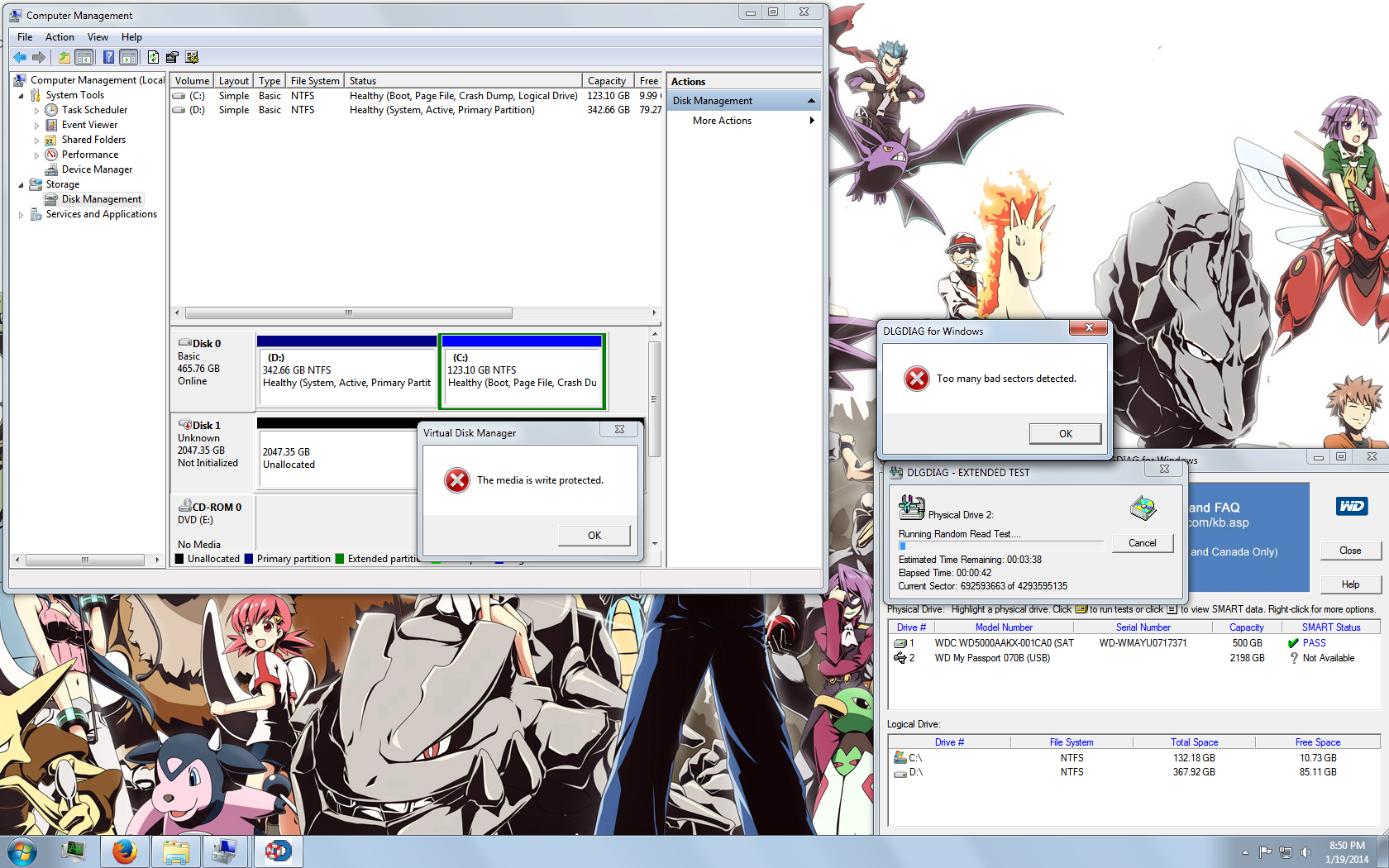
Issue is with my sisters External Hard drive, a WD My Passport Elite 070B.
Asked her a few questions on how she was using the drive/any issues and she explained that she had to pull the usb plug while still reading/writing because it would hang/freeze (/facepalm)
Downloaded PW Minitool Recovery and EasyRecovery Pro Trial, but haven't really run any lengthy tests yet. Just tried them out for 10 mins to see if anything would show up. Going to leave the computer on tonight and do a full scan though.
Some other things I have tried:
-Tried connecting it to other PC's/Laptops(XP/Vista/Windows 7/OSX). Same thing.
-Tried different USB cables
Any suggestions or things I should try?
My Computer
Computer type
PC/Desktop
Computer Manufacturer/Model Number
Dell
OS
Windows 7 Home Basic 32-bit
CPU
Core 2 Duo E6550
Motherboard
Dell Inc. 0PU052 (CPU)
Memory
3.00GB Dual-Channel DDR2 @ 332MHz (5-5-5-15)
Graphics Card(s)
512MB ATI Radeon HD 5450
Hard Drives
465GB Western Digital WDC WD5000AAKX-001CA0 ATA Device (SATA) 44 °C
2047GB Western Digital WD My Passport 070B USB Device (USB (ATA))
Yea, this is a common issue it seems. Theres like 3 or 4 of these threads on the first page of Hardware & Devices. Hopefully we will be able to sort it out and get our data back eh
My Computer
Computer type
PC/Desktop
Computer Manufacturer/Model Number
Dell
OS
Windows 7 Home Basic 32-bit
CPU
Core 2 Duo E6550
Motherboard
Dell Inc. 0PU052 (CPU)
Memory
3.00GB Dual-Channel DDR2 @ 332MHz (5-5-5-15)
Graphics Card(s)
512MB ATI Radeon HD 5450
Hard Drives
465GB Western Digital WDC WD5000AAKX-001CA0 ATA Device (SATA) 44 °C
2047GB Western Digital WD My Passport 070B USB Device (USB (ATA))
Yea, this is a common issue it seems. Theres like 3 or 4 of these threads on the first page of Hardware & Devices. Hopefully we will be able to sort it out and get our data back eh
1. Ahh i wish there was a way to copy data off the drive, but it does not show up on my computer, so I cannot access the drive.
2. Also forgot to mention that when I run both the quick and extended test, It gives me that error shown in the screenshot. It also gets stuck on sector 255 on quick test, and 692593663 ExternalDriveDiagnosis - Imgur
Another thing that may not be clear from my initial post was it incorrectly displays that it has 2047 GB of unallocated space, even though I believe the drive of the size is 500 GB. And trying to initialize it will give me that error about it being write protected.
My Computer
Computer type
PC/Desktop
Computer Manufacturer/Model Number
Dell
OS
Windows 7 Home Basic 32-bit
CPU
Core 2 Duo E6550
Motherboard
Dell Inc. 0PU052 (CPU)
Memory
3.00GB Dual-Channel DDR2 @ 332MHz (5-5-5-15)
Graphics Card(s)
512MB ATI Radeon HD 5450
Hard Drives
465GB Western Digital WDC WD5000AAKX-001CA0 ATA Device (SATA) 44 °C
2047GB Western Digital WD My Passport 070B USB Device (USB (ATA))
This doesn't look good still running PhotoRec but I'm not sure its going to find anything. Its scanning for 4293595136 sectors(x512bytes/sector = 2TB, My Passport has only 500GB)
Any other ideas?
My Computer
Computer type
PC/Desktop
Computer Manufacturer/Model Number
Dell
OS
Windows 7 Home Basic 32-bit
CPU
Core 2 Duo E6550
Motherboard
Dell Inc. 0PU052 (CPU)
Memory
3.00GB Dual-Channel DDR2 @ 332MHz (5-5-5-15)
Graphics Card(s)
512MB ATI Radeon HD 5450
Hard Drives
465GB Western Digital WDC WD5000AAKX-001CA0 ATA Device (SATA) 44 °C
2047GB Western Digital WD My Passport 070B USB Device (USB (ATA))
I think you may be out of luck recovering data. The question is can you salvage the drive. I'd be trying Partition Wizard to do this.
I'm not familiar with Passport firmware quirks - someone else may know more.
My Computer
Computer type
PC/Desktop
Computer Manufacturer/Model Number
Own build
OS
Windows 7x64 Home Premium SP1
CPU
Intel i7 2600k
Motherboard
ASUS P8Z68 Deluxe
Memory
G.Skill Ripjaws (DDR3-1600) 2x4GB
Graphics Card(s)
Nvidia GeForce GTS 450; Intel HD Graphics 3000(GT2+)