Dual Monitors - Help Required!

BananaMann

Banned
Local time
11:20 PM
Messages
179
Hello,
I need help setting up my two monitors.
I recently bought Asus VG248 as a gaming monitor, I would like to use 120HZ while playing games, so I get the smoothest performance. I have Sony KDL-46" TV as my "primary TV". I also have a Denon home theater receiver.
What is the correct way to set these up?
VG248 -> DVI-D cable to Radeon 7870
Sony KDL-46" -> HDMI cable to Denon receiver
Denon Receiver -> HDMI cable to 7870
Denon receiver -> optical audio cable

Right now, I think this is the way they are connected.
The problem is, whenever I turn off Sony KDL, I can only get picture on my Asus 248, but no sound. So I have to have Duplicate monitor on and use both of the monitors 24/7, which is very unneccessary.
I would like to be able to switch between monitors, for movie watching or gaming etc.

I am using Windows 7 64-bit.

Thank you in advance for help, it is really needed.
 

My Computer My Computer

Computer type
PC/Desktop
OS
Windows 7
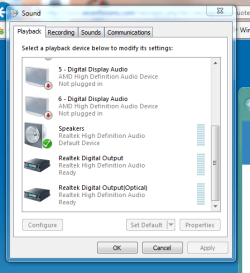
Check your sound options and see if the default is set to Optical. That might be preventing the PC from using the HDMI sound.

Capture50.PNG

Mine is defaulted to speakers but the other options are available. Yours may be set to optical which is why you need the TV and the Denon receiver turned on. You could use the HDMI outputs to provide sound to both monitors rather than the optical output.
 

My Computer My Computer

Computer type
PC/Desktop
Computer Manufacturer/Model Number
Mellon Labs (custom build)
OS
Win 7 Pro x64/Win 10 Pro x64 dual boot
CPU
AMD FX 8350 Vishera @ 4200
Motherboard
ASUS M5A97 R2.0
Memory
16 GB Mushkin Blackline DDR3-2400 @ 1866 (9-10-10-10-31)
Graphics Card(s)
XFX Radeon R9 280 Double D Black Edition
Sound Card
Realtek HD Audio on MB. Sounds great.
Monitor(s) Displays
Acer 24", Acer 22"
Screen Resolution
3840 x 1080
Hard Drives
1 x Mushkin Chronos 120 GB SSD (Win 10)
1 x Samsung 850 EVO 250 GB SSD (Win 7)
1 x WD 1TB SATA Blue
1 x WD 1TB SATA Green
PSU
Corsair TX-750
Case
CoolerMaster HAF 912+
Cooling
Coolermaster Seidon 240M Liquid AIO. 6 case fans
Keyboard
Logitech G710+
Mouse
Logitech G500s
Internet Speed
Much better since I got fiber, but still way overpriced.
Antivirus
MSE, Malware Bytes for scanning
Browser
Firefox
Other Info
Corsair VOID USB headphones.

A Mellon Labs X-1 - LCD Smartie driven system status display.

Brought to you by the letter E
DVI doesn`t carry sound, there`s no path for the sound to get to the Asus monitor.

You need an hdmi cable from the Denon to the Asus. You`d get sound to the Denon and video to the Asus. You would just have to change the output on the Denon to whichever one you have going to the Asus monitor ( with your remote control )

My Sony Bravia has a return audio feed back to my Sony HDTR ( through HDMI ) and when I turn off the tv and the HD set top box, the sound is cut off. Your Sony probably does the same thing and that`s why there`s no sound to the Denon anymore.

If you`re using HDMI as the input for the audio source then that`s all you can use for the output audio source, you just can`t switch it to optical and have sound come out, at least that`s how mine works.

How exactly are you using the optical cable ? If the optic cable is coming from the motherboard you should be able to change the input on the Denon to optical and get sound from the Denon, but not to the Asus.

I hope I read you right, and your not really trying to send audio from your Denon to those 2 Watt speakers on the Asus.

My head hurts :confused:

Just get a killer set of headphones :p and a Gaming keyboard to hookem up to.

What games do you play and what kind of FPS ?
 
Last edited:

My Computer My Computer

Computer type
PC/Desktop
Computer Manufacturer/Model Number
Skylake Special #666
OS
Windows 10 Pro x64
CPU
Intel Core i7 6700K
Motherboard
Asus Sabertooth Z170 Mark 1
Memory
GSkill TridentZ RGB 16GB 3600 16-16-16-36
Graphics Card(s)
EVGA GTX 980 Ti SC x2
Sound Card
Realtek High Definition
Monitor(s) Displays
AOC G2460PG
Screen Resolution
1920 x 1080 144Hz
Hard Drives
Samsung 860 Pro 256GB, Seagate Barracuda 4TB x2
PSU
EVGA 1000 P2, EVGA White Custom Braided Cables
Case
Corsair Vengeance C70 Gunmetal Black
Cooling
Corsair H100i v2, Corsair ML120 x2, Thermal Grizzly Kryonaut
Keyboard
Logitech G910 Orion Spectrum
Mouse
Logitech G700s
Internet Speed
Verizon Fios Quantum Gateway 75/75
Antivirus
Windows Defender, Malwarebytes Free 3.8.3
Browser
Chrome
Other Info
Corsair SP120 x4, LG Blu-ray Drive, Durabrand HT-395 100 Watt Dolby Digital Amp, Corsair H2100 Wireless 7.1 Headset
Hello,
I need help setting up my two monitors.
I recently bought Asus VG248 as a gaming monitor, I would like to use 120HZ while playing games, so I get the smoothest performance. I have Sony KDL-46" TV as my "primary TV". I also have a Denon home theater receiver.
What is the correct way to set these up?
VG248 -> DVI-D cable to Radeon 7870
Sony KDL-46" -> HDMI cable to Denon receiver
Denon Receiver -> HDMI cable to 7870
Denon receiver -> optical audio cable

The problem is, whenever I turn off Sony KDL, I can only get picture on my Asus 248, but no sound. So I have to have Duplicate monitor on and use both of the monitors 24/7, which is very unneccessary.
I would like to be able to switch between monitors, for movie watching or gaming etc.
I'm afraid your system setup description isn't clear enough.

What is your motherboard and/or brand/model PC?

What speakers are you using, or want to use? Speakers managed by the Denon AVR? Or speakers in your VG248 monitor? Or desktop PC speakers? Or the speakers in your KDL TV? Does it vary with the situation or your mood?? This is obviously critical information for us to know in order to diagnose your current issue and suggest the proper wiring and configuration.

As was already explained in an earlier reply, there is no audio delivered on a DVI cable. So if you connect your VG248 via DVI cable to your 7870 then it's impossible to hear anything from speakers which might be present in that monitor. You'd have to use an HDMI cable going from 7870 to the VG248 if you wanted to have sound coming out of the monitor's speakers (if present).

Furthermore, the most crucial setup configuration mechanism is the "playback devices" which is gotten to by right-click on the "speaker" icon in the system tray and selecting "playback devices". This dialog is where you designate which output path you want audio to be sent out through, and also allows you to configure it, and also allows you to "set as default" so you don't have to manually set it every time you boot. But obviously if you set it to use your HDMI output (e.g. going to the VG248 via an HDMI cable, if that's what you are using and the monitor is where you want sound to come from) then you're not going to be sending audio to your Denon via optical from your sound card or out to PC speakers connected to the speaker outputs of your sound card/chip. Audio goes out only one of the possible outputs shown in "playback devices", depending on whichever one you've got currently selected.

I'm guessing that you have real multi-channel loudspeakers supported by your Denon receiver, and that one of your configuration goals is to be able to watch video on your KDL TV or your VG248 and also listen to sound from these speakers. This could be accomplished by (a) using an optical audio cable output from your PC's sound card (assuming it has optical S/PDIF output) going to an optical input of your Denon AVR. You'd check "Realtek digital (optical)" as the output in "playback devices". Now you would ALWAYS get audio from your Denon receiver and real speakers, no matter what you're watching for video.

Note that optical supports DD5.1 audio, but you need to "enable" that in order to get it. When you select "Realtek digital (optical)' in "playback devices, then push the PROPERTIES button to get the properties dialog window. On this properties dialog window select the "supported formats" tab and check all of the multi-channel options. This will now cause true multi-channel digital audio to go out over your optical connection from sound card to the Denon, to feed your multi-channel speaker setup.

Now... for the video. You should continue to use the DVI video cable from 7870 video card to the VG248 (knowing that this will produce NO SOUND from the speakers in the monitor, but that's fine because you probably want to get your multi-channel sound from the speakers managed by the Denon). And you should send HDMI directly from the 7870 video card to your KDL TV (not going through Denon at all, because you don't need to since you're sending optical digital audio from sound card to the Denon).

Or, if you also have ordinary desktop speakers connected to the analog speaker output(s) of your sound card, you can select "speakers" in "playback devices", and then that's where sound will come from.

Again, you will NEVER get sound from the VG248 using a DVI cable. But you don't need it, and you don't want it. Your real speakers from the Denon AVR are most likely what you want to be listening to when gaming, and that will happen via the optical connection from sound card (not video card) to the Denon with all multi-channel formats checked ON in properties dialog for optical output.

If you want to get sound from your KDL TV you can do that (since the HDMI cable from 7870 to the TV supports audio and video). But to activate that you must now check the "HDMI" output in "playback devices" to make it active. Now you will not be getting audio delivered over optical to the Denon, since you've essentially un-checked it when you checked the HDMI output instead. So you won't have sound from your Denon and real speakers, but instead will be getting stereo sound from the TV... if that's what you really want.

Otherwise, leaving the optical audio output checked, you can still get HDMI-delivered video (but no sound) to the TV while getting optical-delivered audio to the Denon. Or, selecting "speakers" gets ordinary analog sound from your desktop PC speakers. Whatever you check in "playback devices", that's where you'll be getting sound from.

Lots of options and choices. But you should have an optical audio connection from PC sound card to the Denon, and run HDMI direct from 7870 to the KDL TV, and run DVI from 7870 to the VG248. Then you use "playback devices" to select audio out of the Denon (via optical), or audio out of the TV (via HDMI), or audio out of your desktop speakers if you have them. Turning off the TV to have video from the VG248 only should be accompanied by optical output (to the Denon) or "speakers" checked, to get sound from your real Denon speakers or desktop PC speakers.

 

My Computer My Computer

Computer type
PC/Desktop
Computer Manufacturer/Model Number
Home-built, two systems (1) and (2)
OS
Windows 7 Pro x64 (1), Win7 Pro X64 (2)
CPU
i5-3350p 3.1Ghz/6MB-cache (1); E8400 3.0Ghz/6MB-cache (2)
Motherboard
ASUS P8Z77-V Pro (1); ASUS P5Q3 (2)
Memory
8GB PC3-12800 DDR3 (1); 4GB PC3-10600 DDR3 (2)
Graphics Card(s)
ATI HD7750 (1), (see TV cards); ATI R7 250 (2)
Sound Card
Realtek ALC892 HD Audio (1); Realtek ALC1200 HD Audio (2)
Monitor(s) Displays
Eizo HD2441W LCD, Eizo S2433W (1); Eizo 24" S2433W (2)
Screen Resolution
1920x1200, 1920x1200 (1); 1920x1200 (2)
Hard Drives
(1) 1TB SATA-II (7200RPM), 2x2TB SATA-III (7200RPM), 250GB SATA-III (10000RPM) for OS; 2x2TB external USB 3.0

(2) 320GB SATA-II (7200RPM), 750GB SATA-II (7200RPM), 150GB SATA-II (10000RPM) for OS; 2TB external USB 3.0
PSU
Nesteq ECS-6001 600W (1); Nesteq ECS-5001 500W (2)
Case
Acousti-Case 360 (1) and (2)
Cooling
Noctua NH-U12P SE2 for CPU, 2x120mm case fans (1) and (2)
Keyboard
IBM PS/2 (1) and (2)
Mouse
Logitech MX Revolution wireless (1); Microsoft wired (2)
Internet Speed
100mbps down / 10mbps up
Antivirus
Microsoft Security Essentials; Malwarebyte Anti-Malware Pro
Browser
Firefox
Other Info
Ceton InfiniTV 4-tuner cablecard-enabled TV card as well as Hauppauge HVR-2250 OTA/ATSC 2-tuner TV card in (1), running under Win7 WMC
you could also run an optical lead from your pc to your AV receiver, which will carry the sound that the DVI cable doesnt.

From my gaming rig under the carpet i have a HDMI to DVI cable connected to my AV receiver (HDMI IN) and then an optical cable for the sound. I then have 2 DVI cables one to each of my monitors.

Just remember youll have to tell your AV receiver what channel to pic up the audio from when doing different activities.
 

My Computer My Computer

Computer type
PC/Desktop
Computer Manufacturer/Model Number
Built by badgers!!!
OS
Windows 7 Ultimate x64, & Mac OS X 10.9.2
CPU
Intel Core i5 2500k
Motherboard
Asus P8z68 LE
Memory
Corsair Vengence 8gb 1866mhz
Graphics Card(s)
Nvidia GTX 770 OC
Monitor(s) Displays
2x ASUS LED 22" IPS
Screen Resolution
3840x1080
Hard Drives
240GB Crucial M500 SSD
120gb Corsair Force 3 SSD
1TB Western Digital
PSU
Corsair HX650w Modular
Case
Corsair Air 540
Cooling
Corsair H60 Push/Pull
Keyboard
Corsair K70/ Logitech G27 wheel
Mouse
Saitek R.A.T 9
Internet Speed
Too slow!
Other Info
AMD fusion E350N Home server-Windows Home Server 2011 (also made by badgers!)
2011 Macbook 2.4ghz Core2Duo, 4gb ddr3, 120gb Ocz Vertex SSD
Back
Top