Dazzle DVC100 doesnt work (factory wipe only working fix fix)

Diddy7Kong

New member
Member
Local time
7:34 AM
Messages
39
Hi, im having problems with my dazzle DVC100, recently pinnicle would start a capture, dropping every single frame right out the gate, a reinstall of pinnicle AND the driver did NOT resolve the problem, when used as a webcam it runs at 0.01FPS, then CRASHES the application that caled it 30 secods later, on skype, it DROPS THE CALL 2 minutes after sharing video. a factory wipe of my laptop fixes the problem.... for 2 days then it acts up again forcing me to factory wipe it clean, which at this point, is NOT worth keeping the dazzle over, and to make matters worse, im jobless so i cant buy any new hardware period.

I installed the included driver to have a framerate issue and capture issue, tried the 64 bit driver from pinnicle's website and it needs a reboot, which did NOT solve the issue either and the frustration this has caused me i am about to smash my dazzle in half and stop using it i really need help on this because i cannot make gaming videos anymore without it
 

My Computer My Computer

At a glance

Windows 7 Professional 64 bitAMD APU8GBATI radeon chipset
Computer type
Laptop
Computer Manufacturer/Model Number
HP
OS
Windows 7 Professional 64 bit
CPU
AMD APU
Motherboard
unknown
Memory
8GB
Graphics Card(s)
ATI radeon chipset
Hard Drives
500GB internal
2,048 GB external
Browser
Google Chrome
try just using it through Windows media center just install drivers skip pinical program
 

My Computer My Computer

At a glance

Windows 10 Home Premium 64bit sp1Intel I7-6700K @ 4.6 Ghz 1.344 volts everyday OC32GB G-Skill TridentZ 3200mhz 16-18-18-38 DDR4Sli Gigabyte Windforce GTX 980 G1
Computer type
PC/Desktop
Computer Manufacturer/Model Number
CoreI7-6700K MrFingerIII Special Builds
OS
Windows 10 Home Premium 64bit sp1
CPU
Intel I7-6700K @ 4.6 Ghz 1.344 volts everyday OC
Motherboard
Asrock Fatality K6 Z170 Socket 1151
Memory
32GB G-Skill TridentZ 3200mhz 16-18-18-38 DDR4
Graphics Card(s)
Sli Gigabyte Windforce GTX 980 G1
Sound Card
AC97 Creative Rage Tactic 3D Headphones Bluetooth
Monitor(s) Displays
27" Asus ROG Swift PG278Q G-Sync 48" Vizio Smart HD TV
Screen Resolution
2560x1440p 27"- 48" Currently Gaming at 2560x1440p Res 2K
Hard Drives
250GB Samsung Evo840SSD Seagate baracuda 500 GB WD Mybook 500Gb 1TB Seagate Barracuda
PSU
HX1050w Corsair Silver 80plus certified crosfire/sli
Case
Enthod Pro Full Tower
Cooling
Corsair H110i GT 280 mm High Performance WaterBlock
Keyboard
Logitech wireless keyboard
Mouse
Logitech wireless mouse
Internet Speed
Cox Cable 100+ mb
Antivirus
WebRoot Spysweeper with Antivirus
Browser
IE-10, Chrome, Opera
Other Info
My Other Rig is a AMD FX8320E @4.6Ghz 16GB Ballistic Sport Ram
Mobo Asrock Fatality 990FX 120GB OCZ SSD 1TB Seagate Barracuda Corsair H75 Cooling PSU Corsair CX750
GPU GTX Gigabyte 970G1
This issue seems related to this:
thanks guys, i finally found a related link within the other links posted here and that FIXED it.... but seems to have broke my dazzle in the process...

But it could have been happening before and went unnoticed.

I found a few posts on the sister forum Vistax64 that looked promising.
the other one (halo3...) is a broken link - it never loaded.

the other one post pointed to this drivers page: Pinnacle - Dazzle* Hardware Installer for Studio 10
Note: The files contained in this package are hardware drivers only.
Beside the driver, a compatible version of Studio is required.
Click on the selected driver, according to your hardware and operating system and download it to your hard disk.
Then double click on the file to start the installation

*: This Vista 64bit driver was not tested with Studio 11 and previous.
Important Note: MovieBoard 500-PCI/700PCI has an issue on Windows 64 bit systems when the computer has 2GB or more system RAM.
In this case Studio will crash during capture.
For this reason other capture devices are recommended on most Windows 64 bit systems.

I'd suggest uninstalling the drivers you have, restart the box (might not be necessry, but...) and install the 32 bit versions of the device driver from the link above. Why the 32 bit - read the * on the driver site about Vista 64bit (yes Vista... same column as Win7 in the driver list)

See how the drivers behave using Media Center as Solarstarshines suggested. Test some other front end applications that can use the device (webcam?).

If all is well, think about installing the appropriate Studio software (SW). If you do install Studio and the device acts oddly again, you know it's because of the Studio SW. If Studio SW causes the issue - uninstall it and use something else.

If Studio behaves, you might find some configuration tips here: The video author sounds young, but that doesn't mean anything. There might be something on the site that helps: Best Dazzle Settings (Dazzle DVC 100) | HDPVR Quality | How To Save Money And Do It Yourself!


I had a Pinnacle card in an older machine, the Studio SW was a resource hog, so I took it off in favor of less resource intensive applications. Which ones?.... it was a very long time ago, I don't know if I just used native Windows applcations (Media Center didn't exist then) or if I found something to replace Studio.

Anyway, that's all I can offer. Good Luck.
 

My Computer My Computer

At a glance

x64 (6.3.9600) Win8.1 Pro & soon dual boot x6...AMD A6-3420M APU with Radeon(tm) HD Graphics6.00 GBAMD Radeon(TM) HD 6520G
Computer type
Laptop
Computer Manufacturer/Model Number
HP Pavilion dv6-6c10us
OS
x64 (6.3.9600) Win8.1 Pro & soon dual boot x64 (6.1.7601) Win7_SP1 HomePrem
CPU
AMD A6-3420M APU with Radeon(tm) HD Graphics
Motherboard
Hewlett-Packard 1805
Memory
6.00 GB
Graphics Card(s)
AMD Radeon(TM) HD 6520G
Sound Card
(1) AMD High Definition Audio Device (2) IDT High Definiti
Monitor(s) Displays
HP W2072a 20" LCD (1600 x 900) @ 60 Hz
Screen Resolution
1366 x 768 x 32 bits (4294967296 colors) @ 60 Hz
Hard Drives
ST640LM0 00 HM641JI SATA Disk Device
Keyboard
Logitech k520 wireless KB
Mouse
Logitech m320 wireless mouse (bundled with KB)
Internet Speed
15/5 | 54 MB Wireless 'n'
Antivirus
Realtime: Defender or Avast | On-demand: Malwarebytes, ESET
Browser
IE 11 on Win8, IE 10 on win 7
Other Info
Media: [Gimp, Audacity, VLC] || Comm: [WEmail 2012, Skype] || Productivity: [OpenOffice,| Textpad] || Utils: [Sysinternals, cCleaner, Speccy, Defraggler]
This issue seems related to this:
thanks guys, i finally found a related link within the other links posted here and that FIXED it.... but seems to have broke my dazzle in the process...

But it could have been happening before and went unnoticed.

I found a few posts on the sister forum Vistax64 that looked promising.
the other one (halo3...) is a broken link - it never loaded.

the other one post pointed to this drivers page: Pinnacle - Dazzle* Hardware Installer for Studio 10
Note: The files contained in this package are hardware drivers only.
Beside the driver, a compatible version of Studio is required.
Click on the selected driver, according to your hardware and operating system and download it to your hard disk.
Then double click on the file to start the installation

*: This Vista 64bit driver was not tested with Studio 11 and previous.
Important Note: MovieBoard 500-PCI/700PCI has an issue on Windows 64 bit systems when the computer has 2GB or more system RAM.
In this case Studio will crash during capture.
For this reason other capture devices are recommended on most Windows 64 bit systems.

I'd suggest uninstalling the drivers you have, restart the box (might not be necessry, but...) and install the 32 bit versions of the device driver from the link above. Why the 32 bit - read the * on the driver site about Vista 64bit (yes Vista... same column as Win7 in the driver list)

See how the drivers behave using Media Center as Solarstarshines suggested. Test some other front end applications that can use the device (webcam?).

If all is well, think about installing the appropriate Studio software (SW). If you do install Studio and the device acts oddly again, you know it's because of the Studio SW. If Studio SW causes the issue - uninstall it and use something else.

If Studio behaves, you might find some configuration tips here: The video author sounds young, but that doesn't mean anything. There might be something on the site that helps: Best Dazzle Settings (Dazzle DVC 100) | HDPVR Quality | How To Save Money And Do It Yourself!


I had a Pinnacle card in an older machine, the Studio SW was a resource hog, so I took it off in favor of less resource intensive applications. Which ones?.... it was a very long time ago, I don't know if I just used native Windows applcations (Media Center didn't exist then) or if I found something to replace Studio.

Anyway, that's all I can offer. Good Luck.

thanks for the tips, but the 32 bit drivers did that too and the pinnicle that came with my dazzle is version 12, the other software i tried to use the device on were virtualdub (very crappy if it records at all (inconsistant video/audio speed)) and skype, with skype, the call DROPS because the webcam fault (dazzle), for virtualdub, it records 1 frame per 3 seconds (driver fault), pinnicle records, but its reports of capture time and dropps frames caps at 0:00:00.02 and dropped frames counter starts climbing up like there is no tomorrow, after i stop capture, file is "corrupted" 0 frames recorded, 10ms of audio recorded

new info: pinnicle, the only application that correctly captures with the right contrast, and never desyncs audio by 30 minutes over an hour, ALWAYS pulls the described problem for the capture side even newer versions, i simply cannot use my dazzle reliably anymore with there being only pinnicle and virtualdub that act as capture card supporting applications when pinnicle has a consistant framerate and audiorate, as well as proper source contrasting, while virtualdub has inconsistant audio rates, sorry if i come off sounding ranty but I feel as if i have to purchase new hardware and capture devices to get back to my game recording sessions which I am still out of a job in this crappy state so i cannot afford to buy anything
 
Last edited:

My Computer My Computer

At a glance

Windows 7 Professional 64 bitAMD APU8GBATI radeon chipset
Computer type
Laptop
Computer Manufacturer/Model Number
HP
OS
Windows 7 Professional 64 bit
CPU
AMD APU
Motherboard
unknown
Memory
8GB
Graphics Card(s)
ATI radeon chipset
Hard Drives
500GB internal
2,048 GB external
Browser
Google Chrome
ok it feels like its the dazzle HARDWARE im not sure, but i factory wiped it AGAIN, and it worked... for exactly 3 seconds, then went to shit again
now i have VIDEO PROOF of whats going on this statistics applies to every single capture software, not just pinnicle 15, all pinnicle versions, virtualdub (shows hardware running at 0FPS)

I cant record videos anymore, the dazzle is fucking being gaya fuck - YouTube
 

My Computer My Computer

At a glance

Windows 7 Professional 64 bitAMD APU8GBATI radeon chipset
Computer type
Laptop
Computer Manufacturer/Model Number
HP
OS
Windows 7 Professional 64 bit
CPU
AMD APU
Motherboard
unknown
Memory
8GB
Graphics Card(s)
ATI radeon chipset
Hard Drives
500GB internal
2,048 GB external
Browser
Google Chrome
ok it feels like its the dazzle HARDWARE im not sure, but i factory wiped it AGAIN, and it worked... for exactly 3 seconds, then went to shit again
now i have VIDEO PROOF of whats going on this statistics applies to every single capture software, not just pinnicle 15, all pinnicle versions, virtualdub (shows hardware running at 0FPS)

I cant record videos anymore, the dazzle is ****ing being gaya **** - YouTube

It could be that because for some reason those product fail pretty quick

I know i have used that pinical connection it sucks to be honest i know it is supposed to be straight forward use but it is a headache to get it working right
 

My Computer My Computer

At a glance

Windows 10 Home Premium 64bit sp1Intel I7-6700K @ 4.6 Ghz 1.344 volts everyday OC32GB G-Skill TridentZ 3200mhz 16-18-18-38 DDR4Sli Gigabyte Windforce GTX 980 G1
Computer type
PC/Desktop
Computer Manufacturer/Model Number
CoreI7-6700K MrFingerIII Special Builds
OS
Windows 10 Home Premium 64bit sp1
CPU
Intel I7-6700K @ 4.6 Ghz 1.344 volts everyday OC
Motherboard
Asrock Fatality K6 Z170 Socket 1151
Memory
32GB G-Skill TridentZ 3200mhz 16-18-18-38 DDR4
Graphics Card(s)
Sli Gigabyte Windforce GTX 980 G1
Sound Card
AC97 Creative Rage Tactic 3D Headphones Bluetooth
Monitor(s) Displays
27" Asus ROG Swift PG278Q G-Sync 48" Vizio Smart HD TV
Screen Resolution
2560x1440p 27"- 48" Currently Gaming at 2560x1440p Res 2K
Hard Drives
250GB Samsung Evo840SSD Seagate baracuda 500 GB WD Mybook 500Gb 1TB Seagate Barracuda
PSU
HX1050w Corsair Silver 80plus certified crosfire/sli
Case
Enthod Pro Full Tower
Cooling
Corsair H110i GT 280 mm High Performance WaterBlock
Keyboard
Logitech wireless keyboard
Mouse
Logitech wireless mouse
Internet Speed
Cox Cable 100+ mb
Antivirus
WebRoot Spysweeper with Antivirus
Browser
IE-10, Chrome, Opera
Other Info
My Other Rig is a AMD FX8320E @4.6Ghz 16GB Ballistic Sport Ram
Mobo Asrock Fatality 990FX 120GB OCZ SSD 1TB Seagate Barracuda Corsair H75 Cooling PSU Corsair CX750
GPU GTX Gigabyte 970G1
ok it feels like its the dazzle HARDWARE im not sure, but i factory wiped it AGAIN, and it worked... for exactly 3 seconds, then went to shit again
now i have VIDEO PROOF of whats going on this statistics applies to every single capture software, not just pinnicle 15, all pinnicle versions, virtualdub (shows hardware running at 0FPS)

I cant record videos anymore, the dazzle is ****ing being gaya **** - YouTube

It could be that because for some reason those product fail pretty quick

I know i have used that pinical connection it sucks to be honest i know it is supposed to be straight forward use but it is a headache to get it working right

and just in case its my computer being dumb, how would i selectively update or rollback just my USB port drivers (AMD)? when i do that it rolls back the GPU driver too and sony vegas stops working (never starts up)

not that that matters because it DOES fix the dazzle issue, but for only 3 seconds per system boot
 

My Computer My Computer

At a glance

Windows 7 Professional 64 bitAMD APU8GBATI radeon chipset
Computer type
Laptop
Computer Manufacturer/Model Number
HP
OS
Windows 7 Professional 64 bit
CPU
AMD APU
Motherboard
unknown
Memory
8GB
Graphics Card(s)
ATI radeon chipset
Hard Drives
500GB internal
2,048 GB external
Browser
Google Chrome
Rolling back drivers you would have to go into Device manager

#1 click start

#2 Go to my computer

#3 System Properties

#4 Device manager

#5 Locate the hardware under name also should be a yellow caution triangle notifying it isn't working

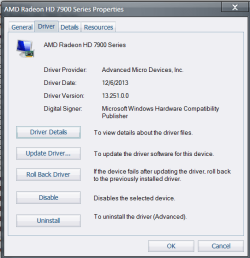
#6 you will now right click mouse and select properties then click the driver tab like in photo below then you have all the selections to update rollback etc.... hope this helps you BTW picture is just a sample pic of what it should look like :geek:
 

Attachments

  • driver.PNG
    driver.PNG
    16.3 KB · Views: 16

My Computer My Computer

At a glance

Windows 10 Home Premium 64bit sp1Intel I7-6700K @ 4.6 Ghz 1.344 volts everyday OC32GB G-Skill TridentZ 3200mhz 16-18-18-38 DDR4Sli Gigabyte Windforce GTX 980 G1
Computer type
PC/Desktop
Computer Manufacturer/Model Number
CoreI7-6700K MrFingerIII Special Builds
OS
Windows 10 Home Premium 64bit sp1
CPU
Intel I7-6700K @ 4.6 Ghz 1.344 volts everyday OC
Motherboard
Asrock Fatality K6 Z170 Socket 1151
Memory
32GB G-Skill TridentZ 3200mhz 16-18-18-38 DDR4
Graphics Card(s)
Sli Gigabyte Windforce GTX 980 G1
Sound Card
AC97 Creative Rage Tactic 3D Headphones Bluetooth
Monitor(s) Displays
27" Asus ROG Swift PG278Q G-Sync 48" Vizio Smart HD TV
Screen Resolution
2560x1440p 27"- 48" Currently Gaming at 2560x1440p Res 2K
Hard Drives
250GB Samsung Evo840SSD Seagate baracuda 500 GB WD Mybook 500Gb 1TB Seagate Barracuda
PSU
HX1050w Corsair Silver 80plus certified crosfire/sli
Case
Enthod Pro Full Tower
Cooling
Corsair H110i GT 280 mm High Performance WaterBlock
Keyboard
Logitech wireless keyboard
Mouse
Logitech wireless mouse
Internet Speed
Cox Cable 100+ mb
Antivirus
WebRoot Spysweeper with Antivirus
Browser
IE-10, Chrome, Opera
Other Info
My Other Rig is a AMD FX8320E @4.6Ghz 16GB Ballistic Sport Ram
Mobo Asrock Fatality 990FX 120GB OCZ SSD 1TB Seagate Barracuda Corsair H75 Cooling PSU Corsair CX750
GPU GTX Gigabyte 970G1
Rolling back drivers you would have to go into Device manager

#1 click start

#2 Go to my computer

#3 System Properties

#4 Device manager

#5 Locate the hardware under name also should be a yellow caution triangle notifying it isn't working

#6 you will now right click mouse and select properties then click the driver tab like in photo below then you have all the selections to update rollback etc.... hope this helps you BTW picture is just a sample pic of what it should look like :geek:
im eyeballing the USB AMD driver actually, i get what you are point out though where generally to look (in my case its the USB host controller) because when i do GPU updates, the USB ports ALL disconnect at the same time when their part of the driver updates before reconnecting and i saw the "dazzle DVC100 - this device can perform faster" which doesnt appear after the update completes, but only during)im HOPING that fixes my problem because i dont have money to go be buying more capture cards
 

My Computer My Computer

At a glance

Windows 7 Professional 64 bitAMD APU8GBATI radeon chipset
Computer type
Laptop
Computer Manufacturer/Model Number
HP
OS
Windows 7 Professional 64 bit
CPU
AMD APU
Motherboard
unknown
Memory
8GB
Graphics Card(s)
ATI radeon chipset
Hard Drives
500GB internal
2,048 GB external
Browser
Google Chrome
I had the same problem, and it was vexing me badly enough, that I thought I'd join this forum just to pass along the answer.

I too have a Dazzle DVC100; and it always worked fine on my old XP computer. Now, I've upgraded to an Asus P8Z68-V LX-based computer (on which two DDR2 memory sockets didn't work, and I sent them the board back, and they said I bent some CPU pins, but I don't believe it, and they wouldn't honor their warranty). Although Pinnacle has Win7 32-bit and 64-bit drivers on their site, I never could get them to work. The little green light on the Dazzle would never come on. I revisited the problem when another computer, the last XP one in the house, was de-commissioned. I tried it on a different Win7 computer, and the little green light came on! My motherboard has both USB 2.0 and USB 3.0 ports; and I had tried both early on. Re-reading the Pinnacle docs, they say that the Dazzle doesn't work with USB 1.0 ports. I again tried USB 2.0 and USB 3.0 ports on my computer. While there's an outside chance my computer doesn't work right due to the bent pins, everything else works right - e.g. the other two DIMM sockets, other USB devices, etc. IMHO, my ASUS just doesn't like the Dazzle (or possibly vice versa, but the Dazzle was made earlier); and it will always come up in my control panel as an unknown device. I have only two settings in my BIOS I can sensibly alter (allow legacy USB 3.0 was one - which would not affect my USB 2.0 ports). I have disallowed the system to power them down (trying to get a portable HD to work more reliably - I'll probably re-allow it). The only thing that worked for me was plugging into a different computer. That one was an HP Win7 SP1 64-bit; and this one is an Asus Win7 SP1 32-bit. Thus, I wouldn't be too quick to blame the Dazzle or the Pinnacle drivers, but rather the MB manufacturer.
 

My Computer My Computer

At a glance

Windows 7 Home 32bit
Computer type
PC/Desktop
OS
Windows 7 Home 32bit
Back
Top