Is 1 Gb memory use at idle OK? (slow computer)

catalogue

New member
Member
VIP
Local time
11:36 PM
Messages
108
My computer has gotten horribly slow and I'm going through the 39-step optimization checklist on this site.

In the meantime I would like to know if my memory usage is too high: 1 Gb with no programs running and the computer just sitting there; 1.59 Gb with these running:

Firefox, Opera, Spotify, Xlporer2 (3rd-party file manager/explorer)

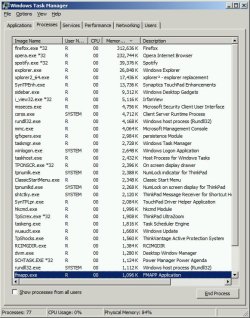
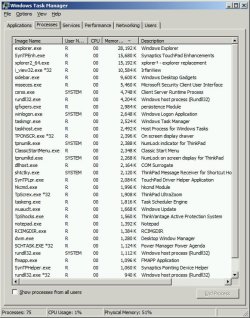
I'm attaching lists of the processes from these two cases.

Thanks
 

Attachments
  • processes - no progs running.jpg
    processes - no progs running.jpg
    82.4 KB · Views: 1
  • process list.jpg
    process list.jpg
    84.3 KB · Views: 1

My Computer My Computer

At a glance

7 Pro 64Intel Core i5-2540M 2.6 GHz6 GB RAM
Computer type
Laptop
Computer Manufacturer/Model Number
Lenovo Thinkpad T520
OS
7 Pro 64
CPU
Intel Core i5-2540M 2.6 GHz
Memory
6 GB RAM
Hard Drives
1 Tb
My computer has gotten horribly slow and I'm going through the 39-step optimization checklist on this site.

In the meantime I would like to know if my memory usage is too high: 1 Gb with no programs running and the computer just sitting there; 1.59 Gb with these running:

Firefox, Opera, Spotify, Xlporer2 (3rd-party file manager/explorer)

I'm attaching lists of the processes from these two cases.

Thanks
Firefox seems to be using around 312mb of ram. Try closing it when you don't need it. Have you gone into msconfig and disabled startup programs you don't need? If not, go to start, type in msconfig and press enter. Then, go to the startup tab and disable everything you don't need. If you have a question on an item to disable, please feel free to post it.
 

My Computer My Computer

At a glance

Windows 7 Professional x64 Service Pack 1AMD Athlon X4 6456GB DDR3 1066Sapphire Radeon HD 5670 512MB GDDR5
Computer type
PC/Desktop
Computer Manufacturer/Model Number
HP Pavilion P7-1010
OS
Windows 7 Professional x64 Service Pack 1
CPU
AMD Athlon X4 645
Motherboard
Foxxcon N-Alvorix RS880
Memory
6GB DDR3 1066
Graphics Card(s)
Sapphire Radeon HD 5670 512MB GDDR5
Sound Card
Realtek Integrated Audio
Monitor(s) Displays
HP 2011x
Screen Resolution
1600x900
Hard Drives
1. Crucial M4 128GB SSD
2. 1TB Seagate Barracuda 7200.12 RPM
3. 1TB Western Digital Caviar Green 5400RPM
PSU
Seasonic S12 II Bronze 380 Watt
Case
HP OEM
Cooling
Coolermaster Heatsink, AVC Case Fan
Keyboard
HP OEM- Made by Chicony
Mouse
HP OEM- Made by Logitech
Internet Speed
20MBit Down/4 Up
Antivirus
Microsoft Security Essentials
Browser
Internet Explorer 10
Can you tell me how much RAM is shown in system properties? To get to system properties, you can go to start, then right click on computer, and click on properties. Does it say #GB (2GB usable)? If so, you might have a problem with your ram (or your graphics chip is using part of it). If not, you may need a RAM upgrade. 2gb of ram is the minimum RAM requirement of 64 bit Windows 7, which is what you have.
 

My Computer My Computer

At a glance

Windows 7 Professional x64 Service Pack 1AMD Athlon X4 6456GB DDR3 1066Sapphire Radeon HD 5670 512MB GDDR5
Computer type
PC/Desktop
Computer Manufacturer/Model Number
HP Pavilion P7-1010
OS
Windows 7 Professional x64 Service Pack 1
CPU
AMD Athlon X4 645
Motherboard
Foxxcon N-Alvorix RS880
Memory
6GB DDR3 1066
Graphics Card(s)
Sapphire Radeon HD 5670 512MB GDDR5
Sound Card
Realtek Integrated Audio
Monitor(s) Displays
HP 2011x
Screen Resolution
1600x900
Hard Drives
1. Crucial M4 128GB SSD
2. 1TB Seagate Barracuda 7200.12 RPM
3. 1TB Western Digital Caviar Green 5400RPM
PSU
Seasonic S12 II Bronze 380 Watt
Case
HP OEM
Cooling
Coolermaster Heatsink, AVC Case Fan
Keyboard
HP OEM- Made by Chicony
Mouse
HP OEM- Made by Logitech
Internet Speed
20MBit Down/4 Up
Antivirus
Microsoft Security Essentials
Browser
Internet Explorer 10
Firefox seems to be using around 312mb of ram. Try closing it when you don't need it. Have you gone into msconfig and disabled startup programs you don't need? If not, go to start, type in msconfig and press enter. Then, go to the startup tab and disable everything you don't need. If you have a question on an item to disable, please feel free to post it.

Yeah, mainly I'm just wondering if 1 Gb of memory usage is normal when *no* programs are running. If it's high then wouldn't it mean I have something like malware or an OS glitch or some other background process hogging memory?

- Firefox: The computer's slow even when Firefox isn't running.

- Startup: Yes, I've done that. Everything was pretty straightforward: things like audio- and cam-related (I kept enabled), or Apple-related (disabled; I don't use Apple stuff)

- I'm about to start going through this list of 'services' that can be disabled.

- And I'm halfway through this list of things to do to speed up. Most of them I already knew about - defragment, turn off Win 7 animations, get rid of bloatware. I'm concerned I'll get through the list with no speed increase... but will cross that bridge when I come to it.
 

My Computer My Computer

At a glance

7 Pro 64Intel Core i5-2540M 2.6 GHz6 GB RAM
Computer type
Laptop
Computer Manufacturer/Model Number
Lenovo Thinkpad T520
OS
7 Pro 64
CPU
Intel Core i5-2540M 2.6 GHz
Memory
6 GB RAM
Hard Drives
1 Tb
Can you tell me how much RAM is shown in system properties?

It says: 2.00 GB (1.89 usable)

Also - the computer speed used to be fine, with the same amount of RAM - so doesn't that mean it's not a RAM problem?
 

My Computer My Computer

At a glance

7 Pro 64Intel Core i5-2540M 2.6 GHz6 GB RAM
Computer type
Laptop
Computer Manufacturer/Model Number
Lenovo Thinkpad T520
OS
7 Pro 64
CPU
Intel Core i5-2540M 2.6 GHz
Memory
6 GB RAM
Hard Drives
1 Tb
Firefox seems to be using around 312mb of ram. Try closing it when you don't need it. Have you gone into msconfig and disabled startup programs you don't need? If not, go to start, type in msconfig and press enter. Then, go to the startup tab and disable everything you don't need. If you have a question on an item to disable, please feel free to post it.

Yeah, mainly I'm just wondering if 1 Gb of memory usage is normal when *no* programs are running. If it's high then wouldn't it mean I have something like malware or an OS glitch or some other background process hogging memory?

- Firefox: The computer's slow even when Firefox isn't running.

- Startup: Yes, I've done that. Everything was pretty straightforward: things like audio- and cam-related (I kept enabled), or Apple-related (disabled; I don't use Apple stuff)

- I'm about to start going through this list of 'services' that can be disabled.

- And I'm halfway through this list of things to do to speed up. Most of them I already knew about - defragment, turn off Win 7 animations, get rid of bloatware. I'm concerned I'll get through the list with no speed increase... but will cross that bridge when I come to it.
Be sure to read the Black Viper list carefully. Also, can you run a full scan with Microsoft Security Essentials and Malwarebytes? Be sure to remove anything that they find. Here is a download link to Malwarebytes: Malwarebytes : Free Anti-Malware
Note: Be sure to uncheck the free trial of Malwarebytes PRO at the end of the installation, unless you want it.
 

My Computer My Computer

At a glance

Windows 7 Professional x64 Service Pack 1AMD Athlon X4 6456GB DDR3 1066Sapphire Radeon HD 5670 512MB GDDR5
Computer type
PC/Desktop
Computer Manufacturer/Model Number
HP Pavilion P7-1010
OS
Windows 7 Professional x64 Service Pack 1
CPU
AMD Athlon X4 645
Motherboard
Foxxcon N-Alvorix RS880
Memory
6GB DDR3 1066
Graphics Card(s)
Sapphire Radeon HD 5670 512MB GDDR5
Sound Card
Realtek Integrated Audio
Monitor(s) Displays
HP 2011x
Screen Resolution
1600x900
Hard Drives
1. Crucial M4 128GB SSD
2. 1TB Seagate Barracuda 7200.12 RPM
3. 1TB Western Digital Caviar Green 5400RPM
PSU
Seasonic S12 II Bronze 380 Watt
Case
HP OEM
Cooling
Coolermaster Heatsink, AVC Case Fan
Keyboard
HP OEM- Made by Chicony
Mouse
HP OEM- Made by Logitech
Internet Speed
20MBit Down/4 Up
Antivirus
Microsoft Security Essentials
Browser
Internet Explorer 10
you should have about 50-60 processes running when just booted and idle before anything is launched. so u do have quite a bit of stuff running. i have about 35-40 processes when started up and idle. i would start to uninstall some stuff and maybe get some more ram. if u r using 1 gb and at 50% that must mean u only have 2gb of total ram installed? if so, shoot for 6gb. you can also check for disk activity in performance monitor and see whats accessing the disk a lot.
 

My Computer My Computer

At a glance

Windows 10 ProIntel i7-3770K 4.4GHz8GB G.SKILL Ripjaws 1866 MHzEVGA GTX 980 Classified
Computer type
PC/Desktop
Computer Manufacturer/Model Number
Weekend Warrior Rig
OS
Windows 10 Pro
CPU
Intel i7-3770K 4.4GHz
Motherboard
ASUS P8Z77-V Pro
Memory
8GB G.SKILL Ripjaws 1866 MHz
Graphics Card(s)
EVGA GTX 980 Classified
Monitor(s) Displays
Asus VH238H 23" 2ms
Screen Resolution
1920x1080
Hard Drives
Intel 330 120GB SSD /
WD Blue 1TB /
WD Black 500GB
PSU
Corsair CX750M
Case
NZXT H440
Cooling
Corsair H80i- CPU / Corsair H90- GPU
Keyboard
Logitech K360 LE
Mouse
Logitech G500
Antivirus
Avast
Browser
Chrome
Other Info
1200W 2.1 Surround Sound Audio
maybe get some more ram. if u r using 1 gb and at 50% that must mean u only have 2gb of total ram installed?

Yes, 2 Gb, but the point is that the computer speed used to be just fine and I haven't installed any new programs.

you can also check for disk activity in performance monitor and see whats accessing the disk a lot.

Yes. I just started this thread about the processes in Task Manager.
 
Last edited:

My Computer My Computer

At a glance

7 Pro 64Intel Core i5-2540M 2.6 GHz6 GB RAM
Computer type
Laptop
Computer Manufacturer/Model Number
Lenovo Thinkpad T520
OS
7 Pro 64
CPU
Intel Core i5-2540M 2.6 GHz
Memory
6 GB RAM
Hard Drives
1 Tb
can you run a full scan with Microsoft Security Essentials and Malwarebytes?

Neither one found anything. I did full scans.

About the Black Viper list - I think it makes more sense to start with my 70 processes running when no programs as such are open. I will start a new thread about that. That seems more likely to turn up red flags about something that's not as it should be.
 

My Computer My Computer

At a glance

7 Pro 64Intel Core i5-2540M 2.6 GHz6 GB RAM
Computer type
Laptop
Computer Manufacturer/Model Number
Lenovo Thinkpad T520
OS
7 Pro 64
CPU
Intel Core i5-2540M 2.6 GHz
Memory
6 GB RAM
Hard Drives
1 Tb
High RAM Usage

Hi,

1Gb RAM usage with nothing much running is not high in my opinion. As you rightly suspect, some services will be using RAM and are not displayed in the processes list. Other stuff gets loaded into RAM anyway like frequently used programs - so that they launch faster when you actually want to use them.

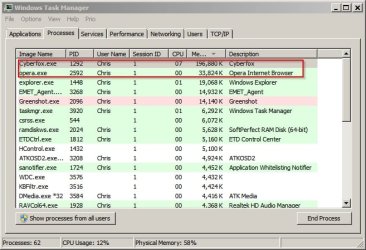
Your Opera & Firefox RAM usage does seem high though. (See screenshot from my machine) - Cyberfox = Firefox 64bit

Opera is 64 bit version.
 

Attachments

  • Task Manager.jpg
    Task Manager.jpg
    52.3 KB · Views: 22

My Computer My Computer

At a glance

Microsoft Windows 7 Home Premium 64-bit 7601 ...AMD C-60 APU with Radeon(tm) HD Graphics4.00 GBAMD Radeon HD 6290 Graphics
Computer type
Laptop
Computer Manufacturer/Model Number
ASUS
OS
Microsoft Windows 7 Home Premium 64-bit 7601 Multiprocessor Free Service Pack 1
CPU
AMD C-60 APU with Radeon(tm) HD Graphics
Motherboard
ASUSTeK COMPUTER INC. X501U
Memory
4.00 GB
Graphics Card(s)
AMD Radeon HD 6290 Graphics
Sound Card
(1) AMD High Definition Audio Device (2) Realtek High Defi
Screen Resolution
1366 x 768 x 32 bits (4294967296 colors) @ 60 Hz
Hard Drives
Hitachi HTS545050A7E380 SATA Disk Device
Antivirus
Comodo CIS & FW, SecureAplus App Whitelisting, Threatfire
Browser
Cyberfox 64bit, Opera 64bit, Airfox
Other Info
Spy-The-Spy, HitmanPro.Alert, Norton Connect Safe, MJRegWatcher, BitDefender TrafficLight, Voodoo Shield, Zemana AntiMalware
1Gb RAM usage with nothing much running is not high in my opinion.

Your Opera & Firefox RAM usage does seem high though.

Opera is 64 bit version.

Thanks. I wish I had noted the RAM use when the computer was right out of the box (2-1/2 years ago). I guess that raises the question of what - if anything - can slow down your computer without obviously high RAM use. Either way, my educated guess is that the process list is worth looking into, so I started this thread.

Also, the computer is slow even without Opera or Firefox running. That being said, my Opera will only go down to 100 K with no tabs open at all. I wonder if it's the email and news feeds. Firefox with no tabs open and no add-ons is 100 K; with add-ons it's 300 K. However they're all deal-breaker essential for me personally :(
 

My Computer My Computer

At a glance

7 Pro 64Intel Core i5-2540M 2.6 GHz6 GB RAM
Computer type
Laptop
Computer Manufacturer/Model Number
Lenovo Thinkpad T520
OS
7 Pro 64
CPU
Intel Core i5-2540M 2.6 GHz
Memory
6 GB RAM
Hard Drives
1 Tb

My Computer My Computer

At a glance

Windows 10 Pro. 64/ version 1709 Windows 7 Pr...Intel i7-6800K @ 4.3Corsair Platinum 16 gig @2400EVGA GTX 1070 OC
Computer type
PC/Desktop
Computer Manufacturer/Model Number
Home made Desktop
OS
Windows 10 Pro. 64/ version 1709 Windows 7 Pro/64
CPU
Intel i7-6800K @ 4.3
Motherboard
ASUS X-99 Deluxe II
Memory
Corsair Platinum 16 gig @2400
Graphics Card(s)
EVGA GTX 1070 OC
Monitor(s) Displays
Asus 27" LED LCD/VE278Q
Screen Resolution
1920-1080 or 1280-720 HDMI
Hard Drives
INTEL SSD 730-240 Gb Sata 3.0/
PSU
EVGA Platium 1200W
Case
Phanteks Luxe Tempered Glass 8 fans/ one radiator
Cooling
XSPC/ Water Cooled CPU
Keyboard
Das 4 Professional
Mouse
Logitech M705/MX Anywhere 2-S
Internet Speed
100 mbits
Antivirus
Microsoft Security Essentials/ Malwarebytes Premium 3.0/ SAS
Browser
I.E. 11 default/Firefox/ ISP Time Warner Cable/Spectrum
Other Info
LG BluRay Burner/
Sound system-KLipsch-THX/
Icy Dock ssd Hot Swap bays.
I see you have two threads with the same subject and problem.

Yes - this one is winding down and the new one - unlike this one - is specifically focused on the running processes and finding out whether there are too many of them, or malicious ones. This thread was very helpful in narrowing down the question.
 

My Computer My Computer

At a glance

7 Pro 64Intel Core i5-2540M 2.6 GHz6 GB RAM
Computer type
Laptop
Computer Manufacturer/Model Number
Lenovo Thinkpad T520
OS
7 Pro 64
CPU
Intel Core i5-2540M 2.6 GHz
Memory
6 GB RAM
Hard Drives
1 Tb
Back
Top