Will be installing Win 7 & win 8 on one hard drive, suggestions?

TheBlindMan12v

New member
Local time
7:22 AM
Messages
23
Location
Southern California
Hello all, I currently have a Emachines et1331g-03W Windows 7 64bit desktop and I want to purchase a1-2TB hard drive. I will be reinstalling Windows 7 on it and creating another partition and will be installing windows 8 on it. I want a dual-boot configuration so I can learn how to use Windows 8 while using Windows 7 as my default operating system. Can you guys please suggest me a reliable hard drive that will work with my computer? Thanks
 

My Computer My Computer

At a glance

Dual boot config with Windows 7 Home premium ...FactoryFactoryFactory
Computer type
PC/Desktop
Computer Manufacturer/Model Number
EMachines ET1331G-03W
OS
Dual boot config with Windows 7 Home premium 64bit & Windows 8.1 64bit
CPU
Factory
Motherboard
Factory
Memory
Factory
Graphics Card(s)
Factory
Hard Drives
Factory
Antivirus
Microsoft security essentials
Browser
Internet explore 10
If you want to just learn Windows 8 I would just use Oracle VM VirtualBox or a similar VM workstation.


But if you are set on re-installing i would go with a WD Black 2Tb.
 

My Computer My Computer

At a glance

Windows 7 Home Premiumi7-470016GBNav
Computer type
PC/Desktop
Computer Manufacturer/Model Number
custom build
OS
Windows 7 Home Premium
CPU
i7-4700
Memory
16GB
Graphics Card(s)
Nav
Hard Drives
120 ssd
1000
1000
Antivirus
Microsoft Esse
Browser
Google Chrome
I use a screen reader (JAWS) to access the computer. Not sure if my software will work with the software you mentioned. Thanks for the suggestion. Hope to hear some more. Thanks again.
 

My Computer My Computer

At a glance

Dual boot config with Windows 7 Home premium ...FactoryFactoryFactory
Computer type
PC/Desktop
Computer Manufacturer/Model Number
EMachines ET1331G-03W
OS
Dual boot config with Windows 7 Home premium 64bit & Windows 8.1 64bit
CPU
Factory
Motherboard
Factory
Memory
Factory
Graphics Card(s)
Factory
Hard Drives
Factory
Antivirus
Microsoft security essentials
Browser
Internet explore 10
For someone that doesn't game, would it be overkill to purchase a solid state drive big enough to install win 7 and win 8 on it? Then I can use another hard drive for storatge purposes? Not sure how all of that stuff would work though since the "documents, pictures videos etc folders will be installed on the solid state drive win 7 partition? Unless I can get those folders transferred to the storage hard drive. Not sure if this is making sense to you guys. New to this....
 

My Computer My Computer

At a glance

Dual boot config with Windows 7 Home premium ...FactoryFactoryFactory
Computer type
PC/Desktop
Computer Manufacturer/Model Number
EMachines ET1331G-03W
OS
Dual boot config with Windows 7 Home premium 64bit & Windows 8.1 64bit
CPU
Factory
Motherboard
Factory
Memory
Factory
Graphics Card(s)
Factory
Hard Drives
Factory
Antivirus
Microsoft security essentials
Browser
Internet explore 10

My Computer My Computer

At a glance

Vista, Windows7, Mint Mate, Zorin, Windows 8from 1.6GHz Duo to i7
Computer Manufacturer/Model Number
HP, Dell, Gateway, Toshiba - 4 laptops and 2 desktops
OS
Vista, Windows7, Mint Mate, Zorin, Windows 8
CPU
from 1.6GHz Duo to i7
Monitor(s) Displays
2x HP w2207
Hard Drives
5x HDD, 7x SSD, 12x Externals
Keyboard
with trackball - no mices
Mouse
Trackball mice
Internet Speed
DSL 6000
Interesting video. Will my desktop accept two hard drives in case I were to go with the solid state hard drive for the operating systems and traditional hard drive for storage?
 

My Computer My Computer

At a glance

Dual boot config with Windows 7 Home premium ...FactoryFactoryFactory
Computer type
PC/Desktop
Computer Manufacturer/Model Number
EMachines ET1331G-03W
OS
Dual boot config with Windows 7 Home premium 64bit & Windows 8.1 64bit
CPU
Factory
Motherboard
Factory
Memory
Factory
Graphics Card(s)
Factory
Hard Drives
Factory
Antivirus
Microsoft security essentials
Browser
Internet explore 10
Interesting video. Will my desktop accept two hard drives in case I were to go with the solid state hard drive for the operating systems and traditional hard drive for storage?
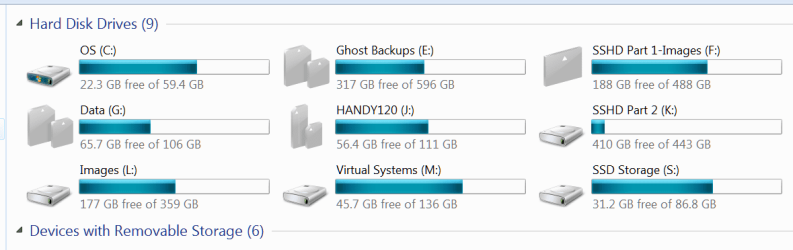
Of course. Your system can access as many harddrives as you attach. Look at mine - they are all accessible. Only OS (C) is on the SSD. The rest are internal or external disks. The virtual Windows 8.1 you saw in the video is running from M which is an external SSD. There are 6 other systems on M - all those are Linux distros. Here is some more about virtual systems.
 

Attachments

  • 2014-01-30_1135.png
    2014-01-30_1135.png
    21.2 KB · Views: 0

My Computer My Computer

At a glance

Vista, Windows7, Mint Mate, Zorin, Windows 8from 1.6GHz Duo to i7
Computer Manufacturer/Model Number
HP, Dell, Gateway, Toshiba - 4 laptops and 2 desktops
OS
Vista, Windows7, Mint Mate, Zorin, Windows 8
CPU
from 1.6GHz Duo to i7
Monitor(s) Displays
2x HP w2207
Hard Drives
5x HDD, 7x SSD, 12x Externals
Keyboard
with trackball - no mices
Mouse
Trackball mice
Internet Speed
DSL 6000
Back
Top