
Solved Coprocessor Driver Nvidia for MSI laptop

OldCorvette

New member
Local time
8:53 AM
Messages
9
Having done some searches online before landing here.. it is evident that finding this coprocessor driver has been an issue accross several laptop manufacturers.

I am running W7 Home Premium 64 bit

Here are my laptop's specs:

laptop- MSI A6000
chipset_ As stated in MSI literature- MCP79MVL (nvidia)
motherboard- As stated by Speccy utility/tool by Pirfoform- MS-1683 (micro star international)
GPU- Nvidia 8200M G

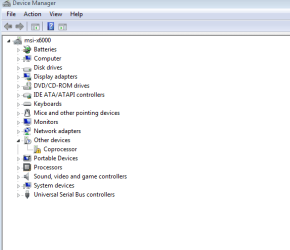
The issue: Under Device Manager scroll down to Coprocessor .. Yellow triangle warning and exclamation mark
in the middle. Upon checking detailed info from the device manager program it says driver out of date or missing.

I have installed Nvidia Geforce Experience (Nvidia's own driver updater/installer) software which updates automatically.. I did a manual update yesterday after running a Nvidia scan off Nvidia's website.. it updated everything but the coprocessor. Which is still in warning phase.

I have read some mention that perhaps a Vista 64 driver would work..

I need help
 

My Computer My Computer

Computer type
Laptop
Computer Manufacturer/Model Number
MSI
OS
Win 7 64 Home Premium
CPU
T9900
Motherboard
MS-1683 - according to Piroform Speccy
Memory
4gb
Graphics Card(s)
MSI 8200M G
Hard Drives
Chipset stated in literatrue - MCP79MVL
That's an interesting problem since the coprocessor is normally part of the CPU. Can you post a snip of the hardware manager showing the device? In the mean time, run SFC /scannow from an elevated command prompt (Option two). This will check to make sure all system drivers are valid according to shadow copies.
 

My Computer My Computer

Computer type
PC/Desktop
Computer Manufacturer/Model Number
Built 2/11/2011
OS
Windows 7 Pro-x64
CPU
i7-2600 3.4GHz - 3.8GHz Turbo
Motherboard
Intel DH67BL-B3
Memory
8Gb - 2x4GB, Muskin 991770 PC3-1333
Graphics Card(s)
Integrated Intel HD 2000
Sound Card
Integrated Intel 10.1 HD, RealTek ALC892
Monitor(s) Displays
Asus LCD VH222H, Haier HL24XSL2a
Screen Resolution
1920x1080, 1920x1080
Hard Drives
Crucial SSD C300-128Gb,
Western Digital WD5002AALX - 500Gb,
Western Digital WD7501AALS - 750Gb
PSU
Seasonic 650W 80+ Gold Modular
Case
Rosewill Defender
Cooling
Stock CPU, Four 120mm case fans, PCH fan added
Keyboard
Logitech EX100 Y-RBH94 Wireless
Mouse
Logitech EX100 M-RCE95 Wireless
Internet Speed
3.0/1.5 Mbs
Antivirus
Microsoft Security Essentials
Browser
Microsoft Internet Explorer 11
Other Info
Antec Veris Premier-Multimedia IR Station,
Cyber Accoustics-3602 Speakers,
AFT XM-5U Card Reader,
Hauppauge TV-HVR-2250,
Sony LX300 USB Turntable
Hi there .. Try Downloading the Chipset Driver from the MSI Website ..
 

My Computer My Computer

Computer Manufacturer/Model Number
W530-3630QM1
OS
windows 7 home 64bit
CPU
INTEL-CORE I7
Memory
16GB
Hard Drives
750GB
Browser
Chrome
My processor is a Core 2 Duo E8435 @ 3.06ghz .. I am an enthusiast, and can follow instructions but I am not a IT pro.
I have used the command line but may need more detail.. "elevated".. you mean right click n run as admin? Sorry, I'm a layman here and my knowledge is confined to self/fixes preformed over time found online.
The Google search of "Coprocessor 8200M G" unleashes a treasure trove from people with many different pc makes having this Coprocessor error/alert.
Here is the path and description.. Start-Computer-System Properties-Device Manager- Scroll Down to Coprocessor and there is a yellow triangle w exclamation and an error listed. Code 28 which is a driver code.
 

My Computer My Computer

Computer type
Laptop
Computer Manufacturer/Model Number
MSI
OS
Win 7 64 Home Premium
CPU
T9900
Motherboard
MS-1683 - according to Piroform Speccy
Memory
4gb
Graphics Card(s)
MSI 8200M G
Hard Drives
Chipset stated in literatrue - MCP79MVL
That's an interesting problem since the coprocessor is normally part of the CPU. Can you post a snip of the hardware manager showing the device? In the mean time, run SFC /scannow from an elevated command prompt (Option two). This will check to make sure all system drivers are valid according to shadow copies.

see above post
 

My Computer My Computer

Computer type
Laptop
Computer Manufacturer/Model Number
MSI
OS
Win 7 64 Home Premium
CPU
T9900
Motherboard
MS-1683 - according to Piroform Speccy
Memory
4gb
Graphics Card(s)
MSI 8200M G
Hard Drives
Chipset stated in literatrue - MCP79MVL
Hi there .. Try Downloading the Chipset Driver from the MSI Website ..
MSI's site sucks .. pretty much.. I went to their site and to support/downloads.. tried searches on A6000, MCP79MVL, and MS-1683.. all yielded zero results.

I have an HP desktop and their site is very friendly in finding info/support for their products.. not the case with MSI unless I've done something wrong.
 

My Computer My Computer

Computer type
Laptop
Computer Manufacturer/Model Number
MSI
OS
Win 7 64 Home Premium
CPU
T9900
Motherboard
MS-1683 - according to Piroform Speccy
Memory
4gb
Graphics Card(s)
MSI 8200M G
Hard Drives
Chipset stated in literatrue - MCP79MVL
I'm still not clear on the device. Are you talking about a display adaptor or the numeric coprocessor in the CPU? The "path" doesn't help. I need to see YOUR device manager. Use the Snipping Tool to save an image of the DM area in question. Upload/Attach that image to your next message using the Paper Clip in the message tool ribbon.

Yes, elevated command prompt is Run as Administrator. Follow the instructions in the tutorial.

Added: You need to search the support area for your laptop model such as A6000. PC Manufacturers seldom list updates by motherboard. (Unless the motherboard was purchased separately.)
 
Last edited:

My Computer My Computer

Computer type
PC/Desktop
Computer Manufacturer/Model Number
Built 2/11/2011
OS
Windows 7 Pro-x64
CPU
i7-2600 3.4GHz - 3.8GHz Turbo
Motherboard
Intel DH67BL-B3
Memory
8Gb - 2x4GB, Muskin 991770 PC3-1333
Graphics Card(s)
Integrated Intel HD 2000
Sound Card
Integrated Intel 10.1 HD, RealTek ALC892
Monitor(s) Displays
Asus LCD VH222H, Haier HL24XSL2a
Screen Resolution
1920x1080, 1920x1080
Hard Drives
Crucial SSD C300-128Gb,
Western Digital WD5002AALX - 500Gb,
Western Digital WD7501AALS - 750Gb
PSU
Seasonic 650W 80+ Gold Modular
Case
Rosewill Defender
Cooling
Stock CPU, Four 120mm case fans, PCH fan added
Keyboard
Logitech EX100 Y-RBH94 Wireless
Mouse
Logitech EX100 M-RCE95 Wireless
Internet Speed
3.0/1.5 Mbs
Antivirus
Microsoft Security Essentials
Browser
Microsoft Internet Explorer 11
Other Info
Antec Veris Premier-Multimedia IR Station,
Cyber Accoustics-3602 Speakers,
AFT XM-5U Card Reader,
Hauppauge TV-HVR-2250,
Sony LX300 USB Turntable

My Computer My Computer

Computer Manufacturer/Model Number
W530-3630QM1
OS
windows 7 home 64bit
CPU
INTEL-CORE I7
Memory
16GB
Hard Drives
750GB
Browser
Chrome
That's an interesting problem since the coprocessor is normally part of the CPU. Can you post a snip of the hardware manager showing the device? In the mean time, run SFC /scannow from an elevated command prompt (Option two). This will check to make sure all system drivers are valid according to shadow copies.

Ok.. ran SFC/scannow as Admin.. "Windows Resource Protection did not find any integrity violations"

The Nvidia Geforce Experience scanner shows my drivers health at 100%

The E8435 is a socket P cpu that was made for Apple, I have been running it successfully for 2 years in
my MSI A6000. System Properties identifies it at E8435 .. Speccy by Piroform identifies it a an Intel T9900.. Thecommon assumption is that when Apple began using Intel cpus .. Intel rebranded several for use in their
computers. When I installed the E8435, at the time a T9900 was about $100 used on Ebay.. the 44w version
of the E8435 was $50 and I had read of successful installs of the E8435 in pc's.. As my install is 2 years old and performance has been outstanding.. outpacing some newer I3's and I5's I consider it a success.
 

My Computer My Computer

Computer type
Laptop
Computer Manufacturer/Model Number
MSI
OS
Win 7 64 Home Premium
CPU
T9900
Motherboard
MS-1683 - according to Piroform Speccy
Memory
4gb
Graphics Card(s)
MSI 8200M G
Hard Drives
Chipset stated in literatrue - MCP79MVL
My Computer My Computer

Computer type
PC/Desktop
Computer Manufacturer/Model Number
Built 2/11/2011
OS
Windows 7 Pro-x64
CPU
i7-2600 3.4GHz - 3.8GHz Turbo
Motherboard
Intel DH67BL-B3
Memory
8Gb - 2x4GB, Muskin 991770 PC3-1333
Graphics Card(s)
Integrated Intel HD 2000
Sound Card
Integrated Intel 10.1 HD, RealTek ALC892
Monitor(s) Displays
Asus LCD VH222H, Haier HL24XSL2a
Screen Resolution
1920x1080, 1920x1080
Hard Drives
Crucial SSD C300-128Gb,
Western Digital WD5002AALX - 500Gb,
Western Digital WD7501AALS - 750Gb
PSU
Seasonic 650W 80+ Gold Modular
Case
Rosewill Defender
Cooling
Stock CPU, Four 120mm case fans, PCH fan added
Keyboard
Logitech EX100 Y-RBH94 Wireless
Mouse
Logitech EX100 M-RCE95 Wireless
Internet Speed
3.0/1.5 Mbs
Antivirus
Microsoft Security Essentials
Browser
Microsoft Internet Explorer 11
Other Info
Antec Veris Premier-Multimedia IR Station,
Cyber Accoustics-3602 Speakers,
AFT XM-5U Card Reader,
Hauppauge TV-HVR-2250,
Sony LX300 USB Turntable
I'm still not clear on the device. Are you talking about a display adaptor or the numeric coprocessor in the CPU? The "path" doesn't help. I need to see YOUR device manager. Use the Snipping Tool to save an image of the DM area in question. Upload/Attach that image to your next message using the Paper Clip in the message tool ribbon.

Yes, elevated command prompt is Run as Administrator. Follow the instructions in the tutorial.

Added: You need to search the support area for your laptop model such as A6000. PC Manufacturers seldom list updates by motherboard. (Unless the motherboard was purchased separately.)
Multiple searches under laptop model, motherboard, and chipset were done at MSI as itemized/stated above.

snippet attatched
 

Attachments

  • CoproError.PNG
    CoproError.PNG
    9.9 KB · Views: 10

My Computer My Computer

Computer type
Laptop
Computer Manufacturer/Model Number
MSI
OS
Win 7 64 Home Premium
CPU
T9900
Motherboard
MS-1683 - according to Piroform Speccy
Memory
4gb
Graphics Card(s)
MSI 8200M G
Hard Drives
Chipset stated in literatrue - MCP79MVL
I found the Drivers on one of MSI Forums
 

My Computer My Computer

Computer Manufacturer/Model Number
W530-3630QM1
OS
windows 7 home 64bit
CPU
INTEL-CORE I7
Memory
16GB
Hard Drives
750GB
Browser
Chrome

My Computer My Computer

Computer type
Laptop
Computer Manufacturer/Model Number
MSI
OS
Win 7 64 Home Premium
CPU
T9900
Motherboard
MS-1683 - according to Piroform Speccy
Memory
4gb
Graphics Card(s)
MSI 8200M G
Hard Drives
Chipset stated in literatrue - MCP79MVL
I found the Drivers on one of MSI Forums

ok.. the one that is still downloading right now came from MSI

it is:
cs_mcp79mvl_15.5_w764.zip

if you have another one please list it.. if this does not work I will try it.
 

My Computer My Computer

Computer type
Laptop
Computer Manufacturer/Model Number
MSI
OS
Win 7 64 Home Premium
CPU
T9900
Motherboard
MS-1683 - according to Piroform Speccy
Memory
4gb
Graphics Card(s)
MSI 8200M G
Hard Drives
Chipset stated in literatrue - MCP79MVL
No its the same one .. The code 28 bothers me there may not be a solution for this issue
 

My Computer My Computer

Computer Manufacturer/Model Number
W530-3630QM1
OS
windows 7 home 64bit
CPU
INTEL-CORE I7
Memory
16GB
Hard Drives
750GB
Browser
Chrome
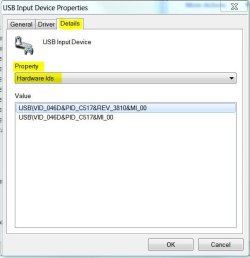
I'm curious about the details of that device. If you would, right click on the device (Device Manager) and select Properties. On the properties window, click on the Details Tab. Just below "Property" there's a drop-down menu bar. Click on the down-arrow and select Hardware Ids. Right click on the first entry under Value and copy. Paste that entry on your next message.

The screen will look similar to this:
 

Attachments

  • Hardware IDs.JPG
    Hardware IDs.JPG
    30.5 KB · Views: 8

My Computer My Computer

Computer type
PC/Desktop
Computer Manufacturer/Model Number
Built 2/11/2011
OS
Windows 7 Pro-x64
CPU
i7-2600 3.4GHz - 3.8GHz Turbo
Motherboard
Intel DH67BL-B3
Memory
8Gb - 2x4GB, Muskin 991770 PC3-1333
Graphics Card(s)
Integrated Intel HD 2000
Sound Card
Integrated Intel 10.1 HD, RealTek ALC892
Monitor(s) Displays
Asus LCD VH222H, Haier HL24XSL2a
Screen Resolution
1920x1080, 1920x1080
Hard Drives
Crucial SSD C300-128Gb,
Western Digital WD5002AALX - 500Gb,
Western Digital WD7501AALS - 750Gb
PSU
Seasonic 650W 80+ Gold Modular
Case
Rosewill Defender
Cooling
Stock CPU, Four 120mm case fans, PCH fan added
Keyboard
Logitech EX100 Y-RBH94 Wireless
Mouse
Logitech EX100 M-RCE95 Wireless
Internet Speed
3.0/1.5 Mbs
Antivirus
Microsoft Security Essentials
Browser
Microsoft Internet Explorer 11
Other Info
Antec Veris Premier-Multimedia IR Station,
Cyber Accoustics-3602 Speakers,
AFT XM-5U Card Reader,
Hauppauge TV-HVR-2250,
Sony LX300 USB Turntable
I found the Drivers on one of MSI Forums

ok.. the one that is still downloading right now came from MSI

it is:
cs_mcp79mvl_15.5_w764.zip

if you have another one please list it.. if this does not work I will try it.


Ok.. Problem is Solved.. I clicked on the link posted by Maxie in post #8.. the MSI CR600/drivers at the MSI site .. this led me to the chipset driver zip file mentioned in the quote above.. mcp79mvl (abbrev) .. It took about 15 mins to download that zip.. ran the application.. then the wizard.. rebooted.. Coprocessor Error message now gone.. Yellow warning and exclamation mark officially gone. Thanks so much for your help, I am selling my laptop and really didn't want it going out the door with any issues whatsover.. wanted it 100%.. and now it is.

Thank you Maxie and Carwiz..

Sad to see the old girl go as she was a helacious performer and I was and still am a Huge Core 2 fan.. had a Samsung 840 SSD installed with the 3.06/E8435 and she was a Freight Train.. blew my brother's I7/std. HDD out of the water in task completion times.
 

My Computer My Computer

Computer type
Laptop
Computer Manufacturer/Model Number
MSI
OS
Win 7 64 Home Premium
CPU
T9900
Motherboard
MS-1683 - according to Piroform Speccy
Memory
4gb
Graphics Card(s)
MSI 8200M G
Hard Drives
Chipset stated in literatrue - MCP79MVL
That's great! Glad you got it resolved and thanks for posting the Solved response. It should help many others with the same problem. +1 on your Reputation in case we see you again. ;)
 

My Computer My Computer

Computer type
PC/Desktop
Computer Manufacturer/Model Number
Built 2/11/2011
OS
Windows 7 Pro-x64
CPU
i7-2600 3.4GHz - 3.8GHz Turbo
Motherboard
Intel DH67BL-B3
Memory
8Gb - 2x4GB, Muskin 991770 PC3-1333
Graphics Card(s)
Integrated Intel HD 2000
Sound Card
Integrated Intel 10.1 HD, RealTek ALC892
Monitor(s) Displays
Asus LCD VH222H, Haier HL24XSL2a
Screen Resolution
1920x1080, 1920x1080
Hard Drives
Crucial SSD C300-128Gb,
Western Digital WD5002AALX - 500Gb,
Western Digital WD7501AALS - 750Gb
PSU
Seasonic 650W 80+ Gold Modular
Case
Rosewill Defender
Cooling
Stock CPU, Four 120mm case fans, PCH fan added
Keyboard
Logitech EX100 Y-RBH94 Wireless
Mouse
Logitech EX100 M-RCE95 Wireless
Internet Speed
3.0/1.5 Mbs
Antivirus
Microsoft Security Essentials
Browser
Microsoft Internet Explorer 11
Other Info
Antec Veris Premier-Multimedia IR Station,
Cyber Accoustics-3602 Speakers,
AFT XM-5U Card Reader,
Hauppauge TV-HVR-2250,
Sony LX300 USB Turntable
Most welcome glad you got it sorted
 

My Computer My Computer

Computer Manufacturer/Model Number
W530-3630QM1
OS
windows 7 home 64bit
CPU
INTEL-CORE I7
Memory
16GB
Hard Drives
750GB
Browser
Chrome
Back
Top