
Solved MBAM cannot remove "culprit" access to 5.45.64.145/5.45.69.131

dsperber is working on a friend's machine: Dell / Vista SP2
Many thanks for your summarizing the chronological essence of this thread.

Most significant "inflection point" regarding progress came on 2/2 at around 14:55PM when I ran HitmanPro and it found and removed MyWebSearch infection, which included the infected RPCSS.DLL as well as related Registry entries to launch it at system startup.

So any logs posted earlier in this thread should be viewed in the context of that 2/2 at 14:55PM turning point. Anything before that was with MyWebSearch still present, and anything after was "post-removal" by HitmanPro.

And then yesterday 2/3 per recommendation I ran SFC /SCANNOW. Apparently the fact that RPCSS.DLL was now missing from C:\Windows\System32 was discovered, and the "backup" version of RPCSS.DLL got restored from the 6002_18005 folder in C:\Windows\Winsxs. Unfortunately that version was itself the infected one. So I now had the infected version once again in C:\Windows\System32, though it appeared completely "harmless" since the necessary Registry entries to launch it into its evil state had actually been deleted on 2/2 by HitmanPro.

So I then again ran HitmanPro just to once again hopefully delete that infected version of RPCSS.DLL from C:\Windows\System32. This time HitmanPro discovered the backup version in the 6002_18005 folder (which it deleted, per its log) but it doesn't seem to have found and deleted it in C:\Windows\System32. I had thought it had disappeared from both locations following this step, but when I look now it appears to be back in C:\Windows\System32.

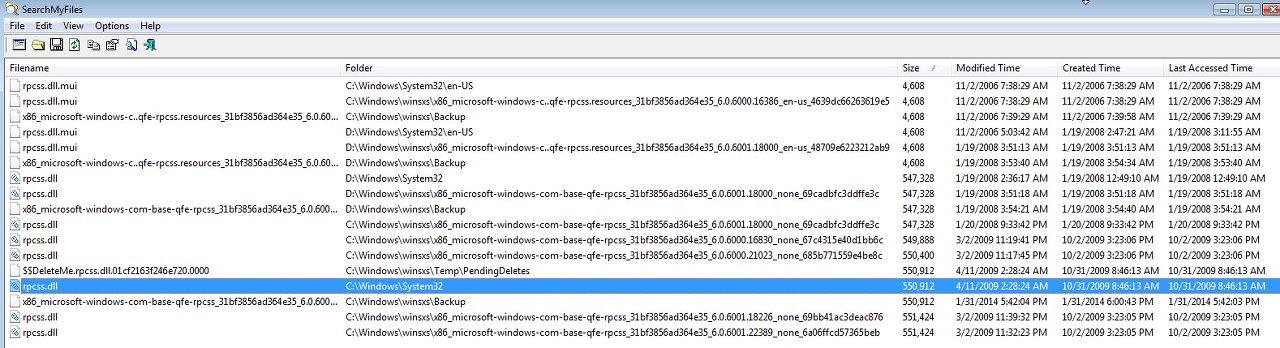
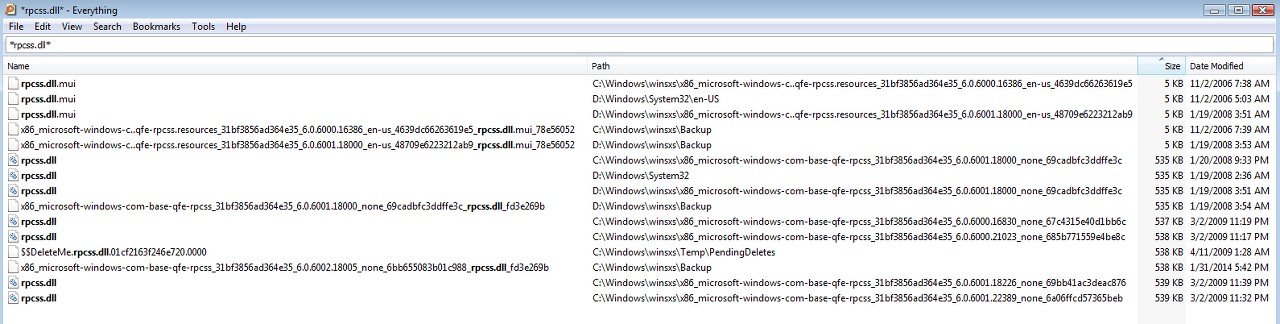
As you can see from the following screenshot, if we believe SearchMyFiles it appears that Windows is seemingly doing its own "restore" of the just-deleted version into C:\Windows\System32, perhaps caused by the effects of the SFC /SCANNOW. I admit I'm confused by the current state of things where for some reason SearchMyFiles discovers a version in C:\Windows\System32 whereas Everything and HitmanPro (just re-run again and latest log attached) do not.
1xmh.jpg


Furthermore, there is still that "$$DELETEME..." infected version in \Winsxs\Temp\PendingDelete which I don't know how it got there and is not being deleted by anything.
wjpg.jpg


The good news is that the infected version of RPCSS.DLL, no matter whether it's truly present or not in C:\Windows\System32, is apparently NOT ACTIVE. There are still no new "blocked IP" entries in the MBAM log, so the active malware definitely seems to be purged from the system.


A few more things observe, regarding the dates and sizes of the various versions of RPCSS.DLL now present on this Vista machine. The dates of the several infected versions of the file are misleading and inconsistent I think.

(1) Based on the D version it would appear that 547,328 is the true original size. And a date of either 1/19/2008 or 1/20/2008 is the correct original date per this Dell build.

(2) It looks like the original infected size of RPCSS.DLL was 549,888. This version is now living in backup folder 6000.16830 in \Winsxs.

(3) What looks like a second "decoy" infected version with size 549,888+512=550,400 is now living in backup folder 6000.21023 in \Winsxs.

(4) The true infected version with size 550,400+512=550,912 was previously stored in backup folder 6002.18005 but has now been deleted by a recent run of HitmanPro. But this infected version does seem to still somehow be present in C:\Windows\System32 according to SearchMyFiles, though it's not seen by Everything or HitmanPro (just re-run again). Quite a mystery here. In any case it is definitely NOT ACTIVE.

(5) Another "decoy" with size 550,912+512=551,424 is present in two backup folders, 6001.18226 as well as 6001.22389.

(6) None of the "decoys" gets detected by any scan, and they remain present. Only the 550,912 version has ever been detected by HitmanPro... and this program is currently convinced that it is no longer present.


The malware removal guide has more scanners in it than there are logs posted.

Can you backfill the logs for the scanners in red:
Kaspersky TDSSKiller
RKill

Malwarebytes Anti-Malware Free
HitmanPro
RogueKiller
AdwCleaner
Junkware Removal Tool
Checking the system after the clean
ESET Online Scanner.
Emsisoft Emergency Kit.
The TDSSKiller log came from running the program in "Windows safe mode" with my friend's manual assistance. He told me the program said NOTHING FOUND. If there was a log from this execution I'm afraid it's lost or was never created. But I don't have it.

I'm attaching the requested additional logs for RKill, RogueKiller, and Junkware Removal Tool, along with the most recent HitmanPro log (from just a little while ago).

I hadn't run Emsisoft, but am doing so now. It seems fairly slow so I'll add its log to this post when if finally finishes.
 

Attachments

My Computer My Computer

At a glance

Windows 7 Pro x64 (1), Win7 Pro X64 (2)i5-3350p 3.1Ghz/6MB-cache (1); E8400 3.0Ghz/6...8GB PC3-12800 DDR3 (1); 4GB PC3-10600 DDR3 (2)ATI HD7750 (1), (see TV cards); ATI R7 250 (2)
Computer type
PC/Desktop
Computer Manufacturer/Model Number
Home-built, two systems (1) and (2)
OS
Windows 7 Pro x64 (1), Win7 Pro X64 (2)
CPU
i5-3350p 3.1Ghz/6MB-cache (1); E8400 3.0Ghz/6MB-cache (2)
Motherboard
ASUS P8Z77-V Pro (1); ASUS P5Q3 (2)
Memory
8GB PC3-12800 DDR3 (1); 4GB PC3-10600 DDR3 (2)
Graphics Card(s)
ATI HD7750 (1), (see TV cards); ATI R7 250 (2)
Sound Card
Realtek ALC892 HD Audio (1); Realtek ALC1200 HD Audio (2)
Monitor(s) Displays
Eizo HD2441W LCD, Eizo S2433W (1); Eizo 24" S2433W (2)
Screen Resolution
1920x1200, 1920x1200 (1); 1920x1200 (2)
Hard Drives
(1) 1TB SATA-II (7200RPM), 2x2TB SATA-III (7200RPM), 250GB SATA-III (10000RPM) for OS; 2x2TB external USB 3.0

(2) 320GB SATA-II (7200RPM), 750GB SATA-II (7200RPM), 150GB SATA-II (10000RPM) for OS; 2TB external USB 3.0
PSU
Nesteq ECS-6001 600W (1); Nesteq ECS-5001 500W (2)
Case
Acousti-Case 360 (1) and (2)
Cooling
Noctua NH-U12P SE2 for CPU, 2x120mm case fans (1) and (2)
Keyboard
IBM PS/2 (1) and (2)
Mouse
Logitech MX Revolution wireless (1); Microsoft wired (2)
Internet Speed
100mbps down / 10mbps up
Antivirus
Microsoft Security Essentials; Malwarebyte Anti-Malware Pro
Browser
Firefox
Other Info
Ceton InfiniTV 4-tuner cablecard-enabled TV card as well as Hauppauge HVR-2250 OTA/ATSC 2-tuner TV card in (1), running under Win7 WMC
dsperber,

tom982's guidance will fix the rpcss.dll issue, however, since you already downloaded and ran FRST, please do the following:

Please run FRST again and type the following in the input box after Search: rpcss.dll
Click the Search button

When done, a report, Search.txt, is created.

Please post the results of the Search.txt in your reply.
Attached.

Interestingly, FRST seems to confirm SearchMyFiles discovery of RPCSS.DLL (the infected version size) in C:\Windows\System32 whereas it now appears undiscovered by both Everything and HitmanPro. This is only since running SFC /SCANNOW yesterday.

Oh well. Hopefully Tom982's guidance will get this all sorted out and end up with the correct original RPCSS.DLL restored into C:\Windows\System32 once and for all.

Note that the 1/20/2008 version in backup folder 6001.18000, size 547,328 bytes, is the true original Vista version that we ultimately want to restore.
 

Attachments

My Computer My Computer

At a glance

Windows 7 Pro x64 (1), Win7 Pro X64 (2)i5-3350p 3.1Ghz/6MB-cache (1); E8400 3.0Ghz/6...8GB PC3-12800 DDR3 (1); 4GB PC3-10600 DDR3 (2)ATI HD7750 (1), (see TV cards); ATI R7 250 (2)
Computer type
PC/Desktop
Computer Manufacturer/Model Number
Home-built, two systems (1) and (2)
OS
Windows 7 Pro x64 (1), Win7 Pro X64 (2)
CPU
i5-3350p 3.1Ghz/6MB-cache (1); E8400 3.0Ghz/6MB-cache (2)
Motherboard
ASUS P8Z77-V Pro (1); ASUS P5Q3 (2)
Memory
8GB PC3-12800 DDR3 (1); 4GB PC3-10600 DDR3 (2)
Graphics Card(s)
ATI HD7750 (1), (see TV cards); ATI R7 250 (2)
Sound Card
Realtek ALC892 HD Audio (1); Realtek ALC1200 HD Audio (2)
Monitor(s) Displays
Eizo HD2441W LCD, Eizo S2433W (1); Eizo 24" S2433W (2)
Screen Resolution
1920x1200, 1920x1200 (1); 1920x1200 (2)
Hard Drives
(1) 1TB SATA-II (7200RPM), 2x2TB SATA-III (7200RPM), 250GB SATA-III (10000RPM) for OS; 2x2TB external USB 3.0

(2) 320GB SATA-II (7200RPM), 750GB SATA-II (7200RPM), 150GB SATA-II (10000RPM) for OS; 2TB external USB 3.0
PSU
Nesteq ECS-6001 600W (1); Nesteq ECS-5001 500W (2)
Case
Acousti-Case 360 (1) and (2)
Cooling
Noctua NH-U12P SE2 for CPU, 2x120mm case fans (1) and (2)
Keyboard
IBM PS/2 (1) and (2)
Mouse
Logitech MX Revolution wireless (1); Microsoft wired (2)
Internet Speed
100mbps down / 10mbps up
Antivirus
Microsoft Security Essentials; Malwarebyte Anti-Malware Pro
Browser
Firefox
Other Info
Ceton InfiniTV 4-tuner cablecard-enabled TV card as well as Hauppauge HVR-2250 OTA/ATSC 2-tuner TV card in (1), running under Win7 WMC
This will fix up your SFC corruption :)

SFCFix Script

Warning: this fix is specific to the user in this thread. No one else should follow these instructions as it may cause more harm than good. If you are after assistance, please start a thread of your own.

  1. Download SFCFix.exe (by niemiro) and save this to your Desktop.
  2. Download the file below, SFCFix.zip, and save this to your Desktop. Ensure that this file is named SFCFix.zip - do not rename it.
  3. Save any open documents and close all open windows.
  4. On your Desktop, you should see two files: SFCFix.exe and SFCFix.zip.
  5. Drag the file SFCFix.zip onto the file SFCFix.exe and release it.
  6. SFCFix will now process the script.
  7. Upon completion, a file should be created on your Desktop: SFCFix.txt.
  8. Copy (Ctrl+C) and Paste (Ctrl+V) the contents of this file into your next post for me to analyse please - put [CODE][/CODE] tags around the log to break up the text.

https://dl.dropboxusercontent.com/u/16537616/Fixes/SFCFix/Scripts/dsperber/SFCFix.zip
Tom,

Much appreciation for your help and guidance.

I haven't run this yet as the Emsisoft scan is still running on the infected laptop. But I've looked inside the SFCFix.zip file and am curious about its contents. I've never used these SFCFix tools before and don't yet have an understanding about what it's trying to do.

But looking inside the zip file it appears that you have the 6002.18005 backup folder (same as is on the Vista laptop), with a copy of RPCSS.DLL that is dated 4/11/2009 and has size 550,400. Actually, that isn't the original content of that backup folder from the Vista laptop. The original version of RPCSS.DLL that was in there was a duplicate of the true infected version living in C:\Windows\System32 and which got purged by HitmanPro, and was originally of size 550,912 bytes. That is the size of the infected RPCSS.DLL which along with the critical Registry entries was causing the original problem.

Again, I don't know what your goal here is, but I believe that this version is actually a "cousin", i.e. is "one decoy removed" (i.e. 550,912 - 512 = 550,400) from the true 550,912 infected version which is what was found and cleansed away by HitmanPro. I don't believe this 550,400 version is correct.

I would have expected to see the original Vista version of size 547,328 in your "fix" package, rather than an incorrectly sized "cousin of the infected 550,912 version". Am I wrong? Do I not understand what will actually happen via SFCFix and this incorrect 550,400 version of RPCSS.DLL?

Or is this 550,400 version from Vista SP2??

Is this my ignorance showing? I'd like to understand what SFCFix will do when I drop the script onto it, and I'm puzzled by the version of RPCSS.DLL that I see inside that ZIP.

Can you please explain what's going to happen here.

Many thanks again.
 

My Computer My Computer

At a glance

Windows 7 Pro x64 (1), Win7 Pro X64 (2)i5-3350p 3.1Ghz/6MB-cache (1); E8400 3.0Ghz/6...8GB PC3-12800 DDR3 (1); 4GB PC3-10600 DDR3 (2)ATI HD7750 (1), (see TV cards); ATI R7 250 (2)
Computer type
PC/Desktop
Computer Manufacturer/Model Number
Home-built, two systems (1) and (2)
OS
Windows 7 Pro x64 (1), Win7 Pro X64 (2)
CPU
i5-3350p 3.1Ghz/6MB-cache (1); E8400 3.0Ghz/6MB-cache (2)
Motherboard
ASUS P8Z77-V Pro (1); ASUS P5Q3 (2)
Memory
8GB PC3-12800 DDR3 (1); 4GB PC3-10600 DDR3 (2)
Graphics Card(s)
ATI HD7750 (1), (see TV cards); ATI R7 250 (2)
Sound Card
Realtek ALC892 HD Audio (1); Realtek ALC1200 HD Audio (2)
Monitor(s) Displays
Eizo HD2441W LCD, Eizo S2433W (1); Eizo 24" S2433W (2)
Screen Resolution
1920x1200, 1920x1200 (1); 1920x1200 (2)
Hard Drives
(1) 1TB SATA-II (7200RPM), 2x2TB SATA-III (7200RPM), 250GB SATA-III (10000RPM) for OS; 2x2TB external USB 3.0

(2) 320GB SATA-II (7200RPM), 750GB SATA-II (7200RPM), 150GB SATA-II (10000RPM) for OS; 2TB external USB 3.0
PSU
Nesteq ECS-6001 600W (1); Nesteq ECS-5001 500W (2)
Case
Acousti-Case 360 (1) and (2)
Cooling
Noctua NH-U12P SE2 for CPU, 2x120mm case fans (1) and (2)
Keyboard
IBM PS/2 (1) and (2)
Mouse
Logitech MX Revolution wireless (1); Microsoft wired (2)
Internet Speed
100mbps down / 10mbps up
Antivirus
Microsoft Security Essentials; Malwarebyte Anti-Malware Pro
Browser
Firefox
Other Info
Ceton InfiniTV 4-tuner cablecard-enabled TV card as well as Hauppauge HVR-2250 OTA/ATSC 2-tuner TV card in (1), running under Win7 WMC
Ok. The EMSISoft scan finally finished. Log attached.

Very strange.

(1) It found the 6002.18005 backup folder version of RPCSS.DLL (and deleted it), which had presumably been deleted by HitmanPro. This version did exist previously, but presumably no longer exists and is undetected by both SearchMyFiles and Everything, as well as FRST and HitmanPro.

So how can it now be found by EMSISoft if it's deleted??

(2) But it did not find the C:\Windows\System32 version of RPCSS.DLL that SearchMyFiles and FRST currently sees and that HitmanPro and Everything do not see.

How can this file be "visible" to some scans and "invisible" to others? Seems the file is either active and present in the file system and "visible", or it is deleted and gone from the file system and should not be seen by any tool. How can it be both??

And... WHAT IS THAT $$DELETEME... version in \Winsxs\Temp\PendingDeletes (see my screenshot above in post 61)?? Who created that, and why didn't it ever actually get deleted?? Is it some "quarantine" version from SFC or some other tool? How is it supposed to be deleted, as I cannot ("access denied")?

Anyway, attached is the requested log.
 

Attachments

My Computer My Computer

At a glance

Windows 7 Pro x64 (1), Win7 Pro X64 (2)i5-3350p 3.1Ghz/6MB-cache (1); E8400 3.0Ghz/6...8GB PC3-12800 DDR3 (1); 4GB PC3-10600 DDR3 (2)ATI HD7750 (1), (see TV cards); ATI R7 250 (2)
Computer type
PC/Desktop
Computer Manufacturer/Model Number
Home-built, two systems (1) and (2)
OS
Windows 7 Pro x64 (1), Win7 Pro X64 (2)
CPU
i5-3350p 3.1Ghz/6MB-cache (1); E8400 3.0Ghz/6MB-cache (2)
Motherboard
ASUS P8Z77-V Pro (1); ASUS P5Q3 (2)
Memory
8GB PC3-12800 DDR3 (1); 4GB PC3-10600 DDR3 (2)
Graphics Card(s)
ATI HD7750 (1), (see TV cards); ATI R7 250 (2)
Sound Card
Realtek ALC892 HD Audio (1); Realtek ALC1200 HD Audio (2)
Monitor(s) Displays
Eizo HD2441W LCD, Eizo S2433W (1); Eizo 24" S2433W (2)
Screen Resolution
1920x1200, 1920x1200 (1); 1920x1200 (2)
Hard Drives
(1) 1TB SATA-II (7200RPM), 2x2TB SATA-III (7200RPM), 250GB SATA-III (10000RPM) for OS; 2x2TB external USB 3.0

(2) 320GB SATA-II (7200RPM), 750GB SATA-II (7200RPM), 150GB SATA-II (10000RPM) for OS; 2TB external USB 3.0
PSU
Nesteq ECS-6001 600W (1); Nesteq ECS-5001 500W (2)
Case
Acousti-Case 360 (1) and (2)
Cooling
Noctua NH-U12P SE2 for CPU, 2x120mm case fans (1) and (2)
Keyboard
IBM PS/2 (1) and (2)
Mouse
Logitech MX Revolution wireless (1); Microsoft wired (2)
Internet Speed
100mbps down / 10mbps up
Antivirus
Microsoft Security Essentials; Malwarebyte Anti-Malware Pro
Browser
Firefox
Other Info
Ceton InfiniTV 4-tuner cablecard-enabled TV card as well as Hauppauge HVR-2250 OTA/ATSC 2-tuner TV card in (1), running under Win7 WMC
Can you upload a full CBS log please? Then I can explain everything and prove to you it's the right file :)

C:\Windows\Logs\CBS\CBS.log

Tom
 

My Computer My Computer

At a glance

Windows 8.1 Pro x64Intel i7 3770K @4.5GHzCorsair Vengeance 2x4GB DDR3 1600MHz Low Prof...Gigabyte Radeon HD 7850 (2GB GDDR5)
Computer type
PC/Desktop
Computer Manufacturer/Model Number
Build #1
OS
Windows 8.1 Pro x64
CPU
Intel i7 3770K @4.5GHz
Motherboard
ASUS P8Z77-V PRO
Memory
Corsair Vengeance 2x4GB DDR3 1600MHz Low Profile (White)
Graphics Card(s)
Gigabyte Radeon HD 7850 (2GB GDDR5)
Sound Card
Integrated on motherboard
Monitor(s) Displays
23" LG LCD/LED IPS
Screen Resolution
1920*1080
Hard Drives
Samsung EVO 128GB SSD
Seagate Barracuda 2GB 7200rpm
2x Seagate FreeAgent [500gb]
PSU
Corsair TX650W V2 (80+ Bronze)
Case
NZXT Phantom 410 White
Cooling
Corsair H100 Water Cooler
Keyboard
Microsoft Desktop 2000 Wireless Keyboard
Mouse
Microsoft Desktop 2000 Wireless Mouse
Internet Speed
95 Mb/s Download 70 Mb/s Upload
Antivirus
MSE + MBAM Pro
Browser
Firefox
Oh well. Hopefully Tom982's guidance will get this all sorted out and end up with the correct original RPCSS.DLL restored into C:\Windows\System32 once and for all.

^^ You got it!!

He is a "software distributor" for rpcss!!! ;)


The MalwareTips link, although well intended, may have provided you too much info at one time.
It addresses "...viruses, ransomware, worms, trojan horses, rootkits, keyloggers, dialers, spyware, adware, malicious BHOs, rogue security software and other malicious programs..." Wheeww!!

Running all those programs is not necessary in every case. In your case, a Trojan Horse: Trojan.Patched.Zekos.A

Malwaretips really means to provide you options, but one needs to sort out what is necessary.

Getting half cross-eyed when trying to figure out all the ins and outs of this stuff is not uncommon for any and/or all of us!! :)
 

My Computer My Computer

At a glance

Windows 7 Home Premium
Computer type
PC/Desktop
Computer Manufacturer/Model Number
An ol' eMachines
OS
Windows 7 Home Premium
Internet Speed
Fine for me...I'm retired!
You all know this is a Rootkit, doncha'? Let's think about Win/32sirefef ;)
 

My Computer My Computer

At a glance

Windows 7 Ultimate 32bit SP1Intel(R) Core(TM)2 Quad CPU @ 2.40GHz, 2400 MHz4 GBATI Radeon HD 2600 Pro
Computer type
PC/Desktop
Computer Manufacturer/Model Number
Bruce ... somewhere in his 40's
OS
Windows 7 Ultimate 32bit SP1
CPU
Intel(R) Core(TM)2 Quad CPU @ 2.40GHz, 2400 MHz
Motherboard
INTEL/D975XBX2
Memory
4 GB
Graphics Card(s)
ATI Radeon HD 2600 Pro
Monitor(s) Displays
Samsung SyncMaster 914v
Screen Resolution
1280 x 1024
Hard Drives
2/500GB each ... ST3500630AS ATA Device.
One is not connected
PSU
Rocketfish 700 W
Case
G.Skill Gigabyte Chassis
Keyboard
Standard PS/2 Keyboard
Mouse
Microsoft PS/2 Mouse
Internet Speed
DSL
Antivirus
Avira Internet Security
Browser
IE 11
Other Info
ATI HDMI Audio
Can you backfill the logs for the scanners in red:
[ ] Kaspersky TDSSKiller -> the TDSSkiller log is on C:\ and should be easily identified
You were right. It was definitely there.

Attached.
 

Attachments

My Computer My Computer

At a glance

Windows 7 Pro x64 (1), Win7 Pro X64 (2)i5-3350p 3.1Ghz/6MB-cache (1); E8400 3.0Ghz/6...8GB PC3-12800 DDR3 (1); 4GB PC3-10600 DDR3 (2)ATI HD7750 (1), (see TV cards); ATI R7 250 (2)
Computer type
PC/Desktop
Computer Manufacturer/Model Number
Home-built, two systems (1) and (2)
OS
Windows 7 Pro x64 (1), Win7 Pro X64 (2)
CPU
i5-3350p 3.1Ghz/6MB-cache (1); E8400 3.0Ghz/6MB-cache (2)
Motherboard
ASUS P8Z77-V Pro (1); ASUS P5Q3 (2)
Memory
8GB PC3-12800 DDR3 (1); 4GB PC3-10600 DDR3 (2)
Graphics Card(s)
ATI HD7750 (1), (see TV cards); ATI R7 250 (2)
Sound Card
Realtek ALC892 HD Audio (1); Realtek ALC1200 HD Audio (2)
Monitor(s) Displays
Eizo HD2441W LCD, Eizo S2433W (1); Eizo 24" S2433W (2)
Screen Resolution
1920x1200, 1920x1200 (1); 1920x1200 (2)
Hard Drives
(1) 1TB SATA-II (7200RPM), 2x2TB SATA-III (7200RPM), 250GB SATA-III (10000RPM) for OS; 2x2TB external USB 3.0

(2) 320GB SATA-II (7200RPM), 750GB SATA-II (7200RPM), 150GB SATA-II (10000RPM) for OS; 2TB external USB 3.0
PSU
Nesteq ECS-6001 600W (1); Nesteq ECS-5001 500W (2)
Case
Acousti-Case 360 (1) and (2)
Cooling
Noctua NH-U12P SE2 for CPU, 2x120mm case fans (1) and (2)
Keyboard
IBM PS/2 (1) and (2)
Mouse
Logitech MX Revolution wireless (1); Microsoft wired (2)
Internet Speed
100mbps down / 10mbps up
Antivirus
Microsoft Security Essentials; Malwarebyte Anti-Malware Pro
Browser
Firefox
Other Info
Ceton InfiniTV 4-tuner cablecard-enabled TV card as well as Hauppauge HVR-2250 OTA/ATSC 2-tuner TV card in (1), running under Win7 WMC
Can you upload a full CBS log please? Then I can explain everything and prove to you it's the right file :)

C:\Windows\Logs\CBS\CBS.log

Tom
This log seems to be an ongoing accumulation, and actually went back to 2/1 when I ran my first scan. I think this is a distraction.

I just ran a brand new fresh SFC /SCANNOW and edited the log to only include the output from this latest scan. Hopefully that is what you really want. If you want the complete log (going all the way back to 2/1) I can ZIP it and attach it.

But hopefully the attached most recent log contribution is what you want.

Also, here is what SearchMyFiles finds on my system following the SFC /SCANNOW just run. Note that the infected RPCSS.DLL (550,912) has once again returned to C:\Windows\System32 as a result of the "repair" done by SFC!!

==> I am STILL looking for an answer as to what the "$$DELETEME..." item is, and why it has not been deleted by whoever created it.

ktao.jpg
 

My Computer My Computer

At a glance

Windows 7 Pro x64 (1), Win7 Pro X64 (2)i5-3350p 3.1Ghz/6MB-cache (1); E8400 3.0Ghz/6...8GB PC3-12800 DDR3 (1); 4GB PC3-10600 DDR3 (2)ATI HD7750 (1), (see TV cards); ATI R7 250 (2)
Computer type
PC/Desktop
Computer Manufacturer/Model Number
Home-built, two systems (1) and (2)
OS
Windows 7 Pro x64 (1), Win7 Pro X64 (2)
CPU
i5-3350p 3.1Ghz/6MB-cache (1); E8400 3.0Ghz/6MB-cache (2)
Motherboard
ASUS P8Z77-V Pro (1); ASUS P5Q3 (2)
Memory
8GB PC3-12800 DDR3 (1); 4GB PC3-10600 DDR3 (2)
Graphics Card(s)
ATI HD7750 (1), (see TV cards); ATI R7 250 (2)
Sound Card
Realtek ALC892 HD Audio (1); Realtek ALC1200 HD Audio (2)
Monitor(s) Displays
Eizo HD2441W LCD, Eizo S2433W (1); Eizo 24" S2433W (2)
Screen Resolution
1920x1200, 1920x1200 (1); 1920x1200 (2)
Hard Drives
(1) 1TB SATA-II (7200RPM), 2x2TB SATA-III (7200RPM), 250GB SATA-III (10000RPM) for OS; 2x2TB external USB 3.0

(2) 320GB SATA-II (7200RPM), 750GB SATA-II (7200RPM), 150GB SATA-II (10000RPM) for OS; 2TB external USB 3.0
PSU
Nesteq ECS-6001 600W (1); Nesteq ECS-5001 500W (2)
Case
Acousti-Case 360 (1) and (2)
Cooling
Noctua NH-U12P SE2 for CPU, 2x120mm case fans (1) and (2)
Keyboard
IBM PS/2 (1) and (2)
Mouse
Logitech MX Revolution wireless (1); Microsoft wired (2)
Internet Speed
100mbps down / 10mbps up
Antivirus
Microsoft Security Essentials; Malwarebyte Anti-Malware Pro
Browser
Firefox
Other Info
Ceton InfiniTV 4-tuner cablecard-enabled TV card as well as Hauppauge HVR-2250 OTA/ATSC 2-tuner TV card in (1), running under Win7 WMC
Thanks, that's fine too. Okay, looking at the SFC results, we can see it's still flagging rpcss.dll as corrupt:

Code:
2014-02-05 00:32:25, Info                  CSI    000001b5 [SR] Verify complete
2014-02-05 00:32:25, Info                  CSI    000001b6 [SR] Repairing 1 components
2014-02-05 00:32:25, Info                  CSI    000001b7 [SR] Beginning Verify and Repair transaction
2014-02-05 00:32:25, Info                  CSI    000001b8 [SR] Cannot repair member file [l:18{9}]"rpcss.dll" of Microsoft-Windows-COM-Base-QFE-RPCSS, Version = 6.0.6002.18005, pA = PROCESSOR_ARCHITECTURE_INTEL (0), Culture neutral, VersionScope = 1 nonSxS, PublicKeyToken = {l:8 b:31bf3856ad364e35}, Type neutral, TypeName neutral, PublicKey neutral in the store, file is missing
2014-02-05 00:32:25, Info                  CSI    000001b9 [SR] Unable to repair \SystemRoot\WinSxS\Manifests\\[l:18{9}]"rpcss.dll"
2014-02-05 00:32:25, Info                  CSI    000001ba [SR] Cannot repair member file [l:18{9}]"rpcss.dll" of Microsoft-Windows-COM-Base-QFE-RPCSS, Version = 6.0.6002.18005, pA = PROCESSOR_ARCHITECTURE_INTEL (0), Culture neutral, VersionScope = 1 nonSxS, PublicKeyToken = {l:8 b:31bf3856ad364e35}, Type neutral, TypeName neutral, PublicKey neutral in the store, file is missing
2014-02-05 00:32:25, Info                  CSI    000001bb [SR] This component was referenced by [l:160{80}]"Package_25_for_KB948465~31bf3856ad364e35~x86~~6.0.1.18005.948465-113_neutral_GDR"
2014-02-05 00:32:25, Info                  CSI    000001bc Hashes for file member \??\C:\Windows\System32\rpcss.dll do not match actual file [l:18{9}]"rpcss.dll" :
  Found: {l:32 b:LoH+3oc4UsIVMAq3bp2C8hqqNYK8qz7aMTs/OXlfwY4=} Expected: {l:32 b:7AKkEtpf3ix1mkosWQRXnhznxJmc6HFFgS81T8j14YM=}
2014-02-05 00:32:25, Info                  CSI    000001bd [SR] Could not reproject corrupted file [ml:520{260},l:46{23}]"\??\C:\Windows\System32"\[l:18{9}]"rpcss.dll"; source file in store is also corrupted

Notice this lists the hashes:

Code:
Found: {l:32 b:LoH+3oc4UsIVMAq3bp2C8hqqNYK8qz7aMTs/OXlfwY4=} 
Expected: {l:32 b:7AKkEtpf3ix1mkosWQRXnhznxJmc6HFFgS81T8j14YM=}

As you would expect with a corrupt file, the hash found differs from the expected value. The replacement file we need needs to return a hash of 7AKkEtpf3ix1mkosWQRXnhznxJmc6HFFgS81T8j14YM=, so let's see what I uploaded:

Code:
[2: 1] C:\Users\Tom\Desktop\rpcss.dll 
File is untraceable.
 Found: 7AKkEtpf3ix1mkosWQRXnhznxJmc6HFFgS81T8j14YM=
 Found: 6.0.6002.18005
Trace not available.

Exactly the same :) This is the file you need, but since Jacee has mentioned there are rootkits at work here, you shouldn't run this fix until you've been cleaned by one of our security analysts. Nothing will be able to repair this file though, so you will need to fix it after the malware has been removed.

Regarding your question on my SFCFix script, all it does is copies this file into winsxs and deals with all of the hardlinks, permissions and ownership data so your computer isn't left open to attack.

Tom
 

My Computer My Computer

At a glance

Windows 8.1 Pro x64Intel i7 3770K @4.5GHzCorsair Vengeance 2x4GB DDR3 1600MHz Low Prof...Gigabyte Radeon HD 7850 (2GB GDDR5)
Computer type
PC/Desktop
Computer Manufacturer/Model Number
Build #1
OS
Windows 8.1 Pro x64
CPU
Intel i7 3770K @4.5GHz
Motherboard
ASUS P8Z77-V PRO
Memory
Corsair Vengeance 2x4GB DDR3 1600MHz Low Profile (White)
Graphics Card(s)
Gigabyte Radeon HD 7850 (2GB GDDR5)
Sound Card
Integrated on motherboard
Monitor(s) Displays
23" LG LCD/LED IPS
Screen Resolution
1920*1080
Hard Drives
Samsung EVO 128GB SSD
Seagate Barracuda 2GB 7200rpm
2x Seagate FreeAgent [500gb]
PSU
Corsair TX650W V2 (80+ Bronze)
Case
NZXT Phantom 410 White
Cooling
Corsair H100 Water Cooler
Keyboard
Microsoft Desktop 2000 Wireless Keyboard
Mouse
Microsoft Desktop 2000 Wireless Mouse
Internet Speed
95 Mb/s Download 70 Mb/s Upload
Antivirus
MSE + MBAM Pro
Browser
Firefox
This is the file you need
You're confirming that the ZIP file you provided is correct, and that the 550,400 byte version of RPCSS.DLL is the right one we want to place in the 6002.18005 backup folder as well as end up with eventually in C:\Windows\System32?


but since Jacee has mentioned there are rootkits at work here, you shouldn't run this fix until you've been cleaned by one of our security analysts.
You're saying I should NOT run the SFCFix and ZIP that you provided earlier?? I thought you said it was the right one.


Nothing will be able to repair this file though, so you will need to fix it after the malware has been removed.
I don't follow. What can't be fixed?? And how is the malware now to be removed... HitmanPro? Something else.

I'm confused.


Regarding your question on my SFCFix script, all it does is copies this file into winsxs and deals with all of the hardlinks, permissions and ownership data so your computer isn't left open to attack.
So should I run it or not? Now, or later after some other preliminary step?

I'm confused. What do I run or not run, and if I'm waiting for "further instructions" from you or someone else please let me know.

Thanks.
 

My Computer My Computer

At a glance

Windows 7 Pro x64 (1), Win7 Pro X64 (2)i5-3350p 3.1Ghz/6MB-cache (1); E8400 3.0Ghz/6...8GB PC3-12800 DDR3 (1); 4GB PC3-10600 DDR3 (2)ATI HD7750 (1), (see TV cards); ATI R7 250 (2)
Computer type
PC/Desktop
Computer Manufacturer/Model Number
Home-built, two systems (1) and (2)
OS
Windows 7 Pro x64 (1), Win7 Pro X64 (2)
CPU
i5-3350p 3.1Ghz/6MB-cache (1); E8400 3.0Ghz/6MB-cache (2)
Motherboard
ASUS P8Z77-V Pro (1); ASUS P5Q3 (2)
Memory
8GB PC3-12800 DDR3 (1); 4GB PC3-10600 DDR3 (2)
Graphics Card(s)
ATI HD7750 (1), (see TV cards); ATI R7 250 (2)
Sound Card
Realtek ALC892 HD Audio (1); Realtek ALC1200 HD Audio (2)
Monitor(s) Displays
Eizo HD2441W LCD, Eizo S2433W (1); Eizo 24" S2433W (2)
Screen Resolution
1920x1200, 1920x1200 (1); 1920x1200 (2)
Hard Drives
(1) 1TB SATA-II (7200RPM), 2x2TB SATA-III (7200RPM), 250GB SATA-III (10000RPM) for OS; 2x2TB external USB 3.0

(2) 320GB SATA-II (7200RPM), 750GB SATA-II (7200RPM), 150GB SATA-II (10000RPM) for OS; 2TB external USB 3.0
PSU
Nesteq ECS-6001 600W (1); Nesteq ECS-5001 500W (2)
Case
Acousti-Case 360 (1) and (2)
Cooling
Noctua NH-U12P SE2 for CPU, 2x120mm case fans (1) and (2)
Keyboard
IBM PS/2 (1) and (2)
Mouse
Logitech MX Revolution wireless (1); Microsoft wired (2)
Internet Speed
100mbps down / 10mbps up
Antivirus
Microsoft Security Essentials; Malwarebyte Anti-Malware Pro
Browser
Firefox
Other Info
Ceton InfiniTV 4-tuner cablecard-enabled TV card as well as Hauppauge HVR-2250 OTA/ATSC 2-tuner TV card in (1), running under Win7 WMC
dsperber,

My apology for the confusion we have caused. :o

The issue is that your Operating System shows infected by Trojan.Patched.Zekos

This particular trojan may display with Trojan.Patched.Sirefef, identified as the ZeroAccess Rootkit.

On the last Farbar Recovery Scan Tool report you posted, there was no sign of the Sirefef/ZeroAccess Rootkit. I do not recall seeing it in other reports either.

However, since malware works fast, and in strange ways, at this point, the best thing you can do is remove the copy of the Farbar Recovery Scan Tool that you have, including its C:\FRST folder, and download a new and updated copy.

Download: Farbar Recovery Scan Tool Download
Select the version that applies to your system: 32-bit

:ar: Save it to your Desktop.

Double-click the downloaded file to run it.
When the tool opens, click Yes to the disclaimer.
Also check the Addition.txt, if not already checked.

Press the Scan button.

When done, the tool makes a log, FRST.txt, on the Desktop.

:ar: Please provide the FRST.txt in your reply.

It also creates another log: Addition.txt
:ar: Also post the Addition.txt in your reply.


Using the new FRST information, we'll prepare a script for you to run, and get rid of any malicious files that show.

We can also address the rcpss issue using FRST, but since you already ran SFC, tom982, who is with no doubt, an expert in solving SFC issues, will re-enter the game, and work on replacing the rpcss.dll

You are in good hands, so please hang in there, please, do not run any more programs, and let FRST and tom982's SFCfix files (.exe and .zip) do the work for you!!!

If you have any other questions, feel free to ask!

Thank you for your understanding and your patience.


.
 

My Computer My Computer

At a glance

Windows 7 Home Premium
Computer type
PC/Desktop
Computer Manufacturer/Model Number
An ol' eMachines
OS
Windows 7 Home Premium
Internet Speed
Fine for me...I'm retired!
dsperber,

My apology for the confusion we have caused. :o

The issue is that your Operating System shows infected by Trojan.Patched.Zekos

This particular trojan may display with Trojan.Patched.Sirefef, identified as the ZeroAccess Rootkit.

On the last Farbar Recovery Scan Tool report you posted, there was no sign of the Sirefef/ZeroAccess Rootkit. I do not recall seeing it in other reports either.
I believe it had been observed and identified as Trojan.Patched.Zekos in my [presumed] "success" post #37, via HitmanPro.

But you're right, it never showed as Trojan.Patched.Sirefef or ZeroAccess Rootkit.

I had assumed it got removed by HitmanPro, although there is that "Pending Delete" annotation which I am not clear about although I definitely DID re-boot after that scan and pushing its DELETE button. And yet, there is still they mysterious $$DELETEME... item in \PendingDeletes which has yet to go away, and that I'm still asking for someone to explain to me.

Nevertheless... I will not run anything more unless specifically told to. There is currently no outgoing access to the problem IP's, so the effect of the malware does appear to be "removed" even if all remnants are not.


However, since malware works fast, and in strange ways, at this point, the best thing you can do is remove the copy of the Farbar Recovery Scan Tool that you have, including its C:\FRST folder, and download a new and updated copy.

Download: Farbar Recovery Scan Tool Download
Select the version that applies to your system: 32-bit

:ar: Save it to your Desktop.

Double-click the downloaded file to run it.
When the tool opens, click Yes to the disclaimer.
Also check the Addition.txt, if not already checked.

Press the Scan button.

When done, the tool makes a log, FRST.txt, on the Desktop.

:ar: Please provide the FRST.txt in your reply.

It also creates another log: Addition.txt
:ar: Also post the Addition.txt in your reply.
Both logs from most recent Farbar SCAN just performed attached below.

Thank you very much for your patience, help and guidance. Note that I have NOT gone beyond this, and have not run SFC again nor SFCFix using Tom's originally posted recipe. I will await further new and specific instructions before doing anything.
 

Attachments

My Computer My Computer

At a glance

Windows 7 Pro x64 (1), Win7 Pro X64 (2)i5-3350p 3.1Ghz/6MB-cache (1); E8400 3.0Ghz/6...8GB PC3-12800 DDR3 (1); 4GB PC3-10600 DDR3 (2)ATI HD7750 (1), (see TV cards); ATI R7 250 (2)
Computer type
PC/Desktop
Computer Manufacturer/Model Number
Home-built, two systems (1) and (2)
OS
Windows 7 Pro x64 (1), Win7 Pro X64 (2)
CPU
i5-3350p 3.1Ghz/6MB-cache (1); E8400 3.0Ghz/6MB-cache (2)
Motherboard
ASUS P8Z77-V Pro (1); ASUS P5Q3 (2)
Memory
8GB PC3-12800 DDR3 (1); 4GB PC3-10600 DDR3 (2)
Graphics Card(s)
ATI HD7750 (1), (see TV cards); ATI R7 250 (2)
Sound Card
Realtek ALC892 HD Audio (1); Realtek ALC1200 HD Audio (2)
Monitor(s) Displays
Eizo HD2441W LCD, Eizo S2433W (1); Eizo 24" S2433W (2)
Screen Resolution
1920x1200, 1920x1200 (1); 1920x1200 (2)
Hard Drives
(1) 1TB SATA-II (7200RPM), 2x2TB SATA-III (7200RPM), 250GB SATA-III (10000RPM) for OS; 2x2TB external USB 3.0

(2) 320GB SATA-II (7200RPM), 750GB SATA-II (7200RPM), 150GB SATA-II (10000RPM) for OS; 2TB external USB 3.0
PSU
Nesteq ECS-6001 600W (1); Nesteq ECS-5001 500W (2)
Case
Acousti-Case 360 (1) and (2)
Cooling
Noctua NH-U12P SE2 for CPU, 2x120mm case fans (1) and (2)
Keyboard
IBM PS/2 (1) and (2)
Mouse
Logitech MX Revolution wireless (1); Microsoft wired (2)
Internet Speed
100mbps down / 10mbps up
Antivirus
Microsoft Security Essentials; Malwarebyte Anti-Malware Pro
Browser
Firefox
Other Info
Ceton InfiniTV 4-tuner cablecard-enabled TV card as well as Hauppauge HVR-2250 OTA/ATSC 2-tuner TV card in (1), running under Win7 WMC
AHA!

I just looked at the most recent of these logs that I was asked to produce from a fresh run of Farbar, and sure enough the things I had asked you about were absolutely right there!

I didn't realize originally that you were actually quoting from those very original logs in your post. I thought you had done your own post-processing or further analysis of what had been revealed. I now see them in the new logs as well.

My misunderstanding. Now clarified. Thanks.
 

My Computer My Computer

At a glance

Windows 7 Pro x64 (1), Win7 Pro X64 (2)i5-3350p 3.1Ghz/6MB-cache (1); E8400 3.0Ghz/6...8GB PC3-12800 DDR3 (1); 4GB PC3-10600 DDR3 (2)ATI HD7750 (1), (see TV cards); ATI R7 250 (2)
Computer type
PC/Desktop
Computer Manufacturer/Model Number
Home-built, two systems (1) and (2)
OS
Windows 7 Pro x64 (1), Win7 Pro X64 (2)
CPU
i5-3350p 3.1Ghz/6MB-cache (1); E8400 3.0Ghz/6MB-cache (2)
Motherboard
ASUS P8Z77-V Pro (1); ASUS P5Q3 (2)
Memory
8GB PC3-12800 DDR3 (1); 4GB PC3-10600 DDR3 (2)
Graphics Card(s)
ATI HD7750 (1), (see TV cards); ATI R7 250 (2)
Sound Card
Realtek ALC892 HD Audio (1); Realtek ALC1200 HD Audio (2)
Monitor(s) Displays
Eizo HD2441W LCD, Eizo S2433W (1); Eizo 24" S2433W (2)
Screen Resolution
1920x1200, 1920x1200 (1); 1920x1200 (2)
Hard Drives
(1) 1TB SATA-II (7200RPM), 2x2TB SATA-III (7200RPM), 250GB SATA-III (10000RPM) for OS; 2x2TB external USB 3.0

(2) 320GB SATA-II (7200RPM), 750GB SATA-II (7200RPM), 150GB SATA-II (10000RPM) for OS; 2TB external USB 3.0
PSU
Nesteq ECS-6001 600W (1); Nesteq ECS-5001 500W (2)
Case
Acousti-Case 360 (1) and (2)
Cooling
Noctua NH-U12P SE2 for CPU, 2x120mm case fans (1) and (2)
Keyboard
IBM PS/2 (1) and (2)
Mouse
Logitech MX Revolution wireless (1); Microsoft wired (2)
Internet Speed
100mbps down / 10mbps up
Antivirus
Microsoft Security Essentials; Malwarebyte Anti-Malware Pro
Browser
Firefox
Other Info
Ceton InfiniTV 4-tuner cablecard-enabled TV card as well as Hauppauge HVR-2250 OTA/ATSC 2-tuner TV card in (1), running under Win7 WMC
dsperber,

Glad things are a little clearer... :)

On:
C:\Windows\winsxs\Temp\PendingDeletes\$$DeleteMe.rpcss.dll
Looks as if HitmanPro is not the program to handle this.

tom982 will take care of it with the SFCfix after we clean up the files everything else missed.

Will take a look at the FRST reports a little later today, and will get back to you this evening with the action required for your system.

Thanks for your patience.
 

My Computer My Computer

At a glance

Windows 7 Home Premium
Computer type
PC/Desktop
Computer Manufacturer/Model Number
An ol' eMachines
OS
Windows 7 Home Premium
Internet Speed
Fine for me...I'm retired!
This is the file you need
You're confirming that the ZIP file you provided is correct, and that the 550,400 byte version of RPCSS.DLL is the right one we want to place in the 6002.18005 backup folder as well as end up with eventually in C:\Windows\System32?

Yes, the file I uploaded was correct. I don't have time to check all the sizes but I know I've uploaded the right file as per the hashes in my previous post. Yes it will end up in winsxs and system32 (technically it's just one file linked to both locations).

but since Jacee has mentioned there are rootkits at work here, you shouldn't run this fix until you've been cleaned by one of our security analysts.
You're saying I should NOT run the SFCFix and ZIP that you provided earlier?? I thought you said it was the right one.

Correct, do not run my script until the malware has been removed. It is the right file, but I'm not sure who would win in a fight between the malware and SFCFix :p Whatever you still have on board is patching this file and may well be protecting it, so there's not much point trying to repair it until we've removed the malware.

Nothing will be able to repair this file though, so you will need to fix it after the malware has been removed.
I don't follow. What can't be fixed?? And how is the malware now to be removed... HitmanPro? Something else.

None of the malware removal tools will be able to replace rpcss.dll with a clean copy as there isn't a clean copy on your computer to replace it with - this is something we will have to do at the end with my SFCFix script. I can't comment on the malware removal I'm afraid, I'm still in training and am under strict rules not to assist with malware removal during this time.

I'm confused.

Hope this clears it up :)

Regarding your question on my SFCFix script, all it does is copies this file into winsxs and deals with all of the hardlinks, permissions and ownership data so your computer isn't left open to attack.
So should I run it or not? Now, or later after some other preliminary step?

Once again, do not run my script until I give you the go ahead :) Wait for cottonball/Jacee to clean your computer, then we can get to work.

Tom
 

My Computer My Computer

At a glance

Windows 8.1 Pro x64Intel i7 3770K @4.5GHzCorsair Vengeance 2x4GB DDR3 1600MHz Low Prof...Gigabyte Radeon HD 7850 (2GB GDDR5)
Computer type
PC/Desktop
Computer Manufacturer/Model Number
Build #1
OS
Windows 8.1 Pro x64
CPU
Intel i7 3770K @4.5GHz
Motherboard
ASUS P8Z77-V PRO
Memory
Corsair Vengeance 2x4GB DDR3 1600MHz Low Profile (White)
Graphics Card(s)
Gigabyte Radeon HD 7850 (2GB GDDR5)
Sound Card
Integrated on motherboard
Monitor(s) Displays
23" LG LCD/LED IPS
Screen Resolution
1920*1080
Hard Drives
Samsung EVO 128GB SSD
Seagate Barracuda 2GB 7200rpm
2x Seagate FreeAgent [500gb]
PSU
Corsair TX650W V2 (80+ Bronze)
Case
NZXT Phantom 410 White
Cooling
Corsair H100 Water Cooler
Keyboard
Microsoft Desktop 2000 Wireless Keyboard
Mouse
Microsoft Desktop 2000 Wireless Mouse
Internet Speed
95 Mb/s Download 70 Mb/s Upload
Antivirus
MSE + MBAM Pro
Browser
Firefox
dsperber,

FRST was run from here: Running from C:\BBS\Farbar

As requested, please have FRST on the :ar: Desktop!

Next, please open notepad (Start > All Programs > Accessories > Notepad)

Copy the entire contents of the code box below (Do not copy the word 'code') to Notepad.
Save it to the Desktop, where FRST is now located, and name it: fixlist.txt

:warn: Note: The fixlist.txt and FRST must both be on the Desktop, or this will not work!

Code:
start
HKLM\...\Run: [] - [X]
HKU\S-1-5-21-1484120312-2850907632-530992151-1000\...\MountPoints2: G - G:\LaunchU3.exe
HKU\S-1-5-21-1484120312-2850907632-530992151-1000\...\MountPoints2: {6acf7da0-e49b-11de-bc1c-00038a000015} - G:\LaunchU3.exe
SearchScopes: HKLM - DefaultScope value is missing.
2014-01-29 21:29 - 2014-01-29 21:29 - 00000000 ____S () C:\Windows\system32\ubwvq.dqs
2014-01-28 19:01 - 2014-01-28 19:01 - 00000000 ____S () C:\Windows\system32\ifmhg.xgj
2014-01-26 08:56 - 2014-01-26 08:56 - 00028672 _____ () C:\Windows\system32\fdnzvw.cnw
2014-01-26 08:45 - 2014-02-02 14:10 - 00000078 _____ () C:\Windows\system32\ntkziiv.ccs
2014-01-26 08:45 - 2014-01-26 08:56 - 00000100 _____ () C:\Windows\system32\ohwyn.tgy
2014-01-26 08:45 - 2014-01-26 08:45 - 00000064 _____ () C:\Windows\system32\yqqn.sxt
2014-01-04 11:46 - 2014-01-04 11:46 - 00101213 ____S () C:\Windows\system32\cdklx.uaf
end

NOTICE: This script is written specifically for this computer!!!
Running this on another computer may cause damage to the Operating System.

Now, please run FRST, and press the Fix button just once, and wait.

When done, the tool creates a report on the Desktop called: Fixlog.txt

:ar: Please post the Fixlog.txt in your reply.
 

My Computer My Computer

At a glance

Windows 7 Home Premium
Computer type
PC/Desktop
Computer Manufacturer/Model Number
An ol' eMachines
OS
Windows 7 Home Premium
Internet Speed
Fine for me...I'm retired!
dsperber,

FRST was run from here: Running from C:\BBS\Farbar
Yes, sorry. Didn't think it was crucial for the scan. The actual "owner" of the laptop likes to keep the desktop "clean" so I was trying to keep the tools for this project in a private folder. Didn't want to lose anything even if I were to purge the items I had used from the desktop when done, so I thought this method would be acceptable... at least for the scan.


As requested, please have FRST on the :ar: Desktop!
Yes, I placed now got it on the Desktop for use in the upcoming FIX step.


Next, please open notepad (Start > All Programs > Accessories > Notepad)

Copy the entire contents of the code box below (Do not copy the word 'code') to Notepad.
Save it to the Desktop, where FRST is now located, and name it: fixlist.txt

:warn: Note: The fixlist.txt and FRST must both be on the Desktop, or this will not work!
Understood.


Now, please run FRST, and press the Fix button just once, and wait.

When done, the tool creates a report on the Desktop called: Fixlog.txt

:ar: Please post the Fixlog.txt in your reply.
Attached.
 

Attachments

My Computer My Computer

At a glance

Windows 7 Pro x64 (1), Win7 Pro X64 (2)i5-3350p 3.1Ghz/6MB-cache (1); E8400 3.0Ghz/6...8GB PC3-12800 DDR3 (1); 4GB PC3-10600 DDR3 (2)ATI HD7750 (1), (see TV cards); ATI R7 250 (2)
Computer type
PC/Desktop
Computer Manufacturer/Model Number
Home-built, two systems (1) and (2)
OS
Windows 7 Pro x64 (1), Win7 Pro X64 (2)
CPU
i5-3350p 3.1Ghz/6MB-cache (1); E8400 3.0Ghz/6MB-cache (2)
Motherboard
ASUS P8Z77-V Pro (1); ASUS P5Q3 (2)
Memory
8GB PC3-12800 DDR3 (1); 4GB PC3-10600 DDR3 (2)
Graphics Card(s)
ATI HD7750 (1), (see TV cards); ATI R7 250 (2)
Sound Card
Realtek ALC892 HD Audio (1); Realtek ALC1200 HD Audio (2)
Monitor(s) Displays
Eizo HD2441W LCD, Eizo S2433W (1); Eizo 24" S2433W (2)
Screen Resolution
1920x1200, 1920x1200 (1); 1920x1200 (2)
Hard Drives
(1) 1TB SATA-II (7200RPM), 2x2TB SATA-III (7200RPM), 250GB SATA-III (10000RPM) for OS; 2x2TB external USB 3.0

(2) 320GB SATA-II (7200RPM), 750GB SATA-II (7200RPM), 150GB SATA-II (10000RPM) for OS; 2TB external USB 3.0
PSU
Nesteq ECS-6001 600W (1); Nesteq ECS-5001 500W (2)
Case
Acousti-Case 360 (1) and (2)
Cooling
Noctua NH-U12P SE2 for CPU, 2x120mm case fans (1) and (2)
Keyboard
IBM PS/2 (1) and (2)
Mouse
Logitech MX Revolution wireless (1); Microsoft wired (2)
Internet Speed
100mbps down / 10mbps up
Antivirus
Microsoft Security Essentials; Malwarebyte Anti-Malware Pro
Browser
Firefox
Other Info
Ceton InfiniTV 4-tuner cablecard-enabled TV card as well as Hauppauge HVR-2250 OTA/ATSC 2-tuner TV card in (1), running under Win7 WMC
Good job, dsperber!!

Since you already have the program installed, please use: Malwarebytes Anti-Malware (MBAM)
Double-click the MBAM file to run it.

If an update is found, the program automatically updates itself.
At the program console, on the Scanner tab, select: Perform Quick Scan

Next, click on the Scan button.

When the scan is completed, click on: Show Results

When presented with a screen showing the malware detected, take a good look at the items shown, and, if present, uncheck:
C:\Windows\System32\rpcss.dll

(MBAM cannot disinfect the file and make it whole again, and we do not want the file removed! We want it replaced!)

Next, checkmark whatever else is found, and click on: Remove Selected

When removal is completed, a report opens in Notepad.

Please provide the entire contents of the MBAM report in your reply.


Thanks!


.
 

My Computer My Computer

At a glance

Windows 7 Home Premium
Computer type
PC/Desktop
Computer Manufacturer/Model Number
An ol' eMachines
OS
Windows 7 Home Premium
Internet Speed
Fine for me...I'm retired!
please use: Malwarebytes Anti-Malware (MBAM)
Double-click the MBAM file to run it.

At the program console, on the Scanner tab, select: Perform Quick Scan

Next, click on the Scan button.

When the scan is completed, click on: Show Results
There was nothing malicious found. No "show results" opportunity.

See attached log.
 

Attachments

My Computer My Computer

At a glance

Windows 7 Pro x64 (1), Win7 Pro X64 (2)i5-3350p 3.1Ghz/6MB-cache (1); E8400 3.0Ghz/6...8GB PC3-12800 DDR3 (1); 4GB PC3-10600 DDR3 (2)ATI HD7750 (1), (see TV cards); ATI R7 250 (2)
Computer type
PC/Desktop
Computer Manufacturer/Model Number
Home-built, two systems (1) and (2)
OS
Windows 7 Pro x64 (1), Win7 Pro X64 (2)
CPU
i5-3350p 3.1Ghz/6MB-cache (1); E8400 3.0Ghz/6MB-cache (2)
Motherboard
ASUS P8Z77-V Pro (1); ASUS P5Q3 (2)
Memory
8GB PC3-12800 DDR3 (1); 4GB PC3-10600 DDR3 (2)
Graphics Card(s)
ATI HD7750 (1), (see TV cards); ATI R7 250 (2)
Sound Card
Realtek ALC892 HD Audio (1); Realtek ALC1200 HD Audio (2)
Monitor(s) Displays
Eizo HD2441W LCD, Eizo S2433W (1); Eizo 24" S2433W (2)
Screen Resolution
1920x1200, 1920x1200 (1); 1920x1200 (2)
Hard Drives
(1) 1TB SATA-II (7200RPM), 2x2TB SATA-III (7200RPM), 250GB SATA-III (10000RPM) for OS; 2x2TB external USB 3.0

(2) 320GB SATA-II (7200RPM), 750GB SATA-II (7200RPM), 150GB SATA-II (10000RPM) for OS; 2TB external USB 3.0
PSU
Nesteq ECS-6001 600W (1); Nesteq ECS-5001 500W (2)
Case
Acousti-Case 360 (1) and (2)
Cooling
Noctua NH-U12P SE2 for CPU, 2x120mm case fans (1) and (2)
Keyboard
IBM PS/2 (1) and (2)
Mouse
Logitech MX Revolution wireless (1); Microsoft wired (2)
Internet Speed
100mbps down / 10mbps up
Antivirus
Microsoft Security Essentials; Malwarebyte Anti-Malware Pro
Browser
Firefox
Other Info
Ceton InfiniTV 4-tuner cablecard-enabled TV card as well as Hauppauge HVR-2250 OTA/ATSC 2-tuner TV card in (1), running under Win7 WMC
Back
Top