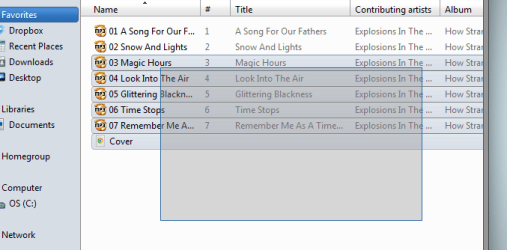
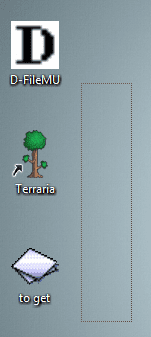
How to change dotted line+transparent selection to colored+solid?

dddavidp

New member
Local time
5:33 AM
Messages
3
Whenever I left click and drag to select files on my desktop, it does not look how i want it to. I want it to look like it does in a folder. please refer to the attachments for clarification.
Also, does anybody know how to change the color of the border of the solid version? I would like to make it fit with my theme better.
 

Attachments
  • i do not want this.png
    i do not want this.png
    17.3 KB · Views: 31
  • this is what i want.png
    this is what i want.png
    14.3 KB · Views: 31

My Computer My Computer

At a glance

windows 7 64 bit
Computer type
PC/Desktop
OS
windows 7 64 bit

My Computer My Computer

At a glance

64-bit Windows 11 Pro for WorkstationsIntel i7-8700K OC'd to 5 GHz64 GB (4x16GB) G.SKILL TridentZ RGB DDR4 3600...ASUS ROG-STRIX-GTX1080TI-O11G-GAMING
Computer type
PC/Desktop
Computer Manufacturer/Model Number
Self built custom
OS
64-bit Windows 11 Pro for Workstations
CPU
Intel i7-8700K OC'd to 5 GHz
Motherboard
ASUS ROG Maximus XI Formula Z390
Memory
64 GB (4x16GB) G.SKILL TridentZ RGB DDR4 3600 MHz
Graphics Card(s)
ASUS ROG-STRIX-GTX1080TI-O11G-GAMING
Sound Card
Integrated
Monitor(s) Displays
2 x Samsung Odyssey G7 27"
Screen Resolution
2560x1440
Hard Drives
1TB Samsung 990 PRO M.2,
4TB Samsung 990 PRO PRO M.2,
TerraMaster F8 SSD Plus NAS
PSU
Seasonic Prime Titanium 850W
Case
Thermaltake Core P3
Cooling
Corsair Hydro H115i
Keyboard
Logitech wireless K800
Mouse
Logitech MX Master 4
Internet Speed
2 Gb/s Download and 100 Mb/s Upload
Antivirus
Malwarebyte Anti-Malware Premium
Browser
Google Chrome
Other Info
Logitech Z625 speaker system,
Logitech BRIO 4K Pro webcam,
HP Color LaserJet Pro MFP M477fdn,
APC SMART-UPS RT 1000 XL - SURT1000XLI,
Galaxy S23 Plus phone
Welcome to the Seven Forums

Are you using a third-party custom theme? If so post a link to it and I will look at it for the color change.

Jerry
 

My Computer My Computer

At a glance

Win 7 Pro x64 / Win 10 ProIntel(R) Core(TM) i7-3630QM CPU @ 2.40GHz12 GB(1) Intel(R) HD Graphics 4000 (2) NVIDIA GeFo...
Computer type
Laptop
Computer Manufacturer/Model Number
Sager NP9170
OS
Win 7 Pro x64 / Win 10 Pro
CPU
Intel(R) Core(TM) i7-3630QM CPU @ 2.40GHz
Motherboard
CLEVO P170EM
Memory
12 GB
Graphics Card(s)
(1) Intel(R) HD Graphics 4000 (2) NVIDIA GeForce GTX 675M
Sound Card
(1) Realtek High Definition Audio (2) Intel(R) Display Aud
Monitor(s) Displays
17.3
Screen Resolution
1920x1080
Hard Drives
(1) Samsung 860 EVO 500GB(OS) (1) Samsung 860 EVO 500GB(Data)
Keyboard
Backlite
Antivirus
MSE, Malwarebytes Pro
Browser
Firefox
Other Info
DESKTOP: Custom-built.
OS: Win 10 Pro x64.
CASE: Rosewill R5.
CPU: Intel I5 4670K CPU @ 3.40GHz.
CPU COOLER: Cool Master Hyper 212 EVO.
MOTHERBOARD: Asus Z87-A.
MEMORY: Kingston HyperX 2x4 GB.
GPU: Nvidia Geforce 650 TI.
PSU: Corsair TX750.
DRIVES: (1) Samsung 840 120 GB SSD (2) Western Digital blue 500 GB 7200 RPM.
Hello David, and welcome to Seven Forums.

The tutorial below can help show you how to turn on the "translucent selection rectangle" to make it solid again. I'm afraid that I don't know a way to change it's color though.

http://www.sevenforums.com/tutorials/127326-show-translucent-selection-rectangle.html

Hope this helps some, :)
Shawn

Yes it does! Thanks!

Welcome to the Seven Forums

Are you using a third-party custom theme? If so post a link to it and I will look at it for the color change.

Jerry

Sorry for the delayed response.
I am using CustoPack, with the theme Vienna Experience.
I like it quite a bit, it makes everything pleasantly blue - some sky blue, some dark blue, rly blue all around.
 

My Computer My Computer

At a glance

windows 7 64 bit
Computer type
PC/Desktop
OS
windows 7 64 bit
Sorry for the delayed response.
I am using CustoPack, with the theme Vienna Experience.
I like it quite a bit, it makes everything pleasantly blue - some sky blue, some dark blue, rly blue all around.

I downloaded and installed that theme and I do not get the dotted line on the desktop I get the regular translucent outline like you get in the Explorer window. The only thing I could recommend would be to uninstall and reinstall that theme to see if it helps.

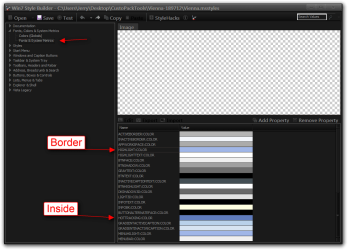
That color of the border can be changed to match the inside but you would have to do it with Ave's Windows7 Style Builder and edit the Vienna.msstyles in C:\Windows\Resources\Themes\CustoPackTools\Vienna-189712 folder (see screenshot).

Jerry
Win7 Style Builder - CUsersJerryDesktopCustoPackToolsVienna-189712Vienna.msstyles.png
 

My Computer My Computer

At a glance

Win 7 Pro x64 / Win 10 ProIntel(R) Core(TM) i7-3630QM CPU @ 2.40GHz12 GB(1) Intel(R) HD Graphics 4000 (2) NVIDIA GeFo...
Computer type
Laptop
Computer Manufacturer/Model Number
Sager NP9170
OS
Win 7 Pro x64 / Win 10 Pro
CPU
Intel(R) Core(TM) i7-3630QM CPU @ 2.40GHz
Motherboard
CLEVO P170EM
Memory
12 GB
Graphics Card(s)
(1) Intel(R) HD Graphics 4000 (2) NVIDIA GeForce GTX 675M
Sound Card
(1) Realtek High Definition Audio (2) Intel(R) Display Aud
Monitor(s) Displays
17.3
Screen Resolution
1920x1080
Hard Drives
(1) Samsung 860 EVO 500GB(OS) (1) Samsung 860 EVO 500GB(Data)
Keyboard
Backlite
Antivirus
MSE, Malwarebytes Pro
Browser
Firefox
Other Info
DESKTOP: Custom-built.
OS: Win 10 Pro x64.
CASE: Rosewill R5.
CPU: Intel I5 4670K CPU @ 3.40GHz.
CPU COOLER: Cool Master Hyper 212 EVO.
MOTHERBOARD: Asus Z87-A.
MEMORY: Kingston HyperX 2x4 GB.
GPU: Nvidia Geforce 650 TI.
PSU: Corsair TX750.
DRIVES: (1) Samsung 840 120 GB SSD (2) Western Digital blue 500 GB 7200 RPM.
Sorry for the delayed response.
I am using CustoPack, with the theme Vienna Experience.
I like it quite a bit, it makes everything pleasantly blue - some sky blue, some dark blue, rly blue all around.

I downloaded and installed that theme and I do not get the dotted line on the desktop I get the regular translucent outline like you get in the Explorer window. The only thing I could recommend would be to uninstall and reinstall that theme to see if it helps.

That color of the border can be changed to match the inside but you would have to do it with Ave's Windows7 Style Builder and edit the Vienna.msstyles in C:\Windows\Resources\Themes\CustoPackTools\Vienna-189712 folder (see screenshot).

Jerry
View attachment 305168

Thanks for the help! I have a couple of other programs which could have changed the setting themselves, and I actually was using a different theme when the problem started.
 

My Computer My Computer

At a glance

windows 7 64 bit
Computer type
PC/Desktop
OS
windows 7 64 bit
Back
Top