
Solved Windows Backup and Restore fails to create backup

CBM

New member
Power User
Local time
12:41 AM
Messages
104
Location
Ohio
I've used Windows Backup and Restore successfully on many occasions but I now get the error "0x81000037: Windows Backup failed while trying to read from the shadow copy on one of the volumes being backed up" and I don't understand it. I've spent hours researching this issue and cannot seem to create a backup.

I've been to all the Microsoft pages and various "Windows 7" forums to no avail. I've gone the "delete the Java cache" route, the "C\Users\my account\AppData\LocalLow\Sun\Java\Deployment\cache\6.0" route and deleted the numbered entries (which remain in my Recycle Bin), the "Command Prompt with DIR /AL /S, which showed "File not found" (I still don't understand what a reparse point is) and the "virus in a shadow copy" route which produced nothing. I've scanned with Microsoft Security Essentials, the only AV application I use, which produced nothing. Disabling MSSE does not help (I checked Task Manager, All users, and the MSSE process before attempting the backup and it was indeed stopped). I've also performed full scans with MalwareBytes, the paid version of Spybot S&D and SuperAntiSpyware, which produced no results. I don't let these additional malware applications run in real time. I only start them when I want to run additional virus scans. I've run the Microsoft Safety Scanner in full mode, which produced nothing. I've run chkdsk at boot time on two occasions which produced "unallocated free space marked as allocated" the first time, which, according to the chkdsk report was fixed during the scan. I've run sfc /scannow three times and found no errors. I've checked Services to ascertain that all the relevant services were running and set properly.

I upgraded to Acronis True Image 2014 but I don't recall if the Backup and Restore failure occurred prior to or after the installation (I have no short-term memory ability). I have not converted any Windows backups to Acronis files or Acronis backups to Windows files. I have not integrated Acronis True Image 2014 with Windows as the Backup and Restore still remains in Control Panel, although when I right click on both the C internal drive and the D internal drive and select Properties I see an Acronis Recovery tab that was not there prior to the Acronis installation. System Restore points can be made and there is abundant drive space dedicated to it.

I am running Windows 7 Ultimate x64 on a Dell XPS-17 L702X laptop with two internal drives at 500GB each. The OS is on C Drive and I'm backing up to D Drive, into the "Windows Image Backup" file that Backup and Restore produced. I don't know what else I can do to get it working. I'm not a super user but I'm not an idiot either. I would appreciate any assistance that can be provided. I've attached a screenshot of my Disk Management that shows the internal drives structures but I don't know if the Recovery partition is the original one placed there by Dell because I usually fully reformat the OS partition into a single partition to eliminate all the crapware that comes with a Dell. If it is in fact a Dell recovery partition I suppose I could simply do a restore from it after exporting my Pale Moon Bookmarks. I don't save anything to my C Drive so I'm not worried about losing any important data. I keep all important information, pictures and videos on the D Drive.

Thank you in advance for your time and assistance.

C. B.
 

Attachments
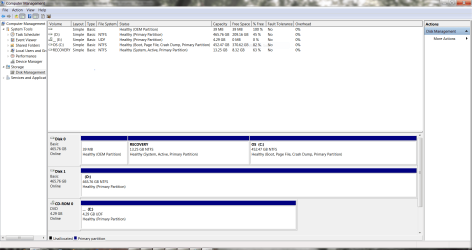
  • Disk Management.PNG
    Disk Management.PNG
    60.5 KB · Views: 5
Last edited:

My Computer My Computer

At a glance

1.Windows 7 Ultimate x64; 2.Windows 7 Ultimat...1.AMD Phenom II X6 1075T; 2.Intel Core i7-272...1.8GB DDR3; 2.8GB DDR31.AMD HD 5670 1GB; 2.NVIDIA GeForce GT 555M 3GB
Computer Manufacturer/Model Number
1.Dell Studio XPS 7100 Desktop; 2.Dell XPS 17 Laptop
OS
1.Windows 7 Ultimate x64; 2.Windows 7 Ultimate x64
CPU
1.AMD Phenom II X6 1075T; 2.Intel Core i7-2720QM 2.20 GHz
Memory
1.8GB DDR3; 2.8GB DDR3
Graphics Card(s)
1.AMD HD 5670 1GB; 2.NVIDIA GeForce GT 555M 3GB
Monitor(s) Displays
1.Samsung SyncMaster; 2.17.3in FHD
Screen Resolution
1.1600X900; 2.1920X1080
Hard Drives
1.1TB; 2.1TB 500GB X2
Keyboard
1.Microsoft Wireless; 2.Backlit
Mouse
Microsoft Wireless; 2.Microsoft Wireless Mobile 3500
Internet Speed
10.0 Mbps
It sounds like something got damaged or corrupted for unknown reasons. You seem to have tried all the usual fixes. Did you go through this Microsoft KB article (Issue 2) and the full suggested workaround about half-way down the page?

Windows backup or restore errors 0x80070001, 0x81000037, or 0x80070003

If the workaround doesn't help do you have a restore point from before this problem first appeared?

http://www.sevenforums.com/tutorials/700-system-restore.html

If a restore point doesn't fix things or isn't available, do you have a recent system image (from before the problem first appeared?)
 

My Computer My Computer

At a glance

Win 7 Pro 64-bitIntel i5 2.4 Ghz8GB DDR3Intel HD 3000
Computer type
Laptop
Computer Manufacturer/Model Number
Sony Vaio VPCEB47GM Laptop
OS
Win 7 Pro 64-bit
CPU
Intel i5 2.4 Ghz
Memory
8GB DDR3
Graphics Card(s)
Intel HD 3000
Sound Card
IDT High Definition
Monitor(s) Displays
15.6 WGXA Anti-Glare LED
Screen Resolution
1280x800
Hard Drives
640Gb 7200rpm
Antivirus
MSE
Browser
Opera (primary) with IE9 backup
It sounds like something got damaged or corrupted for unknown reasons. You seem to have tried all the usual fixes. Did you go through this Microsoft KB article (Issue 2) and the full suggested workaround about half-way down the page?

Windows backup or restore errors 0x80070001, 0x81000037, or 0x80070003

If the workaround doesn't help do you have a restore point from before this problem first appeared?

http://www.sevenforums.com/tutorials/700-system-restore.html

If a restore point doesn't fix things or isn't available, do you have a recent system image (from before the problem first appeared?)

Thank you for your prompt reply, marsmimar. I appreciate it very much. I researched and tried just about everything before posting in this forum. I don't think it's fair for someone to simply expect others to provide the answers to a problem. I feel that one should try to solve it himself/herself before asking others. To do otherwise is simply a case of gross laziness.

In any event, after my failed attempts to get the backup to work successfully I decided to do a recovery since all my restore points had been wiped out by a very popular cleaning application every time I used it, which is denied by the developers of the application even though an abundance of users experienced the same exact problem. I've since decided to stop using third party cleaning and defragging applications and simply go with the native defrag and disk cleanup applications of Windows. I'm going to go the "bare bones" approach from now on because, through experience, I've concluded that Microsoft's built-in applications can be as effective as third party free or paid utilities and much less destructive to the OS.

I attempted to do a recovery using the f8, Advanced Boot Options, Repair My Computer approach but every time I got to the Repair My Computer option it wouldn't work. Nothing would happen when I clicked on it and I couldn't even scroll down to the other options using the arrow keys. I assume it was corrupted in some way or some Windows elements were missing. A repair using my Windows 7 installation disc did nothing to fix the problem. Luckily, I had made a Dell DataSafe backup on DVDs when I first received the new laptop. I used the DVDs to access the Factory Recovery partition on my C Drive and restored the OS to its pristine state, thus eliminating the need to reinstall the hardware drivers and utilities had I used my installation DVD. The nice thing about Dell's Recovery Partition is that Dell no longer includes all the crapware in the Recovery partition but instead retains it on their servers for download if you uninstall them and then decide to reinstall some or all of them at a later date.

Live and learn; that's the name of the game isn't it? Thanks again. I appreciate the effort.
 

My Computer My Computer

At a glance

1.Windows 7 Ultimate x64; 2.Windows 7 Ultimat...1.AMD Phenom II X6 1075T; 2.Intel Core i7-272...1.8GB DDR3; 2.8GB DDR31.AMD HD 5670 1GB; 2.NVIDIA GeForce GT 555M 3GB
Computer Manufacturer/Model Number
1.Dell Studio XPS 7100 Desktop; 2.Dell XPS 17 Laptop
OS
1.Windows 7 Ultimate x64; 2.Windows 7 Ultimate x64
CPU
1.AMD Phenom II X6 1075T; 2.Intel Core i7-2720QM 2.20 GHz
Memory
1.8GB DDR3; 2.8GB DDR3
Graphics Card(s)
1.AMD HD 5670 1GB; 2.NVIDIA GeForce GT 555M 3GB
Monitor(s) Displays
1.Samsung SyncMaster; 2.17.3in FHD
Screen Resolution
1.1600X900; 2.1920X1080
Hard Drives
1.1TB; 2.1TB 500GB X2
Keyboard
1.Microsoft Wireless; 2.Backlit
Mouse
Microsoft Wireless; 2.Microsoft Wireless Mobile 3500
Internet Speed
10.0 Mbps
Glad to hear you were able to successfully use the Dell DataSafe to restore to factory specs. One suggestion, if I may (and no disrespect intended.) When you get your computer set up again, personalize all your settings, and everything is working as it should, I recommend making a periodic system image. Some folks use the built-in Windows 7 imaging tool and others use the highly recommended (and free) Macrium Reflect. Here are a couple of tutorials for the Windows 7 imaging tool:

Create a System Image

Restore a System Image

And a tutorial for Macrium:

http://www.sevenforums.com/tutorials/73828-imaging-free-macrium.html

I found out from personal experience that I can create (or restore) a system image in less than an hour. The image will restore a computer to the exact condition it was in at the time the image was made. All programs, apps, personal settings, updates, etc. The only caveat is to store the image on an external hard drive rather than on a separate partition of the laptop's hard drive. If it's stored on the lappy's hard drive, and that drive ever goes belly up, the images will be useless.

Again, I mean no disrespect and my apologies for offering unsolicited advice.
 

My Computer My Computer

At a glance

Win 7 Pro 64-bitIntel i5 2.4 Ghz8GB DDR3Intel HD 3000
Computer type
Laptop
Computer Manufacturer/Model Number
Sony Vaio VPCEB47GM Laptop
OS
Win 7 Pro 64-bit
CPU
Intel i5 2.4 Ghz
Memory
8GB DDR3
Graphics Card(s)
Intel HD 3000
Sound Card
IDT High Definition
Monitor(s) Displays
15.6 WGXA Anti-Glare LED
Screen Resolution
1280x800
Hard Drives
640Gb 7200rpm
Antivirus
MSE
Browser
Opera (primary) with IE9 backup
Glad to hear you were able to successfully use the Dell DataSafe to restore to factory specs. One suggestion, if I may (and no disrespect intended.) When you get your computer set up again, personalize all your settings, and everything is working as it should, I recommend making a periodic system image. Some folks use the built-in Windows 7 imaging tool and others use the highly recommended (and free) Macrium Reflect. Here are a couple of tutorials for the Windows 7 imaging tool:

Create a System Image

Restore a System Image

And a tutorial for Macrium:

http://www.sevenforums.com/tutorials/73828-imaging-free-macrium.html

I found out from personal experience that I can create (or restore) a system image in less than an hour. The image will restore a computer to the exact condition it was in at the time the image was made. All programs, apps, personal settings, updates, etc. The only caveat is to store the image on an external hard drive rather than on a separate partition of the laptop's hard drive. If it's stored on the lappy's hard drive, and that drive ever goes belly up, the images will be useless.

Again, I mean no disrespect and my apologies for offering unsolicited advice.

LOL. I'll take all the unsolicited advice I can get, any time, day or night, marsmimar, and I really appreciate your desire to help others who lack your knowledge. I do in fact use Windows Backup and Restore, once a week, backed up to my internal D Drive and then copied to an external drive for safe measure. I do the same thing with Acronis 2014 but something was so corrupted the backups wouldn't work, even with the Acronis F11 route and Acronis installation disc, which as you know will boot a corrupted system. I don't particularly like Acronis, as I've had issues with every edition I've purchased but I won't even consider anything from Norton. I've used both the free Paragon and Macrium applications in the past and found them to be quite functional and easy to use.
 

My Computer My Computer

At a glance

1.Windows 7 Ultimate x64; 2.Windows 7 Ultimat...1.AMD Phenom II X6 1075T; 2.Intel Core i7-272...1.8GB DDR3; 2.8GB DDR31.AMD HD 5670 1GB; 2.NVIDIA GeForce GT 555M 3GB
Computer Manufacturer/Model Number
1.Dell Studio XPS 7100 Desktop; 2.Dell XPS 17 Laptop
OS
1.Windows 7 Ultimate x64; 2.Windows 7 Ultimate x64
CPU
1.AMD Phenom II X6 1075T; 2.Intel Core i7-2720QM 2.20 GHz
Memory
1.8GB DDR3; 2.8GB DDR3
Graphics Card(s)
1.AMD HD 5670 1GB; 2.NVIDIA GeForce GT 555M 3GB
Monitor(s) Displays
1.Samsung SyncMaster; 2.17.3in FHD
Screen Resolution
1.1600X900; 2.1920X1080
Hard Drives
1.1TB; 2.1TB 500GB X2
Keyboard
1.Microsoft Wireless; 2.Backlit
Mouse
Microsoft Wireless; 2.Microsoft Wireless Mobile 3500
Internet Speed
10.0 Mbps

My Computer My Computer

At a glance

Vista, Windows7, Mint Mate, Zorin, Windows 8from 1.6GHz Duo to i7
Computer Manufacturer/Model Number
HP, Dell, Gateway, Toshiba - 4 laptops and 2 desktops
OS
Vista, Windows7, Mint Mate, Zorin, Windows 8
CPU
from 1.6GHz Duo to i7
Monitor(s) Displays
2x HP w2207
Hard Drives
5x HDD, 7x SSD, 12x Externals
Keyboard
with trackball - no mices
Mouse
Trackball mice
Internet Speed
DSL 6000
Download the Macrium iso from my Skydrive and burn that to CD. With the CD you can make clean, reliable images and also recover from those images. http://www.sevenforums.com/tutorials/73828-imaging-free-macrium.html?ltr=I

Thank you again, whs. You've helped me in the past and it was much appreciated. I admire you for your willingness to sacrifice your free time for others who don't have the necessary knowledge to solve their problems. I wish you the best in everything you do.
 

My Computer My Computer

At a glance

1.Windows 7 Ultimate x64; 2.Windows 7 Ultimat...1.AMD Phenom II X6 1075T; 2.Intel Core i7-272...1.8GB DDR3; 2.8GB DDR31.AMD HD 5670 1GB; 2.NVIDIA GeForce GT 555M 3GB
Computer Manufacturer/Model Number
1.Dell Studio XPS 7100 Desktop; 2.Dell XPS 17 Laptop
OS
1.Windows 7 Ultimate x64; 2.Windows 7 Ultimate x64
CPU
1.AMD Phenom II X6 1075T; 2.Intel Core i7-2720QM 2.20 GHz
Memory
1.8GB DDR3; 2.8GB DDR3
Graphics Card(s)
1.AMD HD 5670 1GB; 2.NVIDIA GeForce GT 555M 3GB
Monitor(s) Displays
1.Samsung SyncMaster; 2.17.3in FHD
Screen Resolution
1.1600X900; 2.1920X1080
Hard Drives
1.1TB; 2.1TB 500GB X2
Keyboard
1.Microsoft Wireless; 2.Backlit
Mouse
Microsoft Wireless; 2.Microsoft Wireless Mobile 3500
Internet Speed
10.0 Mbps
Download the Macrium iso from my Skydrive and burn that to CD. With the CD you can make clean, reliable images and also recover from those images. http://www.sevenforums.com/tutorials/73828-imaging-free-macrium.html?ltr=I

Thank you again, whs. You've helped me in the past and it was much appreciated. I admire you for your willingness to sacrifice your free time for others who don't have the necessary knowledge to solve their problems. I wish you the best in everything you do.
Thank you. You are very kind.
 

My Computer My Computer

At a glance

Vista, Windows7, Mint Mate, Zorin, Windows 8from 1.6GHz Duo to i7
Computer Manufacturer/Model Number
HP, Dell, Gateway, Toshiba - 4 laptops and 2 desktops
OS
Vista, Windows7, Mint Mate, Zorin, Windows 8
CPU
from 1.6GHz Duo to i7
Monitor(s) Displays
2x HP w2207
Hard Drives
5x HDD, 7x SSD, 12x Externals
Keyboard
with trackball - no mices
Mouse
Trackball mice
Internet Speed
DSL 6000
Back
Top