How do we fake or edit everything inside the system properties??

Welcome to the Seven Forums

I think you'll find some of that information in the basebrd.dll.mui in C:\Windows\Branding\Basebrd\en-US\ (you may have to substitute your country instead of en-US)

Jerry


Sup Jerry,

I did changed some of the details inside the basxedbrd.dll.mui but that actually change the Windows edition part only!! but what I wish to do is, change the whole System properties, that includes everything inside there. You know to be able to edit and everything in there and turn on or off anytime we want to back to the original state etc.

I want to do something similar to what this does, take a quick peak:
Fake your Specs - Free download and software reviews - CNET Download.com

Thanks for your threats.
 

My Computer My Computer

At a glance

Windows 7 Ultimate X64 SP1
Computer type
PC/Desktop
OS
Windows 7 Ultimate X64 SP1
I don't think it actually changes properties, just what is displayed as a joke.

This is a Joke: Fake your Specs - Free download and software reviews - CNET Download.com and I agreed.

I think you're absolutely right, yes and it doesn't change the System Properties at all. But only shows the display as a fake jokes.

But having someone to be able to designed a programme like that, I do think its still possible to make it happen, but the question how??

I am not asking you, but I am asking the majority, perhaps people write scripts or programmes can create or make something like that.

ta ta
 

My Computer My Computer

At a glance

Windows 7 Ultimate X64 SP1
Computer type
PC/Desktop
OS
Windows 7 Ultimate X64 SP1

My Computer My Computer

At a glance

Win 7 Pro x64 / Win 10 ProIntel(R) Core(TM) i7-3630QM CPU @ 2.40GHz12 GB(1) Intel(R) HD Graphics 4000 (2) NVIDIA GeFo...
Computer type
Laptop
Computer Manufacturer/Model Number
Sager NP9170
OS
Win 7 Pro x64 / Win 10 Pro
CPU
Intel(R) Core(TM) i7-3630QM CPU @ 2.40GHz
Motherboard
CLEVO P170EM
Memory
12 GB
Graphics Card(s)
(1) Intel(R) HD Graphics 4000 (2) NVIDIA GeForce GTX 675M
Sound Card
(1) Realtek High Definition Audio (2) Intel(R) Display Aud
Monitor(s) Displays
17.3
Screen Resolution
1920x1080
Hard Drives
(1) Samsung 860 EVO 500GB(OS) (1) Samsung 860 EVO 500GB(Data)
Keyboard
Backlite
Antivirus
MSE, Malwarebytes Pro
Browser
Firefox
Other Info
DESKTOP: Custom-built.
OS: Win 10 Pro x64.
CASE: Rosewill R5.
CPU: Intel I5 4670K CPU @ 3.40GHz.
CPU COOLER: Cool Master Hyper 212 EVO.
MOTHERBOARD: Asus Z87-A.
MEMORY: Kingston HyperX 2x4 GB.
GPU: Nvidia Geforce 650 TI.
PSU: Corsair TX750.
DRIVES: (1) Samsung 840 120 GB SSD (2) Western Digital blue 500 GB 7200 RPM.
You also may be able to find some of the information in systemcpl.dll.mui in C:\Windows\System32\en-US and if you're using 64-bit here also C:\Windows\SysWOW64\en-US

Jerry
 

My Computer My Computer

At a glance

Win 7 Pro x64 / Win 10 ProIntel(R) Core(TM) i7-3630QM CPU @ 2.40GHz12 GB(1) Intel(R) HD Graphics 4000 (2) NVIDIA GeFo...
Computer type
Laptop
Computer Manufacturer/Model Number
Sager NP9170
OS
Win 7 Pro x64 / Win 10 Pro
CPU
Intel(R) Core(TM) i7-3630QM CPU @ 2.40GHz
Motherboard
CLEVO P170EM
Memory
12 GB
Graphics Card(s)
(1) Intel(R) HD Graphics 4000 (2) NVIDIA GeForce GTX 675M
Sound Card
(1) Realtek High Definition Audio (2) Intel(R) Display Aud
Monitor(s) Displays
17.3
Screen Resolution
1920x1080
Hard Drives
(1) Samsung 860 EVO 500GB(OS) (1) Samsung 860 EVO 500GB(Data)
Keyboard
Backlite
Antivirus
MSE, Malwarebytes Pro
Browser
Firefox
Other Info
DESKTOP: Custom-built.
OS: Win 10 Pro x64.
CASE: Rosewill R5.
CPU: Intel I5 4670K CPU @ 3.40GHz.
CPU COOLER: Cool Master Hyper 212 EVO.
MOTHERBOARD: Asus Z87-A.
MEMORY: Kingston HyperX 2x4 GB.
GPU: Nvidia Geforce 650 TI.
PSU: Corsair TX750.
DRIVES: (1) Samsung 840 120 GB SSD (2) Western Digital blue 500 GB 7200 RPM.
You also may be able to find some of the information in systemcpl.dll.mui in C:\Windows\System32\en-US and if you're using 64-bit here also C:\Windows\SysWOW64\en-US

Jerry


Thank you for the kindly supports, I think I could find something in there, not all but at least good enough for now.

I might have talk to that guy Shawn, I think he knew a lot about these things, well perhaps he might. Will ask and see what he can cum up with etc.

Thanks for the supporting once again.

If theres anything, please feel free and let us know as much as you could.

Cheers mate.
 

My Computer My Computer

At a glance

Windows 7 Ultimate X64 SP1
Computer type
PC/Desktop
OS
Windows 7 Ultimate X64 SP1
You also may be able to find some of the information in systemcpl.dll.mui in C:\Windows\System32\en-US and if you're using 64-bit here also C:\Windows\SysWOW64\en-US

Jerry

Hi Jerry,

Are there going to be infect the system if I do touch or change the SysWOW64 folder inside the system32?? Would that cause any errors or faulty??

Yes, I am using Windows Se7en X64 SP1 OS.

Thanks for the suggestions.
Once again, if there's anything just let us know in advance.

Kindly appreciated for your superb supports.

ta ta
 

My Computer My Computer

At a glance

Windows 7 Ultimate X64 SP1
Computer type
PC/Desktop
OS
Windows 7 Ultimate X64 SP1
Are there going to be infect the system if I do touch or change the SysWOW64 folder inside the system32?? Would that cause any errors or faulty??

Yes, I am using Windows Se7en X64 SP1 OS.

Thanks for the suggestions.
Once again, if there's anything just let us know in advance.

Kindly appreciated for your superb supports.

ta ta

SysWOW64 folder inside the system32
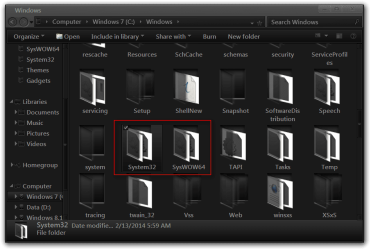
You will not find that folder inside the other one they are two separate folders inside C/Windows
Windows.png

You will find the en-US (or your country) folder inside each one of the above locations. In my experience with changing system files with 64-bit systems you do it in both locations if they exist.

Jerry
 

My Computer My Computer

At a glance

Win 7 Pro x64 / Win 10 ProIntel(R) Core(TM) i7-3630QM CPU @ 2.40GHz12 GB(1) Intel(R) HD Graphics 4000 (2) NVIDIA GeFo...
Computer type
Laptop
Computer Manufacturer/Model Number
Sager NP9170
OS
Win 7 Pro x64 / Win 10 Pro
CPU
Intel(R) Core(TM) i7-3630QM CPU @ 2.40GHz
Motherboard
CLEVO P170EM
Memory
12 GB
Graphics Card(s)
(1) Intel(R) HD Graphics 4000 (2) NVIDIA GeForce GTX 675M
Sound Card
(1) Realtek High Definition Audio (2) Intel(R) Display Aud
Monitor(s) Displays
17.3
Screen Resolution
1920x1080
Hard Drives
(1) Samsung 860 EVO 500GB(OS) (1) Samsung 860 EVO 500GB(Data)
Keyboard
Backlite
Antivirus
MSE, Malwarebytes Pro
Browser
Firefox
Other Info
DESKTOP: Custom-built.
OS: Win 10 Pro x64.
CASE: Rosewill R5.
CPU: Intel I5 4670K CPU @ 3.40GHz.
CPU COOLER: Cool Master Hyper 212 EVO.
MOTHERBOARD: Asus Z87-A.
MEMORY: Kingston HyperX 2x4 GB.
GPU: Nvidia Geforce 650 TI.
PSU: Corsair TX750.
DRIVES: (1) Samsung 840 120 GB SSD (2) Western Digital blue 500 GB 7200 RPM.
Are there going to be infect the system if I do touch or change the SysWOW64 folder inside the system32?? Would that cause any errors or faulty??

Yes, I am using Windows Se7en X64 SP1 OS.

Thanks for the suggestions.
Once again, if there's anything just let us know in advance.

Kindly appreciated for your superb supports.

ta ta

SysWOW64 folder inside the system32
You will not find that folder inside the other one they are two separate folders inside C/Windows
View attachment 306150

You will find the en-US (or your country) folder inside each one of the above locations. In my experience with changing system files with 64-bit systems you do it in both locations if they exist.

Jerry


I don't think I will be touching that systemcpl.dll.mui, as myself are not very familiar with that sort of dll, but I went in have a look and it does show some infor about it.

I'll continue to wait and ask around see if there's any other possibilities and better way of doing it etc.

What I might need is some kinda zip or exe files that could automatically apply to those these settings, and to be able to switch back to normal anytime after change. That would make things lot easier like the Fake Your Spec exe does. Something similar to that would be lot better I guess.

Many thanks in regards to Jerry.
 

My Computer My Computer

At a glance

Windows 7 Ultimate X64 SP1
Computer type
PC/Desktop
OS
Windows 7 Ultimate X64 SP1

My Computer My Computer

At a glance

Windows 10 Home x64INTEL Core i5-750 Quad-Core 3.37GHzHyperX Fury Black Series 8GB (2 x 4GB) 1866MhzEVGA GeForce GTX 750 Superclocked 1GB 128-Bit...
Computer type
PC/Desktop
OS
Windows 10 Home x64
CPU
INTEL Core i5-750 Quad-Core 3.37GHz
Motherboard
ASUS P7P55D
Memory
HyperX Fury Black Series 8GB (2 x 4GB) 1866Mhz
Graphics Card(s)
EVGA GeForce GTX 750 Superclocked 1GB 128-Bit GDDR5
Monitor(s) Displays
LG 32MA68HY 32" IPS
Screen Resolution
1920 x 1080
Hard Drives
Samsung 840 Evo 120GB, SEAGATE 500GB Barracuda® 7200.12, SATA 3 Gb/s, 7200 RPM, 16MB cache
PSU
ANTEC TruePower New TP-550, 80 PLUS, 550W
Case
ANTEC Three Hundred Illusion
Cooling
COOLER MASTER Hyper 212 Plus, 4 x 120mm 1 x 140mm Noctua's
Internet Speed
85 + Mbps
Antivirus
Avast
Browser
Vivaldi
I have a w7 Special Edition. :p

sys props.png
 

My Computer My Computer

At a glance

Windows 7 Ultimate X64 SP1Intel i5-2550K, Differing ~4.4-4.8GHz No buil...16GB G.Skill Sniper 1866MHz @ 2133MHz 2x8GBASUS GTX650TIB-DC2OC-2GD5, (650TI Boost)
Computer type
PC/Desktop
Computer Manufacturer/Model Number
Home Built Desktop By DataTech
OS
Windows 7 Ultimate X64 SP1
CPU
Intel i5-2550K, Differing ~4.4-4.8GHz No built in GPU
Motherboard
ASUS P8Z68-V PRO/GEN3
Memory
16GB G.Skill Sniper 1866MHz @ 2133MHz 2x8GB
Graphics Card(s)
ASUS GTX650TIB-DC2OC-2GD5, (650TI Boost)
Sound Card
Onboard Realtek 5-1
Monitor(s) Displays
Samsung P2570HD
Screen Resolution
1920x1080
Hard Drives
Samsung 840 Pro 256GB SSD for OS, 500GB Seagate Constellation (Enterprise drive) for Data
PSU
Corsair HX650W
Case
Inwin Dragon Rider
Cooling
Hyper 212 EVO w/two Noctua fans, push-pull, @1300 RPM
Keyboard
E-Z Eyes, bright yellow keys with large characters
Mouse
steelseries SENSEI Laser Pro Gaming
Internet Speed
48-51Mbs Mbs down, 11 Mbs up Xfinity Cable
Antivirus
Norton Internet Security 2013
Browser
IE 10, Opera, Pale Moon if needed
Other Info
4 case fans, LG BluRay-RE, ASUS DVD-RW, Mr. Fusion power supply, 1.21 gigawatts.
So do I ;)

A Guy
 

My Computer My Computer

At a glance

Windows 10 Home x64INTEL Core i5-750 Quad-Core 3.37GHzHyperX Fury Black Series 8GB (2 x 4GB) 1866MhzEVGA GeForce GTX 750 Superclocked 1GB 128-Bit...
Computer type
PC/Desktop
OS
Windows 10 Home x64
CPU
INTEL Core i5-750 Quad-Core 3.37GHz
Motherboard
ASUS P7P55D
Memory
HyperX Fury Black Series 8GB (2 x 4GB) 1866Mhz
Graphics Card(s)
EVGA GeForce GTX 750 Superclocked 1GB 128-Bit GDDR5
Monitor(s) Displays
LG 32MA68HY 32" IPS
Screen Resolution
1920 x 1080
Hard Drives
Samsung 840 Evo 120GB, SEAGATE 500GB Barracuda® 7200.12, SATA 3 Gb/s, 7200 RPM, 16MB cache
PSU
ANTEC TruePower New TP-550, 80 PLUS, 550W
Case
ANTEC Three Hundred Illusion
Cooling
COOLER MASTER Hyper 212 Plus, 4 x 120mm 1 x 140mm Noctua's
Internet Speed
85 + Mbps
Antivirus
Avast
Browser
Vivaldi

My Computer My Computer

At a glance

Windows 7 Ultimate X64 SP1Intel i5-2550K, Differing ~4.4-4.8GHz No buil...16GB G.Skill Sniper 1866MHz @ 2133MHz 2x8GBASUS GTX650TIB-DC2OC-2GD5, (650TI Boost)
Computer type
PC/Desktop
Computer Manufacturer/Model Number
Home Built Desktop By DataTech
OS
Windows 7 Ultimate X64 SP1
CPU
Intel i5-2550K, Differing ~4.4-4.8GHz No built in GPU
Motherboard
ASUS P8Z68-V PRO/GEN3
Memory
16GB G.Skill Sniper 1866MHz @ 2133MHz 2x8GB
Graphics Card(s)
ASUS GTX650TIB-DC2OC-2GD5, (650TI Boost)
Sound Card
Onboard Realtek 5-1
Monitor(s) Displays
Samsung P2570HD
Screen Resolution
1920x1080
Hard Drives
Samsung 840 Pro 256GB SSD for OS, 500GB Seagate Constellation (Enterprise drive) for Data
PSU
Corsair HX650W
Case
Inwin Dragon Rider
Cooling
Hyper 212 EVO w/two Noctua fans, push-pull, @1300 RPM
Keyboard
E-Z Eyes, bright yellow keys with large characters
Mouse
steelseries SENSEI Laser Pro Gaming
Internet Speed
48-51Mbs Mbs down, 11 Mbs up Xfinity Cable
Antivirus
Norton Internet Security 2013
Browser
IE 10, Opera, Pale Moon if needed
Other Info
4 case fans, LG BluRay-RE, ASUS DVD-RW, Mr. Fusion power supply, 1.21 gigawatts.
Back
Top