Need Simple weekly backup of main drive - too many opionions makes con

seven66226622

New member
Local time
5:17 PM
Messages
6
Hi,

I have a 1 tb external drive that I would like to use as a backup. Something that I can either manually run weekly or have the software do it by itself.

If my main drive dies, I would like to be able to redirect bios to boot to my backup (which is bootable thanks to whatever 'software' I will wind up using for this purpose.

It appears that what I am looking for is very simple however after reading post after post after post, I am more confused than a newbie on 8.

I am not looking to do ANYTHING other than what I posted above.

Any help greatly appreciate.
 

My Computer My Computer

At a glance

7 64bit
Computer type
PC/Desktop
OS
7 64bit
The simplest way to get a bootable backup onto another HDD would be to use cloning software. Macrium Reflect Free (do not download from the homepage; this page is safer to download from). Macrium Reflect is best known for imaging but its cloning ability is also excellent. A clone is an exact copy of the original drive.

There are better ways to make backups but, since you stated you aren't interested, I won't discuss them here.
 

My Computer My Computer

At a glance

Win 7 Ultimate 64 bitIntel i7-3930KKingston HyperX Genesis 32GB Kit (8x4GB Modul...MSI R7850 Twin Frozr 2GD5/OC Radeon HD 7850 2...
Computer type
PC/Desktop
Computer Manufacturer/Model Number
Custom Build
OS
Win 7 Ultimate 64 bit
CPU
Intel i7-3930K
Motherboard
ASUS P9X79 WS
Memory
Kingston HyperX Genesis 32GB Kit (8x4GB Modules) 1600MHz DDR
Graphics Card(s)
MSI R7850 Twin Frozr 2GD5/OC Radeon HD 7850 2GB 256-bit GDDR
Sound Card
Asus Xonar Essence STX
Monitor(s) Displays
3x Asus VG248QE 24", Vizio 32" TV
Screen Resolution
1920 x 1080, ?
Hard Drives
Samsung 128GB 840 Pro SSD (1),
Samsung 4TB 850 EVO SSDs (4)
Samsung 4TB 850 EVO SSDs (16) external backup drives used in 2.5" hot swap bays in the computer.
PSU
Corsair HX750w
Case
Antec Two Hundred v2 (modified)
Cooling
Cooler Master GeminII S524 120mm (fan replaced with a 140mm)
Keyboard
Logitech G510s
Mouse
Logitech M525 (two in use)
Internet Speed
=< 32Mbps down, 8Mbps up
Antivirus
AVAST!, MBAM, SAS, Spybot S&D (all but MBAM free) Glary Util
Browser
IE11
Other Info
LSI 9211-8i HBA card (8 SATA III ports), 2.5" & 3.5" Hot Swap Bays, HooToo HT-CR001 PCI-E to USB 3.0 Internal Hub + 6 Slot Card Reader, and LG Model CH12LS28 BD-ROM Optical Drive. Also, ScanSnap S1500 ADF duplexing scanner, Canon 9000F flat bed scanner, Corsair SP2500 2.1 speakers, Samsung CLP 415nw laser color printer, Cyberpower PP2200SW UPS
Thanks

Thank you Lady. I appreciate that.

I am not totally against 'better' options if you can think of something I might like. It's just that I am one guy here and don't want to get way too heavy into something that is way over the top and complicated.

Sincerely,

Me
 

My Computer My Computer

At a glance

7 64bit
Computer type
PC/Desktop
OS
7 64bit
As I said, cloning is the simplest way to accomplish what you want. If you have a large amount of data, it will be slow, especially when going over USB. Any other options are going to get a bit more complicated than you are likely to be comfortable with and may involve extra hardware, especially to get a bootable backup. Bootable backups aren't necessarily the best form of backup.

The main point is to get some kind of a viable backup and cloning can accomplish that. You are to be commended for wanting to backup your computer instead of waiting until after you have a fatal disaster.
 

My Computer My Computer

At a glance

Win 7 Ultimate 64 bitIntel i7-3930KKingston HyperX Genesis 32GB Kit (8x4GB Modul...MSI R7850 Twin Frozr 2GD5/OC Radeon HD 7850 2...
Computer type
PC/Desktop
Computer Manufacturer/Model Number
Custom Build
OS
Win 7 Ultimate 64 bit
CPU
Intel i7-3930K
Motherboard
ASUS P9X79 WS
Memory
Kingston HyperX Genesis 32GB Kit (8x4GB Modules) 1600MHz DDR
Graphics Card(s)
MSI R7850 Twin Frozr 2GD5/OC Radeon HD 7850 2GB 256-bit GDDR
Sound Card
Asus Xonar Essence STX
Monitor(s) Displays
3x Asus VG248QE 24", Vizio 32" TV
Screen Resolution
1920 x 1080, ?
Hard Drives
Samsung 128GB 840 Pro SSD (1),
Samsung 4TB 850 EVO SSDs (4)
Samsung 4TB 850 EVO SSDs (16) external backup drives used in 2.5" hot swap bays in the computer.
PSU
Corsair HX750w
Case
Antec Two Hundred v2 (modified)
Cooling
Cooler Master GeminII S524 120mm (fan replaced with a 140mm)
Keyboard
Logitech G510s
Mouse
Logitech M525 (two in use)
Internet Speed
=< 32Mbps down, 8Mbps up
Antivirus
AVAST!, MBAM, SAS, Spybot S&D (all but MBAM free) Glary Util
Browser
IE11
Other Info
LSI 9211-8i HBA card (8 SATA III ports), 2.5" & 3.5" Hot Swap Bays, HooToo HT-CR001 PCI-E to USB 3.0 Internal Hub + 6 Slot Card Reader, and LG Model CH12LS28 BD-ROM Optical Drive. Also, ScanSnap S1500 ADF duplexing scanner, Canon 9000F flat bed scanner, Corsair SP2500 2.1 speakers, Samsung CLP 415nw laser color printer, Cyberpower PP2200SW UPS
Thanks, Im guessing I can use slave drive as my usb replacement to help speed things up a bit. Just keep the slave in a slot and remember to never use it.
 

My Computer My Computer

At a glance

7 64bit
Computer type
PC/Desktop
OS
7 64bit
Ps: Your right, I've lost too much, too many times and this reinstalls/drivers/tweaks etc are a nightmare!
 

My Computer My Computer

At a glance

7 64bit
Computer type
PC/Desktop
OS
7 64bit
Thanks, Im guessing I can use slave drive as my usb replacement to help speed things up a bit. Just keep the slave in a slot and remember to never use it.

Actually, using a slave, or any other internal drive, would be a bad idea. Keeping your backup separate from the machine is much safer. An internal drive is subject to being corrupted by the same viruses, hardware failure, etc. that could take out your computer. Keeping the backup disconnected from the computer when not making a backup is the best way to protect it from those dangers.
 

My Computer My Computer

At a glance

Win 7 Ultimate 64 bitIntel i7-3930KKingston HyperX Genesis 32GB Kit (8x4GB Modul...MSI R7850 Twin Frozr 2GD5/OC Radeon HD 7850 2...
Computer type
PC/Desktop
Computer Manufacturer/Model Number
Custom Build
OS
Win 7 Ultimate 64 bit
CPU
Intel i7-3930K
Motherboard
ASUS P9X79 WS
Memory
Kingston HyperX Genesis 32GB Kit (8x4GB Modules) 1600MHz DDR
Graphics Card(s)
MSI R7850 Twin Frozr 2GD5/OC Radeon HD 7850 2GB 256-bit GDDR
Sound Card
Asus Xonar Essence STX
Monitor(s) Displays
3x Asus VG248QE 24", Vizio 32" TV
Screen Resolution
1920 x 1080, ?
Hard Drives
Samsung 128GB 840 Pro SSD (1),
Samsung 4TB 850 EVO SSDs (4)
Samsung 4TB 850 EVO SSDs (16) external backup drives used in 2.5" hot swap bays in the computer.
PSU
Corsair HX750w
Case
Antec Two Hundred v2 (modified)
Cooling
Cooler Master GeminII S524 120mm (fan replaced with a 140mm)
Keyboard
Logitech G510s
Mouse
Logitech M525 (two in use)
Internet Speed
=< 32Mbps down, 8Mbps up
Antivirus
AVAST!, MBAM, SAS, Spybot S&D (all but MBAM free) Glary Util
Browser
IE11
Other Info
LSI 9211-8i HBA card (8 SATA III ports), 2.5" & 3.5" Hot Swap Bays, HooToo HT-CR001 PCI-E to USB 3.0 Internal Hub + 6 Slot Card Reader, and LG Model CH12LS28 BD-ROM Optical Drive. Also, ScanSnap S1500 ADF duplexing scanner, Canon 9000F flat bed scanner, Corsair SP2500 2.1 speakers, Samsung CLP 415nw laser color printer, Cyberpower PP2200SW UPS
True :(

Your comment about the usb 3.0 taking forever has me wanted better transfer speed now that I think about it.
 

My Computer My Computer

At a glance

7 64bit
Computer type
PC/Desktop
OS
7 64bit
True :(

Your comment about the usb 3.0 taking forever has me wanted better transfer speed now that I think about it.

The only way to get anything faster than USB 3.0 would be to use an internal type drive in an external dock that uses an e-SATA connection. I wouldn't worry about it, though. Use what you have and just let the clone run overnight; that's what I used to do.
 

My Computer My Computer

At a glance

Win 7 Ultimate 64 bitIntel i7-3930KKingston HyperX Genesis 32GB Kit (8x4GB Modul...MSI R7850 Twin Frozr 2GD5/OC Radeon HD 7850 2...
Computer type
PC/Desktop
Computer Manufacturer/Model Number
Custom Build
OS
Win 7 Ultimate 64 bit
CPU
Intel i7-3930K
Motherboard
ASUS P9X79 WS
Memory
Kingston HyperX Genesis 32GB Kit (8x4GB Modules) 1600MHz DDR
Graphics Card(s)
MSI R7850 Twin Frozr 2GD5/OC Radeon HD 7850 2GB 256-bit GDDR
Sound Card
Asus Xonar Essence STX
Monitor(s) Displays
3x Asus VG248QE 24", Vizio 32" TV
Screen Resolution
1920 x 1080, ?
Hard Drives
Samsung 128GB 840 Pro SSD (1),
Samsung 4TB 850 EVO SSDs (4)
Samsung 4TB 850 EVO SSDs (16) external backup drives used in 2.5" hot swap bays in the computer.
PSU
Corsair HX750w
Case
Antec Two Hundred v2 (modified)
Cooling
Cooler Master GeminII S524 120mm (fan replaced with a 140mm)
Keyboard
Logitech G510s
Mouse
Logitech M525 (two in use)
Internet Speed
=< 32Mbps down, 8Mbps up
Antivirus
AVAST!, MBAM, SAS, Spybot S&D (all but MBAM free) Glary Util
Browser
IE11
Other Info
LSI 9211-8i HBA card (8 SATA III ports), 2.5" & 3.5" Hot Swap Bays, HooToo HT-CR001 PCI-E to USB 3.0 Internal Hub + 6 Slot Card Reader, and LG Model CH12LS28 BD-ROM Optical Drive. Also, ScanSnap S1500 ADF duplexing scanner, Canon 9000F flat bed scanner, Corsair SP2500 2.1 speakers, Samsung CLP 415nw laser color printer, Cyberpower PP2200SW UPS
Good Idea. I'll just let it run overnight twice a week. I'm new to solid state and it worries me that they go without warning and data no-recoverable with paying fortune.

Thanks again Lady!
 

My Computer My Computer

At a glance

7 64bit
Computer type
PC/Desktop
OS
7 64bit
My tool is aomei backupper, which support Schedule Backup. I often do monthly backup because I think weekly backup is to short. What's more, my tool is a freeware. That's what I know.
 

My Computer My Computer

At a glance

Windows 7
Computer type
PC/Desktop
OS
Windows 7
Aomei Backupper is a good program, but I am not sure whether you can 'hide' the run. With free Macrium you can 'hide' the backup and go on doing whatever you want to do - then it does not matter how long it takes for the backup. It does not interfere with the backup process because Macrium freezes the image at the beginning of the process. http://www.sevenforums.com/tutorials/73828-imaging-free-macrium.html?ltr=I

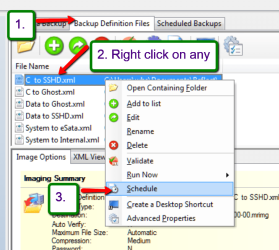
You can also schedule your images. Just right click on the XML file - see pic.
 

Attachments

  • 2014-02-16_2259.png
    2014-02-16_2259.png
    53.9 KB · Views: 12

My Computer My Computer

At a glance

Vista, Windows7, Mint Mate, Zorin, Windows 8from 1.6GHz Duo to i7
Computer Manufacturer/Model Number
HP, Dell, Gateway, Toshiba - 4 laptops and 2 desktops
OS
Vista, Windows7, Mint Mate, Zorin, Windows 8
CPU
from 1.6GHz Duo to i7
Monitor(s) Displays
2x HP w2207
Hard Drives
5x HDD, 7x SSD, 12x Externals
Keyboard
with trackball - no mices
Mouse
Trackball mice
Internet Speed
DSL 6000
Aomei Backupper is a good program, but I am not sure whether you can 'hide' the run. With free Macrium you can 'hide' the backup and go on doing whatever you want to do - then it does not matter how long it takes for the backup. It does not interfere with the backup process because Macrium freezes the image at the beginning of the process. http://www.sevenforums.com/tutorials/73828-imaging-free-macrium.html?ltr=I

You can also schedule your images. Just right click on the XML file - see pic.

hi,
aomei backupper can use VSS: VSS is short for Volume Shadow Copy Service. This technology allows the program to backup data without interrupting the work of applications. If don't use VSS, the program will automatically use the built-in technique instead of it for live backup. Choose one of the modes to begin your backup task.
Use VSS
uh ,the screenshot is omited....
 

My Computer My Computer

At a glance

Windows 7
Computer type
PC/Desktop
OS
Windows 7
I know, that is the same way Macrium works. I call it 'freeze' because then I don't have to go thru a lengthy technical discourse.
 

My Computer My Computer

At a glance

Vista, Windows7, Mint Mate, Zorin, Windows 8from 1.6GHz Duo to i7
Computer Manufacturer/Model Number
HP, Dell, Gateway, Toshiba - 4 laptops and 2 desktops
OS
Vista, Windows7, Mint Mate, Zorin, Windows 8
CPU
from 1.6GHz Duo to i7
Monitor(s) Displays
2x HP w2207
Hard Drives
5x HDD, 7x SSD, 12x Externals
Keyboard
with trackball - no mices
Mouse
Trackball mice
Internet Speed
DSL 6000
Back
Top