OneDrive is Now Available Worldwide

Brink

Administrator
Staff member
Local time
1:00 PM
Messages
74,865
Location
Oklahoma
Today February 19th we are thrilled to announce the global availability of OneDrive. For our existing SkyDrive customers, you are all set; your files are ready in the new OneDrive experience. All you have to do is head over to www.OneDrive.com and log in. For those of you hearing about the service for the first time, OneDrive gives you one place for all of your files, including photos, videos, and documents, and it’s available across the devices you use every day.


When we announced the new name OneDrive, we noted how it is much more aligned with our vision for the future. Our goal is to make it as easy as possible for you to get all of your favorite stuff in one place—one place that is accessible via all of the devices you use every day, at home and at work. Because let’s face it, until now, cloud storage services have been pretty hard to use, and the vast majority of us still have our stuff spread out everywhere. In fact, according to a recent poll*, at least 77% of people who are familiar with the cloud still have content stored on a device that is not backed up elsewhere.

We want to change that.

As part of that goal, we’re doing more than just changing the name with today’s release: We’re rolling out several new capabilities, including automatic camera backup for Android and the ability to share and view videos just as easily as photos. We’ve also added new ways for you to earn more storage—on top of the 7 GB we already give you for free. Customers who refer friends can now receive up to 5 GB (in 500 MB increments) for each friend who accepts an invitation to OneDrive, and we’ll even give you 3 GB just for using the camera backup feature, since we want to help make sure you never lose another photo. There’s even a new monthly payment plan, if you’d like a little more flexibility in how you use your storage.

Of course, OneDrive also builds on everything you know and loved about SkyDrive.

Available across every major device and platform

We’ve built OneDrive into the latest versions of Windows, Windows Phone, Office, and Xbox. You can even make OneDrive your default storage option, so you never have to worry about whether you are saving files to the cloud: They are just there. If you happen to carry an iPhone or Android phone, or use an iPad, Android tablet, Windows device, or a Mac—OneDrive is available there, too.


The best way to store, view, and share photos and videos

The deep integration with so many of the products you already use means you never have to worry about manually saving your photos and videos. And no more trying to sort out what video format to use—it just works. Plus, Start screen integration with Windows 8.1, and even Xbox slide shows, means there are countless ways your favorite photos and those photos shared with you come to life. And with OneDrive, you can share photos or videos directly to Facebook or via email with one click. You can even record and share gameplay from your Xbox One.

Perfect for sharing documents

OneDrive is built in to Office as the default save location, so you can see the recent documents you were working on and pick up right where you left off, even if you switch devices. With real-time co-authoring using the free online version of Office in OneDrive, you can work on Word, Excel, and PowerPoint documents simultaneously with colleagues or family, and see edits as they happen in the latest version of the document.

Built for businesses, too

With OneDrive for Business, companies can give their employees the ability to store, sync, and collaborate on files across multiple devices with ease, manageability, and security. Not only does OneDrive for Business deliver an intuitive experience for employees, allowing them to seamlessly collaborate on documents right from within Office, but it is also backed with enterprise-grade content management, compliance, and administrative controls. Stay tuned for more about OneDrive for Business at the upcoming SharePoint Conference.

To celebrate the official launch of OneDrive, today we will also give 100,000 people 100 GB of free storage for 1 year. That’s 10 PB of free storage—enough storage space for a photo of everyone on the planet. If you want to be one of those 100,000, keep an eye on @OneDrive for clues.

We are excited to share OneDrive with you today, and look forward to hearing what you think. For more details on how to get started, including step by step instructions, just visit www.OneDrive.com.

Chris Jones
Corporate Vice President, Windows Services

Source: OneDrive is Now Available Worldwide: Free Cloud Storage for Microsoft, iOS, and Android Devices | OneDrive Blog
 

My Computer My Computer

At a glance

64-bit Windows 11 Pro for WorkstationsIntel i7-8700K OC'd to 5 GHz64 GB (4x16GB) G.SKILL TridentZ RGB DDR4 3600...ASUS ROG-STRIX-GTX1080TI-O11G-GAMING
Computer type
PC/Desktop
Computer Manufacturer/Model Number
Self built custom
OS
64-bit Windows 11 Pro for Workstations
CPU
Intel i7-8700K OC'd to 5 GHz
Motherboard
ASUS ROG Maximus XI Formula Z390
Memory
64 GB (4x16GB) G.SKILL TridentZ RGB DDR4 3600 MHz
Graphics Card(s)
ASUS ROG-STRIX-GTX1080TI-O11G-GAMING
Sound Card
Integrated
Monitor(s) Displays
2 x Samsung Odyssey G7 27"
Screen Resolution
2560x1440
Hard Drives
1TB Samsung 990 PRO M.2,
4TB Samsung 990 PRO PRO M.2,
TerraMaster F8 SSD Plus NAS
PSU
Seasonic Prime Titanium 850W
Case
Thermaltake Core P3
Cooling
Corsair Hydro H115i
Keyboard
Logitech wireless K800
Mouse
Logitech MX Master 4
Internet Speed
2 Gb/s Download and 100 Mb/s Upload
Antivirus
Malwarebyte Anti-Malware Premium
Browser
Google Chrome
Other Info
Logitech Z625 speaker system,
Logitech BRIO 4K Pro webcam,
HP Color LaserJet Pro MFP M477fdn,
APC SMART-UPS RT 1000 XL - SURT1000XLI,
Galaxy S23 Plus phone
When I login to "One Drive" I just go straight to the old "Sky Drive" :confused:
 

My Computer My Computer

At a glance

Windows 11
Computer type
PC/Desktop
OS
Windows 11
Stick With Google :D
 

My Computer My Computer

At a glance

Windows 10 Pro x64 ; Xubuntu x64Intel i7 860 @ 2.80 GHz O/C'ed to 4.0GHz16GB Corsair Vengance DDR3 @ 661 MHz Dual Cha...EVGA NVidia GTX 560 1024MB
Computer type
PC/Desktop
Computer Manufacturer/Model Number
Golden Mk. I.4
OS
Windows 10 Pro x64 ; Xubuntu x64
CPU
Intel i7 860 @ 2.80 GHz O/C'ed to 4.0GHz
Motherboard
Gigabyte P55A-UD3R Rev.1. Award BIOS F13
Memory
16GB Corsair Vengance DDR3 @ 661 MHz Dual Channel (9-9-9-24)
Graphics Card(s)
EVGA NVidia GTX 560 1024MB
Sound Card
Realtek Integrated
Monitor(s) Displays
Dual Samsung SyncMaster 2494HS
Screen Resolution
1920*1080 and 1920*1080
Hard Drives
1*Samsung 840 EVO 120GB SSD;
1*OCZ Vertex 2 60GB SSD;
2*Samsung F3 SpinPoint 1TB in RAID0;
1*Samsung F1 SpinPoint 1TB;
2*Western Digital 1TB External USB 3.0
1*Western Digital 500GB External USB 3.0
1*Seagate 500GB External USB 2.0
PSU
Thermaltake ToughPower QFan 750W
Case
Thermaltake Element S VK60001W2Z
Cooling
Corsair H60 Water Cooling, 2*230mm and 2*80mm case fans
Keyboard
Logitech G110
Mouse
Logitech MX518

My Computer My Computer

At a glance

Microsoft Windows 7 Home Premium 64-bit Servi...Intel(R) Core(TM) i3 CPU M 330 @ 2.13GHz8 GB DDR3Intel(R) HD Graphics
Computer type
Laptop
Computer Manufacturer/Model Number
Hewlett-Packard/G62-107SA Notebook
OS
Microsoft Windows 7 Home Premium 64-bit Service Pack 1
CPU
Intel(R) Core(TM) i3 CPU M 330 @ 2.13GHz
Motherboard
Hewlett-Packard 1425
Memory
8 GB DDR3
Graphics Card(s)
Intel(R) HD Graphics
Sound Card
Realtek High Definition Audio
Monitor(s) Displays
Builtin
Screen Resolution
1366 x 768 x 32 bits (4294967296 colors) @ 60 Hz
Hard Drives
250 GB SATA Hard Disk Drive 7200 rpm
2TB Seagate GoFlex USB 2 Drive
1TB Iomega Prestige USB 2 Drive
1.5TB Iomega Prestige USB 2 Drive (Samsung)
2TB WD MyBook Live NAS.
Mouse
Logitech Anywhere MX
Internet Speed
152 Mbs download 10 Mbs upload
Antivirus
Norton 360
Browser
Chrome
After losing the battle of the rights to use SkyDrive name, I give kudos to Microsoft for finding a good name to replace the one they were no longer allowed to use. Although OneDrive is nothing but a new name for SkyDrive, it IMO captures the one essential thing I like most in it: one "drive" to save your data accessed from any device.

I'm really fond of SkyDrive OneDrive. For both me and Angie I have created a OneDrive folder structure according our respective needs and all libraries have a OneDrive folder set as default save folder. OneDrive desktop app takes care of auto sync, to allow access to data also when offline, to be synced again when next time online.

It really makes things easy. Wherever I am, whatever device I am using, I have a fast and easy access to same docs, pics and other stuff.

I like it!

Kari
 

My Computer My Computer

At a glance

Windows 10 Pro x64 EN-GB1.6 GHz Intel Core i7-720QM Processor6 GBATI Mobility Radeon HD 5850 Graphics
Computer type
Laptop
Computer Manufacturer/Model Number
HP ENVY 17-1150eg
OS
Windows 10 Pro x64 EN-GB
CPU
1.6 GHz Intel Core i7-720QM Processor
Memory
6 GB
Graphics Card(s)
ATI Mobility Radeon HD 5850 Graphics
Sound Card
Beats sound system with integrated subwoofer
Monitor(s) Displays
17" laptop display, 22" LED and 32" Full HD TV through HDMI
Screen Resolution
1600*900 (1), 1920*1080 (2&3)
Hard Drives
Internal: 2 x 500 GB SATA Hard Disk Drive 7200 rpm
External: 2TB for backups, 3TB USB3 network drive for media
Cooling
As Envy runs a bit warm, I have it on a Cooler Master pad
Keyboard
Logitech diNovo Media Desktop Laser (bluetooth)
Mouse
Logitech Performance Mouse MX
Internet Speed
50/10 Mbps VDSL
Antivirus
Windows Defender 4.3.9431.0
Browser
Maxthon 3.5.2., IE11
When I login to "One Drive" I just go straight to the old "Sky Drive" :confused:

Maybe they should call it "Reverse Drive" ?
 

My Computer My Computer

At a glance

Windows 7 Home Premium x64
OS
Windows 7 Home Premium x64
I'm sure this kind of service is very valuable to some (see Kari's post) but for me........ I'll just keep my back ups and files where I always have.... in an external or two. My situation is a little different than most in that I travel most of the year. It would SEEM that something like this would be right up my alley huh? But I confess to the "fear of the cloud". The small amount of time it takes me to plug in and access a portable drive is nothing compared to the peace of mind I have knowing my data is safe, secure and within reach.
 

My Computer My Computer

At a glance

Windows 10x64 Build 1709Intel i7 7700HQ Kaby Lake16 GB DDR4 @2400Nvidia Geforce GTX 1060
Computer type
Laptop
Computer Manufacturer/Model Number
MSI GE72VR Apache Pro-416
OS
Windows 10x64 Build 1709
CPU
Intel i7 7700HQ Kaby Lake
Motherboard
Micro-Star Intl. MS-179B (U3C1)
Memory
16 GB DDR4 @2400
Graphics Card(s)
Nvidia Geforce GTX 1060
Screen Resolution
1920x1080 120Hz
Hard Drives
256 GB Nvme M.2 SSD

1TB HDD@7200
Cooling
Cooler Blast 4
Keyboard
Steel Series
Antivirus
Bit Defender Free
Browser
Edge
My photos go straight to SkyDrive from my Nokia Lumia by default. I do though send them to Dropbox as well, the main reason there is whenever I've tried to upload a photo from my SkyDrive into a forum it tells me it can't do it as it's not a valid file, I have no problems with doing it via Dropbox.
I still back up to external as well plus burn to DVD, in fact I was looking through some DVD's and CD's the other day and saw photo's I forgot I'd got. ;)
 

My Computer My Computer

At a glance

Windows 10 64bit/Windows 10 64bit/Windows 10 ...Intel Pentium J3710 @ 60GHz/Intel B820,1.7GHz...8.00GB DDR3 @ 1599MHz/8GB 2 x 4GB DDR3/8.00GB...Intel HD Graphics/Intel/512MB ATI AMD Radeon ...
Computer type
PC/Desktop
Computer Manufacturer/Model Number
Acer Aspire XC-704 x64 bit/ Asus K55A Notebook PC/HP Envy x360 Convertible 15-bq0xx
OS
Windows 10 64bit/Windows 10 64bit/Windows 10 64bit
CPU
Intel Pentium J3710 @ 60GHz/Intel B820,1.7GHz/AMD A9 Radeon
Motherboard
Acer Aspire XC-704 (SOCKET 0)/Asus/HP 8312 (Socket FP4)
Memory
8.00GB DDR3 @ 1599MHz/8GB 2 x 4GB DDR3/8.00GB Dual-Channel
Graphics Card(s)
Intel HD Graphics/Intel/512MB ATI AMD Radeon R5 Graphics (HP
Sound Card
Realtek High Definition Audio/Onboard/AMD High Definition Au
Monitor(s) Displays
Acer LCD K222HQL /Asus 15.6/Generic PnP Monitor (1920x1080@6
Screen Resolution
1920x1080@59Hz/1366 x 768/1920x1080@60Hz
Hard Drives
1863GBWesternn Digital WDC/Asus/119GB SanDisk SD8SN8U-128G-1006 (SSD)
931GB Hitachi HGST HTS721010A9E630 (SATA)
Keyboard
Microsoft Natural Ergonomic Keyboard 4000 (UK)/Inbuilt/Inbui
Mouse
Microsoft Optical Wheel Mouse/Same plus Touchpad/Same + Pad
Internet Speed
Infinity 2 up to 76 Mbps
Antivirus
MSE/MSE/MSE and all 3 have MalwareBytes Premium
Browser
Edge, Firefox/Edge, Firefox/Edge, Firefox, Chrome
Other Info
Seagate Expansion 500GB External Desktop Drive
Seagate Expansion Portable Drives 500GB and 1TB
Epson XP-332 Wireless Printer
the main reason there is whenever I've tried to upload a photo from my SkyDrive into a forum it tells me it can't do it as it's not a valid file, I have no problems with doing it via Dropbox.
. ;)

The believe the reason is you need to view the original and simply copy and paste "in the message body" or copy the url and paste it in the image insert option,
Cheers.
 
Last edited:

My Computer My Computer

At a glance

Win-7-Pro64bit 7-H-Prem-64biti7-5930K 2nd i9-9940x both water blocked VRM'...Trident-z 3200C14 2nd Trident-z 3600C16EVGA 1080ti ftw3 2nd Titan Xp both water blocked
Computer type
PC/Desktop
Computer Manufacturer/Model Number
Custom assembled by me :}
OS
Win-7-Pro64bit 7-H-Prem-64bit
CPU
i7-5930K 2nd i9-9940x both water blocked VRM's too
Motherboard
ASUS SABERTOOTH X99 2nd ASUS x299 Apex
Memory
Trident-z 3200C14 2nd Trident-z 3600C16
Graphics Card(s)
EVGA 1080ti ftw3 2nd Titan Xp both water blocked
Sound Card
Built-in Realtek
Monitor(s) Displays
1-AOC G2460PG 24"G-Sync 144Hz/ 2nd 1-ASUS VG248QE 24" 144Hz
Screen Resolution
1920 x 1080 144Hz
Hard Drives
2-Samsung M.2 Evo & Evo Plus
2-Samsung 850 EVO 500GB SSD's/ 3-2.5 W.D. Black 1tb-&3-1tb/3-3.5 WD Black 1tb hdd's
PSU
EVGA SuperNOVA 1000-P2 2nd 1200-P2
Case
2-Corsair Obsidian Series 450D Black ATX Mid Tower
Cooling
Custom water loops
Keyboard
Logitech G710+/ 2nd Logitech G910
Mouse
2-RedDragon M901 Perdition 16400 dpi Gaming mouse = wired
Internet Speed
Comcast Ping 19ms 89.31mbps download speed 6.12mbps upload
Antivirus
Malwarebytes Pro/ Superantispyware Pro
Browser
FireFox & Pale moon
Other Info
2nd ASUS X299 Apex/Intel i9-9940x with Custom water loop/7H-Prem-x64/Corsair 450D case/Ram Trident-z 3600C16 4x8gb / Samsung970Evo plus 500gb SSD/Dual ssd EZ swap evo/PSU EVGA SuperNova 1200w-P2 80+Platinum/GPU Titan Xp /8-ML-140 on push-pull on 2-280GTX rads
I downloaded the new OneDrive Android app so that I could try out the new feature of auto camera backup/upload and get an extra 3 GB of storage. I signed up with SkyDrive pretty early on when they gave 25G of storage so I figure 28G of free storage is not a bad deal.

Anyway, I installed the app on my phone and turned on camera backup, the app indicated it backed up my Android "Camera Roll" folder but, so far, I have not been given the promised additional 3G of additional storage. Has anybody been able to get the extra storage?

BTW, when I first installed the app and it attempted to do the camera backup, my phone was plugged into my PC via USB cable and the app complained that there needed to be an SD card installed and the phone couldn't be in USB storage mode. Once I unplugged the USB cable, the backup proceeded without incident.
 

My Computer My Computer

At a glance

W10 Pro desktop, W11 laptop, W11 Pro tablet (...3.7Ghz 8700K i7, i7-11800H, i7-1065G716G desktop, 16G laptop, 4G tabletAMD Radeon RX580, RTX 3060, Intel Iris Plus
Computer type
PC/Desktop
Computer Manufacturer/Model Number
Home Built desktop, Dell G15 5511 Gaming laptop,MS Surface Pro 7 tablet
OS
W10 Pro desktop, W11 laptop, W11 Pro tablet (all 64-bit)
CPU
3.7Ghz 8700K i7, i7-11800H, i7-1065G7
Motherboard
ASUS TUF Z370-Pro Gaming in desktop
Memory
16G desktop, 16G laptop, 4G tablet
Graphics Card(s)
AMD Radeon RX580, RTX 3060, Intel Iris Plus
Sound Card
High Definition Audio (Built-in to mobo)
Monitor(s) Displays
Samsung U32J59 32" (2x), 15.6", 12"
Screen Resolution
3840x2160, 3840x2160, 1920x1080, 2160x1440
Hard Drives
500G SSD for OS; 2T, 10T & 15T HDDs for Data on Desktop, 1TB SSD laptop, 128G SSD tablet.
PSU
Corsair CX 750M
Case
Antec 100
Cooling
CM 212+
Keyboard
IBM Model M - used continuously since 1986
Mouse
Microsoft Pro IntelliMouse
Internet Speed
400M down 8M up
Antivirus
Windows Defender
Browser
FireFox
Other Info
Built my first computer (8Mhz 8088cpu, 640K RAM, 20MB HDD, 2 360K floppy drives) in 1985 and have been building them for myself, relatives and friends ever since.
Anyway, I installed the app on my phone and turned on camera backup, the app indicated it backed up my Android "Camera Roll" folder but, so far, I have not been given the promised additional 3G of additional storage. Has anybody been able to get the extra storage?

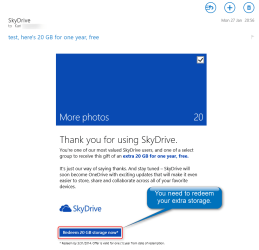
You should have got either a code or an email with redeem link. If so, you need to redeem the code / email offer:

2014-02-19_17h56_43.png

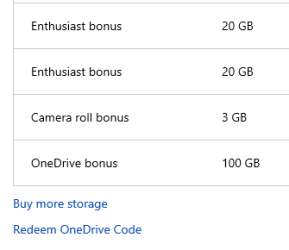
Afterwards you can see the bonuses on your Manage Storage page where you can also find link for redeeming a code:

2014-02-19_18h00_06.png

Kari
 

My Computer My Computer

At a glance

Windows 10 Pro x64 EN-GB1.6 GHz Intel Core i7-720QM Processor6 GBATI Mobility Radeon HD 5850 Graphics
Computer type
Laptop
Computer Manufacturer/Model Number
HP ENVY 17-1150eg
OS
Windows 10 Pro x64 EN-GB
CPU
1.6 GHz Intel Core i7-720QM Processor
Memory
6 GB
Graphics Card(s)
ATI Mobility Radeon HD 5850 Graphics
Sound Card
Beats sound system with integrated subwoofer
Monitor(s) Displays
17" laptop display, 22" LED and 32" Full HD TV through HDMI
Screen Resolution
1600*900 (1), 1920*1080 (2&3)
Hard Drives
Internal: 2 x 500 GB SATA Hard Disk Drive 7200 rpm
External: 2TB for backups, 3TB USB3 network drive for media
Cooling
As Envy runs a bit warm, I have it on a Cooler Master pad
Keyboard
Logitech diNovo Media Desktop Laser (bluetooth)
Mouse
Logitech Performance Mouse MX
Internet Speed
50/10 Mbps VDSL
Antivirus
Windows Defender 4.3.9431.0
Browser
Maxthon 3.5.2., IE11
Microsoft to give 100GB free OneDrive storage to early birds!

Once the promotion kicks off Wednesday, the first 100,000 people to sign into their OneDrive accounts get the heaping helping of free storage.

Just sign into your skydrive (onedrive) account and BAM! Free extra storage!!


OneDrive users who sign in fast enough can score plenty of free storage for the next year.
Microsoft will dole out 100GB of extra space to the first 100,000 people who sign onto their OneDrive accounts once the new promotion gets off the ground sometime on Wednesday. The extra space comes on top of your existing OneDrive (formerly SkyDrive) storage, but is good just for one year.

Angus Logan, the group product marketing manager for OneDrive, confirmed the promotion to CNET but didn't reveal a specific launch time. OneDrive users who want to vie for the free storage should check Microsoft's OneDrive Twitter feed for the latest news.
"We aren't announcing a time in advance. We're telling people to monitor [the OneDrive Twitter account] for clues about the promotion and how they can be part of the 100,000," a Microsoft representative told CNET.
On Wednesday, Microsoft officially opened the doors to OneDrive, the rebranded version of its SkyDrive cloud-based storage service. To further mark the occasion, Microsoft offers the first 7GB of storage for free and up to 5GB split among you and other users you refer to the service. Take advantage of OneDrive's camera backup feature, and you get 3GB more.
Those who fail to snag the free 100GB of storage and need more space can tack on an extra 50GB for $25 a year, 100GB for $50 a year, and 200GB for $100 a year.


Source: Microsoft to give 100GB free OneDrive storage to early birds | Microsoft - CNET News
 

My Computer My Computer

At a glance

Windows 10 ProAMD Ryzen 5 2400G Processor with Radeon RX Ve...G.SKILL Ripjaws V Series 16GB (2 x 8GB) 288-P...2047MB NVIDIA GeForce GTX 1060 6GB (EVGA)
Computer type
PC/Desktop
Computer Manufacturer/Model Number
Custom Built
OS
Windows 10 Pro
CPU
AMD Ryzen 5 2400G Processor with Radeon RX Vega 11 Graphics
Motherboard
ASRock X470 Master SLI/AC AM4 AMD Promontory X470 SATA 6Gb/s
Memory
G.SKILL Ripjaws V Series 16GB (2 x 8GB) 288-Pin DDR4 SDRAM D
Graphics Card(s)
2047MB NVIDIA GeForce GTX 1060 6GB (EVGA)
Sound Card
Motherboard Built in
Monitor(s) Displays
Acer R240HY bidx 23.8-Inch IPS HDMI DVI VGA (1920 x 1080) Wi
Screen Resolution
1920 x 1080
Hard Drives
1TB Sandisk SSD PLUS (Main drive)
500 GB Seagate 7200 RPM (Games)
500 GB Western Digital 7200 RPM (Virtual Machines)
PSU
CORSAIR TX Series TX650M 650W 80+ Gold Modular Power Supply
Case
CORSAIR CARBIDE SPEC-02 Mid-Tower Gaming Case, Red LED Fan
Cooling
220mm, two 120mm, and four 60mm fans
Keyboard
Wired Dell keyboard
Mouse
Wireless Logitech mouse
Internet Speed
250mb down, 30mb up
Antivirus
Panda Cloud Antivirus
Browser
Chrome-ish x64
Other Info
Your awesome for reading this.
I just did it and it works!
 

My Computer My Computer

At a glance

Windows 10 ProAMD Ryzen 5 2400G Processor with Radeon RX Ve...G.SKILL Ripjaws V Series 16GB (2 x 8GB) 288-P...2047MB NVIDIA GeForce GTX 1060 6GB (EVGA)
Computer type
PC/Desktop
Computer Manufacturer/Model Number
Custom Built
OS
Windows 10 Pro
CPU
AMD Ryzen 5 2400G Processor with Radeon RX Vega 11 Graphics
Motherboard
ASRock X470 Master SLI/AC AM4 AMD Promontory X470 SATA 6Gb/s
Memory
G.SKILL Ripjaws V Series 16GB (2 x 8GB) 288-Pin DDR4 SDRAM D
Graphics Card(s)
2047MB NVIDIA GeForce GTX 1060 6GB (EVGA)
Sound Card
Motherboard Built in
Monitor(s) Displays
Acer R240HY bidx 23.8-Inch IPS HDMI DVI VGA (1920 x 1080) Wi
Screen Resolution
1920 x 1080
Hard Drives
1TB Sandisk SSD PLUS (Main drive)
500 GB Seagate 7200 RPM (Games)
500 GB Western Digital 7200 RPM (Virtual Machines)
PSU
CORSAIR TX Series TX650M 650W 80+ Gold Modular Power Supply
Case
CORSAIR CARBIDE SPEC-02 Mid-Tower Gaming Case, Red LED Fan
Cooling
220mm, two 120mm, and four 60mm fans
Keyboard
Wired Dell keyboard
Mouse
Wireless Logitech mouse
Internet Speed
250mb down, 30mb up
Antivirus
Panda Cloud Antivirus
Browser
Chrome-ish x64
Other Info
Your awesome for reading this.
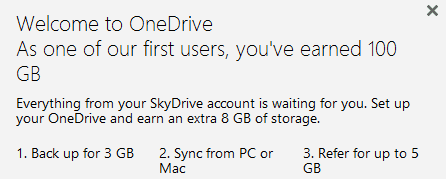
Well, I don't see any bonuses to redeem but when I last checked my account I found this:


onedrive.png


Interestingly, I went to the page with the "secret decoder ring" and solved the message for the first 3 words but didn't finish the whole thing. It appears it gave me a 100G bonus anyway.

Personally, I'm reluctant to use the extra space that has an expiration date since I don't want to come to rely on it then have it expire so I need to pay $$ every month to keep using it.

Still no sign of a redemption code for the 3G extra for signing up for the Camera Roll backup. Nothing on this page and no emails either. I'm more interested in the extra 3G of permanent storage than the temporary 100G storage.
 

My Computer My Computer

At a glance

W10 Pro desktop, W11 laptop, W11 Pro tablet (...3.7Ghz 8700K i7, i7-11800H, i7-1065G716G desktop, 16G laptop, 4G tabletAMD Radeon RX580, RTX 3060, Intel Iris Plus
Computer type
PC/Desktop
Computer Manufacturer/Model Number
Home Built desktop, Dell G15 5511 Gaming laptop,MS Surface Pro 7 tablet
OS
W10 Pro desktop, W11 laptop, W11 Pro tablet (all 64-bit)
CPU
3.7Ghz 8700K i7, i7-11800H, i7-1065G7
Motherboard
ASUS TUF Z370-Pro Gaming in desktop
Memory
16G desktop, 16G laptop, 4G tablet
Graphics Card(s)
AMD Radeon RX580, RTX 3060, Intel Iris Plus
Sound Card
High Definition Audio (Built-in to mobo)
Monitor(s) Displays
Samsung U32J59 32" (2x), 15.6", 12"
Screen Resolution
3840x2160, 3840x2160, 1920x1080, 2160x1440
Hard Drives
500G SSD for OS; 2T, 10T & 15T HDDs for Data on Desktop, 1TB SSD laptop, 128G SSD tablet.
PSU
Corsair CX 750M
Case
Antec 100
Cooling
CM 212+
Keyboard
IBM Model M - used continuously since 1986
Mouse
Microsoft Pro IntelliMouse
Internet Speed
400M down 8M up
Antivirus
Windows Defender
Browser
FireFox
Other Info
Built my first computer (8Mhz 8088cpu, 640K RAM, 20MB HDD, 2 360K floppy drives) in 1985 and have been building them for myself, relatives and friends ever since.
I just did it and it works!

Well, I don't see any bonuses to redeem but when I last checked my account I found this:


Interestingly, I went to the page with the "secret decoder ring" and solved the message for the first 3 words but didn't finish the whole thing. It appears it gave me a 100G bonus anyway.

Personally, I'm reluctant to use the extra space that has an expiration date since I don't want to come to rely on it then have it expire so I need to pay $$ every month to keep using it.

As you can see from my previous post (screenshot), two hours ago I did not have this and now suddenly the free 100GB appeared in my OneDrive:

2014-02-19_20h31_41.png

It's starting to be enough for my purposes, 7 gigs for free, 143 gigs in bonuses and additional purchased storage. Currently 193 GB available although it has been already quite a while my main pic and document storage.

Funny thing, I accidentally checked another of my Microsoft email accounts, went to its OneDrive and found this:

2014-02-19_20h34_08.png

So I recommend you geeks to check every possible Microsoft account you have ever had, to see if they, too have an extra 100GB :).
 

My Computer My Computer

At a glance

Windows 10 Pro x64 EN-GB1.6 GHz Intel Core i7-720QM Processor6 GBATI Mobility Radeon HD 5850 Graphics
Computer type
Laptop
Computer Manufacturer/Model Number
HP ENVY 17-1150eg
OS
Windows 10 Pro x64 EN-GB
CPU
1.6 GHz Intel Core i7-720QM Processor
Memory
6 GB
Graphics Card(s)
ATI Mobility Radeon HD 5850 Graphics
Sound Card
Beats sound system with integrated subwoofer
Monitor(s) Displays
17" laptop display, 22" LED and 32" Full HD TV through HDMI
Screen Resolution
1600*900 (1), 1920*1080 (2&3)
Hard Drives
Internal: 2 x 500 GB SATA Hard Disk Drive 7200 rpm
External: 2TB for backups, 3TB USB3 network drive for media
Cooling
As Envy runs a bit warm, I have it on a Cooler Master pad
Keyboard
Logitech diNovo Media Desktop Laser (bluetooth)
Mouse
Logitech Performance Mouse MX
Internet Speed
50/10 Mbps VDSL
Antivirus
Windows Defender 4.3.9431.0
Browser
Maxthon 3.5.2., IE11
Once the promotion kicks off Wednesday, the first 100,000 people to sign into their OneDrive accounts get the heaping helping of free storage.

Just sign into your skydrive (onedrive) account and BAM! Free extra storage!!


OneDrive users who sign in fast enough can score plenty of free storage for the next year.
Microsoft will dole out 100GB of extra space to the first 100,000 people who sign onto their OneDrive accounts once the new promotion gets off the ground sometime on Wednesday. The extra space comes on top of your existing OneDrive (formerly SkyDrive) storage, but is good just for one year.

Angus Logan, the group product marketing manager for OneDrive, confirmed the promotion to CNET but didn't reveal a specific launch time. OneDrive users who want to vie for the free storage should check Microsoft's OneDrive Twitter feed for the latest news.
"We aren't announcing a time in advance. We're telling people to monitor [the OneDrive Twitter account] for clues about the promotion and how they can be part of the 100,000," a Microsoft representative told CNET.
On Wednesday, Microsoft officially opened the doors to OneDrive, the rebranded version of its SkyDrive cloud-based storage service. To further mark the occasion, Microsoft offers the first 7GB of storage for free and up to 5GB split among you and other users you refer to the service. Take advantage of OneDrive's camera backup feature, and you get 3GB more.
Those who fail to snag the free 100GB of storage and need more space can tack on an extra 50GB for $25 a year, 100GB for $50 a year, and 200GB for $100 a year.


Source: Microsoft to give 100GB free OneDrive storage to early birds | Microsoft - CNET News

I must be missing something cause I just logged into my account and there's nothing there. Could it be expired :confused:

BTW I already had the "free" 20 with my office 365 account
 

My Computer My Computer

At a glance

Windows 10 ProIntel Core i7-4770K (3.5Ghz)32 gig Corsair Dominator Platinum (4x8Gig)Sapphire Tri-X R9 Fury
Computer type
PC/Desktop
Computer Manufacturer/Model Number
Custom built by me.
OS
Windows 10 Pro
CPU
Intel Core i7-4770K (3.5Ghz)
Motherboard
Gigabyte G1 Sniper 5 (F10 Bios)
Memory
32 gig Corsair Dominator Platinum (4x8Gig)
Graphics Card(s)
Sapphire Tri-X R9 Fury
Sound Card
Soundblaster ZXR
Monitor(s) Displays
NEC PA242W 24" LCD Monitor
Screen Resolution
1920 x 1200
Hard Drives
Primary - Samsung 850 Pro (512gig), Samsung 840 Pro (256gig), 2TB WD Caviar Black.
PSU
EVGA Supernova 1000 G2
Case
Cooler Master HAF X
Cooling
Corsair H100i with Corsair Air Series SP120 Quiet Fans
Keyboard
Logitech Wireless Wave
Mouse
Logitech Performance MX
Internet Speed
High Speed Cable
Antivirus
Norton Security
Browser
IE11
Other Info
Memory Timings - 1866MHz @ 9-9-9-27-1T @ 1.5 volts
This was a little slow in being offered/ appearing,
Wasn't there an hour ago ?
I already have 25 gig's
View attachment 307197
 
Last edited:

My Computer My Computer

At a glance

Win-7-Pro64bit 7-H-Prem-64biti7-5930K 2nd i9-9940x both water blocked VRM'...Trident-z 3200C14 2nd Trident-z 3600C16EVGA 1080ti ftw3 2nd Titan Xp both water blocked
Computer type
PC/Desktop
Computer Manufacturer/Model Number
Custom assembled by me :}
OS
Win-7-Pro64bit 7-H-Prem-64bit
CPU
i7-5930K 2nd i9-9940x both water blocked VRM's too
Motherboard
ASUS SABERTOOTH X99 2nd ASUS x299 Apex
Memory
Trident-z 3200C14 2nd Trident-z 3600C16
Graphics Card(s)
EVGA 1080ti ftw3 2nd Titan Xp both water blocked
Sound Card
Built-in Realtek
Monitor(s) Displays
1-AOC G2460PG 24"G-Sync 144Hz/ 2nd 1-ASUS VG248QE 24" 144Hz
Screen Resolution
1920 x 1080 144Hz
Hard Drives
2-Samsung M.2 Evo & Evo Plus
2-Samsung 850 EVO 500GB SSD's/ 3-2.5 W.D. Black 1tb-&3-1tb/3-3.5 WD Black 1tb hdd's
PSU
EVGA SuperNOVA 1000-P2 2nd 1200-P2
Case
2-Corsair Obsidian Series 450D Black ATX Mid Tower
Cooling
Custom water loops
Keyboard
Logitech G710+/ 2nd Logitech G910
Mouse
2-RedDragon M901 Perdition 16400 dpi Gaming mouse = wired
Internet Speed
Comcast Ping 19ms 89.31mbps download speed 6.12mbps upload
Antivirus
Malwarebytes Pro/ Superantispyware Pro
Browser
FireFox & Pale moon
Other Info
2nd ASUS X299 Apex/Intel i9-9940x with Custom water loop/7H-Prem-x64/Corsair 450D case/Ram Trident-z 3600C16 4x8gb / Samsung970Evo plus 500gb SSD/Dual ssd EZ swap evo/PSU EVGA SuperNova 1200w-P2 80+Platinum/GPU Titan Xp /8-ML-140 on push-pull on 2-280GTX rads
Nothing for me :(

I must be missing something cause I just logged into my account and there's nothing there. Could it be expired :confused:

BTW I already had the "free" 20 with my office 365 account
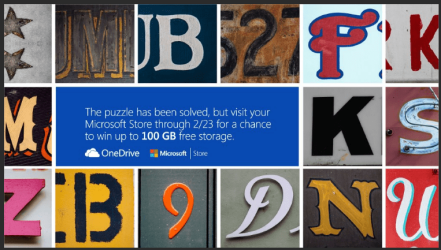
If you click the link in OneDrive's tweet John posted earlier in this thread, you'll find the reason:

2014-02-19_21h00_10.png

Check the tab title when there, it says OD_Giweaway_NoMoreCodes.
 

My Computer My Computer

At a glance

Windows 10 Pro x64 EN-GB1.6 GHz Intel Core i7-720QM Processor6 GBATI Mobility Radeon HD 5850 Graphics
Computer type
Laptop
Computer Manufacturer/Model Number
HP ENVY 17-1150eg
OS
Windows 10 Pro x64 EN-GB
CPU
1.6 GHz Intel Core i7-720QM Processor
Memory
6 GB
Graphics Card(s)
ATI Mobility Radeon HD 5850 Graphics
Sound Card
Beats sound system with integrated subwoofer
Monitor(s) Displays
17" laptop display, 22" LED and 32" Full HD TV through HDMI
Screen Resolution
1600*900 (1), 1920*1080 (2&3)
Hard Drives
Internal: 2 x 500 GB SATA Hard Disk Drive 7200 rpm
External: 2TB for backups, 3TB USB3 network drive for media
Cooling
As Envy runs a bit warm, I have it on a Cooler Master pad
Keyboard
Logitech diNovo Media Desktop Laser (bluetooth)
Mouse
Logitech Performance Mouse MX
Internet Speed
50/10 Mbps VDSL
Antivirus
Windows Defender 4.3.9431.0
Browser
Maxthon 3.5.2., IE11
Back
Top