Solved Very strange memory problem 8gb installed 3.74gb usable

seven09

New member
Local time
8:03 AM
Messages
67
I recently swapped in a new motherboard to upgrade my graphics. the board came from a model in the same Pavilion dv6 3xxx series.

Everything booted fine, the bios recognizes the processor and windows installed all the missing drivers right away.

However I can only get half of my installed memory to work. I have 64bit processor and windows 7 ultimate 64bit.

This memory issue is a real mystery. I have tried almost every trick;

-Uncecking memory box is msconfig advanced boot options.
-Ran memtest86 - 6 passes took 8 hours and came out clean
-Ran Windows memory diagnostic with no problems
-Ran bios memort check with no issues

Now here's the strangest part. Even though the bios and windows can detect that 8gb are installed(as in both 4gb ddr3 memory cards), the computer WILL NOT boot on on memory card in the bottom slot. there is no bios, no display but it starts. Does this not indicate a bad memory slot? I can boot with the same card in the upper slot and run fine

But in task manager I see In a grey box "hardware reserved 4358" which is the half of the memory I cant use?

What is the fix??
 

My Computer My Computer

Computer type
Laptop
Computer Manufacturer/Model Number
HP
OS
Windows 7
CPU
AMD Phenom(tm) II N870 Triple-Core Processor
Motherboard
Hewlett-Packard 1640
Memory
8gb installed only 3.74 usable
Graphics Card(s)
(1) ATI Mobility Radeon HD 6550 (2) AMD M880G with ATI Mob
Sound Card
(1) AMD High Definition Audio Device (2) High Definition A
Screen Resolution
1366x768
Hard Drives
SATA Seagate ST9640320AS ATA Device 640gb 5400rpm
Internet Speed
20mb/s
Antivirus
MSE, malware bytes
Browser
Chromium(comodo dragon)
Can you show us this page: Control Panel\System and Security\System
 

My Computer My Computer

Computer Manufacturer/Model Number
HP, Dell, Gateway, Toshiba - 4 laptops and 2 desktops
OS
Vista, Windows7, Mint Mate, Zorin, Windows 8
CPU
from 1.6GHz Duo to i7
Monitor(s) Displays
2x HP w2207
Hard Drives
5x HDD, 7x SSD, 12x Externals
Keyboard
with trackball - no mices
Mouse
Trackball mice
Internet Speed
DSL 6000
Can you show us this page: Control Panel\System and Security\System

Yes, thanks for the reply. This is the updated experience index too so you know.

21abRoY.jpg


VXln350.jpg
 

My Computer My Computer

Computer type
Laptop
Computer Manufacturer/Model Number
HP
OS
Windows 7
CPU
AMD Phenom(tm) II N870 Triple-Core Processor
Motherboard
Hewlett-Packard 1640
Memory
8gb installed only 3.74 usable
Graphics Card(s)
(1) ATI Mobility Radeon HD 6550 (2) AMD M880G with ATI Mob
Sound Card
(1) AMD High Definition Audio Device (2) High Definition A
Screen Resolution
1366x768
Hard Drives
SATA Seagate ST9640320AS ATA Device 640gb 5400rpm
Internet Speed
20mb/s
Antivirus
MSE, malware bytes
Browser
Chromium(comodo dragon)
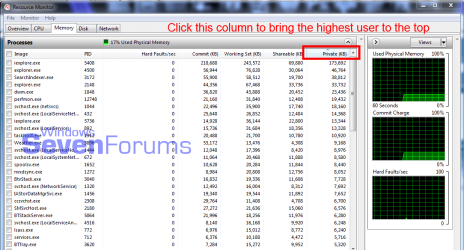
Is Resource Monitor, sort the various memory usage columns to find what is the hardware hog there. Something is using way more that its share.

resmon.PNG
 

My Computer My Computer

Computer type
PC/Desktop
Computer Manufacturer/Model Number
Home Built Desktop By DataTech
OS
Windows 7 Ultimate X64 SP1
CPU
Intel i5-2550K, Differing ~4.4-4.8GHz No built in GPU
Motherboard
ASUS P8Z68-V PRO/GEN3
Memory
16GB G.Skill Sniper 1866MHz @ 2133MHz 2x8GB
Graphics Card(s)
ASUS GTX650TIB-DC2OC-2GD5, (650TI Boost)
Sound Card
Onboard Realtek 5-1
Monitor(s) Displays
Samsung P2570HD
Screen Resolution
1920x1080
Hard Drives
Samsung 840 Pro 256GB SSD for OS, 500GB Seagate Constellation (Enterprise drive) for Data
PSU
Corsair HX650W
Case
Inwin Dragon Rider
Cooling
Hyper 212 EVO w/two Noctua fans, push-pull, @1300 RPM
Keyboard
E-Z Eyes, bright yellow keys with large characters
Mouse
steelseries SENSEI Laser Pro Gaming
Internet Speed
48-51Mbs Mbs down, 11 Mbs up Xfinity Cable
Antivirus
Norton Internet Security 2013
Browser
IE 10, Opera, Pale Moon if needed
Other Info
4 case fans, LG BluRay-RE, ASUS DVD-RW, Mr. Fusion power supply, 1.21 gigawatts.
Check for dirty contacts and be sure both modules are the same make, type and speed. A matched pair is essential.
 

My Computer My Computer

Computer type
PC/Desktop
Computer Manufacturer/Model Number
Built 2/11/2011
OS
Windows 7 Pro-x64
CPU
i7-2600 3.4GHz - 3.8GHz Turbo
Motherboard
Intel DH67BL-B3
Memory
8Gb - 2x4GB, Muskin 991770 PC3-1333
Graphics Card(s)
Integrated Intel HD 2000
Sound Card
Integrated Intel 10.1 HD, RealTek ALC892
Monitor(s) Displays
Asus LCD VH222H, Haier HL24XSL2a
Screen Resolution
1920x1080, 1920x1080
Hard Drives
Crucial SSD C300-128Gb,
Western Digital WD5002AALX - 500Gb,
Western Digital WD7501AALS - 750Gb
PSU
Seasonic 650W 80+ Gold Modular
Case
Rosewill Defender
Cooling
Stock CPU, Four 120mm case fans, PCH fan added
Keyboard
Logitech EX100 Y-RBH94 Wireless
Mouse
Logitech EX100 M-RCE95 Wireless
Internet Speed
3.0/1.5 Mbs
Antivirus
Microsoft Security Essentials
Browser
Microsoft Internet Explorer 11
Other Info
Antec Veris Premier-Multimedia IR Station,
Cyber Accoustics-3602 Speakers,
AFT XM-5U Card Reader,
Hauppauge TV-HVR-2250,
Sony LX300 USB Turntable
Hi, here is a screen shot of that. Thanks.

VhiSn6w.jpg
 

My Computer My Computer

Computer type
Laptop
Computer Manufacturer/Model Number
HP
OS
Windows 7
CPU
AMD Phenom(tm) II N870 Triple-Core Processor
Motherboard
Hewlett-Packard 1640
Memory
8gb installed only 3.74 usable
Graphics Card(s)
(1) ATI Mobility Radeon HD 6550 (2) AMD M880G with ATI Mob
Sound Card
(1) AMD High Definition Audio Device (2) High Definition A
Screen Resolution
1366x768
Hard Drives
SATA Seagate ST9640320AS ATA Device 640gb 5400rpm
Internet Speed
20mb/s
Antivirus
MSE, malware bytes
Browser
Chromium(comodo dragon)
Check for dirty contacts and be sure both modules are the same make, type and speed. A matched pair is essential.

You know the contacts look messed up, as you can see here. The bios or computer can;t be booted when using this slot by tself, but the other can. I am definitely thinking it is bad contatcs, however ALL the 8gb of ram shows in bios and in total physical memory installed in windows, so I have no way to prove this is the cause :(

Open image in new window to zoom

these are pictures I took and sent to the retailer in hopes to get a refund for this mobo. My question is WHY has this not shown up in any diagnostic programs like memtest86 or windows memory diagnostic??

bVoDoGN.jpg
 

My Computer My Computer

Computer type
Laptop
Computer Manufacturer/Model Number
HP
OS
Windows 7
CPU
AMD Phenom(tm) II N870 Triple-Core Processor
Motherboard
Hewlett-Packard 1640
Memory
8gb installed only 3.74 usable
Graphics Card(s)
(1) ATI Mobility Radeon HD 6550 (2) AMD M880G with ATI Mob
Sound Card
(1) AMD High Definition Audio Device (2) High Definition A
Screen Resolution
1366x768
Hard Drives
SATA Seagate ST9640320AS ATA Device 640gb 5400rpm
Internet Speed
20mb/s
Antivirus
MSE, malware bytes
Browser
Chromium(comodo dragon)
Resource manager is no help, unfortunately.
What is the picture of? It does look like there are 6-7 solder lugs shorted.
 

My Computer My Computer

Computer type
PC/Desktop
Computer Manufacturer/Model Number
Home Built Desktop By DataTech
OS
Windows 7 Ultimate X64 SP1
CPU
Intel i5-2550K, Differing ~4.4-4.8GHz No built in GPU
Motherboard
ASUS P8Z68-V PRO/GEN3
Memory
16GB G.Skill Sniper 1866MHz @ 2133MHz 2x8GB
Graphics Card(s)
ASUS GTX650TIB-DC2OC-2GD5, (650TI Boost)
Sound Card
Onboard Realtek 5-1
Monitor(s) Displays
Samsung P2570HD
Screen Resolution
1920x1080
Hard Drives
Samsung 840 Pro 256GB SSD for OS, 500GB Seagate Constellation (Enterprise drive) for Data
PSU
Corsair HX650W
Case
Inwin Dragon Rider
Cooling
Hyper 212 EVO w/two Noctua fans, push-pull, @1300 RPM
Keyboard
E-Z Eyes, bright yellow keys with large characters
Mouse
steelseries SENSEI Laser Pro Gaming
Internet Speed
48-51Mbs Mbs down, 11 Mbs up Xfinity Cable
Antivirus
Norton Internet Security 2013
Browser
IE 10, Opera, Pale Moon if needed
Other Info
4 case fans, LG BluRay-RE, ASUS DVD-RW, Mr. Fusion power supply, 1.21 gigawatts.
Oh yeah, that's toast. Looks like someone raked a screwdriver across it. A couple look like they're broken. Memory can be recognized but not functional. The BIOS just does a quick test.
 

My Computer My Computer

Computer type
PC/Desktop
Computer Manufacturer/Model Number
Built 2/11/2011
OS
Windows 7 Pro-x64
CPU
i7-2600 3.4GHz - 3.8GHz Turbo
Motherboard
Intel DH67BL-B3
Memory
8Gb - 2x4GB, Muskin 991770 PC3-1333
Graphics Card(s)
Integrated Intel HD 2000
Sound Card
Integrated Intel 10.1 HD, RealTek ALC892
Monitor(s) Displays
Asus LCD VH222H, Haier HL24XSL2a
Screen Resolution
1920x1080, 1920x1080
Hard Drives
Crucial SSD C300-128Gb,
Western Digital WD5002AALX - 500Gb,
Western Digital WD7501AALS - 750Gb
PSU
Seasonic 650W 80+ Gold Modular
Case
Rosewill Defender
Cooling
Stock CPU, Four 120mm case fans, PCH fan added
Keyboard
Logitech EX100 Y-RBH94 Wireless
Mouse
Logitech EX100 M-RCE95 Wireless
Internet Speed
3.0/1.5 Mbs
Antivirus
Microsoft Security Essentials
Browser
Microsoft Internet Explorer 11
Other Info
Antec Veris Premier-Multimedia IR Station,
Cyber Accoustics-3602 Speakers,
AFT XM-5U Card Reader,
Hauppauge TV-HVR-2250,
Sony LX300 USB Turntable
Oh yeah, that's toast. Looks like someone raked a screwdriver across it. A couple look like they're broken. Memory can be recognized but not functional. The BIOS just does a quick test.

I know. brutal :(


But not 6 and a half passes with memtest86???

Britton said:
What is the picture of? It does look like there are 6-7 solder lugs shorted.

That's half of the dimm slot contacts for the ddr3 memory
 

My Computer My Computer

Computer type
Laptop
Computer Manufacturer/Model Number
HP
OS
Windows 7
CPU
AMD Phenom(tm) II N870 Triple-Core Processor
Motherboard
Hewlett-Packard 1640
Memory
8gb installed only 3.74 usable
Graphics Card(s)
(1) ATI Mobility Radeon HD 6550 (2) AMD M880G with ATI Mob
Sound Card
(1) AMD High Definition Audio Device (2) High Definition A
Screen Resolution
1366x768
Hard Drives
SATA Seagate ST9640320AS ATA Device 640gb 5400rpm
Internet Speed
20mb/s
Antivirus
MSE, malware bytes
Browser
Chromium(comodo dragon)
Is this a laptop, SODIMM memory?
Odd it passes memtest. The BIOS reads the SPD (Serial Presence Detect) chip on the DIMMs to show it's installed.
I think it's solved, maybe, the slot isn't working at all. Toasted as carwiz said.

Also odd you show so much RAM as hardware reserved though.
 

My Computer My Computer

Computer type
PC/Desktop
Computer Manufacturer/Model Number
Home Built Desktop By DataTech
OS
Windows 7 Ultimate X64 SP1
CPU
Intel i5-2550K, Differing ~4.4-4.8GHz No built in GPU
Motherboard
ASUS P8Z68-V PRO/GEN3
Memory
16GB G.Skill Sniper 1866MHz @ 2133MHz 2x8GB
Graphics Card(s)
ASUS GTX650TIB-DC2OC-2GD5, (650TI Boost)
Sound Card
Onboard Realtek 5-1
Monitor(s) Displays
Samsung P2570HD
Screen Resolution
1920x1080
Hard Drives
Samsung 840 Pro 256GB SSD for OS, 500GB Seagate Constellation (Enterprise drive) for Data
PSU
Corsair HX650W
Case
Inwin Dragon Rider
Cooling
Hyper 212 EVO w/two Noctua fans, push-pull, @1300 RPM
Keyboard
E-Z Eyes, bright yellow keys with large characters
Mouse
steelseries SENSEI Laser Pro Gaming
Internet Speed
48-51Mbs Mbs down, 11 Mbs up Xfinity Cable
Antivirus
Norton Internet Security 2013
Browser
IE 10, Opera, Pale Moon if needed
Other Info
4 case fans, LG BluRay-RE, ASUS DVD-RW, Mr. Fusion power supply, 1.21 gigawatts.

My Computer My Computer

Computer type
Laptop
Computer Manufacturer/Model Number
HP
OS
Windows 7
CPU
AMD Phenom(tm) II N870 Triple-Core Processor
Motherboard
Hewlett-Packard 1640
Memory
8gb installed only 3.74 usable
Graphics Card(s)
(1) ATI Mobility Radeon HD 6550 (2) AMD M880G with ATI Mob
Sound Card
(1) AMD High Definition Audio Device (2) High Definition A
Screen Resolution
1366x768
Hard Drives
SATA Seagate ST9640320AS ATA Device 640gb 5400rpm
Internet Speed
20mb/s
Antivirus
MSE, malware bytes
Browser
Chromium(comodo dragon)
Is this a laptop, SODIMM memory?
Odd it passes memtest. The BIOS reads the SPD (Serial Presence Detect) chip on the DIMMs to show it's installed.
I think it's solved, maybe, the slot isn't working at all. Toasted as carwiz said.

Also odd you show so much RAM as hardware reserved though.

DDr3 1333mhz
 
Last edited:

My Computer My Computer

Computer type
Laptop
Computer Manufacturer/Model Number
HP
OS
Windows 7
CPU
AMD Phenom(tm) II N870 Triple-Core Processor
Motherboard
Hewlett-Packard 1640
Memory
8gb installed only 3.74 usable
Graphics Card(s)
(1) ATI Mobility Radeon HD 6550 (2) AMD M880G with ATI Mob
Sound Card
(1) AMD High Definition Audio Device (2) High Definition A
Screen Resolution
1366x768
Hard Drives
SATA Seagate ST9640320AS ATA Device 640gb 5400rpm
Internet Speed
20mb/s
Antivirus
MSE, malware bytes
Browser
Chromium(comodo dragon)
I doubt that memtest even looks at hardware reserved memory. That's set and used by the BIOS. I don't think Windows will access it so neither will memtest. If the BIOS can't allocate the memory, it marks it as reserved. There used to be an option to do a full memory test on boot but it takes a while so the default was changed to a "presents test". I don't even remember seeing the option in the last 10 years or so.
 

My Computer My Computer

Computer type
PC/Desktop
Computer Manufacturer/Model Number
Built 2/11/2011
OS
Windows 7 Pro-x64
CPU
i7-2600 3.4GHz - 3.8GHz Turbo
Motherboard
Intel DH67BL-B3
Memory
8Gb - 2x4GB, Muskin 991770 PC3-1333
Graphics Card(s)
Integrated Intel HD 2000
Sound Card
Integrated Intel 10.1 HD, RealTek ALC892
Monitor(s) Displays
Asus LCD VH222H, Haier HL24XSL2a
Screen Resolution
1920x1080, 1920x1080
Hard Drives
Crucial SSD C300-128Gb,
Western Digital WD5002AALX - 500Gb,
Western Digital WD7501AALS - 750Gb
PSU
Seasonic 650W 80+ Gold Modular
Case
Rosewill Defender
Cooling
Stock CPU, Four 120mm case fans, PCH fan added
Keyboard
Logitech EX100 Y-RBH94 Wireless
Mouse
Logitech EX100 M-RCE95 Wireless
Internet Speed
3.0/1.5 Mbs
Antivirus
Microsoft Security Essentials
Browser
Microsoft Internet Explorer 11
Other Info
Antec Veris Premier-Multimedia IR Station,
Cyber Accoustics-3602 Speakers,
AFT XM-5U Card Reader,
Hauppauge TV-HVR-2250,
Sony LX300 USB Turntable
What about a startup test.?

Edit: Tried, did not catch anything...

Also the graphics are non-integrated and use its own 1gb of memory so it's not reserve for graphics
 

My Computer My Computer

Computer type
Laptop
Computer Manufacturer/Model Number
HP
OS
Windows 7
CPU
AMD Phenom(tm) II N870 Triple-Core Processor
Motherboard
Hewlett-Packard 1640
Memory
8gb installed only 3.74 usable
Graphics Card(s)
(1) ATI Mobility Radeon HD 6550 (2) AMD M880G with ATI Mob
Sound Card
(1) AMD High Definition Audio Device (2) High Definition A
Screen Resolution
1366x768
Hard Drives
SATA Seagate ST9640320AS ATA Device 640gb 5400rpm
Internet Speed
20mb/s
Antivirus
MSE, malware bytes
Browser
Chromium(comodo dragon)
What about a startup test.?

Edit: Tried, did not catch anything...

Also the graphics are non-integrated and use its own 1gb of memory so it's not reserve for graphics
From previous post:
There used to be an option to do a full memory test on boot but it takes a while so the default was changed to a "presents test". I don't even remember seeing the option in the last 10 years or so.
 

My Computer My Computer

Computer type
PC/Desktop
Computer Manufacturer/Model Number
Built 2/11/2011
OS
Windows 7 Pro-x64
CPU
i7-2600 3.4GHz - 3.8GHz Turbo
Motherboard
Intel DH67BL-B3
Memory
8Gb - 2x4GB, Muskin 991770 PC3-1333
Graphics Card(s)
Integrated Intel HD 2000
Sound Card
Integrated Intel 10.1 HD, RealTek ALC892
Monitor(s) Displays
Asus LCD VH222H, Haier HL24XSL2a
Screen Resolution
1920x1080, 1920x1080
Hard Drives
Crucial SSD C300-128Gb,
Western Digital WD5002AALX - 500Gb,
Western Digital WD7501AALS - 750Gb
PSU
Seasonic 650W 80+ Gold Modular
Case
Rosewill Defender
Cooling
Stock CPU, Four 120mm case fans, PCH fan added
Keyboard
Logitech EX100 Y-RBH94 Wireless
Mouse
Logitech EX100 M-RCE95 Wireless
Internet Speed
3.0/1.5 Mbs
Antivirus
Microsoft Security Essentials
Browser
Microsoft Internet Explorer 11
Other Info
Antec Veris Premier-Multimedia IR Station,
Cyber Accoustics-3602 Speakers,
AFT XM-5U Card Reader,
Hauppauge TV-HVR-2250,
Sony LX300 USB Turntable
So it is a laptop, I was going by your specs which say desktop. It explains the pic, it is SODIMM memory, that's a physical size reference rather than type, as DDR3 is.
 

My Computer My Computer

Computer type
PC/Desktop
Computer Manufacturer/Model Number
Home Built Desktop By DataTech
OS
Windows 7 Ultimate X64 SP1
CPU
Intel i5-2550K, Differing ~4.4-4.8GHz No built in GPU
Motherboard
ASUS P8Z68-V PRO/GEN3
Memory
16GB G.Skill Sniper 1866MHz @ 2133MHz 2x8GB
Graphics Card(s)
ASUS GTX650TIB-DC2OC-2GD5, (650TI Boost)
Sound Card
Onboard Realtek 5-1
Monitor(s) Displays
Samsung P2570HD
Screen Resolution
1920x1080
Hard Drives
Samsung 840 Pro 256GB SSD for OS, 500GB Seagate Constellation (Enterprise drive) for Data
PSU
Corsair HX650W
Case
Inwin Dragon Rider
Cooling
Hyper 212 EVO w/two Noctua fans, push-pull, @1300 RPM
Keyboard
E-Z Eyes, bright yellow keys with large characters
Mouse
steelseries SENSEI Laser Pro Gaming
Internet Speed
48-51Mbs Mbs down, 11 Mbs up Xfinity Cable
Antivirus
Norton Internet Security 2013
Browser
IE 10, Opera, Pale Moon if needed
Other Info
4 case fans, LG BluRay-RE, ASUS DVD-RW, Mr. Fusion power supply, 1.21 gigawatts.
So it is a laptop, I was going by your specs which say desktop. It explains the pic, it is SODIMM memory, that's a physical size reference rather than type, as DDR3 is.

Oops, yes i just added those specs today..fixed it
 

My Computer My Computer

Computer type
Laptop
Computer Manufacturer/Model Number
HP
OS
Windows 7
CPU
AMD Phenom(tm) II N870 Triple-Core Processor
Motherboard
Hewlett-Packard 1640
Memory
8gb installed only 3.74 usable
Graphics Card(s)
(1) ATI Mobility Radeon HD 6550 (2) AMD M880G with ATI Mob
Sound Card
(1) AMD High Definition Audio Device (2) High Definition A
Screen Resolution
1366x768
Hard Drives
SATA Seagate ST9640320AS ATA Device 640gb 5400rpm
Internet Speed
20mb/s
Antivirus
MSE, malware bytes
Browser
Chromium(comodo dragon)
I wonder about the label on the board. "Replace With HP Spare" It looks to me like it's a known defective motherboard.
 

My Computer My Computer

Computer type
PC/Desktop
Computer Manufacturer/Model Number
Built 2/11/2011
OS
Windows 7 Pro-x64
CPU
i7-2600 3.4GHz - 3.8GHz Turbo
Motherboard
Intel DH67BL-B3
Memory
8Gb - 2x4GB, Muskin 991770 PC3-1333
Graphics Card(s)
Integrated Intel HD 2000
Sound Card
Integrated Intel 10.1 HD, RealTek ALC892
Monitor(s) Displays
Asus LCD VH222H, Haier HL24XSL2a
Screen Resolution
1920x1080, 1920x1080
Hard Drives
Crucial SSD C300-128Gb,
Western Digital WD5002AALX - 500Gb,
Western Digital WD7501AALS - 750Gb
PSU
Seasonic 650W 80+ Gold Modular
Case
Rosewill Defender
Cooling
Stock CPU, Four 120mm case fans, PCH fan added
Keyboard
Logitech EX100 Y-RBH94 Wireless
Mouse
Logitech EX100 M-RCE95 Wireless
Internet Speed
3.0/1.5 Mbs
Antivirus
Microsoft Security Essentials
Browser
Microsoft Internet Explorer 11
Other Info
Antec Veris Premier-Multimedia IR Station,
Cyber Accoustics-3602 Speakers,
AFT XM-5U Card Reader,
Hauppauge TV-HVR-2250,
Sony LX300 USB Turntable
they all say that, my old one has that sticker on it too.
 

My Computer My Computer

Computer type
Laptop
Computer Manufacturer/Model Number
HP
OS
Windows 7
CPU
AMD Phenom(tm) II N870 Triple-Core Processor
Motherboard
Hewlett-Packard 1640
Memory
8gb installed only 3.74 usable
Graphics Card(s)
(1) ATI Mobility Radeon HD 6550 (2) AMD M880G with ATI Mob
Sound Card
(1) AMD High Definition Audio Device (2) High Definition A
Screen Resolution
1366x768
Hard Drives
SATA Seagate ST9640320AS ATA Device 640gb 5400rpm
Internet Speed
20mb/s
Antivirus
MSE, malware bytes
Browser
Chromium(comodo dragon)
Back
Top